Key Capabilities
- ZPL label generation from XML input with template-based customization
- Compatible with XML Map connector for automated label creation workflows
- Dynamic field substitution using
${...}syntax for thermal printer output
Overview
The Label connector converts input XML into ZPL files based on a predefined XML template, which enables automated and consistent label creation for printing on Zebra thermal printers. It is compatible with the XML Map connector as well as raw XML input. However, the primary use case is for XML to be mapped to the ZPL structure represented in XML using a flow that goes from an XML Map to a Label connector.Connector Configuration
This section contains all of the configurable connector properties.Settings Tab
Configuration
Settings related to establishing the connection.Template Tab
The ZPL file to use as a template. When you create a Label connector, pre-fills this field with a ZPL template to use as a starting point. See Generating a ZPL Document for details.Advanced Tab
Advanced Settings
Settings not included in the previous categories.| Setting | Description |
|---|---|
| Local File Scheme | A scheme for assigning filenames to messages that are output by the connector. You can use macros in your filenames dynamically to include information such as identifiers and timestamps. For more information, see Macros. |
Logging
Miscellaneous
Automation Tab
Automation Settings
Settings related to the automatic processing of files by the connector.| Setting | Description |
|---|---|
| Send | Check this to have the connector automatically send files when they are ready. |
Performance
Alerts Tab
SLAs Tab
Generating a ZPL Document
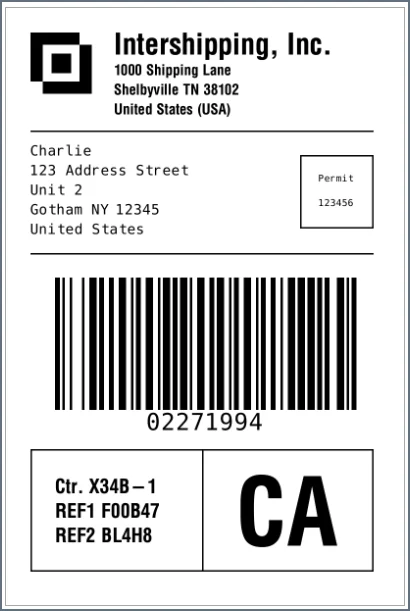
The Label connector reads an XML input file into the ZPL template specified on the Template tab, and uses the data from the template to generate ZPL labels.Default ZPL Template
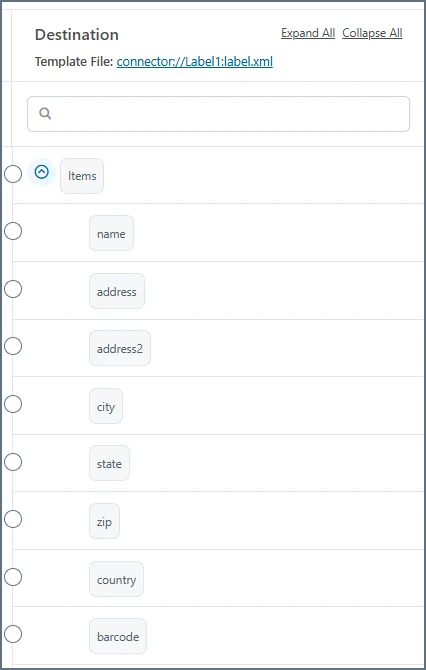
pre-fills the Template field with a ZPL template to use as a starting point. This documentation does not go into detail on how to use the ZPL language: you need to learn that outside of . You can modify other aspects and dynamic fields of the ZPL template as necessary, but here is the default content:${...} syntax (such as ${name} in the content above) are what pulls from the input XML passed into the connector. When you put an XML Map connector in front of a Label connector in a flow, the destination side of the mapping shows these fields, as shown in the following image.