

Key Capabilities
- XML and message header validation using configurable rules and conditions
- XPath-based validation for XML content with sample file support for rule creation
- Data type validation for strings, numbers, and DateTime values
- Group-based rule organization with complex logical conditions (AND/OR)
Overview
Validate connectors are configured with one or more rules that determine whether input XML or message headers are considered valid. Valid input successfully passes through the connector, while XML files or message headers that fail validation throw an error and are not passed along in the flow. For each configured rule, the connector checks the value from the input XML or message header against the target value to see if it is considered valid. See Rules Tab for details.Connector Configuration
This section contains all of the configurable connector properties.Rules Tab
Add and configure rules and groups of rules. Input XML and message headers are considered valid if they conform to all of the configured rules.| Setting | Description |
|---|---|
| Connector Id | The static, unique identifier for the connector. |
| Connector Type | Displays the connector name and a description of what it does. |
| Connector Description | An optional field to provide a free-form description of the connector and its role in the flow. |
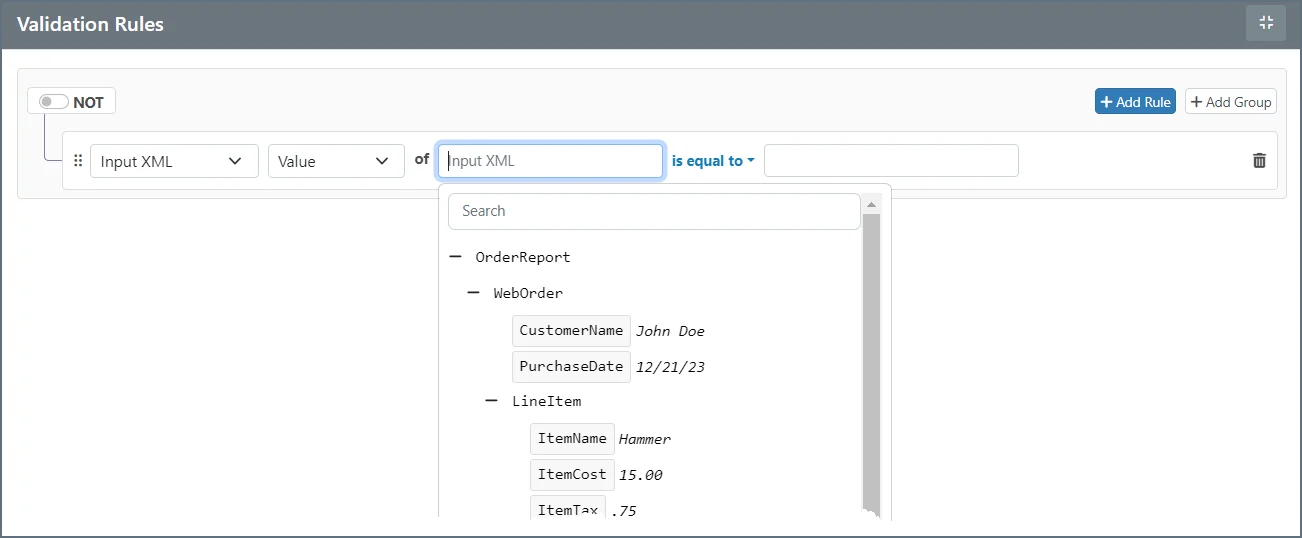
| Sample File | (optional) A file that represents the structure of the XML being validated. If you upload a sample file, the rules editor displays a tree representation of the document so you can easily find the XPath you need. |
- Input XML
- Value: The value at the XPath being evaluated
- Data Type: The data type of the value (String, Number, DateTime)
- Occurrences: The number of times the XPath occurs in the document
- Message Header
- Value: The value of the message header being evaluated
- Data Type: The data type of the value (String, Number, DateTime)
 and drag the object to a new location.
Input XML is only considered valid if all validation rules (or groups of rules) are satisfied. If the XPath configured in a rule is not found in the input XML, the validation automatically fails. In other words, if the connector is unable to read a value for a rule’s XPath, the input file does not pass the rule.
and drag the object to a new location.
Input XML is only considered valid if all validation rules (or groups of rules) are satisfied. If the XPath configured in a rule is not found in the input XML, the validation automatically fails. In other words, if the connector is unable to read a value for a rule’s XPath, the input file does not pass the rule.
Settings Tab
Connector Settings
Advanced Tab
| Setting | Description |
|---|---|
| Processing Delay | The amount of time (in seconds) by which the processing of files placed in the Transactions tab is delayed. This is a legacy setting. Best practice is to use a File connector to manage local file systems instead of this setting. |
Message
Logging
Other Settings
| Setting | Description |
|---|---|
| Processing Delay | The amount of time (in seconds) by which the processing of files placed in the Transactions tab is delayed. This is a legacy setting. Best practice is to use a File connector to manage local file systems instead of this setting. |
Miscellaneous
Automation Tab
Settings related to the automatic processing of files by the connector.| Setting | Description |
|---|---|
| Send | Whether messages arriving at the connector are automatically processed. |