REST connectors expose a simple interface to build the headers, authorization, body, and HTTP method for a REST request. The request body can be set statically in the connector configuration or dynamically generated based on the files processed by the connector.
A scheme for assigning filenames to messages that are output by the connector. You can use macros in your filenames dynamically to include information such as identifiers and timestamps. For more information, see Macros.
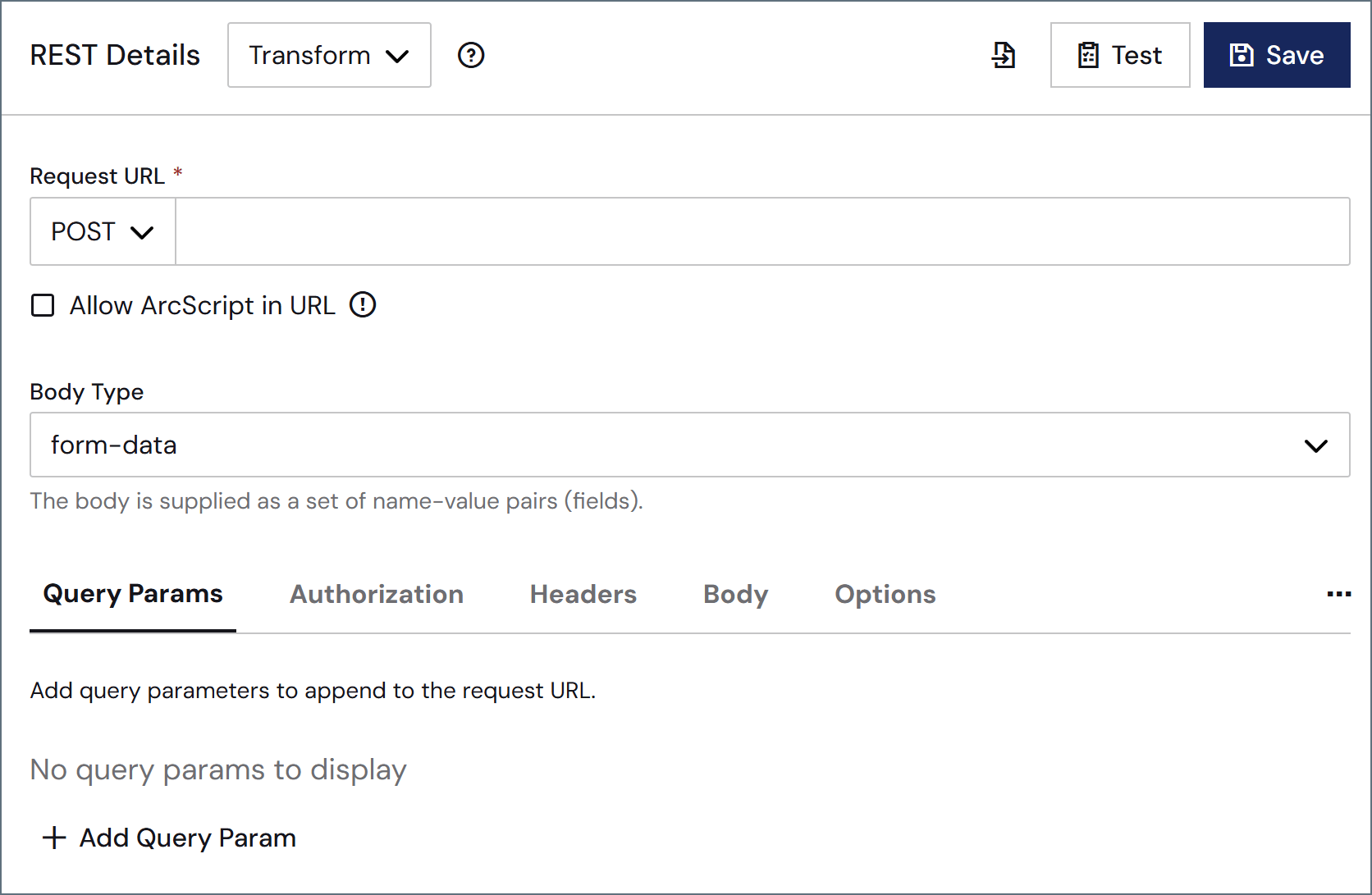
Settings related to the request details for the connector.
Setting
Description
REST Details
Select the action the connector should execute. (See Actions for details on the three options.)
Import from Swagger
Click the icon to import API details directly from a Swagger URL.
Test
Test the current configuration without creating a message or transaction that is sent down the flow. Clicking Test opens a window with additional tabs (see Testing Request Configurations for more information).
Request URL
The HTTP method and target HTTP URL for the REST request. The available method options are: GET, POST, PUT, PATCH, and DELETE.
Allow ArcScript in URL
Check this to allow the evaluation of ArcScript expressions in the URL before the query is issued. When you select this, the ArcScript Editor button appears (), which enables you to build dynamic request URLs using ArcScript. See Using the ArcScript Editor for Request URLs and Headers for details.
Body Type
The type of body content supplied with the REST request. Not visible when the HTTP method is GET. See Body for descriptions of each option.
Content Type
The type of content used for raw data transfers. Only visible when Body Type is set to raw.
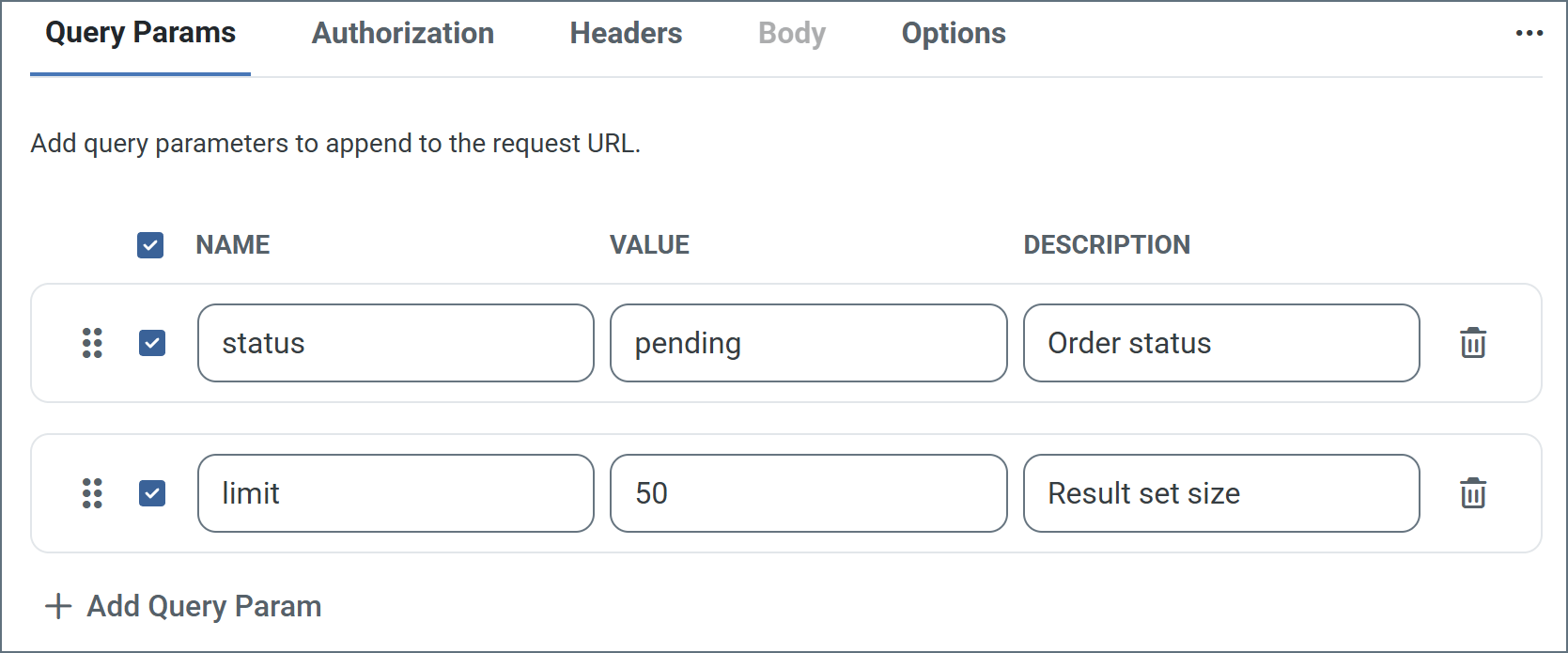
Use this tab to add query parameters to your request URL. Supply the parameters as name-value pairs, with optional descriptions. Click Save to update the URL with your parameters.The previous image includes two sets of query parameters. When the connector is saved, the api.example.com request URL becomes: https://api.example.com/orders?status=pending&limit=50Click the ellipses on the right to set two other options: Bulk Edit View and Hide Description Column.
Use this tab to configure authentication credential for API requests.
Setting
Description
Credentials
Whether to supply authentication credentials from a previously configured Connection, create a new connection, or send requests without authentication. From Connection: Select this, then choose your Connection from the dropdown. Note: Create a new connection by clicking the plus sign next to Connection. No Credentials: Select this to send requests without authentication. Use this option for public APIs or when authentication is handled through query parameters or headers.
TLS Server Certificate
The public key certificate used to verify the identity of a TLS server. You can upload a certificate, leave the field blank to allow the underlying OS/JVM to perform certificate validation, or set it to Any Certificate to trust the target server’s identity. Use Any Certificate with caution: the certificate verifies that you are connecting to the intended server.
This tab enables you to add a list of HTTP headers to include in the outgoing REST request. Headers are also specified as name-value pairs. See Static Requests and Dynamic Requests for more information. Click the ellipses on the right to access three other options: Bulk Edit View, Allow ArcScript in Headers, and Show Autogenerated Headers. See Using the ArcScript Editor for Request URLs and Headers for details on using the ArcScript editor.
If the Body Type is set to form-data or x-www-urlencoded, use the Body tab to supply the set of name-value pairs (fields) that form the body of the request. The following list describes each option in more detail.
none: No body is supplied with the REST request.
form-data: The body is supplied as a set of name-value pairs (fields). Use the dropdown list next to Name to select the field type.
Static: Supply both the Name and the Value.
XML: Supply the Name in the UI. The Value is dynamically read from the input file processed by the connector. For more information, see Dynamic Form Data.
File: Each connector can have one body field set to File. This causes the input file to be sent in the body of the request. The Value field is greyed out since the connector uses the input file itself as the form data.
Header: Use the Value field to specify which header from the input message to read from for the body.
ArcScript: The Value supplied is rendered as ArcScript, and the resulting value is used in the request body.
x-www-urlencoded: The body is configured in the same way as form-data; however, the name-value pairs are encoded as a URL query string instead of multipart form data.
raw: The body is set to the contents of the input file processed by the connector. Select the Content Type of the body using the dropdown, or by specifying it as a custom header in the Header section.
Click the ellipses on the right to access two other settings: Bulk Edit View and Show Content Type Column. Showing the content type column enables you to supply the content type on a per-field basis for form-data and x-www-form-urlencoded body types.
By default, the connector does not output a message to the flow when the response is sent with a status code that does not indicate success. Enable this setting to have the connector output a message to the flow for these error responses. You can use the HTTP-Status-Code header to filter messages later in the flow.
Compress HTTP Request
Enable this to compress the body of PUT or POST requests into gzip format before sending the request. The Content-Encoding header is also added to the outgoing request.
GET Request Body
Allows GET requests to use the input message data as the body of the request.
HTTP Version
Whether to use HTTP 1.0, 1.1, or 2.0 when connecting to the REST service.
Whether to use HTTP Chunked Transfer Encoding when sending requests. This allows the application to send portions (chunks) of the message sequentially to avoid overloading the connection.
Chunk Size
The size, in bytes, of each chunk when Chunked Encoding is enabled.
Follow Authorization Header
When enabled, retains the authorization header when a redirect happens to a different protocol or hostname.
Output Behavior
By default, the connector outputs a message containing the Response data. The other options allow you to output the Input Message so it can be processed further, or to not output a message at all. See Response Event for more information.
Timeout (seconds)
The duration in seconds to wait for a response from the REST server before throwing a timeout error.
Response Headers
When set, the connector promotes the specified headers from the REST message as metadata on the downloaded message. You can specify multiple headers in a comma-separated list.
Preserve Cookies
To preserve cookies on output messages, supply a comma-separated list of the cookie names to persist. Use * to preserve all cookies. Note: Only the name-value pairs are preserved, and no attribute checks are performed. Users are responsible for ensuring cookies are not leaked to unintended destinations.
TLS Enabled Protocols
The list of TLS/SSL protocols supported when establishing outgoing connections. Best practice is to only use TLS protocols. SSL v2 and SSL v3 are considered vulnerable and should only be used if your partner does not support higher versions. Keep in mind that TLS v1.3 is not universally adopted, and might be refused if the destination server does not support it.
Processing Delay
The amount of time (in seconds) by which the processing of files placed in the Transactions tab is delayed. This is a legacy setting. Best practice is to use a File connector to manage local file systems instead of this setting.
These are a collection of settings that identify and authenticate to the proxy through which the connection should be routed. By default, this section uses the global settings on the Proxy Settings portion of the Security Settings page. Clear the checkbox to supply settings specific to your connector.
Setting
Description
Proxy Type
The protocol used by a proxy-based firewall.
Proxy Host
The name or IP address of a proxy-based firewall.
Proxy Port
The TCP port for a proxy-based firewall.
Proxy User
The user name to use to authenticate with a proxy-based firewall.
Proxy Password
A password used to authenticate to a proxy-based firewall.
Authentication Scheme
Leave the default None or choose from one of the following authentication schemes: Basic, Digest, Proprietary, or NTLM.
Settings that govern the creation and storage of logs.
Setting
Description
Log Level
The verbosity of logs generated by the connector. When you request support, set this to Debug.
Log Subfolder Scheme
Instructs the connector to group files in the Logs folder according to the selected interval. The Weekly option (which is the default) instructs the connector to create a new subfolder each week and store all logs for the week in that folder. Leaving this setting blank tells the connector to save all logs directly in the Logs folder. For connectors that process many transactions, using subfolders helps keep logs organized and improves performance.
Log Messages
Check this to have the log entry for a processed file include a copy of the file itself. If you disable this, you might not be able to download a copy of the file from the Transactions tab.
Miscellaneous settings are for specific use cases.
Setting
Description
Other Settings
Enables you to configure hidden connector settings in a semicolon-separated list (for example, setting1=value1;setting2=value2). Normal connector use cases and functionality should not require the use of these settings.
Settings related to the automatic processing of files by the connector.
Setting
Description
Send
A toggle that instructs the connector to automatically send files when they are ready.
Retry Interval
The interval the connector waits before retrying a failed send.
Max Attempts
The number of attempts the connector makes to send the message. Setting this value to 1 instructs the connector to only make the initial send attempt without retrying. The connector waits the duration specified by Retry Interval between each attempt.
Receive
A toggle that instructs the connector to automatically make the REST request at the configured interval.
Interval
The interval at which the connector makes the configured REST request. The next field depends on the selection here: Hourly: A Minutes Past the Hour dropdown menu allows you to specify the number of minutes past the hour to process receive files. Daily: A Time field appears to specify the time of day (in UTC) to process receive files. Weekly: Two fields appear. Day allows you to select the day of the week for processing, and Time allows you to specify the time (in UTC) to process receive files. Monthly: Two fields appear. Day allows you to select the day of the month for processing, and Time allows you to specify the time (in UTC) to process receive files. Minute: A Minutes field appears to specify the number of minutes between processing intervals. Advanced: A five-position Cron Expression field allows you to specify exact processing intervals.
Minutes Past the Hour
The minutes offset for an hourly schedule. Only applicable when Receive is set to Hourly. For example, if this value is set to 5, the automation service sends requests at 1:05, 2:05, 3:05, etc.
Settings related to the allocation of resources to the connector.
Setting
Description
Max Workers
The maximum number of worker threads consumed from the threadpool to process files on this connector. If set, this overrides the default setting on the Performance Settings portion of the Advanced Settings page.
Max Files
The maximum number of files sent by each thread assigned to the connector. If set, this overrides the default setting on the Performance Settings portion of the Advanced Settings page.
This tab lists all messages associated with the connector. Use the search bar to find specific messages, or click the funnel icon to apply a filter. You can filter by time, message direction, and/or status.Options on this tab vary depending on the connector’s action type:
If your connector is a Trigger, use the Receive Files button to start the flow.
If your connector is a Transform or Terminal, use the Upload Files button to upload files to the flow.
A valid target URL is required to establish a connection to any REST service. The service URL can support various HTTP methods, and you should configure the method based on the particular web service action or dataset to retrieve. Some services might also require authentication or a set of custom headers in order to consume the service.The Credentials section of the Authorization tab enables you to specify your connection credentials. Choose from the following options:
From Connection: Choose a previously configured Arc shared Connection, or click the plus sign next to the Connection field to Create a Connection.
No Credentials for public APIs or when authentication is being handled through query parameters or headers. If the target URL is an HTTPS URL, set the TLS Server Certificate to the public key certificate identifying the server. To implicitly trust the target endpoint, set the field to Any Certificate.
The REST connector supports a number of authentication types, and each type has its own requirements:
Basic (plain text), Digest (encrypted), and NTLM require username-password authentication. These credentials are supplied to the REST service as headers in the request.
OAuth authentication requires an app registration in the REST service’s web portal or development console. The Callback URL to include in the app registration is shown in the Arc UI. Choose the Grant Type that applies to the REST service, and specify the remaining settings from the details shown in the REST service’s web portal or development console. Then click Get New Access Token to obtain the necessary tokens to interact with the service. Once the initial tokens have been retrieved, the application refreshes the tokens as they approach expiration.
Bearer Token authentication requires a token from the service’s web portal or development console.
AWS Signature authentication, for authenticating against Amazon, requires configuration credentials provided by Amazon: Access Key, Secret Key, and so forth.
API Key authentication requires a key-value pair, then you must specify whether the key should be added as a header or as a query parameter.
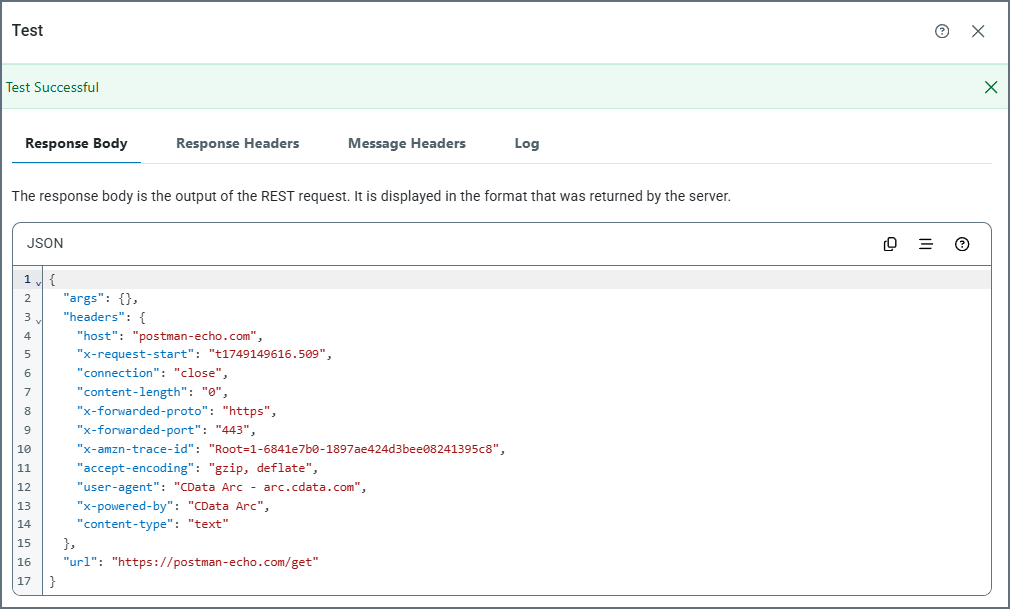
At any time you can test your current configuration without creating a message or transaction that is sent down the flow. Click Test on the REST Details tab. The following image shows the Response Body results of a successful test of a Trigger connector.
Response Body: Displays the output of the REST request in the format that was returned from the server.
Response Headers: Displays the response headers that were included in the response returned from the server.
Message Headers: Displays the message headers that were included in the output of the test.
Log: Displays the test logs.
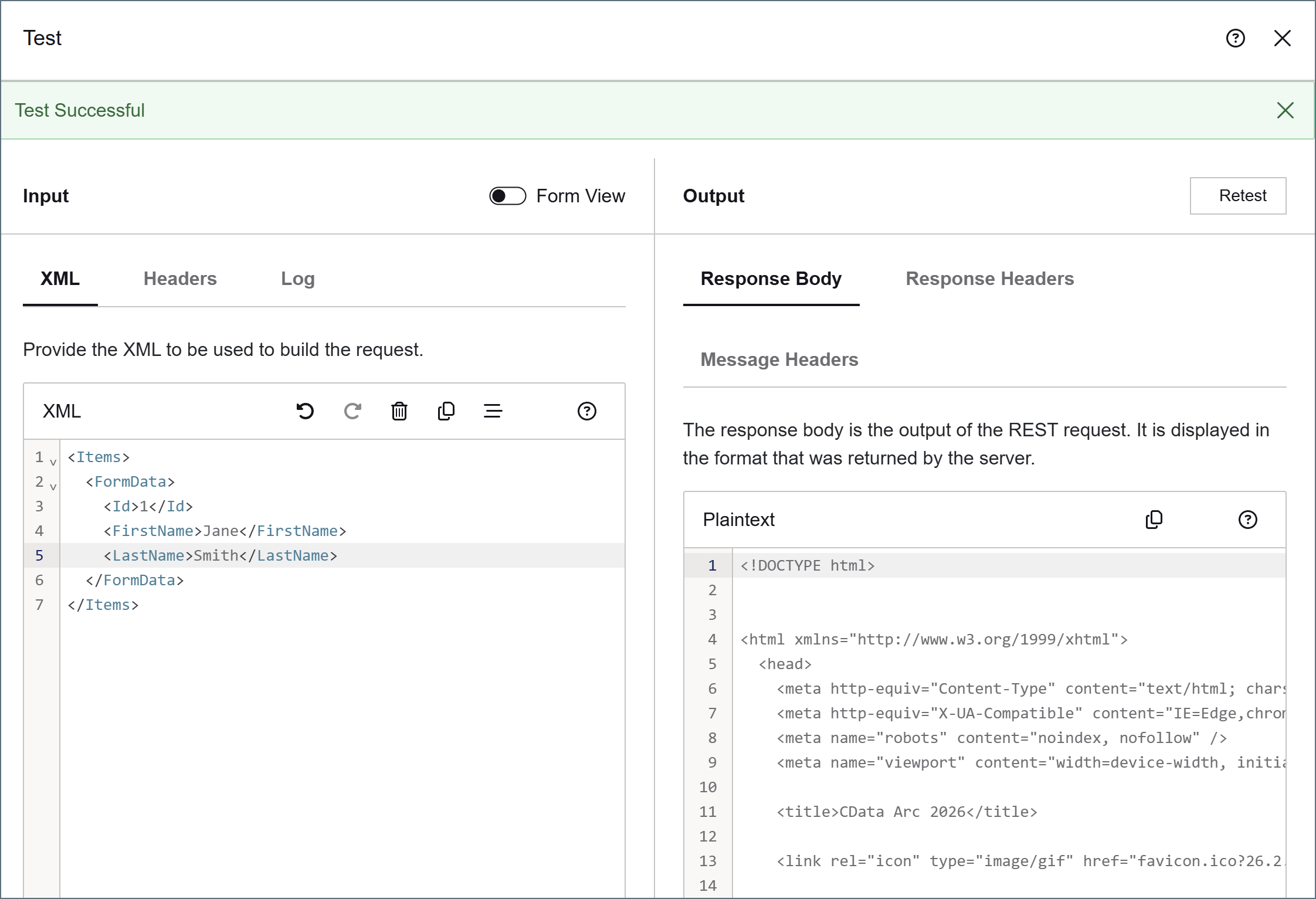
Transform and Terminal connectors have an Input pane with tabs for XML, Headers, and Logs.
The XML tab is only populated if you have defined XML fields in the body of your request, as shown in the following image.
If Allow ArcScript in URL or Allow ArcScript in Headers is checked, use the Headers tab to supply message headers that might be used in scripting contexts (see Using the ArcScript Editor for Request URLs and Headers for details on those options). If your request has a Header configured as an element of the form-data or x-www-form-urlencoded body, the header name appears here and you can supply a value to use for the test.
The Logs tab contains the results of your last test.
REST requests that have entirely static content (such as requests that use the HTTP GET method) do not require an input file, since the request content is configured entirely in the connector UI. Simply add any necessary name-value pairs as custom headers in the Header section or form data in the Body section.Static requests can be automatically sent according to a schedule if Receive Automation is enabled. The response to each request is stored in the output folder or passed along to the next connector in the flow.If Send Automation is enabled, files arriving at the connector Transactions folder also trigger a static request. The content of the input file is ignored, and the request is sent according to the configuration in the UI.
If you set the Body Type of the request to raw, the content of input files is sent as the body of the REST request.Use the Content Type dropdown to set the specific content type of the data. If the content type you need is not listed, you can add a Content-Type header in the Header section.
If you set the Body Type of the request to form-data or x-www-urlencoded, the connector looks for specific values from the input file to populate the request. For each name-value pair that is set to XML, the connector scans input files for an XML element that shares the same name as the field name, and that uses a specific XML structure, as shown below:
To fit this structure, CData strongly recommends that you use an XML Map connector in front of the REST connector in the flow, as described below.When the connector finds an element that matches the field name and required XML structure, the value in this element is used as the value in the name-value pair. For example, if the body has a dynamic field with the name CustomerID, and the input file has the XML shown below, the REST connector sets the value of the CustomerID field to 12354.
Use the XML Map connector in conjunction with the REST connector to easily build dynamic requests out of other XML data structures. The XML Map connector converts custom XML structures into the XML structure that the REST connector expects.First, configure the REST connector with the set of dynamic (and static) Body fields that should be present in the request. Next, connect an XML Map connector to the REST connector in the Arc flow and save the flow changes. This allows the XML Map connector to detect which fields the REST connector expects in incoming input files.Then, inside the XML Map connector, the Destination File dropdown includes the REST request schema. Select this as the Destination, and set the Source File to a custom XML structure. This populates the XML Map Mapping Editor, and you can drag and drop the data that needs to be included in the REST request from the source structure into the destination structure. Once the mapping is complete, the XML Map connector automatically converts files that match the source file into a valid REST request structure.For more information on using the XML Map connector, please see the XML Map connector documentation.
Using the ArcScript Editor for Request URLs and Headers
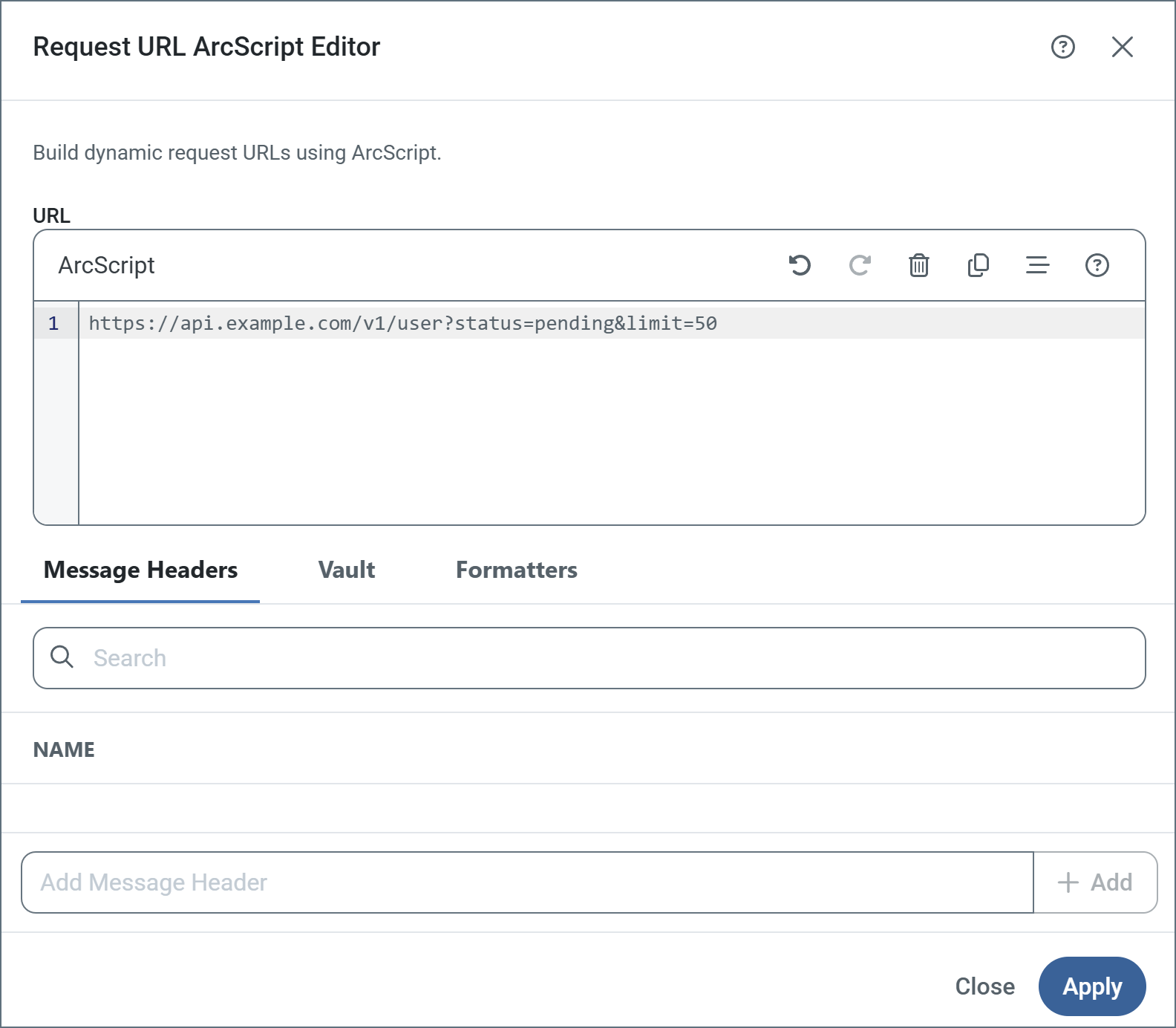
You can use the ArcScript editor shown below to build your request URLs and in headers. The following image shows the request URL editor, but the header value editor works the same way.Select Allow ArcScript in URL on the REST Details tab of the connector configuration pane to allow expressions in ArcScript to be evaluated to generate dynamic strings as URLs. For example, the following URL includes the date and time:http://myendpoint.com/api?day=[_ | now('yyyyMMdd HH:mm:ss')]This URL includes a header on the incoming message for queries triggered through send automation:http://myendpoint.com/api?customer=[_message.header:customerid]Finally, this URL uses a dynamic date range beginning from the time of the last query to the current timestamp, using a default timestamp for the first query:http://myendpoint.com/api?DateFrom=[_connector.lastruntimestamp | def('2025-01-01T00:00:00-04:00')]&DateTo=[_connector.currenttimestamp]You can add the expressions directly to the URL, or use the editor to write them.Select Allow ArcScript in Headers to enable the evaluation of ArcScript expressions in headers before the query is issued. For example, the following header contains the date and time:Timestamp [_ | now('yyyyMMdd')]This header contains a customer Id for queries triggered through send automation:Customer [_message.header:customerid]
Message headers help Arc track the progress of data through flows. All Tracked Headers appear on the Message Header tab in the editor, and you can reference them in your expression.You can also include other message headers in your expression by using the Add Message Header field in the editor and providing the name of an existing header. These do not have to be tracked headers.
Use the Vault tab to add items from your Global Settings Vault to an expression. This is useful if you have values that you reuse in different places throughout a flow. You can define those values in the vault, then reference them at the beginning of the expression. Keep in mind that if you want the mapping to use the value of the item in the vault, you need to reference it inside square brackets; otherwise the editor interprets the item name as a literal.
Formatters support manipulating the values returned at different xpaths. Formatters are separated by a pipe character (|) in the expression, and evaluated from left to right. For example:[xpath('City') | toupper | substring(0,3)]In this example, before the value of the City xpath is returned, all string characters are converted to upper case characters, and a substring of the first three characters is returned in the result. For example, if the source document had a value of:<City>Durham</City>The resulting expression returns the following:DURThe formatters are listed on the Formatters tab. Add a formatter to the expression by clicking it in the list.
You can use a response event in the REST connector to interact with the response received from the server (which includes the body, headers, cookies, and so on), and to enrich the output message generated from the connector. You can use the following special items in the Response event.
This script reads the JSON response received from a REST call, parses out the access token contained in the JSON, and adds it as a header onto the output message created by the REST connector:
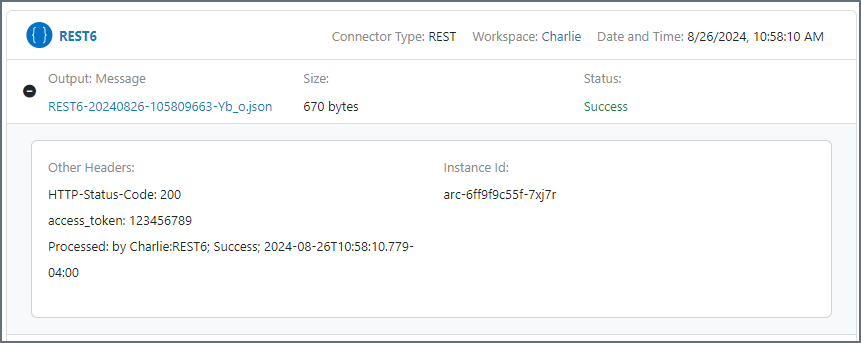
The following steps detail what happens:1 The body of the response sent by the server back to the REST connector in Arc is accessed via _response.body and is set to the text attribute of the jsonDOMGet operation. Other attributes of jsonDOMGet are also populated, such as the map attribute with the jsonpath to the desired token in the response body.2 The jsonDOMGet operation is called. If the token is found in the response JSON body, it is added as a message header to the output message of the REST connector via the _message.header:access_token syntax. If the token is not found, the value of the access_token header is set to a static string: Token not found!.Here is what that result looks like in Arc when you view the output message details of the message from the REST connector:This type of script is useful when you need to parse data from the raw JSON response body received back from a server after a request is sent to it. The header can then be read and used in subsequent connectors in the flow.
If the server responds using XML, you can achieve the same result using xmlDOMget.
{"docsConfig":{"theme":"mint","$schema":"https://mintlify.com/docs.json","name":"CData Arc Documentation","colors":{"primary":"#002660","light":"#FFE500","dark":"#002660"},"logo":{"light":"https://mintcdn.com/cdata-arc/-adMVRA2NGLWRgFp/public/images/cdata_arc_web.svg?fit=max\u0026auto=format\u0026n=-adMVRA2NGLWRgFp\u0026q=85\u0026s=8863df3ad6488c6280d057711f48aa94","dark":"https://mintcdn.com/cdata-arc/-adMVRA2NGLWRgFp/public/images/cdata_arc_yellow.svg?fit=max\u0026auto=format\u0026n=-adMVRA2NGLWRgFp\u0026q=85\u0026s=db878c051424afd58007b04161a4f5e1","href":"https://www.cdata.com/arc"},"favicon":"https://mintcdn.com/cdata-arc/Lo_2D5t4szDfleFN/favicon.ico?fit=max\u0026auto=format\u0026n=Lo_2D5t4szDfleFN\u0026q=85\u0026s=4b165e5b4d92eef3607cdc47218f10e2","appearance":{"default":"system","strict":false},"background":{"color":{"light":"#F1EEE9","dark":"#15151C"}},"footer":{"socials":{"x":"https://x.com/cdatasoftware","youtube":"https://www.youtube.com/c/CDataSoftware","linkedin":"https://www.linkedin.com/company/cdatasoftware","facebook":"https://www.facebook.com/cdatasoftware","instagram":"https://www.instagram.com/cdatasoftware"}},"fonts":{"heading":{"family":"DM Sans","weight":700},"body":{"family":"DM Sans"}},"styling":{"eyebrows":"breadcrumbs","latex":false},"contextual":{"options":["copy","view","chatgpt","claude","perplexity","mcp","cursor","vscode"],"display":"header"},"variables":{"siteName":"CData Arc","siteNameShort":"Arc","companyName":"CData"},"navigation":{"languages":[{"language":"en","navbar":{"primary":{"type":"button","label":" Contact Us","href":"https://www.cdata.com/company/contact.aspx"}},"href":"26.4/self-hosted/en/getting-started"},{"language":"ja","navbar":{"primary":{"type":"button","label":"お問い合わせ","href":"https://jp.cdata.com/contact/"}},"href":"26.4/self-hosted/ja/getting-started"}]}},"deployment":{"deploymentMetadataValue":{"subdomain":"cdata-arc","hasAudioNarration":false,"actualSubdomain":"cdata-arc","customDomains":["docs.arc.cdata.com"],"gitSource":{"type":"github","owner":"cdatasoftware","repo":"arc-docs","deployBranch":"main","contentDirectory":"","isPrivate":true,"mountPath":"","label":""},"chroma":{"liveDeploymentHistoryId":"6adf8b94b1bf97cf215e06e4","collectionId":"b7ec2e9a-1852-4231-acc7-5faf59d91429","schemaVersion":"v3","latestBuiltDeploymentHistoryId":"6adf8b94b1bf97cf215e06e4"},"entitlements":{"AI_CHAT":{"status":"ENABLED"},"WEB_MCP":{"status":"ENABLED"},"NARRATION":{"status":"ENABLED"}},"buildId":"6adf8b94b1bf97cf215e06e4","clientVersion":"0.0.3971","searchFilterCounts":[{"language":"en","tag":"Arc User Guide","count":3135},{"language":"ja","tag":"Arc ユーザーガイド","count":2659},{"language":"en","tag":"Connectors","count":1994},{"language":"en","tag":"Self-Hosted","count":1921},{"language":"ja","tag":"Self-Hosted","count":1921},{"language":"en","tag":"Cloud","count":1760},{"language":"ja","tag":"コネクタ","count":1658},{"language":"ja","tag":"Cloud","count":1211},{"language":"en","tag":"Other","count":1064},{"language":"ja","tag":"その他","count":887},{"language":"en","tag":"Scripting","count":608},{"language":"en","tag":"ArcScript","count":581},{"language":"en","tag":"API Reference","count":546},{"language":"ja","tag":"スクリプティング","count":512},{"language":"ja","tag":"ArcScript","count":489},{"language":"ja","tag":"API リファレンス","count":472},{"language":"en","tag":"Getting Started","count":357},{"language":"en","tag":"Core","count":341},{"language":"ja","tag":"コア","count":312},{"language":"ja","tag":"はじめに","count":306}]},"assistantConfig":{"enableAskAiButton":false,"enableStarterQuestions":false,"enableAskAiSearchBar":true},"basePath":"","hasChatPermissions":true,"hasWebMcpPermissions":true,"toggles":[{"name":"kill-isr","enabled":true,"variant":{"name":"disabled","enabled":false,"feature_enabled":true},"impressionData":false},{"name":"agent-mintlify-slack","enabled":true,"variant":{"name":"disabled","enabled":false,"feature_enabled":true},"impressionData":false},{"name":"editor-v7-file-tree","enabled":true,"variant":{"name":"disabled","enabled":false,"feature_enabled":true},"impressionData":false},{"name":"agent-integrations-settings","enabled":true,"variant":{"name":"disabled","enabled":false,"feature_enabled":true},"impressionData":false},{"name":"automations-pr-grouping","enabled":true,"variant":{"name":"disabled","enabled":false,"feature_enabled":true},"impressionData":false},{"name":"custom-prefix","enabled":true,"variant":{"name":"disabled","enabled":false,"feature_enabled":true},"impressionData":false},{"name":"analytics-v7","enabled":true,"variant":{"name":"disabled","enabled":false,"feature_enabled":true},"impressionData":false},{"name":"user-flows-analytics","enabled":true,"variant":{"name":"disabled","enabled":false,"feature_enabled":true},"impressionData":false},{"name":"no-publish-flow","enabled":true,"variant":{"name":"disabled","enabled":false,"feature_enabled":true},"impressionData":false},{"name":"workos-onboarding","enabled":true,"variant":{"name":"disabled","enabled":false,"feature_enabled":true},"impressionData":false},{"name":"llms-txt-v2","enabled":true,"variant":{"name":"disabled","enabled":false,"feature_enabled":true},"impressionData":false},{"name":"pause-universal-search-reconcile","enabled":true,"variant":{"name":"disabled","enabled":false,"feature_enabled":true},"impressionData":false},{"name":"snapshot-serving-live","enabled":true,"variant":{"name":"disabled","enabled":false,"feature_enabled":true},"impressionData":false},{"name":"stripTemperatureMiddleware","enabled":true,"variant":{"name":"disabled","enabled":false,"feature_enabled":true},"impressionData":false},{"name":"per-site-search-delta","enabled":true,"variant":{"name":"disabled","enabled":false,"feature_enabled":true},"impressionData":false},{"name":"support-platform-pylon-zendesk","enabled":true,"variant":{"name":"disabled","enabled":false,"feature_enabled":true},"impressionData":false},{"name":"snapshot-serving","enabled":true,"variant":{"name":"disabled","enabled":false,"feature_enabled":true},"impressionData":false},{"name":"instant-rollback","enabled":true,"variant":{"name":"disabled","enabled":false,"feature_enabled":true},"impressionData":false},{"name":"granular-notifications-server","enabled":true,"variant":{"name":"disabled","enabled":false,"feature_enabled":true},"impressionData":false},{"name":"granular-notifications","enabled":true,"variant":{"name":"disabled","enabled":false,"feature_enabled":true},"impressionData":false},{"name":"editor-private-page-search","enabled":true,"variant":{"name":"disabled","enabled":false,"feature_enabled":true},"impressionData":false},{"name":"automations-fable","enabled":true,"variant":{"name":"disabled","enabled":false,"feature_enabled":true},"impressionData":false},{"name":"fixed-ai-action-pricing","enabled":true,"variant":{"name":"disabled","enabled":false,"feature_enabled":true},"impressionData":false},{"name":"automation-resolve-merge-conflict","enabled":true,"variant":{"name":"disabled","enabled":false,"feature_enabled":true},"impressionData":false},{"name":"scoped-publishing","enabled":true,"variant":{"name":"disabled","enabled":false,"feature_enabled":true},"impressionData":false},{"name":"mintql","enabled":true,"variant":{"name":"disabled","enabled":false,"feature_enabled":true},"impressionData":false},{"name":"page-level-analytics","enabled":true,"variant":{"name":"disabled","enabled":false,"feature_enabled":true},"impressionData":false},{"name":"editor-version-history-v2","enabled":true,"variant":{"name":"disabled","enabled":false,"feature_enabled":true},"impressionData":false},{"name":"editor-nav-generations","enabled":true,"variant":{"name":"disabled","enabled":false,"feature_enabled":true},"impressionData":false},{"name":"billing-page-v2","enabled":true,"variant":{"name":"disabled","enabled":false,"feature_enabled":true},"impressionData":false},{"name":"workspace-projects","enabled":true,"variant":{"name":"disabled","enabled":false,"feature_enabled":true},"impressionData":false},{"name":"assistant-v5","enabled":true,"variant":{"name":"disabled","enabled":false,"feature_enabled":true},"impressionData":false},{"name":"byok-sep-25","enabled":true,"variant":{"name":"disabled","enabled":false,"feature_enabled":true},"impressionData":false},{"name":"fork-pr-previews","enabled":true,"variant":{"name":"disabled","enabled":false,"feature_enabled":true},"impressionData":false},{"name":"revalidation-jwt","enabled":true,"variant":{"name":"disabled","enabled":false,"feature_enabled":true},"impressionData":false},{"name":"vite-origin","enabled":true,"variant":{"name":"disabled","enabled":false,"feature_enabled":true},"impressionData":false},{"name":"editor-agent-model-picker","enabled":true,"variant":{"name":"disabled","enabled":false,"feature_enabled":true},"impressionData":false},{"name":"billing-updated-9-15","enabled":true,"variant":{"name":"disabled","enabled":false,"feature_enabled":true},"impressionData":false},{"name":"workos-sso-scim","enabled":true,"variant":{"name":"disabled","enabled":false,"feature_enabled":true},"impressionData":false},{"name":"hobby-abuse-scan","enabled":true,"variant":{"name":"disabled","enabled":false,"feature_enabled":true},"impressionData":false},{"name":"dashboard-inbox","enabled":true,"variant":{"name":"disabled","enabled":false,"feature_enabled":true},"impressionData":false},{"name":"workos-signup","enabled":true,"variant":{"name":"disabled","enabled":false,"feature_enabled":true},"impressionData":false},{"name":"workos-enabled","enabled":true,"variant":{"name":"disabled","enabled":false,"feature_enabled":true},"impressionData":false}],"isAtlas":false,"googleFontsInlined":true},"customCss":[{"filePath":"custom.css","content":"@font-face{font-family:'Grafier';src:local('Grafier'),url(/public/fonts/grafier/PPGrafier-Regular.woff2) format('woff2'),url(/public/fonts/grafier/PPGrafier-Regular.woff) format('woff');font-weight:400;font-style:normal;font-display:swap}:root{--brand-agility:#FFE500;--brand-resolve:#002660;--brand-depth:#15151C;--brand-clarity:#F1EEE9;--brand-balance:#B5B9BC;--brand-link:#0B59CE;--brand-link-hover:#1F5B8E;--system-error:#BE6634;--n0:#FFFFFF;--n1:#FFFDFA;--n2:#F1EEE9;--n3:#D9D6D2;--n9:#525252;--n11:#15151C;--surface-bg:var(--brand-clarity);--surface-sidebar:transparent;--surface-card:var(--n0);--surface-header:transparent;--text-primary:var(--n11);--text-secondary:var(--n9);--border:var(--n3);--radius:5px;--shadow:0 10px 35px rgba(50,50,93,.10), 0 3px 15px rgba(0,0,0,.07);--shadow-up:0 13px 35px rgba(50,50,93,.20), 0 3px 18px rgba(0,0,0,.08);--font-sans:'DM Sans', ui-sans-serif, system-ui, sans-serif;--font-mono:'DM Mono', 'Nimbus Mono PS', 'Courier New', monospace;--logo-h:23px;--logo-w:116px}html.dark{--surface-bg:#1a1a22;--surface-sidebar:var(--surface-bg);--surface-card:#1a1a22;--surface-header:var(--surface-bg);--text-primary:rgb(158, 159, 161);--text-secondary:var(--brand-balance);--border:#2e2e3a;--brand-link:#5b9cf6;--brand-link-hover:#93c5fd}html:not(.dark) body{background-color:var(--surface-bg)}html.dark body{background-color:var(--surface-bg)}html.dark #background-color{background-color:var(--surface-bg)!important}html:not(.dark) body .mint-bg-white{background:linear-gradient(135deg,#fffdfa 0,#f1eee9 100%)!important}html.dark body .mint-bg-white{background:linear-gradient(135deg,#1a1a22 0,#15151c 100%)!important}body,html{font-weight:400;color:var(--text-primary)}h1,h2,h3,h4,h5,h6{line-height:1.2;color:#000}body,h3,h4,h5,h6,html{font-family:var(--font-sans)}h3,h4,h5,h6{font-weight:700}#page-title,h1,h2{font-family:'Grafier',var(--font-sans);font-weight:400!important;letter-spacing:normal!important;font-feature-settings:\"ss01\",\"case\"}#page-title *,h1 *,h2 *{letter-spacing:inherit!important;font-weight:inherit!important}html.dark h1,html.dark h2,html.dark h3,html.dark h4,html.dark h5,html.dark h6{color:#fff}label,li,p,td,th{line-height:1.65}code,kbd,pre,samp{font-family:var(--font-mono)!important}a{color:var(--brand-link);text-decoration:none;transition:color .15s}a:hover{color:var(--brand-link-hover)}#header a,#navbar a{color:inherit}#sidebar-content a.nav-anchor{color:var(--text-secondary)}#navbar a.nav-anchor:hover,.nav-anchor:hover{color:var(--brand-resolve)!important}html.dark #navbar a.nav-anchor:hover,html.dark .nav-anchor:hover{color:var(--brand-link-hover)!important}.nav-anchor>div.rounded-md{background:var(--text-secondary)!important}.nav-anchor:hover>div.rounded-md{background:var(--brand-resolve)!important}html.dark .nav-anchor:hover>div.rounded-md{background:var(--brand-link)!important}#header{background-color:var(--surface-header)!important;border-bottom:1px solid var(--border)!important}html.dark #header,html.dark #navbar,html.dark header,html.dark nav{background-color:var(--surface-bg)!important;border-bottom:1px solid var(--border)!important}#navbar a,label,li,p,td,th{font-family:var(--font-sans)}#navbar a{font-weight:500;font-size:.9375rem}html:not(.dark) [class*=btn-primary],html:not(.dark) [class*=button-primary],html:not(.dark) a.btn,html:not(.dark) button:not([class*=ghost]):not([class*=icon]):not([aria-label]):not(#localization-select-trigger):not([class*=text-gray]):not([class*=text-white]):not(.chat-assistant-sheet button):not(.chat-assistant-floating-input button){background-color:var(--brand-depth)!important;color:#fff!important;border-color:var(--brand-depth)!important}html:not(.dark) #navbar button:not(#topbar-cta-button),html:not(.dark) #sidebar button,html:not(.dark) #table-of-contents button,html:not(.dark) .chat-assistant-floating-input button,html:not(.dark) .chat-assistant-sheet button{background-color:transparent!important;color:inherit!important;border-color:transparent!important;box-shadow:none!important}html:not(.dark) #header .breadcrumb-item,html:not(.dark) #header .breadcrumb-item a{color:var(--brand-resolve)}html:not(.dark) #header .breadcrumb-item a:hover{color:var(--brand-link-hover)}html.dark #header .breadcrumb-item,html.dark #header .breadcrumb-item a{color:var(--text-secondary)}html.dark #header .breadcrumb-item a:hover{color:#fff}#topbar-cta-button{background-color:var(--brand-depth)!important;color:#fff!important;border:0!important;border-radius:var(--radius)!important;height:40px;padding:0 20px;font-family:var(--font-sans);font-weight:500;font-size:.9375rem;white-space:nowrap;transition:box-shadow .2s,transform .1s;cursor:pointer}#topbar-cta-button:hover{box-shadow:var(--shadow-up);transform:translateY(-1px);color:#fff!important}html.dark #topbar-cta-button{background-color:var(--brand-agility)!important}html.dark #topbar-cta-button,html.dark #topbar-cta-button:hover{color:var(--brand-depth)!important}html.dark #topbar-cta-button span,html.dark #topbar-cta-button svg{color:var(--brand-depth)!important;fill:var(--brand-depth)!important}#topbar-cta-button span[class*=bg-primary]{background-color:transparent!important;border-radius:inherit!important}img.nav-logo{height:var(--logo-h)!important;width:auto!important;max-width:var(--logo-w)!important;max-height:var(--logo-h)!important}@media (max-width:768px){:root{--logo-h:23px;--logo-w:116px}}#sidebar,html.dark #sidebar{background-color:var(--surface-sidebar)!important;border-right:1px solid var(--border)!important}#sidebar-content a,#sidebar-content button{font-family:var(--font-sans);font-weight:400;font-size:.9rem;color:var(--text-primary);border-radius:var(--radius);transition:background-color .12s,color .12s}#sidebar-content a:hover{background-color:var(--n2);color:var(--brand-resolve)}html.dark #sidebar-content a:hover{background-color:rgba(255,255,255,.06);color:#fff}#sidebar-content li[data-active]>a{color:var(--brand-resolve)!important;font-weight:600!important;background-color:#dedfe1!important;box-shadow:none!important}html.dark #sidebar-content li[data-active]>a{color:#fff!important;background-color:rgba(255,229,0,.12)!important;box-shadow:none!important}.sidebar-group-header{font-family:var(--font-sans);font-size:.7rem;font-weight:500;letter-spacing:.1em;text-transform:uppercase;color:var(--text-secondary)}.nav-tabs{border-bottom:1px solid var(--border)}.nav-tabs-item{font-family:var(--font-sans);font-weight:500;color:var(--text-secondary);transition:color .15s,border-color .15s}.nav-tabs-item[data-active]{color:var(--brand-resolve)!important;font-weight:700!important}html.dark .nav-tabs-item[data-active]{color:#fff!important}a.nav-tabs-item[data-active]>div.absolute.bottom-0{height:8px!important}html:not(.dark) a.nav-tabs-item[data-active]>div.absolute.bottom-0{background-color:var(--brand-resolve)!important}html.dark a.nav-tabs-item[data-active]>div.absolute.bottom-0{background-color:var(--brand-agility)!important}#content-area{background-color:var(--surface-bg);color:var(--text-primary)}#body-content,.mdx-content{font-family:var(--font-sans);color:var(--text-primary)}#page-title{font-size:1.875rem;color:#000;line-height:1.2}html.dark #page-title{color:#fff}:not(pre)>code{background-color:color-mix(in srgb,var(--brand-resolve) 8%,var(--surface-card));color:var(--brand-resolve);border:1px solid color-mix(in srgb,var(--brand-resolve) 18%,transparent);border-radius:3px;padding:.15em .4em;font-family:var(--font-mono)!important;font-size:.875em}html.dark :not(pre)>code{background-color:rgba(255,255,255,.08);color:#93c5fd;border-color:rgba(255,255,255,.12)}.code-block button,pre button{color:var(--brand-balance);border-radius:3px;transition:color .15s,background-color .15s}.code-block button:hover,pre button:hover{color:var(--brand-agility);background-color:rgba(255,229,0,.12)}.card,html.dark .card{background-color:var(--surface-card)}.card{border:1px solid var(--border);border-radius:var(--radius);box-shadow:var(--shadow);transition:box-shadow .2s}.card:hover{box-shadow:var(--shadow-up)}html.dark .card{border-color:var(--border)}.callout[data-type=info]{border-left:4px solid var(--brand-resolve);background-color:color-mix(in srgb,var(--brand-resolve) 6%,var(--surface-card))}.callout[data-type=warning]{border-left:4px solid var(--brand-agility);background-color:color-mix(in srgb,var(--brand-agility) 10%,var(--surface-card))}.callout[data-type=error]{border-left:4px solid var(--system-error);background-color:color-mix(in srgb,var(--system-error) 8%,var(--surface-card))}.callout[data-type=success],.callout[data-type=tip]{border-left:4px solid #27ae60;background-color:color-mix(in srgb,#27ae60 6%,var(--surface-card))}#table-of-contents{font-size:.85rem}.toc-item a{color:var(--text-secondary);transition:color .15s}.toc-item[data-active-deepest] a{color:var(--brand-resolve)!important;font-weight:600}html.dark .toc-item[data-active-deepest] a{color:var(--brand-agility)!important}#search-input,#table-of-contents{font-family:var(--font-sans)}#search-input:focus{outline:2px solid var(--brand-resolve);outline-offset:2px}html.dark #search-input:focus{outline-color:var(--brand-agility)}[cmdk-item][aria-selected=true],[cmdk-item][data-selected=true]{background-color:color-mix(in srgb,var(--brand-resolve) 8%,transparent)!important}html.dark [cmdk-item][aria-selected=true],html.dark [cmdk-item][data-selected=true]{background-color:rgba(255,229,0,.12)!important}#footer,table{font-family:var(--font-sans)}#footer{background-color:transparent!important;border-top:none!important}#footer a{color:var(--brand-balance);transition:color .15s}#footer a:hover{color:var(--text-primary)}#footer [class*=social]:hover,html.dark h1 a,html.dark h2 a,html.dark h3 a,html.dark h4 a{color:var(--brand-agility)}table{border-radius:var(--radius);overflow:hidden;width:100%}table thead tr th,th,thead th{background-color:var(--brand-resolve);color:#fff!important;font-weight:600;font-size:.875rem;padding:.6rem .75rem!important;vertical-align:middle!important}html.dark th{background-color:#1a2a4a}td{border-bottom:1px solid var(--border);padding:.55rem .75rem;font-size:.9rem}td:first-child{padding-left:.75rem!important}tr:last-child td{border-bottom:none}tr:nth-child(even) td{background-color:color-mix(in srgb,var(--brand-resolve) 3%,transparent)}html.dark tr:nth-child(even) td{background-color:rgba(255,255,255,.03)}h1 a,h2 a,h3 a,h4 a{color:var(--brand-resolve);opacity:0;transition:opacity .15s}h1:hover a,h2:hover a,h3:hover a,h4:hover a{opacity:1}hr{border:0;border-top:1px solid var(--border);margin:1.5rem 0}:focus-visible{outline:2px solid var(--brand-resolve);outline-offset:3px;border-radius:var(--radius)}html.dark :focus-visible{outline-color:var(--brand-agility)}::selection{background-color:color-mix(in srgb,var(--brand-agility) 45%,transparent);color:var(--brand-depth)}@media (max-width:768px){h1{font-size:1.625rem}h2{font-size:1.25rem}.code-block,pre{font-size:.8em}}"}],"page":{"pagePath":"26.3/cloud/en/connectors/rest","slug":"/26.3/cloud/en/connectors/rest","pageMetadata":{"title":"REST Connector","sidebarTitle":"REST","description":"Build dynamic REST requests to consume RESTful API web services, with support for all HTTP methods, OAuth 2.0, and ArcScript-driven URLs and headers.","href":"/26.3/cloud/en/connectors/rest"},"description":{"compiledSource":"\"use strict\";\nconst {jsx: _jsx} = arguments[0];\nconst {useMDXComponents: _provideComponents} = arguments[0];\nfunction _createMdxContent(props) {\n const _components = {\n p: \"p\",\n ..._provideComponents(),\n ...props.components\n };\n return _jsx(_components.p, {\n children: \"Build dynamic REST requests to consume RESTful API web services, with support for all HTTP methods, OAuth 2.0, and ArcScript-driven URLs and headers.\"\n });\n}\nfunction MDXContent(props = {}) {\n const {wrapper: MDXLayout} = {\n ..._provideComponents(),\n ...props.components\n };\n return MDXLayout ? _jsx(MDXLayout, {\n ...props,\n children: _jsx(_createMdxContent, {\n ...props\n })\n }) : _createMdxContent(props);\n}\nreturn {\n default: MDXContent\n};\n","frontmatter":{},"scope":{}},"pageType":"default","mdx":{"mdxSource":{"compiledSource":"\"use strict\";const{Fragment:_Fragment,jsx:_jsx,jsxs:_jsxs}=arguments[0];const{useMDXComponents:_provideComponents}=arguments[0];const TlsClientAuthentication=()=>_jsxs(_Fragment,{children:[_jsx(`p`,{children:_jsx(`em`,{children:`Settings related to client authentication when two-way TLS authentication is required.`})}),_jsxs(`table`,{children:[_jsx(`thead`,{children:_jsxs(`tr`,{children:[_jsx(`th`,{children:`Setting`}),_jsx(`th`,{children:`Description`})]})}),_jsxs(`tbody`,{children:[_jsxs(`tr`,{children:[_jsx(`td`,{children:_jsx(`strong`,{children:`Private Certificate`})}),_jsx(`td`,{children:`The private certificate presented during TLS client authentication.`})]}),_jsxs(`tr`,{children:[_jsx(`td`,{children:_jsx(`strong`,{children:`Certificate Password`})}),_jsx(`td`,{children:`The password required to access the TLS client certificate.`})]})]})]})]});const CommonProxySettings=()=>{const _components={a:`a`,..._provideComponents()};return _jsxs(_Fragment,{children:[_jsxs(`p`,{children:[`These are a collection of settings that identify and authenticate to the proxy through which the connection should be routed. By default, this section uses the global settings on the `,_jsx(_components.a,{href:`/26.3/cloud/en/getting-started/administration/settings/proxy-settings`,children:`Proxy Settings`}),` portion of the `,_jsx(_components.a,{href:`/26.3/cloud/en/getting-started/administration/settings/security`,children:`Security Settings`}),` page. Clear the checkbox to supply settings specific to your connector.`]}),_jsxs(`table`,{children:[_jsx(`thead`,{children:_jsxs(`tr`,{children:[_jsx(`th`,{children:`Setting`}),_jsx(`th`,{children:`Description`})]})}),_jsxs(`tbody`,{children:[_jsxs(`tr`,{children:[_jsx(`td`,{children:_jsx(`strong`,{children:`Proxy Type`})}),_jsx(`td`,{children:`The protocol used by a proxy-based firewall.`})]}),_jsxs(`tr`,{children:[_jsx(`td`,{children:_jsx(`strong`,{children:`Proxy Host`})}),_jsx(`td`,{children:`The name or IP address of a proxy-based firewall.`})]}),_jsxs(`tr`,{children:[_jsx(`td`,{children:_jsx(`strong`,{children:`Proxy Port`})}),_jsx(`td`,{children:`The TCP port for a proxy-based firewall.`})]}),_jsxs(`tr`,{children:[_jsx(`td`,{children:_jsx(`strong`,{children:`Proxy User`})}),_jsx(`td`,{children:`The user name to use to authenticate with a proxy-based firewall.`})]}),_jsxs(`tr`,{children:[_jsx(`td`,{children:_jsx(`strong`,{children:`Proxy Password`})}),_jsx(`td`,{children:`A password used to authenticate to a proxy-based firewall.`})]}),_jsxs(`tr`,{children:[_jsx(`td`,{children:_jsx(`strong`,{children:`Authentication Scheme`})}),_jsxs(`td`,{children:[`Leave the default `,_jsx(`strong`,{children:`None`}),` or choose from one of the following authentication schemes: `,_jsx(`strong`,{children:`Basic`}),`, `,_jsx(`strong`,{children:`Digest`}),`, `,_jsx(`strong`,{children:`Proprietary`}),`, or `,_jsx(`strong`,{children:`NTLM`}),`.`]})]})]})]})]})};const CommonActionType=({resource=`script`})=>_jsxs(_Fragment,{children:[_jsx(`p`,{children:`This connector can perform any of the three connector action types:`}),_jsxs(`p`,{style:{paddingLeft:`1.5rem`,marginTop:`0.25rem`,marginBottom:`0.25rem`},children:[`• `,_jsx(`em`,{children:`Trigger`}),` executes a `,resource,` on a schedule and might produce files to be sent down the flow. This action serves as the starting point of a flow.`]}),_jsxs(`p`,{style:{paddingLeft:`1.5rem`,marginTop:`0.25rem`,marginBottom:`0.25rem`},children:[`• `,_jsx(`em`,{children:`Transform`}),` accepts messages from the flow as input for a `,resource,` and produces output. This action serves as the middle of a flow.`]}),_jsxs(`p`,{style:{paddingLeft:`1.5rem`,marginTop:`0.25rem`,marginBottom:`0.25rem`},children:[`• `,_jsx(`em`,{children:`Terminal`}),` accepts messages from the flow as input for a `,resource,` and acts as the terminal point of the flow.`]})]});const NameDescription=({extraRows})=>_jsxs(`table`,{children:[_jsx(`thead`,{children:_jsxs(`tr`,{children:[_jsx(`th`,{children:`Setting`}),_jsx(`th`,{children:`Description`})]})}),_jsxs(`tbody`,{children:[_jsxs(`tr`,{children:[_jsx(`td`,{children:_jsx(`strong`,{children:`Connector Id`})}),_jsx(`td`,{children:`The static, unique identifier for the connector.`})]}),_jsxs(`tr`,{children:[_jsx(`td`,{children:_jsx(`strong`,{children:`Connector Type`})}),_jsx(`td`,{children:`Displays the connector name and a description of what it does.`})]}),_jsxs(`tr`,{children:[_jsx(`td`,{children:_jsx(`strong`,{children:`Connector Description`})}),_jsx(`td`,{children:`An optional field to provide a free-form description of the connector and its role in the flow.`})]}),extraRows]})]});const SlasTab=({siteName=`CData Arc`})=>{const{Note}=_provideComponents()||{};if(!Note)_missingMdxReference(`Note`,true);return _jsxs(_Fragment,{children:[_jsx(`p`,{children:_jsx(`em`,{children:`Settings related to configuring Service Level Agreements (SLAs).`})}),_jsxs(`p`,{children:[`SLAs enable you to configure the volume you expect connectors in your flow to send or receive, and to set the time frame in which you expect that volume to be met. `,siteName,` sends emails to warn the user when an SLA is not met, and marks the SLA as `,_jsx(`em`,{children:`At Risk`}),`, which means that if the SLA is not met soon, it will be marked as `,_jsx(`em`,{children:`Violated`}),`. This gives the user an opportunity to step in and determine the reasons the SLA is not being met, and to take appropriate actions. If the SLA is still not met at the end of the at-risk time period, the SLA is marked as violated, and the user is notified again.`]}),_jsxs(`p`,{children:[`To define an SLA, toggle `,_jsx(`strong`,{children:`Expected Volume`}),` on, then click the `,_jsx(`strong`,{children:`Settings`}),` tab.`]}),_jsx(`img`,{src:`/26.3/images/sla_empty.png`,alt:`SLA Empty`}),_jsxs(`ul`,{children:[_jsx(`li`,{children:`If your connector has separate send and receive actions, use the radio buttons to specify which direction the SLA pertains to.`}),_jsxs(`li`,{children:[`In the `,_jsx(`strong`,{children:`Expect at least`}),` portion of the window:`,_jsxs(`ul`,{children:[_jsx(`li`,{children:`Set the minimum number of transactions you expect to be processed (the volume)`}),_jsxs(`li`,{children:[`Use the `,_jsx(`strong`,{children:`Every`}),` fields to specify the time frame`]}),_jsxs(`li`,{children:[`Indicate when the SLA should go into effect. If you choose `,_jsx(`strong`,{children:`Starting on`}),`, complete the date and time fields.`]}),_jsxs(`li`,{children:[`Check the boxes for the days of the week that you want the SLA to be in effect. Use the dropdown to choose `,_jsx(`strong`,{children:`Everyday`}),` if necessary.`]})]})]}),_jsxs(`li`,{children:[`In the `,_jsx(`strong`,{children:`Set status to 'At Risk'`}),` portion of the window, specify when the SLA should be marked as at risk.`,_jsx(`ul`,{children:_jsxs(`li`,{children:[`By default, notifications are not sent until an SLA is in violation. To change that, check `,_jsx(`strong`,{children:`Send an 'At Risk' notification`}),`.`]})})]})]}),_jsx(`p`,{children:`The following example shows an SLA configured for a connector that expects to receive 1000 files every day Monday-Friday. An at-risk notification is sent 1 hour before the end of the time period if the 1000 files have not been received.`}),_jsx(`img`,{src:`/26.3/images/sla_defined.png`,alt:`SLA Configuration Example`}),_jsxs(Note,{children:[`You can turn off SLA alerts if necessary. This can be useful during maintenance windows. Click `,_jsx(`strong`,{children:`Settings`}),` on the navbar, then navigate to `,_jsx(`strong`,{children:`Alerts > General Alerts`}),`. Click the tablet and pencil icon to edit, and uncheck the `,_jsx(`strong`,{children:`SLA Alerts`}),` setting.`]})]})};const AlertsTab=({siteNameShort=`Arc`})=>{const _components={a:`a`,..._provideComponents()};return _jsxs(_Fragment,{children:[_jsx(`p`,{children:_jsx(`em`,{children:`Settings related to configuring alerts.`})}),_jsxs(`p`,{children:[`Before you can execute Service Level Agreements (SLAs), you need to set up email alerts for notifications. By default, `,siteNameShort,` uses the global settings on the `,_jsx(_components.a,{href:`/26.3/cloud/en/getting-started/administration/settings/alerts`,children:`Alerts`}),` tab. To use other settings for this connector, toggle `,_jsx(`strong`,{children:`Override global setting`}),` on.`]}),_jsxs(`p`,{children:[`By default, error alerts are enabled, which means that emails are sent whenever there is an error. To turn them off, uncheck the `,_jsx(`strong`,{children:`Enable`}),` checkbox.`]}),_jsxs(`p`,{children:[`Enter a `,_jsx(`strong`,{children:`Subject`}),` (mandatory). Check `,_jsxs(`strong`,{children:[`Allow `,siteNameShort,`Script in Subject`]}),` to use `,siteNameShort,`Script in the `,_jsx(`strong`,{children:`Subject`}),` field. When you select this, the `,_jsxs(`strong`,{children:[siteNameShort,`Script Editor`]}),` button appears (`,_jsx(`img`,{src:`/26.3/images/rest_arcscript_editor.png`,alt:`arcscript editor button`,style:{display:`inline`,verticalAlign:`middle`,margin:0}}),`).`]}),_jsxs(`p`,{children:[`Optionally, enter a comma-separated list of `,_jsx(`strong`,{children:`Recipient`}),` emails.`]})]})};const MiscConnector=()=>_jsxs(_Fragment,{children:[_jsx(`p`,{children:_jsx(`em`,{children:`Miscellaneous settings are for specific use cases.`})}),_jsxs(`table`,{children:[_jsx(`thead`,{children:_jsxs(`tr`,{children:[_jsx(`th`,{children:`Setting`}),_jsx(`th`,{children:`Description`})]})}),_jsx(`tbody`,{children:_jsxs(`tr`,{children:[_jsx(`td`,{children:_jsx(`strong`,{children:`Other Settings`})}),_jsxs(`td`,{children:[`Enables you to configure hidden connector settings in a semicolon-separated list (for example, `,_jsx(`code`,{children:`setting1=value1;setting2=value2`}),`). Normal connector use cases and functionality should not require the use of these settings.`]})]})})]})]});const Logging=()=>_jsxs(_Fragment,{children:[_jsx(`p`,{children:_jsx(`em`,{children:`Settings that govern the creation and storage of logs.`})}),_jsxs(`table`,{children:[_jsx(`thead`,{children:_jsxs(`tr`,{children:[_jsx(`th`,{children:`Setting`}),_jsx(`th`,{children:`Description`})]})}),_jsxs(`tbody`,{children:[_jsxs(`tr`,{children:[_jsx(`td`,{children:_jsx(`strong`,{children:`Log Level`})}),_jsxs(`td`,{children:[`The verbosity of logs generated by the connector. When you request support, set this to `,_jsx(`strong`,{children:`Debug`}),`.`]})]}),_jsxs(`tr`,{children:[_jsx(`td`,{children:_jsx(`strong`,{children:`Log Subfolder Scheme`})}),_jsxs(`td`,{children:[`Instructs the connector to group files in the Logs folder according to the selected interval. The `,_jsx(`strong`,{children:`Weekly`}),` option (which is the default) instructs the connector to create a new subfolder each week and store all logs for the week in that folder. Leaving this setting blank tells the connector to save all logs directly in the Logs folder. For connectors that process many transactions, using subfolders helps keep logs organized and improves performance.`]})]}),_jsxs(`tr`,{children:[_jsx(`td`,{children:_jsx(`strong`,{children:`Log Messages`})}),_jsxs(`td`,{children:[`Check this to have the log entry for a processed file include a copy of the file itself. If you disable this, you might not be able to download a copy of the file from the `,_jsx(`strong`,{children:`Transactions`}),` tab.`]})]})]})]})]});const MacrosExamples=({extraMacros=[]})=>{const _components={a:`a`,..._provideComponents()};return _jsxs(_Fragment,{children:[_jsxs(`p`,{children:[`Some macros, such as %Ext% and %ShortDate%, do not require an argument, but others do. All macros that take an argument use the following syntax: `,_jsx(`code`,{children:`%Macro:argument%`})]}),_jsx(`p`,{children:`Here are some examples of the macros that take an argument:`}),_jsxs(`ul`,{children:[_jsxs(`li`,{children:[`%Header:headername%: Where `,_jsx(`code`,{children:`headername`}),` is the name of a header on a message.`]}),_jsxs(`li`,{children:[`%Header:mycustomheader% resolves to the value of the `,_jsx(`code`,{children:`mycustomheader`}),` header set on the input message.`]}),_jsxs(`li`,{children:[`%Header:ponum% resolves to the value of the `,_jsx(`code`,{children:`ponum`}),` header set on the input message.`]}),_jsxs(`li`,{children:[`%RegexFilename:pattern%: Where `,_jsx(`code`,{children:`pattern`}),` is a regex pattern. For example, `,_jsx(`code`,{children:`%RegexFilename:^([\\\\w][A-Za-z]+)%`}),` matches and resolves to the first word in the filename and is case insensitive (`,_jsx(`code`,{children:`test_file.xml`}),` resolves to `,_jsx(`code`,{children:`test`}),`).`]}),_jsxs(`li`,{children:[`%Vault:vaultitem%: Where `,_jsx(`code`,{children:`vaultitem`}),` is the name of an item in the `,_jsx(_components.a,{href:`/26.3/cloud/en/getting-started/administration/settings/global-settings-vault`,children:`vault`}),`. For example, `,_jsx(`code`,{children:`%Vault:companyname%`}),` resolves to the value of the `,_jsx(`code`,{children:`companyname`}),` item stored in the vault.`]}),_jsxs(`li`,{children:[`%DateFormat:format%: Where `,_jsx(`code`,{children:`format`}),` is an accepted date format (see `,_jsx(_components.a,{href:`/26.3/cloud/en/scripting/value-formatters/date-formatters#sample-date-formats`,children:`Sample Date Formats`}),` for details). For example, `,_jsx(`code`,{children:`%DateFormat:yyyy-MM-dd-HH-mm-ss-fff%`}),` resolves to the date and timestamp on the file.`]}),extraMacros.filter(item=>item.example).map(item=>_jsx(`li`,{children:item.example},`ex-${item.name}`))]}),_jsx(`p`,{children:`You can also create more sophisticated macros, as shown in the following examples:`}),_jsxs(`ul`,{children:[_jsxs(`li`,{children:[`Combining multiple macros in one filename: `,_jsx(`code`,{children:`%DateFormat:yyyy-MM-dd-HH-mm-ss-fff%%EXT%`})]}),_jsxs(`li`,{children:[`Including text outside of the macro: `,_jsx(`code`,{children:`MyFile_%DateFormat:yyyy-MM-dd-HH-mm-ss-fff%`})]}),_jsxs(`li`,{children:[`Including text within the macro: `,_jsx(`code`,{children:`%DateFormat:'DateProcessed-'yyyy-MM-dd_'TimeProcessed-'HH-mm-ss%`})]})]})]})};const MacrosTable=({siteName=`CData Arc`,extraMacros=[]})=>{const _components={a:`a`,..._provideComponents()};return _jsxs(_Fragment,{children:[_jsx(`p`,{children:`Using macros in file naming strategies can enhance organizational efficiency and contextual understanding of data. By incorporating macros into filenames, you can dynamically include relevant information such as identifiers, timestamps, and header information, providing valuable context to each file.`}),_jsxs(`p`,{children:[siteName,` supports these macros, which all use the following syntax: `,_jsx(`code`,{children:`%Macro%`}),`.`]}),_jsxs(`table`,{children:[_jsx(`thead`,{children:_jsxs(`tr`,{children:[_jsx(`th`,{children:`Macro`}),_jsx(`th`,{children:`Description`})]})}),_jsxs(`tbody`,{children:[_jsxs(`tr`,{children:[_jsx(`td`,{children:`ConnectorID`}),_jsx(`td`,{children:`Evaluates to the ConnectorID of the connector.`})]}),_jsxs(`tr`,{children:[_jsx(`td`,{children:`ConnectorName`}),_jsx(`td`,{children:`Evaluates to the name of the connector. Enables you to include the connection name in file names or paths: for example, to tag backup files by which database connection produced them.`})]}),_jsxs(`tr`,{children:[_jsx(`td`,{children:`Ext`}),_jsx(`td`,{children:`Evaluates to the file extension of the file currently being processed by the connector.`})]}),_jsxs(`tr`,{children:[_jsx(`td`,{children:`Filename`}),_jsx(`td`,{children:`Evaluates to the filename (extension included) of the file currently being processed by the connector.`})]}),_jsxs(`tr`,{children:[_jsx(`td`,{children:`FilenameNoExt`}),_jsx(`td`,{children:`Evaluates to the filename (without the extension) of the file currently being processed by the connector.`})]}),_jsxs(`tr`,{children:[_jsx(`td`,{children:`MessageId`}),_jsx(`td`,{children:`Evaluates to the MessageId of the message being output by the connector.`})]}),_jsxs(`tr`,{children:[_jsxs(`td`,{children:[`RegexFilename:`,_jsx(`em`,{children:`pattern`})]}),_jsx(`td`,{children:`Applies a RegEx pattern to the filename of the file currently being processed by the connector.`})]}),_jsxs(`tr`,{children:[_jsxs(`td`,{children:[`Header:`,_jsx(`em`,{children:`headername`})]}),_jsxs(`td`,{children:[`Evaluates to the value of a targeted header (`,_jsx(`code`,{children:`headername`}),`) on the current message being processed by the connector.`]})]}),_jsxs(`tr`,{children:[_jsx(`td`,{children:`LongDate`}),_jsx(`td`,{children:`Evaluates to the current datetime of the system in long-handed format (for example, Wednesday, January 24, 2024).`})]}),_jsxs(`tr`,{children:[_jsx(`td`,{children:`ShortDate`}),_jsx(`td`,{children:`Evaluates to the current datetime of the system in a yyyy-MM-dd format (for example, 2024-01-24).`})]}),_jsxs(`tr`,{children:[_jsxs(`td`,{children:[`DateFormat:`,_jsx(`em`,{children:`format`})]}),_jsxs(`td`,{children:[`Evaluates to the current datetime of the system in the specified format (`,_jsx(`code`,{children:`format`}),`). See `,_jsx(_components.a,{href:`/26.3/cloud/en/scripting/value-formatters/date-formatters#date-formats-with-literal-characters`,children:`Sample Date Formats`}),` for the available datetime formats.`]})]}),_jsxs(`tr`,{children:[_jsxs(`td`,{children:[`Vault:`,_jsx(`em`,{children:`vaultitem`})]}),_jsx(`td`,{children:`Evaluates to the value of the specified vault item.`})]}),extraMacros.map(item=>_jsxs(`tr`,{children:[_jsx(`td`,{children:item.name}),_jsx(`td`,{children:item.description})]},item.name))]})]})]})};const Performance=()=>{const _components={a:`a`,..._provideComponents()};return _jsxs(_Fragment,{children:[_jsx(`p`,{children:_jsx(`em`,{children:`Settings related to the allocation of resources to the connector.`})}),_jsxs(`table`,{children:[_jsx(`thead`,{children:_jsxs(`tr`,{children:[_jsx(`th`,{children:`Setting`}),_jsx(`th`,{children:`Description`})]})}),_jsxs(`tbody`,{children:[_jsxs(`tr`,{children:[_jsx(`td`,{children:_jsx(`strong`,{children:`Max Workers`})}),_jsxs(`td`,{children:[`The maximum number of worker threads consumed from the threadpool to process files on this connector. If set, this overrides the default setting on the `,_jsx(_components.a,{href:`/26.3/cloud/en/getting-started/administration/settings/performance-settings`,children:`Performance Settings`}),` portion of the `,_jsx(_components.a,{href:`/26.3/cloud/en/getting-started/administration/settings/advanced-settings`,children:`Advanced Settings`}),` page.`]})]}),_jsxs(`tr`,{children:[_jsx(`td`,{children:_jsx(`strong`,{children:`Max Files`})}),_jsxs(`td`,{children:[`The maximum number of files sent by each thread assigned to the connector. If set, this overrides the default setting on the `,_jsx(_components.a,{href:`/26.3/cloud/en/getting-started/administration/settings/performance-settings`,children:`Performance Settings`}),` portion of the `,_jsx(_components.a,{href:`/26.3/cloud/en/getting-started/administration/settings/advanced-settings`,children:`Advanced Settings`}),` page.`]})]})]})]})]})};const siteNameShort=`Arc`;const siteName=`CData Arc`;const extraMacros=[{name:`ConnectionName`,description:`Evaluates to the connection name used by the connector.`}];function _createMdxContent(props){const _components={a:`a`,code:`code`,em:`em`,li:`li`,p:`p`,pre:`pre`,span:`span`,strong:`strong`,tbody:`tbody`,td:`td`,th:`th`,thead:`thead`,tr:`tr`,ul:`ul`,..._provideComponents(),...props.components},{CodeBlock,Heading,OptimizedImage,Table,Tip,_MdxComponentBoundary}=_components;if(!CodeBlock)_missingMdxReference(`CodeBlock`,true);if(!Heading)_missingMdxReference(`Heading`,true);if(!OptimizedImage)_missingMdxReference(`OptimizedImage`,true);if(!Table)_missingMdxReference(`Table`,true);if(!Tip)_missingMdxReference(`Tip`,true);if(!_MdxComponentBoundary)_missingMdxReference(`_MdxComponentBoundary`,true);return _jsxs(_Fragment,{children:[_jsx(_components.p,{children:`REST connectors support building dynamic REST requests to consume RESTful API web services.`}),`\n`,_jsx(Heading,{level:`2`,id:`key-capabilities`,children:`Key Capabilities`}),`\n`,_jsxs(_components.ul,{children:[`\n`,_jsx(_components.li,{children:`Complete RESTful API client with support for all HTTP methods (GET, POST, PUT, PATCH, and DELETE)`}),`\n`,_jsx(_components.li,{children:`Swagger import capability for automatic API configuration and request generation`}),`\n`,_jsx(_components.li,{children:`Advanced authentication including OAuth 2.0, Bearer Token, AWS Signature, API Key and Basic/Digest auth`}),`\n`,_jsxs(_components.li,{children:[`Dynamic request building with `,siteNameShort,`Script support in URLs, headers, and form data`]}),`\n`,_jsx(_components.li,{children:`Flexible body types including raw, form-data, URL-encoded, and file uploads`}),`\n`]}),`\n`,_jsx(Heading,{level:`2`,id:`overview`,children:`Overview`}),`\n`,_jsx(_components.p,{children:`REST connectors expose a simple interface to build the headers, authorization, body, and HTTP method for a REST request. The request body can be set statically in the connector configuration or dynamically generated based on the files processed by the connector.`}),`\n`,_jsx(Heading,{level:`3`,id:`actions`,children:`Actions`}),`\n`,_jsx(_MdxComponentBoundary,{name:`CommonActionType`,children:_jsx(CommonActionType,{resource:`request`})}),`\n`,_jsx(Heading,{level:`2`,id:`connector-configuration`,children:`Connector Configuration`}),`\n`,_jsx(Heading,{level:`3`,id:`settings-tab`,children:`Settings Tab`}),`\n`,_jsx(_components.p,{children:_jsx(_components.em,{children:`Settings related to the core configuration of the connector.`})}),`\n`,_jsx(Heading,{level:`4`,id:`configuration`,children:`Configuration`}),`\n`,_jsx(_MdxComponentBoundary,{name:`NameDescription`,children:_jsx(NameDescription,{})}),`\n`,_jsx(Heading,{level:`4`,id:`advanced-settings`,children:`Advanced Settings`}),`\n`,_jsxs(Table,{children:[_jsx(_components.thead,{children:_jsxs(_components.tr,{children:[_jsx(_components.th,{children:`Setting`}),_jsx(_components.th,{children:`Description`})]})}),_jsx(_components.tbody,{children:_jsxs(_components.tr,{children:[_jsx(_components.td,{children:_jsx(_components.strong,{children:`Local File Scheme`})}),_jsxs(_components.td,{children:[`A scheme for assigning filenames to messages that are output by the connector. You can use macros in your filenames dynamically to include information such as identifiers and timestamps. For more information, see `,_jsx(_components.a,{href:`#macros`,children:`Macros`}),`.`]})]})})]}),`\n`,_jsx(Heading,{level:`3`,id:`rest-details-tab`,children:`REST Details Tab`}),`\n`,_jsx(_components.p,{children:_jsx(_components.em,{children:`Settings related to the request details for the connector.`})}),`\n`,_jsx(OptimizedImage,{src:`https://mintcdn.com/cdata-arc/LkAbwKqGcezu7w3n/26.3/images/rest_details_tab.png?fit=max\u0026auto=format\u0026n=LkAbwKqGcezu7w3n\u0026q=85\u0026s=147290181fd46604b0e64463824664a4`,width:`700`,\"data-og-width\":`1672`,\"data-og-height\":`1091`,\"data-path\":`26.3/images/rest_details_tab.png`,\"data-optimize\":`true`,\"data-opv\":`3`,srcset:`https://mintcdn.com/cdata-arc/LkAbwKqGcezu7w3n/26.3/images/rest_details_tab.png?w=280\u0026fit=max\u0026auto=format\u0026n=LkAbwKqGcezu7w3n\u0026q=85\u0026s=ff06ea7ec422c0ae02acc981a2a26978 280w, https://mintcdn.com/cdata-arc/LkAbwKqGcezu7w3n/26.3/images/rest_details_tab.png?w=560\u0026fit=max\u0026auto=format\u0026n=LkAbwKqGcezu7w3n\u0026q=85\u0026s=2683ff9ff6c62c6d6face23074396ba7 560w, https://mintcdn.com/cdata-arc/LkAbwKqGcezu7w3n/26.3/images/rest_details_tab.png?w=840\u0026fit=max\u0026auto=format\u0026n=LkAbwKqGcezu7w3n\u0026q=85\u0026s=8c3eee82c01e9809434feb61288549b2 840w, https://mintcdn.com/cdata-arc/LkAbwKqGcezu7w3n/26.3/images/rest_details_tab.png?w=1100\u0026fit=max\u0026auto=format\u0026n=LkAbwKqGcezu7w3n\u0026q=85\u0026s=482015f59c654d8ade47030987082128 1100w, https://mintcdn.com/cdata-arc/LkAbwKqGcezu7w3n/26.3/images/rest_details_tab.png?w=1650\u0026fit=max\u0026auto=format\u0026n=LkAbwKqGcezu7w3n\u0026q=85\u0026s=79bf437272ad249fcc74d1be7d3f48df 1650w, https://mintcdn.com/cdata-arc/LkAbwKqGcezu7w3n/26.3/images/rest_details_tab.png?w=2500\u0026fit=max\u0026auto=format\u0026n=LkAbwKqGcezu7w3n\u0026q=85\u0026s=af346f674183f529b3f94bd84735c6d1 2500w`}),`\n`,_jsxs(Table,{children:[_jsx(_components.thead,{children:_jsxs(_components.tr,{children:[_jsx(_components.th,{children:`Setting`}),_jsx(_components.th,{children:`Description`})]})}),_jsxs(_components.tbody,{children:[_jsxs(_components.tr,{children:[_jsx(_components.td,{children:_jsx(_components.strong,{children:`REST Details`})}),_jsxs(_components.td,{children:[`Select the action the connector should execute. (See `,_jsx(_components.a,{href:`#actions`,children:`Actions`}),` for details on the three options.)`]})]}),_jsxs(_components.tr,{children:[_jsx(_components.td,{children:_jsx(_components.strong,{children:`Import from Swagger`})}),_jsxs(_components.td,{children:[`Click the `,_jsx(OptimizedImage,{src:`https://mintcdn.com/cdata-arc/LkAbwKqGcezu7w3n/26.3/images/rest_import_from_swagger.png?fit=max\u0026auto=format\u0026n=LkAbwKqGcezu7w3n\u0026q=85\u0026s=c164ada095d3559a382f754f46a44812`,alt:`import from swagger`,style:{display:`inline`,verticalAlign:`middle`,margin:0},\"data-og-width\":`23`,width:`23`,\"data-og-height\":`25`,height:`25`,\"data-path\":`26.3/images/rest_import_from_swagger.png`,\"data-optimize\":`true`,\"data-opv\":`3`,srcset:`https://mintcdn.com/cdata-arc/LkAbwKqGcezu7w3n/26.3/images/rest_import_from_swagger.png?w=280\u0026fit=max\u0026auto=format\u0026n=LkAbwKqGcezu7w3n\u0026q=85\u0026s=1940890b539ebadfda0f2de80ea84ed7 280w, https://mintcdn.com/cdata-arc/LkAbwKqGcezu7w3n/26.3/images/rest_import_from_swagger.png?w=560\u0026fit=max\u0026auto=format\u0026n=LkAbwKqGcezu7w3n\u0026q=85\u0026s=92242b105cb34e1aaff0728528055940 560w, https://mintcdn.com/cdata-arc/LkAbwKqGcezu7w3n/26.3/images/rest_import_from_swagger.png?w=840\u0026fit=max\u0026auto=format\u0026n=LkAbwKqGcezu7w3n\u0026q=85\u0026s=5cdcfc7ea8f4c2d189c45cc0d803f3e2 840w, https://mintcdn.com/cdata-arc/LkAbwKqGcezu7w3n/26.3/images/rest_import_from_swagger.png?w=1100\u0026fit=max\u0026auto=format\u0026n=LkAbwKqGcezu7w3n\u0026q=85\u0026s=cb97544e0e18302692a91ac68e05a719 1100w, https://mintcdn.com/cdata-arc/LkAbwKqGcezu7w3n/26.3/images/rest_import_from_swagger.png?w=1650\u0026fit=max\u0026auto=format\u0026n=LkAbwKqGcezu7w3n\u0026q=85\u0026s=b1e40770689fd22fb79749e454455632 1650w, https://mintcdn.com/cdata-arc/LkAbwKqGcezu7w3n/26.3/images/rest_import_from_swagger.png?w=2500\u0026fit=max\u0026auto=format\u0026n=LkAbwKqGcezu7w3n\u0026q=85\u0026s=dfba4a31fb6901d245198b9097cf63fc 2500w`}),` icon to import API details directly from a Swagger URL.`]})]}),_jsxs(_components.tr,{children:[_jsx(_components.td,{children:_jsx(_components.strong,{children:`Test`})}),_jsxs(_components.td,{children:[`Test the current configuration without creating a message or transaction that is sent down the flow. Clicking `,_jsx(_components.strong,{children:`Test`}),` opens a window with additional tabs (see `,_jsx(_components.a,{href:`#testing-request-configurations`,children:`Testing Request Configurations`}),` for more information).`]})]}),_jsxs(_components.tr,{children:[_jsx(_components.td,{children:_jsx(_components.strong,{children:`Request URL`})}),_jsx(_components.td,{children:`The HTTP method and target HTTP URL for the REST request. The available method options are: GET, POST, PUT, PATCH, and DELETE.`})]}),_jsxs(_components.tr,{children:[_jsx(_components.td,{children:_jsxs(_components.strong,{children:[`Allow `,siteNameShort,`Script in URL`]})}),_jsxs(_components.td,{children:[`Check this to allow the evaluation of `,siteNameShort,`Script expressions in the URL before the query is issued. When you select this, the `,_jsxs(_components.strong,{children:[siteNameShort,`Script Editor`]}),` button appears (`,_jsx(OptimizedImage,{src:`https://mintcdn.com/cdata-arc/LkAbwKqGcezu7w3n/26.3/images/rest_arcscript_editor.png?fit=max\u0026auto=format\u0026n=LkAbwKqGcezu7w3n\u0026q=85\u0026s=fa086b86d1a823e968e90fcc8d9746ea`,alt:`arcscript editor button`,style:{display:`inline`,verticalAlign:`middle`,margin:0},\"data-og-width\":`26`,width:`26`,\"data-og-height\":`22`,height:`22`,\"data-path\":`26.3/images/rest_arcscript_editor.png`,\"data-optimize\":`true`,\"data-opv\":`3`,srcset:`https://mintcdn.com/cdata-arc/LkAbwKqGcezu7w3n/26.3/images/rest_arcscript_editor.png?w=280\u0026fit=max\u0026auto=format\u0026n=LkAbwKqGcezu7w3n\u0026q=85\u0026s=b08afb8dabb748658db5eeb5e733f995 280w, https://mintcdn.com/cdata-arc/LkAbwKqGcezu7w3n/26.3/images/rest_arcscript_editor.png?w=560\u0026fit=max\u0026auto=format\u0026n=LkAbwKqGcezu7w3n\u0026q=85\u0026s=2fee802f206c8933b0ce433e5a2af763 560w, https://mintcdn.com/cdata-arc/LkAbwKqGcezu7w3n/26.3/images/rest_arcscript_editor.png?w=840\u0026fit=max\u0026auto=format\u0026n=LkAbwKqGcezu7w3n\u0026q=85\u0026s=3f73fd0cd833e27569fc7586c770cec6 840w, https://mintcdn.com/cdata-arc/LkAbwKqGcezu7w3n/26.3/images/rest_arcscript_editor.png?w=1100\u0026fit=max\u0026auto=format\u0026n=LkAbwKqGcezu7w3n\u0026q=85\u0026s=d1a8d56fb267ea1519bea469eaf42e88 1100w, https://mintcdn.com/cdata-arc/LkAbwKqGcezu7w3n/26.3/images/rest_arcscript_editor.png?w=1650\u0026fit=max\u0026auto=format\u0026n=LkAbwKqGcezu7w3n\u0026q=85\u0026s=1cd25b1512a685c2b11ed5b18eb46648 1650w, https://mintcdn.com/cdata-arc/LkAbwKqGcezu7w3n/26.3/images/rest_arcscript_editor.png?w=2500\u0026fit=max\u0026auto=format\u0026n=LkAbwKqGcezu7w3n\u0026q=85\u0026s=0f6a9d3eaa7b222d87c96b4e1d0e0ac0 2500w`}),`), which enables you to build dynamic request URLs using `,siteNameShort,`Script. See `,_jsxs(_components.a,{href:`#using-the-script-editor-for-request-urls-and-headers`,children:[`Using the `,siteNameShort,`Script Editor for Request URLs and Headers`]}),` for details.`]})]}),_jsxs(_components.tr,{children:[_jsx(_components.td,{children:_jsx(_components.strong,{children:`Body Type`})}),_jsxs(_components.td,{children:[`The type of body content supplied with the REST request. Not visible when the HTTP method is GET. See `,_jsx(_components.a,{href:`#body`,children:`Body`}),` for descriptions of each option.`]})]}),_jsxs(_components.tr,{children:[_jsx(_components.td,{children:_jsx(_components.strong,{children:`Content Type`})}),_jsxs(_components.td,{children:[`The type of content used for raw data transfers. Only visible when `,_jsx(_components.strong,{children:`Body Type`}),` is set to `,_jsx(_components.code,{children:`raw`}),`.`]})]})]})]}),`\n`,_jsx(Heading,{level:`4`,id:`query-params`,children:`Query Params`}),`\n`,_jsxs(_components.p,{children:[`Use this tab to add query parameters to your request URL. Supply the parameters as name-value pairs, with optional descriptions. Click `,_jsx(_components.strong,{children:`Save`}),` to update the URL with your parameters.`]}),`\n`,_jsx(OptimizedImage,{src:`https://mintcdn.com/cdata-arc/LkAbwKqGcezu7w3n/26.3/images/rest_query_params.png?fit=max\u0026auto=format\u0026n=LkAbwKqGcezu7w3n\u0026q=85\u0026s=0b60f47c57109837ba12fffc705dcd69`,width:`700`,\"data-og-width\":`1669`,\"data-og-height\":`695`,\"data-path\":`26.3/images/rest_query_params.png`,\"data-optimize\":`true`,\"data-opv\":`3`,srcset:`https://mintcdn.com/cdata-arc/LkAbwKqGcezu7w3n/26.3/images/rest_query_params.png?w=280\u0026fit=max\u0026auto=format\u0026n=LkAbwKqGcezu7w3n\u0026q=85\u0026s=b4ffe6510b47d3185834c67a413d7eb7 280w, https://mintcdn.com/cdata-arc/LkAbwKqGcezu7w3n/26.3/images/rest_query_params.png?w=560\u0026fit=max\u0026auto=format\u0026n=LkAbwKqGcezu7w3n\u0026q=85\u0026s=437a288923a0460f39b2fd5d77c1c311 560w, https://mintcdn.com/cdata-arc/LkAbwKqGcezu7w3n/26.3/images/rest_query_params.png?w=840\u0026fit=max\u0026auto=format\u0026n=LkAbwKqGcezu7w3n\u0026q=85\u0026s=8ca2ff528d6af532e1eb4aa745883f53 840w, https://mintcdn.com/cdata-arc/LkAbwKqGcezu7w3n/26.3/images/rest_query_params.png?w=1100\u0026fit=max\u0026auto=format\u0026n=LkAbwKqGcezu7w3n\u0026q=85\u0026s=65ac2f2874fdb8ea769e94acdb5f0068 1100w, https://mintcdn.com/cdata-arc/LkAbwKqGcezu7w3n/26.3/images/rest_query_params.png?w=1650\u0026fit=max\u0026auto=format\u0026n=LkAbwKqGcezu7w3n\u0026q=85\u0026s=bbc8ce5ec46124ede9446ecc3cfbe3cc 1650w, https://mintcdn.com/cdata-arc/LkAbwKqGcezu7w3n/26.3/images/rest_query_params.png?w=2500\u0026fit=max\u0026auto=format\u0026n=LkAbwKqGcezu7w3n\u0026q=85\u0026s=20240734ecb021dc4b23566623082b90 2500w`}),`\n`,_jsxs(_components.p,{children:[`The previous image includes two sets of query parameters. When the connector is saved, the `,_jsx(_components.code,{children:`api.example.com`}),` request URL becomes: `,_jsx(_components.code,{children:`https://api.example.com/orders?status=pending\u0026limit=50`})]}),`\n`,_jsxs(_components.p,{children:[`Click the ellipses on the right to set two other options: `,_jsx(_components.strong,{children:`Bulk Edit View`}),` and `,_jsx(_components.strong,{children:`Hide Description Column`}),`.`]}),`\n`,_jsx(Heading,{level:`4`,id:`authorization`,children:`Authorization`}),`\n`,_jsx(_components.p,{children:`Use this tab to configure authentication credential for API requests.`}),`\n`,_jsxs(Table,{children:[_jsx(_components.thead,{children:_jsxs(_components.tr,{children:[_jsx(_components.th,{children:`Setting`}),_jsx(_components.th,{children:`Description`})]})}),_jsxs(_components.tbody,{children:[_jsxs(_components.tr,{children:[_jsx(_components.td,{children:_jsx(_components.strong,{children:`Credentials`})}),_jsxs(_components.td,{children:[`Whether to supply authentication credentials from a previously configured Connection, create a new connection, or send requests without authentication.`,_jsx(`br`,{}),_jsx(_components.strong,{children:`From Connection`}),`: Select this, then choose your `,_jsx(_components.strong,{children:`Connection`}),` from the dropdown. `,_jsx(_components.strong,{children:`Note`}),`: Create a new connection by clicking the plus sign next to `,_jsx(_components.strong,{children:`Connection`}),`.`,_jsx(`br`,{}),_jsx(_components.strong,{children:`No Credentials`}),`: Select this to send requests without authentication. Use this option for public APIs or when authentication is handled through `,_jsx(_components.a,{href:`#query-params`,children:`query parameters`}),` or `,_jsx(_components.a,{href:`#headers`,children:`headers`}),`.`]})]}),_jsxs(_components.tr,{children:[_jsx(_components.td,{children:_jsx(_components.strong,{children:`TLS Server Certificate`})}),_jsxs(_components.td,{children:[`The public key certificate used to verify the identity of a TLS server. You can upload a certificate, leave the field blank to allow the underlying OS/JVM to perform certificate validation, or set it to `,_jsx(_components.code,{children:`Any Certificate`}),` to trust the target server’s identity. Use Any Certificate with caution: the certificate verifies that you are connecting to the intended server.`]})]})]})]}),`\n`,_jsx(Heading,{level:`4`,id:`headers`,children:`Headers`}),`\n`,_jsxs(_components.p,{children:[`This tab enables you to add a list of HTTP headers to include in the outgoing REST request. Headers are also specified as name-value pairs. See `,_jsx(_components.a,{href:`#static-requests`,children:`Static Requests`}),` and `,_jsx(_components.a,{href:`#dynamic-requests`,children:`Dynamic Requests`}),` for more information. Click the ellipses on the right to access three other options: `,_jsx(_components.strong,{children:`Bulk Edit View`}),`, `,_jsxs(_components.strong,{children:[`Allow `,siteNameShort,`Script in Headers`]}),`, and `,_jsx(_components.strong,{children:`Show Autogenerated Headers`}),`. See `,_jsx(_components.a,{href:`#using-the-script-editor-for-request-urls-and-headers`,children:`Using the ArcScript Editor for Request URLs and Headers`}),` for details on using the `,siteNameShort,`Script editor.`]}),`\n`,_jsx(Heading,{level:`4`,id:`body`,children:`Body`}),`\n`,_jsxs(_components.p,{children:[`If the `,_jsx(_components.strong,{children:`Body Type`}),` is set to `,_jsx(_components.code,{children:`form-data`}),` or `,_jsx(_components.code,{children:`x-www-urlencoded`}),`, use the `,_jsx(_components.strong,{children:`Body`}),` tab to supply the set of name-value pairs (fields) that form the body of the request. The following list describes each option in more detail.`]}),`\n`,_jsxs(_components.ul,{children:[`\n`,_jsxs(_components.li,{children:[_jsx(_components.strong,{children:`none`}),`: No body is supplied with the REST request.`]}),`\n`,_jsxs(_components.li,{children:[_jsx(_components.strong,{children:`form-data`}),`: The body is supplied as a set of name-value pairs (fields). Use the dropdown list next to `,_jsx(_components.strong,{children:`Name`}),` to select the field type.`,`\n`,_jsxs(_components.ul,{children:[`\n`,_jsxs(_components.li,{children:[_jsx(_components.strong,{children:`Static`}),`: Supply both the `,_jsx(_components.strong,{children:`Name`}),` and the `,_jsx(_components.strong,{children:`Value`}),`.`]}),`\n`,_jsxs(_components.li,{children:[_jsx(_components.strong,{children:`XML`}),`: Supply the `,_jsx(_components.strong,{children:`Name`}),` in the UI. The `,_jsx(_components.strong,{children:`Value`}),` is dynamically read from the input file processed by the connector. For more information, see `,_jsx(_components.a,{href:`#dynamic-form-data`,children:`Dynamic Form Data`}),`.`]}),`\n`,_jsxs(_components.li,{children:[_jsx(_components.strong,{children:`File`}),`: Each connector can have one body field set to File. This causes the input file to be sent in the body of the request. The `,_jsx(_components.strong,{children:`Value`}),` field is greyed out since the connector uses the input file itself as the form data.`]}),`\n`,_jsxs(_components.li,{children:[_jsx(_components.strong,{children:`Header`}),`: Use the `,_jsx(_components.strong,{children:`Value`}),` field to specify which header from the input message to read from for the body.`]}),`\n`,_jsxs(_components.li,{children:[_jsxs(_components.strong,{children:[siteNameShort,`Script`]}),`: The `,_jsx(_components.strong,{children:`Value`}),` supplied is rendered as `,siteNameShort,`Script, and the resulting value is used in the request body.`]}),`\n`]}),`\n`]}),`\n`,_jsxs(_components.li,{children:[_jsx(_components.strong,{children:`x-www-urlencoded`}),`: The body is configured in the same way as form-data; however, the name-value pairs are encoded as a URL query string instead of multipart form data.`]}),`\n`,_jsxs(_components.li,{children:[_jsx(_components.strong,{children:`raw`}),`: The body is set to the contents of the input file processed by the connector. Select the `,_jsx(_components.strong,{children:`Content Type`}),` of the body using the dropdown, or by specifying it as a custom header in the `,_jsx(_components.strong,{children:`Header`}),` section.`]}),`\n`]}),`\n`,_jsxs(_components.p,{children:[`Click the ellipses on the right to access two other settings: `,_jsx(_components.strong,{children:`Bulk Edit View`}),` and `,_jsx(_components.strong,{children:`Show Content Type Column`}),`. Showing the content type column enables you to supply the content type on a per-field basis for `,_jsx(_components.code,{children:`form-data`}),` and `,_jsx(_components.code,{children:`x-www-form-urlencoded`}),` body types.`]}),`\n`,_jsx(Heading,{level:`4`,id:`options`,children:`Options`}),`\n`,_jsx(_components.p,{children:_jsx(_components.em,{children:`Additional settings related to the request.`})}),`\n`,_jsxs(Table,{children:[_jsx(_components.thead,{children:_jsxs(_components.tr,{children:[_jsx(_components.th,{children:`Setting`}),_jsx(_components.th,{children:`Description`})]})}),_jsxs(_components.tbody,{children:[_jsxs(_components.tr,{children:[_jsx(_components.td,{children:_jsx(_components.strong,{children:`Create an output message for error responses`})}),_jsx(_components.td,{children:`By default, the connector does not output a message to the flow when the response is sent with a status code that does not indicate success. Enable this setting to have the connector output a message to the flow for these error responses. You can use the HTTP-Status-Code header to filter messages later in the flow.`})]}),_jsxs(_components.tr,{children:[_jsx(_components.td,{children:_jsx(_components.strong,{children:`Compress HTTP Request`})}),_jsxs(_components.td,{children:[`Enable this to compress the body of PUT or POST requests into `,_jsx(_components.code,{children:`gzip`}),` format before sending the request. The `,_jsx(_components.strong,{children:`Content-Encoding`}),` header is also added to the outgoing request.`]})]}),_jsxs(_components.tr,{children:[_jsx(_components.td,{children:_jsx(_components.strong,{children:`GET Request Body`})}),_jsx(_components.td,{children:`Allows GET requests to use the input message data as the body of the request.`})]}),_jsxs(_components.tr,{children:[_jsx(_components.td,{children:_jsx(_components.strong,{children:`HTTP Version`})}),_jsx(_components.td,{children:`Whether to use HTTP 1.0, 1.1, or 2.0 when connecting to the REST service.`})]})]})]}),`\n`,_jsx(Heading,{level:`3`,id:`advanced-tab`,children:`Advanced Tab`}),`\n`,_jsx(Heading,{level:`4`,id:`authentication`,children:`Authentication`}),`\n`,_jsx(_MdxComponentBoundary,{name:`TlsClientAuthentication`,children:_jsx(TlsClientAuthentication,{})}),`\n`,_jsx(Heading,{level:`4`,id:`advanced-settings-2`,children:`Advanced Settings`}),`\n`,_jsx(_components.p,{children:_jsx(_components.em,{children:`Settings not included in the previous categories.`})}),`\n`,_jsxs(Table,{children:[_jsx(_components.thead,{children:_jsxs(_components.tr,{children:[_jsx(_components.th,{children:`Setting`}),_jsx(_components.th,{children:`Description`})]})}),_jsxs(_components.tbody,{children:[_jsxs(_components.tr,{children:[_jsx(_components.td,{children:_jsx(_components.strong,{children:`Chunked Encoding`})}),_jsx(_components.td,{children:`Whether to use HTTP Chunked Transfer Encoding when sending requests. This allows the application to send portions (chunks) of the message sequentially to avoid overloading the connection.`})]}),_jsxs(_components.tr,{children:[_jsx(_components.td,{children:_jsx(_components.strong,{children:`Chunk Size`})}),_jsxs(_components.td,{children:[`The size, in bytes, of each chunk when `,_jsx(_components.strong,{children:`Chunked Encoding`}),` is enabled.`]})]}),_jsxs(_components.tr,{children:[_jsx(_components.td,{children:_jsx(_components.strong,{children:`Follow Authorization Header`})}),_jsx(_components.td,{children:`When enabled, retains the authorization header when a redirect happens to a different protocol or hostname.`})]}),_jsxs(_components.tr,{children:[_jsx(_components.td,{children:_jsx(_components.strong,{children:`Output Behavior`})}),_jsxs(_components.td,{children:[`By default, the connector outputs a message containing the `,_jsx(_components.code,{children:`Response`}),` data. The other options allow you to output the `,_jsx(_components.code,{children:`Input Message`}),` so it can be processed further, or to not output a message at all. See `,_jsx(_components.a,{href:`#response-event`,children:`Response Event`}),` for more information.`]})]}),_jsxs(_components.tr,{children:[_jsx(_components.td,{children:_jsx(_components.strong,{children:`Timeout (seconds)`})}),_jsx(_components.td,{children:`The duration in seconds to wait for a response from the REST server before throwing a timeout error.`})]}),_jsxs(_components.tr,{children:[_jsx(_components.td,{children:_jsx(_components.strong,{children:`Response Headers`})}),_jsx(_components.td,{children:`When set, the connector promotes the specified headers from the REST message as metadata on the downloaded message. You can specify multiple headers in a comma-separated list.`})]}),_jsxs(_components.tr,{children:[_jsx(_components.td,{children:_jsx(_components.strong,{children:`Preserve Cookies`})}),_jsxs(_components.td,{children:[`To preserve cookies on output messages, supply a comma-separated list of the cookie names to persist. Use `,_jsx(_components.code,{children:`*`}),` to preserve all cookies. `,_jsx(_components.strong,{children:`Note`}),`: Only the name-value pairs are preserved, and no attribute checks are performed. Users are responsible for ensuring cookies are not leaked to unintended destinations.`]})]}),_jsxs(_components.tr,{children:[_jsx(_components.td,{children:_jsx(_components.strong,{children:`TLS Enabled Protocols`})}),_jsx(_components.td,{children:`The list of TLS/SSL protocols supported when establishing outgoing connections. Best practice is to only use TLS protocols. SSL v2 and SSL v3 are considered vulnerable and should only be used if your partner does not support higher versions. Keep in mind that TLS v1.3 is not universally adopted, and might be refused if the destination server does not support it.`})]}),_jsxs(_components.tr,{children:[_jsx(_components.td,{children:_jsx(_components.strong,{children:`Processing Delay`})}),_jsxs(_components.td,{children:[`The amount of time (in seconds) by which the processing of files placed in the `,_jsx(_components.strong,{children:`Transactions`}),` tab is delayed. This is a legacy setting. Best practice is to `,_jsx(_components.a,{href:`/26.3/cloud/en/flows/designing-a-flow#interacting-with-the-local-file-system`,children:`use a File connector`}),` to manage local file systems instead of this setting.`]})]})]})]}),`\n`,_jsx(Heading,{level:`4`,id:`proxy-settings`,children:`Proxy Settings`}),`\n`,_jsx(_MdxComponentBoundary,{name:`CommonProxySettings`,children:_jsx(CommonProxySettings,{})}),`\n`,_jsx(Heading,{level:`4`,id:`logging`,children:`Logging`}),`\n`,_jsx(_MdxComponentBoundary,{name:`Logging`,children:_jsx(Logging,{})}),`\n`,_jsx(Heading,{level:`4`,id:`miscellaneous`,children:`Miscellaneous`}),`\n`,_jsx(_MdxComponentBoundary,{name:`MiscConnector`,children:_jsx(MiscConnector,{})}),`\n`,_jsx(Heading,{level:`3`,id:`automation-tab`,children:`Automation Tab`}),`\n`,_jsx(Heading,{level:`4`,id:`automation-settings`,children:`Automation Settings`}),`\n`,_jsx(_components.p,{children:_jsx(_components.em,{children:`Settings related to the automatic processing of files by the connector.`})}),`\n`,_jsxs(Table,{children:[_jsx(_components.thead,{children:_jsxs(_components.tr,{children:[_jsx(_components.th,{children:`Setting`}),_jsx(_components.th,{children:`Description`})]})}),_jsxs(_components.tbody,{children:[_jsxs(_components.tr,{children:[_jsx(_components.td,{children:_jsx(_components.strong,{children:`Send`})}),_jsx(_components.td,{children:`A toggle that instructs the connector to automatically send files when they are ready.`})]}),_jsxs(_components.tr,{children:[_jsx(_components.td,{children:_jsx(_components.strong,{children:`Retry Interval`})}),_jsx(_components.td,{children:`The interval the connector waits before retrying a failed send.`})]}),_jsxs(_components.tr,{children:[_jsx(_components.td,{children:_jsx(_components.strong,{children:`Max Attempts`})}),_jsxs(_components.td,{children:[`The number of attempts the connector makes to send the message. Setting this value to `,_jsx(_components.em,{children:`1`}),` instructs the connector to only make the initial send attempt without retrying. The connector waits the duration specified by `,_jsx(_components.strong,{children:`Retry Interval`}),` between each attempt.`]})]}),_jsxs(_components.tr,{children:[_jsx(_components.td,{children:_jsx(_components.strong,{children:`Receive`})}),_jsx(_components.td,{children:`A toggle that instructs the connector to automatically make the REST request at the configured interval.`})]}),_jsxs(_components.tr,{children:[_jsx(_components.td,{children:_jsx(_components.strong,{children:`Interval`})}),_jsxs(_components.td,{children:[`The interval at which the connector makes the configured REST request. The next field depends on the selection here:`,_jsx(`br`,{}),_jsx(_components.strong,{children:`Hourly`}),`: A `,_jsx(_components.em,{children:`Minutes Past the Hour`}),` dropdown menu allows you to specify the number of minutes past the hour to process receive files.`,_jsx(`br`,{}),_jsx(_components.strong,{children:`Daily`}),`: A `,_jsx(_components.em,{children:`Time`}),` field appears to specify the time of day (in UTC) to process receive files.`,_jsx(`br`,{}),_jsx(_components.strong,{children:`Weekly`}),`: Two fields appear. `,_jsx(_components.em,{children:`Day`}),` allows you to select the day of the week for processing, and `,_jsx(_components.em,{children:`Time`}),` allows you to specify the time (in UTC) to process receive files.`,_jsx(`br`,{}),_jsx(_components.strong,{children:`Monthly`}),`: Two fields appear. `,_jsx(_components.em,{children:`Day`}),` allows you to select the day of the month for processing, and `,_jsx(_components.em,{children:`Time`}),` allows you to specify the time (in UTC) to process receive files.`,_jsx(`br`,{}),_jsx(_components.strong,{children:`Minute`}),`: A `,_jsx(_components.em,{children:`Minutes`}),` field appears to specify the number of minutes between processing intervals.`,_jsx(`br`,{}),_jsx(_components.strong,{children:`Advanced`}),`: A five-position `,_jsx(_components.em,{children:`Cron Expression`}),` field allows you to specify exact processing intervals.`]})]}),_jsxs(_components.tr,{children:[_jsx(_components.td,{children:_jsx(_components.strong,{children:`Minutes Past the Hour`})}),_jsxs(_components.td,{children:[`The minutes offset for an hourly schedule. Only applicable when `,_jsx(_components.strong,{children:`Receive`}),` is set to `,_jsx(_components.em,{children:`Hourly`}),`. For example, if this value is set to 5, the automation service sends requests at 1:05, 2:05, 3:05, etc.`]})]})]})]}),`\n`,_jsx(Heading,{level:`4`,id:`performance`,children:`Performance`}),`\n`,_jsx(_MdxComponentBoundary,{name:`Performance`,children:_jsx(Performance,{})}),`\n`,_jsx(Heading,{level:`3`,id:`alerts-tab`,children:`Alerts Tab`}),`\n`,_jsx(_MdxComponentBoundary,{name:`AlertsTab`,children:_jsx(AlertsTab,{})}),`\n`,_jsx(Heading,{level:`3`,id:`slas-tab`,children:`SLAs Tab`}),`\n`,_jsx(_MdxComponentBoundary,{name:`SlasTab`,children:_jsx(SlasTab,{})}),`\n`,_jsx(Heading,{level:`3`,id:`transactions-tab`,children:`Transactions Tab`}),`\n`,_jsx(_components.p,{children:`This tab lists all messages associated with the connector. Use the search bar to find specific messages, or click the funnel icon to apply a filter. You can filter by time, message direction, and/or status.`}),`\n`,_jsxs(_components.p,{children:[`Options on this tab vary depending on the connector’s `,_jsx(_components.a,{href:`#actions`,children:`action type`}),`:`]}),`\n`,_jsxs(_components.ul,{children:[`\n`,_jsxs(_components.li,{children:[`If your connector is a `,_jsx(_components.strong,{children:`Trigger`}),`, use the `,_jsx(_components.strong,{children:`Receive Files`}),` button to start the flow.`]}),`\n`,_jsxs(_components.li,{children:[`If your connector is a `,_jsx(_components.strong,{children:`Transform`}),` or `,_jsx(_components.strong,{children:`Terminal`}),`, use the `,_jsx(_components.strong,{children:`Upload Files`}),` button to upload files to the flow.`]}),`\n`]}),`\n`,_jsx(Heading,{level:`2`,id:`establishing-a-connection`,children:`Establishing a Connection`}),`\n`,_jsx(_components.p,{children:`A valid target URL is required to establish a connection to any REST service. The service URL can support various HTTP methods, and you should configure the method based on the particular web service action or dataset to retrieve. Some services might also require authentication or a set of custom headers in order to consume the service.`}),`\n`,_jsxs(_components.p,{children:[`The `,_jsx(_components.strong,{children:`Credentials`}),` section of the `,_jsx(_components.a,{href:`#authorization`,children:`Authorization`}),` tab enables you to specify your connection credentials. Choose from the following options:`]}),`\n`,_jsxs(_components.ul,{children:[`\n`,_jsxs(_components.li,{children:[_jsx(_components.strong,{children:`From Connection`}),`: Choose a previously configured `,siteNameShort,` shared Connection, or click the plus sign next to the `,_jsx(_components.strong,{children:`Connection`}),` field to `,_jsx(_components.a,{href:`#create-a-connection`,children:`Create a Connection`}),`.`]}),`\n`,_jsxs(_components.li,{children:[_jsx(_components.strong,{children:`No Credentials`}),` for public APIs or when authentication is being handled through `,_jsx(_components.a,{href:`#query-params`,children:`query parameters`}),` or `,_jsx(_components.a,{href:`#headers`,children:`headers`}),`. If the target URL is an HTTPS URL, set the `,_jsx(_components.strong,{children:`TLS Server Certificate`}),` to the public key certificate identifying the server. To implicitly trust the target endpoint, set the field to `,_jsx(_components.code,{children:`Any Certificate`}),`.`]}),`\n`]}),`\n`,_jsx(Heading,{level:`3`,id:`create-a-connection`,children:`Create a Connection`}),`\n`,_jsxs(_components.p,{children:[`To create a new connection, choose `,_jsx(_components.strong,{children:`From Connection`}),`, then click the plus sign next to the `,_jsx(_components.strong,{children:`Connection`}),` field.`]}),`\n`,_jsxs(_components.ul,{children:[`\n`,_jsxs(_components.li,{children:[`Enter a unique `,_jsx(_components.strong,{children:`Connection Name`}),`.`]}),`\n`,_jsxs(_components.li,{children:[`The `,_jsx(_components.strong,{children:`Type`}),` is always set to REST.`]}),`\n`,_jsxs(_components.li,{children:[`Choose your `,_jsx(_components.strong,{children:`Auth Scheme`}),`. See `,_jsx(_components.a,{href:`#authenticating`,children:`Authenticating`}),` for details.`]}),`\n`]}),`\n`,_jsx(Heading,{level:`3`,id:`authenticating`,children:`Authenticating`}),`\n`,_jsx(_components.p,{children:`The REST connector supports a number of authentication types, and each type has its own requirements:`}),`\n`,_jsxs(_components.ul,{children:[`\n`,_jsxs(_components.li,{children:[`\n`,_jsx(_components.p,{children:`Basic (plain text), Digest (encrypted), and NTLM require username-password authentication. These credentials are supplied to the REST service as headers in the request.`}),`\n`]}),`\n`,_jsxs(_components.li,{children:[`\n`,_jsxs(_components.p,{children:[`OAuth authentication requires an app registration in the REST service’s web portal or development console. The `,_jsx(_components.strong,{children:`Callback URL`}),` to include in the app registration is shown in the `,siteNameShort,` UI. Choose the `,_jsx(_components.strong,{children:`Grant Type`}),` that applies to the REST service, and specify the remaining settings from the details shown in the REST service’s web portal or development console. Then click `,_jsx(_components.strong,{children:`Get New Access Token`}),` to obtain the necessary tokens to interact with the service. Once the initial tokens have been retrieved, the application refreshes the tokens as they approach expiration.`]}),`\n`]}),`\n`,_jsxs(_components.li,{children:[`\n`,_jsx(_components.p,{children:`Bearer Token authentication requires a token from the service’s web portal or development console.`}),`\n`]}),`\n`,_jsxs(_components.li,{children:[`\n`,_jsxs(_components.p,{children:[`AWS Signature authentication, for authenticating against Amazon, requires configuration credentials provided by Amazon: `,_jsx(_components.strong,{children:`Access Key`}),`, `,_jsx(_components.strong,{children:`Secret Key`}),`, and so forth.`]}),`\n`]}),`\n`,_jsxs(_components.li,{children:[`\n`,_jsxs(_components.p,{children:[`API Key authentication requires a key-value pair, then you must specify whether the key should be added as a `,_jsx(_components.a,{href:`#headers`,children:`header`}),` or as a `,_jsx(_components.a,{href:`#query-params`,children:`query parameter`}),`.`]}),`\n`]}),`\n`]}),`\n`,_jsx(Heading,{level:`2`,id:`testing-request-configurations`,children:`Testing Request Configurations`}),`\n`,_jsxs(_components.p,{children:[`At any time you can test your current configuration without creating a message or transaction that is sent down the flow. Click `,_jsx(_components.strong,{children:`Test`}),` on the `,_jsx(_components.strong,{children:`REST Details`}),` tab. The following image shows the `,_jsx(_components.strong,{children:`Response Body`}),` results of a successful test of a Trigger connector.`]}),`\n`,_jsx(OptimizedImage,{src:`https://mintcdn.com/cdata-arc/LkAbwKqGcezu7w3n/26.3/images/rest_test_tab.png?fit=max\u0026auto=format\u0026n=LkAbwKqGcezu7w3n\u0026q=85\u0026s=f61111dc05d3b0f932b81a936aebb6d5`,width:`700`,\"data-og-width\":`1010`,\"data-og-height\":`609`,\"data-path\":`26.3/images/rest_test_tab.png`,\"data-optimize\":`true`,\"data-opv\":`3`,srcset:`https://mintcdn.com/cdata-arc/LkAbwKqGcezu7w3n/26.3/images/rest_test_tab.png?w=280\u0026fit=max\u0026auto=format\u0026n=LkAbwKqGcezu7w3n\u0026q=85\u0026s=f707e40361e039ea3d1833b44926c68a 280w, https://mintcdn.com/cdata-arc/LkAbwKqGcezu7w3n/26.3/images/rest_test_tab.png?w=560\u0026fit=max\u0026auto=format\u0026n=LkAbwKqGcezu7w3n\u0026q=85\u0026s=6fce44a2a3a6cb7804500ec11799f5c9 560w, https://mintcdn.com/cdata-arc/LkAbwKqGcezu7w3n/26.3/images/rest_test_tab.png?w=840\u0026fit=max\u0026auto=format\u0026n=LkAbwKqGcezu7w3n\u0026q=85\u0026s=b8af46cfa001959f1828d2a145be04d5 840w, https://mintcdn.com/cdata-arc/LkAbwKqGcezu7w3n/26.3/images/rest_test_tab.png?w=1100\u0026fit=max\u0026auto=format\u0026n=LkAbwKqGcezu7w3n\u0026q=85\u0026s=b2b3730d129389d2365cf846131b9c34 1100w, https://mintcdn.com/cdata-arc/LkAbwKqGcezu7w3n/26.3/images/rest_test_tab.png?w=1650\u0026fit=max\u0026auto=format\u0026n=LkAbwKqGcezu7w3n\u0026q=85\u0026s=3aed70e7d5a29af46ee47bc573fa498f 1650w, https://mintcdn.com/cdata-arc/LkAbwKqGcezu7w3n/26.3/images/rest_test_tab.png?w=2500\u0026fit=max\u0026auto=format\u0026n=LkAbwKqGcezu7w3n\u0026q=85\u0026s=51d8567ef7450ad792c06419a21f89d8 2500w`}),`\n`,_jsxs(_components.ul,{children:[`\n`,_jsxs(_components.li,{children:[_jsx(_components.strong,{children:`Response Body`}),`: Displays the output of the REST request in the format that was returned from the server.`]}),`\n`,_jsxs(_components.li,{children:[_jsx(_components.strong,{children:`Response Headers`}),`: Displays the response headers that were included in the response returned from the server.`]}),`\n`,_jsxs(_components.li,{children:[_jsx(_components.strong,{children:`Message Headers`}),`: Displays the message headers that were included in the output of the test.`]}),`\n`,_jsxs(_components.li,{children:[_jsx(_components.strong,{children:`Log`}),`: Displays the test logs.`]}),`\n`]}),`\n`,_jsxs(_components.p,{children:[`Transform and Terminal connectors have an `,_jsx(_components.strong,{children:`Input`}),` pane with tabs for `,_jsx(_components.strong,{children:`XML`}),`, `,_jsx(_components.strong,{children:`Headers`}),`, and `,_jsx(_components.strong,{children:`Logs`}),`.`]}),`\n`,_jsxs(_components.ul,{children:[`\n`,_jsxs(_components.li,{children:[`The `,_jsx(_components.strong,{children:`XML`}),` tab is only populated if you have defined XML fields in the body of your request, as shown in the following image.`]}),`\n`,_jsxs(_components.li,{children:[`If `,_jsxs(_components.strong,{children:[`Allow `,siteNameShort,`Script in URL`]}),` or `,_jsxs(_components.strong,{children:[`Allow `,siteNameShort,`Script in Headers`]}),` is checked, use the `,_jsx(_components.strong,{children:`Headers`}),` tab to supply message headers that might be used in scripting contexts (see `,_jsxs(_components.a,{href:`#using-the-script-editor-for-request-urls-and-headers`,children:[`Using the `,siteNameShort,`Script Editor for Request URLs and Headers`]}),` for details on those options). If your request has a `,_jsx(_components.a,{href:`#headers`,children:`Header`}),` configured as an element of the `,_jsx(_components.code,{children:`form-data`}),` or `,_jsx(_components.code,{children:`x-www-form-urlencoded`}),` body, the header name appears here and you can supply a value to use for the test.`]}),`\n`,_jsxs(_components.li,{children:[`The `,_jsx(_components.strong,{children:`Logs`}),` tab contains the results of your last test.`]}),`\n`]}),`\n`,_jsx(OptimizedImage,{src:`https://mintcdn.com/cdata-arc/LkAbwKqGcezu7w3n/26.3/images/rest_test_tab_transform.png?fit=max\u0026auto=format\u0026n=LkAbwKqGcezu7w3n\u0026q=85\u0026s=58cc889f589231655898be87a10a5578`,width:`700`,\"data-og-width\":`2244`,\"data-og-height\":`1533`,\"data-path\":`26.3/images/rest_test_tab_transform.png`,\"data-optimize\":`true`,\"data-opv\":`3`,srcset:`https://mintcdn.com/cdata-arc/LkAbwKqGcezu7w3n/26.3/images/rest_test_tab_transform.png?w=280\u0026fit=max\u0026auto=format\u0026n=LkAbwKqGcezu7w3n\u0026q=85\u0026s=150a0e1c233ad7e2dff0b4ed1f17ddfb 280w, https://mintcdn.com/cdata-arc/LkAbwKqGcezu7w3n/26.3/images/rest_test_tab_transform.png?w=560\u0026fit=max\u0026auto=format\u0026n=LkAbwKqGcezu7w3n\u0026q=85\u0026s=2c71a1c8830f3ca2c0a3257723aab284 560w, https://mintcdn.com/cdata-arc/LkAbwKqGcezu7w3n/26.3/images/rest_test_tab_transform.png?w=840\u0026fit=max\u0026auto=format\u0026n=LkAbwKqGcezu7w3n\u0026q=85\u0026s=d6a7e63d7e568830c7a48f9cae9a6995 840w, https://mintcdn.com/cdata-arc/LkAbwKqGcezu7w3n/26.3/images/rest_test_tab_transform.png?w=1100\u0026fit=max\u0026auto=format\u0026n=LkAbwKqGcezu7w3n\u0026q=85\u0026s=d03b779d5bd0b37aa872f9d45e5e53e4 1100w, https://mintcdn.com/cdata-arc/LkAbwKqGcezu7w3n/26.3/images/rest_test_tab_transform.png?w=1650\u0026fit=max\u0026auto=format\u0026n=LkAbwKqGcezu7w3n\u0026q=85\u0026s=a879ffecc0291209a847cd4852411124 1650w, https://mintcdn.com/cdata-arc/LkAbwKqGcezu7w3n/26.3/images/rest_test_tab_transform.png?w=2500\u0026fit=max\u0026auto=format\u0026n=LkAbwKqGcezu7w3n\u0026q=85\u0026s=26abae9eb4b7bd7024fb372db402d5a8 2500w`}),`\n`,_jsx(Heading,{level:`2`,id:`static-requests`,children:`Static Requests`}),`\n`,_jsxs(_components.p,{children:[`REST requests that have entirely static content (such as requests that use the HTTP GET method) do not require an input file, since the request content is configured entirely in the connector UI. Simply add any necessary name-value pairs as custom headers in the `,_jsx(_components.strong,{children:`Header`}),` section or form data in the `,_jsx(_components.strong,{children:`Body`}),` section.`]}),`\n`,_jsxs(_components.p,{children:[`Static requests can be automatically sent according to a schedule if `,_jsx(_components.strong,{children:`Receive Automation`}),` is enabled. The response to each request is stored in the output folder or passed along to the next connector in the flow.`]}),`\n`,_jsxs(_components.p,{children:[`If `,_jsx(_components.strong,{children:`Send Automation`}),` is enabled, files arriving at the connector `,_jsx(_components.strong,{children:`Transactions`}),` folder also trigger a static request. The content of the input file is ignored, and the request is sent according to the configuration in the UI.`]}),`\n`,_jsx(Heading,{level:`2`,id:`dynamic-requests`,children:`Dynamic Requests`}),`\n`,_jsxs(_components.p,{children:[`REST requests can be dynamically populated with data from files that arrive in the connector `,_jsx(_components.strong,{children:`Transactions`}),` folder.`]}),`\n`,_jsx(Heading,{level:`3`,id:`raw-input-data`,children:`Raw Input Data`}),`\n`,_jsxs(_components.p,{children:[`If you set the `,_jsx(_components.strong,{children:`Body Type`}),` of the request to `,_jsx(_components.code,{children:`raw`}),`, the content of input files is sent as the body of the REST request.`]}),`\n`,_jsxs(_components.p,{children:[`Use the `,_jsx(_components.strong,{children:`Content Type`}),` dropdown to set the specific content type of the data. If the content type you need is not listed, you can add a `,_jsx(_components.em,{children:`Content-Type`}),` header in the `,_jsx(_components.strong,{children:`Header`}),` section.`]}),`\n`,_jsx(Heading,{level:`3`,id:`dynamic-form-data`,children:`Dynamic Form Data`}),`\n`,_jsxs(_components.p,{children:[`If you set the `,_jsx(_components.strong,{children:`Body Type`}),` of the request to `,_jsx(_components.code,{children:`form-data`}),` or `,_jsx(_components.code,{children:`x-www-urlencoded`}),`, the connector looks for specific values from the input file to populate the request. For each name-value pair that is set to `,_jsx(_components.code,{children:`XML`}),`, the connector scans input files for an XML element that shares the same name as the field name, and that uses a specific XML structure, as shown below:`]}),`\n`,_jsx(CodeBlock,{filename:``,numberOfLines:`5`,language:`xml`,children:_jsx(_components.pre,{className:`shiki shiki-themes github-light-default dark-plus`,style:{backgroundColor:`#ffffff`,\"--shiki-dark-bg\":`#0B0C0E`,color:`#1f2328`,\"--shiki-dark\":`#D4D4D4`},language:`xml`,children:_jsxs(_components.code,{language:`xml`,numberOfLines:`5`,children:[_jsxs(_components.span,{className:`line`,children:[_jsx(_components.span,{style:{color:`#1F2328`,\"--shiki-dark\":`#808080`},children:`\u003c`}),_jsx(_components.span,{style:{color:`#116329`,\"--shiki-dark\":`#569CD6`},children:`Items`}),_jsx(_components.span,{style:{color:`#1F2328`,\"--shiki-dark\":`#808080`},children:`>`})]}),`\n`,_jsxs(_components.span,{className:`line`,children:[_jsx(_components.span,{style:{color:`#1F2328`,\"--shiki-dark\":`#808080`},children:` \u003c`}),_jsx(_components.span,{style:{color:`#116329`,\"--shiki-dark\":`#569CD6`},children:`FormData`}),_jsx(_components.span,{style:{color:`#1F2328`,\"--shiki-dark\":`#808080`},children:`>`})]}),`\n`,_jsxs(_components.span,{className:`line`,children:[_jsx(_components.span,{style:{color:`#1F2328`,\"--shiki-dark\":`#808080`},children:` \u003c`}),_jsx(_components.span,{style:{color:`#116329`,\"--shiki-dark\":`#569CD6`},children:`FieldName`}),_jsx(_components.span,{style:{color:`#1F2328`,\"--shiki-dark\":`#808080`},children:`>\u003c/`}),_jsx(_components.span,{style:{color:`#116329`,\"--shiki-dark\":`#569CD6`},children:`FieldName`}),_jsx(_components.span,{style:{color:`#1F2328`,\"--shiki-dark\":`#808080`},children:`>`})]}),`\n`,_jsxs(_components.span,{className:`line`,children:[_jsx(_components.span,{style:{color:`#1F2328`,\"--shiki-dark\":`#808080`},children:` \u003c/`}),_jsx(_components.span,{style:{color:`#116329`,\"--shiki-dark\":`#569CD6`},children:`FormData`}),_jsx(_components.span,{style:{color:`#1F2328`,\"--shiki-dark\":`#808080`},children:`>`})]}),`\n`,_jsxs(_components.span,{className:`line`,children:[_jsx(_components.span,{style:{color:`#1F2328`,\"--shiki-dark\":`#808080`},children:`\u003c/`}),_jsx(_components.span,{style:{color:`#116329`,\"--shiki-dark\":`#569CD6`},children:`Items`}),_jsx(_components.span,{style:{color:`#1F2328`,\"--shiki-dark\":`#808080`},children:`>`})]}),`\n`]})})}),`\n`,_jsxs(_components.p,{children:[`To fit this structure, CData strongly recommends that you use an XML Map connector in front of the REST connector in the flow, as described `,_jsx(_components.a,{href:`#dynamic-templates-with-xml-map`,children:`below`}),`.`]}),`\n`,_jsxs(_components.p,{children:[`When the connector finds an element that matches the field name and required XML structure, the value in this element is used as the value in the name-value pair. For example, if the body has a dynamic field with the name `,_jsx(_components.code,{children:`CustomerID`}),`, and the input file has the XML shown below, the REST connector sets the value of the `,_jsx(_components.code,{children:`CustomerID`}),` field to 12354.`]}),`\n`,_jsx(CodeBlock,{filename:``,numberOfLines:`5`,language:`xml`,children:_jsx(_components.pre,{className:`shiki shiki-themes github-light-default dark-plus`,style:{backgroundColor:`#ffffff`,\"--shiki-dark-bg\":`#0B0C0E`,color:`#1f2328`,\"--shiki-dark\":`#D4D4D4`},language:`xml`,children:_jsxs(_components.code,{language:`xml`,numberOfLines:`5`,children:[_jsxs(_components.span,{className:`line`,children:[_jsx(_components.span,{style:{color:`#1F2328`,\"--shiki-dark\":`#808080`},children:`\u003c`}),_jsx(_components.span,{style:{color:`#116329`,\"--shiki-dark\":`#569CD6`},children:`Items`}),_jsx(_components.span,{style:{color:`#1F2328`,\"--shiki-dark\":`#808080`},children:`>`})]}),`\n`,_jsxs(_components.span,{className:`line`,children:[_jsx(_components.span,{style:{color:`#1F2328`,\"--shiki-dark\":`#808080`},children:` \u003c`}),_jsx(_components.span,{style:{color:`#116329`,\"--shiki-dark\":`#569CD6`},children:`FormData`}),_jsx(_components.span,{style:{color:`#1F2328`,\"--shiki-dark\":`#808080`},children:`>`})]}),`\n`,_jsxs(_components.span,{className:`line`,children:[_jsx(_components.span,{style:{color:`#1F2328`,\"--shiki-dark\":`#808080`},children:` \u003c`}),_jsx(_components.span,{style:{color:`#116329`,\"--shiki-dark\":`#569CD6`},children:`CustomerID`}),_jsx(_components.span,{style:{color:`#1F2328`,\"--shiki-dark\":`#808080`},children:`>`}),_jsx(_components.span,{style:{color:`#1F2328`,\"--shiki-dark\":`#D4D4D4`},children:`12354`}),_jsx(_components.span,{style:{color:`#1F2328`,\"--shiki-dark\":`#808080`},children:`\u003c/`}),_jsx(_components.span,{style:{color:`#116329`,\"--shiki-dark\":`#569CD6`},children:`CustomerID`}),_jsx(_components.span,{style:{color:`#1F2328`,\"--shiki-dark\":`#808080`},children:`>`})]}),`\n`,_jsxs(_components.span,{className:`line`,children:[_jsx(_components.span,{style:{color:`#1F2328`,\"--shiki-dark\":`#808080`},children:` \u003c/`}),_jsx(_components.span,{style:{color:`#116329`,\"--shiki-dark\":`#569CD6`},children:`FormData`}),_jsx(_components.span,{style:{color:`#1F2328`,\"--shiki-dark\":`#808080`},children:`>`})]}),`\n`,_jsxs(_components.span,{className:`line`,children:[_jsx(_components.span,{style:{color:`#1F2328`,\"--shiki-dark\":`#808080`},children:`\u003c/`}),_jsx(_components.span,{style:{color:`#116329`,\"--shiki-dark\":`#569CD6`},children:`Items`}),_jsx(_components.span,{style:{color:`#1F2328`,\"--shiki-dark\":`#808080`},children:`>`})]}),`\n`]})})}),`\n`,_jsx(Heading,{level:`4`,id:`dynamic-templates-with-xml-map`,children:`Dynamic Templates with XML Map`}),`\n`,_jsxs(_components.p,{children:[`Use the `,_jsx(_components.a,{href:`/26.3/cloud/en/connectors/xml-map/xml-map`,children:`XML Map`}),` connector in conjunction with the REST connector to easily build dynamic requests out of other XML data structures. The XML Map connector converts custom XML structures into the XML structure that the REST connector expects.`]}),`\n`,_jsxs(_components.p,{children:[`First, configure the REST connector with the set of dynamic (and static) `,_jsx(_components.strong,{children:`Body`}),` fields that should be present in the request. Next, connect an XML Map connector to the REST connector in the `,siteNameShort,` flow and save the flow changes. This allows the XML Map connector to detect which fields the REST connector expects in incoming input files.`]}),`\n`,_jsxs(_components.p,{children:[`Then, inside the XML Map connector, the `,_jsx(_components.strong,{children:`Destination File`}),` dropdown includes the REST request schema. Select this as the Destination, and set the `,_jsx(_components.strong,{children:`Source File`}),` to a custom XML structure. This populates the XML Map Mapping Editor, and you can drag and drop the data that needs to be included in the REST request from the source structure into the destination structure. Once the mapping is complete, the XML Map connector automatically converts files that match the source file into a valid REST request structure.`]}),`\n`,_jsxs(_components.p,{children:[`For more information on using the XML Map connector, please see the `,_jsx(_components.a,{href:`/26.3/cloud/en/connectors/xml-map/xml-map`,children:`XML Map connector documentation`}),`.`]}),`\n`,_jsx(Heading,{level:`4`,id:`dynamic-headers`,children:`Dynamic Headers`}),`\n`,_jsxs(_components.p,{children:[`Expressions in `,siteNameShort,`Script can also be evaluated to generate dynamic strings as header values. See `,_jsx(_components.a,{href:`#headers`,children:`Headers`}),` for details and examples.`]}),`\n`,_jsxs(Heading,{level:`2`,id:`using-the-script-editor-for-request-urls-and-headers`,children:[`Using the `,siteNameShort,`Script Editor for Request URLs and Headers`]}),`\n`,_jsxs(_components.p,{children:[`You can use the `,siteNameShort,`Script editor shown below to build your request URLs and in headers. The following image shows the request URL editor, but the header value editor works the same way.`]}),`\n`,_jsx(OptimizedImage,{src:`https://mintcdn.com/cdata-arc/LkAbwKqGcezu7w3n/26.3/images/rest_arcscript_editor_pane.png?fit=max\u0026auto=format\u0026n=LkAbwKqGcezu7w3n\u0026q=85\u0026s=040e8d12137b02f847572bd6fdde7f86`,width:`600`,\"data-og-width\":`1584`,\"data-og-height\":`1384`,\"data-path\":`26.3/images/rest_arcscript_editor_pane.png`,\"data-optimize\":`true`,\"data-opv\":`3`,srcset:`https://mintcdn.com/cdata-arc/LkAbwKqGcezu7w3n/26.3/images/rest_arcscript_editor_pane.png?w=280\u0026fit=max\u0026auto=format\u0026n=LkAbwKqGcezu7w3n\u0026q=85\u0026s=8fc7d00acfc206dc6287ebe89b132148 280w, https://mintcdn.com/cdata-arc/LkAbwKqGcezu7w3n/26.3/images/rest_arcscript_editor_pane.png?w=560\u0026fit=max\u0026auto=format\u0026n=LkAbwKqGcezu7w3n\u0026q=85\u0026s=4043044034ac10339768cab602e7d7e0 560w, https://mintcdn.com/cdata-arc/LkAbwKqGcezu7w3n/26.3/images/rest_arcscript_editor_pane.png?w=840\u0026fit=max\u0026auto=format\u0026n=LkAbwKqGcezu7w3n\u0026q=85\u0026s=7f9e436c437c8e7023e31466d3e506ed 840w, https://mintcdn.com/cdata-arc/LkAbwKqGcezu7w3n/26.3/images/rest_arcscript_editor_pane.png?w=1100\u0026fit=max\u0026auto=format\u0026n=LkAbwKqGcezu7w3n\u0026q=85\u0026s=30547f7009132b572202c91160561880 1100w, https://mintcdn.com/cdata-arc/LkAbwKqGcezu7w3n/26.3/images/rest_arcscript_editor_pane.png?w=1650\u0026fit=max\u0026auto=format\u0026n=LkAbwKqGcezu7w3n\u0026q=85\u0026s=e418cb560a7658fb69e15a239f848ea0 1650w, https://mintcdn.com/cdata-arc/LkAbwKqGcezu7w3n/26.3/images/rest_arcscript_editor_pane.png?w=2500\u0026fit=max\u0026auto=format\u0026n=LkAbwKqGcezu7w3n\u0026q=85\u0026s=8309861e7589db3f713c758112024fbb 2500w`}),`\n`,_jsxs(_components.p,{children:[`Select `,_jsxs(_components.strong,{children:[`Allow `,siteNameShort,`Script in URL`]}),` on the `,_jsx(_components.a,{href:`#rest-details-tab`,children:`REST Details tab`}),` of the connector configuration pane to allow expressions in `,siteNameShort,`Script to be evaluated to generate dynamic strings as URLs. For example, the following URL includes the date and time:`]}),`\n`,_jsx(_components.p,{children:_jsx(_components.code,{children:`http://myendpoint.com/api?day=[_ | now('yyyyMMdd HH:mm:ss')]`})}),`\n`,_jsx(_components.p,{children:`This URL includes a header on the incoming message for queries triggered through send automation:`}),`\n`,_jsx(_components.p,{children:_jsx(_components.code,{children:`http://myendpoint.com/api?customer=[_message.header:customerid]`})}),`\n`,_jsx(_components.p,{children:`Finally, this URL uses a dynamic date range beginning from the time of the last query to the current timestamp, using a default timestamp for the first query:`}),`\n`,_jsx(_components.p,{children:_jsx(_components.code,{children:`http://myendpoint.com/api?DateFrom=[_connector.lastruntimestamp | def('2025-01-01T00:00:00-04:00')]\u0026DateTo=[_connector.currenttimestamp]`})}),`\n`,_jsx(_components.p,{children:`You can add the expressions directly to the URL, or use the editor to write them.`}),`\n`,_jsxs(_components.p,{children:[`Select `,_jsxs(_components.strong,{children:[`Allow `,siteNameShort,`Script in Headers`]}),` to enable the evaluation of `,siteNameShort,`Script expressions in `,_jsx(_components.a,{href:`#headers`,children:`headers`}),` before the query is issued. For example, the following header contains the date and time:`]}),`\n`,_jsx(_components.p,{children:_jsx(_components.code,{children:`Timestamp [_ | now('yyyyMMdd')]`})}),`\n`,_jsx(_components.p,{children:`This header contains a customer Id for queries triggered through send automation:`}),`\n`,_jsx(_components.p,{children:_jsx(_components.code,{children:`Customer [_message.header:customerid]`})}),`\n`,_jsx(Heading,{level:`3`,id:`message-headers`,children:`Message Headers`}),`\n`,_jsxs(_components.p,{children:[`Message headers help `,siteNameShort,` track the progress of data through flows. All Tracked Headers appear on the `,_jsx(_components.strong,{children:`Message Header`}),` tab in the editor, and you can reference them in your expression.`]}),`\n`,_jsxs(_components.p,{children:[`You can also include other message headers in your expression by using the `,_jsx(_components.strong,{children:`Add Message Header`}),` field in the editor and providing the name of an existing header. These do not have to be tracked headers.`]}),`\n`,_jsx(Heading,{level:`3`,id:`vault`,children:`Vault`}),`\n`,_jsxs(_components.p,{children:[`Use the `,_jsx(_components.strong,{children:`Vault`}),` tab to add items from your `,_jsx(_components.a,{href:`/26.3/cloud/en/getting-started/administration/settings/global-settings-vault`,children:`Global Settings Vault`}),` to an expression. This is useful if you have values that you reuse in different places throughout a flow. You can define those values in the vault, then reference them at the beginning of the expression. Keep in mind that if you want the mapping to use the `,_jsx(_components.em,{children:`value`}),` of the item in the vault, you need to reference it inside square brackets; otherwise the editor interprets the item `,_jsx(_components.em,{children:`name`}),` as a literal.`]}),`\n`,_jsx(Heading,{level:`3`,id:`formatters`,children:`Formatters`}),`\n`,_jsx(_components.p,{children:`Formatters support manipulating the values returned at different xpaths. Formatters are separated by a pipe character (|) in the expression, and evaluated from left to right. For example:`}),`\n`,_jsx(_components.p,{children:_jsx(_components.code,{children:`[xpath('City') | toupper | substring(0,3)]`})}),`\n`,_jsxs(_components.p,{children:[`In this example, before the value of the `,_jsx(_components.code,{children:`City`}),` xpath is returned, all string characters are converted to upper case characters, and a substring of the first three characters is returned in the result. For example, if the source document had a value of:`]}),`\n`,_jsx(_components.p,{children:_jsx(_components.code,{children:`\u003cCity>Durham\u003c/City>`})}),`\n`,_jsx(_components.p,{children:`The resulting expression returns the following:`}),`\n`,_jsx(_components.p,{children:_jsx(_components.code,{children:`DUR`})}),`\n`,_jsxs(_components.p,{children:[`The formatters are listed on the `,_jsx(_components.strong,{children:`Formatters`}),` tab. Add a formatter to the expression by clicking it in the list.`]}),`\n`,_jsx(Heading,{level:`2`,id:`response-event`,children:`Response Event`}),`\n`,_jsxs(_components.p,{children:[`You can use a response event in the REST connector to interact with the response received from the server (which includes the body, headers, cookies, and so on), and to enrich the output message generated from the connector. You can use the following special items in the `,_jsx(_components.code,{children:`Response`}),` event.`]}),`\n`,_jsxs(_components.ul,{children:[`\n`,_jsx(_components.li,{children:_jsx(_components.a,{href:`/26.3/cloud/en/scripting/introduction-to-arcscript#http-cookies-_cookies`,children:`_cookies`})}),`\n`,_jsx(_components.li,{children:_jsx(_components.a,{href:`/26.3/cloud/en/scripting/introduction-to-arcscript#message-_message`,children:`_message`})}),`\n`,_jsx(_components.li,{children:_jsx(_components.a,{href:`/26.3/cloud/en/scripting/introduction-to-arcscript#http-request-_request`,children:`_request`})}),`\n`,_jsx(_components.li,{children:_jsx(_components.a,{href:`/26.3/cloud/en/scripting/introduction-to-arcscript#http-response-_response`,children:`_response`})}),`\n`]}),`\n`,_jsx(Heading,{level:`3`,id:`response-event-example`,children:`Response Event Example`}),`\n`,_jsx(_components.p,{children:`This script reads the JSON response received from a REST call, parses out the access token contained in the JSON, and adds it as a header onto the output message created by the REST connector:`}),`\n`,_jsx(CodeBlock,{filename:``,numberOfLines:`5`,language:`xml`,children:_jsx(_components.pre,{className:`shiki shiki-themes github-light-default dark-plus`,style:{backgroundColor:`#ffffff`,\"--shiki-dark-bg\":`#0B0C0E`,color:`#1f2328`,\"--shiki-dark\":`#D4D4D4`},language:`xml`,children:_jsxs(_components.code,{language:`xml`,numberOfLines:`5`,children:[_jsxs(_components.span,{className:`line`,children:[_jsx(_components.span,{style:{color:`#1F2328`,\"--shiki-dark\":`#808080`},children:`\u003c`}),_jsx(_components.span,{style:{color:`#116329`,\"--shiki-dark\":`#569CD6`},children:`arc:set`}),_jsx(_components.span,{style:{color:`#0550AE`,\"--shiki-dark\":`#9CDCFE`},children:` attr`}),_jsx(_components.span,{style:{color:`#1F2328`,\"--shiki-dark\":`#D4D4D4`},children:`=`}),_jsx(_components.span,{style:{color:`#0A3069`,\"--shiki-dark\":`#CE9178`},children:`\"json.text\"`}),_jsx(_components.span,{style:{color:`#0550AE`,\"--shiki-dark\":`#9CDCFE`},children:` value`}),_jsx(_components.span,{style:{color:`#1F2328`,\"--shiki-dark\":`#D4D4D4`},children:`=`}),_jsx(_components.span,{style:{color:`#0A3069`,\"--shiki-dark\":`#CE9178`},children:`\"[_response.body]\"`}),_jsx(_components.span,{style:{color:`#1F2328`,\"--shiki-dark\":`#808080`},children:` />`})]}),`\n`,_jsxs(_components.span,{className:`line`,children:[_jsx(_components.span,{style:{color:`#1F2328`,\"--shiki-dark\":`#808080`},children:`\u003c`}),_jsx(_components.span,{style:{color:`#116329`,\"--shiki-dark\":`#569CD6`},children:`arc:set`}),_jsx(_components.span,{style:{color:`#0550AE`,\"--shiki-dark\":`#9CDCFE`},children:` attr`}),_jsx(_components.span,{style:{color:`#1F2328`,\"--shiki-dark\":`#D4D4D4`},children:`=`}),_jsx(_components.span,{style:{color:`#0A3069`,\"--shiki-dark\":`#CE9178`},children:`\"json.map:access_token\"`}),_jsx(_components.span,{style:{color:`#0550AE`,\"--shiki-dark\":`#9CDCFE`},children:` value`}),_jsx(_components.span,{style:{color:`#1F2328`,\"--shiki-dark\":`#D4D4D4`},children:`=`}),_jsx(_components.span,{style:{color:`#0A3069`,\"--shiki-dark\":`#CE9178`},children:`\"/json/args/token\"`}),_jsx(_components.span,{style:{color:`#1F2328`,\"--shiki-dark\":`#808080`},children:` />`})]}),`\n`,_jsxs(_components.span,{className:`line`,children:[_jsx(_components.span,{style:{color:`#1F2328`,\"--shiki-dark\":`#808080`},children:`\u003c`}),_jsx(_components.span,{style:{color:`#116329`,\"--shiki-dark\":`#569CD6`},children:`arc:call`}),_jsx(_components.span,{style:{color:`#0550AE`,\"--shiki-dark\":`#9CDCFE`},children:` op`}),_jsx(_components.span,{style:{color:`#1F2328`,\"--shiki-dark\":`#D4D4D4`},children:`=`}),_jsx(_components.span,{style:{color:`#0A3069`,\"--shiki-dark\":`#CE9178`},children:`\"jsonDOMGet\"`}),_jsx(_components.span,{style:{color:`#0550AE`,\"--shiki-dark\":`#9CDCFE`},children:` item`}),_jsx(_components.span,{style:{color:`#1F2328`,\"--shiki-dark\":`#D4D4D4`},children:`=`}),_jsx(_components.span,{style:{color:`#0A3069`,\"--shiki-dark\":`#CE9178`},children:`\"json\"`}),_jsx(_components.span,{style:{color:`#1F2328`,\"--shiki-dark\":`#808080`},children:`>`})]}),`\n`,_jsxs(_components.span,{className:`line`,children:[_jsx(_components.span,{style:{color:`#1F2328`,\"--shiki-dark\":`#808080`},children:` \u003c`}),_jsx(_components.span,{style:{color:`#116329`,\"--shiki-dark\":`#569CD6`},children:`arc:set`}),_jsx(_components.span,{style:{color:`#0550AE`,\"--shiki-dark\":`#9CDCFE`},children:` attr`}),_jsx(_components.span,{style:{color:`#1F2328`,\"--shiki-dark\":`#D4D4D4`},children:`=`}),_jsx(_components.span,{style:{color:`#0A3069`,\"--shiki-dark\":`#CE9178`},children:`\"_message.header:access_token\"`}),_jsx(_components.span,{style:{color:`#0550AE`,\"--shiki-dark\":`#9CDCFE`},children:` value`}),_jsx(_components.span,{style:{color:`#1F2328`,\"--shiki-dark\":`#D4D4D4`},children:`=`}),_jsx(_components.span,{style:{color:`#0A3069`,\"--shiki-dark\":`#CE9178`},children:`\"[json.access_token | def('Token not found!')]\"`}),_jsx(_components.span,{style:{color:`#1F2328`,\"--shiki-dark\":`#808080`},children:`/>`})]}),`\n`,_jsxs(_components.span,{className:`line`,children:[_jsx(_components.span,{style:{color:`#1F2328`,\"--shiki-dark\":`#808080`},children:`\u003c/`}),_jsx(_components.span,{style:{color:`#116329`,\"--shiki-dark\":`#569CD6`},children:`arc:call`}),_jsx(_components.span,{style:{color:`#1F2328`,\"--shiki-dark\":`#808080`},children:`>`})]}),`\n`]})})}),`\n`,_jsx(_components.p,{children:`The following steps detail what happens:`}),`\n`,_jsxs(_components.p,{children:[`1 The body of the response sent by the server back to the REST connector in Arc is accessed via `,_jsx(_components.code,{children:`_response.body`}),` and is set to the text attribute of the jsonDOMGet operation. Other attributes of jsonDOMGet are also populated, such as the `,_jsx(_components.code,{children:`map`}),` attribute with the jsonpath to the desired token in the response body.`]}),`\n`,_jsxs(_components.p,{children:[`2 The jsonDOMGet operation is called. If the token is found in the response JSON body, it is added as a message header to the output message of the REST connector via the `,_jsx(_components.code,{children:`_message.header:access_token`}),` syntax. If the token is not found, the value of the `,_jsx(_components.code,{children:`access_token`}),` header is set to a static string: `,_jsx(_components.em,{children:`Token not found!`}),`.`]}),`\n`,_jsxs(_components.p,{children:[`Here is what that result looks like in `,siteNameShort,` when you view the output message details of the message from the REST connector:`]}),`\n`,_jsx(OptimizedImage,{src:`https://mintcdn.com/cdata-arc/LkAbwKqGcezu7w3n/26.3/images/rest_response_event.png?fit=max\u0026auto=format\u0026n=LkAbwKqGcezu7w3n\u0026q=85\u0026s=6673d0ab54894df11ecbda187beda071`,width:`700`,\"data-og-width\":`861`,\"data-og-height\":`343`,\"data-path\":`26.3/images/rest_response_event.png`,\"data-optimize\":`true`,\"data-opv\":`3`,srcset:`https://mintcdn.com/cdata-arc/LkAbwKqGcezu7w3n/26.3/images/rest_response_event.png?w=280\u0026fit=max\u0026auto=format\u0026n=LkAbwKqGcezu7w3n\u0026q=85\u0026s=1933b0020a94d21c90fda0b92c58a288 280w, https://mintcdn.com/cdata-arc/LkAbwKqGcezu7w3n/26.3/images/rest_response_event.png?w=560\u0026fit=max\u0026auto=format\u0026n=LkAbwKqGcezu7w3n\u0026q=85\u0026s=f883d1109d8ac381e3e45389486645f0 560w, https://mintcdn.com/cdata-arc/LkAbwKqGcezu7w3n/26.3/images/rest_response_event.png?w=840\u0026fit=max\u0026auto=format\u0026n=LkAbwKqGcezu7w3n\u0026q=85\u0026s=e26ea59de365762710ce98fa412979bf 840w, https://mintcdn.com/cdata-arc/LkAbwKqGcezu7w3n/26.3/images/rest_response_event.png?w=1100\u0026fit=max\u0026auto=format\u0026n=LkAbwKqGcezu7w3n\u0026q=85\u0026s=8a6795123dcf16cbae81e346ca6e2a23 1100w, https://mintcdn.com/cdata-arc/LkAbwKqGcezu7w3n/26.3/images/rest_response_event.png?w=1650\u0026fit=max\u0026auto=format\u0026n=LkAbwKqGcezu7w3n\u0026q=85\u0026s=8b79d2e1f3b9aaf0b2f2cb7443a95391 1650w, https://mintcdn.com/cdata-arc/LkAbwKqGcezu7w3n/26.3/images/rest_response_event.png?w=2500\u0026fit=max\u0026auto=format\u0026n=LkAbwKqGcezu7w3n\u0026q=85\u0026s=d19443dd0728f1faa92689fab1e22c5b 2500w`}),`\n`,_jsx(_components.p,{children:`This type of script is useful when you need to parse data from the raw JSON response body received back from a server after a request is sent to it. The header can then be read and used in subsequent connectors in the flow.`}),`\n`,_jsx(Tip,{children:`If the server responds using XML, you can achieve the same result using xmlDOMget.`}),`\n`,_jsx(Heading,{level:`2`,id:`macros`,children:`Macros`}),`\n`,_jsx(_MdxComponentBoundary,{name:`MacrosTable`,children:_jsx(MacrosTable,{siteName,extraMacros})}),`\n`,_jsx(Heading,{level:`3`,id:`examples`,children:`Examples`}),`\n`,_jsx(_MdxComponentBoundary,{name:`MacrosExamples`,children:_jsx(MacrosExamples,{siteName,extraMacros})})]})}function MDXContent(props={}){const{wrapper:MDXLayout}={..._provideComponents(),...props.components};return MDXLayout?_jsx(MDXLayout,{...props,children:_jsx(_createMdxContent,{...props})}):_createMdxContent(props)}return{TlsClientAuthentication,CommonProxySettings,CommonActionType,NameDescription,SlasTab,AlertsTab,MiscConnector,Logging,MacrosExamples,MacrosTable,Performance,siteNameShort,siteName,extraMacros,default:MDXContent};function _missingMdxReference(id,component){throw new Error(`Expected `+(component?`component`:`object`)+\" `\"+id+\"` to be defined: you likely forgot to import, pass, or provide it.\")}","frontmatter":{},"scope":{"config":{},"pageMetadata":{"title":"REST Connector","sidebarTitle":"REST","description":"Build dynamic REST requests to consume RESTful API web services, with support for all HTTP methods, OAuth 2.0, and ArcScript-driven URLs and headers.","href":"/26.3/cloud/en/connectors/rest"}}},"mdxSourceWithNoJs":null,"noJsSplices":[[134,149,"CommonActionType=()=>null;const SlasTab=()=>null;const AlertsTab=()=>null;const MacrosExamples=()=>null;const MacrosTable=()=>null;const extraMacros=undefined;const TlsClientAuthen"],[2934,3879,""],[4655,9243,""],[11436,17638,""],[19178,19292,""],[20676,20704,"`Arc`,`Script suppor"],[27325,27353,"`Arc`,`Script in URL"],[27433,27461,"`Arc`,`Script expres"],[27570,27598,"`Arc`,`Script Editor"],[29189,29217,"`Arc`,`Script. See `"],[29323,29351,"`Arc`,`Script Editor"],[34874,34902,"`Arc`,`Script in Hea"],[35173,35201,"`Arc`,`Script editor"],[37360,37388,"`Arc`,`Script`]}),`:"],[37467,37495,"`Arc`,`Script, and t"],[51351,51379,"`Arc`,` shared Conne"],[53737,53765,"`Arc`,` UI. Choose t"],[58278,58306,"`Arc`,`Script in URL"],[58363,58391,"`Arc`,`Script in Hea"],[58655,58683,"`Arc`,`Script Editor"],[69370,69398,"`Arc`,` flow and sav"],[70523,70551,"`Arc`,`Script can al"],[70818,70846,"`Arc`,`Script Editor"],[70934,70962,"`Arc`,`Script editor"],[72666,72694,"`Arc`,`Script in URL"],[72849,72877,"`Arc`,`Script to be "],[74002,74030,"`Arc`,`Script in Hea"],[74071,74099,"`Arc`,`Script expres"],[74731,74759,"`Arc`,` track the pr"],[83986,84014,"`Arc`,` when you vie"],[86416,86616,"CommonActionType,SlasTab,AlertsTab,MacrosExamples,MacrosTable,extraMacros,TlsClientAuthentication,CommonProxySettings,NameDescription,MiscConnector,Logging,Performance,siteNameShort,siteName,default:M"]]},"mdxExtracts":{"tableOfContents":[{"title":"Key Capabilities","slug":"key-capabilities","depth":2,"children":[]},{"title":"Overview","slug":"overview","depth":2,"children":[{"title":"Actions","slug":"actions","depth":3,"children":[]}]},{"title":"Connector Configuration","slug":"connector-configuration","depth":2,"children":[{"title":"Settings Tab","slug":"settings-tab","depth":3,"children":[]},{"title":"Configuration","slug":"configuration","depth":4,"children":[]},{"title":"Advanced Settings","slug":"advanced-settings","depth":4,"children":[]},{"title":"REST Details Tab","slug":"rest-details-tab","depth":3,"children":[]},{"title":"Query Params","slug":"query-params","depth":4,"children":[]},{"title":"Authorization","slug":"authorization","depth":4,"children":[]},{"title":"Headers","slug":"headers","depth":4,"children":[]},{"title":"Body","slug":"body","depth":4,"children":[]},{"title":"Options","slug":"options","depth":4,"children":[]},{"title":"Advanced Tab","slug":"advanced-tab","depth":3,"children":[]},{"title":"Authentication","slug":"authentication","depth":4,"children":[]},{"title":"Advanced Settings","slug":"advanced-settings-2","depth":4,"children":[]},{"title":"Proxy Settings","slug":"proxy-settings","depth":4,"children":[]},{"title":"Logging","slug":"logging","depth":4,"children":[]},{"title":"Miscellaneous","slug":"miscellaneous","depth":4,"children":[]},{"title":"Automation Tab","slug":"automation-tab","depth":3,"children":[]},{"title":"Automation Settings","slug":"automation-settings","depth":4,"children":[]},{"title":"Performance","slug":"performance","depth":4,"children":[]},{"title":"Alerts Tab","slug":"alerts-tab","depth":3,"children":[]},{"title":"SLAs Tab","slug":"slas-tab","depth":3,"children":[]},{"title":"Transactions Tab","slug":"transactions-tab","depth":3,"children":[]}]},{"title":"Establishing a Connection","slug":"establishing-a-connection","depth":2,"children":[{"title":"Create a Connection","slug":"create-a-connection","depth":3,"children":[]},{"title":"Authenticating","slug":"authenticating","depth":3,"children":[]}]},{"title":"Testing Request Configurations","slug":"testing-request-configurations","depth":2,"children":[]},{"title":"Static Requests","slug":"static-requests","depth":2,"children":[]},{"title":"Dynamic Requests","slug":"dynamic-requests","depth":2,"children":[{"title":"Raw Input Data","slug":"raw-input-data","depth":3,"children":[]},{"title":"Dynamic Form Data","slug":"dynamic-form-data","depth":3,"children":[]},{"title":"Dynamic Templates with XML Map","slug":"dynamic-templates-with-xml-map","depth":4,"children":[]},{"title":"Dynamic Headers","slug":"dynamic-headers","depth":4,"children":[]}]},{"title":"Using the Script Editor for Request URLs and Headers","slug":"using-the-script-editor-for-request-urls-and-headers","depth":2,"children":[{"title":"Message Headers","slug":"message-headers","depth":3,"children":[]},{"title":"Vault","slug":"vault","depth":3,"children":[]},{"title":"Formatters","slug":"formatters","depth":3,"children":[]}]},{"title":"Response Event","slug":"response-event","depth":2,"children":[{"title":"Response Event Example","slug":"response-event-example","depth":3,"children":[]}]},{"title":"Macros","slug":"macros","depth":2,"children":[{"title":"Examples","slug":"examples","depth":3,"children":[]}]}],"codeExamples":{}},"jsLinks":["/_mintlify/custom/cdata-arc/7abc77197b3003de/arc-search-scope.js","/_mintlify/custom/cdata-arc/9296136bf4c6dc0a/custom.js"],"subdomain":"cdata-arc","siteName":"CData Arc Documentation","title":"REST Connector - CData Arc Documentation","navMaps":{"firstHrefInVersion":{"26.4":{"href":"/26.4/cloud/en/connectors/rest","matchLevel":1},"26.3":{"href":"/26.3/cloud/en/connectors/rest","matchLevel":0},"26.2":{"href":"/26.2/cloud/en/connectors/rest","matchLevel":1}},"firstHrefInLanguage":{"en":{"href":"/26.3/cloud/en/connectors/rest","matchLevel":0},"ja":{"href":"/26.3/cloud/ja/connectors/rest","matchLevel":1}}},"lastModified":"2026-09-17T13:15:17.825Z","originalFileLocation":"26.3/cloud/en/connectors/rest.mdx","locale":"en"},"headHtml":"\u003cscript data-mint-head>(function(){var d=document.documentElement,p=null;if(!p){try{p=localStorage.getItem(\"isDarkMode\")}catch(e){}if(p==='true')p='dark';else if(p==='false')p='light';if(p!=='light'\u0026\u0026p!=='dark'\u0026\u0026p!=='system')p=\"system\"}var r=p==='system'?(matchMedia(\"(prefers-color-scheme: dark)\").matches?'dark':'light'):p;d.classList.remove(r==='dark'?'light':'dark');d.classList.add(r);d.setAttribute(\"data-theme-preference\",p)})();\u003c/script>\u003cmeta data-mint-head name=\"description\" content=\"Build dynamic REST requests to consume RESTful API web services, with support for all HTTP methods, OAuth 2.0, and ArcScript-driven URLs and headers.\">\u003cmeta data-mint-head name=\"application-name\" content=\"CData Arc Documentation\">\u003cmeta data-mint-head name=\"generator\" content=\"Mintlify\">\u003clink data-mint-head rel=\"icon\" type=\"image/png\" sizes=\"192x192\" href=\"/mintlify-assets/_mintlify/favicons/cdata-arc/cufCVWpSuDsXuo1O/_generated/favicon/android-chrome-192x192.png\" media=\"(prefers-color-scheme: light)\">\u003clink data-mint-head rel=\"apple-touch-icon\" type=\"image/png\" sizes=\"180x180\" href=\"/mintlify-assets/_mintlify/favicons/cdata-arc/cufCVWpSuDsXuo1O/_generated/favicon/apple-touch-icon.png\">\u003clink data-mint-head rel=\"icon\" type=\"image/png\" sizes=\"16x16\" href=\"/mintlify-assets/_mintlify/favicons/cdata-arc/cufCVWpSuDsXuo1O/_generated/favicon/favicon-16x16.png\" media=\"(prefers-color-scheme: light)\">\u003clink data-mint-head rel=\"icon\" type=\"image/png\" sizes=\"32x32\" href=\"/mintlify-assets/_mintlify/favicons/cdata-arc/cufCVWpSuDsXuo1O/_generated/favicon/favicon-32x32.png\" media=\"(prefers-color-scheme: light)\">\u003clink data-mint-head rel=\"shortcut icon\" type=\"image/x-icon\" href=\"/mintlify-assets/_mintlify/favicons/cdata-arc/cufCVWpSuDsXuo1O/_generated/favicon/favicon.ico\" media=\"(prefers-color-scheme: light)\">\u003clink data-mint-head rel=\"icon\" type=\"image/png\" sizes=\"192x192\" href=\"/mintlify-assets/_mintlify/favicons/cdata-arc/cufCVWpSuDsXuo1O/_generated/favicon-dark/android-chrome-192x192.png\" media=\"(prefers-color-scheme: dark)\">\u003clink data-mint-head rel=\"icon\" type=\"image/png\" sizes=\"16x16\" href=\"/mintlify-assets/_mintlify/favicons/cdata-arc/cufCVWpSuDsXuo1O/_generated/favicon-dark/favicon-16x16.png\" media=\"(prefers-color-scheme: dark)\">\u003clink data-mint-head rel=\"icon\" type=\"image/png\" sizes=\"32x32\" href=\"/mintlify-assets/_mintlify/favicons/cdata-arc/cufCVWpSuDsXuo1O/_generated/favicon-dark/favicon-32x32.png\" media=\"(prefers-color-scheme: dark)\">\u003clink data-mint-head rel=\"shortcut icon\" type=\"image/x-icon\" href=\"/mintlify-assets/_mintlify/favicons/cdata-arc/cufCVWpSuDsXuo1O/_generated/favicon-dark/favicon.ico\" media=\"(prefers-color-scheme: dark)\">\u003cmeta data-mint-head property=\"og:title\" content=\"REST Connector - CData Arc Documentation\">\u003cmeta data-mint-head property=\"og:description\" content=\"Build dynamic REST requests to consume RESTful API web services, with support for all HTTP methods, OAuth 2.0, and ArcScript-driven URLs and headers.\">\u003cmeta data-mint-head property=\"og:site_name\" content=\"CData Arc Documentation\">\u003cmeta data-mint-head property=\"og:url\" content=\"https://docs.arc.cdata.com/26.3/cloud/en/connectors/rest\">\u003cmeta data-mint-head property=\"og:type\" content=\"website\">\u003cmeta data-mint-head property=\"og:image\" content=\"https://cdata-arc.mintlify.app/_mintlify/api/og/v2?division=Core\u0026amp;title=REST+Connector\u0026amp;description=Build+dynamic+REST+requests+to+consume+RESTful+API+web+services%2C+with+support+for+all+HTTP+methods%2C+OAuth+2.0%2C+and+ArcScript-driven+URLs+and+headers.\u0026amp;theme=eac48c68b75976672b9dfc10\u0026amp;signature=61b8081f1684709d884c42b90be17cab7222a131bdcbe4cd949c9ea5ef4f655f\">\u003cmeta data-mint-head property=\"og:image:width\" content=\"1200\">\u003cmeta data-mint-head property=\"og:image:height\" content=\"630\">\u003cmeta data-mint-head name=\"twitter:card\" content=\"summary_large_image\">\u003cmeta data-mint-head name=\"twitter:title\" content=\"REST Connector - CData Arc Documentation\">\u003cmeta data-mint-head name=\"twitter:description\" content=\"Build dynamic REST requests to consume RESTful API web services, with support for all HTTP methods, OAuth 2.0, and ArcScript-driven URLs and headers.\">\u003cmeta data-mint-head name=\"twitter:image\" content=\"https://cdata-arc.mintlify.app/_mintlify/api/og/v2?division=Core\u0026amp;title=REST+Connector\u0026amp;description=Build+dynamic+REST+requests+to+consume+RESTful+API+web+services%2C+with+support+for+all+HTTP+methods%2C+OAuth+2.0%2C+and+ArcScript-driven+URLs+and+headers.\u0026amp;theme=eac48c68b75976672b9dfc10\u0026amp;signature=61b8081f1684709d884c42b90be17cab7222a131bdcbe4cd949c9ea5ef4f655f\">\u003cmeta data-mint-head name=\"twitter:image:width\" content=\"1200\">\u003cmeta data-mint-head name=\"twitter:image:height\" content=\"630\">\u003cmeta data-mint-head name=\"msapplication-config\" content=\"/mintlify-assets/_mintlify/favicons/cdata-arc/cufCVWpSuDsXuo1O/_generated/favicon/browserconfig.xml\">\u003cmeta data-mint-head name=\"apple-mobile-web-app-title\" content=\"CData Arc Documentation\">\u003cmeta data-mint-head name=\"msapplication-TileColor\" content=\"#002660\">\u003clink data-mint-head rel=\"canonical\" href=\"https://docs.arc.cdata.com/26.3/cloud/en/connectors/rest\">\u003clink data-mint-head rel=\"alternate\" type=\"application/xml\" href=\"/sitemap.xml\">\u003clink data-mint-head rel=\"alternate\" type=\"text/markdown\" href=\"/26.3/cloud/en/connectors/rest.md\">\u003clink data-mint-head rel=\"alternate\" hreflang=\"en\" href=\"https://docs.arc.cdata.com/26.3/cloud/en/connectors/rest\">\u003clink data-mint-head rel=\"alternate\" hreflang=\"ja\" href=\"https://docs.arc.cdata.com/26.3/cloud/ja/connectors/rest\">\u003clink data-mint-head rel=\"alternate\" hreflang=\"x-default\" href=\"https://docs.arc.cdata.com/26.3/cloud/en/connectors/rest\">\u003cscript data-mint-head type=\"application/ld+json\">{\"@context\":\"https://schema.org\",\"@graph\":[{\"@type\":\"Organization\",\"@id\":\"https://docs.arc.cdata.com/#organization\",\"name\":\"CData Arc Documentation\",\"url\":\"https://docs.arc.cdata.com\",\"logo\":{\"@type\":\"ImageObject\",\"url\":\"https://mintcdn.com/cdata-arc/-adMVRA2NGLWRgFp/public/images/cdata_arc_web.svg?fit=max\u0026auto=format\u0026n=-adMVRA2NGLWRgFp\u0026q=85\u0026s=8863df3ad6488c6280d057711f48aa94\"}},{\"@type\":\"WebSite\",\"@id\":\"https://docs.arc.cdata.com#website\",\"name\":\"CData Arc Documentation\",\"url\":\"https://docs.arc.cdata.com\",\"publisher\":{\"@id\":\"https://docs.arc.cdata.com/#organization\"}},{\"@type\":\"WebPage\",\"@id\":\"https://docs.arc.cdata.com/26.3/cloud/en/connectors/rest#webpage\",\"url\":\"https://docs.arc.cdata.com/26.3/cloud/en/connectors/rest\",\"name\":\"REST Connector\",\"description\":\"Build dynamic REST requests to consume RESTful API web services, with support for all HTTP methods, OAuth 2.0, and ArcScript-driven URLs and headers.\",\"dateModified\":\"2026-09-17T13:15:17.825Z\",\"isPartOf\":{\"@id\":\"https://docs.arc.cdata.com#website\"},\"breadcrumb\":{\"@id\":\"https://docs.arc.cdata.com/26.3/cloud/en/connectors/rest#breadcrumb\"}},{\"@type\":\"BreadcrumbList\",\"@id\":\"https://docs.arc.cdata.com/26.3/cloud/en/connectors/rest#breadcrumb\",\"itemListElement\":[{\"@type\":\"ListItem\",\"position\":1,\"name\":\"Connectors\",\"item\":\"https://docs.arc.cdata.com/26.3/cloud/en/connectors/connectors\"},{\"@type\":\"ListItem\",\"position\":2,\"name\":\"Core\",\"item\":\"https://docs.arc.cdata.com/26.3/cloud/en/connectors/core-connectors\"},{\"@type\":\"ListItem\",\"position\":3,\"name\":\"REST Connector\",\"item\":\"https://docs.arc.cdata.com/26.3/cloud/en/connectors/rest\"}]},{\"@type\":[\"Article\",\"TechArticle\"],\"@id\":\"https://docs.arc.cdata.com/26.3/cloud/en/connectors/rest#article\",\"headline\":\"REST Connector\",\"name\":\"REST Connector\",\"description\":\"Build dynamic REST requests to consume RESTful API web services, with support for all HTTP methods, OAuth 2.0, and ArcScript-driven URLs and headers.\",\"url\":\"https://docs.arc.cdata.com/26.3/cloud/en/connectors/rest\",\"mainEntityOfPage\":{\"@id\":\"https://docs.arc.cdata.com/26.3/cloud/en/connectors/rest#webpage\"},\"dateModified\":\"2026-09-17T13:15:17.825Z\",\"publisher\":{\"@id\":\"https://docs.arc.cdata.com/#organization\"},\"isPartOf\":{\"@id\":\"https://docs.arc.cdata.com#website\"}}]}\u003c/script>\u003cscript data-mint-head type=\"application/ld+json\">{\"@context\":\"https://schema.org\",\"@type\":\"WebSite\",\"name\":\"CData Arc Documentation\",\"creator\":{\"@type\":\"Organization\",\"name\":\"Mintlify\",\"url\":\"https://mintlify.com\"}}\u003c/script>","siteName":"CData Arc Documentation","nav":{"global":null,"languages":[{"language":"en","navbar":{"primary":{"type":"button","label":" Contact Us","href":"https://www.cdata.com/company/contact.aspx"}},"versions":[{"version":"26.4","default":true,"pages":[{"title":"26.4","href":"/26.4/cloud/en/connectors/rest"}]},{"version":"26.3","tabs":[{"tab":"Self-Hosted","icon":"server","dropdowns":[{"dropdown":"Arc User Guide","icon":"book-open","groups":[{"group":"Getting Started","pages":[{"title":"Getting Started","href":"/26.3/self-hosted/en/getting-started"},{"title":"Quick-Start Guide","href":"/26.3/self-hosted/en/getting-started/quick-start-guide"},{"group":"Installation and Configuration","pages":[{"title":"Installation and Configuration","href":"/26.3/self-hosted/en/getting-started/installation/installation-configuration"},{"title":"Starting the Server","href":"/26.3/self-hosted/en/getting-started/installation/starting-server"},{"group":"Cross-Platform Edition","pages":[{"title":"Cross-Platform Edition","href":"/26.3/self-hosted/en/getting-started/installation/cross-platform-edition"},{"title":"arc.properties Configuration","href":"/26.3/self-hosted/en/getting-started/installation/arc-properties-configuration"}]},{"group":".NET Edition","pages":[{"title":".NET Edition","href":"/26.3/self-hosted/en/getting-started/installation/windows-edition"},{"title":"DMZ Gateway","href":"/26.3/self-hosted/en/getting-started/administration/dmz-gateway"}]},{"title":"Defining a Custom Master Key","href":"/26.3/self-hosted/en/getting-started/installation/custom-master-key"},{"title":"Cloud Marketplaces","href":"/26.3/self-hosted/en/getting-started/installation/cloud-marketplaces"},{"title":"Clustering","href":"/26.3/self-hosted/en/getting-started/administration/clustering"},{"title":"Split-Plane Deployment","href":"/26.3/self-hosted/en/getting-started/administration/split-plane-deployment"},{"title":"How to Upgrade CData Arc","href":"/26.3/self-hosted/en/getting-started/installation/how-to-upgrade"}]},{"group":"Administration","pages":[{"title":"Administration","href":"/26.3/self-hosted/en/getting-started/administration/administration"},{"title":"Dashboard Page","href":"/26.3/self-hosted/en/getting-started/administration/dashboard"},{"title":"Profiles Page","href":"/26.3/self-hosted/en/getting-started/administration/profiles"},{"group":"Settings Page","pages":[{"title":"Settings Page","href":"/26.3/self-hosted/en/getting-started/administration/settings/settings-page"},{"group":"User Management and Roles","pages":[{"title":"Users","href":"/26.3/self-hosted/en/getting-started/administration/settings/users"},{"title":"User Roles","href":"/26.3/self-hosted/en/getting-started/administration/settings/user-roles"}]},{"title":"Certificates","href":"/26.3/self-hosted/en/getting-started/administration/settings/certificates"},{"title":"Alerts","href":"/26.3/self-hosted/en/getting-started/administration/settings/alerts"},{"title":"Connections","href":"/26.3/self-hosted/en/getting-started/administration/settings/connections"},{"group":"Security","pages":[{"title":"Security","href":"/26.3/self-hosted/en/getting-started/administration/settings/security"},{"title":"Admin API Settings","href":"/26.3/self-hosted/en/getting-started/administration/settings/admin-api-settings"},{"title":"Encryption at Rest","href":"/26.3/self-hosted/en/getting-started/administration/settings/encryption-at-rest"},{"title":"Network Access","href":"/26.3/self-hosted/en/getting-started/administration/settings/network-access"},{"title":"Proxy Settings","href":"/26.3/self-hosted/en/getting-started/administration/settings/proxy-settings"},{"group":"Sign In Settings","pages":[{"title":"Sign In Settings","href":"/26.3/self-hosted/en/getting-started/administration/settings/sign-in-settings"},{"title":"Two-Factor Authentication","href":"/26.3/self-hosted/en/getting-started/administration/2fa"}]},{"title":"SSO and User Provisioning","href":"/26.3/self-hosted/en/getting-started/administration/settings/single-sign-on"}]},{"title":"Global Settings Vault","href":"/26.3/self-hosted/en/getting-started/administration/settings/global-settings-vault"},{"group":"Advanced","pages":[{"title":"Advanced Settings","href":"/26.3/self-hosted/en/getting-started/administration/settings/advanced-settings"},{"title":"Cleanup Settings","href":"/26.3/self-hosted/en/getting-started/administration/settings/cleanup-settings"},{"title":"Performance Settings","href":"/26.3/self-hosted/en/getting-started/administration/settings/performance-settings"},{"title":"AI Settings","href":"/26.3/self-hosted/en/getting-started/administration/settings/ai-settings"},{"group":"Migration","pages":[{"title":"Migration","href":"/26.3/self-hosted/en/getting-started/administration/settings/migration"},{"title":"Importing and Exporting","href":"/26.3/self-hosted/en/getting-started/administration/importing-exporting-flows"},{"title":"Application Database Migration Utility","href":"/26.3/self-hosted/en/getting-started/administration/settings/app-db-migration"}]},{"title":"Additional Settings","href":"/26.3/self-hosted/en/getting-started/administration/settings/additional-settings"},{"title":"Git Version Control Settings","href":"/26.3/self-hosted/en/getting-started/administration/settings/git-version-control-settings"}]},{"title":"License","href":"/26.3/self-hosted/en/getting-started/administration/settings/license-settings"}]},{"title":"Activity Page","href":"/26.3/self-hosted/en/getting-started/administration/activity"},{"title":"Reports","href":"/26.3/self-hosted/en/getting-started/administration/reports"},{"title":"Git Version Control","href":"/26.3/self-hosted/en/getting-started/administration/git-version-control"},{"title":"Security Best Practices","href":"/26.3/self-hosted/en/getting-started/administration/security-best-practices"}]},{"title":"Architecture","href":"/26.3/self-hosted/en/getting-started/architecture"},{"title":"Glossary","href":"/26.3/self-hosted/en/getting-started/glossary"},{"group":"Release Notes","pages":[{"group":"2026","pages":[{"title":"Current Release","href":"/26.3/self-hosted/en/getting-started/release-notes/current"},{"title":"July 2026 (26.2.9686)","href":"/26.3/self-hosted/en/getting-started/release-notes/2026-07"},{"title":"April 2026 (26.1.9515)","href":"/26.3/self-hosted/en/getting-started/release-notes/2026-04"}]},{"group":"2025","pages":[{"title":"December 2025 (25.3.9469)","href":"/26.3/self-hosted/en/getting-started/release-notes/2025-12"},{"title":"September 2025 (25.2.9376)","href":"/26.3/self-hosted/en/getting-started/release-notes/2025-09"},{"title":"April 2025 (25.1.9273)","href":"/26.3/self-hosted/en/getting-started/release-notes/2025-04"}]},{"group":"Older Versions","pages":[{"group":"2024","pages":[{"title":"December 2024 (24.3.9159)","href":"/26.3/self-hosted/en/getting-started/release-notes/2024-12"},{"title":"July 2024 (24.2.9039)","href":"/26.3/self-hosted/en/getting-started/release-notes/2024-07"},{"title":"April 2024 (24.1.8949)","href":"/26.3/self-hosted/en/getting-started/release-notes/2024-04"},{"title":"January 2024 (23.4.8839)","href":"/26.3/self-hosted/en/getting-started/release-notes/2024-01"}]},{"group":"2023","pages":[{"title":"October 2023 (23.3.8698)","href":"/26.3/self-hosted/en/getting-started/release-notes/2023-10"},{"title":"July 2023 (23.2.8601)","href":"/26.3/self-hosted/en/getting-started/release-notes/2023-07"},{"title":"April 2023 (23.0.8517)","href":"/26.3/self-hosted/en/getting-started/release-notes/2023-04"},{"title":"January 2023 (22.0.8473)","href":"/26.3/self-hosted/en/getting-started/release-notes/2023-01"}]},{"group":"2022","pages":[{"title":"October 2022 (22.0.8336)","href":"/26.3/self-hosted/en/getting-started/release-notes/2022-10"},{"title":"June 2022 (22.0.8215)","href":"/26.3/self-hosted/en/getting-started/release-notes/2022-06"},{"title":"April 2022 (21.0.8126)","href":"/26.3/self-hosted/en/getting-started/release-notes/2022-04"},{"title":"January 2022 (21.0.8054)","href":"/26.3/self-hosted/en/getting-started/release-notes/2022-01"}]},{"group":"2021","pages":[{"title":"June 2021 (21.0.7832)","href":"/26.3/self-hosted/en/getting-started/release-notes/2021-06"}]}]}]}]},{"group":"Flows","pages":[{"title":"Flows","href":"/26.3/self-hosted/en/flows/flows"},{"title":"Designing a Flow","href":"/26.3/self-hosted/en/flows/designing-a-flow"},{"title":"Common Flows","href":"/26.3/self-hosted/en/flows/common-flows"},{"title":"Error Handling","href":"/26.3/self-hosted/en/flows/error-handling"},{"title":"Workspaces","href":"/26.3/self-hosted/en/flows/workspaces"},{"title":"Flow API","href":"/26.3/self-hosted/en/flows/flow-api"}]},{"group":"EDI Trading Partner Management Console","pages":[{"title":"EDI Trading Partner Management Console","href":"/26.3/self-hosted/en/tpmc/tpmc"},{"group":"Managing Partners","pages":[{"title":"Managing Partners","href":"/26.3/self-hosted/en/tpmc/edi-partners-tab"},{"title":"Partner Dashboard","href":"/26.3/self-hosted/en/tpmc/partner-dashboard"},{"title":"Partner User Access","href":"/26.3/self-hosted/en/tpmc/partner-user-access"}]},{"group":"Managing Documents","pages":[{"title":"Managing Documents","href":"/26.3/self-hosted/en/tpmc/edi-documents-tab"},{"group":"Document Workflow Mappings","pages":[{"title":"Document Workflow Mappings","href":"/26.3/self-hosted/en/tpmc/edi-mapping"},{"title":"Configuring the Source Structure","href":"/26.3/self-hosted/en/tpmc/edi-source-structure"}]},{"title":"Document Workflow Without Mapping","href":"/26.3/self-hosted/en/tpmc/workflow-nomapping"}]},{"title":"End to End Workflow Testing","href":"/26.3/self-hosted/en/tpmc/e2e-workflow-testing"}]},{"group":"Connectors","pages":[{"title":"Connectors","href":"/26.3/self-hosted/en/connectors/connectors"},{"group":"Core","pages":[{"title":"Core Connectors","sidebarTitle":"Core Connectors","href":"/26.3/self-hosted/en/connectors/core-connectors"},{"title":"AES Connector","sidebarTitle":"AES","href":"/26.3/self-hosted/en/connectors/aes"},{"title":"AI Connector","sidebarTitle":"AI","href":"/26.3/self-hosted/en/connectors/ai"},{"group":"API","pages":[{"title":"API Connector Overview","sidebarTitle":"API","href":"/26.3/self-hosted/en/connectors/api/api"},{"title":"Configure a Connector","sidebarTitle":"Configure a Connector","href":"/26.3/self-hosted/en/connectors/api/api-config"},{"title":"Establish a Connection","href":"/26.3/self-hosted/en/connectors/api/api-establish-connection"},{"title":"Build Your First API","href":"/26.3/self-hosted/en/connectors/api/api-build-first-api"},{"title":"API Resources","href":"/26.3/self-hosted/en/connectors/api/api-resources"},{"title":"API Actions","href":"/26.3/self-hosted/en/connectors/api/api-actions"},{"title":"Query Your API","href":"/26.3/self-hosted/en/connectors/api/api-query"},{"title":"API Management","href":"/26.3/self-hosted/en/connectors/api/api-management"},{"title":"Authentication","href":"/26.3/self-hosted/en/connectors/api/api-authentication"},{"title":"Additional Output Formats","href":"/26.3/self-hosted/en/connectors/api/api-additional-output-formats"}]},{"title":"Batch Create Connector","sidebarTitle":"Batch Create","href":"/26.3/self-hosted/en/connectors/batch-create"},{"title":"Batch Merge Connector","sidebarTitle":"Batch Merge","href":"/26.3/self-hosted/en/connectors/batch-merge"},{"title":"Batch Split Connector","sidebarTitle":"Batch Split","href":"/26.3/self-hosted/en/connectors/batch-split"},{"title":"Branch Connector","sidebarTitle":"Branch","href":"/26.3/self-hosted/en/connectors/branch"},{"group":"CData (Deprecated)","pages":[{"title":"CData Connector Setup","sidebarTitle":"CData","href":"/26.3/self-hosted/en/connectors/cdata/cdata"},{"title":"CData Upsert","href":"/26.3/self-hosted/en/connectors/cdata/cdata-upsert"},{"title":"CData Lookup","href":"/26.3/self-hosted/en/connectors/cdata/cdata-lookup"},{"title":"CData Lookup Stored Procedure","href":"/26.3/self-hosted/en/connectors/cdata/cdata-lsp"},{"title":"CData Select","href":"/26.3/self-hosted/en/connectors/cdata/cdata-select"},{"title":"CData Execute Stored Procedure","href":"/26.3/self-hosted/en/connectors/cdata/cdata-esp"},{"title":"CData Advanced Configuration","href":"/26.3/self-hosted/en/connectors/cdata/cdata-ac"}]},{"title":"Copy Connector","sidebarTitle":"Copy","href":"/26.3/self-hosted/en/connectors/copy"},{"title":"CSV Connector","sidebarTitle":"CSV","href":"/26.3/self-hosted/en/connectors/csv"},{"title":"CSV Map Connector","sidebarTitle":"CSV Map","href":"/26.3/self-hosted/en/connectors/map"},{"title":"Discard Connector","sidebarTitle":"Discard","href":"/26.3/self-hosted/en/connectors/discard"},{"title":"Encoding Connector","sidebarTitle":"Encoding","href":"/26.3/self-hosted/en/connectors/encoding"},{"title":"Email Receive Connector","sidebarTitle":"Email Receive","href":"/26.3/self-hosted/en/connectors/email-receive"},{"title":"Email Receive Connector (Deprecated)","sidebarTitle":"Email Receive (Deprecated)","href":"/26.3/self-hosted/en/connectors/email-receivev1"},{"title":"Email Send Connector","sidebarTitle":"Email Send","href":"/26.3/self-hosted/en/connectors/email-send"},{"title":"Email Send Connector (Deprecated)","sidebarTitle":"Email Send (Deprecated)","href":"/26.3/self-hosted/en/connectors/email-sendv1"},{"title":"Excel Connector","sidebarTitle":"Excel","href":"/26.3/self-hosted/en/connectors/excel"},{"title":"File Connector","sidebarTitle":"File","href":"/26.3/self-hosted/en/connectors/file"},{"title":"Flat File Connector","sidebarTitle":"Flat File","href":"/26.3/self-hosted/en/connectors/flat-file"},{"title":"Form Connector","sidebarTitle":"Form","href":"/26.3/self-hosted/en/connectors/form"},{"title":"ICAP Connector","sidebarTitle":"ICAP","href":"/26.3/self-hosted/en/connectors/icap"},{"title":"JSON Connector","sidebarTitle":"JSON","href":"/26.3/self-hosted/en/connectors/json"},{"title":"Notify Connector","sidebarTitle":"Notify","href":"/26.3/self-hosted/en/connectors/notify"},{"title":"PSV Connector","sidebarTitle":"PSV","href":"/26.3/self-hosted/en/connectors/psv"},{"title":"Python Connector","sidebarTitle":"Python","href":"/26.3/self-hosted/en/connectors/python"},{"title":"REST Connector","sidebarTitle":"REST","href":"/26.3/self-hosted/en/connectors/rest"},{"title":"REST V1 Connector (Deprecated)","sidebarTitle":"REST V1 (Deprecated)","href":"/26.3/self-hosted/en/connectors/restv1"},{"title":"RSS Connector","sidebarTitle":"RSS","href":"/26.3/self-hosted/en/connectors/rss"},{"title":"Schedule Connector","sidebarTitle":"Schedule","href":"/26.3/self-hosted/en/connectors/schedule"},{"title":"Script Connector","sidebarTitle":"Script","href":"/26.3/self-hosted/en/connectors/script"},{"title":"SOAP Connector","sidebarTitle":"SOAP","href":"/26.3/self-hosted/en/connectors/soap"},{"title":"Split Connector","sidebarTitle":"Split","href":"/26.3/self-hosted/en/connectors/split"},{"title":"TCP Server Connector","sidebarTitle":"TCP Server","href":"/26.3/self-hosted/en/connectors/tcp-server"},{"title":"TSV Connector","sidebarTitle":"TSV","href":"/26.3/self-hosted/en/connectors/tsv"},{"title":"Validate Connector","sidebarTitle":"Validate","href":"/26.3/self-hosted/en/connectors/validate"},{"title":"Webhook Connector","sidebarTitle":"Webhook","href":"/26.3/self-hosted/en/connectors/webhook"},{"title":"Workspace Receive Connector","sidebarTitle":"Workspace Receive","href":"/26.3/self-hosted/en/connectors/workspace-receive"},{"title":"Workspace Send Connector","sidebarTitle":"Workspace Send","href":"/26.3/self-hosted/en/connectors/workspace-send"},{"title":"XML Group Connector","sidebarTitle":"XML Group","href":"/26.3/self-hosted/en/connectors/xml-group"},{"group":"XML Map","pages":[{"title":"XML Map Connector Overview","sidebarTitle":"XML Map","href":"/26.3/self-hosted/en/connectors/xml-map/xml-map"},{"title":"XML Map Configuration","href":"/26.3/self-hosted/en/connectors/xml-map/xml-map-configuration"},{"title":"Generating Template Files","href":"/26.3/self-hosted/en/connectors/xml-map/xml-map-template-files"},{"title":"Using the Mapping Editor","href":"/26.3/self-hosted/en/connectors/xml-map/xml-map-designer"},{"title":"Advanced","sidebarTitle":"Advanced","href":"/26.3/self-hosted/en/connectors/xml-map/xml-map-advanced"}]},{"title":"XSD Connector","sidebarTitle":"XSD","href":"/26.3/self-hosted/en/connectors/xsd"},{"title":"XSLT Connector","sidebarTitle":"XSLT","href":"/26.3/self-hosted/en/connectors/xslt"},{"title":"Zip Connector","sidebarTitle":"Zip","href":"/26.3/self-hosted/en/connectors/zip"}]},{"group":"MFT","pages":[{"title":"MFT Connectors","sidebarTitle":"MFT Connectors","href":"/26.3/self-hosted/en/connectors/mft-connectors"},{"title":"AS2 Connector","sidebarTitle":"AS2","href":"/26.3/self-hosted/en/connectors/as2"},{"title":"AS3 Connector","sidebarTitle":"AS3","href":"/26.3/self-hosted/en/connectors/as3"},{"title":"AS4 Connector","sidebarTitle":"AS4","href":"/26.3/self-hosted/en/connectors/as4"},{"title":"AS4 V1 Connector (Deprecated)","sidebarTitle":"AS4 V1 (Deprecated)","href":"/26.3/self-hosted/en/connectors/as4v1"},{"title":"Azure Blob Connector","sidebarTitle":"Azure Blob","href":"/26.3/self-hosted/en/connectors/azure-blob"},{"title":"Box Connector","sidebarTitle":"Box","href":"/26.3/self-hosted/en/connectors/box"},{"title":"Dropbox Connector","sidebarTitle":"Dropbox","href":"/26.3/self-hosted/en/connectors/dropbox"},{"title":"FTP Connector","sidebarTitle":"FTP","href":"/26.3/self-hosted/en/connectors/ftp"},{"title":"FTP Server Connector","sidebarTitle":"FTP Server","href":"/26.3/self-hosted/en/connectors/ftp-server"},{"title":"GISB Connector","sidebarTitle":"GISB","href":"/26.3/self-hosted/en/connectors/gisb"},{"title":"Google Drive Connector","sidebarTitle":"Google Drive","href":"/26.3/self-hosted/en/connectors/google-drive"},{"title":"Google Storage Connector","sidebarTitle":"Google Storage","href":"/26.3/self-hosted/en/connectors/google-storage"},{"title":"OFTP Connector","sidebarTitle":"OFTP","href":"/26.3/self-hosted/en/connectors/oftp"},{"title":"OneDrive Connector","sidebarTitle":"OneDrive","href":"/26.3/self-hosted/en/connectors/onedrive"},{"title":"OpenPGP Connector","sidebarTitle":"OpenPGP","href":"/26.3/self-hosted/en/connectors/openpgp"},{"title":"Peppol Connector","sidebarTitle":"Peppol","href":"/26.3/self-hosted/en/connectors/peppol"},{"title":"RosettaNet Connector","sidebarTitle":"RosettaNet","href":"/26.3/self-hosted/en/connectors/rnif"},{"title":"S3 Connector","sidebarTitle":"S3","href":"/26.3/self-hosted/en/connectors/s3"},{"title":"SCP Connector","sidebarTitle":"SCP","href":"/26.3/self-hosted/en/connectors/scp"},{"title":"SFTP Connector","sidebarTitle":"SFTP","href":"/26.3/self-hosted/en/connectors/sftp"},{"title":"SFTP Server Connector","sidebarTitle":"SFTP Server","href":"/26.3/self-hosted/en/connectors/sftp-server"},{"group":"SharePoint","pages":[{"title":"SharePoint Connection Setup","sidebarTitle":"SharePoint","href":"/26.3/self-hosted/en/connectors/sharepoint/sharepoint"},{"title":"SharePoint Configuration","href":"/26.3/self-hosted/en/connectors/sharepoint/sharepoint-config"}]},{"title":"WebDAV Connector","sidebarTitle":"WebDAV","href":"/26.3/self-hosted/en/connectors/webdav"}]},{"group":"EDI","pages":[{"title":"EDI Connectors","sidebarTitle":"EDI Connectors","href":"/26.3/self-hosted/en/connectors/edi-connectors"},{"title":"EANCOM Connector","sidebarTitle":"EANCOM","href":"/26.3/self-hosted/en/connectors/eancom"},{"title":"EDIFACT Connector","sidebarTitle":"EDIFACT","href":"/26.3/self-hosted/en/connectors/edifact"},{"title":"HL7 Connector","sidebarTitle":"HL7","href":"/26.3/self-hosted/en/connectors/hl7"},{"title":"HL7 MLLP Connector","sidebarTitle":"HL7 MLLP","href":"/26.3/self-hosted/en/connectors/hl7mllp"},{"title":"IATA PADIS Connector","sidebarTitle":"IATA PADIS","href":"/26.3/self-hosted/en/connectors/iatapadis"},{"title":"Label Connector","sidebarTitle":"Label","href":"/26.3/self-hosted/en/connectors/label"},{"title":"PDF Label Connector","sidebarTitle":"PDF Label","href":"/26.3/self-hosted/en/connectors/pdf-label"},{"title":"PIP Connector","sidebarTitle":"PIP","href":"/26.3/self-hosted/en/connectors/pip"},{"title":"TRADACOMS Connector","sidebarTitle":"TRADACOMS","href":"/26.3/self-hosted/en/connectors/tradacoms"},{"title":"VDA Connector","sidebarTitle":"VDA","href":"/26.3/self-hosted/en/connectors/vda"},{"title":"X12 Connector","sidebarTitle":"X12","href":"/26.3/self-hosted/en/connectors/x12"},{"title":"ZUGFeRD Connector","sidebarTitle":"ZUGFeRD","href":"/26.3/self-hosted/en/connectors/zugferd"}]},{"group":"Database","pages":[{"title":"Database Connectors","sidebarTitle":"Database Connectors","href":"/26.3/self-hosted/en/connectors/database-connectors"},{"group":"Database","pages":[{"title":"Database Connector Setup","sidebarTitle":"Database","href":"/26.3/self-hosted/en/connectors/database/database"},{"title":"Database Upsert Configuration","sidebarTitle":"Database Upsert","href":"/26.3/self-hosted/en/connectors/database/database-upsert"},{"title":"Database Lookup Configuration","sidebarTitle":"Database Lookup","href":"/26.3/self-hosted/en/connectors/database/database-lookup"},{"title":"Database Lookup Stored Procedure Configuration","sidebarTitle":"Database Lookup Stored Procedure","href":"/26.3/self-hosted/en/connectors/database/database-lsp"},{"title":"Database Select Configuration","sidebarTitle":"Database Select","href":"/26.3/self-hosted/en/connectors/database/database-select"},{"title":"Database Execute Stored Procedure Configuration","sidebarTitle":"Database Execute Stored Procedure","href":"/26.3/self-hosted/en/connectors/database/database-esp"},{"title":"Database Advanced Configuration","href":"/26.3/self-hosted/en/connectors/database/database-ac"}]},{"group":"DB2","pages":[{"title":"DB2 Connector Setup","sidebarTitle":"DB2","href":"/26.3/self-hosted/en/connectors/db2/db2"},{"title":"DB2 Upsert Configuration","sidebarTitle":"DB2 Upsert","href":"/26.3/self-hosted/en/connectors/db2/db2-upsert"},{"title":"DB2 Lookup Configuration","sidebarTitle":"DB2 Lookup","href":"/26.3/self-hosted/en/connectors/db2/db2-lookup"},{"title":"DB2 Lookup Stored Procedure Configuration","sidebarTitle":"DB2 Lookup Stored Procedure","href":"/26.3/self-hosted/en/connectors/db2/db2-lsp"},{"title":"DB2 Select Configuration","sidebarTitle":"DB2 Select","href":"/26.3/self-hosted/en/connectors/db2/db2-select"},{"title":"DB2 Execute Stored Procedure Configuration","sidebarTitle":"DB2 Execute Stored Procedure","href":"/26.3/self-hosted/en/connectors/db2/db2-esp"},{"title":"DB2 Advanced Configuration","href":"/26.3/self-hosted/en/connectors/db2/db2-ac"}]},{"group":"DB2 for IBM i","pages":[{"title":"DB2 for IBM i Connector Setup","sidebarTitle":"DB2 for IBM i","href":"/26.3/self-hosted/en/connectors/db2ibmi/db2ibmi"},{"title":"DB2 for IBM i Upsert Configuration","sidebarTitle":"DB2 for IBM i Upsert","href":"/26.3/self-hosted/en/connectors/db2ibmi/db2ibmi-upsert"},{"title":"DB2 for IBM i Lookup Configuration","sidebarTitle":"DB2 for IBM i Lookup","href":"/26.3/self-hosted/en/connectors/db2ibmi/db2ibmi-lookup"},{"title":"DB2 for IBM i Lookup Stored Procedure Configuration","sidebarTitle":"DB2 for IBM i Lookup Stored Procedure","href":"/26.3/self-hosted/en/connectors/db2ibmi/db2ibmi-lsp"},{"title":"DB2 for IBM i Select Configuration","sidebarTitle":"DB2 for IBM i Select","href":"/26.3/self-hosted/en/connectors/db2ibmi/db2ibmi-select"},{"title":"DB2 for IBM i Execute Stored Procedure Configuration","sidebarTitle":"DB2 for IBM i Execute Stored Procedure","href":"/26.3/self-hosted/en/connectors/db2ibmi/db2ibmi-esp"},{"title":"DB2 for IBM i Advanced Configuration","href":"/26.3/self-hosted/en/connectors/db2ibmi/db2ibmi-ac"}]},{"group":"MySQL","pages":[{"title":"MySQL Connector Setup","sidebarTitle":"MySQL","href":"/26.3/self-hosted/en/connectors/mysql/mysql"},{"title":"MySQL Upsert Configuration","sidebarTitle":"MySQL Upsert","href":"/26.3/self-hosted/en/connectors/mysql/mysql-upsert"},{"title":"MySQL Lookup Configuration","sidebarTitle":"MySQL Lookup","href":"/26.3/self-hosted/en/connectors/mysql/mysql-lookup"},{"title":"MySQL Lookup Stored Procedure Configuration","sidebarTitle":"MySQL Lookup Stored Procedure","href":"/26.3/self-hosted/en/connectors/mysql/mysql-lsp"},{"title":"MySQL Select Configuration","sidebarTitle":"MySQL Select","href":"/26.3/self-hosted/en/connectors/mysql/mysql-select"},{"title":"MySQL Execute Stored Procedure Configuration","sidebarTitle":"MySQL Execute Stored Procedure","href":"/26.3/self-hosted/en/connectors/mysql/mysql-esp"},{"title":"MySQL Advanced Configuration","href":"/26.3/self-hosted/en/connectors/mysql/mysql-ac"}]},{"group":"Oracle","pages":[{"title":"Oracle Connector Setup","sidebarTitle":"Oracle","href":"/26.3/self-hosted/en/connectors/oracle/oracle"},{"title":"Oracle Upsert Configuration","sidebarTitle":"Oracle Upsert","href":"/26.3/self-hosted/en/connectors/oracle/oracle-upsert"},{"title":"Oracle Lookup Configuration","sidebarTitle":"Oracle Lookup","href":"/26.3/self-hosted/en/connectors/oracle/oracle-lookup"},{"title":"Oracle Lookup Stored Procedure Configuration","sidebarTitle":"Oracle Lookup Stored Procedure","href":"/26.3/self-hosted/en/connectors/oracle/oracle-lsp"},{"title":"Oracle Select Configuration","sidebarTitle":"Oracle Select","href":"/26.3/self-hosted/en/connectors/oracle/oracle-select"},{"title":"Oracle Execute Stored Procedure Configuration","sidebarTitle":"Oracle Execute Stored Procedure","href":"/26.3/self-hosted/en/connectors/oracle/oracle-esp"},{"title":"Oracle Advanced Configuration","href":"/26.3/self-hosted/en/connectors/oracle/oracle-ac"}]},{"group":"PostgreSQL","pages":[{"title":"PostgreSQL Connector Setup","sidebarTitle":"PostgreSQL","href":"/26.3/self-hosted/en/connectors/postgresql/postgresql"},{"title":"PostgreSQL Upsert Configuration","sidebarTitle":"PostgreSQL Upsert","href":"/26.3/self-hosted/en/connectors/postgresql/postgresql-upsert"},{"title":"PostgreSQL Lookup Configuration","sidebarTitle":"PostgreSQL Lookup","href":"/26.3/self-hosted/en/connectors/postgresql/postgresql-lookup"},{"title":"PostgreSQL Lookup Stored Procedure Configuration","sidebarTitle":"PostgreSQL Lookup Stored Procedure","href":"/26.3/self-hosted/en/connectors/postgresql/postgresql-lsp"},{"title":"PostgreSQL Select Configuration","sidebarTitle":"PostgreSQL Select","href":"/26.3/self-hosted/en/connectors/postgresql/postgresql-select"},{"title":"PostgreSQL Execute Stored Procedure Configuration","sidebarTitle":"PostgreSQL Execute Stored Procedure","href":"/26.3/self-hosted/en/connectors/postgresql/postgresql-esp"},{"title":"PostgreSQL Advanced Configuration","href":"/26.3/self-hosted/en/connectors/postgresql/postgresql-ac"}]},{"group":"SQL Server","pages":[{"title":"SQL Server Connector Setup","sidebarTitle":"SQL Server","href":"/26.3/self-hosted/en/connectors/sql-server/sql-server"},{"title":"SQL Server Upsert Configuration","sidebarTitle":"SQL Server Upsert","href":"/26.3/self-hosted/en/connectors/sql-server/sql-server-upsert"},{"title":"SQL Server Lookup Configuration","sidebarTitle":"SQL Server Lookup","href":"/26.3/self-hosted/en/connectors/sql-server/sql-server-lookup"},{"title":"SQL Server Lookup Stored Procedure Configuration","sidebarTitle":"SQL Server Lookup Stored Procedure","href":"/26.3/self-hosted/en/connectors/sql-server/sql-server-lsp"},{"title":"SQL Server Select Configuration","sidebarTitle":"SQL Server Select","href":"/26.3/self-hosted/en/connectors/sql-server/sql-server-select"},{"title":"SQL Server Execute Stored Procedure Configuration","sidebarTitle":"SQL Server Execute Stored Procedure","href":"/26.3/self-hosted/en/connectors/sql-server/sql-server-esp"},{"title":"SQL Server Advanced Configuration","href":"/26.3/self-hosted/en/connectors/sql-server/sql-server-ac"}]},{"group":"SQLite","pages":[{"title":"SQLite Connector Setup","sidebarTitle":"SQLite","href":"/26.3/self-hosted/en/connectors/sqlite/sqlite"},{"title":"SQLite Upsert Configuration","sidebarTitle":"SQLite Upsert","href":"/26.3/self-hosted/en/connectors/sqlite/sqlite-upsert"},{"title":"SQLite Lookup Configuration","sidebarTitle":"SQLite Lookup","href":"/26.3/self-hosted/en/connectors/sqlite/sqlite-lookup"},{"title":"SQLite Lookup Stored Procedure Configuration","sidebarTitle":"SQLite Lookup Stored Procedure","href":"/26.3/self-hosted/en/connectors/sqlite/sqlite-lsp"},{"title":"SQLite Select Configuration","sidebarTitle":"SQLite Select","href":"/26.3/self-hosted/en/connectors/sqlite/sqlite-select"},{"title":"SQLite Execute Stored Procedure Configuration","sidebarTitle":"SQLite Execute Stored Procedure","href":"/26.3/self-hosted/en/connectors/sqlite/sqlite-esp"},{"title":"SQLite Advanced Configuration","href":"/26.3/self-hosted/en/connectors/sqlite/sqlite-ac"}]}]},{"group":"Other","pages":[{"title":"Other Connectors","sidebarTitle":"Other Connectors","href":"/26.3/self-hosted/en/connectors/other-connectors"},{"group":"Adobe Commerce","pages":[{"title":"Adobe Commerce Connector Setup","sidebarTitle":"Adobe Commerce","href":"/26.3/self-hosted/en/connectors/adobe-commerce/adobe-commerce"},{"title":"Adobe Commerce Upsert","href":"/26.3/self-hosted/en/connectors/adobe-commerce/adobe-commerce-upsert"},{"title":"Adobe Commerce Lookup","href":"/26.3/self-hosted/en/connectors/adobe-commerce/adobe-commerce-lookup"},{"title":"Adobe Commerce Lookup Stored Procedure","href":"/26.3/self-hosted/en/connectors/adobe-commerce/adobe-commerce-lsp"},{"title":"Adobe Commerce Select","href":"/26.3/self-hosted/en/connectors/adobe-commerce/adobe-commerce-select"},{"title":"Adobe Commerce Execute Stored Procedure","href":"/26.3/self-hosted/en/connectors/adobe-commerce/adobe-commerce-esp"},{"title":"Adobe Commerce Advanced Configuration","href":"/26.3/self-hosted/en/connectors/adobe-commerce/adobe-commerce-ac"}]},{"group":"Amazon Marketplace","pages":[{"title":"Amazon Marketplace Connector Setup","sidebarTitle":"Amazon Marketplace","href":"/26.3/self-hosted/en/connectors/amazon-marketplace/amazon-marketplace"},{"title":"Amazon Marketplace Upsert","href":"/26.3/self-hosted/en/connectors/amazon-marketplace/amazon-marketplace-upsert"},{"title":"Amazon Marketplace Lookup","href":"/26.3/self-hosted/en/connectors/amazon-marketplace/amazon-marketplace-lookup"},{"title":"Amazon Marketplace Lookup Stored Procedure","href":"/26.3/self-hosted/en/connectors/amazon-marketplace/amazon-marketplace-lsp"},{"title":"Amazon Marketplace Select","href":"/26.3/self-hosted/en/connectors/amazon-marketplace/amazon-marketplace-select"},{"title":"Amazon Marketplace Execute Stored Procedure","href":"/26.3/self-hosted/en/connectors/amazon-marketplace/amazon-marketplace-esp"},{"title":"Amazon Marketplace Confirm Shipment","href":"/26.3/self-hosted/en/connectors/amazon-marketplace/amazon-marketplace-confirm-shipment"},{"title":"Amazon Marketplace Submit Vendor Order Acknowledgement","href":"/26.3/self-hosted/en/connectors/amazon-marketplace/amazon-marketplace-submit-vendor-order-acknowledgement"},{"title":"Amazon Marketplace Submit Vendor Shipment Confirmations","href":"/26.3/self-hosted/en/connectors/amazon-marketplace/amazon-marketplace-submit-vendor-shipment-confirmations"},{"title":"Amazon Marketplace Submit Vendor Payments","href":"/26.3/self-hosted/en/connectors/amazon-marketplace/amazon-marketplace-submit-vendor-payments"},{"title":"Amazon Marketplace Update Inventory","href":"/26.3/self-hosted/en/connectors/amazon-marketplace/amazon-marketplace-update-inventory"},{"title":"Amazon Marketplace Advanced Configuration","href":"/26.3/self-hosted/en/connectors/amazon-marketplace/amazon-marketplace-ac"}]},{"title":"AMQP Connector Setup","sidebarTitle":"AMQP","href":"/26.3/self-hosted/en/connectors/amqp"},{"title":"Apache Kafka Connector Setup","sidebarTitle":"Apache Kafka","href":"/26.3/self-hosted/en/connectors/apachekafka"},{"group":"BigCommerce","pages":[{"title":"BigCommerce Connector Setup","sidebarTitle":"BigCommerce","href":"/26.3/self-hosted/en/connectors/bigcommerce/bigcommerce"},{"title":"BigCommerce Upsert","href":"/26.3/self-hosted/en/connectors/bigcommerce/bigcommerce-upsert"},{"title":"BigCommerce Lookup","href":"/26.3/self-hosted/en/connectors/bigcommerce/bigcommerce-lookup"},{"title":"BigCommerce Lookup Stored Procedure","href":"/26.3/self-hosted/en/connectors/bigcommerce/bigcommerce-lsp"},{"title":"BigCommerce Select","href":"/26.3/self-hosted/en/connectors/bigcommerce/bigcommerce-select"},{"title":"BigCommerce Execute Stored Procedure","href":"/26.3/self-hosted/en/connectors/bigcommerce/bigcommerce-esp"},{"title":"BigCommerce Advanced Configuration","href":"/26.3/self-hosted/en/connectors/bigcommerce/bigcommerce-ac"}]},{"group":"Databricks","pages":[{"title":"Databricks Connector Setup","sidebarTitle":"Databricks","href":"/26.3/self-hosted/en/connectors/databricks/databricks"},{"title":"Databricks Upsert","href":"/26.3/self-hosted/en/connectors/databricks/databricks-upsert"},{"title":"Databricks Lookup","href":"/26.3/self-hosted/en/connectors/databricks/databricks-lookup"},{"title":"Databricks Lookup Stored Procedure","href":"/26.3/self-hosted/en/connectors/databricks/databricks-lsp"},{"title":"Databricks Select","href":"/26.3/self-hosted/en/connectors/databricks/databricks-select"},{"title":"Databricks Execute Stored Procedure","href":"/26.3/self-hosted/en/connectors/databricks/databricks-esp"},{"title":"Databricks Advanced Configuration","href":"/26.3/self-hosted/en/connectors/databricks/databricks-ac"}]},{"group":"Dynamics 365","pages":[{"title":"Dynamics 365 Connector Setup","sidebarTitle":"Dynamics 365","href":"/26.3/self-hosted/en/connectors/dynamics-365/dynamics-365"},{"title":"Dynamics 365 Upsert","href":"/26.3/self-hosted/en/connectors/dynamics-365/dynamics-365-upsert"},{"title":"Dynamics 365 Lookup","href":"/26.3/self-hosted/en/connectors/dynamics-365/dynamics-365-lookup"},{"title":"Dynamics 365 Lookup Stored Procedure","href":"/26.3/self-hosted/en/connectors/dynamics-365/dynamics-365-lsp"},{"title":"Dynamics 365 Select","href":"/26.3/self-hosted/en/connectors/dynamics-365/dynamics-365-select"},{"title":"Dynamics 365 Execute Stored Procedure","href":"/26.3/self-hosted/en/connectors/dynamics-365/dynamics-365-esp"},{"title":"Dynamics 365 Advanced Configuration","href":"/26.3/self-hosted/en/connectors/dynamics-365/dynamics-365-ac"}]},{"group":"Dynamics 365 Business Central","pages":[{"title":"Dynamics 365 Business Central Connector Setup","sidebarTitle":"Dynamics 365 Business Central","href":"/26.3/self-hosted/en/connectors/dynamics-365-bc/dynamics-365-bc"},{"title":"Dynamics 365 Business Central Upsert","href":"/26.3/self-hosted/en/connectors/dynamics-365-bc/dynamics-365-bc-upsert"},{"title":"Dynamics 365 Business Central Lookup","href":"/26.3/self-hosted/en/connectors/dynamics-365-bc/dynamics-365-bc-lookup"},{"title":"Dynamics 365 Business Central Lookup Stored Procedure","href":"/26.3/self-hosted/en/connectors/dynamics-365-bc/dynamics-365-bc-lsp"},{"title":"Dynamics 365 Business Central Select","href":"/26.3/self-hosted/en/connectors/dynamics-365-bc/dynamics-365-bc-select"},{"title":"Dynamics 365 Business Central Execute Stored Procedure","href":"/26.3/self-hosted/en/connectors/dynamics-365-bc/dynamics-365-bc-esp"},{"title":"Dynamics 365 Business Central Advanced Configuration","href":"/26.3/self-hosted/en/connectors/dynamics-365-bc/dynamics-365-bc-ac"}]},{"group":"Exact Online","pages":[{"title":"Exact Online Connector Setup","sidebarTitle":"Exact Online","href":"/26.3/self-hosted/en/connectors/exact-online/exact-online"},{"title":"Exact Online Upsert","href":"/26.3/self-hosted/en/connectors/exact-online/exact-online-upsert"},{"title":"Exact Online Lookup","href":"/26.3/self-hosted/en/connectors/exact-online/exact-online-lookup"},{"title":"Exact Online Lookup Stored Procedure","href":"/26.3/self-hosted/en/connectors/exact-online/exact-online-lsp"},{"title":"Exact Online Select","href":"/26.3/self-hosted/en/connectors/exact-online/exact-online-select"},{"title":"Exact Online Execute Stored Procedure","href":"/26.3/self-hosted/en/connectors/exact-online/exact-online-esp"},{"title":"Exact Online Advanced Configuration","href":"/26.3/self-hosted/en/connectors/exact-online/exact-online-ac"}]},{"group":"FHIR","pages":[{"title":"FHIR Connector Setup","sidebarTitle":"FHIR","href":"/26.3/self-hosted/en/connectors/fhir/fhir"},{"title":"FHIR Lookup","href":"/26.3/self-hosted/en/connectors/fhir/fhir-lookup"},{"title":"FHIR Lookup Stored Procedure","href":"/26.3/self-hosted/en/connectors/fhir/fhir-lsp"},{"title":"FHIR Select","href":"/26.3/self-hosted/en/connectors/fhir/fhir-select"},{"title":"FHIR Execute Stored Procedure","href":"/26.3/self-hosted/en/connectors/fhir/fhir-esp"},{"title":"FHIR Advanced Configuration","href":"/26.3/self-hosted/en/connectors/fhir/fhir-ac"}]},{"title":"IBM MQ Connector","sidebarTitle":"IBM MQ","href":"/26.3/self-hosted/en/connectors/ibmmq"},{"title":"Infor","href":"/26.3/self-hosted/en/connectors/infor"},{"group":"Kintone","pages":[{"title":"Kintone Connector Setup","sidebarTitle":"Kintone","href":"/26.3/self-hosted/en/connectors/kintone/kintone"},{"title":"Kintone Upsert","href":"/26.3/self-hosted/en/connectors/kintone/kintone-upsert"},{"title":"Kintone Lookup","href":"/26.3/self-hosted/en/connectors/kintone/kintone-lookup"},{"title":"Kintone Lookup Stored Procedure","href":"/26.3/self-hosted/en/connectors/kintone/kintone-lsp"},{"title":"Kintone Select","href":"/26.3/self-hosted/en/connectors/kintone/kintone-select"},{"title":"Kintone Execute Stored Procedure","href":"/26.3/self-hosted/en/connectors/kintone/kintone-esp"},{"title":"Kintone Advanced Configuration","href":"/26.3/self-hosted/en/connectors/kintone/kintone-ac"}]},{"title":"MQTT","href":"/26.3/self-hosted/en/connectors/mqtt"},{"group":"NetSuite","pages":[{"title":"NetSuite Connector Setup","sidebarTitle":"NetSuite","href":"/26.3/self-hosted/en/connectors/netsuite/netsuite"},{"title":"NetSuite Upsert","href":"/26.3/self-hosted/en/connectors/netsuite/netsuite-upsert"},{"title":"NetSuite Lookup","href":"/26.3/self-hosted/en/connectors/netsuite/netsuite-lookup"},{"title":"NetSuite Lookup Stored Procedure","href":"/26.3/self-hosted/en/connectors/netsuite/netsuite-lsp"},{"title":"NetSuite Select","href":"/26.3/self-hosted/en/connectors/netsuite/netsuite-select"},{"title":"NetSuite Execute Stored Procedure","href":"/26.3/self-hosted/en/connectors/netsuite/netsuite-esp"},{"title":"NetSuite Advanced Configuration","href":"/26.3/self-hosted/en/connectors/netsuite/netsuite-ac"}]},{"group":"Odoo","pages":[{"title":"Odoo Connector Setup","sidebarTitle":"Odoo","href":"/26.3/self-hosted/en/connectors/odoo/odoo"},{"title":"Odoo Upsert","href":"/26.3/self-hosted/en/connectors/odoo/odoo-upsert"},{"title":"Odoo Lookup","href":"/26.3/self-hosted/en/connectors/odoo/odoo-lookup"},{"title":"Odoo Lookup Stored Procedure","href":"/26.3/self-hosted/en/connectors/odoo/odoo-lsp"},{"title":"Odoo Select","href":"/26.3/self-hosted/en/connectors/odoo/odoo-select"},{"title":"Odoo Execute Stored Procedure","href":"/26.3/self-hosted/en/connectors/odoo/odoo-esp"},{"title":"Odoo Advanced Configuration","href":"/26.3/self-hosted/en/connectors/odoo/odoo-ac"}]},{"group":"QuickBooks Online","pages":[{"title":"QuickBooks Online Connector Setup","sidebarTitle":"QuickBooks Online","href":"/26.3/self-hosted/en/connectors/quickbooks-online/quickbooks-online"},{"title":"QuickBooks Online Upsert","href":"/26.3/self-hosted/en/connectors/quickbooks-online/quickbooks-online-upsert"},{"title":"QuickBooks Online Lookup","href":"/26.3/self-hosted/en/connectors/quickbooks-online/quickbooks-online-lookup"},{"title":"QuickBooks Online Lookup Stored Procedure","href":"/26.3/self-hosted/en/connectors/quickbooks-online/quickbooks-online-lsp"},{"title":"QuickBooks Online Select","href":"/26.3/self-hosted/en/connectors/quickbooks-online/quickbooks-online-select"},{"title":"QuickBooks Online Execute Stored Procedure","href":"/26.3/self-hosted/en/connectors/quickbooks-online/quickbooks-online-esp"},{"title":"QuickBooks Online Advanced Configuration","href":"/26.3/self-hosted/en/connectors/quickbooks-online/quickbooks-online-ac"}]},{"group":"Sage Intacct","pages":[{"title":"Sage Intacct Connector Setup","sidebarTitle":"Sage Intacct","href":"/26.3/self-hosted/en/connectors/sage-intacct/sage-intacct"},{"title":"Sage Intacct Upsert","href":"/26.3/self-hosted/en/connectors/sage-intacct/sage-intacct-upsert"},{"title":"Sage Intacct Lookup","href":"/26.3/self-hosted/en/connectors/sage-intacct/sage-intacct-lookup"},{"title":"Sage Intacct Lookup Stored Procedure","href":"/26.3/self-hosted/en/connectors/sage-intacct/sage-intacct-lsp"},{"title":"Sage Intacct Select","href":"/26.3/self-hosted/en/connectors/sage-intacct/sage-intacct-select"},{"title":"Sage Intacct Execute Stored Procedure","href":"/26.3/self-hosted/en/connectors/sage-intacct/sage-intacct-esp"},{"title":"Sage Intacct Advanced Configuration","href":"/26.3/self-hosted/en/connectors/sage-intacct/sage-intacct-ac"}]},{"group":"Salesforce","pages":[{"title":"Salesforce Connector Setup","sidebarTitle":"Salesforce","href":"/26.3/self-hosted/en/connectors/salesforce/salesforce"},{"title":"Salesforce Upsert","href":"/26.3/self-hosted/en/connectors/salesforce/salesforce-upsert"},{"title":"Salesforce Lookup","href":"/26.3/self-hosted/en/connectors/salesforce/salesforce-lookup"},{"title":"Salesforce Lookup Stored Procedure","href":"/26.3/self-hosted/en/connectors/salesforce/salesforce-lsp"},{"title":"Salesforce Select","href":"/26.3/self-hosted/en/connectors/salesforce/salesforce-select"},{"title":"Salesforce Upload","href":"/26.3/self-hosted/en/connectors/salesforce/salesforce-upload"},{"title":"Salesforce Download","href":"/26.3/self-hosted/en/connectors/salesforce/salesforce-download"},{"title":"Salesforce Execute Stored Procedure","href":"/26.3/self-hosted/en/connectors/salesforce/salesforce-esp"},{"title":"Salesforce Advanced Configuration","href":"/26.3/self-hosted/en/connectors/salesforce/salesforce-ac"}]},{"group":"SAP IDoc Connector","pages":[{"title":"SAP IDoc Connector","sidebarTitle":"SAP IDoc","href":"/26.3/self-hosted/en/connectors/sap-idoc/sap-idoc"},{"title":"SAP IDoc Send","href":"/26.3/self-hosted/en/connectors/sap-idoc/sap-idoc-send"},{"title":"SAP IDoc Receive","href":"/26.3/self-hosted/en/connectors/sap-idoc/sap-idoc-receive"},{"title":"SAP IDoc Translate","href":"/26.3/self-hosted/en/connectors/sap-idoc/sap-idoc-translate"}]},{"title":"SAP IDoc Connector V1 (Deprecated)","sidebarTitle":"SAP IDoc V1 (Deprecated)","href":"/26.3/self-hosted/en/connectors/sapidoc-v1"},{"group":"ShipStation","pages":[{"title":"ShipStation Connector Setup","sidebarTitle":"ShipStation","href":"/26.3/self-hosted/en/connectors/shipstation/shipstation"},{"title":"ShipStation Lookup","href":"/26.3/self-hosted/en/connectors/shipstation/shipstation-lookup"},{"title":"ShipStation Lookup Stored Procedure","href":"/26.3/self-hosted/en/connectors/shipstation/shipstation-lsp"},{"title":"ShipStation Select","href":"/26.3/self-hosted/en/connectors/shipstation/shipstation-select"},{"title":"ShipStation Execute Stored Procedure","href":"/26.3/self-hosted/en/connectors/shipstation/shipstation-esp"},{"title":"ShipStation Create Shipment Label","href":"/26.3/self-hosted/en/connectors/shipstation/shipstation-create-shipment-label"},{"title":"ShipStation Advanced Configuration","href":"/26.3/self-hosted/en/connectors/shipstation/shipstation-ac"}]},{"group":"Shopify","pages":[{"title":"Shopify Connector Setup","sidebarTitle":"Shopify","href":"/26.3/self-hosted/en/connectors/shopify/shopify"},{"title":"Shopify Upsert","href":"/26.3/self-hosted/en/connectors/shopify/shopify-upsert"},{"title":"Shopify Lookup","href":"/26.3/self-hosted/en/connectors/shopify/shopify-lookup"},{"title":"Shopify Lookup Stored Procedure","href":"/26.3/self-hosted/en/connectors/shopify/shopify-lsp"},{"title":"Shopify Select","href":"/26.3/self-hosted/en/connectors/shopify/shopify-select"},{"title":"Shopify Execute Stored Procedure","href":"/26.3/self-hosted/en/connectors/shopify/shopify-esp"},{"title":"Shopify Advanced Configuration","href":"/26.3/self-hosted/en/connectors/shopify/shopify-ac"}]},{"group":"Snowflake","pages":[{"title":"Snowflake Connector Setup","sidebarTitle":"Snowflake","href":"/26.3/self-hosted/en/connectors/snowflake/snowflake"},{"title":"Snowflake Upsert","href":"/26.3/self-hosted/en/connectors/snowflake/snowflake-upsert"},{"title":"Snowflake Lookup","href":"/26.3/self-hosted/en/connectors/snowflake/snowflake-lookup"},{"title":"Snowflake Lookup Stored Procedure","href":"/26.3/self-hosted/en/connectors/snowflake/snowflake-lsp"},{"title":"Snowflake Select","href":"/26.3/self-hosted/en/connectors/snowflake/snowflake-select"},{"title":"Snowflake Execute Stored Procedure","href":"/26.3/self-hosted/en/connectors/snowflake/snowflake-esp"},{"title":"Snowflake Advanced Configuration","href":"/26.3/self-hosted/en/connectors/snowflake/snowflake-ac"}]},{"group":"Square","pages":[{"title":"Square Connector Setup","sidebarTitle":"Square","href":"/26.3/self-hosted/en/connectors/square/square"},{"title":"Square Upsert","href":"/26.3/self-hosted/en/connectors/square/square-upsert"},{"title":"Square Lookup","href":"/26.3/self-hosted/en/connectors/square/square-lookup"},{"title":"Square Lookup Stored Procedure","href":"/26.3/self-hosted/en/connectors/square/square-lsp"},{"title":"Square Select","href":"/26.3/self-hosted/en/connectors/square/square-select"},{"title":"Square Execute Stored Procedure","href":"/26.3/self-hosted/en/connectors/square/square-esp"},{"title":"Square Advanced Configuration","href":"/26.3/self-hosted/en/connectors/square/square-ac"}]},{"group":"Stripe","pages":[{"title":"Stripe Connector Setup","sidebarTitle":"Stripe","href":"/26.3/self-hosted/en/connectors/stripe/stripe"},{"title":"Stripe Upsert","href":"/26.3/self-hosted/en/connectors/stripe/stripe-upsert"},{"title":"Stripe Lookup","href":"/26.3/self-hosted/en/connectors/stripe/stripe-lookup"},{"title":"Stripe Lookup Stored Procedure","href":"/26.3/self-hosted/en/connectors/stripe/stripe-lsp"},{"title":"Stripe Select","href":"/26.3/self-hosted/en/connectors/stripe/stripe-select"},{"title":"Stripe Execute Stored Procedure","href":"/26.3/self-hosted/en/connectors/stripe/stripe-esp"},{"title":"Stripe Advanced Configuration","href":"/26.3/self-hosted/en/connectors/stripe/stripe-ac"}]},{"group":"Tally","pages":[{"title":"Tally Connector Setup","sidebarTitle":"Tally","href":"/26.3/self-hosted/en/connectors/tally/tally"},{"title":"Tally Lookup","href":"/26.3/self-hosted/en/connectors/tally/tally-lookup"},{"title":"Tally Lookup Stored Procedure","href":"/26.3/self-hosted/en/connectors/tally/tally-lsp"},{"title":"Tally Select","href":"/26.3/self-hosted/en/connectors/tally/tally-select"},{"title":"Tally Execute Stored Procedure","href":"/26.3/self-hosted/en/connectors/tally/tally-esp"},{"title":"Tally Export Report","href":"/26.3/self-hosted/en/connectors/tally/tally-export-report"},{"title":"Tally Advanced Configuration","href":"/26.3/self-hosted/en/connectors/tally/tally-ac"}]},{"group":"WooCommerce","pages":[{"title":"WooCommerce Connector Setup","sidebarTitle":"WooCommerce","href":"/26.3/self-hosted/en/connectors/woocommerce/woocommerce"},{"title":"WooCommerce Upsert","href":"/26.3/self-hosted/en/connectors/woocommerce/woocommerce-upsert"},{"title":"WooCommerce Lookup","href":"/26.3/self-hosted/en/connectors/woocommerce/woocommerce-lookup"},{"title":"WooCommerce Lookup Stored Procedure","href":"/26.3/self-hosted/en/connectors/woocommerce/woocommerce-lsp"},{"title":"WooCommerce Select","href":"/26.3/self-hosted/en/connectors/woocommerce/woocommerce-select"},{"title":"WooCommerce Execute Stored Procedure","href":"/26.3/self-hosted/en/connectors/woocommerce/woocommerce-esp"},{"title":"WooCommerce Advanced Configuration","href":"/26.3/self-hosted/en/connectors/woocommerce/woocommerce-ac"}]},{"group":"Zoho CRM","pages":[{"title":"Zoho CRM Connector Setup","sidebarTitle":"Zoho CRM","href":"/26.3/self-hosted/en/connectors/zoho-crm/zoho-crm"},{"title":"Zoho CRM Upsert","href":"/26.3/self-hosted/en/connectors/zoho-crm/zoho-crm-upsert"},{"title":"Zoho CRM Lookup","href":"/26.3/self-hosted/en/connectors/zoho-crm/zoho-crm-lookup"},{"title":"Zoho CRM Select","href":"/26.3/self-hosted/en/connectors/zoho-crm/zoho-crm-select"},{"title":"Zoho CRM Execute Stored Procedure","href":"/26.3/self-hosted/en/connectors/zoho-crm/zoho-crm-esp"},{"title":"Zoho CRM Advanced Configuration","href":"/26.3/self-hosted/en/connectors/zoho-crm/zoho-crm-ac"}]},{"group":"Zoho Inventory","pages":[{"title":"Zoho Inventory Connector Setup","sidebarTitle":"Zoho Inventory","href":"/26.3/self-hosted/en/connectors/zoho-inventory/zoho-inventory"},{"title":"Zoho Inventory Upsert","href":"/26.3/self-hosted/en/connectors/zoho-inventory/zoho-inventory-upsert"},{"title":"Zoho Inventory Lookup","href":"/26.3/self-hosted/en/connectors/zoho-inventory/zoho-inventory-lookup"},{"title":"Zoho Inventory Lookup Stored Procedure","href":"/26.3/self-hosted/en/connectors/zoho-inventory/zoho-inventory-lsp"},{"title":"Zoho Inventory Select","href":"/26.3/self-hosted/en/connectors/zoho-inventory/zoho-inventory-select"},{"title":"Zoho Inventory Execute Stored Procedure","href":"/26.3/self-hosted/en/connectors/zoho-inventory/zoho-inventory-esp"},{"title":"Zoho Inventory Advanced Configuration","href":"/26.3/self-hosted/en/connectors/zoho-inventory/zoho-inventory-ac"}]}]},{"title":"Connector View and Bulk Editing Connectors","sidebarTitle":"Connector View and Bulk Editing Connectors","href":"/26.3/self-hosted/en/connectors/bulk-edit-connectors"},{"title":"Connector Backoff","href":"/26.3/self-hosted/en/connectors/connector-backoff"}]},{"group":"Mapping","pages":[{"title":"Mapping","href":"/26.3/self-hosted/en/mapping/mapping"},{"title":"Configure the Mapping","href":"/26.3/self-hosted/en/mapping/mapping-config"},{"title":"Using the Node Value Editor","href":"/26.3/self-hosted/en/mapping/mapping-node-value-editor"},{"title":"Using the Condition Editor","href":"/26.3/self-hosted/en/mapping/mapping-condition-editor"}]},{"group":"APIs and Automation","pages":[{"title":"Remote MCP Server","href":"/26.3/self-hosted/en/admin-api/remote-mcp-server"},{"group":"Admin API","pages":[{"title":"Admin API","href":"/26.3/self-hosted/en/admin-api/admin-api"},{"title":"Authentication","href":"/26.3/self-hosted/en/admin-api/admin-api-authentication"},{"title":"Cross-Origin Resource Sharing (CORS)","href":"/26.3/self-hosted/en/admin-api/admin-api-cors"},{"title":"Resources","href":"/26.3/self-hosted/en/admin-api/admin-api-resources"},{"title":"Filtering","href":"/26.3/self-hosted/en/admin-api/admin-api-filtering"},{"title":"Actions","href":"/26.3/self-hosted/en/admin-api/admin-api-actions"},{"title":"Example Use Cases","href":"/26.3/self-hosted/en/admin-api/admin-api-examples"}]}]},{"group":"How-To Guides","pages":[{"title":"How-To Guides","href":"/26.3/self-hosted/en/how-to/how-to"},{"title":"Configure an AS2 Connection","href":"/26.3/self-hosted/en/how-to/configure-as2"},{"title":"Configure an AS4 Connection","href":"/26.3/self-hosted/en/how-to/configure-as4"},{"title":"Configure an OFTP Connection","href":"/26.3/self-hosted/en/how-to/configure-oftp"},{"title":"EDI Quick-Start with Excel","href":"/26.3/self-hosted/en/how-to/edi-quickstart-excel"},{"title":"Map an EDI 850 Purchase Order to CSV","href":"/26.3/self-hosted/en/how-to/edi850-csv"},{"title":"Map MySQL Output to an EDI 810 Invoice","href":"/26.3/self-hosted/en/how-to/mysql-edi810"},{"title":"Backup or Migrate CData Arc","sidebarTitle":"Backup or Migrate CData Arc","href":"/26.3/self-hosted/en/how-to/back-up-migrate-arcesb"}]},{"group":"Scripting","pages":[{"title":"Scripting","href":"/26.3/self-hosted/en/scripting/scripting"},{"group":"ArcScript","pages":[{"title":"ArcScript","href":"/26.3/self-hosted/en/scripting/arcscript"},{"title":"Introduction to ArcScript","href":"/26.3/self-hosted/en/scripting/introduction-to-arcscript"},{"group":"Keywords","pages":[{"title":"Keywords","href":"/26.3/self-hosted/en/scripting/keyword-reference/keywords"},{"title":"arc:break","href":"/26.3/self-hosted/en/scripting/keyword-reference/op-arc-break"},{"title":"arc:cache","href":"/26.3/self-hosted/en/scripting/keyword-reference/op-arc-cache"},{"title":"arc:call","href":"/26.3/self-hosted/en/scripting/keyword-reference/op-arc-call"},{"title":"arc:case","href":"/26.3/self-hosted/en/scripting/keyword-reference/op-arc-case"},{"title":"arc:catch","href":"/26.3/self-hosted/en/scripting/keyword-reference/op-arc-catch"},{"title":"arc:check","href":"/26.3/self-hosted/en/scripting/keyword-reference/op-arc-check"},{"title":"arc:continue","href":"/26.3/self-hosted/en/scripting/keyword-reference/op-arc-continue"},{"title":"arc:default","href":"/26.3/self-hosted/en/scripting/keyword-reference/op-arc-default"},{"title":"arc:else","href":"/26.3/self-hosted/en/scripting/keyword-reference/op-arc-else"},{"title":"arc:enum","href":"/26.3/self-hosted/en/scripting/keyword-reference/op-arc-enum"},{"title":"arc:equals","href":"/26.3/self-hosted/en/scripting/keyword-reference/op-arc-equals"},{"title":"arc:exists","href":"/26.3/self-hosted/en/scripting/keyword-reference/op-arc-exists"},{"title":"arc:finally","href":"/26.3/self-hosted/en/scripting/keyword-reference/op-arc-finally"},{"title":"arc:first","href":"/26.3/self-hosted/en/scripting/keyword-reference/op-arc-first"},{"title":"arc:if","href":"/26.3/self-hosted/en/scripting/keyword-reference/op-arc-if"},{"title":"arc:import","href":"/26.3/self-hosted/en/scripting/keyword-reference/op-arc-import"},{"title":"arc:include","href":"/26.3/self-hosted/en/scripting/keyword-reference/op-arc-include"},{"title":"arc:includec","href":"/26.3/self-hosted/en/scripting/keyword-reference/op-arc-include-c"},{"title":"arc:info","href":"/26.3/self-hosted/en/scripting/keyword-reference/op-arc-info"},{"title":"arc:last","href":"/26.3/self-hosted/en/scripting/keyword-reference/op-arc-last"},{"title":"arc:map","href":"/26.3/self-hosted/en/scripting/keyword-reference/op-arc-map"},{"title":"arc:match","href":"/26.3/self-hosted/en/scripting/keyword-reference/op-arc-match"},{"title":"arc:notequals","href":"/26.3/self-hosted/en/scripting/keyword-reference/op-arc-not-equals"},{"title":"arc:null","href":"/26.3/self-hosted/en/scripting/keyword-reference/op-arc-null"},{"title":"arc:notnull","href":"/26.3/self-hosted/en/scripting/keyword-reference/op-arc-not-null"},{"title":"arc:push","href":"/26.3/self-hosted/en/scripting/keyword-reference/op-arc-push"},{"title":"arc:render","href":"/26.3/self-hosted/en/scripting/keyword-reference/op-arc-render"},{"title":"arc:restrict","href":"/26.3/self-hosted/en/scripting/keyword-reference/op-arc-restrict"},{"title":"arc:script","href":"/26.3/self-hosted/en/scripting/keyword-reference/op-arc-script"},{"title":"arc:select","href":"/26.3/self-hosted/en/scripting/keyword-reference/op-arc-select"},{"title":"arc:set","href":"/26.3/self-hosted/en/scripting/keyword-reference/op-arc-set"},{"title":"arc:setc","href":"/26.3/self-hosted/en/scripting/keyword-reference/op-arc-set-c"},{"title":"arc:setm","href":"/26.3/self-hosted/en/scripting/keyword-reference/op-arc-set-m"},{"title":"arc:throw","href":"/26.3/self-hosted/en/scripting/keyword-reference/op-arc-throw"},{"title":"arc:try","href":"/26.3/self-hosted/en/scripting/keyword-reference/op-arc-try"},{"title":"arc:unset","href":"/26.3/self-hosted/en/scripting/keyword-reference/op-arc-unset"},{"title":"arc:validate","href":"/26.3/self-hosted/en/scripting/keyword-reference/op-arc-validate"}]},{"group":"Operations","pages":[{"title":"Operations","href":"/26.3/self-hosted/en/scripting/operations/operations"},{"title":"appSendEmail","href":"/26.3/self-hosted/en/scripting/operations/op-app-send-email"},{"title":"cryptoDecrypt","href":"/26.3/self-hosted/en/scripting/operations/op-crypto-decrypt"},{"title":"cryptoEncrypt","href":"/26.3/self-hosted/en/scripting/operations/op-crypto-encrypt"},{"title":"dbBeginTransaction","href":"/26.3/self-hosted/en/scripting/operations/op-db-begin-transaction"},{"title":"dbCall","href":"/26.3/self-hosted/en/scripting/operations/op-db-call"},{"title":"dbEndTransaction","href":"/26.3/self-hosted/en/scripting/operations/op-db-end-transaction"},{"title":"dbListColumns","href":"/26.3/self-hosted/en/scripting/operations/op-db-list-columns"},{"title":"dbListTables","href":"/26.3/self-hosted/en/scripting/operations/op-db-list-tables"},{"title":"dbListViews","href":"/26.3/self-hosted/en/scripting/operations/op-db-list-views"},{"title":"dbNonQuery","href":"/26.3/self-hosted/en/scripting/operations/op-db-non-query"},{"title":"dbQuery","href":"/26.3/self-hosted/en/scripting/operations/op-db-query"},{"title":"encDecode","href":"/26.3/self-hosted/en/scripting/operations/op-enc-decode"},{"title":"encEncode","href":"/26.3/self-hosted/en/scripting/operations/op-enc-encode"},{"title":"excelClose","href":"/26.3/self-hosted/en/scripting/operations/op-excel-close"},{"title":"excelGet","href":"/26.3/self-hosted/en/scripting/operations/op-excel-get"},{"title":"excelListSheets","href":"/26.3/self-hosted/en/scripting/operations/op-excel-list-sheets"},{"title":"excelOpen","href":"/26.3/self-hosted/en/scripting/operations/op-excel-open"},{"title":"fileCopy","href":"/26.3/self-hosted/en/scripting/operations/op-file-copy"},{"title":"fileCreate","href":"/26.3/self-hosted/en/scripting/operations/op-file-create"},{"title":"fileDelete","href":"/26.3/self-hosted/en/scripting/operations/op-file-delete"},{"title":"fileListDir","href":"/26.3/self-hosted/en/scripting/operations/op-file-list-dir"},{"title":"fileMakeDir","href":"/26.3/self-hosted/en/scripting/operations/op-file-make-dir"},{"title":"fileMove","href":"/26.3/self-hosted/en/scripting/operations/op-file-move"},{"title":"fileRead","href":"/26.3/self-hosted/en/scripting/operations/op-file-read"},{"title":"fileReadLine","href":"/26.3/self-hosted/en/scripting/operations/op-file-read-line"},{"title":"fileWrite","href":"/26.3/self-hosted/en/scripting/operations/op-file-write"},{"title":"flowExecute","href":"/26.3/self-hosted/en/scripting/operations/op-flow-execute"},{"title":"httpGet","href":"/26.3/self-hosted/en/scripting/operations/op-http-get"},{"title":"httpPost","href":"/26.3/self-hosted/en/scripting/operations/op-http-post"},{"title":"httpPut","href":"/26.3/self-hosted/en/scripting/operations/op-http-put"},{"title":"httpUpload","href":"/26.3/self-hosted/en/scripting/operations/op-http-upload"},{"title":"integrityResetTampering","href":"/26.3/self-hosted/en/scripting/operations/op-integrity-reset-tampering"},{"title":"jsonClose","href":"/26.3/self-hosted/en/scripting/operations/op-json-close"},{"title":"jsonDOMGet","href":"/26.3/self-hosted/en/scripting/operations/op-json-dom-get"},{"title":"jsonDOMSearch","href":"/26.3/self-hosted/en/scripting/operations/op-json-dom-search"},{"title":"jsonOpen","href":"/26.3/self-hosted/en/scripting/operations/op-json-open"},{"title":"messageRead","href":"/26.3/self-hosted/en/scripting/operations/op-message-read"},{"title":"messageReadLine","href":"/26.3/self-hosted/en/scripting/operations/op-message-read-line"},{"title":"sysExecute","href":"/26.3/self-hosted/en/scripting/operations/op-sys-execute"},{"title":"threadSleep","href":"/26.3/self-hosted/en/scripting/operations/op-thread-sleep"},{"title":"xmlClose","href":"/26.3/self-hosted/en/scripting/operations/op-xml-close"},{"title":"xmlDOMGet","href":"/26.3/self-hosted/en/scripting/operations/op-xml-dom-get"},{"title":"xmlDOMSearch","href":"/26.3/self-hosted/en/scripting/operations/op-xml-dom-search"},{"title":"xmlOpen","href":"/26.3/self-hosted/en/scripting/operations/op-xml-open"},{"title":"zipCompress","href":"/26.3/self-hosted/en/scripting/operations/op-zip-compress"},{"title":"zipExtract","href":"/26.3/self-hosted/en/scripting/operations/op-zip-extract"},{"title":"zipScan","href":"/26.3/self-hosted/en/scripting/operations/op-zip-scan"}]},{"group":"Formatters","pages":[{"title":"Formatters","href":"/26.3/self-hosted/en/scripting/value-formatters/formatters"},{"group":"String Formatters","pages":[{"title":"String Formatters","href":"/26.3/self-hosted/en/scripting/value-formatters/string-formatters"},{"title":"Capitalization Formatters","href":"/26.3/self-hosted/en/scripting/value-formatters/capitalization-string-formatters"},{"title":"Encoding/Decoding Formatters","href":"/26.3/self-hosted/en/scripting/value-formatters/encoding-decoding-string-formatters"},{"title":"Logical Formatters","href":"/26.3/self-hosted/en/scripting/value-formatters/logical-string-formatters"},{"title":"Searching Formatters","href":"/26.3/self-hosted/en/scripting/value-formatters/searching-string-formatters"},{"title":"Transform Formatters","href":"/26.3/self-hosted/en/scripting/value-formatters/transform-string-formatters"},{"title":"Whitespace Formatters","href":"/26.3/self-hosted/en/scripting/value-formatters/whitespace-string-formatters"}]},{"title":"Array Formatters","href":"/26.3/self-hosted/en/scripting/value-formatters/array-string-formatters"},{"title":"Date Formatters","href":"/26.3/self-hosted/en/scripting/value-formatters/date-formatters"},{"title":"Number Formatters","href":"/26.3/self-hosted/en/scripting/value-formatters/number-formatters"},{"title":"File Formatters","href":"/26.3/self-hosted/en/scripting/value-formatters/file-formatters"},{"title":"Function Formatters","href":"/26.3/self-hosted/en/scripting/value-formatters/function-formatters"}]}]},{"group":"Python","pages":[{"title":"Python","href":"/26.3/self-hosted/en/scripting/python-scripting"},{"title":"Prerequisites","href":"/26.3/self-hosted/en/scripting/python-prerequisites"},{"title":"Writing Python","href":"/26.3/self-hosted/en/scripting/writing-python"},{"title":"Third-Party Library Support","href":"/26.3/self-hosted/en/scripting/third-party-library-support"}]}]},{"group":"Software License and Third-Party Copyrights","pages":[{"title":"Software License","href":"/26.3/self-hosted/en/getting-started/license"},{"title":"Third Party Copyrights","href":"/26.3/self-hosted/en/getting-started/third-party-copyrights"}]}]},{"dropdown":"API Reference","icon":"code","groups":[{"group":"Overview","pages":[{"title":"API Reference","href":"/26.3/self-hosted/en/api-reference/overview"}]},{"group":"Certificates","pages":[{"title":"Return certificates","openapi":"26.3/self-hosted/en/api-reference/openapi.json GET /certificates","href":"/26.3/self-hosted/en/api-reference/certificates/return-certificates"},{"title":"Create certificates","openapi":"26.3/self-hosted/en/api-reference/openapi.json POST /certificates","href":"/26.3/self-hosted/en/api-reference/certificates/create-certificates"},{"title":"Return count of certificates","openapi":"26.3/self-hosted/en/api-reference/openapi.json GET /certificates/$count","href":"/26.3/self-hosted/en/api-reference/certificates/return-count-of-certificates"},{"title":"Return a single certificates","openapi":"26.3/self-hosted/en/api-reference/openapi.json GET /certificates('{Name}')","href":"/26.3/self-hosted/en/api-reference/certificates/return-a-single-certificates"},{"title":"Delete certificates","openapi":"26.3/self-hosted/en/api-reference/openapi.json DELETE /certificates('{Name}')","href":"/26.3/self-hosted/en/api-reference/certificates/delete-certificates"},{"title":"Return specified property value of specified certificates","openapi":"26.3/self-hosted/en/api-reference/openapi.json GET /certificates('{Name}')/{propertyName}/$value","href":"/26.3/self-hosted/en/api-reference/certificates/return-specified-property-value-of-specified-certificates"}]},{"group":"Connectors","pages":[{"title":"Return connectors","openapi":"26.3/self-hosted/en/api-reference/openapi.json GET /connectors","href":"/26.3/self-hosted/en/api-reference/connectors/return-connectors"},{"title":"Create connectors","openapi":"26.3/self-hosted/en/api-reference/openapi.json POST /connectors","href":"/26.3/self-hosted/en/api-reference/connectors/create-connectors"},{"title":"Return count of connectors","openapi":"26.3/self-hosted/en/api-reference/openapi.json GET /connectors/$count","href":"/26.3/self-hosted/en/api-reference/connectors/return-count-of-connectors"},{"title":"Return a single connectors","openapi":"26.3/self-hosted/en/api-reference/openapi.json GET /connectors('{ConnectorId}')","href":"/26.3/self-hosted/en/api-reference/connectors/return-a-single-connectors"},{"title":"Update connectors","openapi":"26.3/self-hosted/en/api-reference/openapi.json PUT /connectors('{ConnectorId}')","href":"/26.3/self-hosted/en/api-reference/connectors/update-connectors"},{"title":"Delete connectors","openapi":"26.3/self-hosted/en/api-reference/openapi.json DELETE /connectors('{ConnectorId}')","href":"/26.3/self-hosted/en/api-reference/connectors/delete-connectors"},{"title":"Return specified property value of specified connectors","openapi":"26.3/self-hosted/en/api-reference/openapi.json GET /connectors('{ConnectorId}')/{propertyName}/$value","href":"/26.3/self-hosted/en/api-reference/connectors/return-specified-property-value-of-specified-connectors"}]},{"group":"Files","pages":[{"title":"Return files","openapi":"26.3/self-hosted/en/api-reference/openapi.json GET /files","href":"/26.3/self-hosted/en/api-reference/files/return-files"},{"title":"Create files","openapi":"26.3/self-hosted/en/api-reference/openapi.json POST /files","href":"/26.3/self-hosted/en/api-reference/files/create-files"},{"title":"Return count of files","openapi":"26.3/self-hosted/en/api-reference/openapi.json GET /files/$count","href":"/26.3/self-hosted/en/api-reference/files/return-count-of-files"},{"title":"Return a single files","openapi":"26.3/self-hosted/en/api-reference/openapi.json GET /files(ConnectorId='{ConnectorId}',Filename='{Filename}',Folder='{Folder}')","href":"/26.3/self-hosted/en/api-reference/files/return-a-single-files"},{"title":"Update files","openapi":"26.3/self-hosted/en/api-reference/openapi.json PUT /files(ConnectorId='{ConnectorId}',Filename='{Filename}',Folder='{Folder}')","href":"/26.3/self-hosted/en/api-reference/files/update-files"},{"title":"Delete files","openapi":"26.3/self-hosted/en/api-reference/openapi.json DELETE /files(ConnectorId='{ConnectorId}',Filename='{Filename}',Folder='{Folder}')","href":"/26.3/self-hosted/en/api-reference/files/delete-files"},{"title":"Return specified property value of specified files","openapi":"26.3/self-hosted/en/api-reference/openapi.json GET /files(ConnectorId='{ConnectorId}',Filename='{Filename}',Folder='{Folder}')/{propertyName}/$value","href":"/26.3/self-hosted/en/api-reference/files/return-specified-property-value-of-specified-files"}]},{"group":"Flow APIs","pages":[{"title":"Return flowAPIs","openapi":"26.3/self-hosted/en/api-reference/openapi.json GET /flowAPIs","href":"/26.3/self-hosted/en/api-reference/flow-apis/return-flowapis"},{"title":"Return count of flowAPIs","openapi":"26.3/self-hosted/en/api-reference/openapi.json GET /flowAPIs/$count","href":"/26.3/self-hosted/en/api-reference/flow-apis/return-count-of-flowapis"},{"title":"Return a single flowAPIs","openapi":"26.3/self-hosted/en/api-reference/openapi.json GET /flowAPIs(WorkspaceId='{WorkspaceId}',Name='{Name}',Method='{Method}')","href":"/26.3/self-hosted/en/api-reference/flow-apis/return-a-single-flowapis"},{"title":"Return specified property value of specified flowAPIs","openapi":"26.3/self-hosted/en/api-reference/openapi.json GET /flowAPIs(WorkspaceId='{WorkspaceId}',Name='{Name}',Method='{Method}')/{propertyName}/$value","href":"/26.3/self-hosted/en/api-reference/flow-apis/return-specified-property-value-of-specified-flowapis"}]},{"group":"Flow Connections","pages":[{"title":"Return flowConnections","openapi":"26.3/self-hosted/en/api-reference/openapi.json GET /flowConnections","href":"/26.3/self-hosted/en/api-reference/flow-connections/return-flowconnections"},{"title":"Create flowConnections","openapi":"26.3/self-hosted/en/api-reference/openapi.json POST /flowConnections","href":"/26.3/self-hosted/en/api-reference/flow-connections/create-flowconnections"},{"title":"Return count of flowConnections","openapi":"26.3/self-hosted/en/api-reference/openapi.json GET /flowConnections/$count","href":"/26.3/self-hosted/en/api-reference/flow-connections/return-count-of-flowconnections"},{"title":"Return a single flowConnections","openapi":"26.3/self-hosted/en/api-reference/openapi.json GET /flowConnections(WorkspaceId='{WorkspaceId}',ConnectorId='{ConnectorId}',Output='{Output}')","href":"/26.3/self-hosted/en/api-reference/flow-connections/return-a-single-flowconnections"},{"title":"Update flowConnections","openapi":"26.3/self-hosted/en/api-reference/openapi.json PUT /flowConnections(WorkspaceId='{WorkspaceId}',ConnectorId='{ConnectorId}',Output='{Output}')","href":"/26.3/self-hosted/en/api-reference/flow-connections/update-flowconnections"},{"title":"Delete flowConnections","openapi":"26.3/self-hosted/en/api-reference/openapi.json DELETE /flowConnections(WorkspaceId='{WorkspaceId}',ConnectorId='{ConnectorId}',Output='{Output}')","href":"/26.3/self-hosted/en/api-reference/flow-connections/delete-flowconnections"},{"title":"Return specified property value of specified flowConnections","openapi":"26.3/self-hosted/en/api-reference/openapi.json GET /flowConnections(WorkspaceId='{WorkspaceId}',ConnectorId='{ConnectorId}',Output='{Output}')/{propertyName}/$value","href":"/26.3/self-hosted/en/api-reference/flow-connections/return-specified-property-value-of-specified-flowconnections"}]},{"group":"Flow Nodes","pages":[{"title":"Return flowNodes","openapi":"26.3/self-hosted/en/api-reference/openapi.json GET /flowNodes","href":"/26.3/self-hosted/en/api-reference/flow-nodes/return-flownodes"},{"title":"Create flowNodes","openapi":"26.3/self-hosted/en/api-reference/openapi.json POST /flowNodes","href":"/26.3/self-hosted/en/api-reference/flow-nodes/create-flownodes"},{"title":"Return count of flowNodes","openapi":"26.3/self-hosted/en/api-reference/openapi.json GET /flowNodes/$count","href":"/26.3/self-hosted/en/api-reference/flow-nodes/return-count-of-flownodes"},{"title":"Return a single flowNodes","openapi":"26.3/self-hosted/en/api-reference/openapi.json GET /flowNodes(WorkspaceId='{WorkspaceId}',ConnectorId='{ConnectorId}',Style='{Style}')","href":"/26.3/self-hosted/en/api-reference/flow-nodes/return-a-single-flownodes"},{"title":"Update flowNodes","openapi":"26.3/self-hosted/en/api-reference/openapi.json PUT /flowNodes(WorkspaceId='{WorkspaceId}',ConnectorId='{ConnectorId}',Style='{Style}')","href":"/26.3/self-hosted/en/api-reference/flow-nodes/update-flownodes"},{"title":"Delete flowNodes","openapi":"26.3/self-hosted/en/api-reference/openapi.json DELETE /flowNodes(WorkspaceId='{WorkspaceId}',ConnectorId='{ConnectorId}',Style='{Style}')","href":"/26.3/self-hosted/en/api-reference/flow-nodes/delete-flownodes"},{"title":"Return specified property value of specified flowNodes","openapi":"26.3/self-hosted/en/api-reference/openapi.json GET /flowNodes(WorkspaceId='{WorkspaceId}',ConnectorId='{ConnectorId}',Style='{Style}')/{propertyName}/$value","href":"/26.3/self-hosted/en/api-reference/flow-nodes/return-specified-property-value-of-specified-flownodes"}]},{"group":"Logs","pages":[{"title":"Return logs","openapi":"26.3/self-hosted/en/api-reference/openapi.json GET /logs","href":"/26.3/self-hosted/en/api-reference/logs/return-logs"},{"title":"Return count of logs","openapi":"26.3/self-hosted/en/api-reference/openapi.json GET /logs/$count","href":"/26.3/self-hosted/en/api-reference/logs/return-count-of-logs"},{"title":"Return a single logs","openapi":"26.3/self-hosted/en/api-reference/openapi.json GET /logs('{Id}')","href":"/26.3/self-hosted/en/api-reference/logs/return-a-single-logs"},{"title":"Delete logs","openapi":"26.3/self-hosted/en/api-reference/openapi.json DELETE /logs('{Id}')","href":"/26.3/self-hosted/en/api-reference/logs/delete-logs"},{"title":"Return specified property value of specified logs","openapi":"26.3/self-hosted/en/api-reference/openapi.json GET /logs('{Id}')/{propertyName}/$value","href":"/26.3/self-hosted/en/api-reference/logs/return-specified-property-value-of-specified-logs"}]},{"group":"Profile","pages":[{"title":"Return profile","openapi":"26.3/self-hosted/en/api-reference/openapi.json GET /profile","href":"/26.3/self-hosted/en/api-reference/profile/return-profile"},{"title":"Update profile","openapi":"26.3/self-hosted/en/api-reference/openapi.json PUT /profile","href":"/26.3/self-hosted/en/api-reference/profile/update-profile"},{"title":"Return count of profile","openapi":"26.3/self-hosted/en/api-reference/openapi.json GET /profile/$count","href":"/26.3/self-hosted/en/api-reference/profile/return-count-of-profile"}]},{"group":"Reports","pages":[{"title":"Return reports","openapi":"26.3/self-hosted/en/api-reference/openapi.json GET /reports","href":"/26.3/self-hosted/en/api-reference/reports/return-reports"},{"title":"Create reports","openapi":"26.3/self-hosted/en/api-reference/openapi.json POST /reports","href":"/26.3/self-hosted/en/api-reference/reports/create-reports"},{"title":"Return count of reports","openapi":"26.3/self-hosted/en/api-reference/openapi.json GET /reports/$count","href":"/26.3/self-hosted/en/api-reference/reports/return-count-of-reports"},{"title":"Return a single reports","openapi":"26.3/self-hosted/en/api-reference/openapi.json GET /reports('{Name}')","href":"/26.3/self-hosted/en/api-reference/reports/return-a-single-reports"},{"title":"Update reports","openapi":"26.3/self-hosted/en/api-reference/openapi.json PUT /reports('{Name}')","href":"/26.3/self-hosted/en/api-reference/reports/update-reports"},{"title":"Delete reports","openapi":"26.3/self-hosted/en/api-reference/openapi.json DELETE /reports('{Name}')","href":"/26.3/self-hosted/en/api-reference/reports/delete-reports"},{"title":"Return specified property value of specified reports","openapi":"26.3/self-hosted/en/api-reference/openapi.json GET /reports('{Name}')/{propertyName}/$value","href":"/26.3/self-hosted/en/api-reference/reports/return-specified-property-value-of-specified-reports"}]},{"group":"Requests","pages":[{"title":"Return requests","openapi":"26.3/self-hosted/en/api-reference/openapi.json GET /requests","href":"/26.3/self-hosted/en/api-reference/requests/return-requests"},{"title":"Return count of requests","openapi":"26.3/self-hosted/en/api-reference/openapi.json GET /requests/$count","href":"/26.3/self-hosted/en/api-reference/requests/return-count-of-requests"},{"title":"Return a single requests","openapi":"26.3/self-hosted/en/api-reference/openapi.json GET /requests('{Id}')","href":"/26.3/self-hosted/en/api-reference/requests/return-a-single-requests"},{"title":"Delete requests","openapi":"26.3/self-hosted/en/api-reference/openapi.json DELETE /requests('{Id}')","href":"/26.3/self-hosted/en/api-reference/requests/delete-requests"},{"title":"Return specified property value of specified requests","openapi":"26.3/self-hosted/en/api-reference/openapi.json GET /requests('{Id}')/{propertyName}/$value","href":"/26.3/self-hosted/en/api-reference/requests/return-specified-property-value-of-specified-requests"}]},{"group":"Transactions","pages":[{"title":"Return transactions","openapi":"26.3/self-hosted/en/api-reference/openapi.json GET /transactions","href":"/26.3/self-hosted/en/api-reference/transactions/return-transactions"},{"title":"Return count of transactions","openapi":"26.3/self-hosted/en/api-reference/openapi.json GET /transactions/$count","href":"/26.3/self-hosted/en/api-reference/transactions/return-count-of-transactions"},{"title":"Return a single transactions","openapi":"26.3/self-hosted/en/api-reference/openapi.json GET /transactions('{Id}')","href":"/26.3/self-hosted/en/api-reference/transactions/return-a-single-transactions"},{"title":"Delete transactions","openapi":"26.3/self-hosted/en/api-reference/openapi.json DELETE /transactions('{Id}')","href":"/26.3/self-hosted/en/api-reference/transactions/delete-transactions"},{"title":"Return specified property value of specified transactions","openapi":"26.3/self-hosted/en/api-reference/openapi.json GET /transactions('{Id}')/{propertyName}/$value","href":"/26.3/self-hosted/en/api-reference/transactions/return-specified-property-value-of-specified-transactions"}]},{"group":"Vault","pages":[{"title":"Return vault","openapi":"26.3/self-hosted/en/api-reference/openapi.json GET /vault","href":"/26.3/self-hosted/en/api-reference/vault/return-vault"},{"title":"Create vault","openapi":"26.3/self-hosted/en/api-reference/openapi.json POST /vault","href":"/26.3/self-hosted/en/api-reference/vault/create-vault"},{"title":"Return count of vault","openapi":"26.3/self-hosted/en/api-reference/openapi.json GET /vault/$count","href":"/26.3/self-hosted/en/api-reference/vault/return-count-of-vault"},{"title":"Return a single vault","openapi":"26.3/self-hosted/en/api-reference/openapi.json GET /vault('{Id}')","href":"/26.3/self-hosted/en/api-reference/vault/return-a-single-vault"},{"title":"Update vault","openapi":"26.3/self-hosted/en/api-reference/openapi.json PUT /vault('{Id}')","href":"/26.3/self-hosted/en/api-reference/vault/update-vault"},{"title":"Delete vault","openapi":"26.3/self-hosted/en/api-reference/openapi.json DELETE /vault('{Id}')","href":"/26.3/self-hosted/en/api-reference/vault/delete-vault"},{"title":"Return specified property value of specified vault","openapi":"26.3/self-hosted/en/api-reference/openapi.json GET /vault('{Id}')/{propertyName}/$value","href":"/26.3/self-hosted/en/api-reference/vault/return-specified-property-value-of-specified-vault"}]},{"group":"Workspaces","pages":[{"title":"Return workspaces","openapi":"26.3/self-hosted/en/api-reference/openapi.json GET /workspaces","href":"/26.3/self-hosted/en/api-reference/workspaces/return-workspaces"},{"title":"Create workspaces","openapi":"26.3/self-hosted/en/api-reference/openapi.json POST /workspaces","href":"/26.3/self-hosted/en/api-reference/workspaces/create-workspaces"},{"title":"Return count of workspaces","openapi":"26.3/self-hosted/en/api-reference/openapi.json GET /workspaces/$count","href":"/26.3/self-hosted/en/api-reference/workspaces/return-count-of-workspaces"},{"title":"Return a single workspaces","openapi":"26.3/self-hosted/en/api-reference/openapi.json GET /workspaces('{Workspaceid}')","href":"/26.3/self-hosted/en/api-reference/workspaces/return-a-single-workspaces"},{"title":"Update workspaces","openapi":"26.3/self-hosted/en/api-reference/openapi.json PUT /workspaces('{Workspaceid}')","href":"/26.3/self-hosted/en/api-reference/workspaces/update-workspaces"},{"title":"Delete workspaces","openapi":"26.3/self-hosted/en/api-reference/openapi.json DELETE /workspaces('{Workspaceid}')","href":"/26.3/self-hosted/en/api-reference/workspaces/delete-workspaces"},{"title":"Return specified property value of specified workspaces","openapi":"26.3/self-hosted/en/api-reference/openapi.json GET /workspaces('{Workspaceid}')/{propertyName}/$value","href":"/26.3/self-hosted/en/api-reference/workspaces/return-specified-property-value-of-specified-workspaces"}]},{"group":"Actions","pages":[{"title":"Archive or delete log files, transaction entries in the database, and, optionally, files in the Send, Sent, and Received folders, for the specified workspaces and connectors.","openapi":"26.3/self-hosted/en/api-reference/openapi.json POST /cleanup","href":"/26.3/self-hosted/en/api-reference/actions/archive-or-delete-log-files-transaction-entries-in-the-database-and-optionally-files-in-the-send-sent-and-received-folders-for-the-specified-workspaces-and-connectors"},{"title":"Copies connector settings from an existing connector to a new connector.","openapi":"26.3/self-hosted/en/api-reference/openapi.json POST /copyConnector","href":"/26.3/self-hosted/en/api-reference/actions/copies-connector-settings-from-an-existing-connector-to-a-new-connector"},{"title":"Copies the workspace settings and all connectors from an existing workspace to a new workspace.","openapi":"26.3/self-hosted/en/api-reference/openapi.json POST /copyWorkspace","href":"/26.3/self-hosted/en/api-reference/actions/copies-the-workspace-settings-and-all-connectors-from-an-existing-workspace-to-a-new-workspace"},{"title":"Creates a public/private certificate key pair that can be used for encryption, signing, decryption, verification, SSL/TLS, and so on.","openapi":"26.3/self-hosted/en/api-reference/openapi.json POST /createCert","href":"/26.3/self-hosted/en/api-reference/actions/creates-a-public-private-certificate-key-pair-that-can-be-used-for-encryption-signing-decryption-verification-ssl-tls-and-so-on"},{"title":"Exchange the specified certificate with a trading partner. Only applicable for AS2 and OFTP connectors.","openapi":"26.3/self-hosted/en/api-reference/openapi.json POST /exchangeCert","href":"/26.3/self-hosted/en/api-reference/actions/exchange-the-specified-certificate-with-a-trading-partner-only-applicable-for-as2-and-oftp-connectors"},{"title":"Creates an arcflow configuration file that includes profiles settings, connector settings, and/or workspace settings.","openapi":"26.3/self-hosted/en/api-reference/openapi.json POST /export","href":"/26.3/self-hosted/en/api-reference/actions/creates-an-arcflow-configuration-file-that-includes-profiles-settings-connector-settings-and-or-workspace-settings"},{"title":"Exports the master encryption key as an encrypted data block that contains the data encryption key and its associated cryptographic metadata.","openapi":"26.3/self-hosted/en/api-reference/openapi.json POST /exportDataEncryptionKey","href":"/26.3/self-hosted/en/api-reference/actions/exports-the-master-encryption-key-as-an-encrypted-data-block-that-contains-the-data-encryption-key-and-its-associated-cryptographic-metadata"},{"title":"Retrieve the unsent messages count for connectors (the count of all messages in the Send folder).","openapi":"26.3/self-hosted/en/api-reference/openapi.json POST /getMessageCount","href":"/26.3/self-hosted/en/api-reference/actions/retrieve-the-unsent-messages-count-for-connectors-the-count-of-all-messages-in-the-send-folder"},{"title":"Retrieves the transaction logs for a specific transaction, optionally including the log content.","openapi":"26.3/self-hosted/en/api-reference/openapi.json POST /getTransactionLogs","href":"/26.3/self-hosted/en/api-reference/actions/retrieves-the-transaction-logs-for-a-specific-transaction-optionally-including-the-log-content"},{"title":"Import workspaces, connectors and profiles from a configuration arcflow file.","openapi":"26.3/self-hosted/en/api-reference/openapi.json POST /import","href":"/26.3/self-hosted/en/api-reference/actions/import-workspaces-connectors-and-profiles-from-a-configuration-arcflow-file"},{"title":"Imports an encryption key (typically exported from a production environment) into a development or test instance, enabling the development environment to decrypt configuration data and credentials from production backups or imports.","openapi":"26.3/self-hosted/en/api-reference/openapi.json POST /importDataEncryptionKey","href":"/26.3/self-hosted/en/api-reference/actions/imports-an-encryption-key-typically-exported-from-a-production-environment-into-a-development-or-test-instance-enabling-the-development-environment-to-decrypt-configuration-data-and-credentials-from-production-backups-or-imports"},{"title":"Moves a connector (settings, state and transaction history) from one workspace to another, or renames it within the same workspace. The original connector is removed.","openapi":"26.3/self-hosted/en/api-reference/openapi.json POST /moveConnector","href":"/26.3/self-hosted/en/api-reference/actions/moves-a-connector-settings-state-and-transaction-history-from-one-workspace-to-another-or-renames-it-within-the-same-workspace-the-original-connector-is-removed"},{"title":"Triggers the Receive action for a specific connector to receive one or more specified file(s).","openapi":"26.3/self-hosted/en/api-reference/openapi.json POST /receiveFile","href":"/26.3/self-hosted/en/api-reference/actions/triggers-the-receive-action-for-a-specific-connector-to-receive-one-or-more-specified-file-s"},{"title":"Moves a message back into the connector's Send folder so it can be processed again. Use this to retry messages that failed or need to be reprocessed.","openapi":"26.3/self-hosted/en/api-reference/openapi.json POST /requeueMessage","href":"/26.3/self-hosted/en/api-reference/actions/moves-a-message-back-into-the-connector-s-send-folder-so-it-can-be-processed-again-use-this-to-retry-messages-that-failed-or-need-to-be-reprocessed"},{"title":"Instructs a specific connector to process (upload, send, transform, and so on) a file in that connector's Send folder.","openapi":"26.3/self-hosted/en/api-reference/openapi.json POST /sendFile","href":"/26.3/self-hosted/en/api-reference/actions/instructs-a-specific-connector-to-process-upload-send-transform-and-so-on-a-file-in-that-connector-s-send-folder"}]}]}]},{"tab":"Cloud","icon":"cloud","dropdowns":[{"dropdown":"Arc User Guide","icon":"book-open","groups":[{"group":"Getting Started","pages":[{"title":"Getting Started","href":"/26.3/cloud/en/getting-started"},{"title":"Quick-Start Guide","href":"/26.3/cloud/en/getting-started/quick-start-guide"},{"group":"Administration","pages":[{"title":"Administration","href":"/26.3/cloud/en/getting-started/administration/administration"},{"title":"Dashboard Page","href":"/26.3/cloud/en/getting-started/administration/dashboard"},{"title":"Profiles Page","href":"/26.3/cloud/en/getting-started/administration/profiles"},{"group":"Settings Page","pages":[{"title":"Settings Page","href":"/26.3/cloud/en/getting-started/administration/settings/settings-page"},{"group":"User Management and Roles","pages":[{"title":"Users","href":"/26.3/cloud/en/getting-started/administration/settings/users"},{"title":"User Roles","href":"/26.3/cloud/en/getting-started/administration/settings/user-roles"}]},{"title":"Certificates","href":"/26.3/cloud/en/getting-started/administration/settings/certificates"},{"title":"Alerts","href":"/26.3/cloud/en/getting-started/administration/settings/alerts"},{"title":"Connections","href":"/26.3/cloud/en/getting-started/administration/settings/connections"},{"group":"Security","pages":[{"title":"Security","href":"/26.3/cloud/en/getting-started/administration/settings/security"},{"title":"Admin API Settings","href":"/26.3/cloud/en/getting-started/administration/settings/admin-api-settings"},{"title":"Encryption at Rest","href":"/26.3/cloud/en/getting-started/administration/settings/encryption-at-rest"},{"title":"Network Access","href":"/26.3/cloud/en/getting-started/administration/settings/network-access"},{"title":"Proxy Settings","href":"/26.3/cloud/en/getting-started/administration/settings/proxy-settings"},{"group":"Sign In Settings","pages":[{"title":"Sign In Settings","href":"/26.3/cloud/en/getting-started/administration/settings/sign-in-settings"},{"title":"Two-Factor Authentication","href":"/26.3/cloud/en/getting-started/administration/2fa"}]},{"title":"SSO and User Provisioning","href":"/26.3/cloud/en/getting-started/administration/settings/single-sign-on"}]},{"title":"Global Settings Vault","href":"/26.3/cloud/en/getting-started/administration/settings/global-settings-vault"},{"group":"Advanced","pages":[{"title":"Advanced Settings","href":"/26.3/cloud/en/getting-started/administration/settings/advanced-settings"},{"title":"Cleanup Settings","href":"/26.3/cloud/en/getting-started/administration/settings/cleanup-settings"},{"title":"Performance Settings","href":"/26.3/cloud/en/getting-started/administration/settings/performance-settings"},{"title":"AI Settings","href":"/26.3/cloud/en/getting-started/administration/settings/ai-settings"},{"group":"Migration","pages":[{"title":"Migration","href":"/26.3/cloud/en/getting-started/administration/settings/migration"},{"title":"Importing and Exporting","href":"/26.3/cloud/en/getting-started/administration/importing-exporting-flows"}]},{"title":"Additional Settings","href":"/26.3/cloud/en/getting-started/administration/settings/additional-settings"},{"title":"Git Version Control Settings","href":"/26.3/cloud/en/getting-started/administration/settings/git-version-control-settings"}]},{"title":"License","href":"/26.3/cloud/en/getting-started/administration/settings/license-settings"}]},{"title":"Activity Page","href":"/26.3/cloud/en/getting-started/administration/activity"},{"title":"Reports","href":"/26.3/cloud/en/getting-started/administration/reports"},{"title":"Git Version Control","href":"/26.3/cloud/en/getting-started/administration/git-version-control"},{"title":"Security Best Practices","href":"/26.3/cloud/en/getting-started/administration/security-best-practices"}]},{"title":"Architecture","href":"/26.3/cloud/en/getting-started/architecture"},{"title":"Glossary","href":"/26.3/cloud/en/getting-started/glossary"},{"title":"Frequently Asked Questions (FAQs)","href":"/26.3/cloud/en/getting-started/faqs"},{"group":"Release Notes","pages":[{"group":"2026","pages":[{"title":"Current Release","href":"/26.3/cloud/en/getting-started/release-notes/current"},{"title":"July 2026 (26.2.9686)","href":"/26.3/cloud/en/getting-started/release-notes/2026-07"},{"title":"April 2026 (26.1.9515)","href":"/26.3/cloud/en/getting-started/release-notes/2026-04"}]},{"group":"2025","pages":[{"title":"December 2025 (25.3.9469)","href":"/26.3/cloud/en/getting-started/release-notes/2025-12"},{"title":"September 2025 (25.2.9376)","href":"/26.3/cloud/en/getting-started/release-notes/2025-09"},{"title":"April 2025 (25.1.9273)","href":"/26.3/cloud/en/getting-started/release-notes/2025-04"}]},{"group":"Older Versions","pages":[{"group":"2024","pages":[{"title":"December 2024 (24.3.9159)","href":"/26.3/cloud/en/getting-started/release-notes/2024-12"},{"title":"July 2024 (24.2.9039)","href":"/26.3/cloud/en/getting-started/release-notes/2024-07"},{"title":"April 2024 (24.1.8949)","href":"/26.3/cloud/en/getting-started/release-notes/2024-04"},{"title":"January 2024 (23.4.8839)","href":"/26.3/cloud/en/getting-started/release-notes/2024-01"}]},{"group":"2023","pages":[{"title":"October 2023 (23.3.8698)","href":"/26.3/cloud/en/getting-started/release-notes/2023-10"},{"title":"July 2023 (23.2.8601)","href":"/26.3/cloud/en/getting-started/release-notes/2023-07"},{"title":"April 2023 (23.0.8517)","href":"/26.3/cloud/en/getting-started/release-notes/2023-04"},{"title":"January 2023 (22.0.8473)","href":"/26.3/cloud/en/getting-started/release-notes/2023-01"}]},{"group":"2022","pages":[{"title":"October 2022 (22.0.8336)","href":"/26.3/cloud/en/getting-started/release-notes/2022-10"},{"title":"June 2022 (22.0.8215)","href":"/26.3/cloud/en/getting-started/release-notes/2022-06"},{"title":"April 2022 (21.0.8126)","href":"/26.3/cloud/en/getting-started/release-notes/2022-04"},{"title":"January 2022 (21.0.8054)","href":"/26.3/cloud/en/getting-started/release-notes/2022-01"}]},{"group":"2021","pages":[{"title":"June 2021 (21.0.7832)","href":"/26.3/cloud/en/getting-started/release-notes/2021-06"}]}]}]}]},{"group":"Flows","pages":[{"title":"Flows","href":"/26.3/cloud/en/flows/flows"},{"title":"Designing a Flow","href":"/26.3/cloud/en/flows/designing-a-flow"},{"title":"Common Flows","href":"/26.3/cloud/en/flows/common-flows"},{"title":"Error Handling","href":"/26.3/cloud/en/flows/error-handling"},{"title":"Workspaces","href":"/26.3/cloud/en/flows/workspaces"},{"title":"Flow API","href":"/26.3/cloud/en/flows/flow-api"}]},{"group":"EDI Trading Partner Management Console","pages":[{"title":"EDI Trading Partner Management Console","href":"/26.3/cloud/en/tpmc/tpmc"},{"group":"Managing Partners","pages":[{"title":"Managing Partners","href":"/26.3/cloud/en/tpmc/edi-partners-tab"},{"title":"Partner Dashboard","href":"/26.3/cloud/en/tpmc/partner-dashboard"},{"title":"Partner User Access","href":"/26.3/cloud/en/tpmc/partner-user-access"}]},{"group":"Managing Documents","pages":[{"title":"Managing Documents","href":"/26.3/cloud/en/tpmc/edi-documents-tab"},{"group":"Document Workflow Mappings","pages":[{"title":"Document Workflow Mappings","href":"/26.3/cloud/en/tpmc/edi-mapping"},{"title":"Configuring the Source Structure","href":"/26.3/cloud/en/tpmc/edi-source-structure"}]},{"title":"Document Workflow Without Mapping","href":"/26.3/cloud/en/tpmc/workflow-nomapping"}]},{"title":"End to End Workflow Testing","href":"/26.3/cloud/en/tpmc/e2e-workflow-testing"}]},{"group":"Connectors","pages":[{"title":"Connectors","href":"/26.3/cloud/en/connectors/connectors"},{"group":"Core","pages":[{"title":"Core Connectors","sidebarTitle":"Core Connectors","href":"/26.3/cloud/en/connectors/core-connectors"},{"title":"AES Connector","sidebarTitle":"AES","href":"/26.3/cloud/en/connectors/aes"},{"title":"AI Connector","sidebarTitle":"AI","href":"/26.3/cloud/en/connectors/ai"},{"title":"Batch Create Connector","sidebarTitle":"Batch Create","href":"/26.3/cloud/en/connectors/batch-create"},{"title":"Batch Merge Connector","sidebarTitle":"Batch Merge","href":"/26.3/cloud/en/connectors/batch-merge"},{"title":"Batch Split Connector","sidebarTitle":"Batch Split","href":"/26.3/cloud/en/connectors/batch-split"},{"title":"Branch Connector","sidebarTitle":"Branch","href":"/26.3/cloud/en/connectors/branch"},{"title":"Copy Connector","sidebarTitle":"Copy","href":"/26.3/cloud/en/connectors/copy"},{"title":"CSV Connector","sidebarTitle":"CSV","href":"/26.3/cloud/en/connectors/csv"},{"title":"CSV Map Connector","sidebarTitle":"CSV Map","href":"/26.3/cloud/en/connectors/map"},{"title":"Discard Connector","sidebarTitle":"Discard","href":"/26.3/cloud/en/connectors/discard"},{"title":"Encoding Connector","sidebarTitle":"Encoding","href":"/26.3/cloud/en/connectors/encoding"},{"title":"Email Receive Connector","sidebarTitle":"Email Receive","href":"/26.3/cloud/en/connectors/email-receive"},{"title":"Email Receive Connector (Deprecated)","sidebarTitle":"Email Receive (Deprecated)","href":"/26.3/cloud/en/connectors/email-receivev1"},{"title":"Email Send Connector","sidebarTitle":"Email Send","href":"/26.3/cloud/en/connectors/email-send"},{"title":"Email Send Connector (Deprecated)","sidebarTitle":"Email Send (Deprecated)","href":"/26.3/cloud/en/connectors/email-sendv1"},{"title":"Excel Connector","sidebarTitle":"Excel","href":"/26.3/cloud/en/connectors/excel"},{"title":"Flat File Connector","sidebarTitle":"Flat File","href":"/26.3/cloud/en/connectors/flat-file"},{"title":"Form Connector","sidebarTitle":"Form","href":"/26.3/cloud/en/connectors/form"},{"title":"ICAP Connector","sidebarTitle":"ICAP","href":"/26.3/cloud/en/connectors/icap"},{"title":"JSON Connector","sidebarTitle":"JSON","href":"/26.3/cloud/en/connectors/json"},{"title":"Notify Connector","sidebarTitle":"Notify","href":"/26.3/cloud/en/connectors/notify"},{"title":"PSV Connector","sidebarTitle":"PSV","href":"/26.3/cloud/en/connectors/psv"},{"title":"Python Connector","sidebarTitle":"Python","description":"Perform custom functions and operations using Python script, including data transformations, external calls, and business rule processing.","href":"/26.3/cloud/en/connectors/python"},{"title":"REST Connector","sidebarTitle":"REST","href":"/26.3/cloud/en/connectors/rest"},{"title":"REST V1 Connector (Deprecated)","sidebarTitle":"REST V1 (Deprecated)","description":"The original REST connector for building dynamic REST requests. This version is deprecated; use the current REST connector for new flows.","href":"/26.3/cloud/en/connectors/restv1"},{"title":"RSS Connector","sidebarTitle":"RSS","href":"/26.3/cloud/en/connectors/rss"},{"title":"Schedule Connector","sidebarTitle":"Schedule","href":"/26.3/cloud/en/connectors/schedule"},{"title":"Script Connector","sidebarTitle":"Script","href":"/26.3/cloud/en/connectors/script"},{"title":"SOAP Connector","sidebarTitle":"SOAP","href":"/26.3/cloud/en/connectors/soap"},{"title":"Split Connector","sidebarTitle":"Split","href":"/26.3/cloud/en/connectors/split"},{"title":"TSV Connector","sidebarTitle":"TSV","href":"/26.3/cloud/en/connectors/tsv"},{"title":"Validate Connector","sidebarTitle":"Validate","href":"/26.3/cloud/en/connectors/validate"},{"title":"Webhook Connector","sidebarTitle":"Webhook","href":"/26.3/cloud/en/connectors/webhook"},{"title":"Workspace Receive Connector","sidebarTitle":"Workspace Receive","href":"/26.3/cloud/en/connectors/workspace-receive"},{"title":"Workspace Send Connector","sidebarTitle":"Workspace Send","href":"/26.3/cloud/en/connectors/workspace-send"},{"title":"XML Group Connector","sidebarTitle":"XML Group","href":"/26.3/cloud/en/connectors/xml-group"},{"group":"XML Map","pages":[{"title":"XML Map Connector Overview","sidebarTitle":"XML Map","href":"/26.3/cloud/en/connectors/xml-map/xml-map"},{"title":"XML Map Configuration","href":"/26.3/cloud/en/connectors/xml-map/xml-map-configuration"},{"title":"Generating Template Files","href":"/26.3/cloud/en/connectors/xml-map/xml-map-template-files"},{"title":"Using the Mapping Editor","href":"/26.3/cloud/en/connectors/xml-map/xml-map-designer"},{"title":"Advanced","sidebarTitle":"Advanced","href":"/26.3/cloud/en/connectors/xml-map/xml-map-advanced"}]},{"title":"XSD Connector","sidebarTitle":"XSD","href":"/26.3/cloud/en/connectors/xsd"},{"title":"XSLT Connector","sidebarTitle":"XSLT","href":"/26.3/cloud/en/connectors/xslt"},{"title":"Zip Connector","sidebarTitle":"Zip","href":"/26.3/cloud/en/connectors/zip"}]},{"group":"MFT","pages":[{"title":"MFT Connectors","sidebarTitle":"MFT Connectors","href":"/26.3/cloud/en/connectors/mft-connectors"},{"title":"AS2 Connector","sidebarTitle":"AS2","href":"/26.3/cloud/en/connectors/as2"},{"title":"AS3 Connector","sidebarTitle":"AS3","href":"/26.3/cloud/en/connectors/as3"},{"title":"AS4 Connector","sidebarTitle":"AS4","href":"/26.3/cloud/en/connectors/as4"},{"title":"AS4 V1 Connector (Deprecated)","sidebarTitle":"AS4 V1 (Deprecated)","href":"/26.3/cloud/en/connectors/as4v1"},{"title":"Azure Blob Connector","sidebarTitle":"Azure Blob","href":"/26.3/cloud/en/connectors/azure-blob"},{"title":"Box Connector","sidebarTitle":"Box","href":"/26.3/cloud/en/connectors/box"},{"title":"Dropbox Connector","sidebarTitle":"Dropbox","href":"/26.3/cloud/en/connectors/dropbox"},{"title":"FTP Connector","sidebarTitle":"FTP","href":"/26.3/cloud/en/connectors/ftp"},{"title":"GISB Connector","sidebarTitle":"GISB","href":"/26.3/cloud/en/connectors/gisb"},{"title":"Google Drive Connector","sidebarTitle":"Google Drive","href":"/26.3/cloud/en/connectors/google-drive"},{"title":"Google Storage Connector","sidebarTitle":"Google Storage","href":"/26.3/cloud/en/connectors/google-storage"},{"title":"OFTP Connector","sidebarTitle":"OFTP","href":"/26.3/cloud/en/connectors/oftp"},{"title":"OneDrive Connector","sidebarTitle":"OneDrive","href":"/26.3/cloud/en/connectors/onedrive"},{"title":"OpenPGP Connector","sidebarTitle":"OpenPGP","href":"/26.3/cloud/en/connectors/openpgp"},{"title":"Peppol Connector","sidebarTitle":"Peppol","href":"/26.3/cloud/en/connectors/peppol"},{"title":"RosettaNet Connector","sidebarTitle":"RosettaNet","href":"/26.3/cloud/en/connectors/rnif"},{"title":"S3 Connector","sidebarTitle":"S3","href":"/26.3/cloud/en/connectors/s3"},{"title":"SCP Connector","sidebarTitle":"SCP","href":"/26.3/cloud/en/connectors/scp"},{"title":"SFTP Connector","sidebarTitle":"SFTP","href":"/26.3/cloud/en/connectors/sftp"},{"title":"SFTP Server Connector","sidebarTitle":"SFTP Server","href":"/26.3/cloud/en/connectors/sftp-server"},{"group":"SharePoint","pages":[{"title":"SharePoint Connection Setup","sidebarTitle":"SharePoint","href":"/26.3/cloud/en/connectors/sharepoint/sharepoint"},{"title":"SharePoint Configuration","href":"/26.3/cloud/en/connectors/sharepoint/sharepoint-config"}]},{"title":"WebDAV Connector","sidebarTitle":"WebDAV","href":"/26.3/cloud/en/connectors/webdav"}]},{"group":"EDI","pages":[{"title":"EDI Connectors","sidebarTitle":"EDI Connectors","href":"/26.3/cloud/en/connectors/edi-connectors"},{"title":"EANCOM Connector","sidebarTitle":"EANCOM","href":"/26.3/cloud/en/connectors/eancom"},{"title":"EDIFACT Connector","sidebarTitle":"EDIFACT","href":"/26.3/cloud/en/connectors/edifact"},{"title":"HL7 Connector","sidebarTitle":"HL7","href":"/26.3/cloud/en/connectors/hl7"},{"title":"IATA PADIS Connector","sidebarTitle":"IATA PADIS","href":"/26.3/cloud/en/connectors/iatapadis"},{"title":"Label Connector","sidebarTitle":"Label","href":"/26.3/cloud/en/connectors/label"},{"title":"PDF Label Connector","sidebarTitle":"PDF Label","href":"/26.3/cloud/en/connectors/pdf-label"},{"title":"PIP Connector","sidebarTitle":"PIP","href":"/26.3/cloud/en/connectors/pip"},{"title":"TRADACOMS Connector","sidebarTitle":"TRADACOMS","href":"/26.3/cloud/en/connectors/tradacoms"},{"title":"VDA Connector","sidebarTitle":"VDA","href":"/26.3/cloud/en/connectors/vda"},{"title":"X12 Connector","sidebarTitle":"X12","href":"/26.3/cloud/en/connectors/x12"},{"title":"ZUGFeRD Connector","sidebarTitle":"ZUGFeRD","href":"/26.3/cloud/en/connectors/zugferd"}]},{"group":"Database","pages":[{"title":"Database Connectors","sidebarTitle":"Database Connectors","href":"/26.3/cloud/en/connectors/database-connectors"},{"group":"DB2","pages":[{"title":"DB2 Connector Setup","sidebarTitle":"DB2","href":"/26.3/cloud/en/connectors/db2/db2"},{"title":"DB2 Upsert Configuration","sidebarTitle":"DB2 Upsert","href":"/26.3/cloud/en/connectors/db2/db2-upsert"},{"title":"DB2 Lookup Configuration","sidebarTitle":"DB2 Lookup","href":"/26.3/cloud/en/connectors/db2/db2-lookup"},{"title":"DB2 Lookup Stored Procedure Configuration","sidebarTitle":"DB2 Lookup Stored Procedure","href":"/26.3/cloud/en/connectors/db2/db2-lsp"},{"title":"DB2 Select Configuration","sidebarTitle":"DB2 Select","href":"/26.3/cloud/en/connectors/db2/db2-select"},{"title":"DB2 Execute Stored Procedure Configuration","sidebarTitle":"DB2 Execute Stored Procedure","href":"/26.3/cloud/en/connectors/db2/db2-esp"},{"title":"DB2 Advanced Configuration","href":"/26.3/cloud/en/connectors/db2/db2-ac"}]},{"group":"DB2 for IBM i","pages":[{"title":"DB2 for IBM i Connector Setup","sidebarTitle":"DB2 for IBM i","href":"/26.3/cloud/en/connectors/db2ibmi/db2ibmi"},{"title":"DB2 for IBM i Upsert Configuration","sidebarTitle":"DB2 for IBM i Upsert","href":"/26.3/cloud/en/connectors/db2ibmi/db2ibmi-upsert"},{"title":"DB2 for IBM i Lookup Configuration","sidebarTitle":"DB2 for IBM i Lookup","href":"/26.3/cloud/en/connectors/db2ibmi/db2ibmi-lookup"},{"title":"DB2 for IBM i Lookup Stored Procedure Configuration","sidebarTitle":"DB2 for IBM i Lookup Stored Procedure","href":"/26.3/cloud/en/connectors/db2ibmi/db2ibmi-lsp"},{"title":"DB2 for IBM i Select Configuration","sidebarTitle":"DB2 for IBM i Select","href":"/26.3/cloud/en/connectors/db2ibmi/db2ibmi-select"},{"title":"DB2 for IBM i Execute Stored Procedure Configuration","sidebarTitle":"DB2 for IBM i Execute Stored Procedure","href":"/26.3/cloud/en/connectors/db2ibmi/db2ibmi-esp"},{"title":"DB2 for IBM i Advanced Configuration","href":"/26.3/cloud/en/connectors/db2ibmi/db2ibmi-ac"}]},{"group":"MySQL","pages":[{"title":"MySQL Connector Setup","sidebarTitle":"MySQL","href":"/26.3/cloud/en/connectors/mysql/mysql"},{"title":"MySQL Upsert Configuration","sidebarTitle":"MySQL Upsert","href":"/26.3/cloud/en/connectors/mysql/mysql-upsert"},{"title":"MySQL Lookup Configuration","sidebarTitle":"MySQL Lookup","href":"/26.3/cloud/en/connectors/mysql/mysql-lookup"},{"title":"MySQL Lookup Stored Procedure Configuration","sidebarTitle":"MySQL Lookup Stored Procedure","href":"/26.3/cloud/en/connectors/mysql/mysql-lsp"},{"title":"MySQL Select Configuration","sidebarTitle":"MySQL Select","href":"/26.3/cloud/en/connectors/mysql/mysql-select"},{"title":"MySQL Execute Stored Procedure Configuration","sidebarTitle":"MySQL Execute Stored Procedure","href":"/26.3/cloud/en/connectors/mysql/mysql-esp"},{"title":"MySQL Advanced Configuration","href":"/26.3/cloud/en/connectors/mysql/mysql-ac"}]},{"group":"Oracle","pages":[{"title":"Oracle Connector Setup","sidebarTitle":"Oracle","href":"/26.3/cloud/en/connectors/oracle/oracle"},{"title":"Oracle Upsert Configuration","sidebarTitle":"Oracle Upsert","href":"/26.3/cloud/en/connectors/oracle/oracle-upsert"},{"title":"Oracle Lookup Configuration","sidebarTitle":"Oracle Lookup","href":"/26.3/cloud/en/connectors/oracle/oracle-lookup"},{"title":"Oracle Lookup Stored Procedure Configuration","sidebarTitle":"Oracle Lookup Stored Procedure","href":"/26.3/cloud/en/connectors/oracle/oracle-lsp"},{"title":"Oracle Select Configuration","sidebarTitle":"Oracle Select","href":"/26.3/cloud/en/connectors/oracle/oracle-select"},{"title":"Oracle Execute Stored Procedure Configuration","sidebarTitle":"Oracle Execute Stored Procedure","href":"/26.3/cloud/en/connectors/oracle/oracle-esp"},{"title":"Oracle Advanced Configuration","href":"/26.3/cloud/en/connectors/oracle/oracle-ac"}]},{"group":"PostgreSQL","pages":[{"title":"PostgreSQL Connector Setup","sidebarTitle":"PostgreSQL","href":"/26.3/cloud/en/connectors/postgresql/postgresql"},{"title":"PostgreSQL Upsert Configuration","sidebarTitle":"PostgreSQL Upsert","href":"/26.3/cloud/en/connectors/postgresql/postgresql-upsert"},{"title":"PostgreSQL Lookup Configuration","sidebarTitle":"PostgreSQL Lookup","href":"/26.3/cloud/en/connectors/postgresql/postgresql-lookup"},{"title":"PostgreSQL Lookup Stored Procedure Configuration","sidebarTitle":"PostgreSQL Lookup Stored Procedure","href":"/26.3/cloud/en/connectors/postgresql/postgresql-lsp"},{"title":"PostgreSQL Select Configuration","sidebarTitle":"PostgreSQL Select","href":"/26.3/cloud/en/connectors/postgresql/postgresql-select"},{"title":"PostgreSQL Execute Stored Procedure Configuration","sidebarTitle":"PostgreSQL Execute Stored Procedure","href":"/26.3/cloud/en/connectors/postgresql/postgresql-esp"},{"title":"PostgreSQL Advanced Configuration","href":"/26.3/cloud/en/connectors/postgresql/postgresql-ac"}]},{"group":"SQL Server","pages":[{"title":"SQL Server Connector Setup","sidebarTitle":"SQL Server","href":"/26.3/cloud/en/connectors/sql-server/sql-server"},{"title":"SQL Server Upsert Configuration","sidebarTitle":"SQL Server Upsert","href":"/26.3/cloud/en/connectors/sql-server/sql-server-upsert"},{"title":"SQL Server Lookup Configuration","sidebarTitle":"SQL Server Lookup","href":"/26.3/cloud/en/connectors/sql-server/sql-server-lookup"},{"title":"SQL Server Lookup Stored Procedure Configuration","sidebarTitle":"SQL Server Lookup Stored Procedure","href":"/26.3/cloud/en/connectors/sql-server/sql-server-lsp"},{"title":"SQL Server Select Configuration","sidebarTitle":"SQL Server Select","href":"/26.3/cloud/en/connectors/sql-server/sql-server-select"},{"title":"SQL Server Execute Stored Procedure Configuration","sidebarTitle":"SQL Server Execute Stored Procedure","href":"/26.3/cloud/en/connectors/sql-server/sql-server-esp"},{"title":"SQL Server Advanced Configuration","href":"/26.3/cloud/en/connectors/sql-server/sql-server-ac"}]}]},{"group":"Other","pages":[{"title":"Other Connectors","sidebarTitle":"Other Connectors","href":"/26.3/cloud/en/connectors/other-connectors"},{"group":"Adobe Commerce","pages":[{"title":"Adobe Commerce Connector Setup","sidebarTitle":"Adobe Commerce","href":"/26.3/cloud/en/connectors/adobe-commerce/adobe-commerce"},{"title":"Adobe Commerce Upsert","href":"/26.3/cloud/en/connectors/adobe-commerce/adobe-commerce-upsert"},{"title":"Adobe Commerce Lookup","href":"/26.3/cloud/en/connectors/adobe-commerce/adobe-commerce-lookup"},{"title":"Adobe Commerce Lookup Stored Procedure","href":"/26.3/cloud/en/connectors/adobe-commerce/adobe-commerce-lsp"},{"title":"Adobe Commerce Select","href":"/26.3/cloud/en/connectors/adobe-commerce/adobe-commerce-select"},{"title":"Adobe Commerce Execute Stored Procedure","href":"/26.3/cloud/en/connectors/adobe-commerce/adobe-commerce-esp"},{"title":"Adobe Commerce Advanced Configuration","href":"/26.3/cloud/en/connectors/adobe-commerce/adobe-commerce-ac"}]},{"group":"Amazon Marketplace","pages":[{"title":"Amazon Marketplace Connector Setup","sidebarTitle":"Amazon Marketplace","href":"/26.3/cloud/en/connectors/amazon-marketplace/amazon-marketplace"},{"title":"Amazon Marketplace Upsert","href":"/26.3/cloud/en/connectors/amazon-marketplace/amazon-marketplace-upsert"},{"title":"Amazon Marketplace Lookup","href":"/26.3/cloud/en/connectors/amazon-marketplace/amazon-marketplace-lookup"},{"title":"Amazon Marketplace Lookup Stored Procedure","href":"/26.3/cloud/en/connectors/amazon-marketplace/amazon-marketplace-lsp"},{"title":"Amazon Marketplace Select","href":"/26.3/cloud/en/connectors/amazon-marketplace/amazon-marketplace-select"},{"title":"Amazon Marketplace Execute Stored Procedure","href":"/26.3/cloud/en/connectors/amazon-marketplace/amazon-marketplace-esp"},{"title":"Amazon Marketplace Confirm Shipment","href":"/26.3/cloud/en/connectors/amazon-marketplace/amazon-marketplace-confirm-shipment"},{"title":"Amazon Marketplace Submit Vendor Order Acknowledgement","href":"/26.3/cloud/en/connectors/amazon-marketplace/amazon-marketplace-submit-vendor-order-acknowledgement"},{"title":"Amazon Marketplace Submit Vendor Shipment Confirmations","href":"/26.3/cloud/en/connectors/amazon-marketplace/amazon-marketplace-submit-vendor-shipment-confirmations"},{"title":"Amazon Marketplace Submit Vendor Payments","href":"/26.3/cloud/en/connectors/amazon-marketplace/amazon-marketplace-submit-vendor-payments"},{"title":"Amazon Marketplace Update Inventory","href":"/26.3/cloud/en/connectors/amazon-marketplace/amazon-marketplace-update-inventory"},{"title":"Amazon Marketplace Advanced Configuration","href":"/26.3/cloud/en/connectors/amazon-marketplace/amazon-marketplace-ac"}]},{"title":"AMQP Connector Setup","sidebarTitle":"AMQP","href":"/26.3/cloud/en/connectors/amqp"},{"title":"Apache Kafka Connector Setup","sidebarTitle":"Apache Kafka","href":"/26.3/cloud/en/connectors/apachekafka"},{"group":"BigCommerce","pages":[{"title":"BigCommerce Connector Setup","sidebarTitle":"BigCommerce","href":"/26.3/cloud/en/connectors/bigcommerce/bigcommerce"},{"title":"BigCommerce Upsert","href":"/26.3/cloud/en/connectors/bigcommerce/bigcommerce-upsert"},{"title":"BigCommerce Lookup","href":"/26.3/cloud/en/connectors/bigcommerce/bigcommerce-lookup"},{"title":"BigCommerce Lookup Stored Procedure","href":"/26.3/cloud/en/connectors/bigcommerce/bigcommerce-lsp"},{"title":"BigCommerce Select","href":"/26.3/cloud/en/connectors/bigcommerce/bigcommerce-select"},{"title":"BigCommerce Execute Stored Procedure","href":"/26.3/cloud/en/connectors/bigcommerce/bigcommerce-esp"},{"title":"BigCommerce Advanced Configuration","href":"/26.3/cloud/en/connectors/bigcommerce/bigcommerce-ac"}]},{"group":"Databricks","pages":[{"title":"Databricks Connector Setup","sidebarTitle":"Databricks","href":"/26.3/cloud/en/connectors/databricks/databricks"},{"title":"Databricks Upsert","href":"/26.3/cloud/en/connectors/databricks/databricks-upsert"},{"title":"Databricks Lookup","href":"/26.3/cloud/en/connectors/databricks/databricks-lookup"},{"title":"Databricks Lookup Stored Procedure","href":"/26.3/cloud/en/connectors/databricks/databricks-lsp"},{"title":"Databricks Select","href":"/26.3/cloud/en/connectors/databricks/databricks-select"},{"title":"Databricks Execute Stored Procedure","href":"/26.3/cloud/en/connectors/databricks/databricks-esp"},{"title":"Databricks Advanced Configuration","href":"/26.3/cloud/en/connectors/databricks/databricks-ac"}]},{"group":"Dynamics 365","pages":[{"title":"Dynamics 365 Connector Setup","sidebarTitle":"Dynamics 365","href":"/26.3/cloud/en/connectors/dynamics-365/dynamics-365"},{"title":"Dynamics 365 Upsert","href":"/26.3/cloud/en/connectors/dynamics-365/dynamics-365-upsert"},{"title":"Dynamics 365 Lookup","href":"/26.3/cloud/en/connectors/dynamics-365/dynamics-365-lookup"},{"title":"Dynamics 365 Lookup Stored Procedure","href":"/26.3/cloud/en/connectors/dynamics-365/dynamics-365-lsp"},{"title":"Dynamics 365 Select","href":"/26.3/cloud/en/connectors/dynamics-365/dynamics-365-select"},{"title":"Dynamics 365 Execute Stored Procedure","href":"/26.3/cloud/en/connectors/dynamics-365/dynamics-365-esp"},{"title":"Dynamics 365 Advanced Configuration","href":"/26.3/cloud/en/connectors/dynamics-365/dynamics-365-ac"}]},{"group":"Dynamics 365 Business Central","pages":[{"title":"Dynamics 365 Business Central Connector Setup","sidebarTitle":"Dynamics 365 Business Central","href":"/26.3/cloud/en/connectors/dynamics-365-bc/dynamics-365-bc"},{"title":"Dynamics 365 Business Central Upsert","href":"/26.3/cloud/en/connectors/dynamics-365-bc/dynamics-365-bc-upsert"},{"title":"Dynamics 365 Business Central Lookup","href":"/26.3/cloud/en/connectors/dynamics-365-bc/dynamics-365-bc-lookup"},{"title":"Dynamics 365 Business Central Lookup Stored Procedure","href":"/26.3/cloud/en/connectors/dynamics-365-bc/dynamics-365-bc-lsp"},{"title":"Dynamics 365 Business Central Select","href":"/26.3/cloud/en/connectors/dynamics-365-bc/dynamics-365-bc-select"},{"title":"Dynamics 365 Business Central Execute Stored Procedure","href":"/26.3/cloud/en/connectors/dynamics-365-bc/dynamics-365-bc-esp"},{"title":"Dynamics 365 Business Central Advanced Configuration","href":"/26.3/cloud/en/connectors/dynamics-365-bc/dynamics-365-bc-ac"}]},{"group":"Exact Online","pages":[{"title":"Exact Online Connector Setup","sidebarTitle":"Exact Online","href":"/26.3/cloud/en/connectors/exact-online/exact-online"},{"title":"Exact Online Upsert","href":"/26.3/cloud/en/connectors/exact-online/exact-online-upsert"},{"title":"Exact Online Lookup","href":"/26.3/cloud/en/connectors/exact-online/exact-online-lookup"},{"title":"Exact Online Lookup Stored Procedure","href":"/26.3/cloud/en/connectors/exact-online/exact-online-lsp"},{"title":"Exact Online Select","href":"/26.3/cloud/en/connectors/exact-online/exact-online-select"},{"title":"Exact Online Execute Stored Procedure","href":"/26.3/cloud/en/connectors/exact-online/exact-online-esp"},{"title":"Exact Online Advanced Configuration","href":"/26.3/cloud/en/connectors/exact-online/exact-online-ac"}]},{"group":"FHIR","pages":[{"title":"FHIR Connector Setup","sidebarTitle":"FHIR","href":"/26.3/cloud/en/connectors/fhir/fhir"},{"title":"FHIR Lookup","href":"/26.3/cloud/en/connectors/fhir/fhir-lookup"},{"title":"FHIR Lookup Stored Procedure","href":"/26.3/cloud/en/connectors/fhir/fhir-lsp"},{"title":"FHIR Select","href":"/26.3/cloud/en/connectors/fhir/fhir-select"},{"title":"FHIR Execute Stored Procedure","href":"/26.3/cloud/en/connectors/fhir/fhir-esp"},{"title":"FHIR Advanced Configuration","href":"/26.3/cloud/en/connectors/fhir/fhir-ac"}]},{"title":"IBM MQ Connector","sidebarTitle":"IBM MQ","href":"/26.3/cloud/en/connectors/ibmmq"},{"title":"Infor","href":"/26.3/cloud/en/connectors/infor"},{"group":"Kintone","pages":[{"title":"Kintone Connector Setup","sidebarTitle":"Kintone","href":"/26.3/cloud/en/connectors/kintone/kintone"},{"title":"Kintone Upsert","href":"/26.3/cloud/en/connectors/kintone/kintone-upsert"},{"title":"Kintone Lookup","href":"/26.3/cloud/en/connectors/kintone/kintone-lookup"},{"title":"Kintone Lookup Stored Procedure","href":"/26.3/cloud/en/connectors/kintone/kintone-lsp"},{"title":"Kintone Select","href":"/26.3/cloud/en/connectors/kintone/kintone-select"},{"title":"Kintone Execute Stored Procedure","href":"/26.3/cloud/en/connectors/kintone/kintone-esp"},{"title":"Kintone Advanced Configuration","href":"/26.3/cloud/en/connectors/kintone/kintone-ac"}]},{"title":"MQTT","href":"/26.3/cloud/en/connectors/mqtt"},{"group":"NetSuite","pages":[{"title":"NetSuite Connector Setup","sidebarTitle":"NetSuite","href":"/26.3/cloud/en/connectors/netsuite/netsuite"},{"title":"NetSuite Upsert","href":"/26.3/cloud/en/connectors/netsuite/netsuite-upsert"},{"title":"NetSuite Lookup","href":"/26.3/cloud/en/connectors/netsuite/netsuite-lookup"},{"title":"NetSuite Lookup Stored Procedure","href":"/26.3/cloud/en/connectors/netsuite/netsuite-lsp"},{"title":"NetSuite Select","href":"/26.3/cloud/en/connectors/netsuite/netsuite-select"},{"title":"NetSuite Execute Stored Procedure","href":"/26.3/cloud/en/connectors/netsuite/netsuite-esp"},{"title":"NetSuite Advanced Configuration","href":"/26.3/cloud/en/connectors/netsuite/netsuite-ac"}]},{"group":"Odoo","pages":[{"title":"Odoo Connector Setup","sidebarTitle":"Odoo","href":"/26.3/cloud/en/connectors/odoo/odoo"},{"title":"Odoo Upsert","href":"/26.3/cloud/en/connectors/odoo/odoo-upsert"},{"title":"Odoo Lookup","href":"/26.3/cloud/en/connectors/odoo/odoo-lookup"},{"title":"Odoo Lookup Stored Procedure","href":"/26.3/cloud/en/connectors/odoo/odoo-lsp"},{"title":"Odoo Select","href":"/26.3/cloud/en/connectors/odoo/odoo-select"},{"title":"Odoo Execute Stored Procedure","href":"/26.3/cloud/en/connectors/odoo/odoo-esp"},{"title":"Odoo Advanced Configuration","href":"/26.3/cloud/en/connectors/odoo/odoo-ac"}]},{"group":"QuickBooks Online","pages":[{"title":"QuickBooks Online Connector Setup","sidebarTitle":"QuickBooks Online","href":"/26.3/cloud/en/connectors/quickbooks-online/quickbooks-online"},{"title":"QuickBooks Online Upsert","href":"/26.3/cloud/en/connectors/quickbooks-online/quickbooks-online-upsert"},{"title":"QuickBooks Online Lookup","href":"/26.3/cloud/en/connectors/quickbooks-online/quickbooks-online-lookup"},{"title":"QuickBooks Online Lookup Stored Procedure","href":"/26.3/cloud/en/connectors/quickbooks-online/quickbooks-online-lsp"},{"title":"QuickBooks Online Select","href":"/26.3/cloud/en/connectors/quickbooks-online/quickbooks-online-select"},{"title":"QuickBooks Online Execute Stored Procedure","href":"/26.3/cloud/en/connectors/quickbooks-online/quickbooks-online-esp"},{"title":"QuickBooks Online Advanced Configuration","href":"/26.3/cloud/en/connectors/quickbooks-online/quickbooks-online-ac"}]},{"group":"Sage Intacct","pages":[{"title":"Sage Intacct Connector Setup","sidebarTitle":"Sage Intacct","href":"/26.3/cloud/en/connectors/sage-intacct/sage-intacct"},{"title":"Sage Intacct Upsert","href":"/26.3/cloud/en/connectors/sage-intacct/sage-intacct-upsert"},{"title":"Sage Intacct Lookup","href":"/26.3/cloud/en/connectors/sage-intacct/sage-intacct-lookup"},{"title":"Sage Intacct Lookup Stored Procedure","href":"/26.3/cloud/en/connectors/sage-intacct/sage-intacct-lsp"},{"title":"Sage Intacct Select","href":"/26.3/cloud/en/connectors/sage-intacct/sage-intacct-select"},{"title":"Sage Intacct Execute Stored Procedure","href":"/26.3/cloud/en/connectors/sage-intacct/sage-intacct-esp"},{"title":"Sage Intacct Advanced Configuration","href":"/26.3/cloud/en/connectors/sage-intacct/sage-intacct-ac"}]},{"group":"Salesforce","pages":[{"title":"Salesforce Connector Setup","sidebarTitle":"Salesforce","href":"/26.3/cloud/en/connectors/salesforce/salesforce"},{"title":"Salesforce Upsert","href":"/26.3/cloud/en/connectors/salesforce/salesforce-upsert"},{"title":"Salesforce Lookup","href":"/26.3/cloud/en/connectors/salesforce/salesforce-lookup"},{"title":"Salesforce Lookup Stored Procedure","href":"/26.3/cloud/en/connectors/salesforce/salesforce-lsp"},{"title":"Salesforce Select","href":"/26.3/cloud/en/connectors/salesforce/salesforce-select"},{"title":"Salesforce Upload","href":"/26.3/cloud/en/connectors/salesforce/salesforce-upload"},{"title":"Salesforce Download","href":"/26.3/cloud/en/connectors/salesforce/salesforce-download"},{"title":"Salesforce Execute Stored Procedure","href":"/26.3/cloud/en/connectors/salesforce/salesforce-esp"},{"title":"Salesforce Advanced Configuration","href":"/26.3/cloud/en/connectors/salesforce/salesforce-ac"}]},{"group":"SAP IDoc Connector","pages":[{"title":"SAP IDoc Connector","sidebarTitle":"SAP IDoc","href":"/26.3/cloud/en/connectors/sap-idoc/sap-idoc"},{"title":"SAP IDoc Send","href":"/26.3/cloud/en/connectors/sap-idoc/sap-idoc-send"},{"title":"SAP IDoc Receive","href":"/26.3/cloud/en/connectors/sap-idoc/sap-idoc-receive"},{"title":"SAP IDoc Translate","href":"/26.3/cloud/en/connectors/sap-idoc/sap-idoc-translate"}]},{"title":"SAP IDoc Connector V1 (Deprecated)","sidebarTitle":"SAP IDoc V1 (Deprecated)","href":"/26.3/cloud/en/connectors/sapidoc-v1"},{"group":"ShipStation","pages":[{"title":"ShipStation Connector Setup","sidebarTitle":"ShipStation","href":"/26.3/cloud/en/connectors/shipstation/shipstation"},{"title":"ShipStation Lookup","href":"/26.3/cloud/en/connectors/shipstation/shipstation-lookup"},{"title":"ShipStation Lookup Stored Procedure","href":"/26.3/cloud/en/connectors/shipstation/shipstation-lsp"},{"title":"ShipStation Select","href":"/26.3/cloud/en/connectors/shipstation/shipstation-select"},{"title":"ShipStation Execute Stored Procedure","href":"/26.3/cloud/en/connectors/shipstation/shipstation-esp"},{"title":"ShipStation Create Shipment Label","href":"/26.3/cloud/en/connectors/shipstation/shipstation-create-shipment-label"},{"title":"ShipStation Advanced Configuration","href":"/26.3/cloud/en/connectors/shipstation/shipstation-ac"}]},{"group":"Shopify","pages":[{"title":"Shopify Connector Setup","sidebarTitle":"Shopify","href":"/26.3/cloud/en/connectors/shopify/shopify"},{"title":"Shopify Upsert","href":"/26.3/cloud/en/connectors/shopify/shopify-upsert"},{"title":"Shopify Lookup","href":"/26.3/cloud/en/connectors/shopify/shopify-lookup"},{"title":"Shopify Lookup Stored Procedure","href":"/26.3/cloud/en/connectors/shopify/shopify-lsp"},{"title":"Shopify Select","href":"/26.3/cloud/en/connectors/shopify/shopify-select"},{"title":"Shopify Execute Stored Procedure","href":"/26.3/cloud/en/connectors/shopify/shopify-esp"},{"title":"Shopify Advanced Configuration","href":"/26.3/cloud/en/connectors/shopify/shopify-ac"}]},{"group":"Snowflake","pages":[{"title":"Snowflake Connector Setup","sidebarTitle":"Snowflake","href":"/26.3/cloud/en/connectors/snowflake/snowflake"},{"title":"Snowflake Upsert","href":"/26.3/cloud/en/connectors/snowflake/snowflake-upsert"},{"title":"Snowflake Lookup","href":"/26.3/cloud/en/connectors/snowflake/snowflake-lookup"},{"title":"Snowflake Lookup Stored Procedure","href":"/26.3/cloud/en/connectors/snowflake/snowflake-lsp"},{"title":"Snowflake Select","href":"/26.3/cloud/en/connectors/snowflake/snowflake-select"},{"title":"Snowflake Execute Stored Procedure","href":"/26.3/cloud/en/connectors/snowflake/snowflake-esp"},{"title":"Snowflake Advanced Configuration","href":"/26.3/cloud/en/connectors/snowflake/snowflake-ac"}]},{"group":"Square","pages":[{"title":"Square Connector Setup","sidebarTitle":"Square","href":"/26.3/cloud/en/connectors/square/square"},{"title":"Square Upsert","href":"/26.3/cloud/en/connectors/square/square-upsert"},{"title":"Square Lookup","href":"/26.3/cloud/en/connectors/square/square-lookup"},{"title":"Square Lookup Stored Procedure","href":"/26.3/cloud/en/connectors/square/square-lsp"},{"title":"Square Select","href":"/26.3/cloud/en/connectors/square/square-select"},{"title":"Square Execute Stored Procedure","href":"/26.3/cloud/en/connectors/square/square-esp"},{"title":"Square Advanced Configuration","href":"/26.3/cloud/en/connectors/square/square-ac"}]},{"group":"Stripe","pages":[{"title":"Stripe Connector Setup","sidebarTitle":"Stripe","href":"/26.3/cloud/en/connectors/stripe/stripe"},{"title":"Stripe Upsert","href":"/26.3/cloud/en/connectors/stripe/stripe-upsert"},{"title":"Stripe Lookup","href":"/26.3/cloud/en/connectors/stripe/stripe-lookup"},{"title":"Stripe Lookup Stored Procedure","href":"/26.3/cloud/en/connectors/stripe/stripe-lsp"},{"title":"Stripe Select","href":"/26.3/cloud/en/connectors/stripe/stripe-select"},{"title":"Stripe Execute Stored Procedure","href":"/26.3/cloud/en/connectors/stripe/stripe-esp"},{"title":"Stripe Advanced Configuration","href":"/26.3/cloud/en/connectors/stripe/stripe-ac"}]},{"group":"Tally","pages":[{"title":"Tally Connector Setup","sidebarTitle":"Tally","href":"/26.3/cloud/en/connectors/tally/tally"},{"title":"Tally Lookup","href":"/26.3/cloud/en/connectors/tally/tally-lookup"},{"title":"Tally Lookup Stored Procedure","href":"/26.3/cloud/en/connectors/tally/tally-lsp"},{"title":"Tally Select","href":"/26.3/cloud/en/connectors/tally/tally-select"},{"title":"Tally Execute Stored Procedure","href":"/26.3/cloud/en/connectors/tally/tally-esp"},{"title":"Tally Export Report","href":"/26.3/cloud/en/connectors/tally/tally-export-report"},{"title":"Tally Advanced Configuration","href":"/26.3/cloud/en/connectors/tally/tally-ac"}]},{"group":"WooCommerce","pages":[{"title":"WooCommerce Connector Setup","sidebarTitle":"WooCommerce","href":"/26.3/cloud/en/connectors/woocommerce/woocommerce"},{"title":"WooCommerce Upsert","href":"/26.3/cloud/en/connectors/woocommerce/woocommerce-upsert"},{"title":"WooCommerce Lookup","href":"/26.3/cloud/en/connectors/woocommerce/woocommerce-lookup"},{"title":"WooCommerce Lookup Stored Procedure","href":"/26.3/cloud/en/connectors/woocommerce/woocommerce-lsp"},{"title":"WooCommerce Select","href":"/26.3/cloud/en/connectors/woocommerce/woocommerce-select"},{"title":"WooCommerce Execute Stored Procedure","href":"/26.3/cloud/en/connectors/woocommerce/woocommerce-esp"},{"title":"WooCommerce Advanced Configuration","href":"/26.3/cloud/en/connectors/woocommerce/woocommerce-ac"}]},{"group":"Zoho CRM","pages":[{"title":"Zoho CRM Connector Setup","sidebarTitle":"Zoho CRM","href":"/26.3/cloud/en/connectors/zoho-crm/zoho-crm"},{"title":"Zoho CRM Upsert","href":"/26.3/cloud/en/connectors/zoho-crm/zoho-crm-upsert"},{"title":"Zoho CRM Lookup","href":"/26.3/cloud/en/connectors/zoho-crm/zoho-crm-lookup"},{"title":"Zoho CRM Select","href":"/26.3/cloud/en/connectors/zoho-crm/zoho-crm-select"},{"title":"Zoho CRM Execute Stored Procedure","href":"/26.3/cloud/en/connectors/zoho-crm/zoho-crm-esp"},{"title":"Zoho CRM Advanced Configuration","href":"/26.3/cloud/en/connectors/zoho-crm/zoho-crm-ac"}]},{"group":"Zoho Inventory","pages":[{"title":"Zoho Inventory Connector Setup","sidebarTitle":"Zoho Inventory","href":"/26.3/cloud/en/connectors/zoho-inventory/zoho-inventory"},{"title":"Zoho Inventory Upsert","href":"/26.3/cloud/en/connectors/zoho-inventory/zoho-inventory-upsert"},{"title":"Zoho Inventory Lookup","href":"/26.3/cloud/en/connectors/zoho-inventory/zoho-inventory-lookup"},{"title":"Zoho Inventory Lookup Stored Procedure","href":"/26.3/cloud/en/connectors/zoho-inventory/zoho-inventory-lsp"},{"title":"Zoho Inventory Select","href":"/26.3/cloud/en/connectors/zoho-inventory/zoho-inventory-select"},{"title":"Zoho Inventory Execute Stored Procedure","href":"/26.3/cloud/en/connectors/zoho-inventory/zoho-inventory-esp"},{"title":"Zoho Inventory Advanced Configuration","href":"/26.3/cloud/en/connectors/zoho-inventory/zoho-inventory-ac"}]}]},{"title":"Connector View and Bulk Editing Connectors","sidebarTitle":"Connector View and Bulk Editing Connectors","href":"/26.3/cloud/en/connectors/bulk-edit-connectors"},{"title":"Connector Backoff","href":"/26.3/cloud/en/connectors/connector-backoff"}]},{"group":"Mapping","pages":[{"title":"Mapping","href":"/26.3/cloud/en/mapping/mapping"},{"title":"Configure the Mapping","href":"/26.3/cloud/en/mapping/mapping-config"},{"title":"Using the Node Value Editor","href":"/26.3/cloud/en/mapping/mapping-node-value-editor"},{"title":"Using the Condition Editor","href":"/26.3/cloud/en/mapping/mapping-condition-editor"}]},{"group":"APIs and Automation","pages":[{"title":"Remote MCP Server","href":"/26.3/cloud/en/admin-api/remote-mcp-server"},{"group":"Admin API","pages":[{"title":"Admin API","href":"/26.3/cloud/en/admin-api/admin-api"},{"title":"Authentication","href":"/26.3/cloud/en/admin-api/admin-api-authentication"},{"title":"Cross-Origin Resource Sharing (CORS)","href":"/26.3/cloud/en/admin-api/admin-api-cors"},{"title":"Resources","href":"/26.3/cloud/en/admin-api/admin-api-resources"},{"title":"Filtering","href":"/26.3/cloud/en/admin-api/admin-api-filtering"},{"title":"Actions","href":"/26.3/cloud/en/admin-api/admin-api-actions"},{"title":"Example Use Cases","href":"/26.3/cloud/en/admin-api/admin-api-examples"}]}]},{"group":"How-To Guides","pages":[{"title":"How-To Guides","href":"/26.3/cloud/en/how-to/how-to"},{"title":"Configure an AS2 Connection","href":"/26.3/cloud/en/how-to/configure-as2"},{"title":"Configure an AS4 Connection","href":"/26.3/cloud/en/how-to/configure-as4"},{"title":"Configure an OFTP Connection","href":"/26.3/cloud/en/how-to/configure-oftp"},{"title":"EDI Quick-Start with Excel","href":"/26.3/cloud/en/how-to/edi-quickstart-excel"},{"title":"Map an EDI 850 Purchase Order to CSV","href":"/26.3/cloud/en/how-to/edi850-csv"},{"title":"Map MySQL Output to an EDI 810 Invoice","href":"/26.3/cloud/en/how-to/mysql-edi810"},{"title":"Backup or Migrate CData Arc","sidebarTitle":"Backup or Migrate CData Arc","href":"/26.3/cloud/en/how-to/back-up-migrate-arcesb"}]},{"group":"Scripting","pages":[{"title":"Scripting","href":"/26.3/cloud/en/scripting/scripting"},{"group":"ArcScript","pages":[{"title":"ArcScript","href":"/26.3/cloud/en/scripting/arcscript"},{"title":"Introduction to ArcScript","href":"/26.3/cloud/en/scripting/introduction-to-arcscript"},{"group":"Keywords","pages":[{"title":"Keywords","href":"/26.3/cloud/en/scripting/keyword-reference/keywords"},{"title":"arc:break","href":"/26.3/cloud/en/scripting/keyword-reference/op-arc-break"},{"title":"arc:cache","href":"/26.3/cloud/en/scripting/keyword-reference/op-arc-cache"},{"title":"arc:call","href":"/26.3/cloud/en/scripting/keyword-reference/op-arc-call"},{"title":"arc:case","href":"/26.3/cloud/en/scripting/keyword-reference/op-arc-case"},{"title":"arc:catch","href":"/26.3/cloud/en/scripting/keyword-reference/op-arc-catch"},{"title":"arc:check","href":"/26.3/cloud/en/scripting/keyword-reference/op-arc-check"},{"title":"arc:continue","href":"/26.3/cloud/en/scripting/keyword-reference/op-arc-continue"},{"title":"arc:default","href":"/26.3/cloud/en/scripting/keyword-reference/op-arc-default"},{"title":"arc:else","href":"/26.3/cloud/en/scripting/keyword-reference/op-arc-else"},{"title":"arc:enum","href":"/26.3/cloud/en/scripting/keyword-reference/op-arc-enum"},{"title":"arc:equals","href":"/26.3/cloud/en/scripting/keyword-reference/op-arc-equals"},{"title":"arc:exists","href":"/26.3/cloud/en/scripting/keyword-reference/op-arc-exists"},{"title":"arc:finally","href":"/26.3/cloud/en/scripting/keyword-reference/op-arc-finally"},{"title":"arc:first","href":"/26.3/cloud/en/scripting/keyword-reference/op-arc-first"},{"title":"arc:if","href":"/26.3/cloud/en/scripting/keyword-reference/op-arc-if"},{"title":"arc:import","href":"/26.3/cloud/en/scripting/keyword-reference/op-arc-import"},{"title":"arc:include","href":"/26.3/cloud/en/scripting/keyword-reference/op-arc-include"},{"title":"arc:includec","href":"/26.3/cloud/en/scripting/keyword-reference/op-arc-include-c"},{"title":"arc:info","href":"/26.3/cloud/en/scripting/keyword-reference/op-arc-info"},{"title":"arc:last","href":"/26.3/cloud/en/scripting/keyword-reference/op-arc-last"},{"title":"arc:map","href":"/26.3/cloud/en/scripting/keyword-reference/op-arc-map"},{"title":"arc:match","href":"/26.3/cloud/en/scripting/keyword-reference/op-arc-match"},{"title":"arc:notequals","href":"/26.3/cloud/en/scripting/keyword-reference/op-arc-not-equals"},{"title":"arc:null","href":"/26.3/cloud/en/scripting/keyword-reference/op-arc-null"},{"title":"arc:notnull","href":"/26.3/cloud/en/scripting/keyword-reference/op-arc-not-null"},{"title":"arc:push","href":"/26.3/cloud/en/scripting/keyword-reference/op-arc-push"},{"title":"arc:render","href":"/26.3/cloud/en/scripting/keyword-reference/op-arc-render"},{"title":"arc:restrict","href":"/26.3/cloud/en/scripting/keyword-reference/op-arc-restrict"},{"title":"arc:script","href":"/26.3/cloud/en/scripting/keyword-reference/op-arc-script"},{"title":"arc:select","href":"/26.3/cloud/en/scripting/keyword-reference/op-arc-select"},{"title":"arc:set","href":"/26.3/cloud/en/scripting/keyword-reference/op-arc-set"},{"title":"arc:setc","href":"/26.3/cloud/en/scripting/keyword-reference/op-arc-set-c"},{"title":"arc:setm","href":"/26.3/cloud/en/scripting/keyword-reference/op-arc-set-m"},{"title":"arc:throw","href":"/26.3/cloud/en/scripting/keyword-reference/op-arc-throw"},{"title":"arc:try","href":"/26.3/cloud/en/scripting/keyword-reference/op-arc-try"},{"title":"arc:unset","href":"/26.3/cloud/en/scripting/keyword-reference/op-arc-unset"},{"title":"arc:validate","href":"/26.3/cloud/en/scripting/keyword-reference/op-arc-validate"}]},{"group":"Operations","pages":[{"title":"Operations","href":"/26.3/cloud/en/scripting/operations/operations"},{"title":"appSendEmail","href":"/26.3/cloud/en/scripting/operations/op-app-send-email"},{"title":"cryptoDecrypt","href":"/26.3/cloud/en/scripting/operations/op-crypto-decrypt"},{"title":"cryptoEncrypt","href":"/26.3/cloud/en/scripting/operations/op-crypto-encrypt"},{"title":"dbBeginTransaction","href":"/26.3/cloud/en/scripting/operations/op-db-begin-transaction"},{"title":"dbCall","href":"/26.3/cloud/en/scripting/operations/op-db-call"},{"title":"dbEndTransaction","href":"/26.3/cloud/en/scripting/operations/op-db-end-transaction"},{"title":"dbListColumns","href":"/26.3/cloud/en/scripting/operations/op-db-list-columns"},{"title":"dbListTables","href":"/26.3/cloud/en/scripting/operations/op-db-list-tables"},{"title":"dbListViews","href":"/26.3/cloud/en/scripting/operations/op-db-list-views"},{"title":"dbNonQuery","href":"/26.3/cloud/en/scripting/operations/op-db-non-query"},{"title":"dbQuery","href":"/26.3/cloud/en/scripting/operations/op-db-query"},{"title":"encDecode","href":"/26.3/cloud/en/scripting/operations/op-enc-decode"},{"title":"encEncode","href":"/26.3/cloud/en/scripting/operations/op-enc-encode"},{"title":"excelClose","href":"/26.3/cloud/en/scripting/operations/op-excel-close"},{"title":"excelGet","href":"/26.3/cloud/en/scripting/operations/op-excel-get"},{"title":"excelListSheets","href":"/26.3/cloud/en/scripting/operations/op-excel-list-sheets"},{"title":"excelOpen","href":"/26.3/cloud/en/scripting/operations/op-excel-open"},{"title":"flowExecute","href":"/26.3/cloud/en/scripting/operations/op-flow-execute"},{"title":"httpGet","href":"/26.3/cloud/en/scripting/operations/op-http-get"},{"title":"httpPost","href":"/26.3/cloud/en/scripting/operations/op-http-post"},{"title":"httpPut","href":"/26.3/cloud/en/scripting/operations/op-http-put"},{"title":"httpUpload","href":"/26.3/cloud/en/scripting/operations/op-http-upload"},{"title":"integrityResetTampering","href":"/26.3/cloud/en/scripting/operations/op-integrity-reset-tampering"},{"title":"jsonClose","href":"/26.3/cloud/en/scripting/operations/op-json-close"},{"title":"jsonDOMGet","href":"/26.3/cloud/en/scripting/operations/op-json-dom-get"},{"title":"jsonDOMSearch","href":"/26.3/cloud/en/scripting/operations/op-json-dom-search"},{"title":"jsonOpen","href":"/26.3/cloud/en/scripting/operations/op-json-open"},{"title":"messageRead","href":"/26.3/cloud/en/scripting/operations/op-message-read"},{"title":"messageReadLine","href":"/26.3/cloud/en/scripting/operations/op-message-read-line"},{"title":"sysExecute","href":"/26.3/cloud/en/scripting/operations/op-sys-execute"},{"title":"threadSleep","href":"/26.3/cloud/en/scripting/operations/op-thread-sleep"},{"title":"xmlClose","href":"/26.3/cloud/en/scripting/operations/op-xml-close"},{"title":"xmlDOMGet","href":"/26.3/cloud/en/scripting/operations/op-xml-dom-get"},{"title":"xmlDOMSearch","href":"/26.3/cloud/en/scripting/operations/op-xml-dom-search"},{"title":"xmlOpen","href":"/26.3/cloud/en/scripting/operations/op-xml-open"},{"title":"zipCompress","href":"/26.3/cloud/en/scripting/operations/op-zip-compress"},{"title":"zipExtract","href":"/26.3/cloud/en/scripting/operations/op-zip-extract"},{"title":"zipScan","href":"/26.3/cloud/en/scripting/operations/op-zip-scan"}]},{"group":"Formatters","pages":[{"title":"Formatters","href":"/26.3/cloud/en/scripting/value-formatters/formatters"},{"group":"String Formatters","pages":[{"title":"String Formatters","href":"/26.3/cloud/en/scripting/value-formatters/string-formatters"},{"title":"Capitalization Formatters","href":"/26.3/cloud/en/scripting/value-formatters/capitalization-string-formatters"},{"title":"Encoding/Decoding Formatters","href":"/26.3/cloud/en/scripting/value-formatters/encoding-decoding-string-formatters"},{"title":"Logical Formatters","href":"/26.3/cloud/en/scripting/value-formatters/logical-string-formatters"},{"title":"Searching Formatters","href":"/26.3/cloud/en/scripting/value-formatters/searching-string-formatters"},{"title":"Transform Formatters","href":"/26.3/cloud/en/scripting/value-formatters/transform-string-formatters"},{"title":"Whitespace Formatters","href":"/26.3/cloud/en/scripting/value-formatters/whitespace-string-formatters"}]},{"title":"Array Formatters","href":"/26.3/cloud/en/scripting/value-formatters/array-string-formatters"},{"title":"Date Formatters","href":"/26.3/cloud/en/scripting/value-formatters/date-formatters"},{"title":"Number Formatters","href":"/26.3/cloud/en/scripting/value-formatters/number-formatters"},{"title":"File Formatters","href":"/26.3/cloud/en/scripting/value-formatters/file-formatters"},{"title":"Function Formatters","href":"/26.3/cloud/en/scripting/value-formatters/function-formatters"}]}]},{"group":"Python","pages":[{"title":"Python","href":"/26.3/cloud/en/scripting/python-scripting"},{"title":"Writing Python","href":"/26.3/cloud/en/scripting/writing-python"},{"title":"Third-Party Library Support","href":"/26.3/cloud/en/scripting/third-party-library-support"}]}]},{"group":"Software License and Third-Party Copyrights","pages":[{"title":"Software License","href":"/26.3/cloud/en/getting-started/license"},{"title":"Third Party Copyrights","href":"/26.3/cloud/en/getting-started/third-party-copyrights"}]}]},{"dropdown":"API Reference","icon":"code","groups":[{"group":"Overview","pages":[{"title":"API Reference","href":"/26.3/cloud/en/api-reference/overview"}]},{"group":"Certificates","pages":[{"title":"Return certificates","openapi":"26.3/cloud/en/api-reference/openapi.json GET /certificates","href":"/26.3/cloud/en/api-reference/certificates/return-certificates"},{"title":"Create certificates","openapi":"26.3/cloud/en/api-reference/openapi.json POST /certificates","href":"/26.3/cloud/en/api-reference/certificates/create-certificates"},{"title":"Return count of certificates","openapi":"26.3/cloud/en/api-reference/openapi.json GET /certificates/$count","href":"/26.3/cloud/en/api-reference/certificates/return-count-of-certificates"},{"title":"Return a single certificates","openapi":"26.3/cloud/en/api-reference/openapi.json GET /certificates('{Name}')","href":"/26.3/cloud/en/api-reference/certificates/return-a-single-certificates"},{"title":"Delete certificates","openapi":"26.3/cloud/en/api-reference/openapi.json DELETE /certificates('{Name}')","href":"/26.3/cloud/en/api-reference/certificates/delete-certificates"},{"title":"Return specified property value of specified certificates","openapi":"26.3/cloud/en/api-reference/openapi.json GET /certificates('{Name}')/{propertyName}/$value","href":"/26.3/cloud/en/api-reference/certificates/return-specified-property-value-of-specified-certificates"}]},{"group":"Connectors","pages":[{"title":"Return connectors","openapi":"26.3/cloud/en/api-reference/openapi.json GET /connectors","href":"/26.3/cloud/en/api-reference/connectors/return-connectors"},{"title":"Create connectors","openapi":"26.3/cloud/en/api-reference/openapi.json POST /connectors","href":"/26.3/cloud/en/api-reference/connectors/create-connectors"},{"title":"Return count of connectors","openapi":"26.3/cloud/en/api-reference/openapi.json GET /connectors/$count","href":"/26.3/cloud/en/api-reference/connectors/return-count-of-connectors"},{"title":"Return a single connectors","openapi":"26.3/cloud/en/api-reference/openapi.json GET /connectors('{ConnectorId}')","href":"/26.3/cloud/en/api-reference/connectors/return-a-single-connectors"},{"title":"Update connectors","openapi":"26.3/cloud/en/api-reference/openapi.json PUT /connectors('{ConnectorId}')","href":"/26.3/cloud/en/api-reference/connectors/update-connectors"},{"title":"Delete connectors","openapi":"26.3/cloud/en/api-reference/openapi.json DELETE /connectors('{ConnectorId}')","href":"/26.3/cloud/en/api-reference/connectors/delete-connectors"},{"title":"Return specified property value of specified connectors","openapi":"26.3/cloud/en/api-reference/openapi.json GET /connectors('{ConnectorId}')/{propertyName}/$value","href":"/26.3/cloud/en/api-reference/connectors/return-specified-property-value-of-specified-connectors"}]},{"group":"Files","pages":[{"title":"Return files","openapi":"26.3/cloud/en/api-reference/openapi.json GET /files","href":"/26.3/cloud/en/api-reference/files/return-files"},{"title":"Create files","openapi":"26.3/cloud/en/api-reference/openapi.json POST /files","href":"/26.3/cloud/en/api-reference/files/create-files"},{"title":"Return count of files","openapi":"26.3/cloud/en/api-reference/openapi.json GET /files/$count","href":"/26.3/cloud/en/api-reference/files/return-count-of-files"},{"title":"Return a single files","openapi":"26.3/cloud/en/api-reference/openapi.json GET /files(ConnectorId='{ConnectorId}',Filename='{Filename}',Folder='{Folder}')","href":"/26.3/cloud/en/api-reference/files/return-a-single-files"},{"title":"Update files","openapi":"26.3/cloud/en/api-reference/openapi.json PUT /files(ConnectorId='{ConnectorId}',Filename='{Filename}',Folder='{Folder}')","href":"/26.3/cloud/en/api-reference/files/update-files"},{"title":"Delete files","openapi":"26.3/cloud/en/api-reference/openapi.json DELETE /files(ConnectorId='{ConnectorId}',Filename='{Filename}',Folder='{Folder}')","href":"/26.3/cloud/en/api-reference/files/delete-files"},{"title":"Return specified property value of specified files","openapi":"26.3/cloud/en/api-reference/openapi.json GET /files(ConnectorId='{ConnectorId}',Filename='{Filename}',Folder='{Folder}')/{propertyName}/$value","href":"/26.3/cloud/en/api-reference/files/return-specified-property-value-of-specified-files"}]},{"group":"Flow APIs","pages":[{"title":"Return flowAPIs","openapi":"26.3/cloud/en/api-reference/openapi.json GET /flowAPIs","href":"/26.3/cloud/en/api-reference/flow-apis/return-flowapis"},{"title":"Return count of flowAPIs","openapi":"26.3/cloud/en/api-reference/openapi.json GET /flowAPIs/$count","href":"/26.3/cloud/en/api-reference/flow-apis/return-count-of-flowapis"},{"title":"Return a single flowAPIs","openapi":"26.3/cloud/en/api-reference/openapi.json GET /flowAPIs(WorkspaceId='{WorkspaceId}',Name='{Name}',Method='{Method}')","href":"/26.3/cloud/en/api-reference/flow-apis/return-a-single-flowapis"},{"title":"Return specified property value of specified flowAPIs","openapi":"26.3/cloud/en/api-reference/openapi.json GET /flowAPIs(WorkspaceId='{WorkspaceId}',Name='{Name}',Method='{Method}')/{propertyName}/$value","href":"/26.3/cloud/en/api-reference/flow-apis/return-specified-property-value-of-specified-flowapis"}]},{"group":"Flow Connections","pages":[{"title":"Return flowConnections","openapi":"26.3/cloud/en/api-reference/openapi.json GET /flowConnections","href":"/26.3/cloud/en/api-reference/flow-connections/return-flowconnections"},{"title":"Create flowConnections","openapi":"26.3/cloud/en/api-reference/openapi.json POST /flowConnections","href":"/26.3/cloud/en/api-reference/flow-connections/create-flowconnections"},{"title":"Return count of flowConnections","openapi":"26.3/cloud/en/api-reference/openapi.json GET /flowConnections/$count","href":"/26.3/cloud/en/api-reference/flow-connections/return-count-of-flowconnections"},{"title":"Return a single flowConnections","openapi":"26.3/cloud/en/api-reference/openapi.json GET /flowConnections(WorkspaceId='{WorkspaceId}',ConnectorId='{ConnectorId}',Output='{Output}')","href":"/26.3/cloud/en/api-reference/flow-connections/return-a-single-flowconnections"},{"title":"Update flowConnections","openapi":"26.3/cloud/en/api-reference/openapi.json PUT /flowConnections(WorkspaceId='{WorkspaceId}',ConnectorId='{ConnectorId}',Output='{Output}')","href":"/26.3/cloud/en/api-reference/flow-connections/update-flowconnections"},{"title":"Delete flowConnections","openapi":"26.3/cloud/en/api-reference/openapi.json DELETE /flowConnections(WorkspaceId='{WorkspaceId}',ConnectorId='{ConnectorId}',Output='{Output}')","href":"/26.3/cloud/en/api-reference/flow-connections/delete-flowconnections"},{"title":"Return specified property value of specified flowConnections","openapi":"26.3/cloud/en/api-reference/openapi.json GET /flowConnections(WorkspaceId='{WorkspaceId}',ConnectorId='{ConnectorId}',Output='{Output}')/{propertyName}/$value","href":"/26.3/cloud/en/api-reference/flow-connections/return-specified-property-value-of-specified-flowconnections"}]},{"group":"Flow Nodes","pages":[{"title":"Return flowNodes","openapi":"26.3/cloud/en/api-reference/openapi.json GET /flowNodes","href":"/26.3/cloud/en/api-reference/flow-nodes/return-flownodes"},{"title":"Create flowNodes","openapi":"26.3/cloud/en/api-reference/openapi.json POST /flowNodes","href":"/26.3/cloud/en/api-reference/flow-nodes/create-flownodes"},{"title":"Return count of flowNodes","openapi":"26.3/cloud/en/api-reference/openapi.json GET /flowNodes/$count","href":"/26.3/cloud/en/api-reference/flow-nodes/return-count-of-flownodes"},{"title":"Return a single flowNodes","openapi":"26.3/cloud/en/api-reference/openapi.json GET /flowNodes(WorkspaceId='{WorkspaceId}',ConnectorId='{ConnectorId}',Style='{Style}')","href":"/26.3/cloud/en/api-reference/flow-nodes/return-a-single-flownodes"},{"title":"Update flowNodes","openapi":"26.3/cloud/en/api-reference/openapi.json PUT /flowNodes(WorkspaceId='{WorkspaceId}',ConnectorId='{ConnectorId}',Style='{Style}')","href":"/26.3/cloud/en/api-reference/flow-nodes/update-flownodes"},{"title":"Delete flowNodes","openapi":"26.3/cloud/en/api-reference/openapi.json DELETE /flowNodes(WorkspaceId='{WorkspaceId}',ConnectorId='{ConnectorId}',Style='{Style}')","href":"/26.3/cloud/en/api-reference/flow-nodes/delete-flownodes"},{"title":"Return specified property value of specified flowNodes","openapi":"26.3/cloud/en/api-reference/openapi.json GET /flowNodes(WorkspaceId='{WorkspaceId}',ConnectorId='{ConnectorId}',Style='{Style}')/{propertyName}/$value","href":"/26.3/cloud/en/api-reference/flow-nodes/return-specified-property-value-of-specified-flownodes"}]},{"group":"Logs","pages":[{"title":"Return logs","openapi":"26.3/cloud/en/api-reference/openapi.json GET /logs","href":"/26.3/cloud/en/api-reference/logs/return-logs"},{"title":"Return count of logs","openapi":"26.3/cloud/en/api-reference/openapi.json GET /logs/$count","href":"/26.3/cloud/en/api-reference/logs/return-count-of-logs"},{"title":"Return a single logs","openapi":"26.3/cloud/en/api-reference/openapi.json GET /logs('{Id}')","href":"/26.3/cloud/en/api-reference/logs/return-a-single-logs"},{"title":"Delete logs","openapi":"26.3/cloud/en/api-reference/openapi.json DELETE /logs('{Id}')","href":"/26.3/cloud/en/api-reference/logs/delete-logs"},{"title":"Return specified property value of specified logs","openapi":"26.3/cloud/en/api-reference/openapi.json GET /logs('{Id}')/{propertyName}/$value","href":"/26.3/cloud/en/api-reference/logs/return-specified-property-value-of-specified-logs"}]},{"group":"Profile","pages":[{"title":"Return profile","openapi":"26.3/cloud/en/api-reference/openapi.json GET /profile","href":"/26.3/cloud/en/api-reference/profile/return-profile"},{"title":"Update profile","openapi":"26.3/cloud/en/api-reference/openapi.json PUT /profile","href":"/26.3/cloud/en/api-reference/profile/update-profile"},{"title":"Return count of profile","openapi":"26.3/cloud/en/api-reference/openapi.json GET /profile/$count","href":"/26.3/cloud/en/api-reference/profile/return-count-of-profile"}]},{"group":"Reports","pages":[{"title":"Return reports","openapi":"26.3/cloud/en/api-reference/openapi.json GET /reports","href":"/26.3/cloud/en/api-reference/reports/return-reports"},{"title":"Create reports","openapi":"26.3/cloud/en/api-reference/openapi.json POST /reports","href":"/26.3/cloud/en/api-reference/reports/create-reports"},{"title":"Return count of reports","openapi":"26.3/cloud/en/api-reference/openapi.json GET /reports/$count","href":"/26.3/cloud/en/api-reference/reports/return-count-of-reports"},{"title":"Return a single reports","openapi":"26.3/cloud/en/api-reference/openapi.json GET /reports('{Name}')","href":"/26.3/cloud/en/api-reference/reports/return-a-single-reports"},{"title":"Update reports","openapi":"26.3/cloud/en/api-reference/openapi.json PUT /reports('{Name}')","href":"/26.3/cloud/en/api-reference/reports/update-reports"},{"title":"Delete reports","openapi":"26.3/cloud/en/api-reference/openapi.json DELETE /reports('{Name}')","href":"/26.3/cloud/en/api-reference/reports/delete-reports"},{"title":"Return specified property value of specified reports","openapi":"26.3/cloud/en/api-reference/openapi.json GET /reports('{Name}')/{propertyName}/$value","href":"/26.3/cloud/en/api-reference/reports/return-specified-property-value-of-specified-reports"}]},{"group":"Requests","pages":[{"title":"Return requests","openapi":"26.3/cloud/en/api-reference/openapi.json GET /requests","href":"/26.3/cloud/en/api-reference/requests/return-requests"},{"title":"Return count of requests","openapi":"26.3/cloud/en/api-reference/openapi.json GET /requests/$count","href":"/26.3/cloud/en/api-reference/requests/return-count-of-requests"},{"title":"Return a single requests","openapi":"26.3/cloud/en/api-reference/openapi.json GET /requests('{Id}')","href":"/26.3/cloud/en/api-reference/requests/return-a-single-requests"},{"title":"Delete requests","openapi":"26.3/cloud/en/api-reference/openapi.json DELETE /requests('{Id}')","href":"/26.3/cloud/en/api-reference/requests/delete-requests"},{"title":"Return specified property value of specified requests","openapi":"26.3/cloud/en/api-reference/openapi.json GET /requests('{Id}')/{propertyName}/$value","href":"/26.3/cloud/en/api-reference/requests/return-specified-property-value-of-specified-requests"}]},{"group":"Transactions","pages":[{"title":"Return transactions","openapi":"26.3/cloud/en/api-reference/openapi.json GET /transactions","href":"/26.3/cloud/en/api-reference/transactions/return-transactions"},{"title":"Return count of transactions","openapi":"26.3/cloud/en/api-reference/openapi.json GET /transactions/$count","href":"/26.3/cloud/en/api-reference/transactions/return-count-of-transactions"},{"title":"Return a single transactions","openapi":"26.3/cloud/en/api-reference/openapi.json GET /transactions('{Id}')","href":"/26.3/cloud/en/api-reference/transactions/return-a-single-transactions"},{"title":"Delete transactions","openapi":"26.3/cloud/en/api-reference/openapi.json DELETE /transactions('{Id}')","href":"/26.3/cloud/en/api-reference/transactions/delete-transactions"},{"title":"Return specified property value of specified transactions","openapi":"26.3/cloud/en/api-reference/openapi.json GET /transactions('{Id}')/{propertyName}/$value","href":"/26.3/cloud/en/api-reference/transactions/return-specified-property-value-of-specified-transactions"}]},{"group":"Vault","pages":[{"title":"Return vault","openapi":"26.3/cloud/en/api-reference/openapi.json GET /vault","href":"/26.3/cloud/en/api-reference/vault/return-vault"},{"title":"Create vault","openapi":"26.3/cloud/en/api-reference/openapi.json POST /vault","href":"/26.3/cloud/en/api-reference/vault/create-vault"},{"title":"Return count of vault","openapi":"26.3/cloud/en/api-reference/openapi.json GET /vault/$count","href":"/26.3/cloud/en/api-reference/vault/return-count-of-vault"},{"title":"Return a single vault","openapi":"26.3/cloud/en/api-reference/openapi.json GET /vault('{Id}')","href":"/26.3/cloud/en/api-reference/vault/return-a-single-vault"},{"title":"Update vault","openapi":"26.3/cloud/en/api-reference/openapi.json PUT /vault('{Id}')","href":"/26.3/cloud/en/api-reference/vault/update-vault"},{"title":"Delete vault","openapi":"26.3/cloud/en/api-reference/openapi.json DELETE /vault('{Id}')","href":"/26.3/cloud/en/api-reference/vault/delete-vault"},{"title":"Return specified property value of specified vault","openapi":"26.3/cloud/en/api-reference/openapi.json GET /vault('{Id}')/{propertyName}/$value","href":"/26.3/cloud/en/api-reference/vault/return-specified-property-value-of-specified-vault"}]},{"group":"Workspaces","pages":[{"title":"Return workspaces","openapi":"26.3/cloud/en/api-reference/openapi.json GET /workspaces","href":"/26.3/cloud/en/api-reference/workspaces/return-workspaces"},{"title":"Create workspaces","openapi":"26.3/cloud/en/api-reference/openapi.json POST /workspaces","href":"/26.3/cloud/en/api-reference/workspaces/create-workspaces"},{"title":"Return count of workspaces","openapi":"26.3/cloud/en/api-reference/openapi.json GET /workspaces/$count","href":"/26.3/cloud/en/api-reference/workspaces/return-count-of-workspaces"},{"title":"Return a single workspaces","openapi":"26.3/cloud/en/api-reference/openapi.json GET /workspaces('{Workspaceid}')","href":"/26.3/cloud/en/api-reference/workspaces/return-a-single-workspaces"},{"title":"Update workspaces","openapi":"26.3/cloud/en/api-reference/openapi.json PUT /workspaces('{Workspaceid}')","href":"/26.3/cloud/en/api-reference/workspaces/update-workspaces"},{"title":"Delete workspaces","openapi":"26.3/cloud/en/api-reference/openapi.json DELETE /workspaces('{Workspaceid}')","href":"/26.3/cloud/en/api-reference/workspaces/delete-workspaces"},{"title":"Return specified property value of specified workspaces","openapi":"26.3/cloud/en/api-reference/openapi.json GET /workspaces('{Workspaceid}')/{propertyName}/$value","href":"/26.3/cloud/en/api-reference/workspaces/return-specified-property-value-of-specified-workspaces"}]},{"group":"Actions","pages":[{"title":"Archive or delete log files, transaction entries in the database, and, optionally, files in the Send, Sent, and Received folders, for the specified workspaces and connectors.","openapi":"26.3/cloud/en/api-reference/openapi.json POST /cleanup","href":"/26.3/cloud/en/api-reference/actions/archive-or-delete-log-files-transaction-entries-in-the-database-and-optionally-files-in-the-send-sent-and-received-folders-for-the-specified-workspaces-and-connectors"},{"title":"Copies connector settings from an existing connector to a new connector.","openapi":"26.3/cloud/en/api-reference/openapi.json POST /copyConnector","href":"/26.3/cloud/en/api-reference/actions/copies-connector-settings-from-an-existing-connector-to-a-new-connector"},{"title":"Copies the workspace settings and all connectors from an existing workspace to a new workspace.","openapi":"26.3/cloud/en/api-reference/openapi.json POST /copyWorkspace","href":"/26.3/cloud/en/api-reference/actions/copies-the-workspace-settings-and-all-connectors-from-an-existing-workspace-to-a-new-workspace"},{"title":"Creates a public/private certificate key pair that can be used for encryption, signing, decryption, verification, SSL/TLS, and so on.","openapi":"26.3/cloud/en/api-reference/openapi.json POST /createCert","href":"/26.3/cloud/en/api-reference/actions/creates-a-public-private-certificate-key-pair-that-can-be-used-for-encryption-signing-decryption-verification-ssl-tls-and-so-on"},{"title":"Exchange the specified certificate with a trading partner. Only applicable for AS2 and OFTP connectors.","openapi":"26.3/cloud/en/api-reference/openapi.json POST /exchangeCert","href":"/26.3/cloud/en/api-reference/actions/exchange-the-specified-certificate-with-a-trading-partner-only-applicable-for-as2-and-oftp-connectors"},{"title":"Creates an arcflow configuration file that includes profiles settings, connector settings, and/or workspace settings.","openapi":"26.3/cloud/en/api-reference/openapi.json POST /export","href":"/26.3/cloud/en/api-reference/actions/creates-an-arcflow-configuration-file-that-includes-profiles-settings-connector-settings-and-or-workspace-settings"},{"title":"Exports the master encryption key as an encrypted data block that contains the data encryption key and its associated cryptographic metadata.","openapi":"26.3/cloud/en/api-reference/openapi.json POST /exportDataEncryptionKey","href":"/26.3/cloud/en/api-reference/actions/exports-the-master-encryption-key-as-an-encrypted-data-block-that-contains-the-data-encryption-key-and-its-associated-cryptographic-metadata"},{"title":"Retrieve the unsent messages count for connectors (the count of all messages in the Send folder).","openapi":"26.3/cloud/en/api-reference/openapi.json POST /getMessageCount","href":"/26.3/cloud/en/api-reference/actions/retrieve-the-unsent-messages-count-for-connectors-the-count-of-all-messages-in-the-send-folder"},{"title":"Retrieves the transaction logs for a specific transaction, optionally including the log content.","openapi":"26.3/cloud/en/api-reference/openapi.json POST /getTransactionLogs","href":"/26.3/cloud/en/api-reference/actions/retrieves-the-transaction-logs-for-a-specific-transaction-optionally-including-the-log-content"},{"title":"Import workspaces, connectors and profiles from a configuration arcflow file.","openapi":"26.3/cloud/en/api-reference/openapi.json POST /import","href":"/26.3/cloud/en/api-reference/actions/import-workspaces-connectors-and-profiles-from-a-configuration-arcflow-file"},{"title":"Imports an encryption key (typically exported from a production environment) into a development or test instance, enabling the development environment to decrypt configuration data and credentials from production backups or imports.","openapi":"26.3/cloud/en/api-reference/openapi.json POST /importDataEncryptionKey","href":"/26.3/cloud/en/api-reference/actions/imports-an-encryption-key-typically-exported-from-a-production-environment-into-a-development-or-test-instance-enabling-the-development-environment-to-decrypt-configuration-data-and-credentials-from-production-backups-or-imports"},{"title":"Moves a connector (settings, state and transaction history) from one workspace to another, or renames it within the same workspace. The original connector is removed.","openapi":"26.3/cloud/en/api-reference/openapi.json POST /moveConnector","href":"/26.3/cloud/en/api-reference/actions/moves-a-connector-settings-state-and-transaction-history-from-one-workspace-to-another-or-renames-it-within-the-same-workspace-the-original-connector-is-removed"},{"title":"Triggers the Receive action for a specific connector to receive one or more specified file(s).","openapi":"26.3/cloud/en/api-reference/openapi.json POST /receiveFile","href":"/26.3/cloud/en/api-reference/actions/triggers-the-receive-action-for-a-specific-connector-to-receive-one-or-more-specified-file-s"},{"title":"Moves a message back into the connector's Send folder so it can be processed again. Use this to retry messages that failed or need to be reprocessed.","openapi":"26.3/cloud/en/api-reference/openapi.json POST /requeueMessage","href":"/26.3/cloud/en/api-reference/actions/moves-a-message-back-into-the-connector-s-send-folder-so-it-can-be-processed-again-use-this-to-retry-messages-that-failed-or-need-to-be-reprocessed"},{"title":"Instructs a specific connector to process (upload, send, transform, and so on) a file in that connector's Send folder.","openapi":"26.3/cloud/en/api-reference/openapi.json POST /sendFile","href":"/26.3/cloud/en/api-reference/actions/instructs-a-specific-connector-to-process-upload-send-transform-and-so-on-a-file-in-that-connector-s-send-folder"}]}]}]}]},{"version":"26.2","default":false,"pages":[{"title":"26.2","href":"/26.2/cloud/en/connectors/rest"}]}]},{"language":"ja","navbar":{"primary":{"type":"button","label":"お問い合わせ","href":"https://jp.cdata.com/contact/"}},"pages":[{"title":"ja","href":"/26.3/cloud/ja/connectors/rest"}]}]},"title":"REST Connector - CData Arc Documentation","buildId":"dpl_DFJrtvUi8HS5F9nkooKuDJsuD5BM","deploymentId":"dpl_DFJrtvUi8HS5F9nkooKuDJsuD5BM","dynamics":["a74be98ba7"],"chunks":["zoom-image-lightbox-BZxD9MAj.js","lightbox-handle-r17bVUz3.js"]}