

This feature is currently only available if you use the embedded web server included with the .NET edition of .
How the Gateway Works
supports establishing an SSH reverse tunnel to receive data sent to the DMZ. Here’s how it works:- An SSH server sits in the DMZ and transfers data between and external trading partners.
- connects to this SSH server and opens an SSH reverse tunnel on any open port (for example, port 7777).
- Once the tunnel has been opened, the SSH server forwards any traffic it receives on port 7777 directly to .
- Trading partners connect to the SSH server and send any data intended for to port 7777.
- The data is forwarded from the SSH server to using the SSH standard for transport security.
Setting Up the Gateway
Follow these steps to enable DMZ gateway support:- Install an SSH server in the DMZ or choose a DMZ with an SSH server already installed—for example, an Amazon Machine Image (AMI) pre-loaded with an SSH server, or a free OpenSSH server implementation installed on a DMZ machine.
-
Enable port forwarding in the SSH server. To do this, open the server’s
sshd_configfile and setGatewayPortsto yes. -
Right-click the icon in the system tray, select Server Options, and navigate to the Cloud Gateway tab.
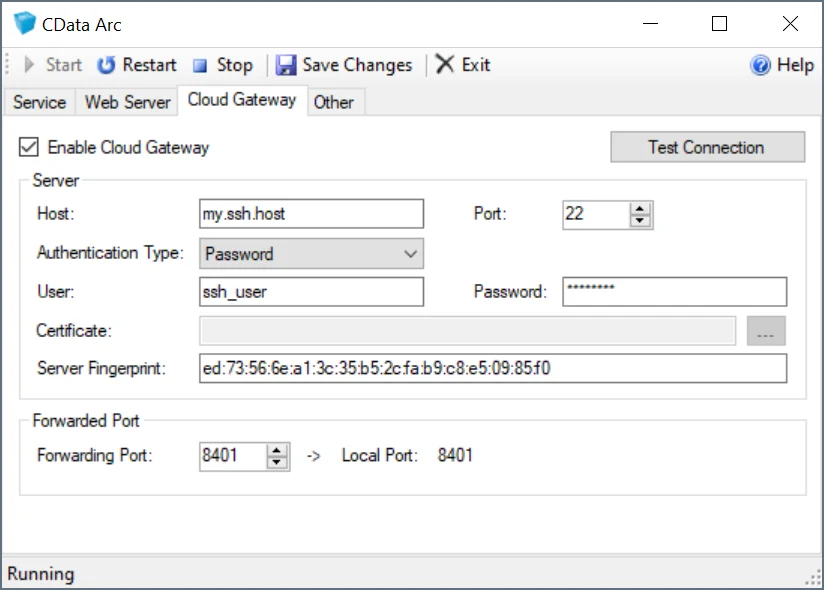
- Check Enable Cloud Gateway.
- In the Server section, configure the connection settings for the SSH server in the DMZ.
- In the Forwarded Port section, set the Forwarding Port to the port on the SSH server to use when forwarding data to . You can also forward two additional ports to establish tunnels for SFTP and OFTP ports. See Additional Forwarding Ports for details.
- Click Test Connection button to verify that the connection is successful.
- Restart the embedded web server to automatically open an SSH reverse tunnel on the specified port.
Additional Forwarding Ports
Configuring the Forwarding Port allows traffic to be forwarded for the HTTP traffic used in . You can also forward two other ports to establish tunnels for SFTP and OFTP ports.The DMZ Gateway supports a total of three forwarded ports for traffic, one of which is the HTTP or HTTPS port used to access HTTP or HTTPS-based service endpoints. While you can use the OFTP and SFTP ports for any other listening service on the machine, support for FTP Server connections requires an additional port range beyond the command channel. This means that FTP Server connections are not supported.
CData.Arc.xml configuration file in the application data directory (default path: C:\ProgramData\CData\Arc\CData.Arc.xml):
<type>Port is the port that the traffic is forwarded to and <type>RemotePort is the port to open on the SSH server.
You cannot forward the port that is already being used for the SSH service. For example, if the SSH server is listening on port 22, the
SFTPRemotePort cannot also be port 22.