Design principles, core concepts, and implementation details of CData Arc’s message-driven integration platform.
CData Arc is a message-driven platform for integrating business processes. It provides a centralized communications hub that enables applications, databases, and external messaging systems to talk to each other.
The Arc architectural decisions flow from a set of core design principles. This section focuses on three aspects of Arc design:
Principles and values that we prioritize
Core concepts necessary for a high-level understanding of Arc
Architectural decisions and how they fit with our design principles
The Core Principles and Concepts sections are intended for both technical and non-technical users. The remaining implementation sections are intended to help engineers understand how to leverage the Arc architecture.
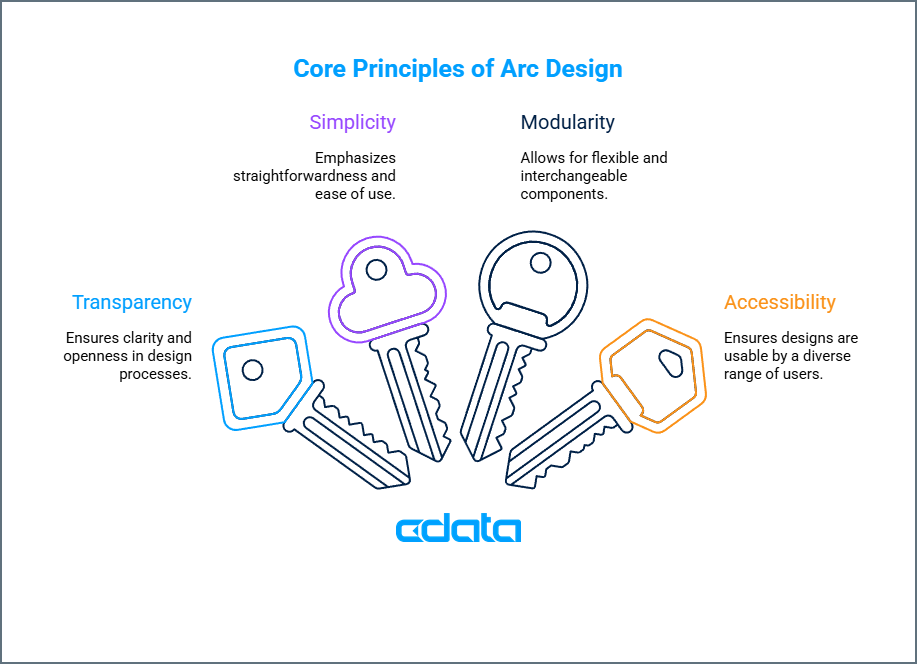
The following diagram illustrates the core principles of Arc design:The Arc architecture is not the only way that the design principles above could be implemented in an integration platform. What follows are explanations of our implementation choices and how they fit with our design principles.
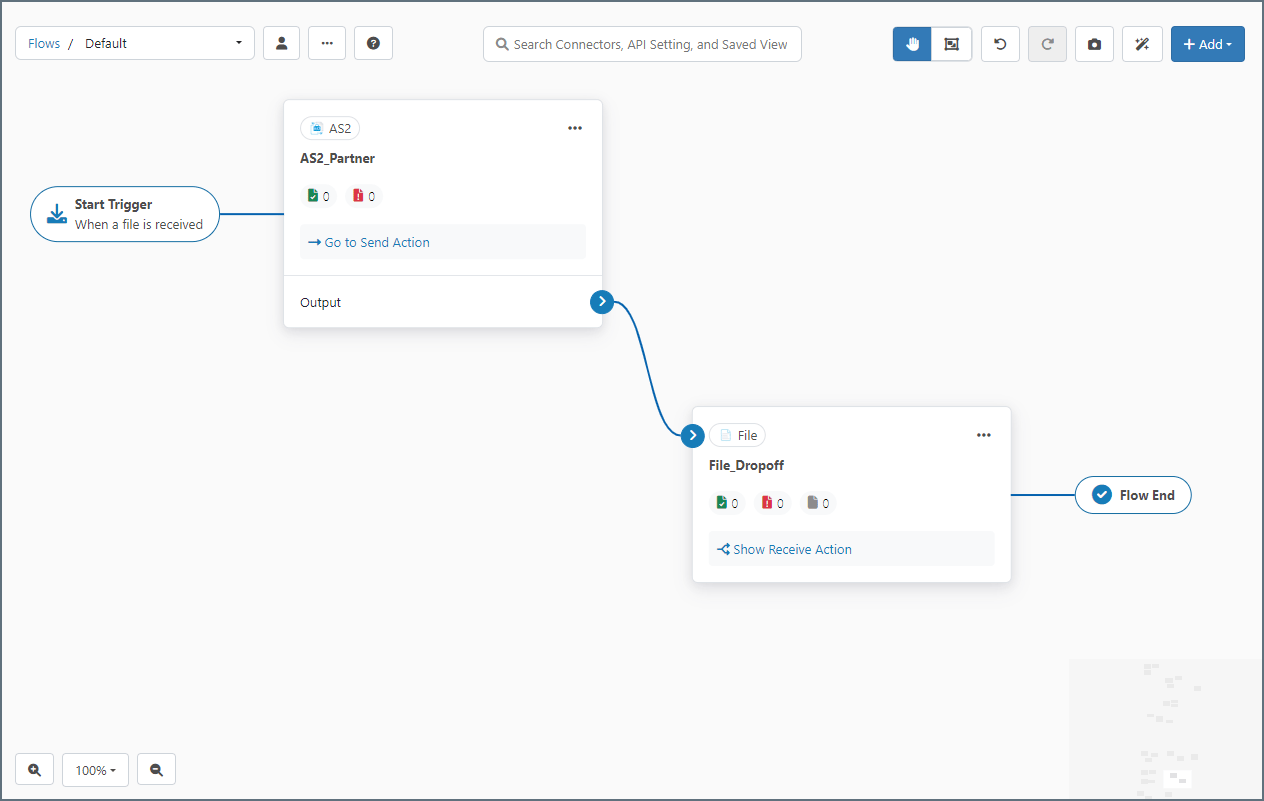
Arc flows are configured workflows that perform an automated set of data processing tasks. Flows are composed of a number of connectors that are connected to each other so that data processed by one connector is automatically passed along to the next connector in the flow.In the UI, flows are held in workspaces on the Flows page. Connectors are added to the blank canvas where they can be configured and connected to each other. The image below represents a simple flow consisting of two connectors: AS2 and File.The blue arrow between the connectors indicates that data received by the AS2 connector is automatically passed along to the File connector. Dragging the blue dot on the right side of a connector onto the left side of another connector establishes this relationship.The series of connectors in a flow establishes a logical chain of data processing, so flows should be designed to accomplish a specific business task. These tasks can vary in complexity from simply downloading a file all the way to synchronizing multiple back-end applications in accordance with received business documents.You can configure multiple flows in Arc to accomplish separate tasks. Flows act independently of each other unless they are explicitly connected to each other by a blue flow arrow.
Connectors are the individual building blocks of a flow, operating on application data, or messages. Each connector performs a specific operation on a message and passes it along to the next connector in the flow, or to an outside party (such as an FTP destination).Operations fall primarily into three categories: Trigger, Transform and Terminal.
Trigger connectors start a flow by Receive Automation pulling or creating a file or, for connectors that support passive receive, when the connector receives a file from an external client. Examples include AS2, Email Receive, or SFTP.
Transform connectors are connectors that reside in the middle of a flow and are responsible for performing work on the message (modifying it in some way). Examples include X12, XML Map, or CSV.
Terminal connectors are the end of a flow, where Arc hands the message off to the underlying disk or where the message is consumed by the connector during its send action and no output is generated. Examples include File, MySQL, or any database connector configured for Upsert.
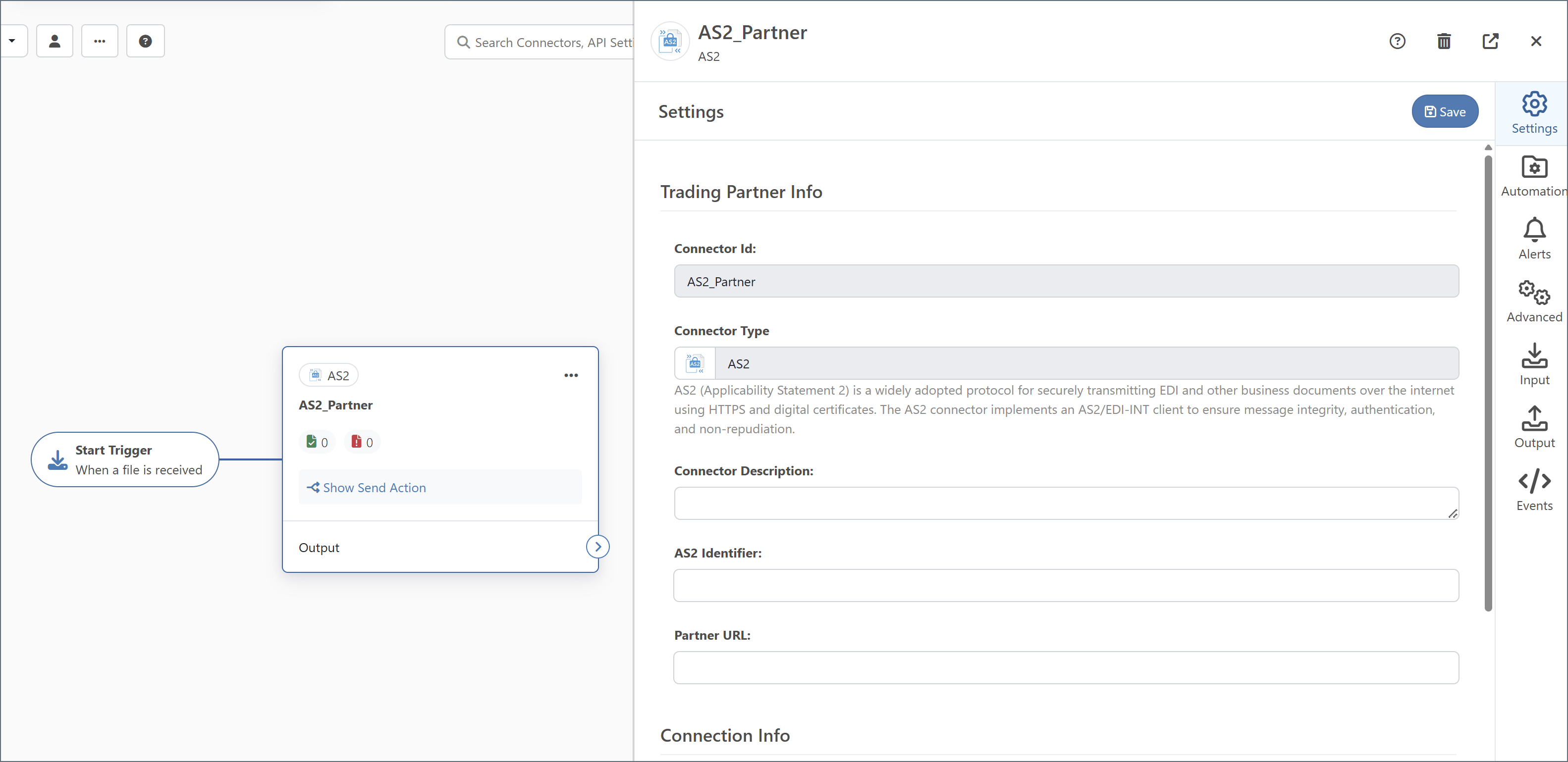
Each time a connector performs one of the above operations it is processing a transaction.In the workspaces on the Flows page, when you add a connector to a canvas its configuration settings panel opens:Connectors have different sets of configuration settings based on the connector type (AS2, SQL Server, XML, and so on).Some connectors, such as AS2 and SFTP, either receive data from an external party or server or send data out to an external party or server (or both). These connectors are typically at the start or the end of a flow, since that’s where data enters or exits the application.Other connectors, such as XML Map and X12, process data locally in the application. These connectors are typically in the middle of a flow, since they can only receive data from other connectors (not from an external source) and can only send data to other connectors (not to an external destination).
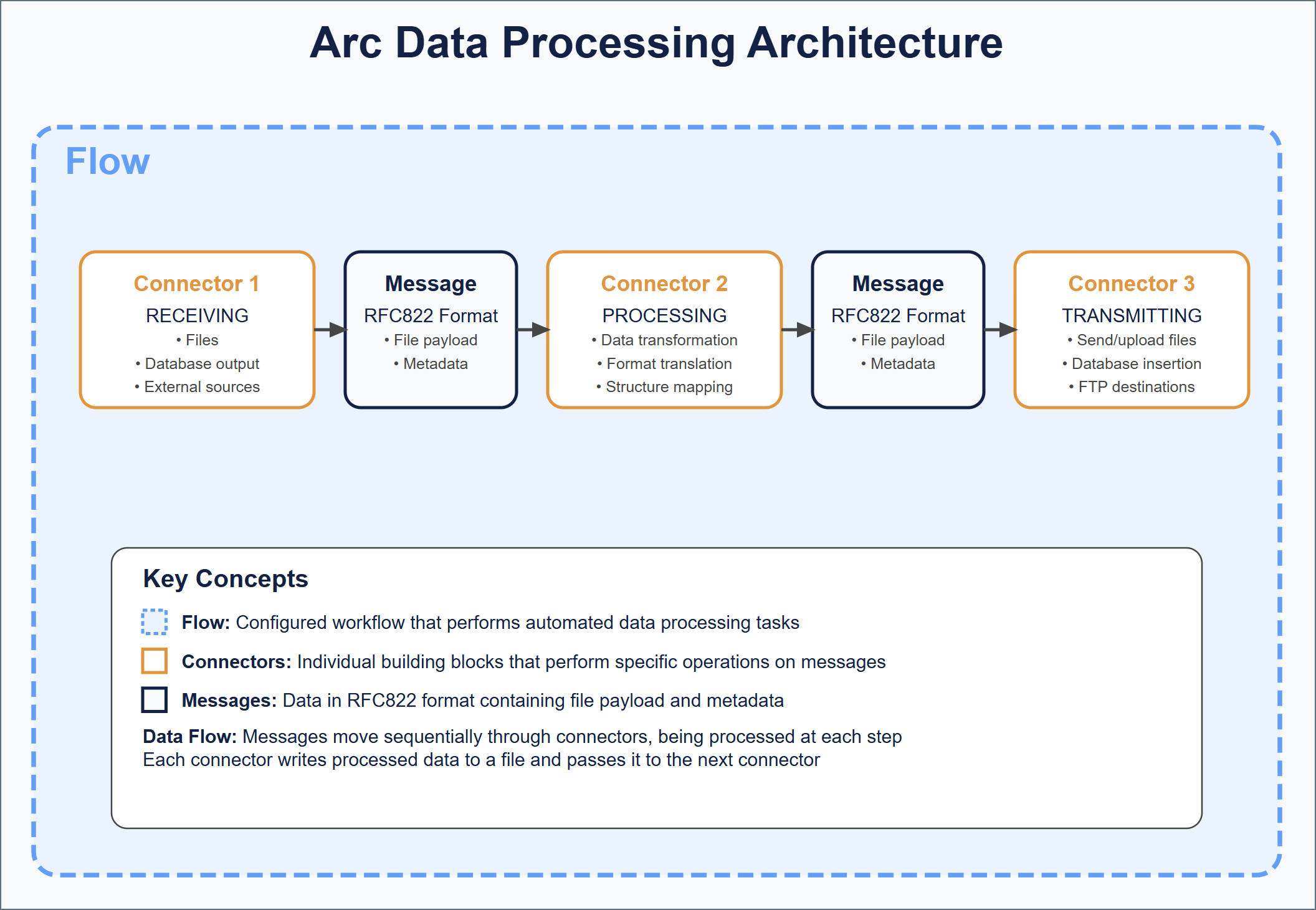
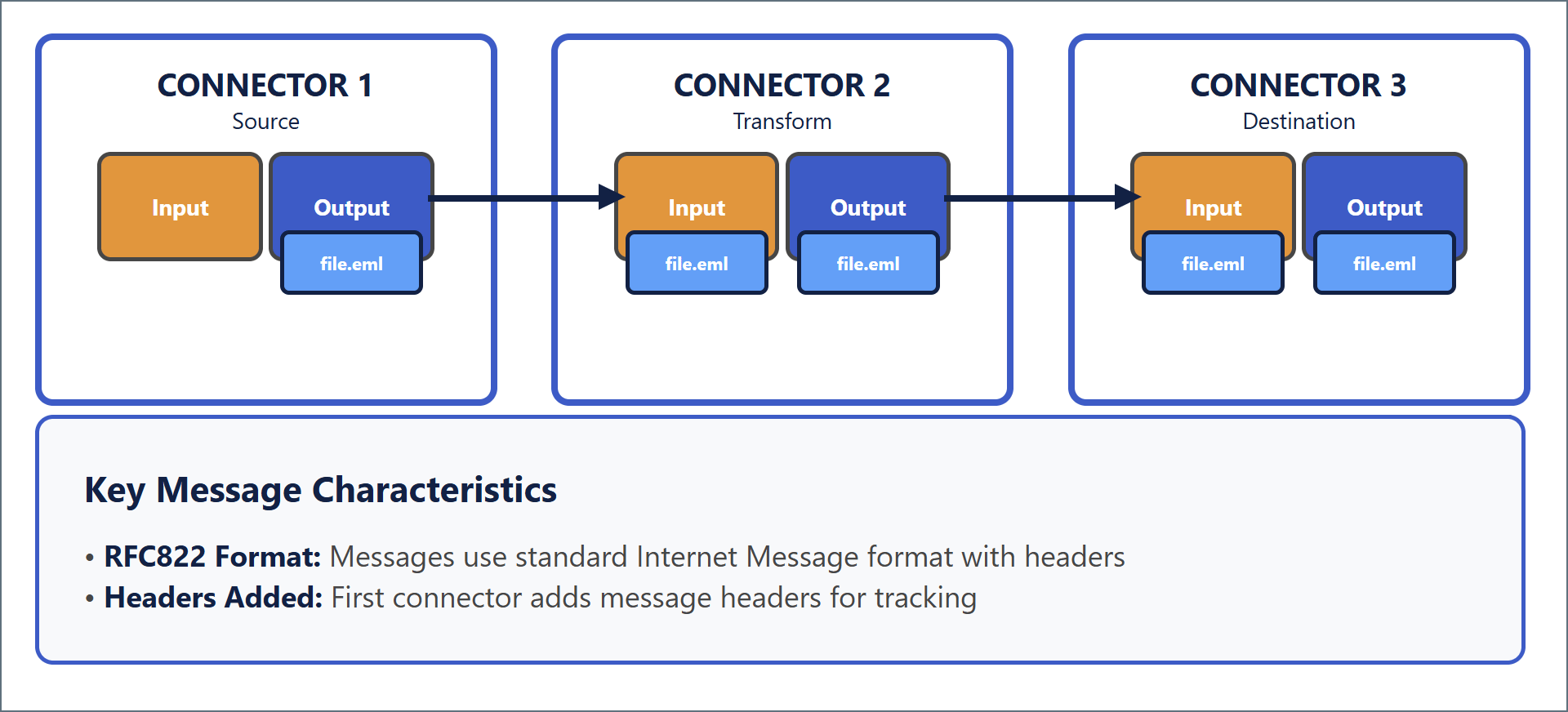
When data is passed between connectors in a flow, it is passed in the form of a message. Messages consist primarily of file payload data (the data that Arc is processing) and metadata (information that Arc uses to track the flow of data through the application).Messages are explained in more detail in Message Implementation, but the high-level takeaway is that messages are files in standard RFC822 (Internet Message) format. When a connector passes data to another connector in the flow, it writes the data to a file then passes that file to the next connector down the line, as illustrated in the following diagram.At each step in a flow, a message (file) is received or downloaded into the application (using a Trigger connector), transformed locally in the application (using a Transform connector), or sent or uploaded out of the application (using a Terminal connector). Each of these operations is referred to as a transaction.Arc is transparent: you can observe what happens inside the platform by looking at the file system, seeing how messages are copied from one folder to another, and viewing message content using a regular text editor or other tool.
This section provides technical details about Arc‘s implementation of the core concepts defined above (Flows, Connectors, and Messages), together with explanations of why we think our implementation satisfies our Design Principles.
Connectors in a configured flow read and write files (messages) from the Transactions tab. When data passes from one connector to the next, these message files are moved from the Receive folder of the first connector into the Send folder of the next connector.Arc provides a web UI on top of this filesystem-based infrastructure to easily construct and configure flows. Arc’s Admin API and UI are the recommended methods for managing configurations. These methods make direct modifications to the configuration files on disk. The file-based architecture also makes it easy to integrate Arc with Infrastructure as Code (IaC) tools and version control systems like Git. For more details on how to integrate Git with Arc, see Using Git with CData Arc.
Messages in Arc are simple files on disk that contain the raw data processed by the application. Messages have two parts:
Body: the application data payload
Headers: message metadata
The combination of headers and body is stored in RFC2822-compliant files with an .eml extension that can be opened by any standard text editor or email client. The headers are a simple list of name: value headers separated by newline characters, and the body is separated from the headers by two newline characters.
To ensure that Arc performs reliably, do not interact directly with these files while the application is running. External programs placing locks on these files can cause performance and reliability issues.
The message body or payload is the actual file data being processed by the application. This is the data that is received from a remote source, manipulated by transformation connectors, and so on. While the message headers are primarily used by Arc for tracking messages, the message payload contains the data that users care primarily about.When data is received, Arc generates a message (it writes a new message file to disk) and uses the incoming data as the message body. For example, when an SFTP connector downloads a file from a remote server, the contents of that remote file become the body of a new message.When data is processed locally in the application (such as when EDI is translated into XML, or when a file is mapped into a new format), the connector performing the operation reads the body of the input message, processes the data in memory, and writes the results into the body of an output message.When data leaves the application (for example, when uploading a file to a remote server, sending a file to a peer, or inserting into a database), only the body of the input message is sent out.
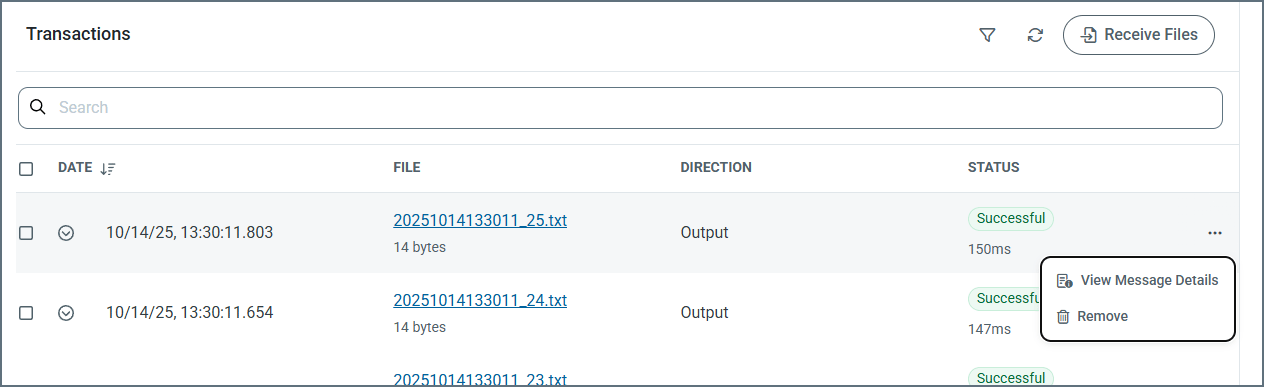
Message headers help Arc track the progress of data through the application. Headers include a unique MessageId (which helps Arc know the full lifecycle of a message, even if the filename is changed), timestamps from when connectors processed the message, any errors that might have occurred during processing, and other metadata.Headers are listed in headerName: headerValue syntax at the top of the message, delimited by line breaks. Hovering over a message and clicking View Details shows its associated headers, and lets you download the message file content.Message headers are also used for miscellaneous values that are helpful for Arc to know in a flow. For example, when downloading files from a subfolder on a remote FTP server, Arc uses a subfolder header to track the folder path to the message in case this folder path needs to be recreated on the local system.Arc augments the raw data files with metadata that describe how the application has processed the file. These are some of the most common headers:
A unique, durable MessageId that identifies the file throughout the flow
Timestamps of the file being processed
The ConnectorId of any connector that processed the file
Any instance of the file failing to process due to an error
Message headers are never edited or overwritten by the application. New headers are always appended to the existing list so that the full processing history is preserved.
While Arc uses message headers internally for tracking and understanding the data processed by the application, it hides these details from users unless the message is inspected. For example, Arc uses an internal MessageId to identify a message, but displays a public filename in the Transactions tab, and on the Messages tab.To examine the headers on a message, hover over the message and choose View Message Details. The following image shows messages on the Transactions tab.Arc stores messages in the .eml format when they are written to a connector’s internal Receive folder, regardless of where the message is in the flow. However, when messages are sent to an external system (for example, a database or an SFTP server), Arc only uploads the file content and does not include the .eml headers. Similarly, when writing files to disk using the File connector’s Send action, Arc omits the .eml structure so that the output matches what external processes expect. In other words, .eml headers are part of Arc‘s internal file format but are not included when delivering data to external destinations.
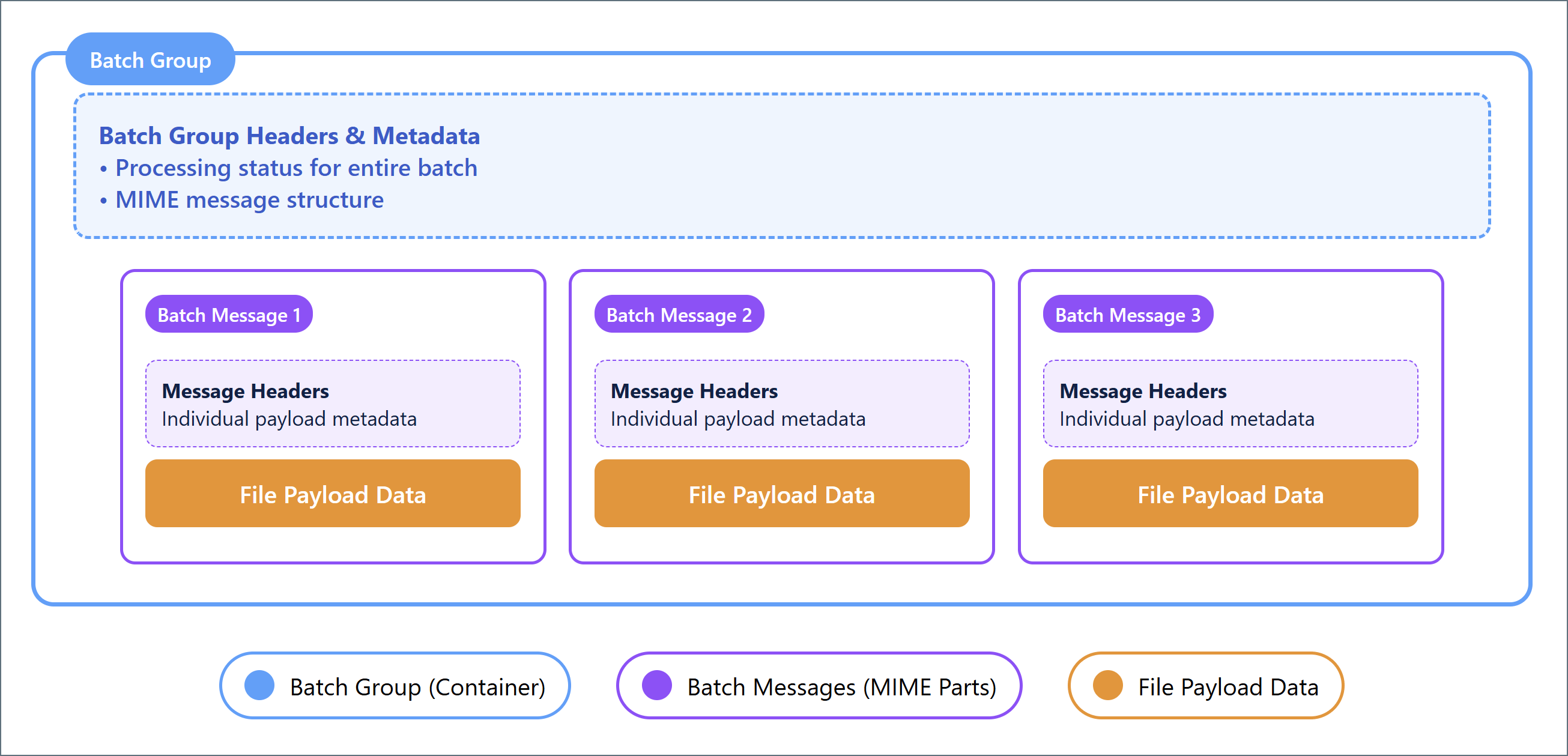
Messages can contain multiple payloads, in which case they are considered batch groups. Each individual payload in a batch group is considered a batch message, as illustrated in the following diagram.
Messages can be batched together into batch groups to improve performance and make large groups of messages more manageable. Batch groups are MIME-format files where each MIME part is a separate batch message. The batch group maintains metadata about the batch using the same header scheme that basic messages use. These headers track the processing of the batch as a whole, rather than individual parts of the batch.
Each batch message in a batch group is a MIME part containing the file payload data processed by the application. Each batch message contains metadata associated with the payload (but not the batch group) in the MIME part. Batch messages have multiple sets of metadata: one set of headers for tracking the batch group as a whole, and a separate set of headers for each message in the batch.
Because messages are just simple files on disk, users and external systems can access and view messages currently in the Arc pipeline. To access messages with an external application, you need to understand where on the filesystem to look for the message .eml files. See Folder Hierarchy to learn the exact location of the message files.
To ensure that Arc performs reliably, do not interact directly with message files while the application is running. External programs placing locks on these files can cause performance and reliability issues.
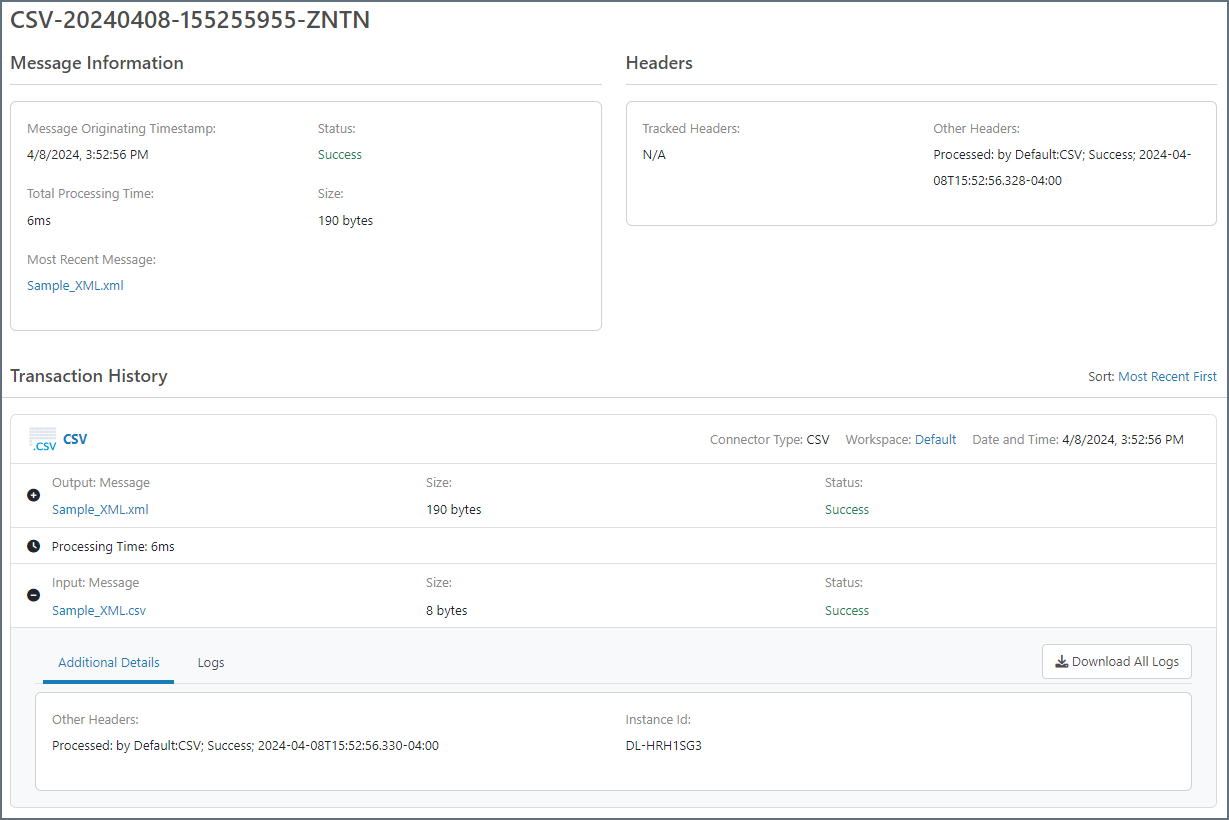
You can also see messages in the Arc UI and the Arc Admin API. Messages are displayed in the Transactions tab for any connector that has processed a message, as well as on the Activity page. Click View Details to open the Message Information page:The values displayed in this panel are the message’s headers. Click the Download button to access the message body. Click Download Logs to download the logs associated with a message.
Messages include a MessageId header that functions as a unique identifier for messages. This MessageId remains the same as the file passes through the flow, even if the file itself is renamed. As a result, the progress of any file throughout a flow can be traced by referencing its MessageId. This value also allows users to find log data associated with a particular transaction.Arc stores log data in two formats:
The application database is a relational database that Arc uses to:
Store metadata about each transaction processed by the application
Store logs for application operations that are not specific to any transaction
Store the state of certain connectors (for example, when a connector is awaiting an acknowledgment or receipt)
Arc comes packaged with a SQLite (Windows/.NET) or H2 (Java) database, but it can be configured to use an external database like SQL Server, PostgreSQL, or MySQL instead. Arc handles the creation and maintenance of all relevant tables in the application database.To use an external database, you must configure the database connection string in the configuration file for the server that hosts the application (see Configuring the Application Database in the .NET edition and the cdataappdb setting in the arc.properties file in the Cross-Platform edition).There is a table in the application database that is used to track messages and find logs. It stores metadata for each transaction processed by the application, and the metadata includes the MessageId of the message that was processed. Use the Activity page in the UI to find messages and transaction logs. You can search for transaction metadata (such as timestamp, ConnectorId, and status) on the Activity page. To minimize the database footprint, verbose logging data is not included on the Activity page and is instead stored in log files on disk.
Each time Arc processes a message, it generates a log folder with the same name as the MessageId. This folder contains the verbose log files, and the specific logging content depends upon the type of connector that sent and/or received the file. For example, the AS2 connector logs the MDN receipt, raw request and response, and connection log in addition to the .eml file representing the message itself.These log files are not necessary for merely tracking a message through the flow; the metadata stored in the application database is enough to track a message. However, to find detailed information on a specific transaction (especially when debugging), you need to find the appropriate files on disk based on the MessageId of the message and the connector that processed it.Users can manually navigate to the appropriate log folder on disk once they know the MessageId; however, it is often more convenient to use the application database to find these verbose log files. See Relationship Between Application Database and Log Files for details.
Relationship Between Application Database and Log Files
The metadata stored in the application database includes everything needed to find the log files associated with a particular transaction. The Arc UI and Admin API take advantage of this relationship to provide easy access to the log files for any transaction.
The Activity page contains all the transaction metadata. Hover over any transaction entry and click View Details to access the associated log files; underneath, Arc is using the MessageId to find the appropriate log files on disk.
Similarly, the Transactions tabs on connector configuration panels provide access to any transaction processed by that specific connector. Expand these transactions to view and download verbose log files.
The application database can also be helpful for manually navigating to the appropriate folder where transaction log files are held. Often, a user knows the filename of a transaction but not the internal MessageId. The Messages tab on the Activity page is searchable, so searching for a specific filename brings up the MessageId for any transactions associated with that filename. See Folder Hierarchy for more information on how to find the log folders once you know the MessageId and connector.
We want application data to remain transparent to users and external systems, so messages are passed using simple data files on the filesystem rather than an opaque internal data channel. As a result, Arc is not a black box where data is hidden away during processing. This means that Arc can effectively be embedded into any system that picks up or drops off files into specific folders on a filesystem.We also want messages to be accessible without specialized tools or programs. Messages are stored in RFC2822-compliant files so that any text editor can open the file. Because messages have a .eml extension, double-clicking on a file opens the message and displays its contents in the system’s default email client.So that messages and logs are accessible and transparent, we provide a searchable database of transaction metadata. This database can be used to access the message payload and verbose log files directly, while maintaining a light database footprint.
Connectors represent a single step in a flow. Complex flows are created by connecting sets of connectors together to perform a logical chain of data processing.Connectors perform three types of operations:
Receive data and write an output message (such as downloading a remote file over SFTP)
Read an input message and send the data to an external party (such as sending a file over AS2)
Read an input message, process it locally, and write an output message (such as translating an EDI file into XML)
Most connectors can perform either the first two operations (send and receive data to/from remote endpoints) or the last operation (transform data locally). Every operation performed by a connector is referred to as a transaction.Connectors read and write input and output messages from the Transactions tab. When connectors are connected in the flow, Arc automatically moves messages from the Transactions tab of the first connector to the Transactions folder for the next connector. (On disk, the input folder is labeled Send, and the output folder is labeled Receive.)
Every instance of a connector exists on disk as a single folder named for the ConnectorId (the display name in the flow). Each connector folder contains the following:
The following sections explain how these folder contents function in the application. Folder Hierarchy explains the exact location of connector folders and subfolders.
Each connector’s port.cfg file contains the settings that govern the connector’s behavior (the settings that appear in the connector’s Settings and Advanced tabs). This file is in INI format: connector settings are listed in SettingName = SettingValue syntax, one-setting-per-line. Editing connector settings in the UI is functionally equivalent to editing the settings directly in the port.cfg file.The port.cfg file supports indirect values, which means settings can use a reference instead of a string literal. This is conceptually similar to setting a variable in other sections of the application, and referencing the variable name in the port.cfg file. See Data Directory for details on how to set indirect values.
The Transactions folder holds input messages, or messages that are queued to be processed by the connector.At every clock tick (half a second by default), Arc checks for changes in each connector’s Send folder and dispatches worker threads to any connector with available messages. When a message is processed, Arc appends a header to that message with the timestamp of the processing attempt.Arc sorts the input messages according to the last modified time so that older files are processed first. Since Arc appends a header during each attempt, this ensures that messages that cause an error do not block the connector unnecessarily through repeated retries.Note that connectors must have Send automation enabled in order to process input messages every clock tick.
The Receive folder holds output messages, or messages that have been received, downloaded, and/or processed by the connector.Some connectors write an output message as soon as they finish processing an input message (such as connectors that translate data formats). Other connectors write an output message without first reading an input message. Examples include an SFTP connector that polls a remote server for files to download, and an AS2 connector that passively listens for incoming files.When a connector is connected to another connector in the flow, output messages do not remain in the Receive folder. They are passed along to the Send folder for the next connector.
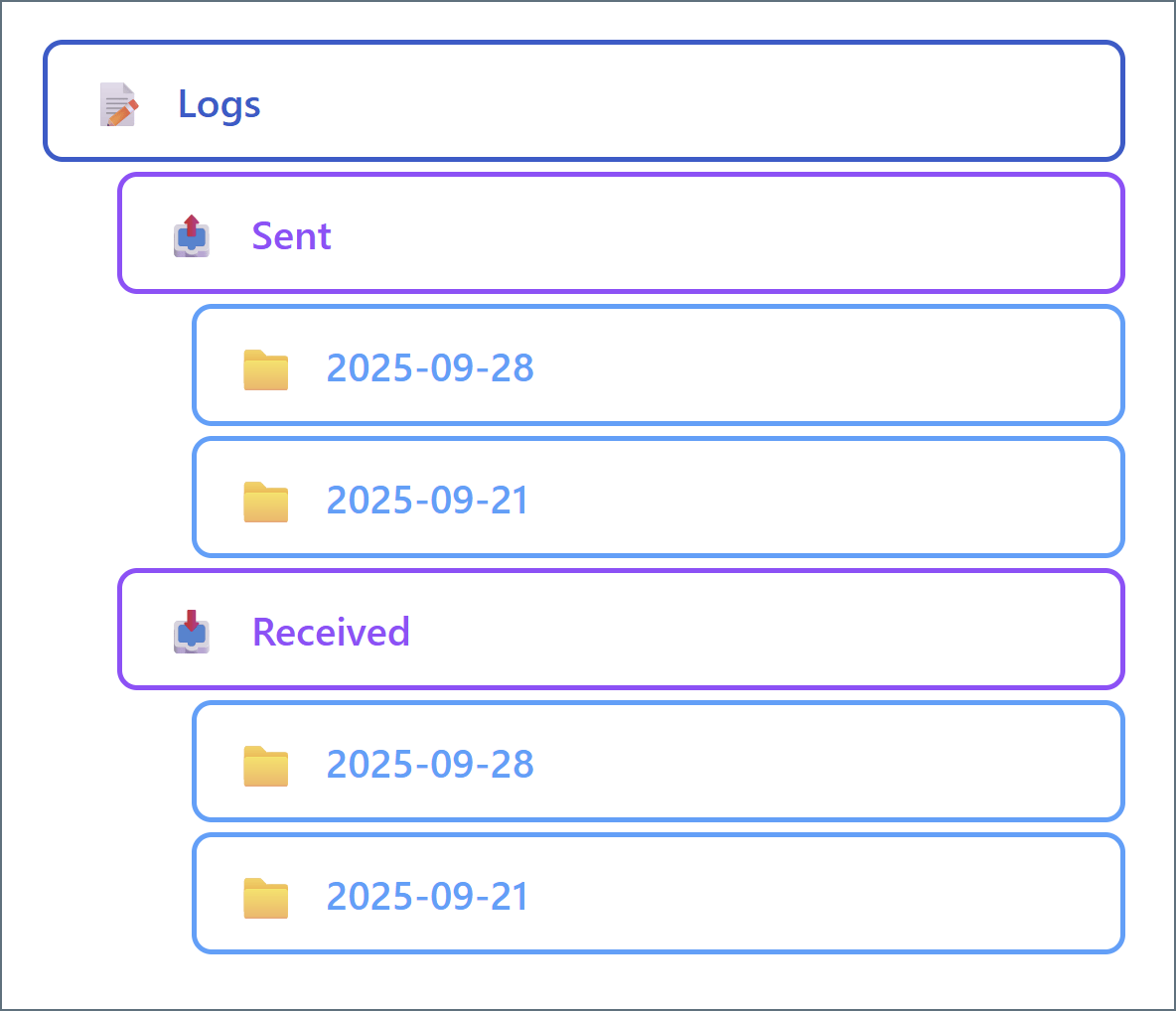
Each transaction processed by a connector generates a set of log files. Metadata about the transaction is added to the log, and the verbose logging information is stored as files on disk. The log files always include the message itself in .eml format along with any connector-specific log files.By default, all connector log files are organized in folders by week, as shown in the following folder structure:To change the default weekly folder organization, set the Log Subfolder Scheme field of any connector to a different time interval (such as Daily or Monthly). This means that all logs generated in that time interval are held in one subfolder. This can improve disk I/O performance by reducing the size of any individual subfolder.You can use the Messages tab to find the appropriate log folder, either by finding the MessageId or by using Download Logs.
Depending on the connector type, some connector folders include additional configuration files. These additional files include:
map.json
script.rsb
template XML files
These files store mapping relationships, custom scripting behavior, and the structure of connector input and output. Manually editing these files is equivalent to editing the associated connector UI settings.
It can be risky to manually edit any of these files. The layout is easy to understand and transparent, but incorrectly modifying these configuration files can have unintended consequences.
We want flows to be fully modular, which means that each connector should provide a straightforward function in a predictable and intuitive way. Arc’s capacity to perform complex tasks comes from the ability to combine arbitrary sets of connectors, while the connector interfaces remain simple. Sophisticated flows remain easy to understand because the connector chain is broken down into discrete steps.We want all of the data relevant to a connector (configuration data, application data, logging data, and so on) to be easy to access. Because the data is all stored in a connector-specific folder, accessing the data is just a matter of knowing where to find the folder. Configuration data is stored in the transparent INI format so that it, like message data, can be easily viewed and edited with simple tools.Our folder-based approach to connectors also makes it easy to understand how data is passed between connectors: a simple file-move operation on the message files turns one connector’s output into another connector’s input. Arc includes built-in tools to establish these file-move relationships automatically.
To ensure that Arc performs reliably, do not interact directly with any configuration files while the application is running. External programs placing locks on these files can cause performance and reliability issues.
Flows are represented on the filesystem in a flow.json file that contains the position and connections for each connector in a flow. See Folder Hierarchy for the location of this file.The position of connectors in a flow is purely cosmetic and is only used when you configure flows in the UI. The connections between connectors are relevant at the data processing level: after a connector writes an output message, it queries the application engine to see if it needs to pass the output message to another connector’s Send folder. The application uses the flow.json file to determine which connector, if any, is given the file.You can configure multiple flows on the same flow canvas, and the Arc UI lets you drag the canvas around to navigate between flows. This is similar to navigating geographical maps such as Google Maps online.Workspaces provide a logical separation between flows. Each workspace provides a fresh canvas within which to configure connectors into logical flows. Extending the Google Maps analogy, workspaces function as separate planets.It is common practice to separate workspaces by trading partners or integrations. However, deciding whether to configure new flows in separate workspaces is a matter of preference. See Organize Flows into Workspaces for more information.
When you introduce new (non-default) workspaces, Arc adds a new set of folders in the folder hierarchy. The workspaces directory contains the connector folders for all connectors configured in non-default workspaces. The workspaces folder is a sibling of the Data Directory.
We think that the best way to preserve the simple and modular relationship between connectors in a flow is to treat flows as a purely logical concept. All of the information necessary to determine the logical series of data processing is already contained in the connector implementation.We want workspaces to provide the ability to separate connectors on a more substantial level. Separate workspaces use separate folders to hold connectors so that filesystem-level operations (such as permissions and directory listings) can be easily isolated to a particular workspace.
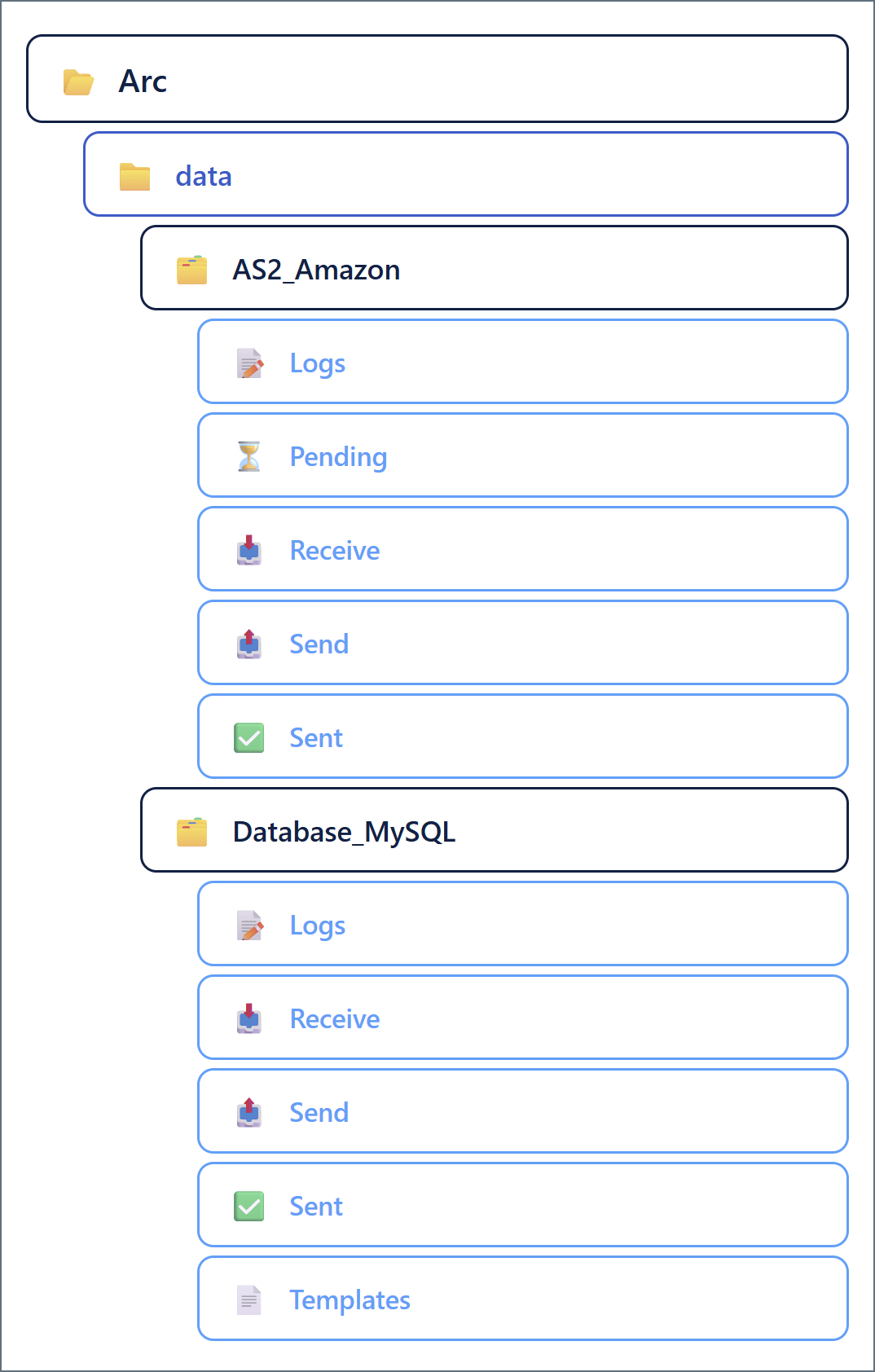
Because all Arc resources are available on the filesystem, understanding Arc at a low level requires learning the application’s folder structure and how files and folders are organized on disk.To understand the hierarchy, it is helpful to see the directory view of an Arc installation. Following is a visual representation of the folder structure. The details of this structure are explained in the following sections.
This hierarchy assumes that flows are only configured in the default workspace. See Flows and Workspaces for details on additional workspaces.
If Local Archive Folder in the Cleanup Settings section of the Settings > Advanced page is empty, each connector also has an Archive folder.
All Arc resources are in the installation directory, in the following default locations:
Windows: C:\Program Files\CData\CData Arc
Linux: /opt/arc
For Java installations, CData provides a zip file that you can extract to the installation directory of your choice (for example, /opt/arc).When the Java edition of Arc is hosted on an external Java servlet like Tomcat, Arc resources reside in ~/cdata/arc. In this path, ~ resolves to the home directory of the user that hosts the Java servlet.In the folder hierarchy above, the root installation directory is the Arc folder at the top of the tree.
The profile.cfg file contains application-wide settings such as those for configured local profiles (for example, the AS2 profile). This file is in INI format: application settings are listed in SettingName = SettingValue syntax, one-setting-per-line.The profile.cfg settings are divided into sections: an Application section for general application settings, and a dedicated section for each profile (for example, there is an AS2 section for the AS2 profile settings and an SFTPServer section for the local SFTP Server settings).Editing application settings on the Profile page of the UI is functionally equivalent to editing the settings directly in the profile.cfg file.
The flow.json file contains the structure of configured flows: the positions and connections between each connector instance. Editing flow.json directly accomplishes the same thing as moving or re-connecting connectors on the Flows page.
The roles.json file includes details related to all custom user roles. Editing roles.json directly accomplishes the same thing as adding and configuring roles on the Roles page.
The settings.json file contains a list of settings that can be referenced elsewhere in the application by using reference names instead of values. This enables you to store secure values (like passwords) in a way that does not display them in the application. You can also use reference names to centralize the configuration of flows that are deployed across multiple instances.Settings that support this centralized reference syntax have a key icon in the UI, which you can click to view a list of defined references in the settings.json file. For more information, see Global Settings Vault.
The users.json file contains details related to all Arc users. Editing users.json directly accomplishes the same thing as adding or editing users on the Users page.
All certificates created or uploaded in the application are stored in the data directory. Typically, certificates come in public/private pairs with the same filename but different file extensions: .pfx for private and .cer for public. Certificates in other formats that are uploaded to the application are stored as-is.Arc enumerates the certificates in the data directory to determine the options available when configuring a certificate in the UI. Adding a certificate file to the data directory accomplishes the same thing as uploading a certificate in the UI.
Each configured connector instance has a dedicated folder in the data directory. The folder names match the ConnectorId value (the display name) for each connector in the flow. In the example folder structure above, the two configured connectors are AS2_Amazon and Database_MySQL.The contents of the connector folder are explained in Connector Files and Folders. Following is an overview of the subfolder structure in the connector folder:
Logs: Verbose log files for each message processed by the connector
Received: Logs for messages received by the connector; each message has its own folder matching the MessageId
Sent: Logs for messages sent by the connector; each message has its own folder matching the MessageId
Receive: Messages that the connector has received or processed
Send: Messages that the connector should send or process
Sent: Copies of successfully processed messages (in raw data file format). Only present when the deprecated Save to Sent Folder setting is enabled.
Depending on the connector type, some connectors can have other subfolders:
Pending: Processed messages that are pending an acknowledgement from another party
Public: Files that should be published as public endpoints in the application
Schemas: Schema files (like EDI schemas) that are specific to a particular connector
Templates: XML representations of connector input and output data
Because we want the data in Arc to be transparent and accessible, specific files in the application should be easy to find. A simple hierarchical folder structure helps ensure that users and external systems know where to look for the Arc data files.We want the Arc UI to provide a convenient interface for configuring and using the application, but we also want the application to remain fully embeddable in other solutions. Understanding the Arc folder structure is all that is required to point these other solutions to any relevant Arc data.
The Arc automation service processes files in the Transactions folder for each connector. The automation service runs on a half-second clock tick, and messages move one step further through the flow at each tick.Arc supports parallel processing by distributing multiple threads to each connector, and each thread can process multiple files in that connector. The specific numbers of workers distributed and files processed per-worker are determined by performance settings in the profile and in the specific connector settings.
At a predefined interval (500 milliseconds by default), Arc checks the contents of the Send folder for every configured connector, and if new files are found, assigns worker threads to process them according to the connector’s settings.The application does not guarantee which connector’s input is enumerated first. When multiple files are in a single connector’s Send folder, they are processed in order according to the last modified time (files modified least recently are processed first).When Arc attempts to process a file, it adds a message header with the processing timestamp, which changes the last modified time for the file. This means that if a file fails to process (causes an error), it becomes the lowest priority file compared to the rest of the files in the Send folder. This prevents a single file from blocking the operation of a connector by repeatedly throwing an error and immediately being retried.
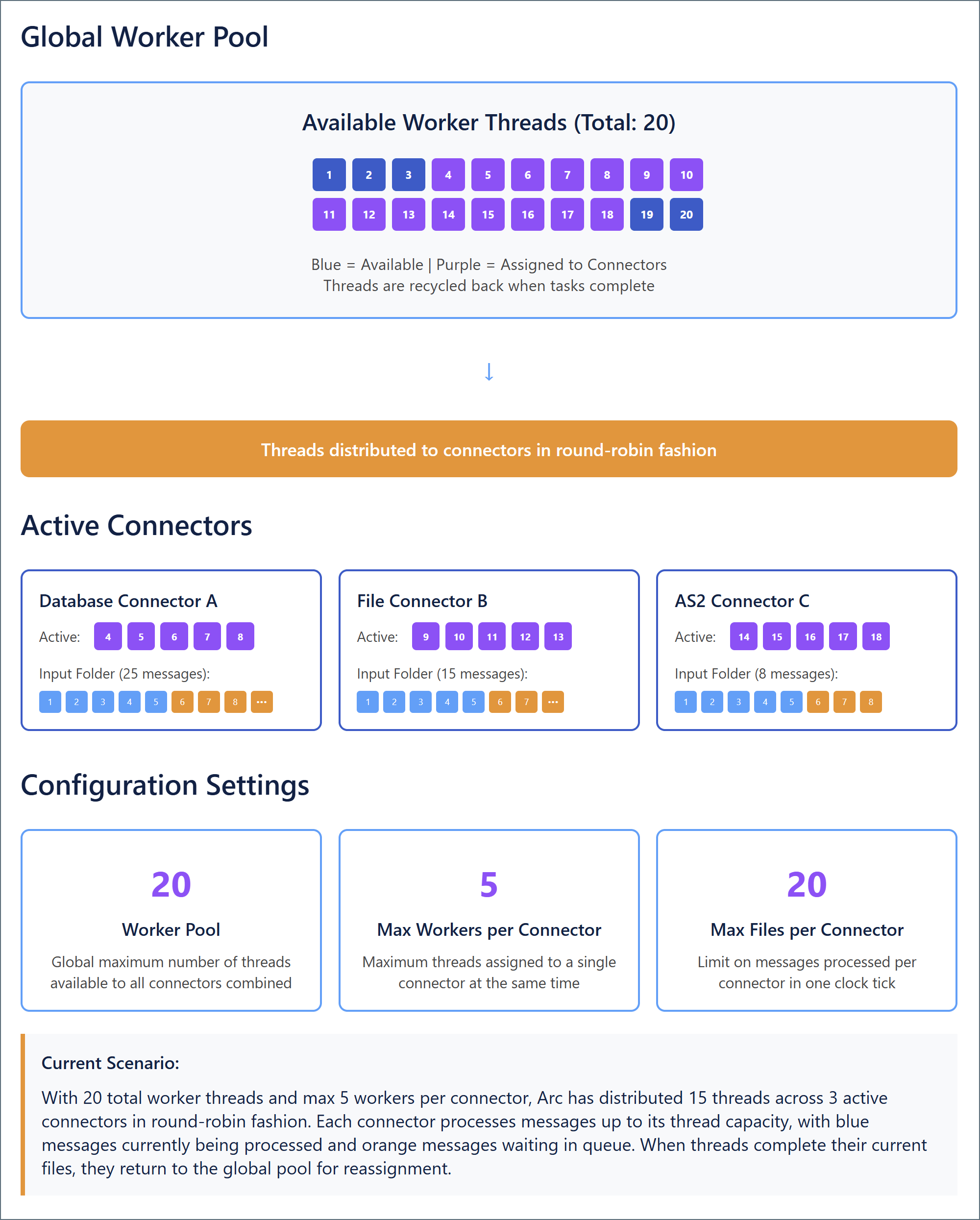
When parallel processing is enabled, Arc can distribute multiple worker threads to the same connector during a single clock tick. The number and behavior of these workers are determined by three settings on the Advanced tab of the Settings page (some of which can be overridden for individual connectors in that connector’s Advanced tab):
Worker Pool: Establishes the global maximum number of threads that the application can assign to all connectors (combined) at the same time. When a thread finishes its assignment in a specific connector, it is recycled back into the pool. The hardware resources available on the host machine determine the upper limit for this setting.
Max Workers per Connector: Establishes the maximum number of threads assigned to a single connector at the same time. Each thread assigned to a connector processes files in that connector’s Send folder one at a time until the folder is empty (or until the Max File per Connector is reached). Once this condition is reached, threads assigned to the connector are recycled back into the worker pool as they finish processing. You can override this setting on an individual connector’s Advanced tab.
Max Files per Connector: Establishes a limit on the number of files processed in a single connector within a single clock tick. For example, if this setting is set to 5, then threads assigned to a connector are recycled back into the worker pool after they have (collectively) processed 5 files, even if there are still files in the connector’s Send folder. You can override this setting on an individual connector’s Advanced tab. When this is set to 0, the connector attempts to process all the files that are present in the connector at the time that the threads are assigned.
Threads are distributed to connectors in round-robin fashion, so adjusting these values (either globally or for specific connectors) can help alleviate throughput problems or prevent some connectors from hogging system resources. The following diagram illustrates how the parallel processing settings work together.
The Max Workers per Connector and Max Files per Connector settings can be adjusted in individual connectors to help maximize Arc performance when certain connectors require more or less resources than others.Increasing Max Workers per Connector for a particular connector tells the application to assign more system resources when processing that connector’s input files. This is useful when a particular connector acts as a bottleneck for flow throughput. However, because threads are assigned in round-robin fashion, increasing this setting for many different connectors might cause the application to run out of threads in the Worker Pool. When this happens, the application must wait for other threads to finish and be recycled before it can assign them to the remaining connectors.Decreasing Max Workers per Connector for a particular connector prevents that connector from severely depleting the worker pool when processing files. This can help avoid issues where the application runs out of threads to distribute during round-robin assignment. However, if the connector’s Send folder has many files, it can take a long time for the smaller number of threads to finish processing the files and be recycled back into the pool (unless Max Files per Connector is also adjusted, as discussed below).Increasing Max Files per Connector for a particular connector (or setting it to 0 to process all files) helps ensure that files do not sit in the connector’s Send folder for multiple clock ticks. This can help increase throughput for high-volume connectors. However, it might also increase the chance that threads assigned to the connector are not recycled back into the worker pool for a long time (which could potentially cause a thread shortage).Decreasing Max Files per Connector for a particular connector helps ensure that threads assigned to that connector are recycled back into the pool in a timely manner. However, it can mean that files are not always processed within a single clock tick if the number of files in the Send folder exceeds the maximum processed per-tick.Maximizing performance is specific to your particular environment and use case. In general, connectors that need to process or send a large number of files should be assigned more workers and those workers should be allowed to process more files before recycling. To prevent the thread pool from being exhausted, other connectors should be assigned fewer workers and those workers should be limited to fewer files.
In Arc, the automated processing of input files described above is called Send automation. Arc also supports Receive automation, which describes the automated process of connectors pulling files into a Arc flow according to a scheduled interval.Receive operations fall into two categories:
Downloading files from a remote host/server (such as FTP, SFTP, or S3)
Pulling data from a back-end system (such as a database, ERP system, or CRM) and writing it out as XML
Receive automation is always tied to a scheduling interval that determines how often the connector attempts to download files or pull data from an external system.Every clock tick, the automation service checks to see if any connector’s receive interval has elapsed. If so, the connector immediately establishes an outbound connection and pulls data according to the connector’s settings.Some connectors, like the AS2 connector, passively listen for incoming data to receive. These connectors do not support receive automation because they cannot actively poll an external system for data.
Getting started in Arc does not require a full understanding of the underlying architecture. However, peeling back the layers of the application provides an important set of benefits:
Evaluating whether the Arc approach fits more specific technical requirements
Manipulating and configuring the application with greater understanding and control
Understanding how to embed Arc as part of a larger data-processing solution
Arc is a lightweight implementation of a message-driven integration framework. An understanding of its underpinnings helps engineers know whether this approach is suitable for their specific business needs.After reading this document, we hope the principles guiding our design decisions are clear, since these principles continue to shape the growth and development of the application. Understanding the why behind an application’s design helps users make informed decisions about whether it is right for them.
The Arc UI provides an accessible interface for manipulating and configuring the application. A better understanding of the underlying architecture helps users perform more advanced work under the hood, such as setting permissions on specific folders for granular control over user access.In addition, we believe that a conceptual grasp of flows, connectors, and their relationship with application data can help users quickly and easily configure optimal workflows. We prioritize the ability for users to take advantage of the Arc feature set with minimal configuration overhead.
Once a user knows the Arc folder structure, the process of embedding Arc in another data processing system is simple. Since Arc interfaces with the system through a set of well-defined folders on disk, any application that reads and writes from specified folders can seamlessly pass data to and from Arc.
Finally, we believe that engineers have a common desire to understand the mechanisms underlying the systems that they use. Even if none of the benefits listed above are applicable to your implementation, we hope that this document has provided you with an additional layer of comfort and familiarity that helps you as you use Arc to build your own data integration workflows. If you have any questions about the content of this document or need further guidance, please reach out to our dedicated support team at arcsupport@cdata.com and we will be happy to assist you.
{"docsConfig":{"theme":"mint","$schema":"https://mintlify.com/docs.json","name":"CData Arc Documentation","colors":{"primary":"#002660","light":"#FFE500","dark":"#002660"},"logo":{"light":"https://mintcdn.com/cdata-arc/-adMVRA2NGLWRgFp/public/images/cdata_arc_web.svg?fit=max\u0026auto=format\u0026n=-adMVRA2NGLWRgFp\u0026q=85\u0026s=8863df3ad6488c6280d057711f48aa94","dark":"https://mintcdn.com/cdata-arc/-adMVRA2NGLWRgFp/public/images/cdata_arc_yellow.svg?fit=max\u0026auto=format\u0026n=-adMVRA2NGLWRgFp\u0026q=85\u0026s=db878c051424afd58007b04161a4f5e1","href":"https://www.cdata.com/arc"},"favicon":"https://mintcdn.com/cdata-arc/Lo_2D5t4szDfleFN/favicon.ico?fit=max\u0026auto=format\u0026n=Lo_2D5t4szDfleFN\u0026q=85\u0026s=4b165e5b4d92eef3607cdc47218f10e2","appearance":{"default":"system","strict":false},"background":{"color":{"light":"#F1EEE9","dark":"#15151C"}},"footer":{"socials":{"x":"https://x.com/cdatasoftware","youtube":"https://www.youtube.com/c/CDataSoftware","linkedin":"https://www.linkedin.com/company/cdatasoftware","facebook":"https://www.facebook.com/cdatasoftware","instagram":"https://www.instagram.com/cdatasoftware"}},"fonts":{"heading":{"family":"DM Sans","weight":700},"body":{"family":"DM Sans"}},"styling":{"eyebrows":"breadcrumbs","latex":false},"contextual":{"options":["copy","view","chatgpt","claude","perplexity","mcp","cursor","vscode"],"display":"header"},"variables":{"siteName":"CData Arc","siteNameShort":"Arc","companyName":"CData"},"navigation":{"languages":[{"language":"en","navbar":{"primary":{"type":"button","label":" Contact Us","href":"https://www.cdata.com/company/contact.aspx"}},"href":"26.4/self-hosted/en/getting-started"},{"language":"ja","navbar":{"primary":{"type":"button","label":"お問い合わせ","href":"https://jp.cdata.com/contact/"}},"href":"26.4/self-hosted/ja/getting-started"}]}},"deployment":{"deploymentMetadataValue":{"subdomain":"cdata-arc","hasAudioNarration":false,"actualSubdomain":"cdata-arc","customDomains":["docs.arc.cdata.com"],"gitSource":{"type":"github","owner":"cdatasoftware","repo":"arc-docs","deployBranch":"main","contentDirectory":"","isPrivate":true,"mountPath":"","label":""},"entitlements":{"AI_CHAT":{"status":"ENABLED"},"WEB_MCP":{"status":"ENABLED"},"NARRATION":{"status":"ENABLED"}},"buildId":"6af4846aabb6fb5bd646dc7c","clientVersion":"0.0.4111","searchFilterCounts":[{"language":"en","tag":"Arc User Guide","count":3135},{"language":"ja","tag":"Arc ユーザーガイド","count":2659},{"language":"en","tag":"Connectors","count":1994},{"language":"en","tag":"Self-Hosted","count":1921},{"language":"ja","tag":"Self-Hosted","count":1921},{"language":"en","tag":"Cloud","count":1760},{"language":"ja","tag":"コネクタ","count":1658},{"language":"ja","tag":"Cloud","count":1211},{"language":"en","tag":"Other","count":1064},{"language":"ja","tag":"その他","count":887},{"language":"en","tag":"Scripting","count":608},{"language":"en","tag":"ArcScript","count":581},{"language":"en","tag":"API Reference","count":546},{"language":"ja","tag":"スクリプティング","count":512},{"language":"ja","tag":"ArcScript","count":489},{"language":"ja","tag":"API リファレンス","count":472},{"language":"en","tag":"Getting Started","count":357},{"language":"en","tag":"Core","count":341},{"language":"ja","tag":"コア","count":312},{"language":"ja","tag":"はじめに","count":306}]},"assistantConfig":{"enableAskAiButton":false,"enableStarterQuestions":false,"enableAskAiSearchBar":true},"basePath":"","hasChatPermissions":true,"hasWebMcpPermissions":true,"toggles":[{"name":"kill-isr","enabled":true,"variant":{"name":"disabled","enabled":false,"feature_enabled":true},"impressionData":false},{"name":"custom-rbac-roles","enabled":true,"variant":{"name":"disabled","enabled":false,"feature_enabled":true},"impressionData":false},{"name":"agent-mintlify-slack","enabled":true,"variant":{"name":"disabled","enabled":false,"feature_enabled":true},"impressionData":false},{"name":"agent-integrations-settings","enabled":true,"variant":{"name":"disabled","enabled":false,"feature_enabled":true},"impressionData":false},{"name":"rbac-expansion","enabled":true,"variant":{"name":"disabled","enabled":false,"feature_enabled":true},"impressionData":false},{"name":"automations-pr-grouping","enabled":true,"variant":{"name":"disabled","enabled":false,"feature_enabled":true},"impressionData":false},{"name":"custom-prefix","enabled":true,"variant":{"name":"disabled","enabled":false,"feature_enabled":true},"impressionData":false},{"name":"analytics-v7","enabled":true,"variant":{"name":"disabled","enabled":false,"feature_enabled":true},"impressionData":false},{"name":"user-flows-analytics","enabled":true,"variant":{"name":"disabled","enabled":false,"feature_enabled":true},"impressionData":false},{"name":"no-publish-flow","enabled":true,"variant":{"name":"disabled","enabled":false,"feature_enabled":true},"impressionData":false},{"name":"workos-onboarding","enabled":true,"variant":{"name":"disabled","enabled":false,"feature_enabled":true},"impressionData":false},{"name":"llms-txt-v2","enabled":true,"variant":{"name":"disabled","enabled":false,"feature_enabled":true},"impressionData":false},{"name":"snapshot-serving-live","enabled":true,"variant":{"name":"disabled","enabled":false,"feature_enabled":true},"impressionData":false},{"name":"stripTemperatureMiddleware","enabled":true,"variant":{"name":"disabled","enabled":false,"feature_enabled":true},"impressionData":false},{"name":"support-platform-pylon-zendesk","enabled":true,"variant":{"name":"disabled","enabled":false,"feature_enabled":true},"impressionData":false},{"name":"snapshot-serving","enabled":true,"variant":{"name":"disabled","enabled":false,"feature_enabled":true},"impressionData":false},{"name":"instant-rollback","enabled":true,"variant":{"name":"disabled","enabled":false,"feature_enabled":true},"impressionData":false},{"name":"granular-notifications-server","enabled":true,"variant":{"name":"disabled","enabled":false,"feature_enabled":true},"impressionData":false},{"name":"granular-notifications","enabled":true,"variant":{"name":"disabled","enabled":false,"feature_enabled":true},"impressionData":false},{"name":"automations-fable","enabled":true,"variant":{"name":"disabled","enabled":false,"feature_enabled":true},"impressionData":false},{"name":"fixed-ai-action-pricing","enabled":true,"variant":{"name":"disabled","enabled":false,"feature_enabled":true},"impressionData":false},{"name":"automation-resolve-merge-conflict","enabled":true,"variant":{"name":"disabled","enabled":false,"feature_enabled":true},"impressionData":false},{"name":"scoped-publishing","enabled":true,"variant":{"name":"disabled","enabled":false,"feature_enabled":true},"impressionData":false},{"name":"mintql","enabled":true,"variant":{"name":"disabled","enabled":false,"feature_enabled":true},"impressionData":false},{"name":"page-level-analytics","enabled":true,"variant":{"name":"disabled","enabled":false,"feature_enabled":true},"impressionData":false},{"name":"editor-version-history-v2","enabled":true,"variant":{"name":"disabled","enabled":false,"feature_enabled":true},"impressionData":false},{"name":"billing-page-v2","enabled":true,"variant":{"name":"disabled","enabled":false,"feature_enabled":true},"impressionData":false},{"name":"full-page-search","enabled":true,"variant":{"name":"disabled","enabled":false,"feature_enabled":true},"impressionData":false},{"name":"workspace-projects","enabled":true,"variant":{"name":"disabled","enabled":false,"feature_enabled":true},"impressionData":false},{"name":"assistant-v5","enabled":true,"variant":{"name":"disabled","enabled":false,"feature_enabled":true},"impressionData":false},{"name":"fork-pr-previews","enabled":true,"variant":{"name":"disabled","enabled":false,"feature_enabled":true},"impressionData":false},{"name":"revalidation-jwt","enabled":true,"variant":{"name":"disabled","enabled":false,"feature_enabled":true},"impressionData":false},{"name":"workos-sso-scim","enabled":true,"variant":{"name":"disabled","enabled":false,"feature_enabled":true},"impressionData":false},{"name":"hobby-abuse-scan","enabled":true,"variant":{"name":"disabled","enabled":false,"feature_enabled":true},"impressionData":false},{"name":"dashboard-inbox","enabled":true,"variant":{"name":"disabled","enabled":false,"feature_enabled":true},"impressionData":false},{"name":"workos-signup","enabled":true,"variant":{"name":"disabled","enabled":false,"feature_enabled":true},"impressionData":false},{"name":"turbopuffer-dual-write","enabled":true,"variant":{"name":"disabled","enabled":false,"feature_enabled":true},"impressionData":false},{"name":"workos-enabled","enabled":true,"variant":{"name":"disabled","enabled":false,"feature_enabled":true},"impressionData":false},{"name":"approve-review-flow","enabled":true,"variant":{"name":"disabled","enabled":false,"feature_enabled":true},"impressionData":false},{"name":"editor-metadata","enabled":true,"variant":{"name":"disabled","enabled":false,"feature_enabled":true},"impressionData":false},{"name":"sso-setup-deadline-banner","enabled":true,"variant":{"name":"disabled","enabled":false,"feature_enabled":true},"impressionData":false},{"name":"turbopuffer-serve","enabled":true,"variant":{"name":"disabled","enabled":false,"feature_enabled":true},"impressionData":false},{"name":"live-agents","enabled":true,"variant":{"name":"disabled","enabled":false,"feature_enabled":true},"impressionData":false}],"googleFontsInlined":true},"customCss":[{"filePath":"custom.css","content":"@font-face{font-family:'Grafier';src:local('Grafier'),\n url('/public/fonts/grafier/PPGrafier-Regular.woff2') format('woff2'),\n url('/public/fonts/grafier/PPGrafier-Regular.woff') format('woff');font-weight:400;font-style:normal;font-display:swap}:root{--brand-agility: #FFE500;--brand-resolve: #002660;--brand-depth: #15151C;--brand-clarity: #F1EEE9;--brand-balance: #B5B9BC;--brand-link: #0B59CE;--brand-link-hover: #1F5B8E;--system-error: #BE6634;--n0: #FFFFFF;--n1: #FFFDFA;--n2: #F1EEE9;--n3: #D9D6D2;--n9: #525252;--n11: #15151C;--surface-bg: var(--brand-clarity);--surface-sidebar: transparent;--surface-card: var(--n0);--surface-header: transparent;--text-primary: var(--n11);--text-secondary: var(--n9);--border: var(--n3);--radius: 5px;--shadow: 0 10px 35px rgba(50,50,93,.10), 0 3px 15px rgba(0,0,0,.07);--shadow-up: 0 13px 35px rgba(50,50,93,.20), 0 3px 18px rgba(0,0,0,.08);--font-sans: 'DM Sans', ui-sans-serif, system-ui, sans-serif;--font-mono: 'DM Mono', 'Nimbus Mono PS', 'Courier New', monospace;--logo-h: 23px;--logo-w: 116px}html.dark{--surface-bg: #1a1a22;--surface-sidebar: var(--surface-bg);--surface-card: #1a1a22;--surface-header: var(--surface-bg);--text-primary: rgb(158, 159, 161);--text-secondary: var(--brand-balance);--border: #2e2e3a;--brand-link: #5b9cf6;--brand-link-hover: #93c5fd}html:not(.dark) body{background-color:var(--surface-bg)}html.dark body{background-color:var(--surface-bg)}html.dark #background-color{background-color:var(--surface-bg)!important}html:not(.dark) body .mint-bg-white{background:linear-gradient(\n 135deg,\n #FFFDFA 0%, /* surface-fill-1 */\n #F1EEE9 100% /* surface-fill-2 = brand-clarity */\n )!important}html.dark body .mint-bg-white{background:linear-gradient(\n 135deg,\n #1a1a22 0%,\n #15151C 100%\n )!important}html,body{font-family:var(--font-sans);font-weight:400;color:var(--text-primary)}h1,h2,h3,h4,h5,h6{font-family:var(--font-sans);font-weight:700;line-height:1.2;color:black}h1,h2,#page-title{font-family:'Grafier', var(--font-sans);font-weight:400!important;letter-spacing:normal!important;font-feature-settings:\"ss01\", \"case\"}h1 *,h2 *,#page-title *{letter-spacing:inherit!important;font-weight:inherit!important}html.dark h1,html.dark h2,html.dark h3,html.dark h4,html.dark h5,html.dark h6{color:#FFFFFF}p,li,td,th,label{font-family:var(--font-sans);line-height:1.65}code,kbd,samp,pre{font-family:var(--font-mono)!important}a{color:var(--brand-link);text-decoration:none;transition:color 0.15s}a:hover{color:var(--brand-link-hover)}#navbar a,#header a{color:inherit}#sidebar-content a.nav-anchor{color:var(--text-secondary)}.nav-anchor:hover,#navbar a.nav-anchor:hover{color:var(--brand-resolve)!important}html.dark .nav-anchor:hover,html.dark #navbar a.nav-anchor:hover{color:var(--brand-link-hover)!important}.nav-anchor>div.rounded-md{background:var(--text-secondary)!important}.nav-anchor:hover>div.rounded-md{background:var(--brand-resolve)!important}html.dark .nav-anchor:hover>div.rounded-md{background:var(--brand-link)!important}#header{background-color:var(--surface-header)!important;border-bottom:1px solid var(--border)!important}html.dark #header,html.dark #navbar,html.dark header,html.dark nav{background-color:var(--surface-bg)!important;border-bottom:1px solid var(--border)!important}#navbar a{font-family:var(--font-sans);font-weight:500;font-size:0.9375rem}html:not(.dark) button:not([class*=\"ghost\"]):not([class*=\"icon\"]):not([aria-label]):not(#localization-select-trigger):not([class*=\"text-gray\"]):not([class*=\"text-white\"]):not(.chat-assistant-sheet button):not(.chat-assistant-floating-input button),html:not(.dark) a.btn,html:not(.dark) [class*=\"btn-primary\"],html:not(.dark) [class*=\"button-primary\"]{background-color:var(--brand-depth)!important;color:#FFFFFF!important;border-color:var(--brand-depth)!important}html:not(.dark) #table-of-contents button,html:not(.dark) #sidebar button,html:not(.dark) #navbar button:not(#topbar-cta-button){background-color:transparent!important;color:inherit!important;border-color:transparent!important;box-shadow:none!important}html:not(.dark) .chat-assistant-sheet button,html:not(.dark) .chat-assistant-floating-input button{background-color:transparent!important;color:inherit!important;border-color:transparent!important;box-shadow:none!important}html:not(.dark) #header .breadcrumb-item,html:not(.dark) #header .breadcrumb-item a{color:var(--brand-resolve)}html:not(.dark) #header .breadcrumb-item a:hover{color:var(--brand-link-hover)}html.dark #header .breadcrumb-item,html.dark #header .breadcrumb-item a{color:var(--text-secondary)}html.dark #header .breadcrumb-item a:hover{color:#FFFFFF}#topbar-cta-button{background-color:var(--brand-depth)!important;color:#FFFFFF!important;border:none!important;border-radius:var(--radius)!important;height:40px;padding:0 20px;font-family:var(--font-sans);font-weight:500;font-size:0.9375rem;white-space:nowrap;transition:box-shadow 0.2s, transform 0.1s;cursor:pointer}#topbar-cta-button:hover{box-shadow:var(--shadow-up);transform:translateY(-1px);color:#FFFFFF!important}html.dark #topbar-cta-button{background-color:var(--brand-agility)!important;color:var(--brand-depth)!important}html.dark #topbar-cta-button:hover{color:var(--brand-depth)!important}html.dark #topbar-cta-button span,html.dark #topbar-cta-button svg{color:var(--brand-depth)!important;fill:var(--brand-depth)!important}#topbar-cta-button span[class*=\"bg-primary\"]{background-color:transparent!important;border-radius:inherit!important}img.nav-logo{height:var(--logo-h)!important;width:auto!important;max-width:var(--logo-w)!important;max-height:var(--logo-h)!important}@media (max-width: 768px){:root{--logo-h: 23px;--logo-w: 116px}}#sidebar{background-color:var(--surface-sidebar)!important;border-right:1px solid var(--border)!important}html.dark #sidebar{background-color:var(--surface-sidebar)!important;border-right:1px solid var(--border)!important}#sidebar-content a,#sidebar-content button{font-family:var(--font-sans);font-weight:400;font-size:0.9rem;color:var(--text-primary);border-radius:var(--radius);transition:background-color 0.12s, color 0.12s}#sidebar-content a:hover{background-color:var(--n2);color:var(--brand-resolve)}html.dark #sidebar-content a:hover{background-color:rgba(255,255,255,.06);color:#FFFFFF}#sidebar-content li[data-active]>a{color:var(--brand-resolve)!important;font-weight:600!important;background-color:rgb(222, 223, 225)!important;box-shadow:none!important}html.dark #sidebar-content li[data-active]>a{color:#FFFFFF!important;background-color:rgba(255,229,0,.12)!important;box-shadow:none!important}.sidebar-group-header{font-family:var(--font-sans);font-size:0.7rem;font-weight:500;letter-spacing:0.1em;text-transform:uppercase;color:var(--text-secondary)}.nav-tabs{border-bottom:1px solid var(--border)}.nav-tabs-item{font-family:var(--font-sans);font-weight:500;color:var(--text-secondary);transition:color 0.15s, border-color 0.15s}.nav-tabs-item[data-active]{color:var(--brand-resolve)!important;font-weight:700!important}html.dark .nav-tabs-item[data-active]{color:#FFFFFF!important}a.nav-tabs-item[data-active]>div.absolute.bottom-0{height:8px!important}html:not(.dark) a.nav-tabs-item[data-active]>div.absolute.bottom-0{background-color:var(--brand-resolve)!important}html.dark a.nav-tabs-item[data-active]>div.absolute.bottom-0{background-color:var(--brand-agility)!important}#content-area{background-color:var(--surface-bg);color:var(--text-primary)}#body-content,.mdx-content{font-family:var(--font-sans);color:var(--text-primary)}#page-title{font-size:1.875rem;color:black;line-height:1.2}html.dark #page-title{color:#FFFFFF}:not(pre)>code{background-color:color-mix(in srgb, var(--brand-resolve) 8%, var(--surface-card));color:var(--brand-resolve);border:1px solid color-mix(in srgb, var(--brand-resolve) 18%, transparent);border-radius:3px;padding:0.15em 0.4em;font-family:var(--font-mono)!important;font-size:0.875em}html.dark :not(pre)>code{background-color:rgba(255,255,255,.08);color:#93c5fd;border-color:rgba(255,255,255,.12)}.code-block button,pre button{color:var(--brand-balance);border-radius:3px;transition:color 0.15s, background-color 0.15s}.code-block button:hover,pre button:hover{color:var(--brand-agility);background-color:rgba(255,229,0,.12)}.card{background-color:var(--surface-card);border:1px solid var(--border);border-radius:var(--radius);box-shadow:var(--shadow);transition:box-shadow 0.2s}.card:hover{box-shadow:var(--shadow-up)}html.dark .card{background-color:var(--surface-card);border-color:var(--border)}.callout[data-type=\"info\"]{border-left:4px solid var(--brand-resolve);background-color:color-mix(in srgb, var(--brand-resolve) 6%, var(--surface-card))}.callout[data-type=\"warning\"]{border-left:4px solid var(--brand-agility);background-color:color-mix(in srgb, var(--brand-agility) 10%, var(--surface-card))}.callout[data-type=\"error\"]{border-left:4px solid var(--system-error);background-color:color-mix(in srgb, var(--system-error) 8%, var(--surface-card))}.callout[data-type=\"tip\"],.callout[data-type=\"success\"]{border-left:4px solid #27AE60;background-color:color-mix(in srgb, #27AE60 6%, var(--surface-card))}#table-of-contents{font-family:var(--font-sans);font-size:0.85rem}.toc-item a{color:var(--text-secondary);transition:color 0.15s}.toc-item[data-active-deepest] a{color:var(--brand-resolve)!important;font-weight:600}html.dark .toc-item[data-active-deepest] a{color:var(--brand-agility)!important}#search-input{font-family:var(--font-sans)}#search-input:focus{outline:2px solid var(--brand-resolve);outline-offset:2px}html.dark #search-input:focus{outline-color:var(--brand-agility)}[cmdk-item][aria-selected=\"true\"],[cmdk-item][data-selected=\"true\"]{background-color:color-mix(in srgb, var(--brand-resolve) 8%, transparent)!important}html.dark [cmdk-item][aria-selected=\"true\"],html.dark [cmdk-item][data-selected=\"true\"]{background-color:rgba(255,229,0,.12)!important}#footer{background-color:transparent!important;font-family:var(--font-sans);border-top:none!important}#footer a{color:var(--brand-balance);transition:color 0.15s}#footer a:hover{color:var(--text-primary)}#footer [class*=\"social\"]:hover{color:var(--brand-agility)}table{font-family:var(--font-sans);border-radius:var(--radius);overflow:hidden;width:100%}th,thead th,table thead tr th{background-color:var(--brand-resolve);color:#FFFFFF!important;font-weight:600;font-size:0.875rem;padding:0.6rem 0.75rem!important;vertical-align:middle!important}html.dark th{background-color:#1a2a4a}td{border-bottom:1px solid var(--border);padding:0.55rem 0.75rem;font-size:0.9rem}td:first-child{padding-left:0.75rem!important}tr:last-child td{border-bottom:none}tr:nth-child(even) td{background-color:color-mix(in srgb, var(--brand-resolve) 3%, transparent)}html.dark tr:nth-child(even) td{background-color:rgba(255,255,255,.03)}h1 a,h2 a,h3 a,h4 a{color:var(--brand-resolve);opacity:0;transition:opacity 0.15s}h1:hover a,h2:hover a,h3:hover a,h4:hover a{opacity:1}html.dark h1 a,html.dark h2 a,html.dark h3 a,html.dark h4 a{color:var(--brand-agility)}hr{border:none;border-top:1px solid var(--border);margin:1.5rem 0}:focus-visible{outline:2px solid var(--brand-resolve);outline-offset:3px;border-radius:var(--radius)}html.dark :focus-visible{outline-color:var(--brand-agility)}::selection{background-color:color-mix(in srgb, var(--brand-agility) 45%, transparent);color:var(--brand-depth)}@media (max-width: 768px){h1{font-size:1.625rem}h2{font-size:1.25rem}pre,.code-block{font-size:0.8em}}"}],"page":{"pagePath":"26.4/cloud/en/getting-started/architecture","slug":"/26.4/cloud/en/getting-started/architecture","pageMetadata":{"title":"Architecture","description":"Design principles, core concepts, and implementation details of CData Arc's message-driven integration platform.","href":"/26.4/cloud/en/getting-started/architecture"},"description":{"compiledSource":"\"use strict\";\nconst {jsx: _jsx} = arguments[0];\nconst {useMDXComponents: _provideComponents} = arguments[0];\nfunction _createMdxContent(props) {\n const _components = {\n p: \"p\",\n ..._provideComponents(),\n ...props.components\n };\n return _jsx(_components.p, {\n children: \"Design principles, core concepts, and implementation details of CData Arc’s message-driven integration platform.\"\n });\n}\nfunction MDXContent(props = {}) {\n const {wrapper: MDXLayout} = {\n ..._provideComponents(),\n ...props.components\n };\n return MDXLayout ? _jsx(MDXLayout, {\n ...props,\n children: _jsx(_createMdxContent, {\n ...props\n })\n }) : _createMdxContent(props);\n}\nreturn {\n default: MDXContent\n};\n","frontmatter":{},"scope":{}},"pageType":"default","mdx":{"mdxSource":{"compiledSource":"\"use strict\";const{Fragment:_Fragment,jsx:_jsx,jsxs:_jsxs}=arguments[0];const{useMDXComponents:_provideComponents}=arguments[0];const companyName=`CData`;const siteNameShort=`Arc`;const siteName=`CData Arc`;function _createMdxContent(props){const _components={a:`a`,code:`code`,em:`em`,li:`li`,p:`p`,strong:`strong`,ul:`ul`,..._provideComponents(),...props.components},{Heading,Note,OptimizedImage,Warning}=_components;if(!Heading)_missingMdxReference(`Heading`,true);if(!Note)_missingMdxReference(`Note`,true);if(!OptimizedImage)_missingMdxReference(`OptimizedImage`,true);if(!Warning)_missingMdxReference(`Warning`,true);return _jsxs(_Fragment,{children:[_jsxs(_components.p,{children:[siteName,` is a message-driven platform for integrating business processes. It provides a centralized communications hub that enables applications, databases, and external messaging systems to talk to each other.`]}),`\n`,_jsx(Heading,{level:`2`,id:`design-principles-and-implementation`,children:`Design Principles and Implementation`}),`\n`,_jsxs(_components.p,{children:[`The `,siteNameShort,` architectural decisions flow from a set of core design principles. This section focuses on three aspects of `,siteNameShort,` design:`]}),`\n`,_jsxs(_components.ul,{children:[`\n`,_jsx(_components.li,{children:`Principles and values that we prioritize`}),`\n`,_jsxs(_components.li,{children:[`Core concepts necessary for a high-level understanding of `,siteNameShort]}),`\n`,_jsx(_components.li,{children:`Architectural decisions and how they fit with our design principles`}),`\n`]}),`\n`,_jsxs(_components.p,{children:[`The `,_jsx(_components.a,{href:`#core-principles`,children:`Core Principles`}),` and `,_jsx(_components.a,{href:`#concepts`,children:`Concepts`}),` sections are intended for both technical and non-technical users. The remaining implementation sections are intended to help engineers understand how to leverage the `,siteNameShort,` architecture.`]}),`\n`,_jsx(Heading,{level:`3`,id:`core-principles`,children:`Core Principles`}),`\n`,_jsxs(_components.p,{children:[`The following diagram illustrates the core principles of `,siteNameShort,` design:`]}),`\n`,_jsx(OptimizedImage,{src:`https://mintcdn.com/cdata-arc/pXe_oAwLTI7MI6MK/26.4/images/architecture_core_principles.png?fit=max\u0026auto=format\u0026n=pXe_oAwLTI7MI6MK\u0026q=85\u0026s=c86cf0205740495242cd9d2105743836`,alt:`Core principles diagram`,width:`600`,\"data-og-width\":`917`,\"data-og-height\":`664`,\"data-path\":`26.4/images/architecture_core_principles.png`,\"data-optimize\":`true`,\"data-opv\":`3`,srcset:`https://mintcdn.com/cdata-arc/pXe_oAwLTI7MI6MK/26.4/images/architecture_core_principles.png?w=280\u0026fit=max\u0026auto=format\u0026n=pXe_oAwLTI7MI6MK\u0026q=85\u0026s=f1cadc4b490a5709394f94cb765a8fb3 280w, https://mintcdn.com/cdata-arc/pXe_oAwLTI7MI6MK/26.4/images/architecture_core_principles.png?w=560\u0026fit=max\u0026auto=format\u0026n=pXe_oAwLTI7MI6MK\u0026q=85\u0026s=80004eefd963774540349ec3c9a5b26e 560w, https://mintcdn.com/cdata-arc/pXe_oAwLTI7MI6MK/26.4/images/architecture_core_principles.png?w=840\u0026fit=max\u0026auto=format\u0026n=pXe_oAwLTI7MI6MK\u0026q=85\u0026s=efd489a84d5f28c4ab12a5517ad6f569 840w, https://mintcdn.com/cdata-arc/pXe_oAwLTI7MI6MK/26.4/images/architecture_core_principles.png?w=1100\u0026fit=max\u0026auto=format\u0026n=pXe_oAwLTI7MI6MK\u0026q=85\u0026s=86fb91b7b52247f5c9470bbbb07cf19e 1100w, https://mintcdn.com/cdata-arc/pXe_oAwLTI7MI6MK/26.4/images/architecture_core_principles.png?w=1650\u0026fit=max\u0026auto=format\u0026n=pXe_oAwLTI7MI6MK\u0026q=85\u0026s=66bd6c851c2262de40b64a936af547b3 1650w, https://mintcdn.com/cdata-arc/pXe_oAwLTI7MI6MK/26.4/images/architecture_core_principles.png?w=2500\u0026fit=max\u0026auto=format\u0026n=pXe_oAwLTI7MI6MK\u0026q=85\u0026s=1056f5f3b770713852c9fe2eeed81e61 2500w`}),`\n`,_jsxs(_components.p,{children:[`The `,siteNameShort,` architecture is not the only way that the design principles above could be implemented in an integration platform. What follows are explanations of our implementation choices and how they fit with our design principles.`]}),`\n`,_jsx(Heading,{level:`2`,id:`concepts`,children:`Concepts`}),`\n`,_jsxs(_components.p,{children:[`At a high level, `,siteNameShort,` implementations are composed of three elements:`]}),`\n`,_jsxs(_components.ul,{children:[`\n`,_jsx(_components.li,{children:`Flows`}),`\n`,_jsx(_components.li,{children:`Connectors`}),`\n`,_jsx(_components.li,{children:`Messages`}),`\n`]}),`\n`,_jsx(_components.p,{children:`The following diagram illustrates the relationships between these elements:`}),`\n`,_jsx(OptimizedImage,{src:`https://mintcdn.com/cdata-arc/pXe_oAwLTI7MI6MK/26.4/images/architecture_data_processing.png?fit=max\u0026auto=format\u0026n=pXe_oAwLTI7MI6MK\u0026q=85\u0026s=d27aec49fee4da70c21e9929aa14a277`,alt:`Data processing relationships`,width:`800`,\"data-og-width\":`2112`,\"data-og-height\":`1460`,\"data-path\":`26.4/images/architecture_data_processing.png`,\"data-optimize\":`true`,\"data-opv\":`3`,srcset:`https://mintcdn.com/cdata-arc/pXe_oAwLTI7MI6MK/26.4/images/architecture_data_processing.png?w=280\u0026fit=max\u0026auto=format\u0026n=pXe_oAwLTI7MI6MK\u0026q=85\u0026s=6906417198966901ad706e73e497cfec 280w, https://mintcdn.com/cdata-arc/pXe_oAwLTI7MI6MK/26.4/images/architecture_data_processing.png?w=560\u0026fit=max\u0026auto=format\u0026n=pXe_oAwLTI7MI6MK\u0026q=85\u0026s=c51988b7187927e4b083421ef707c450 560w, https://mintcdn.com/cdata-arc/pXe_oAwLTI7MI6MK/26.4/images/architecture_data_processing.png?w=840\u0026fit=max\u0026auto=format\u0026n=pXe_oAwLTI7MI6MK\u0026q=85\u0026s=afdd1a57ce201b3009de8f09d9f38d8a 840w, https://mintcdn.com/cdata-arc/pXe_oAwLTI7MI6MK/26.4/images/architecture_data_processing.png?w=1100\u0026fit=max\u0026auto=format\u0026n=pXe_oAwLTI7MI6MK\u0026q=85\u0026s=b7afc62838f1cbbd55c0a3e518b8baad 1100w, https://mintcdn.com/cdata-arc/pXe_oAwLTI7MI6MK/26.4/images/architecture_data_processing.png?w=1650\u0026fit=max\u0026auto=format\u0026n=pXe_oAwLTI7MI6MK\u0026q=85\u0026s=5a1ad7fa9edb173183260cb4d58d0d7d 1650w, https://mintcdn.com/cdata-arc/pXe_oAwLTI7MI6MK/26.4/images/architecture_data_processing.png?w=2500\u0026fit=max\u0026auto=format\u0026n=pXe_oAwLTI7MI6MK\u0026q=85\u0026s=47347168c568ef3967d844801c01e31b 2500w`}),`\n`,_jsx(Heading,{level:`3`,id:`flows`,children:`Flows`}),`\n`,_jsxs(_components.p,{children:[siteNameShort,` `,_jsx(_components.a,{href:`/26.4/cloud/en/flows`,children:`flows`}),` are configured workflows that perform an automated set of data processing tasks. Flows are composed of a number of connectors that are connected to each other so that data processed by one connector is automatically passed along to the next connector in the flow.`]}),`\n`,_jsxs(_components.p,{children:[`In the UI, flows are held in workspaces on the `,_jsx(_components.strong,{children:`Flows`}),` page. Connectors are added to the blank canvas where they can be configured and connected to each other. The image below represents a simple flow consisting of two connectors: AS2 and File.`]}),`\n`,_jsx(OptimizedImage,{src:`https://mintcdn.com/cdata-arc/pXe_oAwLTI7MI6MK/26.4/images/architecture_flow.png?fit=max\u0026auto=format\u0026n=pXe_oAwLTI7MI6MK\u0026q=85\u0026s=623db5d096067bfa100412b4bc150945`,alt:`Simple flow with two connectors`,width:`800`,\"data-og-width\":`1264`,\"data-og-height\":`801`,\"data-path\":`26.4/images/architecture_flow.png`,\"data-optimize\":`true`,\"data-opv\":`3`,srcset:`https://mintcdn.com/cdata-arc/pXe_oAwLTI7MI6MK/26.4/images/architecture_flow.png?w=280\u0026fit=max\u0026auto=format\u0026n=pXe_oAwLTI7MI6MK\u0026q=85\u0026s=725345d2a179db273c69696a1a07f52f 280w, https://mintcdn.com/cdata-arc/pXe_oAwLTI7MI6MK/26.4/images/architecture_flow.png?w=560\u0026fit=max\u0026auto=format\u0026n=pXe_oAwLTI7MI6MK\u0026q=85\u0026s=fcec11d777265e5e4e14406e606c79a7 560w, https://mintcdn.com/cdata-arc/pXe_oAwLTI7MI6MK/26.4/images/architecture_flow.png?w=840\u0026fit=max\u0026auto=format\u0026n=pXe_oAwLTI7MI6MK\u0026q=85\u0026s=e150f596f8ffde11f2a0d233fcc323e2 840w, https://mintcdn.com/cdata-arc/pXe_oAwLTI7MI6MK/26.4/images/architecture_flow.png?w=1100\u0026fit=max\u0026auto=format\u0026n=pXe_oAwLTI7MI6MK\u0026q=85\u0026s=45c031791ff9edfa948e0cc6222a7331 1100w, https://mintcdn.com/cdata-arc/pXe_oAwLTI7MI6MK/26.4/images/architecture_flow.png?w=1650\u0026fit=max\u0026auto=format\u0026n=pXe_oAwLTI7MI6MK\u0026q=85\u0026s=75f3b017c724429f07a342b017f2598e 1650w, https://mintcdn.com/cdata-arc/pXe_oAwLTI7MI6MK/26.4/images/architecture_flow.png?w=2500\u0026fit=max\u0026auto=format\u0026n=pXe_oAwLTI7MI6MK\u0026q=85\u0026s=c19dd9afbd8effe186fa3d903f17855b 2500w`}),`\n`,_jsx(_components.p,{children:`The blue arrow between the connectors indicates that data received by the AS2 connector is automatically passed along to the File connector. Dragging the blue dot on the right side of a connector onto the left side of another connector establishes this relationship.`}),`\n`,_jsx(_components.p,{children:`The series of connectors in a flow establishes a logical chain of data processing, so flows should be designed to accomplish a specific business task. These tasks can vary in complexity from simply downloading a file all the way to synchronizing multiple back-end applications in accordance with received business documents.`}),`\n`,_jsxs(_components.p,{children:[`You can configure multiple flows in `,siteNameShort,` to accomplish separate tasks. Flows act independently of each other unless they are explicitly connected to each other by a blue flow arrow.`]}),`\n`,_jsx(Heading,{level:`3`,id:`connectors`,children:`Connectors`}),`\n`,_jsxs(_components.p,{children:[_jsx(_components.a,{href:`/26.4/cloud/en/connectors`,children:`Connectors`}),` are the individual building blocks of a flow, operating on application data, or messages. Each connector performs a specific operation on a message and passes it along to the next connector in the flow, or to an outside party (such as an FTP destination).`]}),`\n`,_jsx(_components.p,{children:`Operations fall primarily into three categories: Trigger, Transform and Terminal.`}),`\n`,_jsxs(_components.ul,{children:[`\n`,_jsxs(_components.li,{children:[`Trigger connectors start a flow by `,_jsx(_components.strong,{children:`Receive Automation`}),` pulling or creating a file or, for connectors that support passive receive, when the connector receives a file from an external client. Examples include `,_jsx(_components.a,{href:`/26.4/cloud/en/connectors/as2`,children:`AS2`}),`, `,_jsx(_components.a,{href:`/26.4/cloud/en/connectors/email-receive`,children:`Email Receive`}),`, or `,_jsx(_components.a,{href:`/26.4/cloud/en/connectors/sftp`,children:`SFTP`}),`.`]}),`\n`,_jsxs(_components.li,{children:[`Transform connectors are connectors that reside in the middle of a flow and are responsible for performing work on the message (modifying it in some way). Examples include `,_jsx(_components.a,{href:`/26.4/cloud/en/connectors/x12`,children:`X12`}),`, `,_jsx(_components.a,{href:`/26.4/cloud/en/connectors/xml-map/xml-map`,children:`XML Map`}),`, or `,_jsx(_components.a,{href:`/26.4/cloud/en/connectors/csv`,children:`CSV`}),`.`]}),`\n`,_jsxs(_components.li,{children:[`Terminal connectors are the end of a flow, where `,siteNameShort,` hands the message off to the underlying disk or where the message is consumed by the connector during its send action and no output is generated. Examples include `,_jsx(_components.a,{href:`/26.4/cloud/en/connectors/file`,children:`File`}),`, `,_jsx(_components.a,{href:`/26.4/cloud/en/connectors/mysql/mysql`,children:`MySQL`}),`, or any database connector configured for Upsert.`]}),`\n`]}),`\n`,_jsxs(_components.p,{children:[`Each time a connector performs one of the above operations it is processing a `,_jsx(_components.em,{children:`transaction`}),`.`]}),`\n`,_jsxs(_components.p,{children:[`In the workspaces on the `,_jsx(_components.strong,{children:`Flows`}),` page, when you add a connector to a canvas its configuration settings panel opens:`]}),`\n`,_jsx(OptimizedImage,{src:`https://mintcdn.com/cdata-arc/pXe_oAwLTI7MI6MK/26.4/images/architecture_connector.png?fit=max\u0026auto=format\u0026n=pXe_oAwLTI7MI6MK\u0026q=85\u0026s=dcbc712c04ec3f1b0ed44863814545a6`,alt:`Connector configuration panel`,width:`800`,\"data-og-width\":`3165`,\"data-og-height\":`1539`,\"data-path\":`26.4/images/architecture_connector.png`,\"data-optimize\":`true`,\"data-opv\":`3`,srcset:`https://mintcdn.com/cdata-arc/pXe_oAwLTI7MI6MK/26.4/images/architecture_connector.png?w=280\u0026fit=max\u0026auto=format\u0026n=pXe_oAwLTI7MI6MK\u0026q=85\u0026s=f87465222f2bdd02cecce0fab7464057 280w, https://mintcdn.com/cdata-arc/pXe_oAwLTI7MI6MK/26.4/images/architecture_connector.png?w=560\u0026fit=max\u0026auto=format\u0026n=pXe_oAwLTI7MI6MK\u0026q=85\u0026s=bb33e083df24e0ef138144d49ec802c2 560w, https://mintcdn.com/cdata-arc/pXe_oAwLTI7MI6MK/26.4/images/architecture_connector.png?w=840\u0026fit=max\u0026auto=format\u0026n=pXe_oAwLTI7MI6MK\u0026q=85\u0026s=9b7c81b601bed353bf15b7e2ef27f416 840w, https://mintcdn.com/cdata-arc/pXe_oAwLTI7MI6MK/26.4/images/architecture_connector.png?w=1100\u0026fit=max\u0026auto=format\u0026n=pXe_oAwLTI7MI6MK\u0026q=85\u0026s=a4659322a4c52f570befcd5ff01b0d6d 1100w, https://mintcdn.com/cdata-arc/pXe_oAwLTI7MI6MK/26.4/images/architecture_connector.png?w=1650\u0026fit=max\u0026auto=format\u0026n=pXe_oAwLTI7MI6MK\u0026q=85\u0026s=2970bd0f7458c1802e8cb90f377bb43a 1650w, https://mintcdn.com/cdata-arc/pXe_oAwLTI7MI6MK/26.4/images/architecture_connector.png?w=2500\u0026fit=max\u0026auto=format\u0026n=pXe_oAwLTI7MI6MK\u0026q=85\u0026s=77b649599599286e64cb68ea3e966c7a 2500w`}),`\n`,_jsx(_components.p,{children:`Connectors have different sets of configuration settings based on the connector type (AS2, SQL Server, XML, and so on).`}),`\n`,_jsx(_components.p,{children:`Some connectors, such as AS2 and SFTP, either receive data from an external party or server or send data out to an external party or server (or both). These connectors are typically at the start or the end of a flow, since that’s where data enters or exits the application.`}),`\n`,_jsx(_components.p,{children:`Other connectors, such as XML Map and X12, process data locally in the application. These connectors are typically in the middle of a flow, since they can only receive data from other connectors (not from an external source) and can only send data to other connectors (not to an external destination).`}),`\n`,_jsx(Heading,{level:`3`,id:`messages`,children:`Messages`}),`\n`,_jsxs(_components.p,{children:[`When data is passed between connectors in a flow, it is passed in the form of a message. Messages consist primarily of file payload data (the data that `,siteNameShort,` is processing) and metadata (information that `,siteNameShort,` uses to track the flow of data through the application).`]}),`\n`,_jsxs(_components.p,{children:[`Messages are explained in more detail in `,_jsx(_components.a,{href:`#message-implementation`,children:`Message Implementation`}),`, but the high-level takeaway is that messages are files in standard RFC822 (Internet Message) format. When a connector passes data to another connector in the flow, it writes the data to a file then passes that file to the next connector down the line, as illustrated in the following diagram.`]}),`\n`,_jsx(OptimizedImage,{src:`https://mintcdn.com/cdata-arc/pXe_oAwLTI7MI6MK/26.4/images/architecture_message_flow.png?fit=max\u0026auto=format\u0026n=pXe_oAwLTI7MI6MK\u0026q=85\u0026s=44efec8e6673b343000367184efe4d8b`,alt:`Message flow between connectors`,width:`800`,\"data-og-width\":`1920`,\"data-og-height\":`872`,\"data-path\":`26.4/images/architecture_message_flow.png`,\"data-optimize\":`true`,\"data-opv\":`3`,srcset:`https://mintcdn.com/cdata-arc/pXe_oAwLTI7MI6MK/26.4/images/architecture_message_flow.png?w=280\u0026fit=max\u0026auto=format\u0026n=pXe_oAwLTI7MI6MK\u0026q=85\u0026s=bbb5a3ce52679d845f74d7b6cb2c094b 280w, https://mintcdn.com/cdata-arc/pXe_oAwLTI7MI6MK/26.4/images/architecture_message_flow.png?w=560\u0026fit=max\u0026auto=format\u0026n=pXe_oAwLTI7MI6MK\u0026q=85\u0026s=42ce1fe4439c7b948094f2e28b92baff 560w, https://mintcdn.com/cdata-arc/pXe_oAwLTI7MI6MK/26.4/images/architecture_message_flow.png?w=840\u0026fit=max\u0026auto=format\u0026n=pXe_oAwLTI7MI6MK\u0026q=85\u0026s=7796eaea91b8726f403d9d3afd9e951f 840w, https://mintcdn.com/cdata-arc/pXe_oAwLTI7MI6MK/26.4/images/architecture_message_flow.png?w=1100\u0026fit=max\u0026auto=format\u0026n=pXe_oAwLTI7MI6MK\u0026q=85\u0026s=efbe583ba2efab3a63b27a9fe3bec8c2 1100w, https://mintcdn.com/cdata-arc/pXe_oAwLTI7MI6MK/26.4/images/architecture_message_flow.png?w=1650\u0026fit=max\u0026auto=format\u0026n=pXe_oAwLTI7MI6MK\u0026q=85\u0026s=dd33ad1966dec42a0eb14937067d41f5 1650w, https://mintcdn.com/cdata-arc/pXe_oAwLTI7MI6MK/26.4/images/architecture_message_flow.png?w=2500\u0026fit=max\u0026auto=format\u0026n=pXe_oAwLTI7MI6MK\u0026q=85\u0026s=a53ea44616e40fd121a9dbc495941e5a 2500w`}),`\n`,_jsxs(_components.p,{children:[`At each step in a flow, a message (file) is received or downloaded into the application (using a Trigger connector), transformed locally in the application (using a Transform connector), or sent or uploaded out of the application (using a Terminal connector). Each of these operations is referred to as a `,_jsx(_components.em,{children:`transaction`}),`.`]}),`\n`,_jsxs(_components.p,{children:[siteNameShort,` is transparent: you can observe what happens inside the platform by looking at the file system, seeing how messages are copied from one folder to another, and viewing message content using a regular text editor or other tool.`]}),`\n`,_jsx(Heading,{level:`2`,id:`implementation-overview`,children:`Implementation Overview`}),`\n`,_jsxs(_components.p,{children:[`This section provides technical details about `,siteNameShort,`‘s implementation of the core concepts defined above (`,_jsx(_components.a,{href:`#flows`,children:`Flows`}),`, `,_jsx(_components.a,{href:`#connectors`,children:`Connectors`}),`, and `,_jsx(_components.a,{href:`#messages`,children:`Messages`}),`), together with explanations of why we think our implementation satisfies our `,_jsx(_components.a,{href:`#core-principles`,children:`Design Principles`}),`.`]}),`\n`,_jsx(Heading,{level:`4`,id:`file-based-architecture`,children:`File-based Architecture`}),`\n`,_jsxs(_components.p,{children:[siteNameShort,` stores all data in files on the filesystem, so everything in the application persists to disk. For example:`]}),`\n`,_jsxs(_components.ul,{children:[`\n`,_jsx(_components.li,{children:`Application data (messages)`}),`\n`,_jsxs(_components.li,{children:[`Configuration data (`,_jsx(_components.a,{href:`/26.4/cloud/en/getting-started/administration/profiles`,children:`profiles`}),` and flows)`]}),`\n`,_jsxs(_components.li,{children:[`Logs (see `,_jsx(_components.a,{href:`/26.4/cloud/en/getting-started/administration/activity`,children:`Activity`}),` for details)`]}),`\n`]}),`\n`,_jsxs(_components.p,{children:[`Connectors in a configured flow read and write files (messages) from the `,_jsx(_components.strong,{children:`Transactions`}),` tab. When data passes from one connector to the next, these message files are moved from the Receive folder of the first connector into the Send folder of the next connector.`]}),`\n`,_jsxs(_components.p,{children:[siteNameShort,` provides a web UI on top of this filesystem-based infrastructure to easily construct and configure flows. `,siteNameShort,`’s `,_jsx(_components.a,{href:`/26.4/cloud/en/admin-api`,children:`Admin API`}),` and UI are the recommended methods for managing configurations. These methods make direct modifications to the configuration files on disk. The file-based architecture also makes it easy to integrate `,siteNameShort,` with Infrastructure as Code (IaC) tools and version control systems like Git. For more details on how to integrate Git with `,siteNameShort,`, see `,_jsxs(`a`,{href:`https://arc.cdata.com/kb/articles/arc-git.rst`,target:`_blank`,children:[`Using Git with `,siteName]}),`.`]}),`\n`,_jsx(Heading,{level:`2`,id:`message-implementation`,children:`Message Implementation`}),`\n`,_jsxs(_components.p,{children:[`Messages in `,siteNameShort,` are simple files on disk that contain the raw data processed by the application. Messages have two parts:`]}),`\n`,_jsxs(_components.ul,{children:[`\n`,_jsx(_components.li,{children:`Body: the application data payload`}),`\n`,_jsx(_components.li,{children:`Headers: message metadata`}),`\n`]}),`\n`,_jsxs(_components.p,{children:[`The combination of headers and body is stored in RFC2822-compliant files with an `,_jsx(_components.code,{children:`.eml`}),` extension that can be opened by any standard text editor or email client. The headers are a simple list of `,_jsx(_components.code,{children:`name: value`}),` headers separated by `,_jsx(_components.code,{children:`newline`}),` characters, and the body is separated from the headers by two `,_jsx(_components.code,{children:`newline`}),` characters.`]}),`\n`,_jsxs(Warning,{children:[`To ensure that `,siteNameShort,` performs reliably, do not interact directly with these files while the application is running. External programs placing locks on these files can cause performance and reliability issues.`]}),`\n`,_jsx(Heading,{level:`3`,id:`message-body`,children:`Message Body`}),`\n`,_jsxs(_components.p,{children:[`The message body or payload is the actual file data being processed by the application. This is the data that is received from a remote source, manipulated by transformation connectors, and so on. While the message headers are primarily used by `,siteNameShort,` for tracking messages, the message payload contains the data that users care primarily about.`]}),`\n`,_jsxs(_components.p,{children:[`When data is received, `,siteNameShort,` generates a message (it writes a new message file to disk) and uses the incoming data as the message body. For example, when an SFTP connector downloads a file from a remote server, the contents of that remote file become the body of a new message.`]}),`\n`,_jsx(_components.p,{children:`When data is processed locally in the application (such as when EDI is translated into XML, or when a file is mapped into a new format), the connector performing the operation reads the body of the input message, processes the data in memory, and writes the results into the body of an output message.`}),`\n`,_jsx(_components.p,{children:`When data leaves the application (for example, when uploading a file to a remote server, sending a file to a peer, or inserting into a database), only the body of the input message is sent out.`}),`\n`,_jsx(Heading,{level:`3`,id:`message-headers`,children:`Message Headers`}),`\n`,_jsxs(_components.p,{children:[`Message headers help `,siteNameShort,` track the progress of data through the application. Headers include a unique MessageId (which helps `,siteNameShort,` know the full lifecycle of a message, even if the filename is changed), timestamps from when connectors processed the message, any errors that might have occurred during processing, and other metadata.`]}),`\n`,_jsxs(_components.p,{children:[`Headers are listed in `,_jsx(_components.em,{children:`headerName: headerValue`}),` syntax at the top of the message, delimited by line breaks. Hovering over a message and clicking `,_jsx(_components.strong,{children:`View Details`}),` shows its associated headers, and lets you download the message file content.`]}),`\n`,_jsxs(_components.p,{children:[`Message headers are also used for miscellaneous values that are helpful for `,siteNameShort,` to know in a flow. For example, when downloading files from a subfolder on a remote FTP server, `,siteNameShort,` uses a `,_jsx(_components.a,{href:`/26.4/cloud/en/connectors/ftp#subfolder-headers`,children:`subfolder header`}),` to track the folder path to the message in case this folder path needs to be recreated on the local system.`]}),`\n`,_jsxs(_components.p,{children:[siteNameShort,` augments the raw data files with metadata that describe how the application has processed the file. These are some of the most common headers:`]}),`\n`,_jsxs(_components.ul,{children:[`\n`,_jsx(_components.li,{children:`A unique, durable MessageId that identifies the file throughout the flow`}),`\n`,_jsx(_components.li,{children:`Timestamps of the file being processed`}),`\n`,_jsx(_components.li,{children:`The ConnectorId of any connector that processed the file`}),`\n`,_jsx(_components.li,{children:`Any instance of the file failing to process due to an error`}),`\n`]}),`\n`,_jsx(_components.p,{children:`Message headers are never edited or overwritten by the application. New headers are always appended to the existing list so that the full processing history is preserved.`}),`\n`,_jsx(Heading,{level:`3`,id:`messages-in-a-flow`,children:`Messages in a Flow`}),`\n`,_jsxs(_components.p,{children:[`While `,siteNameShort,` uses message headers internally for tracking and understanding the data processed by the application, it hides these details from users unless the message is inspected. For example, `,siteNameShort,` uses an internal MessageId to identify a message, but displays a public filename in the `,_jsx(_components.strong,{children:`Transactions`}),` tab, and on the `,_jsx(_components.strong,{children:`Messages`}),` tab.`]}),`\n`,_jsxs(_components.p,{children:[`To examine the headers on a message, hover over the message and choose `,_jsx(_components.strong,{children:`View Message Details`}),`. The following image shows messages on the `,_jsx(_components.strong,{children:`Transactions`}),` tab.`]}),`\n`,_jsx(OptimizedImage,{src:`https://mintcdn.com/cdata-arc/pXe_oAwLTI7MI6MK/26.4/images/architecture_headers.png?fit=max\u0026auto=format\u0026n=pXe_oAwLTI7MI6MK\u0026q=85\u0026s=f6c1a822fe909b36ea9486fa89e3555c`,alt:`Messages on the Transactions tab`,width:`800`,\"data-og-width\":`1264`,\"data-og-height\":`387`,\"data-path\":`26.4/images/architecture_headers.png`,\"data-optimize\":`true`,\"data-opv\":`3`,srcset:`https://mintcdn.com/cdata-arc/pXe_oAwLTI7MI6MK/26.4/images/architecture_headers.png?w=280\u0026fit=max\u0026auto=format\u0026n=pXe_oAwLTI7MI6MK\u0026q=85\u0026s=94bd9ccba6efcbb24acdd302703530aa 280w, https://mintcdn.com/cdata-arc/pXe_oAwLTI7MI6MK/26.4/images/architecture_headers.png?w=560\u0026fit=max\u0026auto=format\u0026n=pXe_oAwLTI7MI6MK\u0026q=85\u0026s=b928712d57e646f1027bd198e06afcb6 560w, https://mintcdn.com/cdata-arc/pXe_oAwLTI7MI6MK/26.4/images/architecture_headers.png?w=840\u0026fit=max\u0026auto=format\u0026n=pXe_oAwLTI7MI6MK\u0026q=85\u0026s=99e6bf9a389420dd5c4035de6eb1b093 840w, https://mintcdn.com/cdata-arc/pXe_oAwLTI7MI6MK/26.4/images/architecture_headers.png?w=1100\u0026fit=max\u0026auto=format\u0026n=pXe_oAwLTI7MI6MK\u0026q=85\u0026s=11eff80aee721107278a39c0852aa349 1100w, https://mintcdn.com/cdata-arc/pXe_oAwLTI7MI6MK/26.4/images/architecture_headers.png?w=1650\u0026fit=max\u0026auto=format\u0026n=pXe_oAwLTI7MI6MK\u0026q=85\u0026s=85308fbfc74e240068ecb069b7556a6e 1650w, https://mintcdn.com/cdata-arc/pXe_oAwLTI7MI6MK/26.4/images/architecture_headers.png?w=2500\u0026fit=max\u0026auto=format\u0026n=pXe_oAwLTI7MI6MK\u0026q=85\u0026s=fe103f029efc1b5313ab3c7203897c0b 2500w`}),`\n`,_jsxs(_components.p,{children:[siteNameShort,` stores messages in the `,_jsx(_components.code,{children:`.eml`}),` format when they are written to a connector’s internal Receive folder, regardless of where the message is in the flow. However, when messages are sent to an external system (for example, a database or an SFTP server), `,siteNameShort,` only uploads the file content and does not include the `,_jsx(_components.code,{children:`.eml`}),` headers. Similarly, when writing files to disk using the `,_jsx(_components.a,{href:`/26.4/cloud/en/connectors/file`,children:`File connector’s`}),` Send action, `,siteNameShort,` omits the `,_jsx(_components.code,{children:`.eml`}),` structure so that the output matches what external processes expect. In other words, `,_jsx(_components.code,{children:`.eml`}),` headers are part of `,siteNameShort,`‘s internal file format but are not included when delivering data to external destinations.`]}),`\n`,_jsx(Heading,{level:`3`,id:`batch-groups-and-batch-messages`,children:`Batch Groups and Batch Messages`}),`\n`,_jsxs(_components.p,{children:[`Messages can contain multiple payloads, in which case they are considered `,_jsx(_components.em,{children:`batch groups`}),`. Each individual payload in a batch group is considered a `,_jsx(_components.em,{children:`batch message`}),`, as illustrated in the following diagram.`]}),`\n`,_jsx(OptimizedImage,{src:`https://mintcdn.com/cdata-arc/pXe_oAwLTI7MI6MK/26.4/images/architecture_batch_processing.png?fit=max\u0026auto=format\u0026n=pXe_oAwLTI7MI6MK\u0026q=85\u0026s=0cfc0305fa14b3cc0a956e7c71957c00`,alt:`Batch groups and batch messages`,width:`800`,\"data-og-width\":`2611`,\"data-og-height\":`1259`,\"data-path\":`26.4/images/architecture_batch_processing.png`,\"data-optimize\":`true`,\"data-opv\":`3`,srcset:`https://mintcdn.com/cdata-arc/pXe_oAwLTI7MI6MK/26.4/images/architecture_batch_processing.png?w=280\u0026fit=max\u0026auto=format\u0026n=pXe_oAwLTI7MI6MK\u0026q=85\u0026s=413c5cb928d5758350af0619cbf47f69 280w, https://mintcdn.com/cdata-arc/pXe_oAwLTI7MI6MK/26.4/images/architecture_batch_processing.png?w=560\u0026fit=max\u0026auto=format\u0026n=pXe_oAwLTI7MI6MK\u0026q=85\u0026s=a5b068732867d58944526dc962ecef1f 560w, https://mintcdn.com/cdata-arc/pXe_oAwLTI7MI6MK/26.4/images/architecture_batch_processing.png?w=840\u0026fit=max\u0026auto=format\u0026n=pXe_oAwLTI7MI6MK\u0026q=85\u0026s=38c9e4787d684286a5ccc22a7571043d 840w, https://mintcdn.com/cdata-arc/pXe_oAwLTI7MI6MK/26.4/images/architecture_batch_processing.png?w=1100\u0026fit=max\u0026auto=format\u0026n=pXe_oAwLTI7MI6MK\u0026q=85\u0026s=42acb881f3697e22790d288209ae818b 1100w, https://mintcdn.com/cdata-arc/pXe_oAwLTI7MI6MK/26.4/images/architecture_batch_processing.png?w=1650\u0026fit=max\u0026auto=format\u0026n=pXe_oAwLTI7MI6MK\u0026q=85\u0026s=79aa6df9c8ac638d7f252ea32767bbc1 1650w, https://mintcdn.com/cdata-arc/pXe_oAwLTI7MI6MK/26.4/images/architecture_batch_processing.png?w=2500\u0026fit=max\u0026auto=format\u0026n=pXe_oAwLTI7MI6MK\u0026q=85\u0026s=228e1fe4d2e52a41d921fcf5b60f2115 2500w`}),`\n`,_jsx(Heading,{level:`4`,id:`batch-groups`,children:`Batch Groups`}),`\n`,_jsx(_components.p,{children:`Messages can be batched together into batch groups to improve performance and make large groups of messages more manageable. Batch groups are MIME-format files where each MIME part is a separate batch message. The batch group maintains metadata about the batch using the same header scheme that basic messages use. These headers track the processing of the batch as a whole, rather than individual parts of the batch.`}),`\n`,_jsx(Heading,{level:`4`,id:`batch-messages`,children:`Batch Messages`}),`\n`,_jsx(_components.p,{children:`Each batch message in a batch group is a MIME part containing the file payload data processed by the application. Each batch message contains metadata associated with the payload (but not the batch group) in the MIME part. Batch messages have multiple sets of metadata: one set of headers for tracking the batch group as a whole, and a separate set of headers for each message in the batch.`}),`\n`,_jsx(Heading,{level:`3`,id:`accessing-and-viewing-messages`,children:`Accessing and Viewing Messages`}),`\n`,_jsxs(_components.p,{children:[`Because messages are just simple files on disk, users and external systems can access and view messages currently in the `,siteNameShort,` pipeline. To access messages with an external application, you need to understand where on the filesystem to look for the message `,_jsx(_components.code,{children:`.eml`}),` files. See `,_jsx(_components.a,{href:`#folder-hierarchy`,children:`Folder Hierarchy`}),` to learn the exact location of the message files.`]}),`\n`,_jsxs(Warning,{children:[`To ensure that `,siteNameShort,` performs reliably, do not interact directly with message files while the application is running. External programs placing locks on these files can cause performance and reliability issues.`]}),`\n`,_jsxs(_components.p,{children:[`You can also see messages in the `,siteNameShort,` UI and the `,siteNameShort,` `,_jsx(_components.a,{href:`/26.4/cloud/en/admin-api`,children:`Admin API`}),`. Messages are displayed in the `,_jsx(_components.strong,{children:`Transactions`}),` tab for any connector that has processed a message, as well as on the `,_jsx(_components.a,{href:`/26.4/cloud/en/getting-started/administration/activity`,children:`Activity`}),` page. Click `,_jsx(_components.strong,{children:`View Details`}),` to open the `,_jsx(_components.strong,{children:`Message Information`}),` page:`]}),`\n`,_jsx(OptimizedImage,{src:`https://mintcdn.com/cdata-arc/pXe_oAwLTI7MI6MK/26.4/images/architecture_message_headers.png?fit=max\u0026auto=format\u0026n=pXe_oAwLTI7MI6MK\u0026q=85\u0026s=1d5ab8427804480e6e30ec89c82ddc6d`,alt:`Message Information panel showing headers`,width:`800`,\"data-og-width\":`1229`,\"data-og-height\":`820`,\"data-path\":`26.4/images/architecture_message_headers.png`,\"data-optimize\":`true`,\"data-opv\":`3`,srcset:`https://mintcdn.com/cdata-arc/pXe_oAwLTI7MI6MK/26.4/images/architecture_message_headers.png?w=280\u0026fit=max\u0026auto=format\u0026n=pXe_oAwLTI7MI6MK\u0026q=85\u0026s=6d29e06c2a1d5b6d8bf36f458aa3a1d5 280w, https://mintcdn.com/cdata-arc/pXe_oAwLTI7MI6MK/26.4/images/architecture_message_headers.png?w=560\u0026fit=max\u0026auto=format\u0026n=pXe_oAwLTI7MI6MK\u0026q=85\u0026s=534f40ebdf2ce7f5867ac2347b084ade 560w, https://mintcdn.com/cdata-arc/pXe_oAwLTI7MI6MK/26.4/images/architecture_message_headers.png?w=840\u0026fit=max\u0026auto=format\u0026n=pXe_oAwLTI7MI6MK\u0026q=85\u0026s=c4e0eb417350aa8549d90e18e1ba4835 840w, https://mintcdn.com/cdata-arc/pXe_oAwLTI7MI6MK/26.4/images/architecture_message_headers.png?w=1100\u0026fit=max\u0026auto=format\u0026n=pXe_oAwLTI7MI6MK\u0026q=85\u0026s=513cc743919063f6ff0322d4cf2cd8b3 1100w, https://mintcdn.com/cdata-arc/pXe_oAwLTI7MI6MK/26.4/images/architecture_message_headers.png?w=1650\u0026fit=max\u0026auto=format\u0026n=pXe_oAwLTI7MI6MK\u0026q=85\u0026s=5b51254b767a71e262483ce4ef40dfbf 1650w, https://mintcdn.com/cdata-arc/pXe_oAwLTI7MI6MK/26.4/images/architecture_message_headers.png?w=2500\u0026fit=max\u0026auto=format\u0026n=pXe_oAwLTI7MI6MK\u0026q=85\u0026s=97dc55aed5d78885f33c26eb3cb02567 2500w`}),`\n`,_jsxs(_components.p,{children:[`The values displayed in this panel are the message’s headers. Click the `,_jsx(_components.strong,{children:`Download`}),` button to access the message body. Click `,_jsx(_components.strong,{children:`Download Logs`}),` to download the `,_jsx(_components.a,{href:`#message-tracking-and-logs`,children:`logs`}),` associated with a message.`]}),`\n`,_jsx(Heading,{level:`3`,id:`message-tracking-and-logs`,children:`Message Tracking and Logs`}),`\n`,_jsx(_components.p,{children:`Messages include a MessageId header that functions as a unique identifier for messages. This MessageId remains the same as the file passes through the flow, even if the file itself is renamed. As a result, the progress of any file throughout a flow can be traced by referencing its MessageId. This value also allows users to find log data associated with a particular transaction.`}),`\n`,_jsxs(_components.p,{children:[siteNameShort,` stores log data in two formats:`]}),`\n`,_jsxs(_components.ul,{children:[`\n`,_jsx(_components.li,{children:_jsx(_components.a,{href:`#application-database`,children:`Application database`})}),`\n`,_jsxs(_components.li,{children:[_jsx(_components.a,{href:`#verbose-log-files`,children:`Verbose log files`}),` on disk`]}),`\n`]}),`\n`,_jsx(_components.p,{children:`These formats and the relationship between the two are detailed below.`}),`\n`,_jsx(Heading,{level:`4`,id:`application-database`,children:`Application Database`}),`\n`,_jsxs(_components.p,{children:[`The `,_jsx(_components.em,{children:`application database`}),` is a relational database that `,siteNameShort,` uses to:`]}),`\n`,_jsxs(_components.ul,{children:[`\n`,_jsx(_components.li,{children:`Store metadata about each transaction processed by the application`}),`\n`,_jsx(_components.li,{children:`Store logs for application operations that are not specific to any transaction`}),`\n`,_jsx(_components.li,{children:`Store the state of certain connectors (for example, when a connector is awaiting an acknowledgment or receipt)`}),`\n`]}),`\n`,_jsxs(_components.p,{children:[siteNameShort,` comes packaged with a SQLite (Windows/.NET) or H2 (Java) database, but it can be configured to use an external database like SQL Server, PostgreSQL, or MySQL instead. `,siteNameShort,` handles the creation and maintenance of all relevant tables in the application database.`]}),`\n`,_jsxs(_components.p,{children:[`To use an external database, you must configure the database connection string in the configuration file for the server that hosts the application (see `,_jsx(_components.a,{href:`/26.4/cloud/en/getting-started/installation/windows-edition#configuring-the-application-database`,children:`Configuring the Application Database`}),` in the `,_jsx(_components.a,{href:`/26.4/cloud/en/getting-started/installation/windows-edition`,children:`.NET edition`}),` and the `,_jsx(_components.a,{href:`/26.4/cloud/en/getting-started/installation/arc-properties-configuration#cdata-app-db`,children:`cdataappdb`}),` setting in the `,_jsx(_components.code,{children:`arc.properties`}),` file in the `,_jsx(_components.a,{href:`/26.4/cloud/en/getting-started/installation/cross-platform-edition`,children:`Cross-Platform edition`}),`).`]}),`\n`,_jsxs(_components.p,{children:[`There is a table in the application database that is used to track messages and find logs. It stores metadata for each transaction processed by the application, and the metadata includes the MessageId of the message that was processed. Use the `,_jsx(_components.strong,{children:`Activity`}),` page in the UI to find messages and transaction logs. You can search for transaction metadata (such as timestamp, ConnectorId, and status) on the `,_jsx(_components.strong,{children:`Activity`}),` page. To minimize the database footprint, verbose logging data is not included on the `,_jsx(_components.strong,{children:`Activity`}),` page and is instead stored in log files on disk.`]}),`\n`,_jsx(Heading,{level:`4`,id:`verbose-log-files`,children:`Verbose Log Files`}),`\n`,_jsxs(_components.p,{children:[`Each time `,siteNameShort,` processes a message, it generates a log folder with the same name as the MessageId. This folder contains the verbose log files, and the specific logging content depends upon the type of connector that sent and/or received the file. For example, the AS2 connector logs the MDN receipt, raw request and response, and connection log in addition to the `,_jsx(_components.code,{children:`.eml`}),` file representing the message itself.`]}),`\n`,_jsx(_components.p,{children:`These log files are not necessary for merely tracking a message through the flow; the metadata stored in the application database is enough to track a message. However, to find detailed information on a specific transaction (especially when debugging), you need to find the appropriate files on disk based on the MessageId of the message and the connector that processed it.`}),`\n`,_jsxs(_components.p,{children:[`Users can manually navigate to the appropriate log folder on disk once they know the MessageId; however, it is often more convenient to use the application database to find these verbose log files. See `,_jsx(_components.a,{href:`#relationship-between-application-database-and-log-files`,children:`Relationship Between Application Database and Log Files`}),` for details.`]}),`\n`,_jsx(Heading,{level:`4`,id:`relationship-between-application-database-and-log-files`,children:`Relationship Between Application Database and Log Files`}),`\n`,_jsxs(_components.p,{children:[`The metadata stored in the application database includes everything needed to find the log files associated with a particular transaction. The `,siteNameShort,` UI and `,_jsx(_components.a,{href:`/26.4/cloud/en/admin-api`,children:`Admin API`}),` take advantage of this relationship to provide easy access to the log files for any transaction.`]}),`\n`,_jsxs(_components.ul,{children:[`\n`,_jsxs(_components.li,{children:[`\n`,_jsxs(_components.p,{children:[`The `,_jsx(_components.strong,{children:`Activity`}),` page contains all the transaction metadata. Hover over any transaction entry and click `,_jsx(_components.strong,{children:`View Details`}),` to access the associated log files; underneath, `,siteNameShort,` is using the MessageId to find the appropriate log files on disk.`]}),`\n`]}),`\n`,_jsxs(_components.li,{children:[`\n`,_jsxs(_components.p,{children:[`Similarly, the `,_jsx(_components.strong,{children:`Transactions`}),` tabs on connector configuration panels provide access to any transaction processed by that specific connector. Expand these transactions to view and download verbose log files.`]}),`\n`]}),`\n`,_jsxs(_components.li,{children:[`\n`,_jsxs(_components.p,{children:[`The application database can also be helpful for manually navigating to the appropriate folder where transaction log files are held. Often, a user knows the filename of a transaction but not the internal MessageId. The `,_jsx(_components.strong,{children:`Messages`}),` tab on the `,_jsx(_components.strong,{children:`Activity`}),` page is searchable, so searching for a specific filename brings up the MessageId for any transactions associated with that filename. See `,_jsx(_components.a,{href:`#folder-hierarchy`,children:`Folder Hierarchy`}),` for more information on how to find the log folders once you know the MessageId and connector.`]}),`\n`]}),`\n`]}),`\n`,_jsx(Heading,{level:`3`,id:`design-decisions-behind-message-implementation`,children:`Design Decisions Behind Message Implementation`}),`\n`,_jsxs(_components.p,{children:[`We want application data to remain transparent to users and external systems, so messages are passed using simple data files on the filesystem rather than an opaque internal data channel. As a result, `,siteNameShort,` is not a black box where data is hidden away during processing. This means that `,siteNameShort,` can effectively be embedded into any system that picks up or drops off files into specific folders on a filesystem.`]}),`\n`,_jsxs(_components.p,{children:[`We also want messages to be accessible without specialized tools or programs. Messages are stored in RFC2822-compliant files so that any text editor can open the file. Because messages have a `,_jsx(_components.code,{children:`.eml`}),` extension, double-clicking on a file opens the message and displays its contents in the system’s default email client.`]}),`\n`,_jsx(_components.p,{children:`So that messages and logs are accessible and transparent, we provide a searchable database of transaction metadata. This database can be used to access the message payload and verbose log files directly, while maintaining a light database footprint.`}),`\n`,_jsx(Heading,{level:`2`,id:`connector-implementation`,children:`Connector Implementation`}),`\n`,_jsxs(_components.p,{children:[`Connectors represent a single step in a `,_jsx(_components.a,{href:`/26.4/cloud/en/flows`,children:`flow`}),`. Complex flows are created by connecting sets of connectors together to perform a logical chain of data processing.`]}),`\n`,_jsx(_components.p,{children:`Connectors perform three types of operations:`}),`\n`,_jsxs(_components.ul,{children:[`\n`,_jsx(_components.li,{children:`Receive data and write an output message (such as downloading a remote file over SFTP)`}),`\n`,_jsx(_components.li,{children:`Read an input message and send the data to an external party (such as sending a file over AS2)`}),`\n`,_jsx(_components.li,{children:`Read an input message, process it locally, and write an output message (such as translating an EDI file into XML)`}),`\n`]}),`\n`,_jsxs(_components.p,{children:[`Most connectors can perform either the first two operations (send and receive data to/from remote endpoints) or the last operation (transform data locally). Every operation performed by a connector is referred to as a `,_jsx(_components.em,{children:`transaction`}),`.`]}),`\n`,_jsxs(_components.p,{children:[`Connectors read and write input and output messages from the `,_jsx(_components.strong,{children:`Transactions`}),` tab. When connectors are connected in the flow, `,siteNameShort,` automatically moves messages from the `,_jsx(_components.strong,{children:`Transactions`}),` tab of the first connector to the `,_jsx(_components.strong,{children:`Transactions`}),` folder for the next connector. (On disk, the input folder is labeled Send, and the output folder is labeled Receive.)`]}),`\n`,_jsx(Heading,{level:`3`,id:`connector-files-and-folders`,children:`Connector Files and Folders`}),`\n`,_jsx(_components.p,{children:`Every instance of a connector exists on disk as a single folder named for the ConnectorId (the display name in the flow). Each connector folder contains the following:`}),`\n`,_jsxs(_components.ul,{children:[`\n`,_jsxs(_components.li,{children:[`A `,_jsx(_components.a,{href:`#port-cfg`,children:`port.cfg`}),` file containing configuration settings`]}),`\n`,_jsxs(_components.li,{children:[`Messages in the `,_jsx(_components.a,{href:`#input-messages`,children:`Send`}),` subfolder to send or process (such as input messages)`]}),`\n`,_jsxs(_components.li,{children:[`Received messages in the `,_jsx(_components.a,{href:`#output-messages`,children:`Receive`}),` subfolder (such as output messages)`]}),`\n`,_jsxs(_components.li,{children:[_jsx(_components.a,{href:`#log-files`,children:`Log files`}),` for messages processed by the connector`]}),`\n`,_jsxs(_components.li,{children:[_jsx(_components.a,{href:`#additional-configuration-files`,children:`Connector-specific files`}),` like maps, templates, and scripts`]}),`\n`]}),`\n`,_jsxs(_components.p,{children:[`The following sections explain how these folder contents function in the application. `,_jsx(_components.a,{href:`#folder-hierarchy`,children:`Folder Hierarchy`}),` explains the exact location of connector folders and subfolders.`]}),`\n`,_jsx(Heading,{level:`4`,id:`port-cfg`,children:`Port.cfg`}),`\n`,_jsxs(_components.p,{children:[`Each connector’s `,_jsx(_components.code,{children:`port.cfg`}),` file contains the settings that govern the connector’s behavior (the settings that appear in the connector’s `,_jsx(_components.strong,{children:`Settings`}),` and `,_jsx(_components.strong,{children:`Advanced`}),` tabs). This file is in INI format: connector settings are listed in `,_jsx(_components.code,{children:`SettingName = SettingValue`}),` syntax, one-setting-per-line. Editing connector settings in the UI is functionally equivalent to editing the settings directly in the `,_jsx(_components.code,{children:`port.cfg`}),` file.`]}),`\n`,_jsxs(_components.p,{children:[`The `,_jsx(_components.code,{children:`port.cfg`}),` file supports `,_jsx(_components.em,{children:`indirect values`}),`, which means settings can use a reference instead of a string literal. This is conceptually similar to setting a variable in other sections of the application, and referencing the variable name in the `,_jsx(_components.code,{children:`port.cfg`}),` file. See `,_jsx(_components.a,{href:`#data-directory`,children:`Data Directory`}),` for details on how to set indirect values.`]}),`\n`,_jsx(Heading,{level:`4`,id:`input-messages`,children:`Input Messages`}),`\n`,_jsxs(_components.p,{children:[`The `,_jsx(_components.strong,{children:`Transactions`}),` folder holds input messages, or messages that are queued to be processed by the connector.`]}),`\n`,_jsxs(_components.p,{children:[`At every clock tick (half a second by default), `,siteNameShort,` checks for changes in each connector’s Send folder and dispatches worker threads to any connector with available messages. When a message is processed, `,siteNameShort,` appends a header to that message with the timestamp of the processing attempt.`]}),`\n`,_jsxs(_components.p,{children:[siteNameShort,` sorts the input messages according to the last modified time so that older files are processed first. Since `,siteNameShort,` appends a header during each attempt, this ensures that messages that cause an error do not block the connector unnecessarily through repeated retries.`]}),`\n`,_jsxs(_components.p,{children:[`Note that connectors must have `,_jsx(_components.em,{children:`Send`}),` automation enabled in order to process input messages every clock tick.`]}),`\n`,_jsx(Heading,{level:`4`,id:`output-messages`,children:`Output Messages`}),`\n`,_jsx(_components.p,{children:`The Receive folder holds output messages, or messages that have been received, downloaded, and/or processed by the connector.`}),`\n`,_jsx(_components.p,{children:`Some connectors write an output message as soon as they finish processing an input message (such as connectors that translate data formats). Other connectors write an output message without first reading an input message. Examples include an SFTP connector that polls a remote server for files to download, and an AS2 connector that passively listens for incoming files.`}),`\n`,_jsx(_components.p,{children:`When a connector is connected to another connector in the flow, output messages do not remain in the Receive folder. They are passed along to the Send folder for the next connector.`}),`\n`,_jsx(Heading,{level:`4`,id:`log-files`,children:`Log Files`}),`\n`,_jsxs(_components.p,{children:[`Each transaction processed by a connector generates a set of log files. Metadata about the transaction is added to the log, and the `,_jsx(_components.a,{href:`#verbose-log-files`,children:`verbose logging`}),` information is stored as files on disk. The log files always include the message itself in `,_jsx(_components.code,{children:`.eml`}),` format along with any connector-specific log files.`]}),`\n`,_jsx(_components.p,{children:`By default, all connector log files are organized in folders by week, as shown in the following folder structure:`}),`\n`,_jsx(OptimizedImage,{src:`https://mintcdn.com/cdata-arc/pXe_oAwLTI7MI6MK/26.4/images/architecture_logs_folder_hierarchy.png?fit=max\u0026auto=format\u0026n=pXe_oAwLTI7MI6MK\u0026q=85\u0026s=23c2294bce0cf1ba77e90c2915067975`,alt:`Log folder hierarchy`,width:`400`,\"data-og-width\":`1184`,\"data-og-height\":`1018`,\"data-path\":`26.4/images/architecture_logs_folder_hierarchy.png`,\"data-optimize\":`true`,\"data-opv\":`3`,srcset:`https://mintcdn.com/cdata-arc/pXe_oAwLTI7MI6MK/26.4/images/architecture_logs_folder_hierarchy.png?w=280\u0026fit=max\u0026auto=format\u0026n=pXe_oAwLTI7MI6MK\u0026q=85\u0026s=90cd8b0c8afe34e8faed5a7f3ca07ca3 280w, https://mintcdn.com/cdata-arc/pXe_oAwLTI7MI6MK/26.4/images/architecture_logs_folder_hierarchy.png?w=560\u0026fit=max\u0026auto=format\u0026n=pXe_oAwLTI7MI6MK\u0026q=85\u0026s=b21b83ea76a5f894c5f385f50a1321c5 560w, https://mintcdn.com/cdata-arc/pXe_oAwLTI7MI6MK/26.4/images/architecture_logs_folder_hierarchy.png?w=840\u0026fit=max\u0026auto=format\u0026n=pXe_oAwLTI7MI6MK\u0026q=85\u0026s=f2c8a7b156401b9baf1b030abcb3ef67 840w, https://mintcdn.com/cdata-arc/pXe_oAwLTI7MI6MK/26.4/images/architecture_logs_folder_hierarchy.png?w=1100\u0026fit=max\u0026auto=format\u0026n=pXe_oAwLTI7MI6MK\u0026q=85\u0026s=c110c3e9a71875c79a723d962e7df685 1100w, https://mintcdn.com/cdata-arc/pXe_oAwLTI7MI6MK/26.4/images/architecture_logs_folder_hierarchy.png?w=1650\u0026fit=max\u0026auto=format\u0026n=pXe_oAwLTI7MI6MK\u0026q=85\u0026s=0df976e6b2b1dd2f90dc1e5add01b90f 1650w, https://mintcdn.com/cdata-arc/pXe_oAwLTI7MI6MK/26.4/images/architecture_logs_folder_hierarchy.png?w=2500\u0026fit=max\u0026auto=format\u0026n=pXe_oAwLTI7MI6MK\u0026q=85\u0026s=84437bc1e831e918fcca8a282b65e0ae 2500w`}),`\n`,_jsxs(_components.p,{children:[`To change the default weekly folder organization, set the `,_jsx(_components.strong,{children:`Log Subfolder Scheme`}),` field of any connector to a different time interval (such as `,_jsx(_components.em,{children:`Daily`}),` or `,_jsx(_components.em,{children:`Monthly`}),`). This means that all logs generated in that time interval are held in one subfolder. This can improve disk I/O performance by reducing the size of any individual subfolder.`]}),`\n`,_jsxs(_components.p,{children:[`You can use the `,_jsx(_components.a,{href:`/26.4/cloud/en/getting-started/administration/activity#messages-tab`,children:`Messages tab`}),` to find the appropriate log folder, either by finding the MessageId or by using `,_jsx(_components.strong,{children:`Download Logs`}),`.`]}),`\n`,_jsx(Heading,{level:`4`,id:`additional-configuration-files`,children:`Additional Configuration Files`}),`\n`,_jsx(_components.p,{children:`Depending on the connector type, some connector folders include additional configuration files. These additional files include:`}),`\n`,_jsxs(_components.ul,{children:[`\n`,_jsx(_components.li,{children:_jsx(_components.code,{children:`map.json`})}),`\n`,_jsx(_components.li,{children:_jsx(_components.code,{children:`script.rsb`})}),`\n`,_jsx(_components.li,{children:`template XML files`}),`\n`]}),`\n`,_jsx(_components.p,{children:`These files store mapping relationships, custom scripting behavior, and the structure of connector input and output. Manually editing these files is equivalent to editing the associated connector UI settings.`}),`\n`,_jsx(Warning,{children:`It can be risky to manually edit any of these files. The layout is easy to understand and transparent, but incorrectly modifying these configuration files can have unintended consequences.`}),`\n`,_jsx(Heading,{level:`3`,id:`design-decisions-behind-connector-implementation`,children:`Design Decisions Behind Connector Implementation`}),`\n`,_jsxs(_components.p,{children:[`We want flows to be fully modular, which means that each connector should provide a straightforward function in a predictable and intuitive way. `,siteNameShort,`’s capacity to perform complex tasks comes from the ability to combine arbitrary sets of connectors, while the connector interfaces remain simple. Sophisticated flows remain easy to understand because the connector chain is broken down into discrete steps.`]}),`\n`,_jsx(_components.p,{children:`We want all of the data relevant to a connector (configuration data, application data, logging data, and so on) to be easy to access. Because the data is all stored in a connector-specific folder, accessing the data is just a matter of knowing where to find the folder. Configuration data is stored in the transparent INI format so that it, like message data, can be easily viewed and edited with simple tools.`}),`\n`,_jsxs(_components.p,{children:[`Our folder-based approach to connectors also makes it easy to understand how data is passed between connectors: a simple file-move operation on the message files turns one connector’s output into another connector’s input. `,siteNameShort,` includes built-in tools to establish these file-move relationships automatically.`]}),`\n`,_jsxs(Warning,{children:[`To ensure that `,siteNameShort,` performs reliably, do not interact directly with any configuration files while the application is running. External programs placing locks on these files can cause performance and reliability issues.`]}),`\n`,_jsx(Heading,{level:`2`,id:`flows-and-workspaces-implementation`,children:`Flows and Workspaces Implementation`}),`\n`,_jsxs(_components.p,{children:[_jsx(_components.a,{href:`/26.4/cloud/en/flows`,children:`Flows`}),` are represented on the filesystem in a `,_jsx(_components.code,{children:`flow.json`}),` file that contains the position and connections for each connector in a flow. See `,_jsx(_components.a,{href:`#folder-hierarchy`,children:`Folder Hierarchy`}),` for the location of this file.`]}),`\n`,_jsxs(_components.p,{children:[`The position of connectors in a flow is purely cosmetic and is only used when you configure flows in the UI. The connections between connectors are relevant at the data processing level: after a connector writes an output message, it queries the application engine to see if it needs to pass the output message to another connector’s Send folder. The application uses the `,_jsx(_components.code,{children:`flow.json`}),` file to determine which connector, if any, is given the file.`]}),`\n`,_jsxs(_components.p,{children:[`You can configure multiple flows on the same flow canvas, and the `,siteNameShort,` UI lets you drag the canvas around to navigate between flows. This is similar to navigating geographical maps such as Google Maps online.`]}),`\n`,_jsxs(_components.p,{children:[_jsx(_components.a,{href:`/26.4/cloud/en/flows/workspaces`,children:`Workspaces`}),` provide a logical separation between flows. Each workspace provides a fresh canvas within which to configure connectors into logical flows. Extending the Google Maps analogy, workspaces function as separate `,_jsx(_components.em,{children:`planets`}),`.`]}),`\n`,_jsxs(_components.p,{children:[`It is common practice to separate workspaces by trading partners or integrations. However, deciding whether to configure new flows in separate workspaces is a matter of preference. See `,_jsx(_components.a,{href:`/26.4/cloud/en/flows/designing-a-flow#organize-flows-into-workspaces`,children:`Organize Flows into Workspaces`}),` for more information.`]}),`\n`,_jsx(Heading,{level:`4`,id:`workspaces-on-the-filesystem`,children:`Workspaces on the Filesystem`}),`\n`,_jsxs(_components.p,{children:[`When you introduce new (non-default) workspaces, `,siteNameShort,` adds a new set of folders in the folder hierarchy. The `,_jsx(_components.code,{children:`workspaces`}),` directory contains the connector folders for all connectors configured in non-default workspaces. The `,_jsx(_components.code,{children:`workspaces`}),` folder is a sibling of the `,_jsx(_components.a,{href:`#data-directory`,children:`Data Directory`}),`.`]}),`\n`,_jsx(Heading,{level:`3`,id:`design-decisions-behind-flows-and-workspaces`,children:`Design Decisions Behind Flows and Workspaces`}),`\n`,_jsx(_components.p,{children:`We think that the best way to preserve the simple and modular relationship between connectors in a flow is to treat flows as a purely logical concept. All of the information necessary to determine the logical series of data processing is already contained in the connector implementation.`}),`\n`,_jsx(_components.p,{children:`We want workspaces to provide the ability to separate connectors on a more substantial level. Separate workspaces use separate folders to hold connectors so that filesystem-level operations (such as permissions and directory listings) can be easily isolated to a particular workspace.`}),`\n`,_jsx(Heading,{level:`2`,id:`folder-hierarchy`,children:`Folder Hierarchy`}),`\n`,_jsxs(_components.p,{children:[`Because all `,siteNameShort,` resources are available on the filesystem, understanding `,siteNameShort,` at a low level requires learning the application’s folder structure and how files and folders are organized on disk.`]}),`\n`,_jsxs(_components.p,{children:[`To understand the hierarchy, it is helpful to see the directory view of an `,siteNameShort,` installation. Following is a visual representation of the folder structure. The details of this structure are explained in the following sections.`]}),`\n`,_jsx(OptimizedImage,{src:`https://mintcdn.com/cdata-arc/pXe_oAwLTI7MI6MK/26.4/images/architecture_folder_hierarchy.png?fit=max\u0026auto=format\u0026n=pXe_oAwLTI7MI6MK\u0026q=85\u0026s=27941bcd0a3c2ad03baf6cfb618c7772`,alt:`Folder hierarchy`,width:`400`,\"data-og-width\":`1074`,\"data-og-height\":`1684`,\"data-path\":`26.4/images/architecture_folder_hierarchy.png`,\"data-optimize\":`true`,\"data-opv\":`3`,srcset:`https://mintcdn.com/cdata-arc/pXe_oAwLTI7MI6MK/26.4/images/architecture_folder_hierarchy.png?w=280\u0026fit=max\u0026auto=format\u0026n=pXe_oAwLTI7MI6MK\u0026q=85\u0026s=933e4616a9de37d033501b210f5e0ef9 280w, https://mintcdn.com/cdata-arc/pXe_oAwLTI7MI6MK/26.4/images/architecture_folder_hierarchy.png?w=560\u0026fit=max\u0026auto=format\u0026n=pXe_oAwLTI7MI6MK\u0026q=85\u0026s=449d531607e9cea3b88edeaae7523ba5 560w, https://mintcdn.com/cdata-arc/pXe_oAwLTI7MI6MK/26.4/images/architecture_folder_hierarchy.png?w=840\u0026fit=max\u0026auto=format\u0026n=pXe_oAwLTI7MI6MK\u0026q=85\u0026s=3abbb311db506acb690366ae4a7de40f 840w, https://mintcdn.com/cdata-arc/pXe_oAwLTI7MI6MK/26.4/images/architecture_folder_hierarchy.png?w=1100\u0026fit=max\u0026auto=format\u0026n=pXe_oAwLTI7MI6MK\u0026q=85\u0026s=d80716d00567c160528ac665773a1bfc 1100w, https://mintcdn.com/cdata-arc/pXe_oAwLTI7MI6MK/26.4/images/architecture_folder_hierarchy.png?w=1650\u0026fit=max\u0026auto=format\u0026n=pXe_oAwLTI7MI6MK\u0026q=85\u0026s=968f70d7a21249b43036f0978e0a3c7d 1650w, https://mintcdn.com/cdata-arc/pXe_oAwLTI7MI6MK/26.4/images/architecture_folder_hierarchy.png?w=2500\u0026fit=max\u0026auto=format\u0026n=pXe_oAwLTI7MI6MK\u0026q=85\u0026s=28151186e07ce1c0ec2aca6f1d228b12 2500w`}),`\n`,_jsx(Note,{children:_jsxs(_components.ul,{children:[`\n`,_jsxs(_components.li,{children:[`This hierarchy assumes that flows are only configured in the default workspace. See `,_jsx(_components.a,{href:`#flows-and-workspaces-implementation`,children:`Flows and Workspaces`}),` for details on additional workspaces.`]}),`\n`,_jsxs(_components.li,{children:[`If `,_jsx(_components.strong,{children:`Local Archive Folder`}),` in the `,_jsx(_components.a,{href:`/26.4/cloud/en/getting-started/administration/settings/cleanup-settings`,children:`Cleanup Settings`}),` section of the `,_jsx(_components.strong,{children:`Settings > Advanced`}),` page is empty, each connector also has an `,_jsx(_components.strong,{children:`Archive`}),` folder.`]}),`\n`]})}),`\n`,_jsx(Heading,{level:`3`,id:`root-installation-directory`,children:`Root Installation Directory`}),`\n`,_jsxs(_components.p,{children:[`All `,siteNameShort,` resources are in the installation directory, in the following default locations:`]}),`\n`,_jsxs(_components.ul,{children:[`\n`,_jsxs(_components.li,{children:[_jsx(_components.strong,{children:`Windows`}),`: `,_jsx(_components.code,{children:`C:\\\\Program Files\\\\CData\\\\CData Arc`})]}),`\n`,_jsxs(_components.li,{children:[_jsx(_components.strong,{children:`Linux`}),`: `,_jsx(_components.code,{children:`/opt/arc`})]}),`\n`]}),`\n`,_jsxs(_components.p,{children:[`For Java installations, `,companyName,` provides a zip file that you can extract to the installation directory of your choice (for example, `,_jsx(_components.code,{children:`/opt/arc`}),`).`]}),`\n`,_jsxs(_components.p,{children:[`When the Java edition of `,siteNameShort,` is hosted on an external Java servlet like Tomcat, `,siteNameShort,` resources reside in `,_jsx(_components.code,{children:`~/cdata/arc`}),`. In this path, `,_jsx(_components.code,{children:`~`}),` resolves to the home directory of the user that hosts the Java servlet.`]}),`\n`,_jsxs(_components.p,{children:[`In the `,_jsx(_components.a,{href:`#folder-hierarchy`,children:`folder hierarchy`}),` above, the root installation directory is the `,_jsx(_components.code,{children:`Arc`}),` folder at the top of the tree.`]}),`\n`,_jsx(Heading,{level:`3`,id:`data-directory`,children:`Data Directory`}),`\n`,_jsxs(_components.p,{children:[`The `,_jsx(_components.code,{children:`data`}),` directory contains the following:`]}),`\n`,_jsxs(_components.ul,{children:[`\n`,_jsxs(_components.li,{children:[`A subfolder for each connector configured on the `,_jsx(_components.a,{href:`/26.4/cloud/en/flows`,children:`flows`}),` page (in the default workspace)`]}),`\n`,_jsxs(_components.li,{children:[`A `,_jsx(_components.a,{href:`#profile-cfg`,children:`profile.cfg`}),` file`]}),`\n`,_jsxs(_components.li,{children:[`A `,_jsx(_components.a,{href:`#flow-json`,children:`flow.json`}),` file`]}),`\n`,_jsxs(_components.li,{children:[`A `,_jsx(_components.a,{href:`#roles-json`,children:`roles.json`}),` file`]}),`\n`,_jsxs(_components.li,{children:[`A `,_jsx(_components.a,{href:`#settings-json`,children:`settings.json`}),` file`]}),`\n`,_jsxs(_components.li,{children:[`A `,_jsx(_components.a,{href:`#users-json`,children:`users.json`}),` file`]}),`\n`,_jsxs(_components.li,{children:[`All `,_jsx(_components.a,{href:`#certificates`,children:`certificate`}),` files`]}),`\n`]}),`\n`,_jsx(Heading,{level:`4`,id:`profile-cfg`,children:`Profile.cfg`}),`\n`,_jsxs(_components.p,{children:[`The `,_jsx(_components.code,{children:`profile.cfg`}),` file contains application-wide settings such as those for configured local `,_jsx(_components.a,{href:`/26.4/cloud/en/getting-started/administration/profiles`,children:`profiles`}),` (for example, the AS2 profile). This file is in INI format: application settings are listed in `,_jsx(_components.code,{children:`SettingName = SettingValue`}),` syntax, one-setting-per-line.`]}),`\n`,_jsxs(_components.p,{children:[`The `,_jsx(_components.code,{children:`profile.cfg`}),` settings are divided into sections: an `,_jsx(_components.code,{children:`Application`}),` section for general application settings, and a dedicated section for each profile (for example, there is an `,_jsx(_components.code,{children:`AS2`}),` section for the AS2 profile settings and an `,_jsx(_components.code,{children:`SFTPServer`}),` section for the local SFTP Server settings).`]}),`\n`,_jsxs(_components.p,{children:[`Editing application settings on the `,_jsx(_components.strong,{children:`Profile`}),` page of the UI is functionally equivalent to editing the settings directly in the `,_jsx(_components.code,{children:`profile.cfg`}),` file.`]}),`\n`,_jsx(Heading,{level:`4`,id:`flow-json`,children:`Flow.json`}),`\n`,_jsxs(_components.p,{children:[`The `,_jsx(_components.code,{children:`flow.json`}),` file contains the structure of configured flows: the positions and connections between each connector instance. Editing `,_jsx(_components.code,{children:`flow.json`}),` directly accomplishes the same thing as moving or re-connecting connectors on the `,_jsx(_components.strong,{children:`Flows`}),` page.`]}),`\n`,_jsx(Heading,{level:`4`,id:`roles-json`,children:`Roles.json`}),`\n`,_jsxs(_components.p,{children:[`The `,_jsx(_components.code,{children:`roles.json`}),` file includes details related to all custom `,_jsx(_components.a,{href:`/26.4/cloud/en/getting-started/administration/settings/user-roles`,children:`user roles`}),`. Editing `,_jsx(_components.code,{children:`roles.json`}),` directly accomplishes the same thing as adding and configuring roles on the `,_jsx(_components.strong,{children:`Roles`}),` page.`]}),`\n`,_jsx(Heading,{level:`4`,id:`settings-json`,children:`Settings.json`}),`\n`,_jsxs(_components.p,{children:[`The `,_jsx(_components.code,{children:`settings.json`}),` file contains a list of settings that can be referenced elsewhere in the application by using reference names instead of values. This enables you to store secure values (like passwords) in a way that does not display them in the application. You can also use reference names to centralize the configuration of flows that are deployed across multiple instances.`]}),`\n`,_jsxs(_components.p,{children:[`Settings that support this centralized reference syntax have a key icon in the UI, which you can click to view a list of defined references in the `,_jsx(_components.code,{children:`settings.json`}),` file. For more information, see `,_jsx(_components.a,{href:`/26.4/cloud/en/getting-started/administration/settings/global-settings-vault`,children:`Global Settings Vault`}),`.`]}),`\n`,_jsx(Heading,{level:`4`,id:`users-json`,children:`Users.json`}),`\n`,_jsxs(_components.p,{children:[`The `,_jsx(_components.code,{children:`users.json`}),` file contains details related to all `,siteNameShort,` `,_jsx(_components.a,{href:`/26.4/cloud/en/getting-started/administration/settings/users`,children:`users`}),`. Editing `,_jsx(_components.code,{children:`users.json`}),` directly accomplishes the same thing as adding or editing users on the `,_jsx(_components.strong,{children:`Users`}),` page.`]}),`\n`,_jsx(Heading,{level:`4`,id:`certificates`,children:`Certificates`}),`\n`,_jsxs(_components.p,{children:[`All certificates created or uploaded in the application are stored in the `,_jsx(_components.code,{children:`data`}),` directory. Typically, certificates come in public/private pairs with the same filename but different file extensions: `,_jsx(_components.code,{children:`.pfx`}),` for private and `,_jsx(_components.code,{children:`.cer`}),` for public. Certificates in other formats that are uploaded to the application are stored as-is.`]}),`\n`,_jsxs(_components.p,{children:[siteNameShort,` enumerates the certificates in the `,_jsx(_components.code,{children:`data`}),` directory to determine the options available when configuring a certificate in the UI. Adding a certificate file to the `,_jsx(_components.code,{children:`data`}),` directory accomplishes the same thing as uploading a certificate in the UI.`]}),`\n`,_jsx(Heading,{level:`3`,id:`connector-folders`,children:`Connector Folders`}),`\n`,_jsxs(_components.p,{children:[`Each configured connector instance has a dedicated folder in the `,_jsx(_components.code,{children:`data`}),` directory. The folder names match the ConnectorId value (the display name) for each connector in the flow. In the example folder structure above, the two configured connectors are AS2_Amazon and Database_MySQL.`]}),`\n`,_jsxs(_components.p,{children:[`The contents of the connector folder are explained in `,_jsx(_components.a,{href:`#connector-files-and-folders`,children:`Connector Files and Folders`}),`. Following is an overview of the subfolder structure in the connector folder:`]}),`\n`,_jsxs(_components.ul,{children:[`\n`,_jsxs(_components.li,{children:[`Logs: Verbose log files for each message processed by the connector`,`\n`,_jsxs(_components.ul,{children:[`\n`,_jsx(_components.li,{children:`Received: Logs for messages received by the connector; each message has its own folder matching the MessageId`}),`\n`,_jsx(_components.li,{children:`Sent: Logs for messages sent by the connector; each message has its own folder matching the MessageId`}),`\n`]}),`\n`]}),`\n`,_jsx(_components.li,{children:`Receive: Messages that the connector has received or processed`}),`\n`,_jsx(_components.li,{children:`Send: Messages that the connector should send or process`}),`\n`,_jsxs(_components.li,{children:[`Sent: Copies of successfully processed messages (in raw data file format). Only present when the deprecated `,_jsx(_components.strong,{children:`Save to Sent Folder`}),` setting is enabled.`]}),`\n`]}),`\n`,_jsx(_components.p,{children:`Depending on the connector type, some connectors can have other subfolders:`}),`\n`,_jsxs(_components.ul,{children:[`\n`,_jsx(_components.li,{children:`Pending: Processed messages that are pending an acknowledgement from another party`}),`\n`,_jsx(_components.li,{children:`Public: Files that should be published as public endpoints in the application`}),`\n`,_jsx(_components.li,{children:`Schemas: Schema files (like EDI schemas) that are specific to a particular connector`}),`\n`,_jsx(_components.li,{children:`Templates: XML representations of connector input and output data`}),`\n`]}),`\n`,_jsx(Heading,{level:`3`,id:`design-decisions-behind-the-folder-hierarchy`,children:`Design Decisions Behind the Folder Hierarchy`}),`\n`,_jsxs(_components.p,{children:[`Because we want the data in `,siteNameShort,` to be transparent and accessible, specific files in the application should be easy to find. A simple hierarchical folder structure helps ensure that users and external systems know where to look for the `,siteNameShort,` data files.`]}),`\n`,_jsxs(_components.p,{children:[`We want the `,siteNameShort,` UI to provide a convenient interface for configuring and using the application, but we also want the application to remain fully embeddable in other solutions. Understanding the `,siteNameShort,` folder structure is all that is required to point these other solutions to any relevant `,siteNameShort,` data.`]}),`\n`,_jsx(Heading,{level:`2`,id:`automation`,children:`Automation`}),`\n`,_jsxs(_components.p,{children:[`The `,siteNameShort,` automation service processes files in the `,_jsx(_components.strong,{children:`Transactions`}),` folder for each connector. The automation service runs on a half-second `,_jsx(_components.em,{children:`clock tick`}),`, and messages move one step further through the flow at each tick.`]}),`\n`,_jsxs(_components.p,{children:[siteNameShort,` supports parallel processing by distributing multiple threads to each connector, and each thread can process multiple files in that connector. The specific numbers of workers distributed and files processed per-worker are determined by performance settings in the `,_jsx(_components.a,{href:`/26.4/cloud/en/getting-started/administration/profiles`,children:`profile`}),` and in the specific connector settings.`]}),`\n`,_jsx(Heading,{level:`3`,id:`clock-ticks`,children:`Clock Ticks`}),`\n`,_jsxs(_components.p,{children:[`At a predefined interval (500 milliseconds by default), `,siteNameShort,` checks the contents of the Send folder for every configured connector, and if new files are found, assigns worker threads to process them according to the connector’s settings.`]}),`\n`,_jsx(_components.p,{children:`The application does not guarantee which connector’s input is enumerated first. When multiple files are in a single connector’s Send folder, they are processed in order according to the last modified time (files modified least recently are processed first).`}),`\n`,_jsxs(_components.p,{children:[`When `,siteNameShort,` attempts to process a file, it adds a message header with the processing timestamp, which changes the last modified time for the file. This means that if a file fails to process (causes an error), it becomes the lowest priority file compared to the rest of the files in the Send folder. This prevents a single file from blocking the operation of a connector by repeatedly throwing an error and immediately being retried.`]}),`\n`,_jsx(Heading,{level:`3`,id:`parallel-processing`,children:`Parallel Processing`}),`\n`,_jsxs(_components.p,{children:[`When parallel processing is enabled, `,siteNameShort,` can distribute multiple worker threads to the same connector during a single clock tick. The number and behavior of these workers are determined by three settings on the `,_jsx(_components.strong,{children:`Advanced`}),` tab of the `,_jsx(_components.strong,{children:`Settings`}),` page (some of which can be overridden for individual connectors in that connector’s `,_jsx(_components.strong,{children:`Advanced`}),` tab):`]}),`\n`,_jsxs(_components.ul,{children:[`\n`,_jsxs(_components.li,{children:[_jsx(_components.strong,{children:`Worker Pool`}),`: Establishes the global maximum number of threads that the application can assign to all connectors (combined) at the same time. When a thread finishes its assignment in a specific connector, it is recycled back into the pool. The hardware resources available on the host machine determine the upper limit for this setting.`]}),`\n`,_jsxs(_components.li,{children:[_jsx(_components.strong,{children:`Max Workers per Connector`}),`: Establishes the maximum number of threads assigned to a single connector at the same time. Each thread assigned to a connector processes files in that connector’s Send folder one at a time until the folder is empty (or until the `,_jsx(_components.strong,{children:`Max File per Connector`}),` is reached). Once this condition is reached, threads assigned to the connector are recycled back into the worker pool as they finish processing. You can override this setting on an individual connector’s `,_jsx(_components.strong,{children:`Advanced`}),` tab.`]}),`\n`,_jsxs(_components.li,{children:[_jsx(_components.strong,{children:`Max Files per Connector`}),`: Establishes a limit on the number of files processed in a single connector within a single clock tick. For example, if this setting is set to 5, then threads assigned to a connector are recycled back into the worker pool after they have (collectively) processed 5 files, even if there are still files in the connector’s Send folder. You can override this setting on an individual connector’s `,_jsx(_components.strong,{children:`Advanced`}),` tab. When this is set to 0, the connector attempts to process all the files that are present in the connector at the time that the threads are assigned.`]}),`\n`]}),`\n`,_jsx(_components.p,{children:`Threads are distributed to connectors in round-robin fashion, so adjusting these values (either globally or for specific connectors) can help alleviate throughput problems or prevent some connectors from hogging system resources. The following diagram illustrates how the parallel processing settings work together.`}),`\n`,_jsx(OptimizedImage,{src:`https://mintcdn.com/cdata-arc/pXe_oAwLTI7MI6MK/26.4/images/architecture_parallel_processing.png?fit=max\u0026auto=format\u0026n=pXe_oAwLTI7MI6MK\u0026q=85\u0026s=24536542dcff100247264b02bde5d368`,alt:`Parallel processing settings diagram`,width:`800`,\"data-og-width\":`2000`,\"data-og-height\":`2490`,\"data-path\":`26.4/images/architecture_parallel_processing.png`,\"data-optimize\":`true`,\"data-opv\":`3`,srcset:`https://mintcdn.com/cdata-arc/pXe_oAwLTI7MI6MK/26.4/images/architecture_parallel_processing.png?w=280\u0026fit=max\u0026auto=format\u0026n=pXe_oAwLTI7MI6MK\u0026q=85\u0026s=1e93f9fbe6aad7cad029eab270469968 280w, https://mintcdn.com/cdata-arc/pXe_oAwLTI7MI6MK/26.4/images/architecture_parallel_processing.png?w=560\u0026fit=max\u0026auto=format\u0026n=pXe_oAwLTI7MI6MK\u0026q=85\u0026s=837cebb8dc896b0e80be2d30a70b9e4c 560w, https://mintcdn.com/cdata-arc/pXe_oAwLTI7MI6MK/26.4/images/architecture_parallel_processing.png?w=840\u0026fit=max\u0026auto=format\u0026n=pXe_oAwLTI7MI6MK\u0026q=85\u0026s=89b695b29aec11c8bb8622fa2cf1be0d 840w, https://mintcdn.com/cdata-arc/pXe_oAwLTI7MI6MK/26.4/images/architecture_parallel_processing.png?w=1100\u0026fit=max\u0026auto=format\u0026n=pXe_oAwLTI7MI6MK\u0026q=85\u0026s=2a85cdbd2239549557c4e57bc719cf61 1100w, https://mintcdn.com/cdata-arc/pXe_oAwLTI7MI6MK/26.4/images/architecture_parallel_processing.png?w=1650\u0026fit=max\u0026auto=format\u0026n=pXe_oAwLTI7MI6MK\u0026q=85\u0026s=3edbf896b3876e4b79e6ceeb65ea4820 1650w, https://mintcdn.com/cdata-arc/pXe_oAwLTI7MI6MK/26.4/images/architecture_parallel_processing.png?w=2500\u0026fit=max\u0026auto=format\u0026n=pXe_oAwLTI7MI6MK\u0026q=85\u0026s=32ddc967279fc045605b2b66747ad667 2500w`}),`\n`,_jsx(Heading,{level:`4`,id:`maximizing-performance`,children:`Maximizing Performance`}),`\n`,_jsxs(_components.p,{children:[`The `,_jsx(_components.strong,{children:`Max Workers per Connector`}),` and `,_jsx(_components.strong,{children:`Max Files per Connector`}),` settings can be adjusted in individual connectors to help maximize `,siteNameShort,` performance when certain connectors require more or less resources than others.`]}),`\n`,_jsxs(_components.p,{children:[`Increasing `,_jsx(_components.strong,{children:`Max Workers per Connector`}),` for a particular connector tells the application to assign more system resources when processing that connector’s input files. This is useful when a particular connector acts as a bottleneck for flow throughput. However, because threads are assigned in round-robin fashion, increasing this setting for many different connectors might cause the application to run out of threads in the `,_jsx(_components.strong,{children:`Worker Pool`}),`. When this happens, the application must wait for other threads to finish and be recycled before it can assign them to the remaining connectors.`]}),`\n`,_jsxs(_components.p,{children:[`Decreasing `,_jsx(_components.strong,{children:`Max Workers per Connector`}),` for a particular connector prevents that connector from severely depleting the worker pool when processing files. This can help avoid issues where the application runs out of threads to distribute during round-robin assignment. However, if the connector’s Send folder has many files, it can take a long time for the smaller number of threads to finish processing the files and be recycled back into the pool (unless `,_jsx(_components.strong,{children:`Max Files per Connector`}),` is also adjusted, as discussed below).`]}),`\n`,_jsxs(_components.p,{children:[`Increasing `,_jsx(_components.strong,{children:`Max Files per Connector`}),` for a particular connector (or setting it to `,_jsx(_components.code,{children:`0`}),` to process all files) helps ensure that files do not sit in the connector’s Send folder for multiple clock ticks. This can help increase throughput for high-volume connectors. However, it might also increase the chance that threads assigned to the connector are not recycled back into the worker pool for a long time (which could potentially cause a thread shortage).`]}),`\n`,_jsxs(_components.p,{children:[`Decreasing `,_jsx(_components.strong,{children:`Max Files per Connector`}),` for a particular connector helps ensure that threads assigned to that connector are recycled back into the pool in a timely manner. However, it can mean that files are not always processed within a single clock tick if the number of files in the Send folder exceeds the maximum processed per-tick.`]}),`\n`,_jsx(_components.p,{children:`Maximizing performance is specific to your particular environment and use case. In general, connectors that need to process or send a large number of files should be assigned more workers and those workers should be allowed to process more files before recycling. To prevent the thread pool from being exhausted, other connectors should be assigned fewer workers and those workers should be limited to fewer files.`}),`\n`,_jsx(Heading,{level:`3`,id:`receive-automation`,children:`Receive Automation`}),`\n`,_jsxs(_components.p,{children:[`In `,siteNameShort,`, the automated processing of input files described above is called `,_jsx(_components.em,{children:`Send`}),` automation. `,siteNameShort,` also supports `,_jsx(_components.em,{children:`Receive`}),` automation, which describes the automated process of connectors pulling files into a `,siteNameShort,` flow according to a scheduled interval.`]}),`\n`,_jsx(_components.p,{children:`Receive operations fall into two categories:`}),`\n`,_jsxs(_components.ul,{children:[`\n`,_jsx(_components.li,{children:`Downloading files from a remote host/server (such as FTP, SFTP, or S3)`}),`\n`,_jsx(_components.li,{children:`Pulling data from a back-end system (such as a database, ERP system, or CRM) and writing it out as XML`}),`\n`]}),`\n`,_jsx(_components.p,{children:`Receive automation is always tied to a scheduling interval that determines how often the connector attempts to download files or pull data from an external system.`}),`\n`,_jsx(_components.p,{children:`Every clock tick, the automation service checks to see if any connector’s receive interval has elapsed. If so, the connector immediately establishes an outbound connection and pulls data according to the connector’s settings.`}),`\n`,_jsx(_components.p,{children:`Some connectors, like the AS2 connector, passively listen for incoming data to receive. These connectors do not support receive automation because they cannot actively poll an external system for data.`}),`\n`,_jsx(Heading,{level:`2`,id:`putting-this-document-to-use`,children:`Putting This Document to Use`}),`\n`,_jsxs(_components.p,{children:[`Getting started in `,siteNameShort,` does not require a full understanding of the underlying architecture. However, peeling back the layers of the application provides an important set of benefits:`]}),`\n`,_jsxs(_components.ul,{children:[`\n`,_jsxs(_components.li,{children:[_jsx(_components.a,{href:`#evaluate-arc-technical-characteristics`,children:`Evaluating`}),` whether the `,siteNameShort,` approach fits more specific technical requirements`]}),`\n`,_jsxs(_components.li,{children:[_jsx(_components.a,{href:`#manipulate-arc-with-confidence`,children:`Manipulating`}),` and configuring the application with greater understanding and control`]}),`\n`,_jsxs(_components.li,{children:[`Understanding how to `,_jsx(_components.a,{href:`#embed-arc-in-a-larger-solution`,children:`embed`}),` `,siteNameShort,` as part of a larger data-processing solution`]}),`\n`]}),`\n`,_jsx(Heading,{level:`4`,id:`evaluate-arc-technical-characteristics`,children:`Evaluate Arc Technical Characteristics`}),`\n`,_jsxs(_components.p,{children:[siteNameShort,` is a lightweight implementation of a message-driven integration framework. An understanding of its underpinnings helps engineers know whether this approach is suitable for their specific business needs.`]}),`\n`,_jsxs(_components.p,{children:[`After reading this document, we hope the principles guiding our design decisions are clear, since these principles continue to shape the growth and development of the application. Understanding the `,_jsx(_components.em,{children:`why`}),` behind an application’s design helps users make informed decisions about whether it is right for them.`]}),`\n`,_jsx(Heading,{level:`4`,id:`manipulate-arc-with-confidence`,children:`Manipulate Arc With Confidence`}),`\n`,_jsxs(_components.p,{children:[`The `,siteNameShort,` UI provides an accessible interface for manipulating and configuring the application. A better understanding of the underlying architecture helps users perform more advanced work `,_jsx(_components.em,{children:`under the hood`}),`, such as setting permissions on specific folders for granular control over user access.`]}),`\n`,_jsxs(_components.p,{children:[`In addition, we believe that a conceptual grasp of flows, connectors, and their relationship with application data can help users quickly and easily configure optimal workflows. We prioritize the ability for users to take advantage of the `,siteNameShort,` feature set with minimal configuration overhead.`]}),`\n`,_jsx(Heading,{level:`4`,id:`embed-arc-in-a-larger-solution`,children:`Embed Arc in a Larger Solution`}),`\n`,_jsxs(_components.p,{children:[`Once a user knows the `,siteNameShort,` folder structure, the process of embedding `,siteNameShort,` in another data processing system is simple. Since `,siteNameShort,` interfaces with the system through a set of well-defined folders on disk, any application that reads and writes from specified folders can seamlessly pass data to and from `,siteNameShort,`. `,_jsxs(_Fragment,{children:[companyName,` recommends using an MFT connector when interacting with external systems. See `,_jsx(_components.a,{href:`/26.4/cloud/en/flows/designing-a-flow#transferring-files-with-mft-connectors`,children:`Transferring Files with MFT Connectors`}),` for configuration details.`]})]}),`\n`,_jsx(Heading,{level:`4`,id:`feel-comfortable-with-arc`,children:`Feel Comfortable with Arc`}),`\n`,_jsxs(_components.p,{children:[`Finally, we believe that engineers have a common desire to understand the mechanisms underlying the systems that they use. Even if none of the benefits listed above are applicable to your implementation, we hope that this document has provided you with an additional layer of comfort and familiarity that helps you as you use `,siteNameShort,` to build your own data integration workflows. If you have any questions about the content of this document or need further guidance, please reach out to our dedicated support team at `,_jsx(_components.strong,{children:_jsx(_components.a,{href:`mailto:arcsupport@cdata.com`,children:`arcsupport@cdata.com`})}),` and we will be happy to assist you.`]})]})}function MDXContent(props={}){const{wrapper:MDXLayout}={..._provideComponents(),...props.components};return MDXLayout?_jsx(MDXLayout,{...props,children:_jsx(_createMdxContent,{...props})}):_createMdxContent(props)}return{companyName,siteNameShort,siteName,default:MDXContent};function _missingMdxReference(id,component){throw new Error(`Expected `+(component?`component`:`object`)+\" `\"+id+\"` to be defined: you likely forgot to import, pass, or provide it.\")}","frontmatter":{},"scope":{"config":{},"pageMetadata":{"title":"Architecture","description":"Design principles, core concepts, and implementation details of CData Arc's message-driven integration platform.","href":"/26.4/cloud/en/getting-started/architecture"}}},"mdxSourceWithNoJs":null,"noJsSplices":[[688,705,"`CData Arc`,` is a m"],[1067,1095,"`Arc`,` architectura"],[1193,1221,"`Arc`,` design:`]}),"],[1433,1461,"`Arc`]}),`\n`,_jsx(_c"],[1915,1943,"`Arc`,` architecture"],[2122,2150,"`Arc`,` design:`]}),"],[3692,3720,"`Arc`,` architecture"],[4051,4079,"`Arc`,` implementati"],[6016,6044,"`Arc`,` `,_jsx(_comp"],[8857,8885,"`Arc`,` to accomplis"],[10724,10752,"`Arc`,` hands the me"],[14019,14115,"`Arc`,` is processing) and metadata (information that `,`Arc`,` uses to track th"],[16542,16570,"`Arc`,` is transpare"],[16966,16994,"`Arc`,`‘s implementa"],[17519,17547,"`Arc`,` stores all d"],[18486,18514,"`Arc`,` provides a w"],[18610,18638,"`Arc`,`’s `,_jsx(_co"],[18909,18937,"`Arc`,` with Infrast"],[19051,19079,"`Arc`,`, see `,_jsxs"],[19182,19199,"`CData Arc`]}),`.`]}"],[19343,19371,"`Arc`,` are simple f"],[20212,20240,"`Arc`,` performs rel"],[20775,20803,"`Arc`,` for tracking"],[20950,20978,"`Arc`,` generates a "],[21926,21954,"`Arc`,` track the pr"],[22044,22072,"`Arc`,` know the ful"],[22734,22762,"`Arc`,` to know in a"],[22848,22876,"`Arc`,` uses a `,_js"],[23127,23155,"`Arc`,` augments the"],[24050,24078,"`Arc`,` uses message"],[24250,24278,"`Arc`,` uses an inte"],[26243,26271,"`Arc`,` stores messa"],[26547,26575,"`Arc`,` only uploads"],[26827,26855,"`Arc`,` omits the `,"],[27050,27078,"`Arc`,`‘s internal f"],[30404,30432,"`Arc`,` pipeline. To"],[30786,30814,"`Arc`,` performs rel"],[31067,31123,"`Arc`,` UI and the `,`Arc`,` `,_jsx(_com"],[34055,34083,"`Arc`,` stores log d"],[34723,34751,"`Arc`,` uses to:`]})"],[35201,35229,"`Arc`,` comes packag"],[35386,35414,"`Arc`,` handles the "],[37204,37232,"`Arc`,` processes a "],[38819,38847,"`Arc`,` UI and `,_js"],[39377,39405,"`Arc`,` is using the"],[40912,40940,"`Arc`,` is not a bla"],[41010,41038,"`Arc`,` can effectiv"],[43238,43266,"`Arc`,` automaticall"],[46586,46614,"`Arc`,` checks for c"],[46756,46784,"`Arc`,` appends a he"],[46890,46918,"`Arc`,` sorts the in"],[47016,47044,"`Arc`,` appends a he"],[52582,52610,"`Arc`,`’s capacity t"],[53567,53595,"`Arc`,` includes bui"],[53716,53744,"`Arc`,` performs rel"],[55071,55099,"`Arc`,` UI lets you "],[56189,56217,"`Arc`,` adds a new s"],[57485,57513,"`Arc`,` resources ar"],[57560,57588,"`Arc`,` at a low lev"],[57810,57838,"`Arc`,` installation"],[60378,60406,"`Arc`,` resources ar"],[60879,60903,"`CData`,` provides a"],[61111,61139,"`Arc`,` is hosted on"],[61180,61208,"`Arc`,` resources re"],[66204,66232,"`Arc`,` `,_jsx(_comp"],[67107,67135,"`Arc`,` enumerates t"],[69900,69928,"`Arc`,` to be transp"],[70121,70149,"`Arc`,` data files.`"],[70203,70231,"`Arc`,` UI to provid"],[70399,70427,"`Arc`,` folder struc"],[70505,70533,"`Arc`,` data.`]}),`\n"],[70641,70669,"`Arc`,` automation s"],[70981,71009,"`Arc`,` supports par"],[71576,71604,"`Arc`,` checks the c"],[72111,72139,"`Arc`,` attempts to "],[72713,72741,"`Arc`,` can distribu"],[77217,77245,"`Arc`,` performance "],[80224,80252,"`Arc`,`, the automat"],[80364,80392,"`Arc`,` also support"],[80527,80555,"`Arc`,` flow accordi"],[81826,81854,"`Arc`,` does not req"],[82186,82214,"`Arc`,` approach fit"],[82597,82625,"`Arc`,` as part of a"],[82828,82856,"`Arc`,` is a lightwe"],[83584,83612,"`Arc`,` UI provides "],[84201,84229,"`Arc`,` feature set "],[84438,84514,"`Arc`,` folder structure, the process of embedding `,`Arc`,`"],[84568,84596,"`Arc`,` interfaces w"],[84758,85096,"`Arc`,`. `]}),`\n`,_j"],[85552,85580,"`Arc`,` to build you"]]},"mdxExtracts":{"tableOfContents":[{"title":"Design Principles and Implementation","slug":"design-principles-and-implementation","depth":2,"children":[{"title":"Core Principles","slug":"core-principles","depth":3,"children":[]}]},{"title":"Concepts","slug":"concepts","depth":2,"children":[{"title":"Flows","slug":"flows","depth":3,"children":[]},{"title":"Connectors","slug":"connectors","depth":3,"children":[]},{"title":"Messages","slug":"messages","depth":3,"children":[]}]},{"title":"Implementation Overview","slug":"implementation-overview","depth":2,"children":[{"title":"File-based Architecture","slug":"file-based-architecture","depth":4,"children":[]}]},{"title":"Message Implementation","slug":"message-implementation","depth":2,"children":[{"title":"Message Body","slug":"message-body","depth":3,"children":[]},{"title":"Message Headers","slug":"message-headers","depth":3,"children":[]},{"title":"Messages in a Flow","slug":"messages-in-a-flow","depth":3,"children":[]},{"title":"Batch Groups and Batch Messages","slug":"batch-groups-and-batch-messages","depth":3,"children":[]},{"title":"Batch Groups","slug":"batch-groups","depth":4,"children":[]},{"title":"Batch Messages","slug":"batch-messages","depth":4,"children":[]},{"title":"Accessing and Viewing Messages","slug":"accessing-and-viewing-messages","depth":3,"children":[]},{"title":"Message Tracking and Logs","slug":"message-tracking-and-logs","depth":3,"children":[]},{"title":"Application Database","slug":"application-database","depth":4,"children":[]},{"title":"Verbose Log Files","slug":"verbose-log-files","depth":4,"children":[]},{"title":"Relationship Between Application Database and Log Files","slug":"relationship-between-application-database-and-log-files","depth":4,"children":[]},{"title":"Design Decisions Behind Message Implementation","slug":"design-decisions-behind-message-implementation","depth":3,"children":[]}]},{"title":"Connector Implementation","slug":"connector-implementation","depth":2,"children":[{"title":"Connector Files and Folders","slug":"connector-files-and-folders","depth":3,"children":[]},{"title":"Port.cfg","slug":"port-cfg","depth":4,"children":[]},{"title":"Input Messages","slug":"input-messages","depth":4,"children":[]},{"title":"Output Messages","slug":"output-messages","depth":4,"children":[]},{"title":"Log Files","slug":"log-files","depth":4,"children":[]},{"title":"Additional Configuration Files","slug":"additional-configuration-files","depth":4,"children":[]},{"title":"Design Decisions Behind Connector Implementation","slug":"design-decisions-behind-connector-implementation","depth":3,"children":[]}]},{"title":"Flows and Workspaces Implementation","slug":"flows-and-workspaces-implementation","depth":2,"children":[{"title":"Workspaces on the Filesystem","slug":"workspaces-on-the-filesystem","depth":4,"children":[]},{"title":"Design Decisions Behind Flows and Workspaces","slug":"design-decisions-behind-flows-and-workspaces","depth":3,"children":[]}]},{"title":"Folder Hierarchy","slug":"folder-hierarchy","depth":2,"children":[{"title":"Root Installation Directory","slug":"root-installation-directory","depth":3,"children":[]},{"title":"Data Directory","slug":"data-directory","depth":3,"children":[]},{"title":"Profile.cfg","slug":"profile-cfg","depth":4,"children":[]},{"title":"Flow.json","slug":"flow-json","depth":4,"children":[]},{"title":"Roles.json","slug":"roles-json","depth":4,"children":[]},{"title":"Settings.json","slug":"settings-json","depth":4,"children":[]},{"title":"Users.json","slug":"users-json","depth":4,"children":[]},{"title":"Certificates","slug":"certificates","depth":4,"children":[]},{"title":"Connector Folders","slug":"connector-folders","depth":3,"children":[]},{"title":"Design Decisions Behind the Folder Hierarchy","slug":"design-decisions-behind-the-folder-hierarchy","depth":3,"children":[]}]},{"title":"Automation","slug":"automation","depth":2,"children":[{"title":"Clock Ticks","slug":"clock-ticks","depth":3,"children":[]},{"title":"Parallel Processing","slug":"parallel-processing","depth":3,"children":[]},{"title":"Maximizing Performance","slug":"maximizing-performance","depth":4,"children":[]},{"title":"Receive Automation","slug":"receive-automation","depth":3,"children":[]}]},{"title":"Putting This Document to Use","slug":"putting-this-document-to-use","depth":2,"children":[{"title":"Evaluate Arc Technical Characteristics","slug":"evaluate-arc-technical-characteristics","depth":4,"children":[]},{"title":"Manipulate Arc With Confidence","slug":"manipulate-arc-with-confidence","depth":4,"children":[]},{"title":"Embed Arc in a Larger Solution","slug":"embed-arc-in-a-larger-solution","depth":4,"children":[]},{"title":"Feel Comfortable with Arc","slug":"feel-comfortable-with-arc","depth":4,"children":[]}]}],"codeExamples":{}},"jsLinks":["/_mintlify/custom/cdata-arc/7abc77197b3003de/arc-search-scope.js","/_mintlify/custom/cdata-arc/9296136bf4c6dc0a/custom.js"],"subdomain":"cdata-arc","siteName":"CData Arc Documentation","title":"Architecture - CData Arc Documentation","navMaps":{"firstHrefInVersion":{"26.4":{"href":"/26.4/cloud/en/getting-started/architecture","matchLevel":0},"26.3":{"href":"/26.3/cloud/en/getting-started/architecture","matchLevel":1},"26.2":{"href":"/26.2/cloud/en/getting-started/architecture","matchLevel":1}},"firstHrefInLanguage":{"en":{"href":"/26.4/cloud/en/getting-started/architecture","matchLevel":0},"ja":{"href":"/26.4/cloud/ja/getting-started/architecture","matchLevel":1}}},"lastModified":"2026-11-10T16:11:14.962Z","originalFileLocation":"26.4/cloud/en/getting-started/architecture.mdx","locale":"en"},"headHtml":"\u003cscript data-mint-head>(function(){var d=document.documentElement,p=null;if(!p){try{p=localStorage.getItem(\"isDarkMode\")}catch(e){}if(p==='true')p='dark';else if(p==='false')p='light';if(p!=='light'\u0026\u0026p!=='dark'\u0026\u0026p!=='system')p=\"system\"}var r=p==='system'?(matchMedia(\"(prefers-color-scheme: dark)\").matches?'dark':'light'):p;d.classList.remove(r==='dark'?'light':'dark');d.classList.add(r);d.setAttribute(\"data-theme-preference\",p)})();\u003c/script>\u003cmeta data-mint-head name=\"description\" content=\"Design principles, core concepts, and implementation details of CData Arc\u0026#x27;s message-driven integration platform.\">\u003cmeta data-mint-head name=\"application-name\" content=\"CData Arc Documentation\">\u003cmeta data-mint-head name=\"generator\" content=\"Mintlify\">\u003clink data-mint-head rel=\"icon\" type=\"image/png\" sizes=\"192x192\" href=\"/mintlify-assets/_mintlify/favicons/cdata-arc/cufCVWpSuDsXuo1O/_generated/favicon/android-chrome-192x192.png\" media=\"(prefers-color-scheme: light)\">\u003clink data-mint-head rel=\"apple-touch-icon\" type=\"image/png\" sizes=\"180x180\" href=\"/mintlify-assets/_mintlify/favicons/cdata-arc/cufCVWpSuDsXuo1O/_generated/favicon/apple-touch-icon.png\">\u003clink data-mint-head rel=\"icon\" type=\"image/png\" sizes=\"16x16\" href=\"/mintlify-assets/_mintlify/favicons/cdata-arc/cufCVWpSuDsXuo1O/_generated/favicon/favicon-16x16.png\" media=\"(prefers-color-scheme: light)\">\u003clink data-mint-head rel=\"icon\" type=\"image/png\" sizes=\"32x32\" href=\"/mintlify-assets/_mintlify/favicons/cdata-arc/cufCVWpSuDsXuo1O/_generated/favicon/favicon-32x32.png\" media=\"(prefers-color-scheme: light)\">\u003clink data-mint-head rel=\"shortcut icon\" type=\"image/x-icon\" href=\"/mintlify-assets/_mintlify/favicons/cdata-arc/cufCVWpSuDsXuo1O/_generated/favicon/favicon.ico\" media=\"(prefers-color-scheme: light)\">\u003clink data-mint-head rel=\"icon\" type=\"image/png\" sizes=\"192x192\" href=\"/mintlify-assets/_mintlify/favicons/cdata-arc/cufCVWpSuDsXuo1O/_generated/favicon-dark/android-chrome-192x192.png\" media=\"(prefers-color-scheme: dark)\">\u003clink data-mint-head rel=\"icon\" type=\"image/png\" sizes=\"16x16\" href=\"/mintlify-assets/_mintlify/favicons/cdata-arc/cufCVWpSuDsXuo1O/_generated/favicon-dark/favicon-16x16.png\" media=\"(prefers-color-scheme: dark)\">\u003clink data-mint-head rel=\"icon\" type=\"image/png\" sizes=\"32x32\" href=\"/mintlify-assets/_mintlify/favicons/cdata-arc/cufCVWpSuDsXuo1O/_generated/favicon-dark/favicon-32x32.png\" media=\"(prefers-color-scheme: dark)\">\u003clink data-mint-head rel=\"shortcut icon\" type=\"image/x-icon\" href=\"/mintlify-assets/_mintlify/favicons/cdata-arc/cufCVWpSuDsXuo1O/_generated/favicon-dark/favicon.ico\" media=\"(prefers-color-scheme: dark)\">\u003cmeta data-mint-head property=\"og:title\" content=\"Architecture - CData Arc Documentation\">\u003cmeta data-mint-head property=\"og:description\" content=\"Design principles, core concepts, and implementation details of CData Arc\u0026#x27;s message-driven integration platform.\">\u003cmeta data-mint-head property=\"og:site_name\" content=\"CData Arc Documentation\">\u003cmeta data-mint-head property=\"og:url\" content=\"https://docs.arc.cdata.com/26.4/cloud/en/getting-started/architecture\">\u003cmeta data-mint-head property=\"og:type\" content=\"website\">\u003cmeta data-mint-head property=\"og:image\" content=\"https://cdata-arc.mintlify.site/_mintlify/api/og/v2?division=Getting+Started\u0026amp;title=Architecture\u0026amp;description=Design+principles%2C+core+concepts%2C+and+implementation+details+of+CData+Arc%27s+message-driven+integration+platform.\u0026amp;theme=90192fd2630063771ce4d1e9\u0026amp;signature=0b86843d9e6eb50fc88dfe0041feca2a1bc99bde9f487ce002b3a583aaf38816\">\u003cmeta data-mint-head property=\"og:image:width\" content=\"1200\">\u003cmeta data-mint-head property=\"og:image:height\" content=\"630\">\u003cmeta data-mint-head name=\"twitter:card\" content=\"summary_large_image\">\u003cmeta data-mint-head name=\"twitter:title\" content=\"Architecture - CData Arc Documentation\">\u003cmeta data-mint-head name=\"twitter:description\" content=\"Design principles, core concepts, and implementation details of CData Arc\u0026#x27;s message-driven integration platform.\">\u003cmeta data-mint-head name=\"twitter:image\" content=\"https://cdata-arc.mintlify.site/_mintlify/api/og/v2?division=Getting+Started\u0026amp;title=Architecture\u0026amp;description=Design+principles%2C+core+concepts%2C+and+implementation+details+of+CData+Arc%27s+message-driven+integration+platform.\u0026amp;theme=90192fd2630063771ce4d1e9\u0026amp;signature=0b86843d9e6eb50fc88dfe0041feca2a1bc99bde9f487ce002b3a583aaf38816\">\u003cmeta data-mint-head name=\"twitter:image:width\" content=\"1200\">\u003cmeta data-mint-head name=\"twitter:image:height\" content=\"630\">\u003cmeta data-mint-head name=\"msapplication-config\" content=\"/mintlify-assets/_mintlify/favicons/cdata-arc/cufCVWpSuDsXuo1O/_generated/favicon/browserconfig.xml\">\u003cmeta data-mint-head name=\"apple-mobile-web-app-title\" content=\"CData Arc Documentation\">\u003cmeta data-mint-head name=\"msapplication-TileColor\" content=\"#002660\">\u003clink data-mint-head rel=\"canonical\" href=\"https://docs.arc.cdata.com/26.4/cloud/en/getting-started/architecture\">\u003clink data-mint-head rel=\"alternate\" type=\"application/xml\" href=\"/sitemap.xml\">\u003clink data-mint-head rel=\"alternate\" type=\"text/markdown\" href=\"/26.4/cloud/en/getting-started/architecture.md\">\u003clink data-mint-head rel=\"alternate\" hreflang=\"en\" href=\"https://docs.arc.cdata.com/26.4/cloud/en/getting-started/architecture\">\u003clink data-mint-head rel=\"alternate\" hreflang=\"ja\" href=\"https://docs.arc.cdata.com/26.4/cloud/ja/getting-started/architecture\">\u003clink data-mint-head rel=\"alternate\" hreflang=\"x-default\" href=\"https://docs.arc.cdata.com/26.4/cloud/en/getting-started/architecture\">\u003cscript data-mint-head type=\"application/ld+json\">{\"@context\":\"https://schema.org\",\"@graph\":[{\"@type\":\"Organization\",\"@id\":\"https://docs.arc.cdata.com/#organization\",\"name\":\"CData Arc Documentation\",\"url\":\"https://docs.arc.cdata.com\",\"logo\":{\"@type\":\"ImageObject\",\"url\":\"https://mintcdn.com/cdata-arc/-adMVRA2NGLWRgFp/public/images/cdata_arc_web.svg?fit=max\u0026auto=format\u0026n=-adMVRA2NGLWRgFp\u0026q=85\u0026s=8863df3ad6488c6280d057711f48aa94\"}},{\"@type\":\"WebSite\",\"@id\":\"https://docs.arc.cdata.com#website\",\"name\":\"CData Arc Documentation\",\"url\":\"https://docs.arc.cdata.com\",\"publisher\":{\"@id\":\"https://docs.arc.cdata.com/#organization\"}},{\"@type\":\"WebPage\",\"@id\":\"https://docs.arc.cdata.com/26.4/cloud/en/getting-started/architecture#webpage\",\"url\":\"https://docs.arc.cdata.com/26.4/cloud/en/getting-started/architecture\",\"name\":\"Architecture\",\"description\":\"Design principles, core concepts, and implementation details of CData Arc's message-driven integration platform.\",\"dateModified\":\"2026-11-10T16:11:14.962Z\",\"isPartOf\":{\"@id\":\"https://docs.arc.cdata.com#website\"},\"breadcrumb\":{\"@id\":\"https://docs.arc.cdata.com/26.4/cloud/en/getting-started/architecture#breadcrumb\"}},{\"@type\":\"BreadcrumbList\",\"@id\":\"https://docs.arc.cdata.com/26.4/cloud/en/getting-started/architecture#breadcrumb\",\"itemListElement\":[{\"@type\":\"ListItem\",\"position\":1,\"name\":\"Getting Started\",\"item\":\"https://docs.arc.cdata.com/26.4/cloud/en/getting-started\"},{\"@type\":\"ListItem\",\"position\":2,\"name\":\"Architecture\",\"item\":\"https://docs.arc.cdata.com/26.4/cloud/en/getting-started/architecture\"}]},{\"@type\":[\"Article\",\"TechArticle\"],\"@id\":\"https://docs.arc.cdata.com/26.4/cloud/en/getting-started/architecture#article\",\"headline\":\"Architecture\",\"name\":\"Architecture\",\"description\":\"Design principles, core concepts, and implementation details of CData Arc's message-driven integration platform.\",\"url\":\"https://docs.arc.cdata.com/26.4/cloud/en/getting-started/architecture\",\"mainEntityOfPage\":{\"@id\":\"https://docs.arc.cdata.com/26.4/cloud/en/getting-started/architecture#webpage\"},\"dateModified\":\"2026-11-10T16:11:14.962Z\",\"publisher\":{\"@id\":\"https://docs.arc.cdata.com/#organization\"},\"isPartOf\":{\"@id\":\"https://docs.arc.cdata.com#website\"}}]}\u003c/script>\u003cscript data-mint-head type=\"application/ld+json\">{\"@context\":\"https://schema.org\",\"@type\":\"WebSite\",\"name\":\"CData Arc Documentation\",\"publisher\":{\"@type\":\"Organization\",\"name\":\"CData Arc Documentation\"},\"provider\":{\"@type\":\"Organization\",\"name\":\"Mintlify\",\"url\":\"https://mintlify.com\"}}\u003c/script>","agentPointerHref":"/26.4/cloud/en/getting-started/architecture.md","siteName":"CData Arc Documentation","nav":{"global":null,"languages":[{"language":"en","navbar":{"primary":{"type":"button","label":" Contact Us","href":"https://www.cdata.com/company/contact.aspx"}},"versions":[{"version":"26.4","default":true,"tabs":[{"tab":"Self-Hosted","icon":"server","dropdowns":[{"dropdown":"Arc User Guide","icon":"book-open","groups":[{"group":"Getting Started","pages":[{"title":"Getting Started","href":"/26.4/self-hosted/en/getting-started"},{"title":"Quick-Start Guide","href":"/26.4/self-hosted/en/getting-started/quick-start-guide"},{"group":"Installation and Configuration","pages":[{"title":"Installation and Configuration","href":"/26.4/self-hosted/en/getting-started/installation/installation-configuration"},{"title":"Starting the Server","href":"/26.4/self-hosted/en/getting-started/installation/starting-server"},{"group":"Cross-Platform Edition","pages":[{"title":"Cross-Platform Edition","href":"/26.4/self-hosted/en/getting-started/installation/cross-platform-edition"},{"title":"arc.properties Configuration","href":"/26.4/self-hosted/en/getting-started/installation/arc-properties-configuration"}]},{"group":".NET Edition","pages":[{"title":".NET Edition","href":"/26.4/self-hosted/en/getting-started/installation/windows-edition"},{"title":"DMZ Gateway","href":"/26.4/self-hosted/en/getting-started/administration/dmz-gateway"}]},{"title":"Defining a Custom Master Key","href":"/26.4/self-hosted/en/getting-started/installation/custom-master-key"},{"title":"Cloud Marketplaces","href":"/26.4/self-hosted/en/getting-started/installation/cloud-marketplaces"},{"title":"Clustering","href":"/26.4/self-hosted/en/getting-started/administration/clustering"},{"title":"Split-Plane Deployment","href":"/26.4/self-hosted/en/getting-started/administration/split-plane-deployment"},{"title":"How to Upgrade CData Arc","href":"/26.4/self-hosted/en/getting-started/installation/how-to-upgrade"}]},{"group":"Administration","pages":[{"title":"Administration","href":"/26.4/self-hosted/en/getting-started/administration/administration"},{"title":"Dashboard Page","href":"/26.4/self-hosted/en/getting-started/administration/dashboard"},{"title":"Profiles Page","href":"/26.4/self-hosted/en/getting-started/administration/profiles"},{"group":"Settings Page","pages":[{"title":"Settings Page","href":"/26.4/self-hosted/en/getting-started/administration/settings/settings-page"},{"group":"User Management and Roles","pages":[{"title":"Users","href":"/26.4/self-hosted/en/getting-started/administration/settings/users"},{"title":"User Roles","href":"/26.4/self-hosted/en/getting-started/administration/settings/user-roles"}]},{"title":"Certificates","href":"/26.4/self-hosted/en/getting-started/administration/settings/certificates"},{"title":"Alerts","href":"/26.4/self-hosted/en/getting-started/administration/settings/alerts"},{"title":"Connections","href":"/26.4/self-hosted/en/getting-started/administration/settings/connections"},{"group":"Security","pages":[{"title":"Security","href":"/26.4/self-hosted/en/getting-started/administration/settings/security"},{"title":"Admin API Settings","href":"/26.4/self-hosted/en/getting-started/administration/settings/admin-api-settings"},{"title":"Encryption at Rest","href":"/26.4/self-hosted/en/getting-started/administration/settings/encryption-at-rest"},{"title":"Network Access","href":"/26.4/self-hosted/en/getting-started/administration/settings/network-access"},{"title":"Proxy Settings","href":"/26.4/self-hosted/en/getting-started/administration/settings/proxy-settings"},{"group":"Sign In Settings","pages":[{"title":"Sign In Settings","href":"/26.4/self-hosted/en/getting-started/administration/settings/sign-in-settings"},{"title":"Two-Factor Authentication","href":"/26.4/self-hosted/en/getting-started/administration/2fa"}]},{"title":"SSO and User Provisioning","href":"/26.4/self-hosted/en/getting-started/administration/settings/single-sign-on"}]},{"title":"Global Settings Vault","href":"/26.4/self-hosted/en/getting-started/administration/settings/global-settings-vault"},{"group":"Advanced","pages":[{"title":"Advanced Settings","href":"/26.4/self-hosted/en/getting-started/administration/settings/advanced-settings"},{"title":"Cleanup Settings","href":"/26.4/self-hosted/en/getting-started/administration/settings/cleanup-settings"},{"title":"Performance Settings","href":"/26.4/self-hosted/en/getting-started/administration/settings/performance-settings"},{"title":"AI Settings","href":"/26.4/self-hosted/en/getting-started/administration/settings/ai-settings"},{"group":"Migration","pages":[{"title":"Migration","href":"/26.4/self-hosted/en/getting-started/administration/settings/migration"},{"title":"Importing and Exporting","href":"/26.4/self-hosted/en/getting-started/administration/importing-exporting-flows"},{"title":"Application Database Migration Utility","href":"/26.4/self-hosted/en/getting-started/administration/settings/app-db-migration"}]},{"title":"Additional Settings","href":"/26.4/self-hosted/en/getting-started/administration/settings/additional-settings"},{"title":"Git Version Control Settings","href":"/26.4/self-hosted/en/getting-started/administration/settings/git-version-control-settings"}]},{"title":"License","href":"/26.4/self-hosted/en/getting-started/administration/settings/license-settings"}]},{"title":"Activity Page","href":"/26.4/self-hosted/en/getting-started/administration/activity"},{"title":"Reports","href":"/26.4/self-hosted/en/getting-started/administration/reports"},{"title":"Git Version Control","href":"/26.4/self-hosted/en/getting-started/administration/git-version-control"},{"title":"Security Best Practices","href":"/26.4/self-hosted/en/getting-started/administration/security-best-practices"}]},{"title":"Architecture","href":"/26.4/self-hosted/en/getting-started/architecture"},{"title":"Glossary","href":"/26.4/self-hosted/en/getting-started/glossary"},{"group":"Release Notes","pages":[{"group":"2026","pages":[{"title":"Current Release","href":"/26.4/self-hosted/en/getting-started/release-notes/current"},{"title":"October 2026 (26.3.9783)","href":"/26.4/self-hosted/en/getting-started/release-notes/2026-10"},{"title":"July 2026 (26.2.9686)","href":"/26.4/self-hosted/en/getting-started/release-notes/2026-07"},{"title":"April 2026 (26.1.9515)","href":"/26.4/self-hosted/en/getting-started/release-notes/2026-04"}]},{"group":"2025","pages":[{"title":"December 2025 (25.3.9469)","href":"/26.4/self-hosted/en/getting-started/release-notes/2025-12"},{"title":"September 2025 (25.2.9376)","href":"/26.4/self-hosted/en/getting-started/release-notes/2025-09"},{"title":"April 2025 (25.1.9273)","href":"/26.4/self-hosted/en/getting-started/release-notes/2025-04"}]},{"group":"Older Versions","pages":[{"group":"2024","pages":[{"title":"December 2024 (24.3.9159)","href":"/26.4/self-hosted/en/getting-started/release-notes/2024-12"},{"title":"July 2024 (24.2.9039)","href":"/26.4/self-hosted/en/getting-started/release-notes/2024-07"},{"title":"April 2024 (24.1.8949)","href":"/26.4/self-hosted/en/getting-started/release-notes/2024-04"},{"title":"January 2024 (23.4.8839)","href":"/26.4/self-hosted/en/getting-started/release-notes/2024-01"}]},{"group":"2023","pages":[{"title":"October 2023 (23.3.8698)","href":"/26.4/self-hosted/en/getting-started/release-notes/2023-10"},{"title":"July 2023 (23.2.8601)","href":"/26.4/self-hosted/en/getting-started/release-notes/2023-07"},{"title":"April 2023 (23.0.8517)","href":"/26.4/self-hosted/en/getting-started/release-notes/2023-04"},{"title":"January 2023 (22.0.8473)","href":"/26.4/self-hosted/en/getting-started/release-notes/2023-01"}]},{"group":"2022","pages":[{"title":"October 2022 (22.0.8336)","href":"/26.4/self-hosted/en/getting-started/release-notes/2022-10"},{"title":"June 2022 (22.0.8215)","href":"/26.4/self-hosted/en/getting-started/release-notes/2022-06"},{"title":"April 2022 (21.0.8126)","href":"/26.4/self-hosted/en/getting-started/release-notes/2022-04"},{"title":"January 2022 (21.0.8054)","href":"/26.4/self-hosted/en/getting-started/release-notes/2022-01"}]},{"group":"2021","pages":[{"title":"June 2021 (21.0.7832)","href":"/26.4/self-hosted/en/getting-started/release-notes/2021-06"}]}]}]}]},{"group":"Flows","pages":[{"title":"Flows","href":"/26.4/self-hosted/en/flows/flows"},{"title":"Designing a Flow","href":"/26.4/self-hosted/en/flows/designing-a-flow"},{"title":"Common Flows","href":"/26.4/self-hosted/en/flows/common-flows"},{"title":"Error Handling","href":"/26.4/self-hosted/en/flows/error-handling"},{"title":"Workspaces","href":"/26.4/self-hosted/en/flows/workspaces"},{"title":"Flow API","href":"/26.4/self-hosted/en/flows/flow-api"}]},{"group":"EDI Trading Partner Management Console","pages":[{"title":"EDI Trading Partner Management Console","href":"/26.4/self-hosted/en/tpmc/tpmc"},{"group":"Managing Partners","pages":[{"title":"Managing Partners","href":"/26.4/self-hosted/en/tpmc/edi-partners-tab"},{"title":"Partner Dashboard","href":"/26.4/self-hosted/en/tpmc/partner-dashboard"},{"title":"Partner User Access","href":"/26.4/self-hosted/en/tpmc/partner-user-access"}]},{"group":"Managing Documents","pages":[{"title":"Managing Documents","href":"/26.4/self-hosted/en/tpmc/edi-documents-tab"},{"group":"Document Workflow Mappings","pages":[{"title":"Document Workflow Mappings","href":"/26.4/self-hosted/en/tpmc/edi-mapping"},{"title":"Configuring the Source Structure","href":"/26.4/self-hosted/en/tpmc/edi-source-structure"}]},{"title":"Document Workflow Without Mapping","href":"/26.4/self-hosted/en/tpmc/workflow-nomapping"}]},{"title":"End to End Workflow Testing","href":"/26.4/self-hosted/en/tpmc/e2e-workflow-testing"}]},{"group":"Connectors","pages":[{"title":"Connectors","href":"/26.4/self-hosted/en/connectors/connectors"},{"group":"Core","pages":[{"title":"Core Connectors","sidebarTitle":"Core Connectors","href":"/26.4/self-hosted/en/connectors/core-connectors"},{"title":"AES Connector","sidebarTitle":"AES","href":"/26.4/self-hosted/en/connectors/aes"},{"title":"AI Connector","sidebarTitle":"AI","href":"/26.4/self-hosted/en/connectors/ai"},{"group":"API","pages":[{"title":"API Connector Overview","sidebarTitle":"API","href":"/26.4/self-hosted/en/connectors/api/api"},{"title":"Configure a Connector","sidebarTitle":"Configure a Connector","href":"/26.4/self-hosted/en/connectors/api/api-config"},{"title":"Establish a Connection","href":"/26.4/self-hosted/en/connectors/api/api-establish-connection"},{"title":"Build Your First API","href":"/26.4/self-hosted/en/connectors/api/api-build-first-api"},{"title":"API Resources","href":"/26.4/self-hosted/en/connectors/api/api-resources"},{"title":"API Actions","href":"/26.4/self-hosted/en/connectors/api/api-actions"},{"title":"Query Your API","href":"/26.4/self-hosted/en/connectors/api/api-query"},{"title":"API Management","href":"/26.4/self-hosted/en/connectors/api/api-management"},{"title":"Authentication","href":"/26.4/self-hosted/en/connectors/api/api-authentication"},{"title":"Additional Output Formats","href":"/26.4/self-hosted/en/connectors/api/api-additional-output-formats"}]},{"title":"Batch Create Connector","sidebarTitle":"Batch Create","href":"/26.4/self-hosted/en/connectors/batch-create"},{"title":"Batch Merge Connector","sidebarTitle":"Batch Merge","href":"/26.4/self-hosted/en/connectors/batch-merge"},{"title":"Batch Split Connector","sidebarTitle":"Batch Split","href":"/26.4/self-hosted/en/connectors/batch-split"},{"title":"Branch Connector","sidebarTitle":"Branch","href":"/26.4/self-hosted/en/connectors/branch"},{"group":"CData (Deprecated)","pages":[{"title":"CData Connector Setup","sidebarTitle":"CData","href":"/26.4/self-hosted/en/connectors/cdata/cdata"},{"title":"CData Upsert","href":"/26.4/self-hosted/en/connectors/cdata/cdata-upsert"},{"title":"CData Lookup","href":"/26.4/self-hosted/en/connectors/cdata/cdata-lookup"},{"title":"CData Lookup Stored Procedure","href":"/26.4/self-hosted/en/connectors/cdata/cdata-lsp"},{"title":"CData Select","href":"/26.4/self-hosted/en/connectors/cdata/cdata-select"},{"title":"CData Execute Stored Procedure","href":"/26.4/self-hosted/en/connectors/cdata/cdata-esp"},{"title":"CData Advanced Configuration","href":"/26.4/self-hosted/en/connectors/cdata/cdata-ac"}]},{"title":"Copy Connector","sidebarTitle":"Copy","href":"/26.4/self-hosted/en/connectors/copy"},{"title":"CSV Connector","sidebarTitle":"CSV","href":"/26.4/self-hosted/en/connectors/csv"},{"title":"CSV Map Connector","sidebarTitle":"CSV Map","href":"/26.4/self-hosted/en/connectors/map"},{"title":"Discard Connector","sidebarTitle":"Discard","href":"/26.4/self-hosted/en/connectors/discard"},{"title":"Encoding Connector","sidebarTitle":"Encoding","href":"/26.4/self-hosted/en/connectors/encoding"},{"title":"Email Receive Connector","sidebarTitle":"Email Receive","href":"/26.4/self-hosted/en/connectors/email-receive"},{"title":"Email Receive Connector (Deprecated)","sidebarTitle":"Email Receive (Deprecated)","href":"/26.4/self-hosted/en/connectors/email-receivev1"},{"title":"Email Send Connector","sidebarTitle":"Email Send","href":"/26.4/self-hosted/en/connectors/email-send"},{"title":"Email Send Connector (Deprecated)","sidebarTitle":"Email Send (Deprecated)","href":"/26.4/self-hosted/en/connectors/email-sendv1"},{"title":"Excel Connector","sidebarTitle":"Excel","href":"/26.4/self-hosted/en/connectors/excel"},{"title":"File Connector","sidebarTitle":"File","href":"/26.4/self-hosted/en/connectors/file"},{"title":"Flat File Connector","sidebarTitle":"Flat File","href":"/26.4/self-hosted/en/connectors/flat-file"},{"title":"Form Connector","sidebarTitle":"Form","href":"/26.4/self-hosted/en/connectors/form"},{"title":"ICAP Connector","sidebarTitle":"ICAP","href":"/26.4/self-hosted/en/connectors/icap"},{"title":"JSON Connector","sidebarTitle":"JSON","href":"/26.4/self-hosted/en/connectors/json"},{"group":"Microsoft 365 Email","pages":[{"title":"Microsoft 365 Email Connector Setup","sidebarTitle":"Microsoft 365 Email","href":"/26.4/self-hosted/en/connectors/ms365email/ms365email"},{"title":"Microsoft 365 Email Send","href":"/26.4/self-hosted/en/connectors/ms365email/ms365email-send"},{"title":"Microsoft 365 Email Receive","href":"/26.4/self-hosted/en/connectors/ms365email/ms365email-receive"},{"title":"Microsoft 365 Email Upsert Configuration","sidebarTitle":"Microsoft 365 Email Upsert","href":"/26.4/self-hosted/en/connectors/ms365email/ms365email-upsert"},{"title":"Microsoft 365 Email Lookup Configuration","sidebarTitle":"Microsoft 365 Email Lookup","href":"/26.4/self-hosted/en/connectors/ms365email/ms365email-lookup"},{"title":"Microsoft 365 Email Lookup Stored Procedure Configuration","sidebarTitle":"Microsoft 365 Email Lookup Stored Procedure","href":"/26.4/self-hosted/en/connectors/ms365email/ms365email-lsp"},{"title":"Microsoft 365 Email Select Configuration","sidebarTitle":"Microsoft 365 Email Select","href":"/26.4/self-hosted/en/connectors/ms365email/ms365email-select"},{"title":"Microsoft 365 Email Execute Stored Procedure Configuration","sidebarTitle":"Microsoft 365 Email Execute Stored Procedure","href":"/26.4/self-hosted/en/connectors/ms365email/ms365email-esp"},{"title":"Microsoft 365 Email Advanced Configuration","href":"/26.4/self-hosted/en/connectors/ms365email/ms365email-ac"}]},{"title":"Notify Connector","sidebarTitle":"Notify","href":"/26.4/self-hosted/en/connectors/notify"},{"title":"PSV Connector","sidebarTitle":"PSV","href":"/26.4/self-hosted/en/connectors/psv"},{"title":"Python Connector","sidebarTitle":"Python","href":"/26.4/self-hosted/en/connectors/python"},{"title":"REST Connector","sidebarTitle":"REST","href":"/26.4/self-hosted/en/connectors/rest"},{"title":"REST V1 Connector (Deprecated)","sidebarTitle":"REST V1 (Deprecated)","href":"/26.4/self-hosted/en/connectors/restv1"},{"title":"RSS Connector","sidebarTitle":"RSS","href":"/26.4/self-hosted/en/connectors/rss"},{"title":"Schedule Connector","sidebarTitle":"Schedule","href":"/26.4/self-hosted/en/connectors/schedule"},{"title":"Script Connector","sidebarTitle":"Script","href":"/26.4/self-hosted/en/connectors/script"},{"title":"SOAP Connector","sidebarTitle":"SOAP","href":"/26.4/self-hosted/en/connectors/soap"},{"title":"Split Connector","sidebarTitle":"Split","href":"/26.4/self-hosted/en/connectors/split"},{"title":"TCP Server Connector","sidebarTitle":"TCP Server","href":"/26.4/self-hosted/en/connectors/tcp-server"},{"title":"TSV Connector","sidebarTitle":"TSV","href":"/26.4/self-hosted/en/connectors/tsv"},{"title":"Validate Connector","sidebarTitle":"Validate","href":"/26.4/self-hosted/en/connectors/validate"},{"title":"Webhook Connector","sidebarTitle":"Webhook","href":"/26.4/self-hosted/en/connectors/webhook"},{"title":"Workspace Receive Connector","sidebarTitle":"Workspace Receive","href":"/26.4/self-hosted/en/connectors/workspace-receive"},{"title":"Workspace Send Connector","sidebarTitle":"Workspace Send","href":"/26.4/self-hosted/en/connectors/workspace-send"},{"title":"XML Group Connector","sidebarTitle":"XML Group","href":"/26.4/self-hosted/en/connectors/xml-group"},{"group":"XML Map","pages":[{"title":"XML Map Connector Overview","sidebarTitle":"XML Map","href":"/26.4/self-hosted/en/connectors/xml-map/xml-map"},{"title":"XML Map Configuration","href":"/26.4/self-hosted/en/connectors/xml-map/xml-map-configuration"},{"title":"Generating Template Files","href":"/26.4/self-hosted/en/connectors/xml-map/xml-map-template-files"},{"title":"Using the Mapping Editor","href":"/26.4/self-hosted/en/connectors/xml-map/xml-map-designer"},{"title":"Advanced","sidebarTitle":"Advanced","href":"/26.4/self-hosted/en/connectors/xml-map/xml-map-advanced"}]},{"title":"XSD Connector","sidebarTitle":"XSD","href":"/26.4/self-hosted/en/connectors/xsd"},{"title":"XSLT Connector","sidebarTitle":"XSLT","href":"/26.4/self-hosted/en/connectors/xslt"},{"title":"Zip Connector","sidebarTitle":"Zip","href":"/26.4/self-hosted/en/connectors/zip"}]},{"group":"MFT","pages":[{"title":"MFT Connectors","sidebarTitle":"MFT Connectors","href":"/26.4/self-hosted/en/connectors/mft-connectors"},{"title":"AS2 Connector","sidebarTitle":"AS2","href":"/26.4/self-hosted/en/connectors/as2"},{"title":"AS3 Connector","sidebarTitle":"AS3","href":"/26.4/self-hosted/en/connectors/as3"},{"title":"AS4 Connector","sidebarTitle":"AS4","href":"/26.4/self-hosted/en/connectors/as4"},{"title":"AS4 V1 Connector (Deprecated)","sidebarTitle":"AS4 V1 (Deprecated)","href":"/26.4/self-hosted/en/connectors/as4v1"},{"title":"Azure Blob Connector","sidebarTitle":"Azure Blob","href":"/26.4/self-hosted/en/connectors/azure-blob"},{"title":"Box Connector","sidebarTitle":"Box","href":"/26.4/self-hosted/en/connectors/box"},{"title":"Dropbox Connector","sidebarTitle":"Dropbox","href":"/26.4/self-hosted/en/connectors/dropbox"},{"title":"FTP Connector","sidebarTitle":"FTP","href":"/26.4/self-hosted/en/connectors/ftp"},{"title":"FTP Server Connector","sidebarTitle":"FTP Server","href":"/26.4/self-hosted/en/connectors/ftp-server"},{"title":"GISB Connector","sidebarTitle":"GISB","href":"/26.4/self-hosted/en/connectors/gisb"},{"title":"Google Drive Connector","sidebarTitle":"Google Drive","href":"/26.4/self-hosted/en/connectors/google-drive"},{"title":"Google Storage Connector","sidebarTitle":"Google Storage","href":"/26.4/self-hosted/en/connectors/google-storage"},{"title":"OFTP Connector","sidebarTitle":"OFTP","href":"/26.4/self-hosted/en/connectors/oftp"},{"title":"OneDrive Connector","sidebarTitle":"OneDrive","href":"/26.4/self-hosted/en/connectors/onedrive"},{"title":"OpenPGP Connector","sidebarTitle":"OpenPGP","href":"/26.4/self-hosted/en/connectors/openpgp"},{"title":"Partner Mailbox Connector","sidebarTitle":"Partner Mailbox","href":"/26.4/self-hosted/en/connectors/partner-mailbox"},{"title":"Peppol Connector","sidebarTitle":"Peppol","href":"/26.4/self-hosted/en/connectors/peppol"},{"title":"RosettaNet Connector","sidebarTitle":"RosettaNet","href":"/26.4/self-hosted/en/connectors/rnif"},{"title":"S3 Connector","sidebarTitle":"S3","href":"/26.4/self-hosted/en/connectors/s3"},{"title":"SCP Connector","sidebarTitle":"SCP","href":"/26.4/self-hosted/en/connectors/scp"},{"title":"SFTP Connector","sidebarTitle":"SFTP","href":"/26.4/self-hosted/en/connectors/sftp"},{"title":"SFTP Server Connector","sidebarTitle":"SFTP Server","href":"/26.4/self-hosted/en/connectors/sftp-server"},{"group":"SharePoint","pages":[{"title":"SharePoint Connection Setup","sidebarTitle":"SharePoint","href":"/26.4/self-hosted/en/connectors/sharepoint/sharepoint"},{"title":"SharePoint Configuration","href":"/26.4/self-hosted/en/connectors/sharepoint/sharepoint-config"}]},{"title":"WebDAV Connector","sidebarTitle":"WebDAV","href":"/26.4/self-hosted/en/connectors/webdav"}]},{"group":"EDI","pages":[{"title":"EDI Connectors","sidebarTitle":"EDI Connectors","href":"/26.4/self-hosted/en/connectors/edi-connectors"},{"title":"EANCOM Connector","sidebarTitle":"EANCOM","href":"/26.4/self-hosted/en/connectors/eancom"},{"title":"EDIFACT Connector","sidebarTitle":"EDIFACT","href":"/26.4/self-hosted/en/connectors/edifact"},{"title":"HL7 Connector","sidebarTitle":"HL7","href":"/26.4/self-hosted/en/connectors/hl7"},{"title":"HL7 MLLP Connector","sidebarTitle":"HL7 MLLP","href":"/26.4/self-hosted/en/connectors/hl7mllp"},{"title":"IATA PADIS Connector","sidebarTitle":"IATA PADIS","href":"/26.4/self-hosted/en/connectors/iatapadis"},{"title":"Label Connector","sidebarTitle":"Label","href":"/26.4/self-hosted/en/connectors/label"},{"title":"PDF Label Connector","sidebarTitle":"PDF Label","href":"/26.4/self-hosted/en/connectors/pdf-label"},{"title":"PIP Connector","sidebarTitle":"PIP","href":"/26.4/self-hosted/en/connectors/pip"},{"title":"TRADACOMS Connector","sidebarTitle":"TRADACOMS","href":"/26.4/self-hosted/en/connectors/tradacoms"},{"title":"VDA Connector","sidebarTitle":"VDA","href":"/26.4/self-hosted/en/connectors/vda"},{"title":"X12 Connector","sidebarTitle":"X12","href":"/26.4/self-hosted/en/connectors/x12"},{"title":"ZUGFeRD Connector","sidebarTitle":"ZUGFeRD","href":"/26.4/self-hosted/en/connectors/zugferd"}]},{"group":"Database","pages":[{"title":"Database Connectors","sidebarTitle":"Database Connectors","href":"/26.4/self-hosted/en/connectors/database-connectors"},{"group":"Database","pages":[{"title":"Database Connector Setup","sidebarTitle":"Database","href":"/26.4/self-hosted/en/connectors/database/database"},{"title":"Database Upsert Configuration","sidebarTitle":"Database Upsert","href":"/26.4/self-hosted/en/connectors/database/database-upsert"},{"title":"Database Lookup Configuration","sidebarTitle":"Database Lookup","href":"/26.4/self-hosted/en/connectors/database/database-lookup"},{"title":"Database Lookup Stored Procedure Configuration","sidebarTitle":"Database Lookup Stored Procedure","href":"/26.4/self-hosted/en/connectors/database/database-lsp"},{"title":"Database Select Configuration","sidebarTitle":"Database Select","href":"/26.4/self-hosted/en/connectors/database/database-select"},{"title":"Database Execute Stored Procedure Configuration","sidebarTitle":"Database Execute Stored Procedure","href":"/26.4/self-hosted/en/connectors/database/database-esp"},{"title":"Database Advanced Configuration","href":"/26.4/self-hosted/en/connectors/database/database-ac"}]},{"group":"DB2","pages":[{"title":"DB2 Connector Setup","sidebarTitle":"DB2","href":"/26.4/self-hosted/en/connectors/db2/db2"},{"title":"DB2 Upsert Configuration","sidebarTitle":"DB2 Upsert","href":"/26.4/self-hosted/en/connectors/db2/db2-upsert"},{"title":"DB2 Lookup Configuration","sidebarTitle":"DB2 Lookup","href":"/26.4/self-hosted/en/connectors/db2/db2-lookup"},{"title":"DB2 Lookup Stored Procedure Configuration","sidebarTitle":"DB2 Lookup Stored Procedure","href":"/26.4/self-hosted/en/connectors/db2/db2-lsp"},{"title":"DB2 Select Configuration","sidebarTitle":"DB2 Select","href":"/26.4/self-hosted/en/connectors/db2/db2-select"},{"title":"DB2 Execute Stored Procedure Configuration","sidebarTitle":"DB2 Execute Stored Procedure","href":"/26.4/self-hosted/en/connectors/db2/db2-esp"},{"title":"DB2 Advanced Configuration","href":"/26.4/self-hosted/en/connectors/db2/db2-ac"}]},{"group":"DB2 for IBM i","pages":[{"title":"DB2 for IBM i Connector Setup","sidebarTitle":"DB2 for IBM i","href":"/26.4/self-hosted/en/connectors/db2ibmi/db2ibmi"},{"title":"DB2 for IBM i Upsert Configuration","sidebarTitle":"DB2 for IBM i Upsert","href":"/26.4/self-hosted/en/connectors/db2ibmi/db2ibmi-upsert"},{"title":"DB2 for IBM i Lookup Configuration","sidebarTitle":"DB2 for IBM i Lookup","href":"/26.4/self-hosted/en/connectors/db2ibmi/db2ibmi-lookup"},{"title":"DB2 for IBM i Lookup Stored Procedure Configuration","sidebarTitle":"DB2 for IBM i Lookup Stored Procedure","href":"/26.4/self-hosted/en/connectors/db2ibmi/db2ibmi-lsp"},{"title":"DB2 for IBM i Select Configuration","sidebarTitle":"DB2 for IBM i Select","href":"/26.4/self-hosted/en/connectors/db2ibmi/db2ibmi-select"},{"title":"DB2 for IBM i Execute Stored Procedure Configuration","sidebarTitle":"DB2 for IBM i Execute Stored Procedure","href":"/26.4/self-hosted/en/connectors/db2ibmi/db2ibmi-esp"},{"title":"DB2 for IBM i Advanced Configuration","href":"/26.4/self-hosted/en/connectors/db2ibmi/db2ibmi-ac"}]},{"group":"MySQL","pages":[{"title":"MySQL Connector Setup","sidebarTitle":"MySQL","href":"/26.4/self-hosted/en/connectors/mysql/mysql"},{"title":"MySQL Upsert Configuration","sidebarTitle":"MySQL Upsert","href":"/26.4/self-hosted/en/connectors/mysql/mysql-upsert"},{"title":"MySQL Lookup Configuration","sidebarTitle":"MySQL Lookup","href":"/26.4/self-hosted/en/connectors/mysql/mysql-lookup"},{"title":"MySQL Lookup Stored Procedure Configuration","sidebarTitle":"MySQL Lookup Stored Procedure","href":"/26.4/self-hosted/en/connectors/mysql/mysql-lsp"},{"title":"MySQL Select Configuration","sidebarTitle":"MySQL Select","href":"/26.4/self-hosted/en/connectors/mysql/mysql-select"},{"title":"MySQL Execute Stored Procedure Configuration","sidebarTitle":"MySQL Execute Stored Procedure","href":"/26.4/self-hosted/en/connectors/mysql/mysql-esp"},{"title":"MySQL Advanced Configuration","href":"/26.4/self-hosted/en/connectors/mysql/mysql-ac"}]},{"group":"Oracle","pages":[{"title":"Oracle Connector Setup","sidebarTitle":"Oracle","href":"/26.4/self-hosted/en/connectors/oracle/oracle"},{"title":"Oracle Upsert Configuration","sidebarTitle":"Oracle Upsert","href":"/26.4/self-hosted/en/connectors/oracle/oracle-upsert"},{"title":"Oracle Lookup Configuration","sidebarTitle":"Oracle Lookup","href":"/26.4/self-hosted/en/connectors/oracle/oracle-lookup"},{"title":"Oracle Lookup Stored Procedure Configuration","sidebarTitle":"Oracle Lookup Stored Procedure","href":"/26.4/self-hosted/en/connectors/oracle/oracle-lsp"},{"title":"Oracle Select Configuration","sidebarTitle":"Oracle Select","href":"/26.4/self-hosted/en/connectors/oracle/oracle-select"},{"title":"Oracle Execute Stored Procedure Configuration","sidebarTitle":"Oracle Execute Stored Procedure","href":"/26.4/self-hosted/en/connectors/oracle/oracle-esp"},{"title":"Oracle Advanced Configuration","href":"/26.4/self-hosted/en/connectors/oracle/oracle-ac"}]},{"group":"PostgreSQL","pages":[{"title":"PostgreSQL Connector Setup","sidebarTitle":"PostgreSQL","href":"/26.4/self-hosted/en/connectors/postgresql/postgresql"},{"title":"PostgreSQL Upsert Configuration","sidebarTitle":"PostgreSQL Upsert","href":"/26.4/self-hosted/en/connectors/postgresql/postgresql-upsert"},{"title":"PostgreSQL Lookup Configuration","sidebarTitle":"PostgreSQL Lookup","href":"/26.4/self-hosted/en/connectors/postgresql/postgresql-lookup"},{"title":"PostgreSQL Lookup Stored Procedure Configuration","sidebarTitle":"PostgreSQL Lookup Stored Procedure","href":"/26.4/self-hosted/en/connectors/postgresql/postgresql-lsp"},{"title":"PostgreSQL Select Configuration","sidebarTitle":"PostgreSQL Select","href":"/26.4/self-hosted/en/connectors/postgresql/postgresql-select"},{"title":"PostgreSQL Execute Stored Procedure Configuration","sidebarTitle":"PostgreSQL Execute Stored Procedure","href":"/26.4/self-hosted/en/connectors/postgresql/postgresql-esp"},{"title":"PostgreSQL Advanced Configuration","href":"/26.4/self-hosted/en/connectors/postgresql/postgresql-ac"}]},{"group":"SQL Server","pages":[{"title":"SQL Server Connector Setup","sidebarTitle":"SQL Server","href":"/26.4/self-hosted/en/connectors/sql-server/sql-server"},{"title":"SQL Server Upsert Configuration","sidebarTitle":"SQL Server Upsert","href":"/26.4/self-hosted/en/connectors/sql-server/sql-server-upsert"},{"title":"SQL Server Lookup Configuration","sidebarTitle":"SQL Server Lookup","href":"/26.4/self-hosted/en/connectors/sql-server/sql-server-lookup"},{"title":"SQL Server Lookup Stored Procedure Configuration","sidebarTitle":"SQL Server Lookup Stored Procedure","href":"/26.4/self-hosted/en/connectors/sql-server/sql-server-lsp"},{"title":"SQL Server Select Configuration","sidebarTitle":"SQL Server Select","href":"/26.4/self-hosted/en/connectors/sql-server/sql-server-select"},{"title":"SQL Server Execute Stored Procedure Configuration","sidebarTitle":"SQL Server Execute Stored Procedure","href":"/26.4/self-hosted/en/connectors/sql-server/sql-server-esp"},{"title":"SQL Server Advanced Configuration","href":"/26.4/self-hosted/en/connectors/sql-server/sql-server-ac"}]},{"group":"SQLite","pages":[{"title":"SQLite Connector Setup","sidebarTitle":"SQLite","href":"/26.4/self-hosted/en/connectors/sqlite/sqlite"},{"title":"SQLite Upsert Configuration","sidebarTitle":"SQLite Upsert","href":"/26.4/self-hosted/en/connectors/sqlite/sqlite-upsert"},{"title":"SQLite Lookup Configuration","sidebarTitle":"SQLite Lookup","href":"/26.4/self-hosted/en/connectors/sqlite/sqlite-lookup"},{"title":"SQLite Lookup Stored Procedure Configuration","sidebarTitle":"SQLite Lookup Stored Procedure","href":"/26.4/self-hosted/en/connectors/sqlite/sqlite-lsp"},{"title":"SQLite Select Configuration","sidebarTitle":"SQLite Select","href":"/26.4/self-hosted/en/connectors/sqlite/sqlite-select"},{"title":"SQLite Execute Stored Procedure Configuration","sidebarTitle":"SQLite Execute Stored Procedure","href":"/26.4/self-hosted/en/connectors/sqlite/sqlite-esp"},{"title":"SQLite Advanced Configuration","href":"/26.4/self-hosted/en/connectors/sqlite/sqlite-ac"}]}]},{"group":"Other","pages":[{"title":"Other Connectors","sidebarTitle":"Other Connectors","href":"/26.4/self-hosted/en/connectors/other-connectors"},{"group":"Adobe Commerce","pages":[{"title":"Adobe Commerce Connector Setup","sidebarTitle":"Adobe Commerce","href":"/26.4/self-hosted/en/connectors/adobe-commerce/adobe-commerce"},{"title":"Adobe Commerce Upsert","href":"/26.4/self-hosted/en/connectors/adobe-commerce/adobe-commerce-upsert"},{"title":"Adobe Commerce Lookup","href":"/26.4/self-hosted/en/connectors/adobe-commerce/adobe-commerce-lookup"},{"title":"Adobe Commerce Lookup Stored Procedure","href":"/26.4/self-hosted/en/connectors/adobe-commerce/adobe-commerce-lsp"},{"title":"Adobe Commerce Select","href":"/26.4/self-hosted/en/connectors/adobe-commerce/adobe-commerce-select"},{"title":"Adobe Commerce Execute Stored Procedure","href":"/26.4/self-hosted/en/connectors/adobe-commerce/adobe-commerce-esp"},{"title":"Adobe Commerce Advanced Configuration","href":"/26.4/self-hosted/en/connectors/adobe-commerce/adobe-commerce-ac"}]},{"group":"Amazon Marketplace","pages":[{"title":"Amazon Marketplace Connector Setup","sidebarTitle":"Amazon Marketplace","href":"/26.4/self-hosted/en/connectors/amazon-marketplace/amazon-marketplace"},{"title":"Amazon Marketplace Upsert","href":"/26.4/self-hosted/en/connectors/amazon-marketplace/amazon-marketplace-upsert"},{"title":"Amazon Marketplace Lookup","href":"/26.4/self-hosted/en/connectors/amazon-marketplace/amazon-marketplace-lookup"},{"title":"Amazon Marketplace Lookup Stored Procedure","href":"/26.4/self-hosted/en/connectors/amazon-marketplace/amazon-marketplace-lsp"},{"title":"Amazon Marketplace Select","href":"/26.4/self-hosted/en/connectors/amazon-marketplace/amazon-marketplace-select"},{"title":"Amazon Marketplace Execute Stored Procedure","href":"/26.4/self-hosted/en/connectors/amazon-marketplace/amazon-marketplace-esp"},{"title":"Amazon Marketplace Confirm Shipment","href":"/26.4/self-hosted/en/connectors/amazon-marketplace/amazon-marketplace-confirm-shipment"},{"title":"Amazon Marketplace Submit Vendor Order Acknowledgement","href":"/26.4/self-hosted/en/connectors/amazon-marketplace/amazon-marketplace-submit-vendor-order-acknowledgement"},{"title":"Amazon Marketplace Submit Vendor Shipment Confirmations","href":"/26.4/self-hosted/en/connectors/amazon-marketplace/amazon-marketplace-submit-vendor-shipment-confirmations"},{"title":"Amazon Marketplace Submit Vendor Payments","href":"/26.4/self-hosted/en/connectors/amazon-marketplace/amazon-marketplace-submit-vendor-payments"},{"title":"Amazon Marketplace Update Inventory","href":"/26.4/self-hosted/en/connectors/amazon-marketplace/amazon-marketplace-update-inventory"},{"title":"Amazon Marketplace Advanced Configuration","href":"/26.4/self-hosted/en/connectors/amazon-marketplace/amazon-marketplace-ac"}]},{"title":"AMQP Connector Setup","sidebarTitle":"AMQP","href":"/26.4/self-hosted/en/connectors/amqp"},{"title":"Apache Kafka Connector Setup","sidebarTitle":"Apache Kafka","href":"/26.4/self-hosted/en/connectors/apachekafka"},{"group":"BigCommerce","pages":[{"title":"BigCommerce Connector Setup","sidebarTitle":"BigCommerce","href":"/26.4/self-hosted/en/connectors/bigcommerce/bigcommerce"},{"title":"BigCommerce Upsert","href":"/26.4/self-hosted/en/connectors/bigcommerce/bigcommerce-upsert"},{"title":"BigCommerce Lookup","href":"/26.4/self-hosted/en/connectors/bigcommerce/bigcommerce-lookup"},{"title":"BigCommerce Lookup Stored Procedure","href":"/26.4/self-hosted/en/connectors/bigcommerce/bigcommerce-lsp"},{"title":"BigCommerce Select","href":"/26.4/self-hosted/en/connectors/bigcommerce/bigcommerce-select"},{"title":"BigCommerce Execute Stored Procedure","href":"/26.4/self-hosted/en/connectors/bigcommerce/bigcommerce-esp"},{"title":"BigCommerce Advanced Configuration","href":"/26.4/self-hosted/en/connectors/bigcommerce/bigcommerce-ac"}]},{"group":"Databricks","pages":[{"title":"Databricks Connector Setup","sidebarTitle":"Databricks","href":"/26.4/self-hosted/en/connectors/databricks/databricks"},{"title":"Databricks Upsert","href":"/26.4/self-hosted/en/connectors/databricks/databricks-upsert"},{"title":"Databricks Lookup","href":"/26.4/self-hosted/en/connectors/databricks/databricks-lookup"},{"title":"Databricks Lookup Stored Procedure","href":"/26.4/self-hosted/en/connectors/databricks/databricks-lsp"},{"title":"Databricks Select","href":"/26.4/self-hosted/en/connectors/databricks/databricks-select"},{"title":"Databricks Execute Stored Procedure","href":"/26.4/self-hosted/en/connectors/databricks/databricks-esp"},{"title":"Databricks Advanced Configuration","href":"/26.4/self-hosted/en/connectors/databricks/databricks-ac"}]},{"group":"Dynamics 365","pages":[{"title":"Dynamics 365 Connector Setup","sidebarTitle":"Dynamics 365","href":"/26.4/self-hosted/en/connectors/dynamics-365/dynamics-365"},{"title":"Dynamics 365 Upsert","href":"/26.4/self-hosted/en/connectors/dynamics-365/dynamics-365-upsert"},{"title":"Dynamics 365 Lookup","href":"/26.4/self-hosted/en/connectors/dynamics-365/dynamics-365-lookup"},{"title":"Dynamics 365 Lookup Stored Procedure","href":"/26.4/self-hosted/en/connectors/dynamics-365/dynamics-365-lsp"},{"title":"Dynamics 365 Select","href":"/26.4/self-hosted/en/connectors/dynamics-365/dynamics-365-select"},{"title":"Dynamics 365 Execute Stored Procedure","href":"/26.4/self-hosted/en/connectors/dynamics-365/dynamics-365-esp"},{"title":"Dynamics 365 Advanced Configuration","href":"/26.4/self-hosted/en/connectors/dynamics-365/dynamics-365-ac"}]},{"group":"Dynamics 365 Business Central","pages":[{"title":"Dynamics 365 Business Central Connector Setup","sidebarTitle":"Dynamics 365 Business Central","href":"/26.4/self-hosted/en/connectors/dynamics-365-bc/dynamics-365-bc"},{"title":"Dynamics 365 Business Central Upsert","href":"/26.4/self-hosted/en/connectors/dynamics-365-bc/dynamics-365-bc-upsert"},{"title":"Dynamics 365 Business Central Lookup","href":"/26.4/self-hosted/en/connectors/dynamics-365-bc/dynamics-365-bc-lookup"},{"title":"Dynamics 365 Business Central Lookup Stored Procedure","href":"/26.4/self-hosted/en/connectors/dynamics-365-bc/dynamics-365-bc-lsp"},{"title":"Dynamics 365 Business Central Select","href":"/26.4/self-hosted/en/connectors/dynamics-365-bc/dynamics-365-bc-select"},{"title":"Dynamics 365 Business Central Execute Stored Procedure","href":"/26.4/self-hosted/en/connectors/dynamics-365-bc/dynamics-365-bc-esp"},{"title":"Dynamics 365 Business Central Advanced Configuration","href":"/26.4/self-hosted/en/connectors/dynamics-365-bc/dynamics-365-bc-ac"}]},{"group":"Exact Online","pages":[{"title":"Exact Online Connector Setup","sidebarTitle":"Exact Online","href":"/26.4/self-hosted/en/connectors/exact-online/exact-online"},{"title":"Exact Online Upsert","href":"/26.4/self-hosted/en/connectors/exact-online/exact-online-upsert"},{"title":"Exact Online Lookup","href":"/26.4/self-hosted/en/connectors/exact-online/exact-online-lookup"},{"title":"Exact Online Lookup Stored Procedure","href":"/26.4/self-hosted/en/connectors/exact-online/exact-online-lsp"},{"title":"Exact Online Select","href":"/26.4/self-hosted/en/connectors/exact-online/exact-online-select"},{"title":"Exact Online Execute Stored Procedure","href":"/26.4/self-hosted/en/connectors/exact-online/exact-online-esp"},{"title":"Exact Online Advanced Configuration","href":"/26.4/self-hosted/en/connectors/exact-online/exact-online-ac"}]},{"group":"FHIR","pages":[{"title":"FHIR Connector Setup","sidebarTitle":"FHIR","href":"/26.4/self-hosted/en/connectors/fhir/fhir"},{"title":"FHIR Lookup","href":"/26.4/self-hosted/en/connectors/fhir/fhir-lookup"},{"title":"FHIR Lookup Stored Procedure","href":"/26.4/self-hosted/en/connectors/fhir/fhir-lsp"},{"title":"FHIR Select","href":"/26.4/self-hosted/en/connectors/fhir/fhir-select"},{"title":"FHIR Execute Stored Procedure","href":"/26.4/self-hosted/en/connectors/fhir/fhir-esp"},{"title":"FHIR Advanced Configuration","href":"/26.4/self-hosted/en/connectors/fhir/fhir-ac"}]},{"title":"Finalize Connector","sidebarTitle":"Finalize","href":"/26.4/self-hosted/en/connectors/finalize"},{"title":"IBM MQ Connector","sidebarTitle":"IBM MQ","href":"/26.4/self-hosted/en/connectors/ibmmq"},{"title":"Infor","href":"/26.4/self-hosted/en/connectors/infor"},{"group":"Kintone","pages":[{"title":"Kintone Connector Setup","sidebarTitle":"Kintone","href":"/26.4/self-hosted/en/connectors/kintone/kintone"},{"title":"Kintone Upsert","href":"/26.4/self-hosted/en/connectors/kintone/kintone-upsert"},{"title":"Kintone Lookup","href":"/26.4/self-hosted/en/connectors/kintone/kintone-lookup"},{"title":"Kintone Lookup Stored Procedure","href":"/26.4/self-hosted/en/connectors/kintone/kintone-lsp"},{"title":"Kintone Select","href":"/26.4/self-hosted/en/connectors/kintone/kintone-select"},{"title":"Kintone Execute Stored Procedure","href":"/26.4/self-hosted/en/connectors/kintone/kintone-esp"},{"title":"Kintone Advanced Configuration","href":"/26.4/self-hosted/en/connectors/kintone/kintone-ac"}]},{"title":"MQTT","href":"/26.4/self-hosted/en/connectors/mqtt"},{"group":"NetSuite","pages":[{"title":"NetSuite Connector Setup","sidebarTitle":"NetSuite","href":"/26.4/self-hosted/en/connectors/netsuite/netsuite"},{"title":"NetSuite Upsert","href":"/26.4/self-hosted/en/connectors/netsuite/netsuite-upsert"},{"title":"NetSuite Lookup","href":"/26.4/self-hosted/en/connectors/netsuite/netsuite-lookup"},{"title":"NetSuite Lookup Stored Procedure","href":"/26.4/self-hosted/en/connectors/netsuite/netsuite-lsp"},{"title":"NetSuite Select","href":"/26.4/self-hosted/en/connectors/netsuite/netsuite-select"},{"title":"NetSuite Execute Stored Procedure","href":"/26.4/self-hosted/en/connectors/netsuite/netsuite-esp"},{"title":"NetSuite Advanced Configuration","href":"/26.4/self-hosted/en/connectors/netsuite/netsuite-ac"}]},{"group":"Odoo","pages":[{"title":"Odoo Connector Setup","sidebarTitle":"Odoo","href":"/26.4/self-hosted/en/connectors/odoo/odoo"},{"title":"Odoo Upsert","href":"/26.4/self-hosted/en/connectors/odoo/odoo-upsert"},{"title":"Odoo Lookup","href":"/26.4/self-hosted/en/connectors/odoo/odoo-lookup"},{"title":"Odoo Lookup Stored Procedure","href":"/26.4/self-hosted/en/connectors/odoo/odoo-lsp"},{"title":"Odoo Select","href":"/26.4/self-hosted/en/connectors/odoo/odoo-select"},{"title":"Odoo Execute Stored Procedure","href":"/26.4/self-hosted/en/connectors/odoo/odoo-esp"},{"title":"Odoo Advanced Configuration","href":"/26.4/self-hosted/en/connectors/odoo/odoo-ac"}]},{"group":"QuickBooks Online","pages":[{"title":"QuickBooks Online Connector Setup","sidebarTitle":"QuickBooks Online","href":"/26.4/self-hosted/en/connectors/quickbooks-online/quickbooks-online"},{"title":"QuickBooks Online Upsert","href":"/26.4/self-hosted/en/connectors/quickbooks-online/quickbooks-online-upsert"},{"title":"QuickBooks Online Lookup","href":"/26.4/self-hosted/en/connectors/quickbooks-online/quickbooks-online-lookup"},{"title":"QuickBooks Online Lookup Stored Procedure","href":"/26.4/self-hosted/en/connectors/quickbooks-online/quickbooks-online-lsp"},{"title":"QuickBooks Online Select","href":"/26.4/self-hosted/en/connectors/quickbooks-online/quickbooks-online-select"},{"title":"QuickBooks Online Execute Stored Procedure","href":"/26.4/self-hosted/en/connectors/quickbooks-online/quickbooks-online-esp"},{"title":"QuickBooks Online Advanced Configuration","href":"/26.4/self-hosted/en/connectors/quickbooks-online/quickbooks-online-ac"}]},{"group":"Sage Intacct","pages":[{"title":"Sage Intacct Connector Setup","sidebarTitle":"Sage Intacct","href":"/26.4/self-hosted/en/connectors/sage-intacct/sage-intacct"},{"title":"Sage Intacct Upsert","href":"/26.4/self-hosted/en/connectors/sage-intacct/sage-intacct-upsert"},{"title":"Sage Intacct Lookup","href":"/26.4/self-hosted/en/connectors/sage-intacct/sage-intacct-lookup"},{"title":"Sage Intacct Lookup Stored Procedure","href":"/26.4/self-hosted/en/connectors/sage-intacct/sage-intacct-lsp"},{"title":"Sage Intacct Select","href":"/26.4/self-hosted/en/connectors/sage-intacct/sage-intacct-select"},{"title":"Sage Intacct Execute Stored Procedure","href":"/26.4/self-hosted/en/connectors/sage-intacct/sage-intacct-esp"},{"title":"Sage Intacct Advanced Configuration","href":"/26.4/self-hosted/en/connectors/sage-intacct/sage-intacct-ac"}]},{"group":"Salesforce","pages":[{"title":"Salesforce Connector Setup","sidebarTitle":"Salesforce","href":"/26.4/self-hosted/en/connectors/salesforce/salesforce"},{"title":"Salesforce Upsert","href":"/26.4/self-hosted/en/connectors/salesforce/salesforce-upsert"},{"title":"Salesforce Lookup","href":"/26.4/self-hosted/en/connectors/salesforce/salesforce-lookup"},{"title":"Salesforce Lookup Stored Procedure","href":"/26.4/self-hosted/en/connectors/salesforce/salesforce-lsp"},{"title":"Salesforce Select","href":"/26.4/self-hosted/en/connectors/salesforce/salesforce-select"},{"title":"Salesforce Upload","href":"/26.4/self-hosted/en/connectors/salesforce/salesforce-upload"},{"title":"Salesforce Download","href":"/26.4/self-hosted/en/connectors/salesforce/salesforce-download"},{"title":"Salesforce Execute Stored Procedure","href":"/26.4/self-hosted/en/connectors/salesforce/salesforce-esp"},{"title":"Salesforce Advanced Configuration","href":"/26.4/self-hosted/en/connectors/salesforce/salesforce-ac"}]},{"group":"SAP IDoc Connector","pages":[{"title":"SAP IDoc Connector","sidebarTitle":"SAP IDoc","href":"/26.4/self-hosted/en/connectors/sap-idoc/sap-idoc"},{"title":"SAP IDoc Send","href":"/26.4/self-hosted/en/connectors/sap-idoc/sap-idoc-send"},{"title":"SAP IDoc Receive","href":"/26.4/self-hosted/en/connectors/sap-idoc/sap-idoc-receive"},{"title":"SAP IDoc Translate","href":"/26.4/self-hosted/en/connectors/sap-idoc/sap-idoc-translate"}]},{"title":"SAP IDoc Connector V1 (Deprecated)","sidebarTitle":"SAP IDoc V1 (Deprecated)","href":"/26.4/self-hosted/en/connectors/sapidoc-v1"},{"group":"ShipStation","pages":[{"title":"ShipStation Connector Setup","sidebarTitle":"ShipStation","href":"/26.4/self-hosted/en/connectors/shipstation/shipstation"},{"title":"ShipStation Lookup","href":"/26.4/self-hosted/en/connectors/shipstation/shipstation-lookup"},{"title":"ShipStation Lookup Stored Procedure","href":"/26.4/self-hosted/en/connectors/shipstation/shipstation-lsp"},{"title":"ShipStation Select","href":"/26.4/self-hosted/en/connectors/shipstation/shipstation-select"},{"title":"ShipStation Execute Stored Procedure","href":"/26.4/self-hosted/en/connectors/shipstation/shipstation-esp"},{"title":"ShipStation Create Shipment Label","href":"/26.4/self-hosted/en/connectors/shipstation/shipstation-create-shipment-label"},{"title":"ShipStation Advanced Configuration","href":"/26.4/self-hosted/en/connectors/shipstation/shipstation-ac"}]},{"group":"Shopify","pages":[{"title":"Shopify Connector Setup","sidebarTitle":"Shopify","href":"/26.4/self-hosted/en/connectors/shopify/shopify"},{"title":"Shopify Upsert","href":"/26.4/self-hosted/en/connectors/shopify/shopify-upsert"},{"title":"Shopify Lookup","href":"/26.4/self-hosted/en/connectors/shopify/shopify-lookup"},{"title":"Shopify Lookup Stored Procedure","href":"/26.4/self-hosted/en/connectors/shopify/shopify-lsp"},{"title":"Shopify Select","href":"/26.4/self-hosted/en/connectors/shopify/shopify-select"},{"title":"Shopify Execute Stored Procedure","href":"/26.4/self-hosted/en/connectors/shopify/shopify-esp"},{"title":"Shopify Advanced Configuration","href":"/26.4/self-hosted/en/connectors/shopify/shopify-ac"}]},{"group":"Snowflake","pages":[{"title":"Snowflake Connector Setup","sidebarTitle":"Snowflake","href":"/26.4/self-hosted/en/connectors/snowflake/snowflake"},{"title":"Snowflake Upsert","href":"/26.4/self-hosted/en/connectors/snowflake/snowflake-upsert"},{"title":"Snowflake Lookup","href":"/26.4/self-hosted/en/connectors/snowflake/snowflake-lookup"},{"title":"Snowflake Lookup Stored Procedure","href":"/26.4/self-hosted/en/connectors/snowflake/snowflake-lsp"},{"title":"Snowflake Select","href":"/26.4/self-hosted/en/connectors/snowflake/snowflake-select"},{"title":"Snowflake Execute Stored Procedure","href":"/26.4/self-hosted/en/connectors/snowflake/snowflake-esp"},{"title":"Snowflake Advanced Configuration","href":"/26.4/self-hosted/en/connectors/snowflake/snowflake-ac"}]},{"group":"Square","pages":[{"title":"Square Connector Setup","sidebarTitle":"Square","href":"/26.4/self-hosted/en/connectors/square/square"},{"title":"Square Upsert","href":"/26.4/self-hosted/en/connectors/square/square-upsert"},{"title":"Square Lookup","href":"/26.4/self-hosted/en/connectors/square/square-lookup"},{"title":"Square Lookup Stored Procedure","href":"/26.4/self-hosted/en/connectors/square/square-lsp"},{"title":"Square Select","href":"/26.4/self-hosted/en/connectors/square/square-select"},{"title":"Square Execute Stored Procedure","href":"/26.4/self-hosted/en/connectors/square/square-esp"},{"title":"Square Advanced Configuration","href":"/26.4/self-hosted/en/connectors/square/square-ac"}]},{"group":"Stripe","pages":[{"title":"Stripe Connector Setup","sidebarTitle":"Stripe","href":"/26.4/self-hosted/en/connectors/stripe/stripe"},{"title":"Stripe Upsert","href":"/26.4/self-hosted/en/connectors/stripe/stripe-upsert"},{"title":"Stripe Lookup","href":"/26.4/self-hosted/en/connectors/stripe/stripe-lookup"},{"title":"Stripe Lookup Stored Procedure","href":"/26.4/self-hosted/en/connectors/stripe/stripe-lsp"},{"title":"Stripe Select","href":"/26.4/self-hosted/en/connectors/stripe/stripe-select"},{"title":"Stripe Execute Stored Procedure","href":"/26.4/self-hosted/en/connectors/stripe/stripe-esp"},{"title":"Stripe Advanced Configuration","href":"/26.4/self-hosted/en/connectors/stripe/stripe-ac"}]},{"group":"Tally","pages":[{"title":"Tally Connector Setup","sidebarTitle":"Tally","href":"/26.4/self-hosted/en/connectors/tally/tally"},{"title":"Tally Lookup","href":"/26.4/self-hosted/en/connectors/tally/tally-lookup"},{"title":"Tally Lookup Stored Procedure","href":"/26.4/self-hosted/en/connectors/tally/tally-lsp"},{"title":"Tally Select","href":"/26.4/self-hosted/en/connectors/tally/tally-select"},{"title":"Tally Execute Stored Procedure","href":"/26.4/self-hosted/en/connectors/tally/tally-esp"},{"title":"Tally Export Report","href":"/26.4/self-hosted/en/connectors/tally/tally-export-report"},{"title":"Tally Advanced Configuration","href":"/26.4/self-hosted/en/connectors/tally/tally-ac"}]},{"group":"WooCommerce","pages":[{"title":"WooCommerce Connector Setup","sidebarTitle":"WooCommerce","href":"/26.4/self-hosted/en/connectors/woocommerce/woocommerce"},{"title":"WooCommerce Upsert","href":"/26.4/self-hosted/en/connectors/woocommerce/woocommerce-upsert"},{"title":"WooCommerce Lookup","href":"/26.4/self-hosted/en/connectors/woocommerce/woocommerce-lookup"},{"title":"WooCommerce Lookup Stored Procedure","href":"/26.4/self-hosted/en/connectors/woocommerce/woocommerce-lsp"},{"title":"WooCommerce Select","href":"/26.4/self-hosted/en/connectors/woocommerce/woocommerce-select"},{"title":"WooCommerce Execute Stored Procedure","href":"/26.4/self-hosted/en/connectors/woocommerce/woocommerce-esp"},{"title":"WooCommerce Advanced Configuration","href":"/26.4/self-hosted/en/connectors/woocommerce/woocommerce-ac"}]},{"group":"Zoho CRM","pages":[{"title":"Zoho CRM Connector Setup","sidebarTitle":"Zoho CRM","href":"/26.4/self-hosted/en/connectors/zoho-crm/zoho-crm"},{"title":"Zoho CRM Upsert","href":"/26.4/self-hosted/en/connectors/zoho-crm/zoho-crm-upsert"},{"title":"Zoho CRM Lookup","href":"/26.4/self-hosted/en/connectors/zoho-crm/zoho-crm-lookup"},{"title":"Zoho CRM Select","href":"/26.4/self-hosted/en/connectors/zoho-crm/zoho-crm-select"},{"title":"Zoho CRM Execute Stored Procedure","href":"/26.4/self-hosted/en/connectors/zoho-crm/zoho-crm-esp"},{"title":"Zoho CRM Advanced Configuration","href":"/26.4/self-hosted/en/connectors/zoho-crm/zoho-crm-ac"}]},{"group":"Zoho Inventory","pages":[{"title":"Zoho Inventory Connector Setup","sidebarTitle":"Zoho Inventory","href":"/26.4/self-hosted/en/connectors/zoho-inventory/zoho-inventory"},{"title":"Zoho Inventory Upsert","href":"/26.4/self-hosted/en/connectors/zoho-inventory/zoho-inventory-upsert"},{"title":"Zoho Inventory Lookup","href":"/26.4/self-hosted/en/connectors/zoho-inventory/zoho-inventory-lookup"},{"title":"Zoho Inventory Lookup Stored Procedure","href":"/26.4/self-hosted/en/connectors/zoho-inventory/zoho-inventory-lsp"},{"title":"Zoho Inventory Select","href":"/26.4/self-hosted/en/connectors/zoho-inventory/zoho-inventory-select"},{"title":"Zoho Inventory Execute Stored Procedure","href":"/26.4/self-hosted/en/connectors/zoho-inventory/zoho-inventory-esp"},{"title":"Zoho Inventory Advanced Configuration","href":"/26.4/self-hosted/en/connectors/zoho-inventory/zoho-inventory-ac"}]}]},{"title":"Connector View and Bulk Editing Connectors","sidebarTitle":"Connector View and Bulk Editing Connectors","href":"/26.4/self-hosted/en/connectors/bulk-edit-connectors"},{"title":"Connector Backoff","href":"/26.4/self-hosted/en/connectors/connector-backoff"}]},{"group":"Mapping","pages":[{"title":"Mapping","href":"/26.4/self-hosted/en/mapping/mapping"},{"title":"Configure the Mapping","href":"/26.4/self-hosted/en/mapping/mapping-config"},{"title":"Using the Node Value Editor","href":"/26.4/self-hosted/en/mapping/mapping-node-value-editor"},{"title":"Using the Condition Editor","href":"/26.4/self-hosted/en/mapping/mapping-condition-editor"}]},{"group":"APIs and Automation","pages":[{"title":"Remote MCP Server","href":"/26.4/self-hosted/en/admin-api/remote-mcp-server"},{"group":"Admin API","pages":[{"title":"Admin API","href":"/26.4/self-hosted/en/admin-api/admin-api"},{"title":"Authentication","href":"/26.4/self-hosted/en/admin-api/admin-api-authentication"},{"title":"Cross-Origin Resource Sharing (CORS)","href":"/26.4/self-hosted/en/admin-api/admin-api-cors"},{"title":"Resources","href":"/26.4/self-hosted/en/admin-api/admin-api-resources"},{"title":"Filtering","href":"/26.4/self-hosted/en/admin-api/admin-api-filtering"},{"title":"Actions","href":"/26.4/self-hosted/en/admin-api/admin-api-actions"},{"title":"Example Use Cases","href":"/26.4/self-hosted/en/admin-api/admin-api-examples"}]}]},{"group":"How-To Guides","pages":[{"title":"How-To Guides","href":"/26.4/self-hosted/en/how-to/how-to"},{"title":"Configure an AS2 Connection","href":"/26.4/self-hosted/en/how-to/configure-as2"},{"title":"Configure an AS4 Connection","href":"/26.4/self-hosted/en/how-to/configure-as4"},{"title":"Configure an OFTP Connection","href":"/26.4/self-hosted/en/how-to/configure-oftp"},{"title":"EDI Quick-Start with Excel","href":"/26.4/self-hosted/en/how-to/edi-quickstart-excel"},{"title":"Map an EDI 850 Purchase Order to CSV","href":"/26.4/self-hosted/en/how-to/edi850-csv"},{"title":"Map MySQL Output to an EDI 810 Invoice","href":"/26.4/self-hosted/en/how-to/mysql-edi810"},{"title":"Backup or Migrate CData Arc","sidebarTitle":"Backup or Migrate CData Arc","href":"/26.4/self-hosted/en/how-to/back-up-migrate-arcesb"}]},{"group":"Scripting","pages":[{"title":"Scripting","href":"/26.4/self-hosted/en/scripting/scripting"},{"group":"ArcScript","pages":[{"title":"ArcScript","href":"/26.4/self-hosted/en/scripting/arcscript"},{"title":"Introduction to ArcScript","href":"/26.4/self-hosted/en/scripting/introduction-to-arcscript"},{"group":"Keywords","pages":[{"title":"Keywords","href":"/26.4/self-hosted/en/scripting/keyword-reference/keywords"},{"title":"arc:break","href":"/26.4/self-hosted/en/scripting/keyword-reference/op-arc-break"},{"title":"arc:cache","href":"/26.4/self-hosted/en/scripting/keyword-reference/op-arc-cache"},{"title":"arc:call","href":"/26.4/self-hosted/en/scripting/keyword-reference/op-arc-call"},{"title":"arc:case","href":"/26.4/self-hosted/en/scripting/keyword-reference/op-arc-case"},{"title":"arc:catch","href":"/26.4/self-hosted/en/scripting/keyword-reference/op-arc-catch"},{"title":"arc:check","href":"/26.4/self-hosted/en/scripting/keyword-reference/op-arc-check"},{"title":"arc:continue","href":"/26.4/self-hosted/en/scripting/keyword-reference/op-arc-continue"},{"title":"arc:default","href":"/26.4/self-hosted/en/scripting/keyword-reference/op-arc-default"},{"title":"arc:else","href":"/26.4/self-hosted/en/scripting/keyword-reference/op-arc-else"},{"title":"arc:enum","href":"/26.4/self-hosted/en/scripting/keyword-reference/op-arc-enum"},{"title":"arc:equals","href":"/26.4/self-hosted/en/scripting/keyword-reference/op-arc-equals"},{"title":"arc:exists","href":"/26.4/self-hosted/en/scripting/keyword-reference/op-arc-exists"},{"title":"arc:finally","href":"/26.4/self-hosted/en/scripting/keyword-reference/op-arc-finally"},{"title":"arc:first","href":"/26.4/self-hosted/en/scripting/keyword-reference/op-arc-first"},{"title":"arc:if","href":"/26.4/self-hosted/en/scripting/keyword-reference/op-arc-if"},{"title":"arc:import","href":"/26.4/self-hosted/en/scripting/keyword-reference/op-arc-import"},{"title":"arc:include","href":"/26.4/self-hosted/en/scripting/keyword-reference/op-arc-include"},{"title":"arc:includec","href":"/26.4/self-hosted/en/scripting/keyword-reference/op-arc-include-c"},{"title":"arc:info","href":"/26.4/self-hosted/en/scripting/keyword-reference/op-arc-info"},{"title":"arc:last","href":"/26.4/self-hosted/en/scripting/keyword-reference/op-arc-last"},{"title":"arc:map","href":"/26.4/self-hosted/en/scripting/keyword-reference/op-arc-map"},{"title":"arc:match","href":"/26.4/self-hosted/en/scripting/keyword-reference/op-arc-match"},{"title":"arc:notequals","href":"/26.4/self-hosted/en/scripting/keyword-reference/op-arc-not-equals"},{"title":"arc:null","href":"/26.4/self-hosted/en/scripting/keyword-reference/op-arc-null"},{"title":"arc:notnull","href":"/26.4/self-hosted/en/scripting/keyword-reference/op-arc-not-null"},{"title":"arc:push","href":"/26.4/self-hosted/en/scripting/keyword-reference/op-arc-push"},{"title":"arc:render","href":"/26.4/self-hosted/en/scripting/keyword-reference/op-arc-render"},{"title":"arc:restrict","href":"/26.4/self-hosted/en/scripting/keyword-reference/op-arc-restrict"},{"title":"arc:script","href":"/26.4/self-hosted/en/scripting/keyword-reference/op-arc-script"},{"title":"arc:select","href":"/26.4/self-hosted/en/scripting/keyword-reference/op-arc-select"},{"title":"arc:set","href":"/26.4/self-hosted/en/scripting/keyword-reference/op-arc-set"},{"title":"arc:setc","href":"/26.4/self-hosted/en/scripting/keyword-reference/op-arc-set-c"},{"title":"arc:setm","href":"/26.4/self-hosted/en/scripting/keyword-reference/op-arc-set-m"},{"title":"arc:throw","href":"/26.4/self-hosted/en/scripting/keyword-reference/op-arc-throw"},{"title":"arc:try","href":"/26.4/self-hosted/en/scripting/keyword-reference/op-arc-try"},{"title":"arc:unset","href":"/26.4/self-hosted/en/scripting/keyword-reference/op-arc-unset"},{"title":"arc:validate","href":"/26.4/self-hosted/en/scripting/keyword-reference/op-arc-validate"}]},{"group":"Operations","pages":[{"title":"Operations","href":"/26.4/self-hosted/en/scripting/operations/operations"},{"title":"appSendEmail","href":"/26.4/self-hosted/en/scripting/operations/op-app-send-email"},{"title":"connectorBatchGroupRead","href":"/26.4/self-hosted/en/scripting/operations/op-connector-batch-group-read"},{"title":"cryptoDecrypt","href":"/26.4/self-hosted/en/scripting/operations/op-crypto-decrypt"},{"title":"cryptoEncrypt","href":"/26.4/self-hosted/en/scripting/operations/op-crypto-encrypt"},{"title":"dbBeginTransaction","href":"/26.4/self-hosted/en/scripting/operations/op-db-begin-transaction"},{"title":"dbCall","href":"/26.4/self-hosted/en/scripting/operations/op-db-call"},{"title":"dbEndTransaction","href":"/26.4/self-hosted/en/scripting/operations/op-db-end-transaction"},{"title":"dbListColumns","href":"/26.4/self-hosted/en/scripting/operations/op-db-list-columns"},{"title":"dbListTables","href":"/26.4/self-hosted/en/scripting/operations/op-db-list-tables"},{"title":"dbListViews","href":"/26.4/self-hosted/en/scripting/operations/op-db-list-views"},{"title":"dbNonQuery","href":"/26.4/self-hosted/en/scripting/operations/op-db-non-query"},{"title":"dbQuery","href":"/26.4/self-hosted/en/scripting/operations/op-db-query"},{"title":"encDecode","href":"/26.4/self-hosted/en/scripting/operations/op-enc-decode"},{"title":"encEncode","href":"/26.4/self-hosted/en/scripting/operations/op-enc-encode"},{"title":"excelClose","href":"/26.4/self-hosted/en/scripting/operations/op-excel-close"},{"title":"excelGet","href":"/26.4/self-hosted/en/scripting/operations/op-excel-get"},{"title":"excelListSheets","href":"/26.4/self-hosted/en/scripting/operations/op-excel-list-sheets"},{"title":"excelOpen","href":"/26.4/self-hosted/en/scripting/operations/op-excel-open"},{"title":"fileCopy","href":"/26.4/self-hosted/en/scripting/operations/op-file-copy"},{"title":"fileCreate","href":"/26.4/self-hosted/en/scripting/operations/op-file-create"},{"title":"fileDelete","href":"/26.4/self-hosted/en/scripting/operations/op-file-delete"},{"title":"fileListDir","href":"/26.4/self-hosted/en/scripting/operations/op-file-list-dir"},{"title":"fileMakeDir","href":"/26.4/self-hosted/en/scripting/operations/op-file-make-dir"},{"title":"fileMove","href":"/26.4/self-hosted/en/scripting/operations/op-file-move"},{"title":"fileRead","href":"/26.4/self-hosted/en/scripting/operations/op-file-read"},{"title":"fileReadLine","href":"/26.4/self-hosted/en/scripting/operations/op-file-read-line"},{"title":"fileWrite","href":"/26.4/self-hosted/en/scripting/operations/op-file-write"},{"title":"flowExecute","href":"/26.4/self-hosted/en/scripting/operations/op-flow-execute"},{"title":"httpGet","href":"/26.4/self-hosted/en/scripting/operations/op-http-get"},{"title":"httpPost","href":"/26.4/self-hosted/en/scripting/operations/op-http-post"},{"title":"httpPut","href":"/26.4/self-hosted/en/scripting/operations/op-http-put"},{"title":"httpUpload","href":"/26.4/self-hosted/en/scripting/operations/op-http-upload"},{"title":"integrityResetTampering","href":"/26.4/self-hosted/en/scripting/operations/op-integrity-reset-tampering"},{"title":"jsonClose","href":"/26.4/self-hosted/en/scripting/operations/op-json-close"},{"title":"jsonDOMGet","href":"/26.4/self-hosted/en/scripting/operations/op-json-dom-get"},{"title":"jsonDOMSearch","href":"/26.4/self-hosted/en/scripting/operations/op-json-dom-search"},{"title":"jsonOpen","href":"/26.4/self-hosted/en/scripting/operations/op-json-open"},{"title":"messageRead","href":"/26.4/self-hosted/en/scripting/operations/op-message-read"},{"title":"messageReadLine","href":"/26.4/self-hosted/en/scripting/operations/op-message-read-line"},{"title":"sysExecute","href":"/26.4/self-hosted/en/scripting/operations/op-sys-execute"},{"title":"threadSleep","href":"/26.4/self-hosted/en/scripting/operations/op-thread-sleep"},{"title":"xmlClose","href":"/26.4/self-hosted/en/scripting/operations/op-xml-close"},{"title":"xmlDOMGet","href":"/26.4/self-hosted/en/scripting/operations/op-xml-dom-get"},{"title":"xmlDOMSearch","href":"/26.4/self-hosted/en/scripting/operations/op-xml-dom-search"},{"title":"xmlOpen","href":"/26.4/self-hosted/en/scripting/operations/op-xml-open"},{"title":"zipCompress","href":"/26.4/self-hosted/en/scripting/operations/op-zip-compress"},{"title":"zipExtract","href":"/26.4/self-hosted/en/scripting/operations/op-zip-extract"},{"title":"zipScan","href":"/26.4/self-hosted/en/scripting/operations/op-zip-scan"}]},{"group":"Formatters","pages":[{"title":"Formatters","href":"/26.4/self-hosted/en/scripting/value-formatters/formatters"},{"group":"String Formatters","pages":[{"title":"String Formatters","href":"/26.4/self-hosted/en/scripting/value-formatters/string-formatters"},{"title":"Capitalization Formatters","href":"/26.4/self-hosted/en/scripting/value-formatters/capitalization-string-formatters"},{"title":"Encoding/Decoding Formatters","href":"/26.4/self-hosted/en/scripting/value-formatters/encoding-decoding-string-formatters"},{"title":"Logical Formatters","href":"/26.4/self-hosted/en/scripting/value-formatters/logical-string-formatters"},{"title":"Searching Formatters","href":"/26.4/self-hosted/en/scripting/value-formatters/searching-string-formatters"},{"title":"Transform Formatters","href":"/26.4/self-hosted/en/scripting/value-formatters/transform-string-formatters"},{"title":"Whitespace Formatters","href":"/26.4/self-hosted/en/scripting/value-formatters/whitespace-string-formatters"}]},{"title":"Array Formatters","href":"/26.4/self-hosted/en/scripting/value-formatters/array-string-formatters"},{"title":"Date Formatters","href":"/26.4/self-hosted/en/scripting/value-formatters/date-formatters"},{"title":"Number Formatters","href":"/26.4/self-hosted/en/scripting/value-formatters/number-formatters"},{"title":"File Formatters","href":"/26.4/self-hosted/en/scripting/value-formatters/file-formatters"},{"title":"Function Formatters","href":"/26.4/self-hosted/en/scripting/value-formatters/function-formatters"}]}]},{"group":"Python","pages":[{"title":"Python","href":"/26.4/self-hosted/en/scripting/python-scripting"},{"title":"Prerequisites","href":"/26.4/self-hosted/en/scripting/python-prerequisites"},{"title":"Writing Python","href":"/26.4/self-hosted/en/scripting/writing-python"},{"title":"Third-Party Library Support","href":"/26.4/self-hosted/en/scripting/third-party-library-support"}]}]},{"group":"Software License and Third-Party Copyrights","pages":[{"title":"Software License","href":"/26.4/self-hosted/en/getting-started/license"},{"title":"Third Party Copyrights","href":"/26.4/self-hosted/en/getting-started/third-party-copyrights"}]}]},{"dropdown":"API Reference","icon":"code","groups":[{"group":"Overview","pages":[{"title":"API Reference","href":"/26.4/self-hosted/en/api-reference/overview"}]},{"group":"Audits","pages":[{"title":"Return audits","openapi":"26.4/self-hosted/en/api-reference/openapi.json GET /audits","href":"/26.4/self-hosted/en/api-reference/audits/return-audits"},{"title":"Return count of audits","openapi":"26.4/self-hosted/en/api-reference/openapi.json GET /audits/$count","href":"/26.4/self-hosted/en/api-reference/audits/return-count-of-audits"},{"title":"Return a single audits","openapi":"26.4/self-hosted/en/api-reference/openapi.json GET /audits('{Id}')","href":"/26.4/self-hosted/en/api-reference/audits/return-a-single-audits"},{"title":"Return specified property value of specified audits","openapi":"26.4/self-hosted/en/api-reference/openapi.json GET /audits('{Id}')/{propertyName}/$value","href":"/26.4/self-hosted/en/api-reference/audits/return-specified-property-value-of-specified-audits"}]},{"group":"Certificates","pages":[{"title":"Return certificates","openapi":"26.4/self-hosted/en/api-reference/openapi.json GET /certificates","href":"/26.4/self-hosted/en/api-reference/certificates/return-certificates"},{"title":"Create certificates","openapi":"26.4/self-hosted/en/api-reference/openapi.json POST /certificates","href":"/26.4/self-hosted/en/api-reference/certificates/create-certificates"},{"title":"Return count of certificates","openapi":"26.4/self-hosted/en/api-reference/openapi.json GET /certificates/$count","href":"/26.4/self-hosted/en/api-reference/certificates/return-count-of-certificates"},{"title":"Return a single certificates","openapi":"26.4/self-hosted/en/api-reference/openapi.json GET /certificates('{Name}')","href":"/26.4/self-hosted/en/api-reference/certificates/return-a-single-certificates"},{"title":"Delete certificates","openapi":"26.4/self-hosted/en/api-reference/openapi.json DELETE /certificates('{Name}')","href":"/26.4/self-hosted/en/api-reference/certificates/delete-certificates"},{"title":"Return specified property value of specified certificates","openapi":"26.4/self-hosted/en/api-reference/openapi.json GET /certificates('{Name}')/{propertyName}/$value","href":"/26.4/self-hosted/en/api-reference/certificates/return-specified-property-value-of-specified-certificates"}]},{"group":"Connectors","pages":[{"title":"Return connectors","openapi":"26.4/self-hosted/en/api-reference/openapi.json GET /connectors","href":"/26.4/self-hosted/en/api-reference/connectors/return-connectors"},{"title":"Create connectors","openapi":"26.4/self-hosted/en/api-reference/openapi.json POST /connectors","href":"/26.4/self-hosted/en/api-reference/connectors/create-connectors"},{"title":"Return count of connectors","openapi":"26.4/self-hosted/en/api-reference/openapi.json GET /connectors/$count","href":"/26.4/self-hosted/en/api-reference/connectors/return-count-of-connectors"},{"title":"Return a single connectors","openapi":"26.4/self-hosted/en/api-reference/openapi.json GET /connectors('{ConnectorId}')","href":"/26.4/self-hosted/en/api-reference/connectors/return-a-single-connectors"},{"title":"Update connectors","openapi":"26.4/self-hosted/en/api-reference/openapi.json PUT /connectors('{ConnectorId}')","href":"/26.4/self-hosted/en/api-reference/connectors/update-connectors"},{"title":"Delete connectors","openapi":"26.4/self-hosted/en/api-reference/openapi.json DELETE /connectors('{ConnectorId}')","href":"/26.4/self-hosted/en/api-reference/connectors/delete-connectors"},{"title":"Return specified property value of specified connectors","openapi":"26.4/self-hosted/en/api-reference/openapi.json GET /connectors('{ConnectorId}')/{propertyName}/$value","href":"/26.4/self-hosted/en/api-reference/connectors/return-specified-property-value-of-specified-connectors"}]},{"group":"Files","pages":[{"title":"Return files","openapi":"26.4/self-hosted/en/api-reference/openapi.json GET /files","href":"/26.4/self-hosted/en/api-reference/files/return-files"},{"title":"Create files","openapi":"26.4/self-hosted/en/api-reference/openapi.json POST /files","href":"/26.4/self-hosted/en/api-reference/files/create-files"},{"title":"Return count of files","openapi":"26.4/self-hosted/en/api-reference/openapi.json GET /files/$count","href":"/26.4/self-hosted/en/api-reference/files/return-count-of-files"},{"title":"Return a single files","openapi":"26.4/self-hosted/en/api-reference/openapi.json GET /files(ConnectorId='{ConnectorId}',Filename='{Filename}',Folder='{Folder}')","href":"/26.4/self-hosted/en/api-reference/files/return-a-single-files"},{"title":"Update files","openapi":"26.4/self-hosted/en/api-reference/openapi.json PUT /files(ConnectorId='{ConnectorId}',Filename='{Filename}',Folder='{Folder}')","href":"/26.4/self-hosted/en/api-reference/files/update-files"},{"title":"Delete files","openapi":"26.4/self-hosted/en/api-reference/openapi.json DELETE /files(ConnectorId='{ConnectorId}',Filename='{Filename}',Folder='{Folder}')","href":"/26.4/self-hosted/en/api-reference/files/delete-files"},{"title":"Return specified property value of specified files","openapi":"26.4/self-hosted/en/api-reference/openapi.json GET /files(ConnectorId='{ConnectorId}',Filename='{Filename}',Folder='{Folder}')/{propertyName}/$value","href":"/26.4/self-hosted/en/api-reference/files/return-specified-property-value-of-specified-files"}]},{"group":"Flow APIs","pages":[{"title":"Return flowAPIs","openapi":"26.4/self-hosted/en/api-reference/openapi.json GET /flowAPIs","href":"/26.4/self-hosted/en/api-reference/flow-apis/return-flowapis"},{"title":"Return count of flowAPIs","openapi":"26.4/self-hosted/en/api-reference/openapi.json GET /flowAPIs/$count","href":"/26.4/self-hosted/en/api-reference/flow-apis/return-count-of-flowapis"},{"title":"Return a single flowAPIs","openapi":"26.4/self-hosted/en/api-reference/openapi.json GET /flowAPIs(WorkspaceId='{WorkspaceId}',Name='{Name}',Method='{Method}')","href":"/26.4/self-hosted/en/api-reference/flow-apis/return-a-single-flowapis"},{"title":"Return specified property value of specified flowAPIs","openapi":"26.4/self-hosted/en/api-reference/openapi.json GET /flowAPIs(WorkspaceId='{WorkspaceId}',Name='{Name}',Method='{Method}')/{propertyName}/$value","href":"/26.4/self-hosted/en/api-reference/flow-apis/return-specified-property-value-of-specified-flowapis"}]},{"group":"Flow Connections","pages":[{"title":"Return flowConnections","openapi":"26.4/self-hosted/en/api-reference/openapi.json GET /flowConnections","href":"/26.4/self-hosted/en/api-reference/flow-connections/return-flowconnections"},{"title":"Create flowConnections","openapi":"26.4/self-hosted/en/api-reference/openapi.json POST /flowConnections","href":"/26.4/self-hosted/en/api-reference/flow-connections/create-flowconnections"},{"title":"Return count of flowConnections","openapi":"26.4/self-hosted/en/api-reference/openapi.json GET /flowConnections/$count","href":"/26.4/self-hosted/en/api-reference/flow-connections/return-count-of-flowconnections"},{"title":"Return a single flowConnections","openapi":"26.4/self-hosted/en/api-reference/openapi.json GET /flowConnections(WorkspaceId='{WorkspaceId}',ConnectorId='{ConnectorId}',Output='{Output}')","href":"/26.4/self-hosted/en/api-reference/flow-connections/return-a-single-flowconnections"},{"title":"Update flowConnections","openapi":"26.4/self-hosted/en/api-reference/openapi.json PUT /flowConnections(WorkspaceId='{WorkspaceId}',ConnectorId='{ConnectorId}',Output='{Output}')","href":"/26.4/self-hosted/en/api-reference/flow-connections/update-flowconnections"},{"title":"Delete flowConnections","openapi":"26.4/self-hosted/en/api-reference/openapi.json DELETE /flowConnections(WorkspaceId='{WorkspaceId}',ConnectorId='{ConnectorId}',Output='{Output}')","href":"/26.4/self-hosted/en/api-reference/flow-connections/delete-flowconnections"},{"title":"Return specified property value of specified flowConnections","openapi":"26.4/self-hosted/en/api-reference/openapi.json GET /flowConnections(WorkspaceId='{WorkspaceId}',ConnectorId='{ConnectorId}',Output='{Output}')/{propertyName}/$value","href":"/26.4/self-hosted/en/api-reference/flow-connections/return-specified-property-value-of-specified-flowconnections"}]},{"group":"Flow Nodes","pages":[{"title":"Return flowNodes","openapi":"26.4/self-hosted/en/api-reference/openapi.json GET /flowNodes","href":"/26.4/self-hosted/en/api-reference/flow-nodes/return-flownodes"},{"title":"Create flowNodes","openapi":"26.4/self-hosted/en/api-reference/openapi.json POST /flowNodes","href":"/26.4/self-hosted/en/api-reference/flow-nodes/create-flownodes"},{"title":"Return count of flowNodes","openapi":"26.4/self-hosted/en/api-reference/openapi.json GET /flowNodes/$count","href":"/26.4/self-hosted/en/api-reference/flow-nodes/return-count-of-flownodes"},{"title":"Return a single flowNodes","openapi":"26.4/self-hosted/en/api-reference/openapi.json GET /flowNodes(WorkspaceId='{WorkspaceId}',ConnectorId='{ConnectorId}',Style='{Style}')","href":"/26.4/self-hosted/en/api-reference/flow-nodes/return-a-single-flownodes"},{"title":"Update flowNodes","openapi":"26.4/self-hosted/en/api-reference/openapi.json PUT /flowNodes(WorkspaceId='{WorkspaceId}',ConnectorId='{ConnectorId}',Style='{Style}')","href":"/26.4/self-hosted/en/api-reference/flow-nodes/update-flownodes"},{"title":"Delete flowNodes","openapi":"26.4/self-hosted/en/api-reference/openapi.json DELETE /flowNodes(WorkspaceId='{WorkspaceId}',ConnectorId='{ConnectorId}',Style='{Style}')","href":"/26.4/self-hosted/en/api-reference/flow-nodes/delete-flownodes"},{"title":"Return specified property value of specified flowNodes","openapi":"26.4/self-hosted/en/api-reference/openapi.json GET /flowNodes(WorkspaceId='{WorkspaceId}',ConnectorId='{ConnectorId}',Style='{Style}')/{propertyName}/$value","href":"/26.4/self-hosted/en/api-reference/flow-nodes/return-specified-property-value-of-specified-flownodes"}]},{"group":"Logs","pages":[{"title":"Return logs","openapi":"26.4/self-hosted/en/api-reference/openapi.json GET /logs","href":"/26.4/self-hosted/en/api-reference/logs/return-logs"},{"title":"Return count of logs","openapi":"26.4/self-hosted/en/api-reference/openapi.json GET /logs/$count","href":"/26.4/self-hosted/en/api-reference/logs/return-count-of-logs"},{"title":"Return a single logs","openapi":"26.4/self-hosted/en/api-reference/openapi.json GET /logs('{Id}')","href":"/26.4/self-hosted/en/api-reference/logs/return-a-single-logs"},{"title":"Delete logs","openapi":"26.4/self-hosted/en/api-reference/openapi.json DELETE /logs('{Id}')","href":"/26.4/self-hosted/en/api-reference/logs/delete-logs"},{"title":"Return specified property value of specified logs","openapi":"26.4/self-hosted/en/api-reference/openapi.json GET /logs('{Id}')/{propertyName}/$value","href":"/26.4/self-hosted/en/api-reference/logs/return-specified-property-value-of-specified-logs"}]},{"group":"Profile","pages":[{"title":"Return profile","openapi":"26.4/self-hosted/en/api-reference/openapi.json GET /profile","href":"/26.4/self-hosted/en/api-reference/profile/return-profile"},{"title":"Update profile","openapi":"26.4/self-hosted/en/api-reference/openapi.json PUT /profile","href":"/26.4/self-hosted/en/api-reference/profile/update-profile"},{"title":"Return count of profile","openapi":"26.4/self-hosted/en/api-reference/openapi.json GET /profile/$count","href":"/26.4/self-hosted/en/api-reference/profile/return-count-of-profile"}]},{"group":"Reports","pages":[{"title":"Return reports","openapi":"26.4/self-hosted/en/api-reference/openapi.json GET /reports","href":"/26.4/self-hosted/en/api-reference/reports/return-reports"},{"title":"Create reports","openapi":"26.4/self-hosted/en/api-reference/openapi.json POST /reports","href":"/26.4/self-hosted/en/api-reference/reports/create-reports"},{"title":"Return count of reports","openapi":"26.4/self-hosted/en/api-reference/openapi.json GET /reports/$count","href":"/26.4/self-hosted/en/api-reference/reports/return-count-of-reports"},{"title":"Return a single reports","openapi":"26.4/self-hosted/en/api-reference/openapi.json GET /reports('{Name}')","href":"/26.4/self-hosted/en/api-reference/reports/return-a-single-reports"},{"title":"Update reports","openapi":"26.4/self-hosted/en/api-reference/openapi.json PUT /reports('{Name}')","href":"/26.4/self-hosted/en/api-reference/reports/update-reports"},{"title":"Delete reports","openapi":"26.4/self-hosted/en/api-reference/openapi.json DELETE /reports('{Name}')","href":"/26.4/self-hosted/en/api-reference/reports/delete-reports"},{"title":"Return specified property value of specified reports","openapi":"26.4/self-hosted/en/api-reference/openapi.json GET /reports('{Name}')/{propertyName}/$value","href":"/26.4/self-hosted/en/api-reference/reports/return-specified-property-value-of-specified-reports"}]},{"group":"Requests","pages":[{"title":"Return requests","openapi":"26.4/self-hosted/en/api-reference/openapi.json GET /requests","href":"/26.4/self-hosted/en/api-reference/requests/return-requests"},{"title":"Return count of requests","openapi":"26.4/self-hosted/en/api-reference/openapi.json GET /requests/$count","href":"/26.4/self-hosted/en/api-reference/requests/return-count-of-requests"},{"title":"Return a single requests","openapi":"26.4/self-hosted/en/api-reference/openapi.json GET /requests('{Id}')","href":"/26.4/self-hosted/en/api-reference/requests/return-a-single-requests"},{"title":"Delete requests","openapi":"26.4/self-hosted/en/api-reference/openapi.json DELETE /requests('{Id}')","href":"/26.4/self-hosted/en/api-reference/requests/delete-requests"},{"title":"Return specified property value of specified requests","openapi":"26.4/self-hosted/en/api-reference/openapi.json GET /requests('{Id}')/{propertyName}/$value","href":"/26.4/self-hosted/en/api-reference/requests/return-specified-property-value-of-specified-requests"}]},{"group":"Transactions","pages":[{"title":"Return transactions","openapi":"26.4/self-hosted/en/api-reference/openapi.json GET /transactions","href":"/26.4/self-hosted/en/api-reference/transactions/return-transactions"},{"title":"Return count of transactions","openapi":"26.4/self-hosted/en/api-reference/openapi.json GET /transactions/$count","href":"/26.4/self-hosted/en/api-reference/transactions/return-count-of-transactions"},{"title":"Return a single transactions","openapi":"26.4/self-hosted/en/api-reference/openapi.json GET /transactions('{Id}')","href":"/26.4/self-hosted/en/api-reference/transactions/return-a-single-transactions"},{"title":"Delete transactions","openapi":"26.4/self-hosted/en/api-reference/openapi.json DELETE /transactions('{Id}')","href":"/26.4/self-hosted/en/api-reference/transactions/delete-transactions"},{"title":"Return specified property value of specified transactions","openapi":"26.4/self-hosted/en/api-reference/openapi.json GET /transactions('{Id}')/{propertyName}/$value","href":"/26.4/self-hosted/en/api-reference/transactions/return-specified-property-value-of-specified-transactions"}]},{"group":"Users","pages":[{"title":"Return users","openapi":"26.4/self-hosted/en/api-reference/openapi.json GET /users","href":"/26.4/self-hosted/en/api-reference/users/return-users"},{"title":"Create users","openapi":"26.4/self-hosted/en/api-reference/openapi.json POST /users","href":"/26.4/self-hosted/en/api-reference/users/create-users"},{"title":"Return count of users","openapi":"26.4/self-hosted/en/api-reference/openapi.json GET /users/$count","href":"/26.4/self-hosted/en/api-reference/users/return-count-of-users"},{"title":"Return a single users","openapi":"26.4/self-hosted/en/api-reference/openapi.json GET /users('{User}')","href":"/26.4/self-hosted/en/api-reference/users/return-a-single-users"},{"title":"Update users","openapi":"26.4/self-hosted/en/api-reference/openapi.json PUT /users('{User}')","href":"/26.4/self-hosted/en/api-reference/users/update-users"},{"title":"Delete users","openapi":"26.4/self-hosted/en/api-reference/openapi.json DELETE /users('{User}')","href":"/26.4/self-hosted/en/api-reference/users/delete-users"},{"title":"Return specified property value of specified users","openapi":"26.4/self-hosted/en/api-reference/openapi.json GET /users('{User}')/{propertyName}/$value","href":"/26.4/self-hosted/en/api-reference/users/return-specified-property-value-of-specified-users"}]},{"group":"Vault","pages":[{"title":"Return vault","openapi":"26.4/self-hosted/en/api-reference/openapi.json GET /vault","href":"/26.4/self-hosted/en/api-reference/vault/return-vault"},{"title":"Create vault","openapi":"26.4/self-hosted/en/api-reference/openapi.json POST /vault","href":"/26.4/self-hosted/en/api-reference/vault/create-vault"},{"title":"Return count of vault","openapi":"26.4/self-hosted/en/api-reference/openapi.json GET /vault/$count","href":"/26.4/self-hosted/en/api-reference/vault/return-count-of-vault"},{"title":"Return a single vault","openapi":"26.4/self-hosted/en/api-reference/openapi.json GET /vault('{Id}')","href":"/26.4/self-hosted/en/api-reference/vault/return-a-single-vault"},{"title":"Update vault","openapi":"26.4/self-hosted/en/api-reference/openapi.json PUT /vault('{Id}')","href":"/26.4/self-hosted/en/api-reference/vault/update-vault"},{"title":"Delete vault","openapi":"26.4/self-hosted/en/api-reference/openapi.json DELETE /vault('{Id}')","href":"/26.4/self-hosted/en/api-reference/vault/delete-vault"},{"title":"Return specified property value of specified vault","openapi":"26.4/self-hosted/en/api-reference/openapi.json GET /vault('{Id}')/{propertyName}/$value","href":"/26.4/self-hosted/en/api-reference/vault/return-specified-property-value-of-specified-vault"}]},{"group":"Workspaces","pages":[{"title":"Return workspaces","openapi":"26.4/self-hosted/en/api-reference/openapi.json GET /workspaces","href":"/26.4/self-hosted/en/api-reference/workspaces/return-workspaces"},{"title":"Create workspaces","openapi":"26.4/self-hosted/en/api-reference/openapi.json POST /workspaces","href":"/26.4/self-hosted/en/api-reference/workspaces/create-workspaces"},{"title":"Return count of workspaces","openapi":"26.4/self-hosted/en/api-reference/openapi.json GET /workspaces/$count","href":"/26.4/self-hosted/en/api-reference/workspaces/return-count-of-workspaces"},{"title":"Return a single workspaces","openapi":"26.4/self-hosted/en/api-reference/openapi.json GET /workspaces('{Workspaceid}')","href":"/26.4/self-hosted/en/api-reference/workspaces/return-a-single-workspaces"},{"title":"Update workspaces","openapi":"26.4/self-hosted/en/api-reference/openapi.json PUT /workspaces('{Workspaceid}')","href":"/26.4/self-hosted/en/api-reference/workspaces/update-workspaces"},{"title":"Delete workspaces","openapi":"26.4/self-hosted/en/api-reference/openapi.json DELETE /workspaces('{Workspaceid}')","href":"/26.4/self-hosted/en/api-reference/workspaces/delete-workspaces"},{"title":"Return specified property value of specified workspaces","openapi":"26.4/self-hosted/en/api-reference/openapi.json GET /workspaces('{Workspaceid}')/{propertyName}/$value","href":"/26.4/self-hosted/en/api-reference/workspaces/return-specified-property-value-of-specified-workspaces"}]},{"group":"Actions","pages":[{"title":"Archive or delete log files, transaction entries in the database, and, optionally, files in the Send, Sent, and Received folders, for the specified workspaces and connectors.","openapi":"26.4/self-hosted/en/api-reference/openapi.json POST /cleanup","href":"/26.4/self-hosted/en/api-reference/actions/archive-or-delete-log-files-transaction-entries-in-the-database-and-optionally-files-in-the-send-sent-and-received-folders-for-the-specified-workspaces-and-connectors"},{"title":"Copies connector settings from an existing connector to a new connector.","openapi":"26.4/self-hosted/en/api-reference/openapi.json POST /copyConnector","href":"/26.4/self-hosted/en/api-reference/actions/copies-connector-settings-from-an-existing-connector-to-a-new-connector"},{"title":"Copies the workspace settings and all connectors from an existing workspace to a new workspace.","openapi":"26.4/self-hosted/en/api-reference/openapi.json POST /copyWorkspace","href":"/26.4/self-hosted/en/api-reference/actions/copies-the-workspace-settings-and-all-connectors-from-an-existing-workspace-to-a-new-workspace"},{"title":"Creates a public/private certificate key pair that can be used for encryption, signing, decryption, verification, SSL/TLS, and so on.","openapi":"26.4/self-hosted/en/api-reference/openapi.json POST /createCert","href":"/26.4/self-hosted/en/api-reference/actions/creates-a-public-private-certificate-key-pair-that-can-be-used-for-encryption-signing-decryption-verification-ssl-tls-and-so-on"},{"title":"Exchange the specified certificate with a trading partner. Only applicable for AS2 and OFTP connectors.","openapi":"26.4/self-hosted/en/api-reference/openapi.json POST /exchangeCert","href":"/26.4/self-hosted/en/api-reference/actions/exchange-the-specified-certificate-with-a-trading-partner-only-applicable-for-as2-and-oftp-connectors"},{"title":"Creates an arcflow configuration file that includes profiles settings, connector settings, and/or workspace settings.","openapi":"26.4/self-hosted/en/api-reference/openapi.json POST /export","href":"/26.4/self-hosted/en/api-reference/actions/creates-an-arcflow-configuration-file-that-includes-profiles-settings-connector-settings-and-or-workspace-settings"},{"title":"Exports the data encryption key as an encrypted data block that includes its associated cryptographic metadata.","openapi":"26.4/self-hosted/en/api-reference/openapi.json POST /exportDataEncryptionKey","href":"/26.4/self-hosted/en/api-reference/actions/exports-the-data-encryption-key-as-an-encrypted-data-block-that-includes-its-associated-cryptographic-metadata"},{"title":"Retrieve the unsent messages count for connectors (the count of all messages in the Send folder).","openapi":"26.4/self-hosted/en/api-reference/openapi.json POST /getMessageCount","href":"/26.4/self-hosted/en/api-reference/actions/retrieve-the-unsent-messages-count-for-connectors-the-count-of-all-messages-in-the-send-folder"},{"title":"Retrieves the transaction logs for a specific transaction, optionally including the log content.","openapi":"26.4/self-hosted/en/api-reference/openapi.json POST /getTransactionLogs","href":"/26.4/self-hosted/en/api-reference/actions/retrieves-the-transaction-logs-for-a-specific-transaction-optionally-including-the-log-content"},{"title":"Import workspaces, connectors and profiles from a configuration arcflow file.","openapi":"26.4/self-hosted/en/api-reference/openapi.json POST /import","href":"/26.4/self-hosted/en/api-reference/actions/import-workspaces-connectors-and-profiles-from-a-configuration-arcflow-file"},{"title":"Imports a data encryption key (typically exported from a production environment) into a development or test instance, enabling the development environment to decrypt configuration data and credentials from production backups or imports.","openapi":"26.4/self-hosted/en/api-reference/openapi.json POST /importDataEncryptionKey","href":"/26.4/self-hosted/en/api-reference/actions/imports-a-data-encryption-key-typically-exported-from-a-production-environment-into-a-development-or-test-instance-enabling-the-development-environment-to-decrypt-configuration-data-and-credentials-from-production-backups-or-imports"},{"title":"Moves a connector (settings, state and transaction history) from one workspace to another, or renames it within the same workspace. The original connector is removed.","openapi":"26.4/self-hosted/en/api-reference/openapi.json POST /moveConnector","href":"/26.4/self-hosted/en/api-reference/actions/moves-a-connector-settings-state-and-transaction-history-from-one-workspace-to-another-or-renames-it-within-the-same-workspace-the-original-connector-is-removed"},{"title":"Moves connectors between workspaces on the Flows page and preserves connections inside the moved set.","openapi":"26.4/self-hosted/en/api-reference/openapi.json POST /moveConnectors","href":"/26.4/self-hosted/en/api-reference/actions/moves-connectors-between-workspaces-on-the-flows-page-and-preserves-connections-inside-the-moved-set"},{"title":"Triggers the Receive action for a specific connector to receive one or more specified file(s).","openapi":"26.4/self-hosted/en/api-reference/openapi.json POST /receiveFile","href":"/26.4/self-hosted/en/api-reference/actions/triggers-the-receive-action-for-a-specific-connector-to-receive-one-or-more-specified-file-s"},{"title":"Regenerates an auth token or client secret for a user and returns the new plaintext value.","openapi":"26.4/self-hosted/en/api-reference/openapi.json POST /refreshAPICredential","href":"/26.4/self-hosted/en/api-reference/actions/regenerates-an-auth-token-or-client-secret-for-a-user-and-returns-the-new-plaintext-value"},{"title":"Moves a message back into the connector's Send folder so it can be processed again. Use this to retry messages that failed or need to be reprocessed.","openapi":"26.4/self-hosted/en/api-reference/openapi.json POST /requeueMessage","href":"/26.4/self-hosted/en/api-reference/actions/moves-a-message-back-into-the-connector-s-send-folder-so-it-can-be-processed-again-use-this-to-retry-messages-that-failed-or-need-to-be-reprocessed"},{"title":"Instructs a specific connector to process (upload, send, transform, and so on) a file in that connector's Send folder.","openapi":"26.4/self-hosted/en/api-reference/openapi.json POST /sendFile","href":"/26.4/self-hosted/en/api-reference/actions/instructs-a-specific-connector-to-process-upload-send-transform-and-so-on-a-file-in-that-connector-s-send-folder"}]}]}]},{"tab":"Cloud","icon":"cloud","dropdowns":[{"dropdown":"Arc User Guide","icon":"book-open","groups":[{"group":"Getting Started","pages":[{"title":"Getting Started","href":"/26.4/cloud/en/getting-started"},{"title":"Quick-Start Guide","href":"/26.4/cloud/en/getting-started/quick-start-guide"},{"group":"Administration","pages":[{"title":"Administration","href":"/26.4/cloud/en/getting-started/administration/administration"},{"title":"Dashboard Page","href":"/26.4/cloud/en/getting-started/administration/dashboard"},{"title":"Profiles Page","href":"/26.4/cloud/en/getting-started/administration/profiles"},{"group":"Settings Page","pages":[{"title":"Settings Page","href":"/26.4/cloud/en/getting-started/administration/settings/settings-page"},{"group":"User Management and Roles","pages":[{"title":"Users","href":"/26.4/cloud/en/getting-started/administration/settings/users"},{"title":"User Roles","href":"/26.4/cloud/en/getting-started/administration/settings/user-roles"}]},{"title":"Certificates","href":"/26.4/cloud/en/getting-started/administration/settings/certificates"},{"title":"Alerts","href":"/26.4/cloud/en/getting-started/administration/settings/alerts"},{"title":"Connections","href":"/26.4/cloud/en/getting-started/administration/settings/connections"},{"group":"Security","pages":[{"title":"Security","href":"/26.4/cloud/en/getting-started/administration/settings/security"},{"title":"Admin API Settings","href":"/26.4/cloud/en/getting-started/administration/settings/admin-api-settings"},{"title":"Encryption at Rest","href":"/26.4/cloud/en/getting-started/administration/settings/encryption-at-rest"},{"title":"Network Access","href":"/26.4/cloud/en/getting-started/administration/settings/network-access"},{"title":"Proxy Settings","href":"/26.4/cloud/en/getting-started/administration/settings/proxy-settings"},{"group":"Sign In Settings","pages":[{"title":"Sign In Settings","href":"/26.4/cloud/en/getting-started/administration/settings/sign-in-settings"},{"title":"Two-Factor Authentication","href":"/26.4/cloud/en/getting-started/administration/2fa"}]},{"title":"SSO and User Provisioning","href":"/26.4/cloud/en/getting-started/administration/settings/single-sign-on"}]},{"title":"Global Settings Vault","href":"/26.4/cloud/en/getting-started/administration/settings/global-settings-vault"},{"group":"Advanced","pages":[{"title":"Advanced Settings","href":"/26.4/cloud/en/getting-started/administration/settings/advanced-settings"},{"title":"Cleanup Settings","href":"/26.4/cloud/en/getting-started/administration/settings/cleanup-settings"},{"title":"Performance Settings","href":"/26.4/cloud/en/getting-started/administration/settings/performance-settings"},{"title":"AI Settings","href":"/26.4/cloud/en/getting-started/administration/settings/ai-settings"},{"group":"Migration","pages":[{"title":"Migration","href":"/26.4/cloud/en/getting-started/administration/settings/migration"},{"title":"Importing and Exporting","href":"/26.4/cloud/en/getting-started/administration/importing-exporting-flows"}]},{"title":"Additional Settings","href":"/26.4/cloud/en/getting-started/administration/settings/additional-settings"},{"title":"Git Version Control Settings","href":"/26.4/cloud/en/getting-started/administration/settings/git-version-control-settings"}]},{"title":"License","href":"/26.4/cloud/en/getting-started/administration/settings/license-settings"}]},{"title":"Activity Page","href":"/26.4/cloud/en/getting-started/administration/activity"},{"title":"Reports","href":"/26.4/cloud/en/getting-started/administration/reports"},{"title":"Git Version Control","href":"/26.4/cloud/en/getting-started/administration/git-version-control"},{"title":"Security Best Practices","description":"Security-related features and recommended best practices for CData Arc installations.","href":"/26.4/cloud/en/getting-started/administration/security-best-practices"}]},{"title":"Architecture","href":"/26.4/cloud/en/getting-started/architecture"},{"title":"Glossary","description":"Standard terms used in the CData Arc documentation.","href":"/26.4/cloud/en/getting-started/glossary"},{"title":"Frequently Asked Questions (FAQs)","href":"/26.4/cloud/en/getting-started/faqs"},{"group":"Release Notes","pages":[{"group":"2026","pages":[{"title":"Current Release","href":"/26.4/cloud/en/getting-started/release-notes/current"},{"title":"October 2026 (26.3.9783)","href":"/26.4/cloud/en/getting-started/release-notes/2026-10"},{"title":"July 2026 (26.2.9686)","href":"/26.4/cloud/en/getting-started/release-notes/2026-07"},{"title":"April 2026 (26.1.9515)","href":"/26.4/cloud/en/getting-started/release-notes/2026-04"}]},{"group":"2025","pages":[{"title":"December 2025 (25.3.9469)","href":"/26.4/cloud/en/getting-started/release-notes/2025-12"},{"title":"September 2025 (25.2.9376)","href":"/26.4/cloud/en/getting-started/release-notes/2025-09"},{"title":"April 2025 (25.1.9273)","href":"/26.4/cloud/en/getting-started/release-notes/2025-04"}]},{"group":"Older Versions","pages":[{"group":"2024","pages":[{"title":"December 2024 (24.3.9159)","href":"/26.4/cloud/en/getting-started/release-notes/2024-12"},{"title":"July 2024 (24.2.9039)","href":"/26.4/cloud/en/getting-started/release-notes/2024-07"},{"title":"April 2024 (24.1.8949)","href":"/26.4/cloud/en/getting-started/release-notes/2024-04"},{"title":"January 2024 (23.4.8839)","href":"/26.4/cloud/en/getting-started/release-notes/2024-01"}]},{"group":"2023","pages":[{"title":"October 2023 (23.3.8698)","href":"/26.4/cloud/en/getting-started/release-notes/2023-10"},{"title":"July 2023 (23.2.8601)","href":"/26.4/cloud/en/getting-started/release-notes/2023-07"},{"title":"April 2023 (23.0.8517)","href":"/26.4/cloud/en/getting-started/release-notes/2023-04"},{"title":"January 2023 (22.0.8473)","href":"/26.4/cloud/en/getting-started/release-notes/2023-01"}]},{"group":"2022","pages":[{"title":"October 2022 (22.0.8336)","href":"/26.4/cloud/en/getting-started/release-notes/2022-10"},{"title":"June 2022 (22.0.8215)","href":"/26.4/cloud/en/getting-started/release-notes/2022-06"},{"title":"April 2022 (21.0.8126)","href":"/26.4/cloud/en/getting-started/release-notes/2022-04"},{"title":"January 2022 (21.0.8054)","href":"/26.4/cloud/en/getting-started/release-notes/2022-01"}]},{"group":"2021","pages":[{"title":"June 2021 (21.0.7832)","href":"/26.4/cloud/en/getting-started/release-notes/2021-06"}]}]}]}]},{"group":"Flows","pages":[{"title":"Flows","href":"/26.4/cloud/en/flows/flows"},{"title":"Designing a Flow","href":"/26.4/cloud/en/flows/designing-a-flow"},{"title":"Common Flows","href":"/26.4/cloud/en/flows/common-flows"},{"title":"Error Handling","href":"/26.4/cloud/en/flows/error-handling"},{"title":"Workspaces","href":"/26.4/cloud/en/flows/workspaces"},{"title":"Flow API","href":"/26.4/cloud/en/flows/flow-api"}]},{"group":"EDI Trading Partner Management Console","pages":[{"title":"EDI Trading Partner Management Console","href":"/26.4/cloud/en/tpmc/tpmc"},{"group":"Managing Partners","pages":[{"title":"Managing Partners","href":"/26.4/cloud/en/tpmc/edi-partners-tab"},{"title":"Partner Dashboard","href":"/26.4/cloud/en/tpmc/partner-dashboard"},{"title":"Partner User Access","href":"/26.4/cloud/en/tpmc/partner-user-access"}]},{"group":"Managing Documents","pages":[{"title":"Managing Documents","href":"/26.4/cloud/en/tpmc/edi-documents-tab"},{"group":"Document Workflow Mappings","pages":[{"title":"Document Workflow Mappings","href":"/26.4/cloud/en/tpmc/edi-mapping"},{"title":"Configuring the Source Structure","href":"/26.4/cloud/en/tpmc/edi-source-structure"}]},{"title":"Document Workflow Without Mapping","href":"/26.4/cloud/en/tpmc/workflow-nomapping"}]},{"title":"End to End Workflow Testing","href":"/26.4/cloud/en/tpmc/e2e-workflow-testing"}]},{"group":"Connectors","pages":[{"title":"Connectors","href":"/26.4/cloud/en/connectors/connectors"},{"group":"Core","pages":[{"title":"Core Connectors","sidebarTitle":"Core Connectors","href":"/26.4/cloud/en/connectors/core-connectors"},{"title":"AES Connector","sidebarTitle":"AES","href":"/26.4/cloud/en/connectors/aes"},{"title":"AI Connector","sidebarTitle":"AI","href":"/26.4/cloud/en/connectors/ai"},{"title":"Batch Create Connector","sidebarTitle":"Batch Create","href":"/26.4/cloud/en/connectors/batch-create"},{"title":"Batch Merge Connector","sidebarTitle":"Batch Merge","href":"/26.4/cloud/en/connectors/batch-merge"},{"title":"Batch Split Connector","sidebarTitle":"Batch Split","href":"/26.4/cloud/en/connectors/batch-split"},{"title":"Branch Connector","sidebarTitle":"Branch","href":"/26.4/cloud/en/connectors/branch"},{"title":"Copy Connector","sidebarTitle":"Copy","href":"/26.4/cloud/en/connectors/copy"},{"title":"CSV Connector","sidebarTitle":"CSV","href":"/26.4/cloud/en/connectors/csv"},{"title":"CSV Map Connector","sidebarTitle":"CSV Map","href":"/26.4/cloud/en/connectors/map"},{"title":"Discard Connector","sidebarTitle":"Discard","href":"/26.4/cloud/en/connectors/discard"},{"title":"Encoding Connector","sidebarTitle":"Encoding","href":"/26.4/cloud/en/connectors/encoding"},{"title":"Email Receive Connector","sidebarTitle":"Email Receive","href":"/26.4/cloud/en/connectors/email-receive"},{"title":"Email Receive Connector (Deprecated)","sidebarTitle":"Email Receive (Deprecated)","href":"/26.4/cloud/en/connectors/email-receivev1"},{"title":"Email Send Connector","sidebarTitle":"Email Send","href":"/26.4/cloud/en/connectors/email-send"},{"title":"Email Send Connector (Deprecated)","sidebarTitle":"Email Send (Deprecated)","href":"/26.4/cloud/en/connectors/email-sendv1"},{"title":"Excel Connector","sidebarTitle":"Excel","href":"/26.4/cloud/en/connectors/excel"},{"title":"Flat File Connector","sidebarTitle":"Flat File","href":"/26.4/cloud/en/connectors/flat-file"},{"title":"Form Connector","sidebarTitle":"Form","href":"/26.4/cloud/en/connectors/form"},{"title":"ICAP Connector","sidebarTitle":"ICAP","href":"/26.4/cloud/en/connectors/icap"},{"title":"JSON Connector","sidebarTitle":"JSON","href":"/26.4/cloud/en/connectors/json"},{"group":"Microsoft 365 Email","pages":[{"title":"Microsoft 365 Email Connector Setup","sidebarTitle":"Microsoft 365 Email","href":"/26.4/cloud/en/connectors/ms365email/ms365email"},{"title":"Microsoft 365 Email Send","href":"/26.4/cloud/en/connectors/ms365email/ms365email-send"},{"title":"Microsoft 365 Email Receive","href":"/26.4/cloud/en/connectors/ms365email/ms365email-receive"},{"title":"Microsoft 365 Email Upsert Configuration","sidebarTitle":"Microsoft 365 Email Upsert","href":"/26.4/cloud/en/connectors/ms365email/ms365email-upsert"},{"title":"Microsoft 365 Email Lookup Configuration","sidebarTitle":"Microsoft 365 Email Lookup","href":"/26.4/cloud/en/connectors/ms365email/ms365email-lookup"},{"title":"Microsoft 365 Email Lookup Stored Procedure Configuration","sidebarTitle":"Microsoft 365 Email Lookup Stored Procedure","href":"/26.4/cloud/en/connectors/ms365email/ms365email-lsp"},{"title":"Microsoft 365 Email Select Configuration","sidebarTitle":"Microsoft 365 Email Select","href":"/26.4/cloud/en/connectors/ms365email/ms365email-select"},{"title":"Microsoft 365 Email Execute Stored Procedure Configuration","sidebarTitle":"Microsoft 365 Email Execute Stored Procedure","href":"/26.4/cloud/en/connectors/ms365email/ms365email-esp"},{"title":"Microsoft 365 Email Advanced Configuration","href":"/26.4/cloud/en/connectors/ms365email/ms365email-ac"}]},{"title":"Notify Connector","sidebarTitle":"Notify","href":"/26.4/cloud/en/connectors/notify"},{"title":"PSV Connector","sidebarTitle":"PSV","href":"/26.4/cloud/en/connectors/psv"},{"title":"Python Connector","sidebarTitle":"Python","href":"/26.4/cloud/en/connectors/python"},{"title":"REST Connector","sidebarTitle":"REST","href":"/26.4/cloud/en/connectors/rest"},{"title":"REST V1 Connector (Deprecated)","sidebarTitle":"REST V1 (Deprecated)","href":"/26.4/cloud/en/connectors/restv1"},{"title":"RSS Connector","sidebarTitle":"RSS","href":"/26.4/cloud/en/connectors/rss"},{"title":"Schedule Connector","sidebarTitle":"Schedule","href":"/26.4/cloud/en/connectors/schedule"},{"title":"Script Connector","sidebarTitle":"Script","href":"/26.4/cloud/en/connectors/script"},{"title":"SOAP Connector","sidebarTitle":"SOAP","href":"/26.4/cloud/en/connectors/soap"},{"title":"Split Connector","sidebarTitle":"Split","href":"/26.4/cloud/en/connectors/split"},{"title":"TSV Connector","sidebarTitle":"TSV","href":"/26.4/cloud/en/connectors/tsv"},{"title":"Validate Connector","sidebarTitle":"Validate","href":"/26.4/cloud/en/connectors/validate"},{"title":"Webhook Connector","sidebarTitle":"Webhook","href":"/26.4/cloud/en/connectors/webhook"},{"title":"Workspace Receive Connector","sidebarTitle":"Workspace Receive","href":"/26.4/cloud/en/connectors/workspace-receive"},{"title":"Workspace Send Connector","sidebarTitle":"Workspace Send","href":"/26.4/cloud/en/connectors/workspace-send"},{"title":"XML Group Connector","sidebarTitle":"XML Group","href":"/26.4/cloud/en/connectors/xml-group"},{"group":"XML Map","pages":[{"title":"XML Map Connector Overview","sidebarTitle":"XML Map","href":"/26.4/cloud/en/connectors/xml-map/xml-map"},{"title":"XML Map Configuration","href":"/26.4/cloud/en/connectors/xml-map/xml-map-configuration"},{"title":"Generating Template Files","href":"/26.4/cloud/en/connectors/xml-map/xml-map-template-files"},{"title":"Using the Mapping Editor","href":"/26.4/cloud/en/connectors/xml-map/xml-map-designer"},{"title":"Advanced","sidebarTitle":"Advanced","href":"/26.4/cloud/en/connectors/xml-map/xml-map-advanced"}]},{"title":"XSD Connector","sidebarTitle":"XSD","href":"/26.4/cloud/en/connectors/xsd"},{"title":"XSLT Connector","sidebarTitle":"XSLT","href":"/26.4/cloud/en/connectors/xslt"},{"title":"Zip Connector","sidebarTitle":"Zip","href":"/26.4/cloud/en/connectors/zip"}]},{"group":"MFT","pages":[{"title":"MFT Connectors","sidebarTitle":"MFT Connectors","href":"/26.4/cloud/en/connectors/mft-connectors"},{"title":"AS2 Connector","sidebarTitle":"AS2","href":"/26.4/cloud/en/connectors/as2"},{"title":"AS3 Connector","sidebarTitle":"AS3","href":"/26.4/cloud/en/connectors/as3"},{"title":"AS4 Connector","sidebarTitle":"AS4","href":"/26.4/cloud/en/connectors/as4"},{"title":"AS4 V1 Connector (Deprecated)","sidebarTitle":"AS4 V1 (Deprecated)","href":"/26.4/cloud/en/connectors/as4v1"},{"title":"Azure Blob Connector","sidebarTitle":"Azure Blob","href":"/26.4/cloud/en/connectors/azure-blob"},{"title":"Box Connector","sidebarTitle":"Box","href":"/26.4/cloud/en/connectors/box"},{"title":"Dropbox Connector","sidebarTitle":"Dropbox","href":"/26.4/cloud/en/connectors/dropbox"},{"title":"FTP Connector","sidebarTitle":"FTP","href":"/26.4/cloud/en/connectors/ftp"},{"title":"GISB Connector","sidebarTitle":"GISB","href":"/26.4/cloud/en/connectors/gisb"},{"title":"Google Drive Connector","sidebarTitle":"Google Drive","href":"/26.4/cloud/en/connectors/google-drive"},{"title":"Google Storage Connector","sidebarTitle":"Google Storage","href":"/26.4/cloud/en/connectors/google-storage"},{"title":"OFTP Connector","sidebarTitle":"OFTP","href":"/26.4/cloud/en/connectors/oftp"},{"title":"OneDrive Connector","sidebarTitle":"OneDrive","href":"/26.4/cloud/en/connectors/onedrive"},{"title":"OpenPGP Connector","sidebarTitle":"OpenPGP","href":"/26.4/cloud/en/connectors/openpgp"},{"title":"Partner Mailbox Connector","sidebarTitle":"Partner Mailbox","href":"/26.4/cloud/en/connectors/partner-mailbox"},{"title":"Peppol Connector","sidebarTitle":"Peppol","href":"/26.4/cloud/en/connectors/peppol"},{"title":"RosettaNet Connector","sidebarTitle":"RosettaNet","href":"/26.4/cloud/en/connectors/rnif"},{"title":"S3 Connector","sidebarTitle":"S3","href":"/26.4/cloud/en/connectors/s3"},{"title":"SCP Connector","sidebarTitle":"SCP","href":"/26.4/cloud/en/connectors/scp"},{"title":"SFTP Connector","sidebarTitle":"SFTP","href":"/26.4/cloud/en/connectors/sftp"},{"title":"SFTP Server Connector","sidebarTitle":"SFTP Server","href":"/26.4/cloud/en/connectors/sftp-server"},{"group":"SharePoint","pages":[{"title":"SharePoint Connection Setup","sidebarTitle":"SharePoint","href":"/26.4/cloud/en/connectors/sharepoint/sharepoint"},{"title":"SharePoint Configuration","href":"/26.4/cloud/en/connectors/sharepoint/sharepoint-config"}]},{"title":"WebDAV Connector","sidebarTitle":"WebDAV","href":"/26.4/cloud/en/connectors/webdav"}]},{"group":"EDI","pages":[{"title":"EDI Connectors","sidebarTitle":"EDI Connectors","href":"/26.4/cloud/en/connectors/edi-connectors"},{"title":"EANCOM Connector","sidebarTitle":"EANCOM","href":"/26.4/cloud/en/connectors/eancom"},{"title":"EDIFACT Connector","sidebarTitle":"EDIFACT","href":"/26.4/cloud/en/connectors/edifact"},{"title":"HL7 Connector","sidebarTitle":"HL7","href":"/26.4/cloud/en/connectors/hl7"},{"title":"IATA PADIS Connector","sidebarTitle":"IATA PADIS","href":"/26.4/cloud/en/connectors/iatapadis"},{"title":"Label Connector","sidebarTitle":"Label","href":"/26.4/cloud/en/connectors/label"},{"title":"PDF Label Connector","sidebarTitle":"PDF Label","href":"/26.4/cloud/en/connectors/pdf-label"},{"title":"PIP Connector","sidebarTitle":"PIP","href":"/26.4/cloud/en/connectors/pip"},{"title":"TRADACOMS Connector","sidebarTitle":"TRADACOMS","href":"/26.4/cloud/en/connectors/tradacoms"},{"title":"VDA Connector","sidebarTitle":"VDA","href":"/26.4/cloud/en/connectors/vda"},{"title":"X12 Connector","sidebarTitle":"X12","href":"/26.4/cloud/en/connectors/x12"},{"title":"ZUGFeRD Connector","sidebarTitle":"ZUGFeRD","href":"/26.4/cloud/en/connectors/zugferd"}]},{"group":"Database","pages":[{"title":"Database Connectors","sidebarTitle":"Database Connectors","href":"/26.4/cloud/en/connectors/database-connectors"},{"group":"DB2","pages":[{"title":"DB2 Connector Setup","sidebarTitle":"DB2","href":"/26.4/cloud/en/connectors/db2/db2"},{"title":"DB2 Upsert Configuration","sidebarTitle":"DB2 Upsert","href":"/26.4/cloud/en/connectors/db2/db2-upsert"},{"title":"DB2 Lookup Configuration","sidebarTitle":"DB2 Lookup","href":"/26.4/cloud/en/connectors/db2/db2-lookup"},{"title":"DB2 Lookup Stored Procedure Configuration","sidebarTitle":"DB2 Lookup Stored Procedure","href":"/26.4/cloud/en/connectors/db2/db2-lsp"},{"title":"DB2 Select Configuration","sidebarTitle":"DB2 Select","href":"/26.4/cloud/en/connectors/db2/db2-select"},{"title":"DB2 Execute Stored Procedure Configuration","sidebarTitle":"DB2 Execute Stored Procedure","href":"/26.4/cloud/en/connectors/db2/db2-esp"},{"title":"DB2 Advanced Configuration","href":"/26.4/cloud/en/connectors/db2/db2-ac"}]},{"group":"DB2 for IBM i","pages":[{"title":"DB2 for IBM i Connector Setup","sidebarTitle":"DB2 for IBM i","href":"/26.4/cloud/en/connectors/db2ibmi/db2ibmi"},{"title":"DB2 for IBM i Upsert Configuration","sidebarTitle":"DB2 for IBM i Upsert","href":"/26.4/cloud/en/connectors/db2ibmi/db2ibmi-upsert"},{"title":"DB2 for IBM i Lookup Configuration","sidebarTitle":"DB2 for IBM i Lookup","href":"/26.4/cloud/en/connectors/db2ibmi/db2ibmi-lookup"},{"title":"DB2 for IBM i Lookup Stored Procedure Configuration","sidebarTitle":"DB2 for IBM i Lookup Stored Procedure","href":"/26.4/cloud/en/connectors/db2ibmi/db2ibmi-lsp"},{"title":"DB2 for IBM i Select Configuration","sidebarTitle":"DB2 for IBM i Select","href":"/26.4/cloud/en/connectors/db2ibmi/db2ibmi-select"},{"title":"DB2 for IBM i Execute Stored Procedure Configuration","sidebarTitle":"DB2 for IBM i Execute Stored Procedure","href":"/26.4/cloud/en/connectors/db2ibmi/db2ibmi-esp"},{"title":"DB2 for IBM i Advanced Configuration","href":"/26.4/cloud/en/connectors/db2ibmi/db2ibmi-ac"}]},{"group":"MySQL","pages":[{"title":"MySQL Connector Setup","sidebarTitle":"MySQL","href":"/26.4/cloud/en/connectors/mysql/mysql"},{"title":"MySQL Upsert Configuration","sidebarTitle":"MySQL Upsert","href":"/26.4/cloud/en/connectors/mysql/mysql-upsert"},{"title":"MySQL Lookup Configuration","sidebarTitle":"MySQL Lookup","href":"/26.4/cloud/en/connectors/mysql/mysql-lookup"},{"title":"MySQL Lookup Stored Procedure Configuration","sidebarTitle":"MySQL Lookup Stored Procedure","href":"/26.4/cloud/en/connectors/mysql/mysql-lsp"},{"title":"MySQL Select Configuration","sidebarTitle":"MySQL Select","href":"/26.4/cloud/en/connectors/mysql/mysql-select"},{"title":"MySQL Execute Stored Procedure Configuration","sidebarTitle":"MySQL Execute Stored Procedure","href":"/26.4/cloud/en/connectors/mysql/mysql-esp"},{"title":"MySQL Advanced Configuration","href":"/26.4/cloud/en/connectors/mysql/mysql-ac"}]},{"group":"Oracle","pages":[{"title":"Oracle Connector Setup","sidebarTitle":"Oracle","href":"/26.4/cloud/en/connectors/oracle/oracle"},{"title":"Oracle Upsert Configuration","sidebarTitle":"Oracle Upsert","href":"/26.4/cloud/en/connectors/oracle/oracle-upsert"},{"title":"Oracle Lookup Configuration","sidebarTitle":"Oracle Lookup","href":"/26.4/cloud/en/connectors/oracle/oracle-lookup"},{"title":"Oracle Lookup Stored Procedure Configuration","sidebarTitle":"Oracle Lookup Stored Procedure","href":"/26.4/cloud/en/connectors/oracle/oracle-lsp"},{"title":"Oracle Select Configuration","sidebarTitle":"Oracle Select","href":"/26.4/cloud/en/connectors/oracle/oracle-select"},{"title":"Oracle Execute Stored Procedure Configuration","sidebarTitle":"Oracle Execute Stored Procedure","href":"/26.4/cloud/en/connectors/oracle/oracle-esp"},{"title":"Oracle Advanced Configuration","href":"/26.4/cloud/en/connectors/oracle/oracle-ac"}]},{"group":"PostgreSQL","pages":[{"title":"PostgreSQL Connector Setup","sidebarTitle":"PostgreSQL","href":"/26.4/cloud/en/connectors/postgresql/postgresql"},{"title":"PostgreSQL Upsert Configuration","sidebarTitle":"PostgreSQL Upsert","href":"/26.4/cloud/en/connectors/postgresql/postgresql-upsert"},{"title":"PostgreSQL Lookup Configuration","sidebarTitle":"PostgreSQL Lookup","href":"/26.4/cloud/en/connectors/postgresql/postgresql-lookup"},{"title":"PostgreSQL Lookup Stored Procedure Configuration","sidebarTitle":"PostgreSQL Lookup Stored Procedure","href":"/26.4/cloud/en/connectors/postgresql/postgresql-lsp"},{"title":"PostgreSQL Select Configuration","sidebarTitle":"PostgreSQL Select","href":"/26.4/cloud/en/connectors/postgresql/postgresql-select"},{"title":"PostgreSQL Execute Stored Procedure Configuration","sidebarTitle":"PostgreSQL Execute Stored Procedure","href":"/26.4/cloud/en/connectors/postgresql/postgresql-esp"},{"title":"PostgreSQL Advanced Configuration","href":"/26.4/cloud/en/connectors/postgresql/postgresql-ac"}]},{"group":"SQL Server","pages":[{"title":"SQL Server Connector Setup","sidebarTitle":"SQL Server","href":"/26.4/cloud/en/connectors/sql-server/sql-server"},{"title":"SQL Server Upsert Configuration","sidebarTitle":"SQL Server Upsert","href":"/26.4/cloud/en/connectors/sql-server/sql-server-upsert"},{"title":"SQL Server Lookup Configuration","sidebarTitle":"SQL Server Lookup","href":"/26.4/cloud/en/connectors/sql-server/sql-server-lookup"},{"title":"SQL Server Lookup Stored Procedure Configuration","sidebarTitle":"SQL Server Lookup Stored Procedure","href":"/26.4/cloud/en/connectors/sql-server/sql-server-lsp"},{"title":"SQL Server Select Configuration","sidebarTitle":"SQL Server Select","href":"/26.4/cloud/en/connectors/sql-server/sql-server-select"},{"title":"SQL Server Execute Stored Procedure Configuration","sidebarTitle":"SQL Server Execute Stored Procedure","href":"/26.4/cloud/en/connectors/sql-server/sql-server-esp"},{"title":"SQL Server Advanced Configuration","href":"/26.4/cloud/en/connectors/sql-server/sql-server-ac"}]}]},{"group":"Other","pages":[{"title":"Other Connectors","sidebarTitle":"Other Connectors","href":"/26.4/cloud/en/connectors/other-connectors"},{"group":"Adobe Commerce","pages":[{"title":"Adobe Commerce Connector Setup","sidebarTitle":"Adobe Commerce","href":"/26.4/cloud/en/connectors/adobe-commerce/adobe-commerce"},{"title":"Adobe Commerce Upsert","href":"/26.4/cloud/en/connectors/adobe-commerce/adobe-commerce-upsert"},{"title":"Adobe Commerce Lookup","href":"/26.4/cloud/en/connectors/adobe-commerce/adobe-commerce-lookup"},{"title":"Adobe Commerce Lookup Stored Procedure","href":"/26.4/cloud/en/connectors/adobe-commerce/adobe-commerce-lsp"},{"title":"Adobe Commerce Select","href":"/26.4/cloud/en/connectors/adobe-commerce/adobe-commerce-select"},{"title":"Adobe Commerce Execute Stored Procedure","href":"/26.4/cloud/en/connectors/adobe-commerce/adobe-commerce-esp"},{"title":"Adobe Commerce Advanced Configuration","href":"/26.4/cloud/en/connectors/adobe-commerce/adobe-commerce-ac"}]},{"group":"Amazon Marketplace","pages":[{"title":"Amazon Marketplace Connector Setup","sidebarTitle":"Amazon Marketplace","href":"/26.4/cloud/en/connectors/amazon-marketplace/amazon-marketplace"},{"title":"Amazon Marketplace Upsert","href":"/26.4/cloud/en/connectors/amazon-marketplace/amazon-marketplace-upsert"},{"title":"Amazon Marketplace Lookup","href":"/26.4/cloud/en/connectors/amazon-marketplace/amazon-marketplace-lookup"},{"title":"Amazon Marketplace Lookup Stored Procedure","href":"/26.4/cloud/en/connectors/amazon-marketplace/amazon-marketplace-lsp"},{"title":"Amazon Marketplace Select","href":"/26.4/cloud/en/connectors/amazon-marketplace/amazon-marketplace-select"},{"title":"Amazon Marketplace Execute Stored Procedure","href":"/26.4/cloud/en/connectors/amazon-marketplace/amazon-marketplace-esp"},{"title":"Amazon Marketplace Confirm Shipment","href":"/26.4/cloud/en/connectors/amazon-marketplace/amazon-marketplace-confirm-shipment"},{"title":"Amazon Marketplace Submit Vendor Order Acknowledgement","href":"/26.4/cloud/en/connectors/amazon-marketplace/amazon-marketplace-submit-vendor-order-acknowledgement"},{"title":"Amazon Marketplace Submit Vendor Shipment Confirmations","href":"/26.4/cloud/en/connectors/amazon-marketplace/amazon-marketplace-submit-vendor-shipment-confirmations"},{"title":"Amazon Marketplace Submit Vendor Payments","href":"/26.4/cloud/en/connectors/amazon-marketplace/amazon-marketplace-submit-vendor-payments"},{"title":"Amazon Marketplace Update Inventory","href":"/26.4/cloud/en/connectors/amazon-marketplace/amazon-marketplace-update-inventory"},{"title":"Amazon Marketplace Advanced Configuration","href":"/26.4/cloud/en/connectors/amazon-marketplace/amazon-marketplace-ac"}]},{"title":"AMQP Connector Setup","sidebarTitle":"AMQP","href":"/26.4/cloud/en/connectors/amqp"},{"title":"Apache Kafka Connector Setup","sidebarTitle":"Apache Kafka","href":"/26.4/cloud/en/connectors/apachekafka"},{"group":"BigCommerce","pages":[{"title":"BigCommerce Connector Setup","sidebarTitle":"BigCommerce","href":"/26.4/cloud/en/connectors/bigcommerce/bigcommerce"},{"title":"BigCommerce Upsert","href":"/26.4/cloud/en/connectors/bigcommerce/bigcommerce-upsert"},{"title":"BigCommerce Lookup","href":"/26.4/cloud/en/connectors/bigcommerce/bigcommerce-lookup"},{"title":"BigCommerce Lookup Stored Procedure","href":"/26.4/cloud/en/connectors/bigcommerce/bigcommerce-lsp"},{"title":"BigCommerce Select","href":"/26.4/cloud/en/connectors/bigcommerce/bigcommerce-select"},{"title":"BigCommerce Execute Stored Procedure","href":"/26.4/cloud/en/connectors/bigcommerce/bigcommerce-esp"},{"title":"BigCommerce Advanced Configuration","href":"/26.4/cloud/en/connectors/bigcommerce/bigcommerce-ac"}]},{"group":"Databricks","pages":[{"title":"Databricks Connector Setup","sidebarTitle":"Databricks","href":"/26.4/cloud/en/connectors/databricks/databricks"},{"title":"Databricks Upsert","href":"/26.4/cloud/en/connectors/databricks/databricks-upsert"},{"title":"Databricks Lookup","href":"/26.4/cloud/en/connectors/databricks/databricks-lookup"},{"title":"Databricks Lookup Stored Procedure","href":"/26.4/cloud/en/connectors/databricks/databricks-lsp"},{"title":"Databricks Select","href":"/26.4/cloud/en/connectors/databricks/databricks-select"},{"title":"Databricks Execute Stored Procedure","href":"/26.4/cloud/en/connectors/databricks/databricks-esp"},{"title":"Databricks Advanced Configuration","href":"/26.4/cloud/en/connectors/databricks/databricks-ac"}]},{"group":"Dynamics 365","pages":[{"title":"Dynamics 365 Connector Setup","sidebarTitle":"Dynamics 365","href":"/26.4/cloud/en/connectors/dynamics-365/dynamics-365"},{"title":"Dynamics 365 Upsert","href":"/26.4/cloud/en/connectors/dynamics-365/dynamics-365-upsert"},{"title":"Dynamics 365 Lookup","href":"/26.4/cloud/en/connectors/dynamics-365/dynamics-365-lookup"},{"title":"Dynamics 365 Lookup Stored Procedure","href":"/26.4/cloud/en/connectors/dynamics-365/dynamics-365-lsp"},{"title":"Dynamics 365 Select","href":"/26.4/cloud/en/connectors/dynamics-365/dynamics-365-select"},{"title":"Dynamics 365 Execute Stored Procedure","href":"/26.4/cloud/en/connectors/dynamics-365/dynamics-365-esp"},{"title":"Dynamics 365 Advanced Configuration","href":"/26.4/cloud/en/connectors/dynamics-365/dynamics-365-ac"}]},{"group":"Dynamics 365 Business Central","pages":[{"title":"Dynamics 365 Business Central Connector Setup","sidebarTitle":"Dynamics 365 Business Central","href":"/26.4/cloud/en/connectors/dynamics-365-bc/dynamics-365-bc"},{"title":"Dynamics 365 Business Central Upsert","href":"/26.4/cloud/en/connectors/dynamics-365-bc/dynamics-365-bc-upsert"},{"title":"Dynamics 365 Business Central Lookup","href":"/26.4/cloud/en/connectors/dynamics-365-bc/dynamics-365-bc-lookup"},{"title":"Dynamics 365 Business Central Lookup Stored Procedure","href":"/26.4/cloud/en/connectors/dynamics-365-bc/dynamics-365-bc-lsp"},{"title":"Dynamics 365 Business Central Select","href":"/26.4/cloud/en/connectors/dynamics-365-bc/dynamics-365-bc-select"},{"title":"Dynamics 365 Business Central Execute Stored Procedure","href":"/26.4/cloud/en/connectors/dynamics-365-bc/dynamics-365-bc-esp"},{"title":"Dynamics 365 Business Central Advanced Configuration","href":"/26.4/cloud/en/connectors/dynamics-365-bc/dynamics-365-bc-ac"}]},{"group":"Exact Online","pages":[{"title":"Exact Online Connector Setup","sidebarTitle":"Exact Online","href":"/26.4/cloud/en/connectors/exact-online/exact-online"},{"title":"Exact Online Upsert","href":"/26.4/cloud/en/connectors/exact-online/exact-online-upsert"},{"title":"Exact Online Lookup","href":"/26.4/cloud/en/connectors/exact-online/exact-online-lookup"},{"title":"Exact Online Lookup Stored Procedure","href":"/26.4/cloud/en/connectors/exact-online/exact-online-lsp"},{"title":"Exact Online Select","href":"/26.4/cloud/en/connectors/exact-online/exact-online-select"},{"title":"Exact Online Execute Stored Procedure","href":"/26.4/cloud/en/connectors/exact-online/exact-online-esp"},{"title":"Exact Online Advanced Configuration","href":"/26.4/cloud/en/connectors/exact-online/exact-online-ac"}]},{"group":"FHIR","pages":[{"title":"FHIR Connector Setup","sidebarTitle":"FHIR","href":"/26.4/cloud/en/connectors/fhir/fhir"},{"title":"FHIR Lookup","href":"/26.4/cloud/en/connectors/fhir/fhir-lookup"},{"title":"FHIR Lookup Stored Procedure","href":"/26.4/cloud/en/connectors/fhir/fhir-lsp"},{"title":"FHIR Select","href":"/26.4/cloud/en/connectors/fhir/fhir-select"},{"title":"FHIR Execute Stored Procedure","href":"/26.4/cloud/en/connectors/fhir/fhir-esp"},{"title":"FHIR Advanced Configuration","href":"/26.4/cloud/en/connectors/fhir/fhir-ac"}]},{"title":"Finalize Connector","sidebarTitle":"Finalize","href":"/26.4/cloud/en/connectors/finalize"},{"title":"IBM MQ Connector","sidebarTitle":"IBM MQ","href":"/26.4/cloud/en/connectors/ibmmq"},{"title":"Infor","href":"/26.4/cloud/en/connectors/infor"},{"group":"Kintone","pages":[{"title":"Kintone Connector Setup","sidebarTitle":"Kintone","href":"/26.4/cloud/en/connectors/kintone/kintone"},{"title":"Kintone Upsert","href":"/26.4/cloud/en/connectors/kintone/kintone-upsert"},{"title":"Kintone Lookup","href":"/26.4/cloud/en/connectors/kintone/kintone-lookup"},{"title":"Kintone Lookup Stored Procedure","href":"/26.4/cloud/en/connectors/kintone/kintone-lsp"},{"title":"Kintone Select","href":"/26.4/cloud/en/connectors/kintone/kintone-select"},{"title":"Kintone Execute Stored Procedure","href":"/26.4/cloud/en/connectors/kintone/kintone-esp"},{"title":"Kintone Advanced Configuration","href":"/26.4/cloud/en/connectors/kintone/kintone-ac"}]},{"title":"MQTT","href":"/26.4/cloud/en/connectors/mqtt"},{"group":"NetSuite","pages":[{"title":"NetSuite Connector Setup","sidebarTitle":"NetSuite","href":"/26.4/cloud/en/connectors/netsuite/netsuite"},{"title":"NetSuite Upsert","href":"/26.4/cloud/en/connectors/netsuite/netsuite-upsert"},{"title":"NetSuite Lookup","href":"/26.4/cloud/en/connectors/netsuite/netsuite-lookup"},{"title":"NetSuite Lookup Stored Procedure","href":"/26.4/cloud/en/connectors/netsuite/netsuite-lsp"},{"title":"NetSuite Select","href":"/26.4/cloud/en/connectors/netsuite/netsuite-select"},{"title":"NetSuite Execute Stored Procedure","href":"/26.4/cloud/en/connectors/netsuite/netsuite-esp"},{"title":"NetSuite Advanced Configuration","href":"/26.4/cloud/en/connectors/netsuite/netsuite-ac"}]},{"group":"Odoo","pages":[{"title":"Odoo Connector Setup","sidebarTitle":"Odoo","href":"/26.4/cloud/en/connectors/odoo/odoo"},{"title":"Odoo Upsert","href":"/26.4/cloud/en/connectors/odoo/odoo-upsert"},{"title":"Odoo Lookup","href":"/26.4/cloud/en/connectors/odoo/odoo-lookup"},{"title":"Odoo Lookup Stored Procedure","href":"/26.4/cloud/en/connectors/odoo/odoo-lsp"},{"title":"Odoo Select","href":"/26.4/cloud/en/connectors/odoo/odoo-select"},{"title":"Odoo Execute Stored Procedure","href":"/26.4/cloud/en/connectors/odoo/odoo-esp"},{"title":"Odoo Advanced Configuration","href":"/26.4/cloud/en/connectors/odoo/odoo-ac"}]},{"group":"QuickBooks Online","pages":[{"title":"QuickBooks Online Connector Setup","sidebarTitle":"QuickBooks Online","href":"/26.4/cloud/en/connectors/quickbooks-online/quickbooks-online"},{"title":"QuickBooks Online Upsert","href":"/26.4/cloud/en/connectors/quickbooks-online/quickbooks-online-upsert"},{"title":"QuickBooks Online Lookup","href":"/26.4/cloud/en/connectors/quickbooks-online/quickbooks-online-lookup"},{"title":"QuickBooks Online Lookup Stored Procedure","href":"/26.4/cloud/en/connectors/quickbooks-online/quickbooks-online-lsp"},{"title":"QuickBooks Online Select","href":"/26.4/cloud/en/connectors/quickbooks-online/quickbooks-online-select"},{"title":"QuickBooks Online Execute Stored Procedure","href":"/26.4/cloud/en/connectors/quickbooks-online/quickbooks-online-esp"},{"title":"QuickBooks Online Advanced Configuration","href":"/26.4/cloud/en/connectors/quickbooks-online/quickbooks-online-ac"}]},{"group":"Sage Intacct","pages":[{"title":"Sage Intacct Connector Setup","sidebarTitle":"Sage Intacct","href":"/26.4/cloud/en/connectors/sage-intacct/sage-intacct"},{"title":"Sage Intacct Upsert","href":"/26.4/cloud/en/connectors/sage-intacct/sage-intacct-upsert"},{"title":"Sage Intacct Lookup","href":"/26.4/cloud/en/connectors/sage-intacct/sage-intacct-lookup"},{"title":"Sage Intacct Lookup Stored Procedure","href":"/26.4/cloud/en/connectors/sage-intacct/sage-intacct-lsp"},{"title":"Sage Intacct Select","href":"/26.4/cloud/en/connectors/sage-intacct/sage-intacct-select"},{"title":"Sage Intacct Execute Stored Procedure","href":"/26.4/cloud/en/connectors/sage-intacct/sage-intacct-esp"},{"title":"Sage Intacct Advanced Configuration","href":"/26.4/cloud/en/connectors/sage-intacct/sage-intacct-ac"}]},{"group":"Salesforce","pages":[{"title":"Salesforce Connector Setup","sidebarTitle":"Salesforce","href":"/26.4/cloud/en/connectors/salesforce/salesforce"},{"title":"Salesforce Upsert","href":"/26.4/cloud/en/connectors/salesforce/salesforce-upsert"},{"title":"Salesforce Lookup","href":"/26.4/cloud/en/connectors/salesforce/salesforce-lookup"},{"title":"Salesforce Lookup Stored Procedure","href":"/26.4/cloud/en/connectors/salesforce/salesforce-lsp"},{"title":"Salesforce Select","href":"/26.4/cloud/en/connectors/salesforce/salesforce-select"},{"title":"Salesforce Upload","href":"/26.4/cloud/en/connectors/salesforce/salesforce-upload"},{"title":"Salesforce Download","href":"/26.4/cloud/en/connectors/salesforce/salesforce-download"},{"title":"Salesforce Execute Stored Procedure","href":"/26.4/cloud/en/connectors/salesforce/salesforce-esp"},{"title":"Salesforce Advanced Configuration","href":"/26.4/cloud/en/connectors/salesforce/salesforce-ac"}]},{"group":"SAP IDoc Connector","pages":[{"title":"SAP IDoc Connector","sidebarTitle":"SAP IDoc","href":"/26.4/cloud/en/connectors/sap-idoc/sap-idoc"},{"title":"SAP IDoc Send","href":"/26.4/cloud/en/connectors/sap-idoc/sap-idoc-send"},{"title":"SAP IDoc Receive","href":"/26.4/cloud/en/connectors/sap-idoc/sap-idoc-receive"},{"title":"SAP IDoc Translate","href":"/26.4/cloud/en/connectors/sap-idoc/sap-idoc-translate"}]},{"title":"SAP IDoc Connector V1 (Deprecated)","sidebarTitle":"SAP IDoc V1 (Deprecated)","href":"/26.4/cloud/en/connectors/sapidoc-v1"},{"group":"ShipStation","pages":[{"title":"ShipStation Connector Setup","sidebarTitle":"ShipStation","href":"/26.4/cloud/en/connectors/shipstation/shipstation"},{"title":"ShipStation Lookup","href":"/26.4/cloud/en/connectors/shipstation/shipstation-lookup"},{"title":"ShipStation Lookup Stored Procedure","href":"/26.4/cloud/en/connectors/shipstation/shipstation-lsp"},{"title":"ShipStation Select","href":"/26.4/cloud/en/connectors/shipstation/shipstation-select"},{"title":"ShipStation Execute Stored Procedure","href":"/26.4/cloud/en/connectors/shipstation/shipstation-esp"},{"title":"ShipStation Create Shipment Label","href":"/26.4/cloud/en/connectors/shipstation/shipstation-create-shipment-label"},{"title":"ShipStation Advanced Configuration","href":"/26.4/cloud/en/connectors/shipstation/shipstation-ac"}]},{"group":"Shopify","pages":[{"title":"Shopify Connector Setup","sidebarTitle":"Shopify","href":"/26.4/cloud/en/connectors/shopify/shopify"},{"title":"Shopify Upsert","href":"/26.4/cloud/en/connectors/shopify/shopify-upsert"},{"title":"Shopify Lookup","href":"/26.4/cloud/en/connectors/shopify/shopify-lookup"},{"title":"Shopify Lookup Stored Procedure","href":"/26.4/cloud/en/connectors/shopify/shopify-lsp"},{"title":"Shopify Select","href":"/26.4/cloud/en/connectors/shopify/shopify-select"},{"title":"Shopify Execute Stored Procedure","href":"/26.4/cloud/en/connectors/shopify/shopify-esp"},{"title":"Shopify Advanced Configuration","href":"/26.4/cloud/en/connectors/shopify/shopify-ac"}]},{"group":"Snowflake","pages":[{"title":"Snowflake Connector Setup","sidebarTitle":"Snowflake","href":"/26.4/cloud/en/connectors/snowflake/snowflake"},{"title":"Snowflake Upsert","href":"/26.4/cloud/en/connectors/snowflake/snowflake-upsert"},{"title":"Snowflake Lookup","href":"/26.4/cloud/en/connectors/snowflake/snowflake-lookup"},{"title":"Snowflake Lookup Stored Procedure","href":"/26.4/cloud/en/connectors/snowflake/snowflake-lsp"},{"title":"Snowflake Select","href":"/26.4/cloud/en/connectors/snowflake/snowflake-select"},{"title":"Snowflake Execute Stored Procedure","href":"/26.4/cloud/en/connectors/snowflake/snowflake-esp"},{"title":"Snowflake Advanced Configuration","href":"/26.4/cloud/en/connectors/snowflake/snowflake-ac"}]},{"group":"Square","pages":[{"title":"Square Connector Setup","sidebarTitle":"Square","href":"/26.4/cloud/en/connectors/square/square"},{"title":"Square Upsert","href":"/26.4/cloud/en/connectors/square/square-upsert"},{"title":"Square Lookup","href":"/26.4/cloud/en/connectors/square/square-lookup"},{"title":"Square Lookup Stored Procedure","href":"/26.4/cloud/en/connectors/square/square-lsp"},{"title":"Square Select","href":"/26.4/cloud/en/connectors/square/square-select"},{"title":"Square Execute Stored Procedure","href":"/26.4/cloud/en/connectors/square/square-esp"},{"title":"Square Advanced Configuration","href":"/26.4/cloud/en/connectors/square/square-ac"}]},{"group":"Stripe","pages":[{"title":"Stripe Connector Setup","sidebarTitle":"Stripe","href":"/26.4/cloud/en/connectors/stripe/stripe"},{"title":"Stripe Upsert","href":"/26.4/cloud/en/connectors/stripe/stripe-upsert"},{"title":"Stripe Lookup","href":"/26.4/cloud/en/connectors/stripe/stripe-lookup"},{"title":"Stripe Lookup Stored Procedure","href":"/26.4/cloud/en/connectors/stripe/stripe-lsp"},{"title":"Stripe Select","href":"/26.4/cloud/en/connectors/stripe/stripe-select"},{"title":"Stripe Execute Stored Procedure","href":"/26.4/cloud/en/connectors/stripe/stripe-esp"},{"title":"Stripe Advanced Configuration","href":"/26.4/cloud/en/connectors/stripe/stripe-ac"}]},{"group":"Tally","pages":[{"title":"Tally Connector Setup","sidebarTitle":"Tally","href":"/26.4/cloud/en/connectors/tally/tally"},{"title":"Tally Lookup","href":"/26.4/cloud/en/connectors/tally/tally-lookup"},{"title":"Tally Lookup Stored Procedure","href":"/26.4/cloud/en/connectors/tally/tally-lsp"},{"title":"Tally Select","href":"/26.4/cloud/en/connectors/tally/tally-select"},{"title":"Tally Execute Stored Procedure","href":"/26.4/cloud/en/connectors/tally/tally-esp"},{"title":"Tally Export Report","href":"/26.4/cloud/en/connectors/tally/tally-export-report"},{"title":"Tally Advanced Configuration","href":"/26.4/cloud/en/connectors/tally/tally-ac"}]},{"group":"WooCommerce","pages":[{"title":"WooCommerce Connector Setup","sidebarTitle":"WooCommerce","href":"/26.4/cloud/en/connectors/woocommerce/woocommerce"},{"title":"WooCommerce Upsert","href":"/26.4/cloud/en/connectors/woocommerce/woocommerce-upsert"},{"title":"WooCommerce Lookup","href":"/26.4/cloud/en/connectors/woocommerce/woocommerce-lookup"},{"title":"WooCommerce Lookup Stored Procedure","href":"/26.4/cloud/en/connectors/woocommerce/woocommerce-lsp"},{"title":"WooCommerce Select","href":"/26.4/cloud/en/connectors/woocommerce/woocommerce-select"},{"title":"WooCommerce Execute Stored Procedure","href":"/26.4/cloud/en/connectors/woocommerce/woocommerce-esp"},{"title":"WooCommerce Advanced Configuration","href":"/26.4/cloud/en/connectors/woocommerce/woocommerce-ac"}]},{"group":"Zoho CRM","pages":[{"title":"Zoho CRM Connector Setup","sidebarTitle":"Zoho CRM","href":"/26.4/cloud/en/connectors/zoho-crm/zoho-crm"},{"title":"Zoho CRM Upsert","href":"/26.4/cloud/en/connectors/zoho-crm/zoho-crm-upsert"},{"title":"Zoho CRM Lookup","href":"/26.4/cloud/en/connectors/zoho-crm/zoho-crm-lookup"},{"title":"Zoho CRM Select","href":"/26.4/cloud/en/connectors/zoho-crm/zoho-crm-select"},{"title":"Zoho CRM Execute Stored Procedure","href":"/26.4/cloud/en/connectors/zoho-crm/zoho-crm-esp"},{"title":"Zoho CRM Advanced Configuration","href":"/26.4/cloud/en/connectors/zoho-crm/zoho-crm-ac"}]},{"group":"Zoho Inventory","pages":[{"title":"Zoho Inventory Connector Setup","sidebarTitle":"Zoho Inventory","href":"/26.4/cloud/en/connectors/zoho-inventory/zoho-inventory"},{"title":"Zoho Inventory Upsert","href":"/26.4/cloud/en/connectors/zoho-inventory/zoho-inventory-upsert"},{"title":"Zoho Inventory Lookup","href":"/26.4/cloud/en/connectors/zoho-inventory/zoho-inventory-lookup"},{"title":"Zoho Inventory Lookup Stored Procedure","href":"/26.4/cloud/en/connectors/zoho-inventory/zoho-inventory-lsp"},{"title":"Zoho Inventory Select","href":"/26.4/cloud/en/connectors/zoho-inventory/zoho-inventory-select"},{"title":"Zoho Inventory Execute Stored Procedure","href":"/26.4/cloud/en/connectors/zoho-inventory/zoho-inventory-esp"},{"title":"Zoho Inventory Advanced Configuration","href":"/26.4/cloud/en/connectors/zoho-inventory/zoho-inventory-ac"}]}]},{"title":"Connector View and Bulk Editing Connectors","sidebarTitle":"Connector View and Bulk Editing Connectors","href":"/26.4/cloud/en/connectors/bulk-edit-connectors"},{"title":"Connector Backoff","href":"/26.4/cloud/en/connectors/connector-backoff"}]},{"group":"Mapping","pages":[{"title":"Mapping","href":"/26.4/cloud/en/mapping/mapping"},{"title":"Configure the Mapping","href":"/26.4/cloud/en/mapping/mapping-config"},{"title":"Using the Node Value Editor","href":"/26.4/cloud/en/mapping/mapping-node-value-editor"},{"title":"Using the Condition Editor","href":"/26.4/cloud/en/mapping/mapping-condition-editor"}]},{"group":"APIs and Automation","pages":[{"title":"Remote MCP Server","href":"/26.4/cloud/en/admin-api/remote-mcp-server"},{"group":"Admin API","pages":[{"title":"Admin API","href":"/26.4/cloud/en/admin-api/admin-api"},{"title":"Authentication","href":"/26.4/cloud/en/admin-api/admin-api-authentication"},{"title":"Cross-Origin Resource Sharing (CORS)","href":"/26.4/cloud/en/admin-api/admin-api-cors"},{"title":"Resources","href":"/26.4/cloud/en/admin-api/admin-api-resources"},{"title":"Filtering","href":"/26.4/cloud/en/admin-api/admin-api-filtering"},{"title":"Actions","href":"/26.4/cloud/en/admin-api/admin-api-actions"},{"title":"Example Use Cases","href":"/26.4/cloud/en/admin-api/admin-api-examples"}]}]},{"group":"How-To Guides","pages":[{"title":"How-To Guides","href":"/26.4/cloud/en/how-to/how-to"},{"title":"Configure an AS2 Connection","href":"/26.4/cloud/en/how-to/configure-as2"},{"title":"Configure an AS4 Connection","href":"/26.4/cloud/en/how-to/configure-as4"},{"title":"Configure an OFTP Connection","href":"/26.4/cloud/en/how-to/configure-oftp"},{"title":"EDI Quick-Start with Excel","href":"/26.4/cloud/en/how-to/edi-quickstart-excel"},{"title":"Map an EDI 850 Purchase Order to CSV","href":"/26.4/cloud/en/how-to/edi850-csv"},{"title":"Map MySQL Output to an EDI 810 Invoice","href":"/26.4/cloud/en/how-to/mysql-edi810"},{"title":"Backup or Migrate CData Arc","sidebarTitle":"Backup or Migrate CData Arc","href":"/26.4/cloud/en/how-to/back-up-migrate-arcesb"}]},{"group":"Scripting","pages":[{"title":"Scripting","href":"/26.4/cloud/en/scripting/scripting"},{"group":"ArcScript","pages":[{"title":"ArcScript","href":"/26.4/cloud/en/scripting/arcscript"},{"title":"Introduction to ArcScript","href":"/26.4/cloud/en/scripting/introduction-to-arcscript"},{"group":"Keywords","pages":[{"title":"Keywords","href":"/26.4/cloud/en/scripting/keyword-reference/keywords"},{"title":"arc:break","href":"/26.4/cloud/en/scripting/keyword-reference/op-arc-break"},{"title":"arc:cache","href":"/26.4/cloud/en/scripting/keyword-reference/op-arc-cache"},{"title":"arc:call","href":"/26.4/cloud/en/scripting/keyword-reference/op-arc-call"},{"title":"arc:case","href":"/26.4/cloud/en/scripting/keyword-reference/op-arc-case"},{"title":"arc:catch","href":"/26.4/cloud/en/scripting/keyword-reference/op-arc-catch"},{"title":"arc:check","href":"/26.4/cloud/en/scripting/keyword-reference/op-arc-check"},{"title":"arc:continue","href":"/26.4/cloud/en/scripting/keyword-reference/op-arc-continue"},{"title":"arc:default","href":"/26.4/cloud/en/scripting/keyword-reference/op-arc-default"},{"title":"arc:else","href":"/26.4/cloud/en/scripting/keyword-reference/op-arc-else"},{"title":"arc:enum","href":"/26.4/cloud/en/scripting/keyword-reference/op-arc-enum"},{"title":"arc:equals","href":"/26.4/cloud/en/scripting/keyword-reference/op-arc-equals"},{"title":"arc:exists","href":"/26.4/cloud/en/scripting/keyword-reference/op-arc-exists"},{"title":"arc:finally","href":"/26.4/cloud/en/scripting/keyword-reference/op-arc-finally"},{"title":"arc:first","href":"/26.4/cloud/en/scripting/keyword-reference/op-arc-first"},{"title":"arc:if","href":"/26.4/cloud/en/scripting/keyword-reference/op-arc-if"},{"title":"arc:import","href":"/26.4/cloud/en/scripting/keyword-reference/op-arc-import"},{"title":"arc:include","href":"/26.4/cloud/en/scripting/keyword-reference/op-arc-include"},{"title":"arc:includec","href":"/26.4/cloud/en/scripting/keyword-reference/op-arc-include-c"},{"title":"arc:info","href":"/26.4/cloud/en/scripting/keyword-reference/op-arc-info"},{"title":"arc:last","href":"/26.4/cloud/en/scripting/keyword-reference/op-arc-last"},{"title":"arc:map","href":"/26.4/cloud/en/scripting/keyword-reference/op-arc-map"},{"title":"arc:match","href":"/26.4/cloud/en/scripting/keyword-reference/op-arc-match"},{"title":"arc:notequals","href":"/26.4/cloud/en/scripting/keyword-reference/op-arc-not-equals"},{"title":"arc:null","href":"/26.4/cloud/en/scripting/keyword-reference/op-arc-null"},{"title":"arc:notnull","href":"/26.4/cloud/en/scripting/keyword-reference/op-arc-not-null"},{"title":"arc:push","href":"/26.4/cloud/en/scripting/keyword-reference/op-arc-push"},{"title":"arc:render","href":"/26.4/cloud/en/scripting/keyword-reference/op-arc-render"},{"title":"arc:restrict","href":"/26.4/cloud/en/scripting/keyword-reference/op-arc-restrict"},{"title":"arc:script","href":"/26.4/cloud/en/scripting/keyword-reference/op-arc-script"},{"title":"arc:select","href":"/26.4/cloud/en/scripting/keyword-reference/op-arc-select"},{"title":"arc:set","href":"/26.4/cloud/en/scripting/keyword-reference/op-arc-set"},{"title":"arc:setc","href":"/26.4/cloud/en/scripting/keyword-reference/op-arc-set-c"},{"title":"arc:setm","href":"/26.4/cloud/en/scripting/keyword-reference/op-arc-set-m"},{"title":"arc:throw","href":"/26.4/cloud/en/scripting/keyword-reference/op-arc-throw"},{"title":"arc:try","href":"/26.4/cloud/en/scripting/keyword-reference/op-arc-try"},{"title":"arc:unset","href":"/26.4/cloud/en/scripting/keyword-reference/op-arc-unset"},{"title":"arc:validate","href":"/26.4/cloud/en/scripting/keyword-reference/op-arc-validate"}]},{"group":"Operations","pages":[{"title":"Operations","href":"/26.4/cloud/en/scripting/operations/operations"},{"title":"appSendEmail","href":"/26.4/cloud/en/scripting/operations/op-app-send-email"},{"title":"connectorBatchGroupRead","href":"/26.4/cloud/en/scripting/operations/op-connector-batch-group-read"},{"title":"cryptoDecrypt","href":"/26.4/cloud/en/scripting/operations/op-crypto-decrypt"},{"title":"cryptoEncrypt","href":"/26.4/cloud/en/scripting/operations/op-crypto-encrypt"},{"title":"dbBeginTransaction","href":"/26.4/cloud/en/scripting/operations/op-db-begin-transaction"},{"title":"dbCall","href":"/26.4/cloud/en/scripting/operations/op-db-call"},{"title":"dbEndTransaction","href":"/26.4/cloud/en/scripting/operations/op-db-end-transaction"},{"title":"dbListColumns","href":"/26.4/cloud/en/scripting/operations/op-db-list-columns"},{"title":"dbListTables","href":"/26.4/cloud/en/scripting/operations/op-db-list-tables"},{"title":"dbListViews","href":"/26.4/cloud/en/scripting/operations/op-db-list-views"},{"title":"dbNonQuery","href":"/26.4/cloud/en/scripting/operations/op-db-non-query"},{"title":"dbQuery","href":"/26.4/cloud/en/scripting/operations/op-db-query"},{"title":"encDecode","href":"/26.4/cloud/en/scripting/operations/op-enc-decode"},{"title":"encEncode","href":"/26.4/cloud/en/scripting/operations/op-enc-encode"},{"title":"excelClose","href":"/26.4/cloud/en/scripting/operations/op-excel-close"},{"title":"excelGet","href":"/26.4/cloud/en/scripting/operations/op-excel-get"},{"title":"excelListSheets","href":"/26.4/cloud/en/scripting/operations/op-excel-list-sheets"},{"title":"excelOpen","href":"/26.4/cloud/en/scripting/operations/op-excel-open"},{"title":"flowExecute","href":"/26.4/cloud/en/scripting/operations/op-flow-execute"},{"title":"httpGet","href":"/26.4/cloud/en/scripting/operations/op-http-get"},{"title":"httpPost","href":"/26.4/cloud/en/scripting/operations/op-http-post"},{"title":"httpPut","href":"/26.4/cloud/en/scripting/operations/op-http-put"},{"title":"httpUpload","href":"/26.4/cloud/en/scripting/operations/op-http-upload"},{"title":"integrityResetTampering","href":"/26.4/cloud/en/scripting/operations/op-integrity-reset-tampering"},{"title":"jsonClose","href":"/26.4/cloud/en/scripting/operations/op-json-close"},{"title":"jsonDOMGet","href":"/26.4/cloud/en/scripting/operations/op-json-dom-get"},{"title":"jsonDOMSearch","href":"/26.4/cloud/en/scripting/operations/op-json-dom-search"},{"title":"jsonOpen","href":"/26.4/cloud/en/scripting/operations/op-json-open"},{"title":"messageRead","href":"/26.4/cloud/en/scripting/operations/op-message-read"},{"title":"messageReadLine","href":"/26.4/cloud/en/scripting/operations/op-message-read-line"},{"title":"sysExecute","href":"/26.4/cloud/en/scripting/operations/op-sys-execute"},{"title":"threadSleep","href":"/26.4/cloud/en/scripting/operations/op-thread-sleep"},{"title":"xmlClose","href":"/26.4/cloud/en/scripting/operations/op-xml-close"},{"title":"xmlDOMGet","href":"/26.4/cloud/en/scripting/operations/op-xml-dom-get"},{"title":"xmlDOMSearch","href":"/26.4/cloud/en/scripting/operations/op-xml-dom-search"},{"title":"xmlOpen","href":"/26.4/cloud/en/scripting/operations/op-xml-open"},{"title":"zipCompress","href":"/26.4/cloud/en/scripting/operations/op-zip-compress"},{"title":"zipExtract","href":"/26.4/cloud/en/scripting/operations/op-zip-extract"},{"title":"zipScan","href":"/26.4/cloud/en/scripting/operations/op-zip-scan"}]},{"group":"Formatters","pages":[{"title":"Formatters","href":"/26.4/cloud/en/scripting/value-formatters/formatters"},{"group":"String Formatters","pages":[{"title":"String Formatters","href":"/26.4/cloud/en/scripting/value-formatters/string-formatters"},{"title":"Capitalization Formatters","href":"/26.4/cloud/en/scripting/value-formatters/capitalization-string-formatters"},{"title":"Encoding/Decoding Formatters","href":"/26.4/cloud/en/scripting/value-formatters/encoding-decoding-string-formatters"},{"title":"Logical Formatters","href":"/26.4/cloud/en/scripting/value-formatters/logical-string-formatters"},{"title":"Searching Formatters","href":"/26.4/cloud/en/scripting/value-formatters/searching-string-formatters"},{"title":"Transform Formatters","href":"/26.4/cloud/en/scripting/value-formatters/transform-string-formatters"},{"title":"Whitespace Formatters","href":"/26.4/cloud/en/scripting/value-formatters/whitespace-string-formatters"}]},{"title":"Array Formatters","href":"/26.4/cloud/en/scripting/value-formatters/array-string-formatters"},{"title":"Date Formatters","href":"/26.4/cloud/en/scripting/value-formatters/date-formatters"},{"title":"Number Formatters","href":"/26.4/cloud/en/scripting/value-formatters/number-formatters"},{"title":"File Formatters","href":"/26.4/cloud/en/scripting/value-formatters/file-formatters"},{"title":"Function Formatters","href":"/26.4/cloud/en/scripting/value-formatters/function-formatters"}]}]},{"group":"Python","pages":[{"title":"Python","href":"/26.4/cloud/en/scripting/python-scripting"},{"title":"Writing Python","href":"/26.4/cloud/en/scripting/writing-python"},{"title":"Third-Party Library Support","href":"/26.4/cloud/en/scripting/third-party-library-support"}]}]},{"group":"Software License and Third-Party Copyrights","pages":[{"title":"Software License","href":"/26.4/cloud/en/getting-started/license"},{"title":"Third Party Copyrights","href":"/26.4/cloud/en/getting-started/third-party-copyrights"}]}]},{"dropdown":"API Reference","icon":"code","groups":[{"group":"Overview","pages":[{"title":"API Reference","href":"/26.4/cloud/en/api-reference/overview"}]},{"group":"Audits","pages":[{"title":"Return audits","openapi":"26.4/cloud/en/api-reference/openapi.json GET /audits","href":"/26.4/cloud/en/api-reference/audits/return-audits"},{"title":"Return count of audits","openapi":"26.4/cloud/en/api-reference/openapi.json GET /audits/$count","href":"/26.4/cloud/en/api-reference/audits/return-count-of-audits"},{"title":"Return a single audits","openapi":"26.4/cloud/en/api-reference/openapi.json GET /audits('{Id}')","href":"/26.4/cloud/en/api-reference/audits/return-a-single-audits"},{"title":"Return specified property value of specified audits","openapi":"26.4/cloud/en/api-reference/openapi.json GET /audits('{Id}')/{propertyName}/$value","href":"/26.4/cloud/en/api-reference/audits/return-specified-property-value-of-specified-audits"}]},{"group":"Certificates","pages":[{"title":"Return certificates","openapi":"26.4/cloud/en/api-reference/openapi.json GET /certificates","href":"/26.4/cloud/en/api-reference/certificates/return-certificates"},{"title":"Create certificates","openapi":"26.4/cloud/en/api-reference/openapi.json POST /certificates","href":"/26.4/cloud/en/api-reference/certificates/create-certificates"},{"title":"Return count of certificates","openapi":"26.4/cloud/en/api-reference/openapi.json GET /certificates/$count","href":"/26.4/cloud/en/api-reference/certificates/return-count-of-certificates"},{"title":"Return a single certificates","openapi":"26.4/cloud/en/api-reference/openapi.json GET /certificates('{Name}')","href":"/26.4/cloud/en/api-reference/certificates/return-a-single-certificates"},{"title":"Delete certificates","openapi":"26.4/cloud/en/api-reference/openapi.json DELETE /certificates('{Name}')","href":"/26.4/cloud/en/api-reference/certificates/delete-certificates"},{"title":"Return specified property value of specified certificates","openapi":"26.4/cloud/en/api-reference/openapi.json GET /certificates('{Name}')/{propertyName}/$value","href":"/26.4/cloud/en/api-reference/certificates/return-specified-property-value-of-specified-certificates"}]},{"group":"Connectors","pages":[{"title":"Return connectors","openapi":"26.4/cloud/en/api-reference/openapi.json GET /connectors","href":"/26.4/cloud/en/api-reference/connectors/return-connectors"},{"title":"Create connectors","openapi":"26.4/cloud/en/api-reference/openapi.json POST /connectors","href":"/26.4/cloud/en/api-reference/connectors/create-connectors"},{"title":"Return count of connectors","openapi":"26.4/cloud/en/api-reference/openapi.json GET /connectors/$count","href":"/26.4/cloud/en/api-reference/connectors/return-count-of-connectors"},{"title":"Return a single connectors","openapi":"26.4/cloud/en/api-reference/openapi.json GET /connectors('{ConnectorId}')","href":"/26.4/cloud/en/api-reference/connectors/return-a-single-connectors"},{"title":"Update connectors","openapi":"26.4/cloud/en/api-reference/openapi.json PUT /connectors('{ConnectorId}')","href":"/26.4/cloud/en/api-reference/connectors/update-connectors"},{"title":"Delete connectors","openapi":"26.4/cloud/en/api-reference/openapi.json DELETE /connectors('{ConnectorId}')","href":"/26.4/cloud/en/api-reference/connectors/delete-connectors"},{"title":"Return specified property value of specified connectors","openapi":"26.4/cloud/en/api-reference/openapi.json GET /connectors('{ConnectorId}')/{propertyName}/$value","href":"/26.4/cloud/en/api-reference/connectors/return-specified-property-value-of-specified-connectors"}]},{"group":"Files","pages":[{"title":"Return files","openapi":"26.4/cloud/en/api-reference/openapi.json GET /files","href":"/26.4/cloud/en/api-reference/files/return-files"},{"title":"Create files","openapi":"26.4/cloud/en/api-reference/openapi.json POST /files","href":"/26.4/cloud/en/api-reference/files/create-files"},{"title":"Return count of files","openapi":"26.4/cloud/en/api-reference/openapi.json GET /files/$count","href":"/26.4/cloud/en/api-reference/files/return-count-of-files"},{"title":"Return a single files","openapi":"26.4/cloud/en/api-reference/openapi.json GET /files(ConnectorId='{ConnectorId}',Filename='{Filename}',Folder='{Folder}')","href":"/26.4/cloud/en/api-reference/files/return-a-single-files"},{"title":"Update files","openapi":"26.4/cloud/en/api-reference/openapi.json PUT /files(ConnectorId='{ConnectorId}',Filename='{Filename}',Folder='{Folder}')","href":"/26.4/cloud/en/api-reference/files/update-files"},{"title":"Delete files","openapi":"26.4/cloud/en/api-reference/openapi.json DELETE /files(ConnectorId='{ConnectorId}',Filename='{Filename}',Folder='{Folder}')","href":"/26.4/cloud/en/api-reference/files/delete-files"},{"title":"Return specified property value of specified files","openapi":"26.4/cloud/en/api-reference/openapi.json GET /files(ConnectorId='{ConnectorId}',Filename='{Filename}',Folder='{Folder}')/{propertyName}/$value","href":"/26.4/cloud/en/api-reference/files/return-specified-property-value-of-specified-files"}]},{"group":"Flow APIs","pages":[{"title":"Return flowAPIs","openapi":"26.4/cloud/en/api-reference/openapi.json GET /flowAPIs","href":"/26.4/cloud/en/api-reference/flow-apis/return-flowapis"},{"title":"Return count of flowAPIs","openapi":"26.4/cloud/en/api-reference/openapi.json GET /flowAPIs/$count","href":"/26.4/cloud/en/api-reference/flow-apis/return-count-of-flowapis"},{"title":"Return a single flowAPIs","openapi":"26.4/cloud/en/api-reference/openapi.json GET /flowAPIs(WorkspaceId='{WorkspaceId}',Name='{Name}',Method='{Method}')","href":"/26.4/cloud/en/api-reference/flow-apis/return-a-single-flowapis"},{"title":"Return specified property value of specified flowAPIs","openapi":"26.4/cloud/en/api-reference/openapi.json GET /flowAPIs(WorkspaceId='{WorkspaceId}',Name='{Name}',Method='{Method}')/{propertyName}/$value","href":"/26.4/cloud/en/api-reference/flow-apis/return-specified-property-value-of-specified-flowapis"}]},{"group":"Flow Connections","pages":[{"title":"Return flowConnections","openapi":"26.4/cloud/en/api-reference/openapi.json GET /flowConnections","href":"/26.4/cloud/en/api-reference/flow-connections/return-flowconnections"},{"title":"Create flowConnections","openapi":"26.4/cloud/en/api-reference/openapi.json POST /flowConnections","href":"/26.4/cloud/en/api-reference/flow-connections/create-flowconnections"},{"title":"Return count of flowConnections","openapi":"26.4/cloud/en/api-reference/openapi.json GET /flowConnections/$count","href":"/26.4/cloud/en/api-reference/flow-connections/return-count-of-flowconnections"},{"title":"Return a single flowConnections","openapi":"26.4/cloud/en/api-reference/openapi.json GET /flowConnections(WorkspaceId='{WorkspaceId}',ConnectorId='{ConnectorId}',Output='{Output}')","href":"/26.4/cloud/en/api-reference/flow-connections/return-a-single-flowconnections"},{"title":"Update flowConnections","openapi":"26.4/cloud/en/api-reference/openapi.json PUT /flowConnections(WorkspaceId='{WorkspaceId}',ConnectorId='{ConnectorId}',Output='{Output}')","href":"/26.4/cloud/en/api-reference/flow-connections/update-flowconnections"},{"title":"Delete flowConnections","openapi":"26.4/cloud/en/api-reference/openapi.json DELETE /flowConnections(WorkspaceId='{WorkspaceId}',ConnectorId='{ConnectorId}',Output='{Output}')","href":"/26.4/cloud/en/api-reference/flow-connections/delete-flowconnections"},{"title":"Return specified property value of specified flowConnections","openapi":"26.4/cloud/en/api-reference/openapi.json GET /flowConnections(WorkspaceId='{WorkspaceId}',ConnectorId='{ConnectorId}',Output='{Output}')/{propertyName}/$value","href":"/26.4/cloud/en/api-reference/flow-connections/return-specified-property-value-of-specified-flowconnections"}]},{"group":"Flow Nodes","pages":[{"title":"Return flowNodes","openapi":"26.4/cloud/en/api-reference/openapi.json GET /flowNodes","href":"/26.4/cloud/en/api-reference/flow-nodes/return-flownodes"},{"title":"Create flowNodes","openapi":"26.4/cloud/en/api-reference/openapi.json POST /flowNodes","href":"/26.4/cloud/en/api-reference/flow-nodes/create-flownodes"},{"title":"Return count of flowNodes","openapi":"26.4/cloud/en/api-reference/openapi.json GET /flowNodes/$count","href":"/26.4/cloud/en/api-reference/flow-nodes/return-count-of-flownodes"},{"title":"Return a single flowNodes","openapi":"26.4/cloud/en/api-reference/openapi.json GET /flowNodes(WorkspaceId='{WorkspaceId}',ConnectorId='{ConnectorId}',Style='{Style}')","href":"/26.4/cloud/en/api-reference/flow-nodes/return-a-single-flownodes"},{"title":"Update flowNodes","openapi":"26.4/cloud/en/api-reference/openapi.json PUT /flowNodes(WorkspaceId='{WorkspaceId}',ConnectorId='{ConnectorId}',Style='{Style}')","href":"/26.4/cloud/en/api-reference/flow-nodes/update-flownodes"},{"title":"Delete flowNodes","openapi":"26.4/cloud/en/api-reference/openapi.json DELETE /flowNodes(WorkspaceId='{WorkspaceId}',ConnectorId='{ConnectorId}',Style='{Style}')","href":"/26.4/cloud/en/api-reference/flow-nodes/delete-flownodes"},{"title":"Return specified property value of specified flowNodes","openapi":"26.4/cloud/en/api-reference/openapi.json GET /flowNodes(WorkspaceId='{WorkspaceId}',ConnectorId='{ConnectorId}',Style='{Style}')/{propertyName}/$value","href":"/26.4/cloud/en/api-reference/flow-nodes/return-specified-property-value-of-specified-flownodes"}]},{"group":"Logs","pages":[{"title":"Return logs","openapi":"26.4/cloud/en/api-reference/openapi.json GET /logs","href":"/26.4/cloud/en/api-reference/logs/return-logs"},{"title":"Return count of logs","openapi":"26.4/cloud/en/api-reference/openapi.json GET /logs/$count","href":"/26.4/cloud/en/api-reference/logs/return-count-of-logs"},{"title":"Return a single logs","openapi":"26.4/cloud/en/api-reference/openapi.json GET /logs('{Id}')","href":"/26.4/cloud/en/api-reference/logs/return-a-single-logs"},{"title":"Delete logs","openapi":"26.4/cloud/en/api-reference/openapi.json DELETE /logs('{Id}')","href":"/26.4/cloud/en/api-reference/logs/delete-logs"},{"title":"Return specified property value of specified logs","openapi":"26.4/cloud/en/api-reference/openapi.json GET /logs('{Id}')/{propertyName}/$value","href":"/26.4/cloud/en/api-reference/logs/return-specified-property-value-of-specified-logs"}]},{"group":"Profile","pages":[{"title":"Return profile","openapi":"26.4/cloud/en/api-reference/openapi.json GET /profile","href":"/26.4/cloud/en/api-reference/profile/return-profile"},{"title":"Update profile","openapi":"26.4/cloud/en/api-reference/openapi.json PUT /profile","href":"/26.4/cloud/en/api-reference/profile/update-profile"},{"title":"Return count of profile","openapi":"26.4/cloud/en/api-reference/openapi.json GET /profile/$count","href":"/26.4/cloud/en/api-reference/profile/return-count-of-profile"}]},{"group":"Reports","pages":[{"title":"Return reports","openapi":"26.4/cloud/en/api-reference/openapi.json GET /reports","href":"/26.4/cloud/en/api-reference/reports/return-reports"},{"title":"Create reports","openapi":"26.4/cloud/en/api-reference/openapi.json POST /reports","href":"/26.4/cloud/en/api-reference/reports/create-reports"},{"title":"Return count of reports","openapi":"26.4/cloud/en/api-reference/openapi.json GET /reports/$count","href":"/26.4/cloud/en/api-reference/reports/return-count-of-reports"},{"title":"Return a single reports","openapi":"26.4/cloud/en/api-reference/openapi.json GET /reports('{Name}')","href":"/26.4/cloud/en/api-reference/reports/return-a-single-reports"},{"title":"Update reports","openapi":"26.4/cloud/en/api-reference/openapi.json PUT /reports('{Name}')","href":"/26.4/cloud/en/api-reference/reports/update-reports"},{"title":"Delete reports","openapi":"26.4/cloud/en/api-reference/openapi.json DELETE /reports('{Name}')","href":"/26.4/cloud/en/api-reference/reports/delete-reports"},{"title":"Return specified property value of specified reports","openapi":"26.4/cloud/en/api-reference/openapi.json GET /reports('{Name}')/{propertyName}/$value","href":"/26.4/cloud/en/api-reference/reports/return-specified-property-value-of-specified-reports"}]},{"group":"Requests","pages":[{"title":"Return requests","openapi":"26.4/cloud/en/api-reference/openapi.json GET /requests","href":"/26.4/cloud/en/api-reference/requests/return-requests"},{"title":"Return count of requests","openapi":"26.4/cloud/en/api-reference/openapi.json GET /requests/$count","href":"/26.4/cloud/en/api-reference/requests/return-count-of-requests"},{"title":"Return a single requests","openapi":"26.4/cloud/en/api-reference/openapi.json GET /requests('{Id}')","href":"/26.4/cloud/en/api-reference/requests/return-a-single-requests"},{"title":"Delete requests","openapi":"26.4/cloud/en/api-reference/openapi.json DELETE /requests('{Id}')","href":"/26.4/cloud/en/api-reference/requests/delete-requests"},{"title":"Return specified property value of specified requests","openapi":"26.4/cloud/en/api-reference/openapi.json GET /requests('{Id}')/{propertyName}/$value","href":"/26.4/cloud/en/api-reference/requests/return-specified-property-value-of-specified-requests"}]},{"group":"Transactions","pages":[{"title":"Return transactions","openapi":"26.4/cloud/en/api-reference/openapi.json GET /transactions","href":"/26.4/cloud/en/api-reference/transactions/return-transactions"},{"title":"Return count of transactions","openapi":"26.4/cloud/en/api-reference/openapi.json GET /transactions/$count","href":"/26.4/cloud/en/api-reference/transactions/return-count-of-transactions"},{"title":"Return a single transactions","openapi":"26.4/cloud/en/api-reference/openapi.json GET /transactions('{Id}')","href":"/26.4/cloud/en/api-reference/transactions/return-a-single-transactions"},{"title":"Delete transactions","openapi":"26.4/cloud/en/api-reference/openapi.json DELETE /transactions('{Id}')","href":"/26.4/cloud/en/api-reference/transactions/delete-transactions"},{"title":"Return specified property value of specified transactions","openapi":"26.4/cloud/en/api-reference/openapi.json GET /transactions('{Id}')/{propertyName}/$value","href":"/26.4/cloud/en/api-reference/transactions/return-specified-property-value-of-specified-transactions"}]},{"group":"Users","pages":[{"title":"Return users","openapi":"26.4/cloud/en/api-reference/openapi.json GET /users","href":"/26.4/cloud/en/api-reference/users/return-users"},{"title":"Create users","openapi":"26.4/cloud/en/api-reference/openapi.json POST /users","href":"/26.4/cloud/en/api-reference/users/create-users"},{"title":"Return count of users","openapi":"26.4/cloud/en/api-reference/openapi.json GET /users/$count","href":"/26.4/cloud/en/api-reference/users/return-count-of-users"},{"title":"Return a single users","openapi":"26.4/cloud/en/api-reference/openapi.json GET /users('{User}')","href":"/26.4/cloud/en/api-reference/users/return-a-single-users"},{"title":"Update users","openapi":"26.4/cloud/en/api-reference/openapi.json PUT /users('{User}')","href":"/26.4/cloud/en/api-reference/users/update-users"},{"title":"Delete users","openapi":"26.4/cloud/en/api-reference/openapi.json DELETE /users('{User}')","href":"/26.4/cloud/en/api-reference/users/delete-users"},{"title":"Return specified property value of specified users","openapi":"26.4/cloud/en/api-reference/openapi.json GET /users('{User}')/{propertyName}/$value","href":"/26.4/cloud/en/api-reference/users/return-specified-property-value-of-specified-users"}]},{"group":"Vault","pages":[{"title":"Return vault","openapi":"26.4/cloud/en/api-reference/openapi.json GET /vault","href":"/26.4/cloud/en/api-reference/vault/return-vault"},{"title":"Create vault","openapi":"26.4/cloud/en/api-reference/openapi.json POST /vault","href":"/26.4/cloud/en/api-reference/vault/create-vault"},{"title":"Return count of vault","openapi":"26.4/cloud/en/api-reference/openapi.json GET /vault/$count","href":"/26.4/cloud/en/api-reference/vault/return-count-of-vault"},{"title":"Return a single vault","openapi":"26.4/cloud/en/api-reference/openapi.json GET /vault('{Id}')","href":"/26.4/cloud/en/api-reference/vault/return-a-single-vault"},{"title":"Update vault","openapi":"26.4/cloud/en/api-reference/openapi.json PUT /vault('{Id}')","href":"/26.4/cloud/en/api-reference/vault/update-vault"},{"title":"Delete vault","openapi":"26.4/cloud/en/api-reference/openapi.json DELETE /vault('{Id}')","href":"/26.4/cloud/en/api-reference/vault/delete-vault"},{"title":"Return specified property value of specified vault","openapi":"26.4/cloud/en/api-reference/openapi.json GET /vault('{Id}')/{propertyName}/$value","href":"/26.4/cloud/en/api-reference/vault/return-specified-property-value-of-specified-vault"}]},{"group":"Workspaces","pages":[{"title":"Return workspaces","openapi":"26.4/cloud/en/api-reference/openapi.json GET /workspaces","href":"/26.4/cloud/en/api-reference/workspaces/return-workspaces"},{"title":"Create workspaces","openapi":"26.4/cloud/en/api-reference/openapi.json POST /workspaces","href":"/26.4/cloud/en/api-reference/workspaces/create-workspaces"},{"title":"Return count of workspaces","openapi":"26.4/cloud/en/api-reference/openapi.json GET /workspaces/$count","href":"/26.4/cloud/en/api-reference/workspaces/return-count-of-workspaces"},{"title":"Return a single workspaces","openapi":"26.4/cloud/en/api-reference/openapi.json GET /workspaces('{Workspaceid}')","href":"/26.4/cloud/en/api-reference/workspaces/return-a-single-workspaces"},{"title":"Update workspaces","openapi":"26.4/cloud/en/api-reference/openapi.json PUT /workspaces('{Workspaceid}')","href":"/26.4/cloud/en/api-reference/workspaces/update-workspaces"},{"title":"Delete workspaces","openapi":"26.4/cloud/en/api-reference/openapi.json DELETE /workspaces('{Workspaceid}')","href":"/26.4/cloud/en/api-reference/workspaces/delete-workspaces"},{"title":"Return specified property value of specified workspaces","openapi":"26.4/cloud/en/api-reference/openapi.json GET /workspaces('{Workspaceid}')/{propertyName}/$value","href":"/26.4/cloud/en/api-reference/workspaces/return-specified-property-value-of-specified-workspaces"}]},{"group":"Actions","pages":[{"title":"Archive or delete log files, transaction entries in the database, and, optionally, files in the Send, Sent, and Received folders, for the specified workspaces and connectors.","openapi":"26.4/cloud/en/api-reference/openapi.json POST /cleanup","href":"/26.4/cloud/en/api-reference/actions/archive-or-delete-log-files-transaction-entries-in-the-database-and-optionally-files-in-the-send-sent-and-received-folders-for-the-specified-workspaces-and-connectors"},{"title":"Copies connector settings from an existing connector to a new connector.","openapi":"26.4/cloud/en/api-reference/openapi.json POST /copyConnector","href":"/26.4/cloud/en/api-reference/actions/copies-connector-settings-from-an-existing-connector-to-a-new-connector"},{"title":"Copies the workspace settings and all connectors from an existing workspace to a new workspace.","openapi":"26.4/cloud/en/api-reference/openapi.json POST /copyWorkspace","href":"/26.4/cloud/en/api-reference/actions/copies-the-workspace-settings-and-all-connectors-from-an-existing-workspace-to-a-new-workspace"},{"title":"Creates a public/private certificate key pair that can be used for encryption, signing, decryption, verification, SSL/TLS, and so on.","openapi":"26.4/cloud/en/api-reference/openapi.json POST /createCert","href":"/26.4/cloud/en/api-reference/actions/creates-a-public-private-certificate-key-pair-that-can-be-used-for-encryption-signing-decryption-verification-ssl-tls-and-so-on"},{"title":"Exchange the specified certificate with a trading partner. Only applicable for AS2 and OFTP connectors.","openapi":"26.4/cloud/en/api-reference/openapi.json POST /exchangeCert","href":"/26.4/cloud/en/api-reference/actions/exchange-the-specified-certificate-with-a-trading-partner-only-applicable-for-as2-and-oftp-connectors"},{"title":"Creates an arcflow configuration file that includes profiles settings, connector settings, and/or workspace settings.","openapi":"26.4/cloud/en/api-reference/openapi.json POST /export","href":"/26.4/cloud/en/api-reference/actions/creates-an-arcflow-configuration-file-that-includes-profiles-settings-connector-settings-and-or-workspace-settings"},{"title":"Exports the data encryption key as an encrypted data block that includes its associated cryptographic metadata.","openapi":"26.4/cloud/en/api-reference/openapi.json POST /exportDataEncryptionKey","href":"/26.4/cloud/en/api-reference/actions/exports-the-data-encryption-key-as-an-encrypted-data-block-that-includes-its-associated-cryptographic-metadata"},{"title":"Retrieve the unsent messages count for connectors (the count of all messages in the Send folder).","openapi":"26.4/cloud/en/api-reference/openapi.json POST /getMessageCount","href":"/26.4/cloud/en/api-reference/actions/retrieve-the-unsent-messages-count-for-connectors-the-count-of-all-messages-in-the-send-folder"},{"title":"Retrieves the transaction logs for a specific transaction, optionally including the log content.","openapi":"26.4/cloud/en/api-reference/openapi.json POST /getTransactionLogs","href":"/26.4/cloud/en/api-reference/actions/retrieves-the-transaction-logs-for-a-specific-transaction-optionally-including-the-log-content"},{"title":"Import workspaces, connectors and profiles from a configuration arcflow file.","openapi":"26.4/cloud/en/api-reference/openapi.json POST /import","href":"/26.4/cloud/en/api-reference/actions/import-workspaces-connectors-and-profiles-from-a-configuration-arcflow-file"},{"title":"Imports a data encryption key (typically exported from a production environment) into a development or test instance, enabling the development environment to decrypt configuration data and credentials from production backups or imports.","openapi":"26.4/cloud/en/api-reference/openapi.json POST /importDataEncryptionKey","href":"/26.4/cloud/en/api-reference/actions/imports-a-data-encryption-key-typically-exported-from-a-production-environment-into-a-development-or-test-instance-enabling-the-development-environment-to-decrypt-configuration-data-and-credentials-from-production-backups-or-imports"},{"title":"Moves a connector (settings, state and transaction history) from one workspace to another, or renames it within the same workspace. The original connector is removed.","openapi":"26.4/cloud/en/api-reference/openapi.json POST /moveConnector","href":"/26.4/cloud/en/api-reference/actions/moves-a-connector-settings-state-and-transaction-history-from-one-workspace-to-another-or-renames-it-within-the-same-workspace-the-original-connector-is-removed"},{"title":"Moves connectors between workspaces on the Flows page and preserves connections inside the moved set.","openapi":"26.4/cloud/en/api-reference/openapi.json POST /moveConnectors","href":"/26.4/cloud/en/api-reference/actions/moves-connectors-between-workspaces-on-the-flows-page-and-preserves-connections-inside-the-moved-set"},{"title":"Triggers the Receive action for a specific connector to receive one or more specified file(s).","openapi":"26.4/cloud/en/api-reference/openapi.json POST /receiveFile","href":"/26.4/cloud/en/api-reference/actions/triggers-the-receive-action-for-a-specific-connector-to-receive-one-or-more-specified-file-s"},{"title":"Regenerates an auth token or client secret for a user and returns the new plaintext value.","openapi":"26.4/cloud/en/api-reference/openapi.json POST /refreshAPICredential","href":"/26.4/cloud/en/api-reference/actions/regenerates-an-auth-token-or-client-secret-for-a-user-and-returns-the-new-plaintext-value"},{"title":"Moves a message back into the connector's Send folder so it can be processed again. Use this to retry messages that failed or need to be reprocessed.","openapi":"26.4/cloud/en/api-reference/openapi.json POST /requeueMessage","href":"/26.4/cloud/en/api-reference/actions/moves-a-message-back-into-the-connector-s-send-folder-so-it-can-be-processed-again-use-this-to-retry-messages-that-failed-or-need-to-be-reprocessed"},{"title":"Instructs a specific connector to process (upload, send, transform, and so on) a file in that connector's Send folder.","openapi":"26.4/cloud/en/api-reference/openapi.json POST /sendFile","href":"/26.4/cloud/en/api-reference/actions/instructs-a-specific-connector-to-process-upload-send-transform-and-so-on-a-file-in-that-connector-s-send-folder"}]}]}]}]},{"version":"26.3","pages":[{"title":"26.3","href":"/26.3/cloud/en/getting-started/architecture"}]},{"version":"26.2","default":false,"pages":[{"title":"26.2","href":"/26.2/cloud/en/getting-started/architecture"}]}]},{"language":"ja","navbar":{"primary":{"type":"button","label":"お問い合わせ","href":"https://jp.cdata.com/contact/"}},"pages":[{"title":"ja","href":"/26.4/cloud/ja/getting-started/architecture"}]}]},"basePath":"","title":"Architecture - CData Arc Documentation","buildId":"dpl_DqYu5MPb49gWBBbUGgpHQUmCHY3P","deploymentId":"dpl_DqYu5MPb49gWBBbUGgpHQUmCHY3P","dynamics":["a74be98ba7"],"chunks":["zoom-image-lightbox-DTFzvaXJ.js","lightbox-handle-r17bVUz3.js"]}