

- Set the package specifications, “ship to” values, and customs information with an XML Map connector.
- Enter the “ship from” and test label values in the connector configuration pane.
XML Map Connector: Package, Ship To, Customs
You must connect an XML Map connector to the ShipStation connector to map the package specifications, “ship to” values, and customs information. In the example below, the shipment information appears in the Source column, and the ShipStation shipping label parameters appear in the Destination column.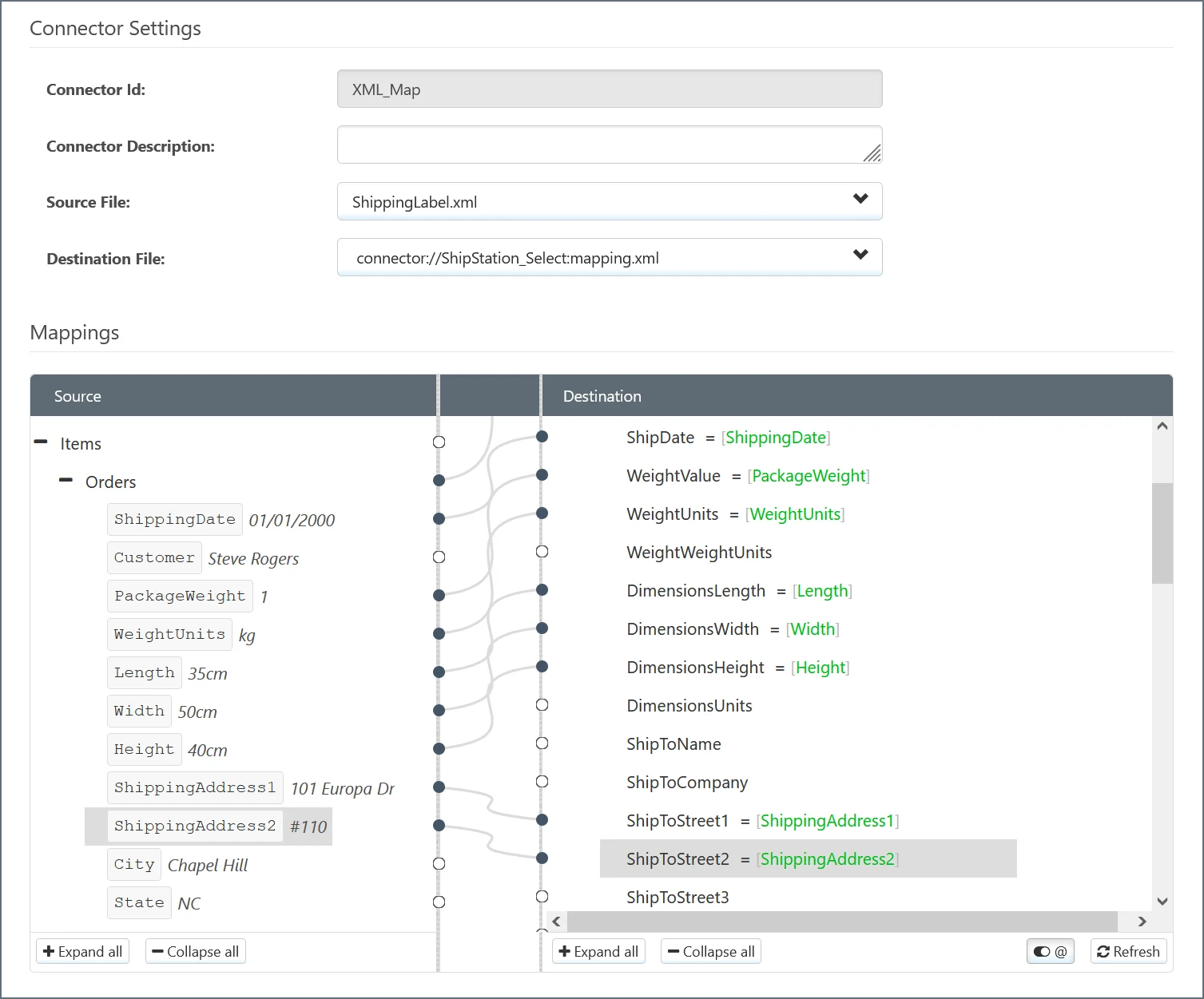
Shipment Label Values
The table below lists the values that you can map for shipment labels using the XML Map connector interface.| Name | Data Type | Required? | Description |
|---|---|---|---|
| CarrierCode | String | Yes | Shipping carrier code. |
| ServiceCode | String | Yes | Shipping service code. |
| PackageCode | String | Yes | Package type code. |
| Confirmation | String | No | Type of delivery confirmation to use. Allowed values are none, delivery, signature, adult_signature, or direct_signature. direct_signature is available for FedEx only. |
| ShipDate | String | Yes | Date the order should be shipped. |
| WeightValue | Integer | Yes | Weight value for the shipment. |
| WeightUnits | String | Yes | Unit for the weight value. |
| WeightWeightUnits | Integer | No | Weight Weight Units for the shipment. |
| DimensionsLength | String | No | Package length. |
| DimensionsWidth | String | No | Package width. |
| DimensionsHeight | String | No | Package height. |
| DimensionsUnits | String | No | Units of measurement for the dimensions. Allowed values are inches or centimeters. |
| ShipToName | String | Yes | Name of person. |
| ShipToCompany | String | Yes | Name of company. |
| ShipToStreet1 | String | Yes | First line of address. |
| ShipToStreet2 | String | No | Second line of address, if applicable. |
| ShipToStreet3 | String | No | Third line of address, if applicable. |
| ShipToCity | String | Yes | Name of city. |
| ShipToState | String | Yes | Name of state. |
| ShipToPostalCode | String | Yes | Postal code. |
| ShipToCountry | String | Yes | Two-character ISO country code. |
| ShipToPhone | String | No | Telephone number for recipient. |
| ShipToResidential | Boolean | Yes | Whether the ShipTo address is residential. |
| ShipToAddressVerified | String | No | Whether the address has been verified by ShipStation. Allowed values are Address not yet validated, Address validated successfully, Address validation warning, or Address validation failed. |
| InsuranceOptions InsureShipment | String | No | Whether the shipment should be insured. |
| InsuranceOptions Provider | String | No | Preferred insurance provider. Allowed values are shipsurance, carrier, or provider. provider indicates that a shipment was insured by a third party other than ShipSurance or the carrier. Provider insurance is handled outside of ShipStation and does not affect the cost of processing the label. |
| InternationalOptions Contents | String | No | Contents for international shipments. Allowed values are merchandise, documents, gift, returned_goods, or sample. |
| InternationalOptions CustomsItems CustomsItemId | String | No | ItemId values for customs. If there are multiple values, separate them with commas (for example, 121221,21211,12121). |
| InternationalOptions CustomsItems Description | String | No | A short description of the items for customs. If you have multiple items, provide descriptions for each one by separating them with commas (for example, desc1,desc2,desc3). |
| InternationalOptions CustomsItems Quantity | String | No | Quantity of each item for customs. If you have multiple items, provide quantities for each one by separating them with commas (for example, 5,1,4). |
| InternationalOptions CustomsItems Value | String | No | Value (in USD) of each item for customs. If you have multiple items, provide values for each one by separating them with commas (for example, 10,50,100). |
| InternationalOptions CustomsItems HarmonizedTariffCode | String | No | Harmonized Commodity Code of each item for customs. If you have multiple items, provide codes for each one by separating them with commas (for example, 10012,40021,30091). |
| InternationalOptions CustomsItems CountryOfOrigin | String | No | Two-character ISO country code of each item for customs. If you have multiple items, provide codes for each one by separating them with commas (for example, US,US,US). |
| InternationalOptions NonDelivery | String | No | Non-delivery options for international shipments. Allowed values are return_to_sender or treat_as_abandoned. |
| AdvancedOptions WarehouseId | Integer | No | The Id of the warehouse that the order will ship from. If the order is fulfilled using a fill provider, there is no warehouse attached and this value is null. |
| AdvancedOptions NonMachinable | Boolean | No | Whether the order is non-machinable. |
| AdvancedOptions SaturdayDelivery | Boolean | No | Whether the order is to be delivered on a Saturday. |
| AdvancedOptions ContainsAlcohol | Boolean | No | Whether the order contains alcohol. |
| AdvancedOptions StoreId | Integer | No | Id of the store associated with the order. If this value is not specified, ShipStation defaults to the first manual store on the account. |
| AdvancedOptions CustomField1 | String | No | Field that allows for custom data to be associated with an order. |
| AdvancedOptions CustomField2 | String | No | Field that allows for custom data to be associated with an order. |
| AdvancedOptions CustomField3 | String | No | Field that allows for custom data to be associated with an order. |
| AdvancedOptions Source | String | No | Original source or marketplace for the order. |
| AdvancedOptions MergedOrSplit | Boolean | No | Whether an order has been merged with or split from another order. |
| AdvancedOptions MergedIds | Integer | No | If the order was merged, this is an array of the orderIds that were merged. |
| AdvancedOptions ParentId | Integer | No | If the order was split from a parent order, this is the orderId of the parent order. |
| AdvancedOptions BillToParty | String | No | Party to bill for the shipment. Allowed values are my_account, my_other_account, recipient, or third_party. |
| AdvancedOptions BillToAccount | String | No | Account number of the party to bill for the shipment. |
| AdvancedOptions BillToPostalCode | String | No | Postal code of the party to bill for the shipment. |
| AdvancedOptions BillToCountryCode | String | No | Two-character ISO country code of the party to bill for the shipment. |
| AdvancedOptions BillToMyOtherAccount | String | No | If AdvancedOptions BillToParty is set to my_other_account, this is the shippingProviderId value for the desired account. You can make a List Carriers call to obtain shippingProviderId values. |
Connector Configuration: Ship From
The configuration pane for the Create Shipment Label connector allows you to specify the ship from information and toggle between test labels and real labels. The table below outlines these values:| Setting | Description |
|---|---|
| Ship From Name | Name of person. |
| Ship From Company | Name of company. |
| Ship From Street 1 | First line of address. |
| Ship From Street 2 | Second line of address, if applicable. |
| Ship From Street 3 | Third line of address, if applicable. |
| Ship From City | Name of city. |
| Ship From State | Name of state. |
| Ship From Postal Code | Postal code. |
| Ship From Country | Two-character ISO country code. |
| Ship From Phone | Telephone number for shipper. |
| Ship From Residential | Whether the Ship From address is residential. |
| Ship From Address Verified | Whether the address has been verified by ShipStation. Allowed values are Address not yet validated, Address validated successfully, Address validation warning, or Address validation failed. |
| Enable Test Mode | Whether the shipping label should be a test label. Disabled by default. |