Key Capabilities
- ZPL label generation from XML input with template-based customization
- Compatible with XML Map connector for automated label creation workflows
- Dynamic field substitution using
${...}syntax for thermal printer output
Overview
The Label connector converts input XML into ZPL files based on a predefined XML template, which enables automated and consistent label creation for printing on Zebra thermal printers. It is compatible with the XML Map connector as well as raw XML input. However, the primary use case is for XML to be mapped to the ZPL structure represented in XML using a flow that goes from an XML Map to a Label connector.Connector Configuration
This section contains all of the configurable connector properties.Settings Tab
Configuration
Settings related to establishing the connection.| 設定 | 説明 |
|---|---|
| Connector Id | コネクタの静的で一意の識別子です。 |
| Connector Type | コネクタ名とその機能の説明を表示します。 |
| Connector Description | コネクタおよびフロー内でのその役割について自由形式の説明を提供するためのオプションフィールドです。 |
Template Tab
The ZPL file to use as a template. When you create a Label connector, Arc pre-fills this field with a ZPL template to use as a starting point. See Generating a ZPL Document for details.Advanced Tab
Advanced Settings
Settings not included in the previous categories.Message
Message 設定は、コネクタがメッセージを検索する方法と、処理後にメッセージを管理する方法を決定します。
Note: 以下の設定は非推奨となり、デフォルトで非表示になっています。以前に有効化またはデフォルト以外の値に設定されていたコネクタにのみ表示されます。処理済みファイルのコピーを保持するには、フロー内のコネクタを右クリックし、成功パスを表示を選択して、成功パスをFile コネクタに接続してください。
| 設定 | 説明 |
|---|---|
| Sent フォルダに保存(非推奨) | コネクタが処理したファイルをSent フォルダにコピーします。デフォルトで無効です。Sent フォルダに保存されたファイルは保存データの暗号化の対象外です。 |
| Sent フォルダのスキーム(非推奨) | 選択した時間間隔でSent フォルダ内のファイルをグループ化します。Sent フォルダに保存が有効な場合のみ適用されます。 |
Logging
ログの作成と保存を制御する設定です。
| 設定 | 説明 |
|---|---|
| Log Level | コネクタが生成するログの詳細度です。サポートを依頼する際は、これをDebug に設定してください。 |
| Log Subfolder Scheme | 選択した間隔に従って、コネクタがLogs フォルダ内のファイルをグループ化するよう指示します。Weekly オプション(デフォルト)は、コネクタが毎週新しいサブフォルダを作成し、その週のすべてのログをそのフォルダに保存するよう指示します。この設定を空白のままにすると、コネクタはすべてのログをLogs フォルダに直接保存します。多数のトランザクションを処理するコネクタでは、サブフォルダを使用することでログを整理しやすくなり、パフォーマンスが向上します。 |
| Log Messages | 処理したファイルのログエントリにファイル自体のコピーを含めるには、これをオンにします。これを無効にすると、Transactions タブからファイルのコピーをダウンロードできなくなる場合があります。 |
Miscellaneous
Miscellaneous 設定は、特定のユースケース向けの設定です。
| 設定 | 説明 |
|---|---|
| Other Settings | 非表示のコネクタ設定をセミコロン区切りのリストで設定できます(例:setting1=value1;setting2=value2)。通常のコネクタのユースケースや機能では、これらの設定の使用は必要ありません。 |
Automation Tab
Automation Settings
Settings related to the automatic processing of files by the connector.Performance
コネクタへのリソースの割り当てに関する設定です。
| 設定 | 説明 |
|---|---|
| Max Workers | このコネクタでファイルを処理するためにスレッドプールから消費されるワーカースレッドの最大数です。設定すると、Advanced Settings ページのPerformance Settings 部分にあるデフォルト設定が上書きされます。 |
| Max Files | コネクタに割り当てられた各スレッドが送信するファイルの最大数です。設定すると、Advanced Settings ページのPerformance Settings 部分にあるデフォルト設定が上書きされます。 |
Alerts Tab
SLAs Tab
Generating a ZPL Document
The Label connector reads an XML input file into the ZPL template specified on the Template tab, and uses the data from the template to generate ZPL labels.Default ZPL Template
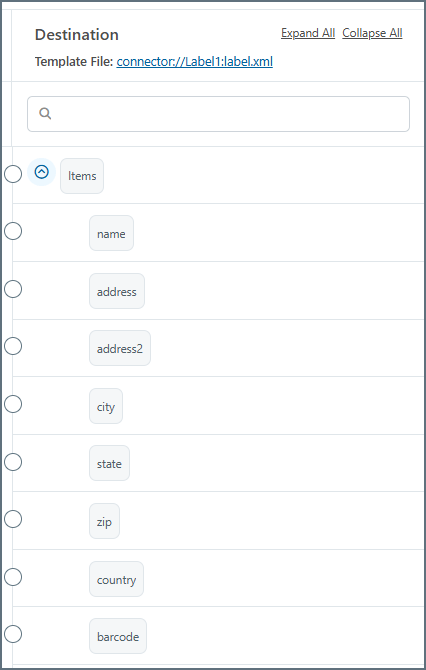
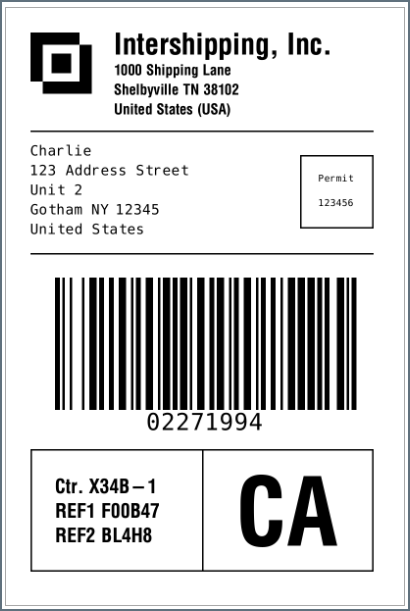
Arc pre-fills the Template field with a ZPL template to use as a starting point. This documentation does not go into detail on how to use the ZPL language: you need to learn that outside of Arc. You can modify other aspects and dynamic fields of the ZPL template as necessary, but here is the default content:${...} syntax (such as ${name} in the content above) are what Arc pulls from the input XML passed into the connector. When you put an XML Map connector in front of a Label connector in a flow, the destination side of the mapping shows these fields, as shown in the following image.