How to configure single sign-on via SAML 2.0 or OpenID Connect in CData Arc, including Microsoft Entra ID and Okta integration.
CData Arc supports single sign-on (SSO) via either the SAML 2.0 or OpenID authentication protocols. This feature enables identity providers such as Microsoft Entra ID (formerly Azure Active Directory) or Okta, which support these protocols, to serve as SSO platforms for Arc.
Enabling SSO requires that you configure a group of settings on the Security tab of the Settings page. When you configure the SSO settings, users that are created within Arc should be given a federation Identifier (Id). This federation Id associates a Arc username with an identity provider entity. When the Arc user attempts to log in to the application, it is redirected to the SSO platform where the credentials for the appropriate identity must be entered.If Just-in-Time (JIT) user provisioning is enabled (also from the Security tab), a new user account is automatically created in Arc at the time of login, based on attributes that are received from the identity provider (for example, the user’s name and email address). This identity and access management (IAM) process streamlines onboarding by eliminating the need for manual account creation. For more details, see Just-in-Time (JIT) User Provisioning.After SSO is configured and Arc users have a federation Id value to associate them with an identity provider, any additional advanced configuration for SSO user management should be performed directly in the SSO platform, as explained in the following sections.
Once SSO is enabled, existing users who are not members of the Admin role cannot log in unless they have a federation Id (described below) on their account. Admin users can still log in without SSO in case the SSO settings need to be reconfigured.
Currently, Arc supports only individual users, not groups of users. If an SSO platform provides access for a group of users, each individual user within that group must be added as a user on the Arc Settings page in order to log in. Each user should reference the federation Id from the identity provider.
The following sections explain how to set up SSO configuration through two identity providers, Microsoft Entra ID and Okta, with the OpenID Connect and SAML 2.0 authentication protocols.
The callback URL is configured in the IdP (not Arc) to indicate where users should be returned once they perform the authentication against the IdP.
OAuth Client Id
The client Id associated with the OAuth application created in the IdP.
OAuth Client Secret
The client secret associated with the OAuth application created in the IdP.
Audience URIs
The intended recipient of SSO login tokens. This ensures that tokens generated by the SSO platform are intended for use by Arc. Set this value to the URI that identifies Arc as a trusted application in your SSO platform (for example, the Application Id that the SSO platform generated for Arc). To accommodate multiple URIs, supply a comma-separated list.
Discovery URL
Required to import settings from your SSO provider.
Issuer Certificate
The public portion of the certificate that the IdP uses to sign JWT tokens. This helps ensure that only tokens generated by the expected IdP are accepted.
Token Issuer Identifier
The identifier used by the IdP when generating JWT tokens. Arc validates tokens to ensure that they include this identifier. This helps ensure that only tokens generated by the expected IdP are accepted.
Authorization URL
The URL where the user should perform authorization via the IdP. When an SSO user attempts to login in to Arc, the application redirects the user to this URL where they enter their SSO platform credentials.
Token URL
The URL where a secure authentication token can be obtained from the IdP.
Logoff URL
Specifies where the Arc user is redirected after logging out of the application.
Default Scopes
A space-separated list of scopes (sets of permissions) to request from the IdP. Typically the scope(s) should at least include profile openid to request identity verification.
Key Claim
The value from the IdP to treat as the federation Id. In other words, this specifies the claim to use as the federation Id when mapping users from the IdP to Arc usernames.
Token Signature Algorithm
Which signature algorithms are accepted from signed JWT tokens. Unsigned tokens are never accepted.
Just-in-Time (JIT) Provisioning
Whether a new user account is created automatically in Arc when a user first logs in. User details are based on the attributes provided in the claim.
Group Mapping
Maps SSO group identifiers to Arc roles. When a user logs in, Arc matches the groups in the claim against these mappings and assigns the roles from every matching group. The Default row sets one or more roles (Support, Standard, Admin, or Custom) to assign when no mapping matches. If you select No Default Role, users whose claims do not map to a role are denied sign-in. No user is created, and any existing user’s roles are removed. For more details, see JIT Configuration in Arc.
The endpoint on the Arc application where the IdP sends the SAML authentication response after a user successfully logs in. This is similar to the Callback URL setting in OpenID.
Audience URI
A unique identifier (typically the application’s Entity ID) that the SAML assertion is intended for. Used to validate that the response is meant for your application.
SAML Discovery URL
The endpoint used to determine which IdP should be used for authentication. Required to import settings from your SSO provider.
Issuer Certificate
The public portion of the certificate that the IdP uses to sign JWT tokens. Helps ensure that only tokens generated by the expected IdP are accepted.
Entity ID
A globally unique identifier used to identify an IdP or service provider in a SAML authentication process (often formatted as a URI).
SSO URL
The IdP endpoint where the service provider redirects the user to initiate the SAML authentication flow.
Logoff URL
Specifies where the Arc user is redirected after logging out of the application.
Just-in-Time (JIT) Provisioning
Whether a new user account is created automatically in Arc when a user first logs in. User details are based on the attributes provided in the SAML assertion.
Group Mapping
Maps SSO group identifiers to Arc roles. When a user logs in, Arc matches the values of the Role attribute in the SAML assertion against these mappings and assigns the roles from every matching group. The Default row sets one or more roles (Support, Standard, Admin, or Custom) to assign when no mapping matches. If you select No Default Role, users whose claims do not map to a role are denied sign-in. No user is created, and any existing user’s roles are removed. For more details, see JIT Configuration in Arc.
Single sign-on (SSO) with Microsoft Entra ID streamlines access to CData Arc, enabling just-in-time provisioning at the time of login. The following steps explain how to set up Microsoft Entra ID for SSO with the OpenID Connect protocol.
Log in to the Azure portal and open Microsoft Entra ID.
Log in to CData Arc and select Settings > SSO to open the Single Sign-On (SSO) Settings dialog box.
Browse to Entra ID > App registrations > New registration and create an application registration for Arc. Follow the prompts to complete the process.
In your app registration, set the redirect URL to the Callback URL value that is specified in the Single Sign-On (SSO) Settings dialog box in Arc, as shown below.
In the Single Sign-On (SSO) Settings dialog box in Arc, specify the following properties:
Set the Client ID property to the value of Application (client) Id that is found in the new app registration shown below.
Set the Client Secret property to the value of the new client secret that you created in the Client credentials section of your app registration.
Set Discovery URL to the OpenID Connect MetaData document value from the Endpoint page in your app registration. Then, click Import to import the remaining settings into Arc.
Click Save and Test in Arc to verify the SSO configuration. Arc opens a new tab and prompts you to sign in to your Microsoft account. If the test succeeds, Arc displays a success message along with claim details.
(Optional) Update your Arc user account with your federation Id.
Copy the federation Id from the Single Sign-On (SSO) Settings dialog box in step 5.
Navigate to Settings > Users. Then, locate your user account and click Edit.
Add the federation Id to your user account. Then click Save to save your change and exit the dialog box.
At this point, you have completed the basic OpenID Connect SSO setup, allowing your users to log in to Arc through Microsoft Entra ID.
With SAML-based single sign-on (SSO), users can seamlessly authenticate through their organization’s identity provider, enabling just-in-time provisioning at the time of login. The following steps explain how to set up Microsoft Entra ID SSO with the SAML 2.0 protocol.
Log in to the Azure portal and open Microsoft Entra ID and navigate to the Enterprise applications page.
Select New application > Create your own application. In the Create your own application dialog box:
Enter a name for your application (for example, CData Arc).
Specify what you want to do with your application by selecting one of the options under What are you looking to do with your application?
Click Create.
In your newly created application, select Set up single sign on.
Select SAML as the sign-on method.
Log into CData Arc and select Settings > SSO. On that SSO tab, click Configure in the Single Sign On (SSO) Settings section. This action displays the Single Sign On (SSO) Settings dialog box.
Select SAML 2.0. This selection displays the Assertion Consumer Services (ACS) URL and the audience URI.
Keep this dialog box open because you need to return to it later in these steps.
In Entra ID, set Reply URL (Assertion Consumer Service URL) to the Assertion Consumer Services (ACS) URL value in Arc. Then, set Identifier (Entity ID) in Entra ID to the Audience URI value in Arc.
Leave the Sign on URL text box empty if you plan to use sign-on initiated by your identity provider.
In the Arc Single Sign-On (SSO) Settings dialog box, set Discovery URL to the App Federation Metadata URL value that is found in Entra ID. Then, click Import to import the remaining settings into Arc.
Click Save and Test in Arc to verify the SSO configuration. Arc opens a new tab and prompts you to sign in to your Microsoft account. If the test succeeds, Arc displays a success message along with claim details.
Single sign-on (SSO) with Okta streamlines access to CData Arc, enabling just-in-time provisioning at the time of login. The following steps explain how to set up Okta for SSO with the OpenID Connect protocol.
Log in to the Okta Admin Console and select Applications > Applications > Create App Integration.
In the Create a new app integration dialog box, select OIDC - OpenID Connect for Sign-in method and Web Application for Application type. Then click Next.
Log in to CData Arc and select Settings > SSO to open the Single Sign-On (SSO) Settings dialog box.
In Okta, set the redirect URI to the Callback URL value that is specified in the Single Sign-On (SSO) Settings dialog box in Arc, as shown below.Then, click Next to create your application.
Locate and copy the Issuer URL, as follows.
Click the Sign-On tab for your application in the Okta Admin Console.
Scroll to the OpenID Connect ID Token section.
Copy the URL from the Issuer field.
If you want to sign in through an authorization server, you must obtain the Issuer URL for that particular server. In the Okta Admin Console, click Security in the left navigation pane, and then select API to display the Authorization Servers list. Locate your authorization server and copy the URL from the Issuer field.
In the Single Sign-On (SSO) Settings dialog box in Arc, specify the following properties:
Set the Client ID and Client Secret properties to the corresponding values that are found on the General tab in Okta.
Set Discovery URL to the Issuer URL that you copied previously, and append the OpenID Connect Discovery endpoint (.well-known/openid-configuration).Example:https://MyOrganization.okta.com/.well-known/openid-configurationThen, click Import to import the remaining settings into Arc.
Click Save and Test in Arc to verify the SSO configuration. Arc opens a new tab and prompts you to sign in to your Okta account. If the test succeeds, Arc displays a success message along with claim details.
(Optional) Update your Arc user account with your federation Id.
Copy the federation Id from the Single Sign-On (SSO) Settings dialog box in step 6.
Navigate to Settings > Users. Then, locate your user account and click Edit.
Add the federation Id to your user account. Then click Save to save your change and exit the dialog box.
At this point, you have completed the basic OpenID Connect SSO setup, allowing your users to log in to Arc through Okta.
With SAML-based single sign-on (SSO), users can seamlessly authenticate through their organization’s identity provider, enabling just-in-time provisioning at the time of login. The following steps explain how to set up Okta for SSO with the SAML 2.0 protocol.
Log in to the Okta Admin Console and select Applications > Create App Integration. This step opens the Create a new app integration dialog box.
Select SAML 2.0 as the sign-in method. Then, click Next, which opens the Create SAML Integration dialog box.
Enter a descriptive name (for example, CData Arc) for your application in the App Name text box. You can also add a logo for your application, if you choose. Then, click Next.
In the Arc application, click the SSO tab on the Settings page. On that tab, click Configure in the Single Sign On (SSO) Settings section. This action displays the Single Sign On (SSO) Settings dialog box.
Select SAML 2.0. This selection displays the Assertion Consumer Services (ACS) URL and the audience URI.
Keep this dialog box open because you need to return to it later in these steps.
In Okta, enter the Assertion Consumer Services (ACS) URL value from Arc into the Single sign on URL text box. Then, enter the Audience URI value from Arc into the Audience URI (SP Entity ID) text box. You can leave the default settings for the remaining Okta fields.
In Arc, set Discovery URL to the domain of your registered Okta organization, followed by /oauth2/default/.well-known/openid-configuration.Example:https://trial-1234567.okta.com/oauth2/default/.well-known/openid-configurationThen, click Import to import the remaining settings into Arc.
Click Save and Test in Arc to verify the SSO configuration. Arc opens a new tab and prompts you to sign in to your Okta account. If the test succeeds, Arc displays a success message along with claim details.
As mentioned earlier, Just-in-Time user provisioning enables Arc to create and manage user accounts automatically at first login by using information that is provided by your identity provider. JIT provisioning is particularly useful when users access Arc through an identity provider for the first time, and the application receives a secure message confirming their identity. The resulting account is assigned the roles mapped to the user’s groups in the claim or, if no mapping matches, the default role specified in the SSO settings. This functionality streamlines user onboarding and ensures account details remain consistent with identity claims.When a user logs in to Arc by using SAML or OpenID Connect, Arc searches for that user via a federation Id.
If a user does not exist, Arc creates a new user automatically by using the information that is provided in the authentication claim, provided that a role can be resolved (see JIT Configuration in Arc).
If a user does exist, Arc updates the user’s username and email if they do not match the claim values. If no role can be resolved and you have selected No Default Role in Group Mapping, Arc removes the user’s roles and denies login.
Requirements and Mappings in your Identity Provider
Identity-provider requirements vary depending on whether you use SAML 2.0 or OpenID Connect. This section explains claim requirements for each authentication method.OpenID Connect
By default, subcontrols are mapped to the user’s role and the claim is mapped to the federation Id. As an option, admin users can use a different field (for example, oid) by setting the Key Claim property in Arc.
The Email claim maps to Email Address in Arc.
The preferred_username claim maps to name in Arc.
SAML 2.0
The NameID and Email claims are required.
(Optional) You can add the Name claim, which maps to Username in Arc.
(Optional) You can add the Role claim. Arc matches its values against Group Mapping to assign the user’s roles.
Click the tablet and pencil icon to open the User Provisioning dialog box.
Select Enable under JIT Provisioning.
In the Group Mapping section, select one or more roles from the Arc Roles list for the Default row. If you select No Default Role, Arc denies login to users whose claims do not map to a role.
(Optional) To assign roles based on a user’s SSO group, click Add Mapping, enter the SSO group identifier, and select the roles to assign to members of that group.
Click Save to save your selection and exit the dialog box.
When a user logs in, Arc resolves the user’s roles in the following order:
Arc matches the group values in the claim (the groups claim for OpenID Connect, or the Role attribute for SAML) against Group Mapping. The user gets the roles from every matching group.
If no mapping matches, Arc assigns the roles in the Default row.
If the Default row is No Default Role, login is denied. Arc does not create a user account, and any existing user’s roles are removed.
Arc reapplies the resolved roles each time the user logs in, whether they come from a mapping or the Default row, so an admin user cannot override them in Arc.
If Arc cannot resolve a role for a user and you selected No Default Role, the user sees the error Access denied. No role is available for this account. Contact your administrator. Manually assigning a role to the user in Arc does not resolve this, because the next SSO login removes the role again. To resolve the issue, make sure your identity provider sends the user’s group in the claim and add a group mapping for that group, or select a default role in the Default row of Group Mapping.
When you configure SAML 2.0 in the .NET edition, clicking the Save and Test button appears to authenticate successfully but then displays an error. This is a known .NET platform issue, and your actual SAML login is unaffected.These settings are not included in Web.Config by default because relaxing the SameSite cookie restrictions can increase exposure to cross-site request forgery (CSRF) attacks. Enabling this workaround trades stricter default security for compatibility with certain SAML 2.0 login flows in .NET.Follow these steps to work around the issue:
Add the following to your Web.Config file (by default, the file is in C:\Program Files\CData\CData Arc\www):
cookieSameSite="None" requireSSL="true" in authentication mode="forms"
sameSite="None" requireSSL="true" in httpCookies
cookieSameSite="None" cookieless="UseCookies" in sessionState
Restart Arc with HTTPS.
This sample Web.Config file shows the necessary updates:
{"docsConfig":{"theme":"mint","$schema":"https://mintlify.com/docs.json","name":"CData Arc Documentation","colors":{"primary":"#002660","light":"#FFE500","dark":"#002660"},"logo":{"light":"https://mintcdn.com/cdata-arc/-adMVRA2NGLWRgFp/public/images/cdata_arc_web.svg?fit=max\u0026auto=format\u0026n=-adMVRA2NGLWRgFp\u0026q=85\u0026s=8863df3ad6488c6280d057711f48aa94","dark":"https://mintcdn.com/cdata-arc/-adMVRA2NGLWRgFp/public/images/cdata_arc_yellow.svg?fit=max\u0026auto=format\u0026n=-adMVRA2NGLWRgFp\u0026q=85\u0026s=db878c051424afd58007b04161a4f5e1","href":"https://www.cdata.com/arc"},"favicon":"https://mintcdn.com/cdata-arc/Lo_2D5t4szDfleFN/favicon.ico?fit=max\u0026auto=format\u0026n=Lo_2D5t4szDfleFN\u0026q=85\u0026s=4b165e5b4d92eef3607cdc47218f10e2","appearance":{"default":"system","strict":false},"background":{"color":{"light":"#F1EEE9","dark":"#15151C"}},"footer":{"socials":{"x":"https://x.com/cdatasoftware","youtube":"https://www.youtube.com/c/CDataSoftware","linkedin":"https://www.linkedin.com/company/cdatasoftware","facebook":"https://www.facebook.com/cdatasoftware","instagram":"https://www.instagram.com/cdatasoftware"}},"fonts":{"heading":{"family":"DM Sans","weight":700},"body":{"family":"DM Sans"}},"styling":{"eyebrows":"breadcrumbs","latex":false},"contextual":{"options":["copy","view","chatgpt","claude","perplexity","mcp","cursor","vscode"],"display":"header"},"variables":{"siteName":"CData Arc","siteNameShort":"Arc","companyName":"CData"},"navigation":{"languages":[{"language":"en","navbar":{"primary":{"type":"button","label":" Contact Us","href":"https://www.cdata.com/company/contact.aspx"}},"href":"26.4/self-hosted/en/getting-started"},{"language":"ja","navbar":{"primary":{"type":"button","label":"お問い合わせ","href":"https://jp.cdata.com/contact/"}},"href":"26.4/self-hosted/ja/getting-started"}]}},"deployment":{"deploymentMetadataValue":{"subdomain":"cdata-arc","hasAudioNarration":false,"actualSubdomain":"cdata-arc","customDomains":["docs.arc.cdata.com"],"gitSource":{"type":"github","owner":"cdatasoftware","repo":"arc-docs","deployBranch":"main","contentDirectory":"","isPrivate":true,"mountPath":"","label":""},"entitlements":{"AI_CHAT":{"status":"ENABLED"},"WEB_MCP":{"status":"ENABLED"},"NARRATION":{"status":"ENABLED"}},"buildId":"6aee2bad4037d8a342c048ee","clientVersion":"0.0.4094","searchFilterCounts":[{"language":"en","tag":"Arc User Guide","count":3135},{"language":"ja","tag":"Arc ユーザーガイド","count":2659},{"language":"en","tag":"Connectors","count":1994},{"language":"en","tag":"Self-Hosted","count":1921},{"language":"ja","tag":"Self-Hosted","count":1921},{"language":"en","tag":"Cloud","count":1760},{"language":"ja","tag":"コネクタ","count":1658},{"language":"ja","tag":"Cloud","count":1211},{"language":"en","tag":"Other","count":1064},{"language":"ja","tag":"その他","count":887},{"language":"en","tag":"Scripting","count":608},{"language":"en","tag":"ArcScript","count":581},{"language":"en","tag":"API Reference","count":546},{"language":"ja","tag":"スクリプティング","count":512},{"language":"ja","tag":"ArcScript","count":489},{"language":"ja","tag":"API リファレンス","count":472},{"language":"en","tag":"Getting Started","count":357},{"language":"en","tag":"Core","count":341},{"language":"ja","tag":"コア","count":312},{"language":"ja","tag":"はじめに","count":306}]},"assistantConfig":{"enableAskAiButton":false,"enableStarterQuestions":false,"enableAskAiSearchBar":true},"basePath":"","hasChatPermissions":true,"hasWebMcpPermissions":true,"toggles":[{"name":"kill-isr","enabled":true,"variant":{"name":"disabled","enabled":false,"feature_enabled":true},"impressionData":false},{"name":"agent-mintlify-slack","enabled":true,"variant":{"name":"disabled","enabled":false,"feature_enabled":true},"impressionData":false},{"name":"agent-integrations-settings","enabled":true,"variant":{"name":"disabled","enabled":false,"feature_enabled":true},"impressionData":false},{"name":"rbac-expansion","enabled":true,"variant":{"name":"disabled","enabled":false,"feature_enabled":true},"impressionData":false},{"name":"automations-pr-grouping","enabled":true,"variant":{"name":"disabled","enabled":false,"feature_enabled":true},"impressionData":false},{"name":"custom-prefix","enabled":true,"variant":{"name":"disabled","enabled":false,"feature_enabled":true},"impressionData":false},{"name":"analytics-v7","enabled":true,"variant":{"name":"disabled","enabled":false,"feature_enabled":true},"impressionData":false},{"name":"user-flows-analytics","enabled":true,"variant":{"name":"disabled","enabled":false,"feature_enabled":true},"impressionData":false},{"name":"no-publish-flow","enabled":true,"variant":{"name":"disabled","enabled":false,"feature_enabled":true},"impressionData":false},{"name":"workos-onboarding","enabled":true,"variant":{"name":"disabled","enabled":false,"feature_enabled":true},"impressionData":false},{"name":"llms-txt-v2","enabled":true,"variant":{"name":"disabled","enabled":false,"feature_enabled":true},"impressionData":false},{"name":"snapshot-serving-live","enabled":true,"variant":{"name":"disabled","enabled":false,"feature_enabled":true},"impressionData":false},{"name":"stripTemperatureMiddleware","enabled":true,"variant":{"name":"disabled","enabled":false,"feature_enabled":true},"impressionData":false},{"name":"support-platform-pylon-zendesk","enabled":true,"variant":{"name":"disabled","enabled":false,"feature_enabled":true},"impressionData":false},{"name":"snapshot-serving","enabled":true,"variant":{"name":"disabled","enabled":false,"feature_enabled":true},"impressionData":false},{"name":"instant-rollback","enabled":true,"variant":{"name":"disabled","enabled":false,"feature_enabled":true},"impressionData":false},{"name":"granular-notifications-server","enabled":true,"variant":{"name":"disabled","enabled":false,"feature_enabled":true},"impressionData":false},{"name":"granular-notifications","enabled":true,"variant":{"name":"disabled","enabled":false,"feature_enabled":true},"impressionData":false},{"name":"automations-fable","enabled":true,"variant":{"name":"disabled","enabled":false,"feature_enabled":true},"impressionData":false},{"name":"fixed-ai-action-pricing","enabled":true,"variant":{"name":"disabled","enabled":false,"feature_enabled":true},"impressionData":false},{"name":"automation-resolve-merge-conflict","enabled":true,"variant":{"name":"disabled","enabled":false,"feature_enabled":true},"impressionData":false},{"name":"scoped-publishing","enabled":true,"variant":{"name":"disabled","enabled":false,"feature_enabled":true},"impressionData":false},{"name":"mintql","enabled":true,"variant":{"name":"disabled","enabled":false,"feature_enabled":true},"impressionData":false},{"name":"page-level-analytics","enabled":true,"variant":{"name":"disabled","enabled":false,"feature_enabled":true},"impressionData":false},{"name":"editor-version-history-v2","enabled":true,"variant":{"name":"disabled","enabled":false,"feature_enabled":true},"impressionData":false},{"name":"billing-page-v2","enabled":true,"variant":{"name":"disabled","enabled":false,"feature_enabled":true},"impressionData":false},{"name":"full-page-search","enabled":true,"variant":{"name":"disabled","enabled":false,"feature_enabled":true},"impressionData":false},{"name":"workspace-projects","enabled":true,"variant":{"name":"disabled","enabled":false,"feature_enabled":true},"impressionData":false},{"name":"assistant-v5","enabled":true,"variant":{"name":"disabled","enabled":false,"feature_enabled":true},"impressionData":false},{"name":"fork-pr-previews","enabled":true,"variant":{"name":"disabled","enabled":false,"feature_enabled":true},"impressionData":false},{"name":"revalidation-jwt","enabled":true,"variant":{"name":"disabled","enabled":false,"feature_enabled":true},"impressionData":false},{"name":"workos-sso-scim","enabled":true,"variant":{"name":"disabled","enabled":false,"feature_enabled":true},"impressionData":false},{"name":"hobby-abuse-scan","enabled":true,"variant":{"name":"disabled","enabled":false,"feature_enabled":true},"impressionData":false},{"name":"dashboard-inbox","enabled":true,"variant":{"name":"disabled","enabled":false,"feature_enabled":true},"impressionData":false},{"name":"workos-signup","enabled":true,"variant":{"name":"disabled","enabled":false,"feature_enabled":true},"impressionData":false},{"name":"turbopuffer-dual-write","enabled":true,"variant":{"name":"disabled","enabled":false,"feature_enabled":true},"impressionData":false},{"name":"workos-enabled","enabled":true,"variant":{"name":"disabled","enabled":false,"feature_enabled":true},"impressionData":false},{"name":"approve-review-flow","enabled":true,"variant":{"name":"disabled","enabled":false,"feature_enabled":true},"impressionData":false},{"name":"editor-metadata","enabled":true,"variant":{"name":"disabled","enabled":false,"feature_enabled":true},"impressionData":false},{"name":"sso-setup-deadline-banner","enabled":true,"variant":{"name":"disabled","enabled":false,"feature_enabled":true},"impressionData":false},{"name":"turbopuffer-serve","enabled":true,"variant":{"name":"disabled","enabled":false,"feature_enabled":true},"impressionData":false},{"name":"live-agents","enabled":true,"variant":{"name":"disabled","enabled":false,"feature_enabled":true},"impressionData":false},{"name":"comment-mode","enabled":true,"variant":{"name":"disabled","enabled":false,"feature_enabled":true},"impressionData":false}],"googleFontsInlined":true},"customCss":[{"filePath":"custom.css","content":"@font-face{font-family:'Grafier';src:local('Grafier'),\n url('/public/fonts/grafier/PPGrafier-Regular.woff2') format('woff2'),\n url('/public/fonts/grafier/PPGrafier-Regular.woff') format('woff');font-weight:400;font-style:normal;font-display:swap}:root{--brand-agility: #FFE500;--brand-resolve: #002660;--brand-depth: #15151C;--brand-clarity: #F1EEE9;--brand-balance: #B5B9BC;--brand-link: #0B59CE;--brand-link-hover: #1F5B8E;--system-error: #BE6634;--n0: #FFFFFF;--n1: #FFFDFA;--n2: #F1EEE9;--n3: #D9D6D2;--n9: #525252;--n11: #15151C;--surface-bg: var(--brand-clarity);--surface-sidebar: transparent;--surface-card: var(--n0);--surface-header: transparent;--text-primary: var(--n11);--text-secondary: var(--n9);--border: var(--n3);--radius: 5px;--shadow: 0 10px 35px rgba(50,50,93,.10), 0 3px 15px rgba(0,0,0,.07);--shadow-up: 0 13px 35px rgba(50,50,93,.20), 0 3px 18px rgba(0,0,0,.08);--font-sans: 'DM Sans', ui-sans-serif, system-ui, sans-serif;--font-mono: 'DM Mono', 'Nimbus Mono PS', 'Courier New', monospace;--logo-h: 23px;--logo-w: 116px}html.dark{--surface-bg: #1a1a22;--surface-sidebar: var(--surface-bg);--surface-card: #1a1a22;--surface-header: var(--surface-bg);--text-primary: rgb(158, 159, 161);--text-secondary: var(--brand-balance);--border: #2e2e3a;--brand-link: #5b9cf6;--brand-link-hover: #93c5fd}html:not(.dark) body{background-color:var(--surface-bg)}html.dark body{background-color:var(--surface-bg)}html.dark #background-color{background-color:var(--surface-bg)!important}html:not(.dark) body .mint-bg-white{background:linear-gradient(\n 135deg,\n #FFFDFA 0%, /* surface-fill-1 */\n #F1EEE9 100% /* surface-fill-2 = brand-clarity */\n )!important}html.dark body .mint-bg-white{background:linear-gradient(\n 135deg,\n #1a1a22 0%,\n #15151C 100%\n )!important}html,body{font-family:var(--font-sans);font-weight:400;color:var(--text-primary)}h1,h2,h3,h4,h5,h6{font-family:var(--font-sans);font-weight:700;line-height:1.2;color:black}h1,h2,#page-title{font-family:'Grafier', var(--font-sans);font-weight:400!important;letter-spacing:normal!important;font-feature-settings:\"ss01\", \"case\"}h1 *,h2 *,#page-title *{letter-spacing:inherit!important;font-weight:inherit!important}html.dark h1,html.dark h2,html.dark h3,html.dark h4,html.dark h5,html.dark h6{color:#FFFFFF}p,li,td,th,label{font-family:var(--font-sans);line-height:1.65}code,kbd,samp,pre{font-family:var(--font-mono)!important}a{color:var(--brand-link);text-decoration:none;transition:color 0.15s}a:hover{color:var(--brand-link-hover)}#navbar a,#header a{color:inherit}#sidebar-content a.nav-anchor{color:var(--text-secondary)}.nav-anchor:hover,#navbar a.nav-anchor:hover{color:var(--brand-resolve)!important}html.dark .nav-anchor:hover,html.dark #navbar a.nav-anchor:hover{color:var(--brand-link-hover)!important}.nav-anchor>div.rounded-md{background:var(--text-secondary)!important}.nav-anchor:hover>div.rounded-md{background:var(--brand-resolve)!important}html.dark .nav-anchor:hover>div.rounded-md{background:var(--brand-link)!important}#header{background-color:var(--surface-header)!important;border-bottom:1px solid var(--border)!important}html.dark #header,html.dark #navbar,html.dark header,html.dark nav{background-color:var(--surface-bg)!important;border-bottom:1px solid var(--border)!important}#navbar a{font-family:var(--font-sans);font-weight:500;font-size:0.9375rem}html:not(.dark) button:not([class*=\"ghost\"]):not([class*=\"icon\"]):not([aria-label]):not(#localization-select-trigger):not([class*=\"text-gray\"]):not([class*=\"text-white\"]):not(.chat-assistant-sheet button):not(.chat-assistant-floating-input button),html:not(.dark) a.btn,html:not(.dark) [class*=\"btn-primary\"],html:not(.dark) [class*=\"button-primary\"]{background-color:var(--brand-depth)!important;color:#FFFFFF!important;border-color:var(--brand-depth)!important}html:not(.dark) #table-of-contents button,html:not(.dark) #sidebar button,html:not(.dark) #navbar button:not(#topbar-cta-button){background-color:transparent!important;color:inherit!important;border-color:transparent!important;box-shadow:none!important}html:not(.dark) .chat-assistant-sheet button,html:not(.dark) .chat-assistant-floating-input button{background-color:transparent!important;color:inherit!important;border-color:transparent!important;box-shadow:none!important}html:not(.dark) #header .breadcrumb-item,html:not(.dark) #header .breadcrumb-item a{color:var(--brand-resolve)}html:not(.dark) #header .breadcrumb-item a:hover{color:var(--brand-link-hover)}html.dark #header .breadcrumb-item,html.dark #header .breadcrumb-item a{color:var(--text-secondary)}html.dark #header .breadcrumb-item a:hover{color:#FFFFFF}#topbar-cta-button{background-color:var(--brand-depth)!important;color:#FFFFFF!important;border:none!important;border-radius:var(--radius)!important;height:40px;padding:0 20px;font-family:var(--font-sans);font-weight:500;font-size:0.9375rem;white-space:nowrap;transition:box-shadow 0.2s, transform 0.1s;cursor:pointer}#topbar-cta-button:hover{box-shadow:var(--shadow-up);transform:translateY(-1px);color:#FFFFFF!important}html.dark #topbar-cta-button{background-color:var(--brand-agility)!important;color:var(--brand-depth)!important}html.dark #topbar-cta-button:hover{color:var(--brand-depth)!important}html.dark #topbar-cta-button span,html.dark #topbar-cta-button svg{color:var(--brand-depth)!important;fill:var(--brand-depth)!important}#topbar-cta-button span[class*=\"bg-primary\"]{background-color:transparent!important;border-radius:inherit!important}img.nav-logo{height:var(--logo-h)!important;width:auto!important;max-width:var(--logo-w)!important;max-height:var(--logo-h)!important}@media (max-width: 768px){:root{--logo-h: 23px;--logo-w: 116px}}#sidebar{background-color:var(--surface-sidebar)!important;border-right:1px solid var(--border)!important}html.dark #sidebar{background-color:var(--surface-sidebar)!important;border-right:1px solid var(--border)!important}#sidebar-content a,#sidebar-content button{font-family:var(--font-sans);font-weight:400;font-size:0.9rem;color:var(--text-primary);border-radius:var(--radius);transition:background-color 0.12s, color 0.12s}#sidebar-content a:hover{background-color:var(--n2);color:var(--brand-resolve)}html.dark #sidebar-content a:hover{background-color:rgba(255,255,255,.06);color:#FFFFFF}#sidebar-content li[data-active]>a{color:var(--brand-resolve)!important;font-weight:600!important;background-color:rgb(222, 223, 225)!important;box-shadow:none!important}html.dark #sidebar-content li[data-active]>a{color:#FFFFFF!important;background-color:rgba(255,229,0,.12)!important;box-shadow:none!important}.sidebar-group-header{font-family:var(--font-sans);font-size:0.7rem;font-weight:500;letter-spacing:0.1em;text-transform:uppercase;color:var(--text-secondary)}.nav-tabs{border-bottom:1px solid var(--border)}.nav-tabs-item{font-family:var(--font-sans);font-weight:500;color:var(--text-secondary);transition:color 0.15s, border-color 0.15s}.nav-tabs-item[data-active]{color:var(--brand-resolve)!important;font-weight:700!important}html.dark .nav-tabs-item[data-active]{color:#FFFFFF!important}a.nav-tabs-item[data-active]>div.absolute.bottom-0{height:8px!important}html:not(.dark) a.nav-tabs-item[data-active]>div.absolute.bottom-0{background-color:var(--brand-resolve)!important}html.dark a.nav-tabs-item[data-active]>div.absolute.bottom-0{background-color:var(--brand-agility)!important}#content-area{background-color:var(--surface-bg);color:var(--text-primary)}#body-content,.mdx-content{font-family:var(--font-sans);color:var(--text-primary)}#page-title{font-size:1.875rem;color:black;line-height:1.2}html.dark #page-title{color:#FFFFFF}:not(pre)>code{background-color:color-mix(in srgb, var(--brand-resolve) 8%, var(--surface-card));color:var(--brand-resolve);border:1px solid color-mix(in srgb, var(--brand-resolve) 18%, transparent);border-radius:3px;padding:0.15em 0.4em;font-family:var(--font-mono)!important;font-size:0.875em}html.dark :not(pre)>code{background-color:rgba(255,255,255,.08);color:#93c5fd;border-color:rgba(255,255,255,.12)}.code-block button,pre button{color:var(--brand-balance);border-radius:3px;transition:color 0.15s, background-color 0.15s}.code-block button:hover,pre button:hover{color:var(--brand-agility);background-color:rgba(255,229,0,.12)}.card{background-color:var(--surface-card);border:1px solid var(--border);border-radius:var(--radius);box-shadow:var(--shadow);transition:box-shadow 0.2s}.card:hover{box-shadow:var(--shadow-up)}html.dark .card{background-color:var(--surface-card);border-color:var(--border)}.callout[data-type=\"info\"]{border-left:4px solid var(--brand-resolve);background-color:color-mix(in srgb, var(--brand-resolve) 6%, var(--surface-card))}.callout[data-type=\"warning\"]{border-left:4px solid var(--brand-agility);background-color:color-mix(in srgb, var(--brand-agility) 10%, var(--surface-card))}.callout[data-type=\"error\"]{border-left:4px solid var(--system-error);background-color:color-mix(in srgb, var(--system-error) 8%, var(--surface-card))}.callout[data-type=\"tip\"],.callout[data-type=\"success\"]{border-left:4px solid #27AE60;background-color:color-mix(in srgb, #27AE60 6%, var(--surface-card))}#table-of-contents{font-family:var(--font-sans);font-size:0.85rem}.toc-item a{color:var(--text-secondary);transition:color 0.15s}.toc-item[data-active-deepest] a{color:var(--brand-resolve)!important;font-weight:600}html.dark .toc-item[data-active-deepest] a{color:var(--brand-agility)!important}#search-input{font-family:var(--font-sans)}#search-input:focus{outline:2px solid var(--brand-resolve);outline-offset:2px}html.dark #search-input:focus{outline-color:var(--brand-agility)}[cmdk-item][aria-selected=\"true\"],[cmdk-item][data-selected=\"true\"]{background-color:color-mix(in srgb, var(--brand-resolve) 8%, transparent)!important}html.dark [cmdk-item][aria-selected=\"true\"],html.dark [cmdk-item][data-selected=\"true\"]{background-color:rgba(255,229,0,.12)!important}#footer{background-color:transparent!important;font-family:var(--font-sans);border-top:none!important}#footer a{color:var(--brand-balance);transition:color 0.15s}#footer a:hover{color:var(--text-primary)}#footer [class*=\"social\"]:hover{color:var(--brand-agility)}table{font-family:var(--font-sans);border-radius:var(--radius);overflow:hidden;width:100%}th,thead th,table thead tr th{background-color:var(--brand-resolve);color:#FFFFFF!important;font-weight:600;font-size:0.875rem;padding:0.6rem 0.75rem!important;vertical-align:middle!important}html.dark th{background-color:#1a2a4a}td{border-bottom:1px solid var(--border);padding:0.55rem 0.75rem;font-size:0.9rem}td:first-child{padding-left:0.75rem!important}tr:last-child td{border-bottom:none}tr:nth-child(even) td{background-color:color-mix(in srgb, var(--brand-resolve) 3%, transparent)}html.dark tr:nth-child(even) td{background-color:rgba(255,255,255,.03)}h1 a,h2 a,h3 a,h4 a{color:var(--brand-resolve);opacity:0;transition:opacity 0.15s}h1:hover a,h2:hover a,h3:hover a,h4:hover a{opacity:1}html.dark h1 a,html.dark h2 a,html.dark h3 a,html.dark h4 a{color:var(--brand-agility)}hr{border:none;border-top:1px solid var(--border);margin:1.5rem 0}:focus-visible{outline:2px solid var(--brand-resolve);outline-offset:3px;border-radius:var(--radius)}html.dark :focus-visible{outline-color:var(--brand-agility)}::selection{background-color:color-mix(in srgb, var(--brand-agility) 45%, transparent);color:var(--brand-depth)}@media (max-width: 768px){h1{font-size:1.625rem}h2{font-size:1.25rem}pre,.code-block{font-size:0.8em}}"}],"page":{"pagePath":"26.4/self-hosted/en/getting-started/administration/settings/single-sign-on","slug":"/26.4/self-hosted/en/getting-started/administration/settings/single-sign-on","pageMetadata":{"title":"SSO and User Provisioning","description":"How to configure single sign-on via SAML 2.0 or OpenID Connect in CData Arc, including Microsoft Entra ID and Okta integration.","href":"/26.4/self-hosted/en/getting-started/administration/settings/single-sign-on"},"description":{"compiledSource":"\"use strict\";\nconst {jsx: _jsx} = arguments[0];\nconst {useMDXComponents: _provideComponents} = arguments[0];\nfunction _createMdxContent(props) {\n const _components = {\n p: \"p\",\n ..._provideComponents(),\n ...props.components\n };\n return _jsx(_components.p, {\n children: \"How to configure single sign-on via SAML 2.0 or OpenID Connect in CData Arc, including Microsoft Entra ID and Okta integration.\"\n });\n}\nfunction MDXContent(props = {}) {\n const {wrapper: MDXLayout} = {\n ..._provideComponents(),\n ...props.components\n };\n return MDXLayout ? _jsx(MDXLayout, {\n ...props,\n children: _jsx(_createMdxContent, {\n ...props\n })\n }) : _createMdxContent(props);\n}\nreturn {\n default: MDXContent\n};\n","frontmatter":{},"scope":{}},"pageType":"default","mdx":{"mdxSource":{"compiledSource":"\"use strict\";const{Fragment:_Fragment,jsx:_jsx,jsxs:_jsxs}=arguments[0];const{useMDXComponents:_provideComponents}=arguments[0];const siteNameShort=`Arc`;const siteName=`CData Arc`;function _createMdxContent(props){const _components={a:`a`,code:`code`,em:`em`,li:`li`,ol:`ol`,p:`p`,pre:`pre`,span:`span`,strong:`strong`,tbody:`tbody`,td:`td`,th:`th`,thead:`thead`,tr:`tr`,ul:`ul`,..._provideComponents(),...props.components},{CodeBlock,Heading,Note,OptimizedImage,Table,Warning}=_components;if(!CodeBlock)_missingMdxReference(`CodeBlock`,true);if(!Heading)_missingMdxReference(`Heading`,true);if(!Note)_missingMdxReference(`Note`,true);if(!OptimizedImage)_missingMdxReference(`OptimizedImage`,true);if(!Table)_missingMdxReference(`Table`,true);if(!Warning)_missingMdxReference(`Warning`,true);return _jsxs(_Fragment,{children:[_jsxs(_components.p,{children:[siteName,` supports single sign-on (SSO) via either the SAML 2.0 or OpenID authentication protocols. This feature enables identity providers such as Microsoft Entra ID (formerly Azure Active Directory) or Okta, which support these protocols, to serve as SSO platforms for `,siteNameShort,`.`]}),`\n`,_jsx(Heading,{level:`2`,id:`overview`,children:`Overview`}),`\n`,_jsxs(_components.p,{children:[`Enabling SSO requires that you configure a group of settings on the `,_jsx(_components.strong,{children:`Security`}),` tab of the `,_jsx(_components.strong,{children:`Settings`}),` page. When you configure the SSO settings, users that are created within `,siteNameShort,` should be given a federation Identifier (Id). This federation Id associates a `,siteNameShort,` username with an identity provider entity. When the `,siteNameShort,` user attempts to log in to the application, it is redirected to the SSO platform where the credentials for the appropriate identity must be entered.`]}),`\n`,_jsxs(_components.p,{children:[`If Just-in-Time (JIT) user provisioning is enabled (also from the `,_jsx(_components.strong,{children:`Security`}),` tab), a new user account is automatically created in `,siteNameShort,` at the time of login, based on attributes that are received from the identity provider (for example, the user’s name and email address). This identity and access management (IAM) process streamlines onboarding by eliminating the need for manual account creation. For more details, see `,_jsx(_components.a,{href:`#just-in-time-jit-user-provisioning`,children:`Just-in-Time (JIT) User Provisioning`}),`.`]}),`\n`,_jsxs(_components.p,{children:[`After SSO is configured and `,siteNameShort,` users have a federation Id value to associate them with an identity provider, any additional advanced configuration for SSO user management should be performed directly in the SSO platform, as explained in the following sections.`]}),`\n`,_jsx(Note,{children:_jsxs(_components.ul,{children:[`\n`,_jsxs(_components.li,{children:[`\n`,_jsxs(_components.p,{children:[`Once SSO is enabled, existing users who are not members of the `,_jsx(_components.a,{href:`/26.4/self-hosted/en/getting-started/administration/settings/user-roles#admin-role`,children:`Admin role`}),` cannot log in unless they have a federation Id (described below) on their account. Admin users can still log in without SSO in case the SSO settings need to be reconfigured.`]}),`\n`]}),`\n`,_jsxs(_components.li,{children:[`\n`,_jsxs(_components.p,{children:[`Currently, `,siteNameShort,` supports only individual users, not groups of users. If an SSO platform provides access for a group of users, each individual user within that group must be added as a user on the `,siteNameShort,` `,_jsx(_components.strong,{children:`Settings`}),` page in order to log in. Each user should reference the federation Id from the identity provider.`]}),`\n`]}),`\n`]})}),`\n`,_jsx(_components.p,{children:`The following sections explain how to set up SSO configuration through two identity providers, Microsoft Entra ID and Okta, with the OpenID Connect and SAML 2.0 authentication protocols.`}),`\n`,_jsx(Heading,{level:`2`,id:`sso-settings`,children:`SSO Settings`}),`\n`,_jsxs(_components.p,{children:[`This section describes each of the SSO settings and what they represent in `,siteNameShort,`. The details of these settings might differ based on your IdP.`]}),`\n`,_jsx(Heading,{level:`3`,id:`openid-connect-settings`,children:`OpenID Connect Settings`}),`\n`,_jsxs(Table,{children:[_jsx(_components.thead,{children:_jsxs(_components.tr,{children:[_jsx(_components.th,{children:`Setting`}),_jsx(_components.th,{children:`Description`})]})}),_jsxs(_components.tbody,{children:[_jsxs(_components.tr,{children:[_jsx(_components.td,{children:_jsx(_components.strong,{children:`Callback URL`})}),_jsxs(_components.td,{children:[`The callback URL is configured in the IdP (not `,siteNameShort,`) to indicate where users should be returned once they perform the authentication against the IdP.`]})]}),_jsxs(_components.tr,{children:[_jsx(_components.td,{children:_jsx(_components.strong,{children:`OAuth Client Id`})}),_jsx(_components.td,{children:`The client Id associated with the OAuth application created in the IdP.`})]}),_jsxs(_components.tr,{children:[_jsx(_components.td,{children:_jsx(_components.strong,{children:`OAuth Client Secret`})}),_jsx(_components.td,{children:`The client secret associated with the OAuth application created in the IdP.`})]}),_jsxs(_components.tr,{children:[_jsx(_components.td,{children:_jsx(_components.strong,{children:`Audience URIs`})}),_jsxs(_components.td,{children:[`The intended recipient of SSO login tokens. This ensures that tokens generated by the SSO platform are intended for use by `,siteNameShort,`. Set this value to the URI that identifies `,siteNameShort,` as a trusted application in your SSO platform (for example, the `,_jsx(_components.em,{children:`Application Id`}),` that the SSO platform generated for `,siteNameShort,`). To accommodate multiple URIs, supply a comma-separated list.`]})]}),_jsxs(_components.tr,{children:[_jsx(_components.td,{children:_jsx(_components.strong,{children:`Discovery URL`})}),_jsx(_components.td,{children:`Required to import settings from your SSO provider.`})]}),_jsxs(_components.tr,{children:[_jsx(_components.td,{children:_jsx(_components.strong,{children:`Issuer Certificate`})}),_jsx(_components.td,{children:`The public portion of the certificate that the IdP uses to sign JWT tokens. This helps ensure that only tokens generated by the expected IdP are accepted.`})]}),_jsxs(_components.tr,{children:[_jsx(_components.td,{children:_jsx(_components.strong,{children:`Token Issuer Identifier`})}),_jsxs(_components.td,{children:[`The identifier used by the IdP when generating JWT tokens. `,siteNameShort,` validates tokens to ensure that they include this identifier. This helps ensure that only tokens generated by the expected IdP are accepted.`]})]}),_jsxs(_components.tr,{children:[_jsx(_components.td,{children:_jsx(_components.strong,{children:`Authorization URL`})}),_jsxs(_components.td,{children:[`The URL where the user should perform authorization via the IdP. When an SSO user attempts to login in to `,siteNameShort,`, the application redirects the user to this URL where they enter their SSO platform credentials.`]})]}),_jsxs(_components.tr,{children:[_jsx(_components.td,{children:_jsx(_components.strong,{children:`Token URL`})}),_jsx(_components.td,{children:`The URL where a secure authentication token can be obtained from the IdP.`})]}),_jsxs(_components.tr,{children:[_jsx(_components.td,{children:_jsx(_components.strong,{children:`Logoff URL`})}),_jsxs(_components.td,{children:[`Specifies where the `,siteNameShort,` user is redirected after logging out of the application.`]})]}),_jsxs(_components.tr,{children:[_jsx(_components.td,{children:_jsx(_components.strong,{children:`Default Scopes`})}),_jsxs(_components.td,{children:[`A space-separated list of scopes (sets of permissions) to request from the IdP. Typically the scope(s) should at least include `,_jsx(_components.code,{children:`profile openid`}),` to request identity verification.`]})]}),_jsxs(_components.tr,{children:[_jsx(_components.td,{children:_jsx(_components.strong,{children:`Key Claim`})}),_jsxs(_components.td,{children:[`The value from the IdP to treat as the federation Id. In other words, this specifies the claim to use as the federation Id when mapping users from the IdP to `,siteNameShort,` usernames.`]})]}),_jsxs(_components.tr,{children:[_jsx(_components.td,{children:_jsx(_components.strong,{children:`Token Signature Algorithm`})}),_jsx(_components.td,{children:`Which signature algorithms are accepted from signed JWT tokens. Unsigned tokens are never accepted.`})]}),_jsxs(_components.tr,{children:[_jsx(_components.td,{children:_jsx(_components.strong,{children:`Just-in-Time (JIT) Provisioning`})}),_jsxs(_components.td,{children:[`Whether a new user account is created automatically in `,siteNameShort,` when a user first logs in. User details are based on the attributes provided in the claim.`]})]}),_jsxs(_components.tr,{children:[_jsx(_components.td,{children:_jsx(_components.strong,{children:`Group Mapping`})}),_jsxs(_components.td,{children:[`Maps SSO group identifiers to `,siteNameShort,` `,_jsx(_components.a,{href:`/26.4/self-hosted/en/getting-started/administration/settings/user-roles`,children:`roles`}),`. When a user logs in, `,siteNameShort,` matches the groups in the claim against these mappings and assigns the roles from every matching group. The `,_jsx(_components.strong,{children:`Default`}),` row sets one or more roles (Support, Standard, Admin, or Custom) to assign when no mapping matches. If you select `,_jsx(_components.strong,{children:`No Default Role`}),`, users whose claims do not map to a role are denied sign-in. No user is created, and any existing user’s roles are removed. For more details, see `,_jsx(_components.a,{href:`#jit-configuration-in-arc`,children:`JIT Configuration in Arc`}),`.`]})]})]})]}),`\n`,_jsx(Heading,{level:`3`,id:`saml-2-0-settings`,children:`SAML 2.0 Settings`}),`\n`,_jsxs(Table,{children:[_jsx(_components.thead,{children:_jsxs(_components.tr,{children:[_jsx(_components.th,{children:`Setting`}),_jsx(_components.th,{children:`Description`})]})}),_jsxs(_components.tbody,{children:[_jsxs(_components.tr,{children:[_jsx(_components.td,{children:_jsx(_components.strong,{children:`Assertion Consumer Services (ACS) URL`})}),_jsxs(_components.td,{children:[`The endpoint on the `,siteNameShort,` application where the IdP sends the SAML authentication response after a user successfully logs in. This is similar to the Callback URL setting in OpenID.`]})]}),_jsxs(_components.tr,{children:[_jsx(_components.td,{children:_jsx(_components.strong,{children:`Audience URI`})}),_jsx(_components.td,{children:`A unique identifier (typically the application’s Entity ID) that the SAML assertion is intended for. Used to validate that the response is meant for your application.`})]}),_jsxs(_components.tr,{children:[_jsx(_components.td,{children:_jsx(_components.strong,{children:`SAML Discovery URL`})}),_jsx(_components.td,{children:`The endpoint used to determine which IdP should be used for authentication. Required to import settings from your SSO provider.`})]}),_jsxs(_components.tr,{children:[_jsx(_components.td,{children:_jsx(_components.strong,{children:`Issuer Certificate`})}),_jsx(_components.td,{children:`The public portion of the certificate that the IdP uses to sign JWT tokens. Helps ensure that only tokens generated by the expected IdP are accepted.`})]}),_jsxs(_components.tr,{children:[_jsx(_components.td,{children:_jsx(_components.strong,{children:`Entity ID`})}),_jsx(_components.td,{children:`A globally unique identifier used to identify an IdP or service provider in a SAML authentication process (often formatted as a URI).`})]}),_jsxs(_components.tr,{children:[_jsx(_components.td,{children:_jsx(_components.strong,{children:`SSO URL`})}),_jsx(_components.td,{children:`The IdP endpoint where the service provider redirects the user to initiate the SAML authentication flow.`})]}),_jsxs(_components.tr,{children:[_jsx(_components.td,{children:_jsx(_components.strong,{children:`Logoff URL`})}),_jsxs(_components.td,{children:[`Specifies where the `,siteNameShort,` user is redirected after logging out of the application.`]})]}),_jsxs(_components.tr,{children:[_jsx(_components.td,{children:_jsx(_components.strong,{children:`Just-in-Time (JIT) Provisioning`})}),_jsxs(_components.td,{children:[`Whether a new user account is created automatically in `,siteNameShort,` when a user first logs in. User details are based on the attributes provided in the SAML assertion.`]})]}),_jsxs(_components.tr,{children:[_jsx(_components.td,{children:_jsx(_components.strong,{children:`Group Mapping`})}),_jsxs(_components.td,{children:[`Maps SSO group identifiers to `,siteNameShort,` `,_jsx(_components.a,{href:`/26.4/self-hosted/en/getting-started/administration/settings/user-roles`,children:`roles`}),`. When a user logs in, `,siteNameShort,` matches the values of the `,_jsx(_components.strong,{children:`Role`}),` attribute in the SAML assertion against these mappings and assigns the roles from every matching group. The `,_jsx(_components.strong,{children:`Default`}),` row sets one or more roles (Support, Standard, Admin, or Custom) to assign when no mapping matches. If you select `,_jsx(_components.strong,{children:`No Default Role`}),`, users whose claims do not map to a role are denied sign-in. No user is created, and any existing user’s roles are removed. For more details, see `,_jsx(_components.a,{href:`#jit-configuration-in-arc`,children:`JIT Configuration in Arc`}),`.`]})]})]})]}),`\n`,_jsx(Heading,{level:`2`,id:`configuring-microsoft-entra-id-for-sso`,children:`Configuring Microsoft Entra ID for SSO`}),`\n`,_jsx(_components.p,{children:`The following sections explain how to set up Microsoft Entra ID for SSO via either OpenID Connect or SAML 2.0.`}),`\n`,_jsx(Heading,{level:`3`,id:`openid-connect-configuration`,children:`OpenID Connect Configuration`}),`\n`,_jsxs(_components.p,{children:[`Single sign-on (SSO) with Microsoft Entra ID streamlines access to `,siteName,`, enabling just-in-time provisioning at the time of login. The following steps explain how to set up Microsoft Entra ID for SSO with the OpenID Connect protocol.`]}),`\n`,_jsxs(_components.ol,{children:[`\n`,_jsxs(_components.li,{children:[`\n`,_jsx(_components.p,{children:`Log in to the Azure portal and open Microsoft Entra ID.`}),`\n`]}),`\n`,_jsxs(_components.li,{children:[`\n`,_jsxs(_components.p,{children:[`Log in to `,siteName,` and select `,_jsx(_components.strong,{children:`Settings > SSO`}),` to open the `,_jsx(_components.strong,{children:`Single Sign-On (SSO) Settings`}),` dialog box.`]}),`\n`]}),`\n`,_jsxs(_components.li,{children:[`\n`,_jsxs(_components.p,{children:[`Browse to `,_jsx(_components.strong,{children:`Entra ID > App registrations > New registration`}),` and create an application registration for `,siteNameShort,`. Follow the prompts to complete the process.`]}),`\n`]}),`\n`,_jsxs(_components.li,{children:[`\n`,_jsxs(_components.p,{children:[`In your app registration, set the redirect URL to the `,_jsx(_components.strong,{children:`Callback URL`}),` value that is specified in the `,_jsx(_components.strong,{children:`Single Sign-On (SSO) Settings`}),` dialog box in `,siteNameShort,`, as shown below.`]}),`\n`,_jsx(OptimizedImage,{src:`https://mintcdn.com/cdata-arc/JuVWSaGlKX7avH_C/26.4/images/settings_sso_openid-connect-configuration_1.png?fit=max\u0026auto=format\u0026n=JuVWSaGlKX7avH_C\u0026q=85\u0026s=d02e2f8566afa89bdf052391bbe4ed50`,alt:`Redirect URL configuration in Azure app registration`,width:`450`,\"data-og-width\":`780`,\"data-og-height\":`314`,\"data-path\":`26.4/images/settings_sso_openid-connect-configuration_1.png`,\"data-optimize\":`true`,\"data-opv\":`3`,srcset:`https://mintcdn.com/cdata-arc/JuVWSaGlKX7avH_C/26.4/images/settings_sso_openid-connect-configuration_1.png?w=280\u0026fit=max\u0026auto=format\u0026n=JuVWSaGlKX7avH_C\u0026q=85\u0026s=f8934a8cbb0f1d2af5713665dc95948c 280w, https://mintcdn.com/cdata-arc/JuVWSaGlKX7avH_C/26.4/images/settings_sso_openid-connect-configuration_1.png?w=560\u0026fit=max\u0026auto=format\u0026n=JuVWSaGlKX7avH_C\u0026q=85\u0026s=e7a9b38fd271e7ba1afedb357fa1707c 560w, https://mintcdn.com/cdata-arc/JuVWSaGlKX7avH_C/26.4/images/settings_sso_openid-connect-configuration_1.png?w=840\u0026fit=max\u0026auto=format\u0026n=JuVWSaGlKX7avH_C\u0026q=85\u0026s=458f726ae6995c462e4840e698905a64 840w, https://mintcdn.com/cdata-arc/JuVWSaGlKX7avH_C/26.4/images/settings_sso_openid-connect-configuration_1.png?w=1100\u0026fit=max\u0026auto=format\u0026n=JuVWSaGlKX7avH_C\u0026q=85\u0026s=9c3edde9f6dc9db2e7ee2da1b48b240b 1100w, https://mintcdn.com/cdata-arc/JuVWSaGlKX7avH_C/26.4/images/settings_sso_openid-connect-configuration_1.png?w=1650\u0026fit=max\u0026auto=format\u0026n=JuVWSaGlKX7avH_C\u0026q=85\u0026s=2f58010966e6d5c0175cda9ccbf3ca71 1650w, https://mintcdn.com/cdata-arc/JuVWSaGlKX7avH_C/26.4/images/settings_sso_openid-connect-configuration_1.png?w=2500\u0026fit=max\u0026auto=format\u0026n=JuVWSaGlKX7avH_C\u0026q=85\u0026s=2a683e5e7e41b32e6220a4632104f6f9 2500w`}),`\n`]}),`\n`,_jsxs(_components.li,{children:[`\n`,_jsxs(_components.p,{children:[`In the `,_jsx(_components.strong,{children:`Single Sign-On (SSO) Settings`}),` dialog box in `,siteNameShort,`, specify the following properties:`]}),`\n`,_jsxs(_components.ol,{children:[`\n`,_jsxs(_components.li,{children:[`\n`,_jsxs(_components.p,{children:[`Set the `,_jsx(_components.strong,{children:`Client ID`}),` property to the value of `,_jsx(_components.strong,{children:`Application (client) Id`}),` that is found in the new app registration shown below.`]}),`\n`,_jsx(OptimizedImage,{src:`https://mintcdn.com/cdata-arc/JuVWSaGlKX7avH_C/26.4/images/settings_sso_openid-connect-configuration_2.png?fit=max\u0026auto=format\u0026n=JuVWSaGlKX7avH_C\u0026q=85\u0026s=23c1675818d56b58620f266fee6c8694`,alt:`Application client ID in Azure app registration`,width:`800`,\"data-og-width\":`1480`,\"data-og-height\":`316`,\"data-path\":`26.4/images/settings_sso_openid-connect-configuration_2.png`,\"data-optimize\":`true`,\"data-opv\":`3`,srcset:`https://mintcdn.com/cdata-arc/JuVWSaGlKX7avH_C/26.4/images/settings_sso_openid-connect-configuration_2.png?w=280\u0026fit=max\u0026auto=format\u0026n=JuVWSaGlKX7avH_C\u0026q=85\u0026s=9a41ba25b4fb500264b58ecf1e7618e3 280w, https://mintcdn.com/cdata-arc/JuVWSaGlKX7avH_C/26.4/images/settings_sso_openid-connect-configuration_2.png?w=560\u0026fit=max\u0026auto=format\u0026n=JuVWSaGlKX7avH_C\u0026q=85\u0026s=0b386814b5b2613ddb712bc5dfbf1892 560w, https://mintcdn.com/cdata-arc/JuVWSaGlKX7avH_C/26.4/images/settings_sso_openid-connect-configuration_2.png?w=840\u0026fit=max\u0026auto=format\u0026n=JuVWSaGlKX7avH_C\u0026q=85\u0026s=4f7d504dc64cfb41db5a9cbcb9dcd9ef 840w, https://mintcdn.com/cdata-arc/JuVWSaGlKX7avH_C/26.4/images/settings_sso_openid-connect-configuration_2.png?w=1100\u0026fit=max\u0026auto=format\u0026n=JuVWSaGlKX7avH_C\u0026q=85\u0026s=824a97e286ea6289a0a549f4896aed9e 1100w, https://mintcdn.com/cdata-arc/JuVWSaGlKX7avH_C/26.4/images/settings_sso_openid-connect-configuration_2.png?w=1650\u0026fit=max\u0026auto=format\u0026n=JuVWSaGlKX7avH_C\u0026q=85\u0026s=6c625684fb1906d1e9e1b7165a4f7f9e 1650w, https://mintcdn.com/cdata-arc/JuVWSaGlKX7avH_C/26.4/images/settings_sso_openid-connect-configuration_2.png?w=2500\u0026fit=max\u0026auto=format\u0026n=JuVWSaGlKX7avH_C\u0026q=85\u0026s=0602f68813664531f8120497fb60dcfa 2500w`}),`\n`]}),`\n`,_jsxs(_components.li,{children:[`\n`,_jsxs(_components.p,{children:[`Set the `,_jsx(_components.strong,{children:`Client Secret`}),` property to the value of the new client secret that you created in the `,_jsx(_components.strong,{children:`Client credentials`}),` section of your app registration.`]}),`\n`]}),`\n`,_jsxs(_components.li,{children:[`\n`,_jsxs(_components.p,{children:[`Set `,_jsx(_components.strong,{children:`Discovery URL`}),` to the `,_jsx(_components.strong,{children:`OpenID Connect MetaData document`}),` value from the `,_jsx(_components.strong,{children:`Endpoint`}),` page in your app registration. Then, click `,_jsx(_components.strong,{children:`Import`}),` to import the remaining settings into `,siteNameShort,`.`]}),`\n`]}),`\n`]}),`\n`]}),`\n`,_jsxs(_components.li,{children:[`\n`,_jsxs(_components.p,{children:[`Click `,_jsx(_components.strong,{children:`Save and Test`}),` in `,siteNameShort,` to verify the SSO configuration. `,siteNameShort,` opens a new tab and prompts you to sign in to your Microsoft account. If the test succeeds, `,siteNameShort,` displays a success message along with claim details.`]}),`\n`]}),`\n`,_jsxs(_components.li,{children:[`\n`,_jsxs(_components.p,{children:[`(Optional) Update your `,siteNameShort,` user account with your federation Id.`]}),`\n`,_jsxs(_components.ol,{children:[`\n`,_jsxs(_components.li,{children:[`\n`,_jsxs(_components.p,{children:[`Copy the federation Id from the `,_jsx(_components.strong,{children:`Single Sign-On (SSO) Settings`}),` dialog box in step 5.`]}),`\n`]}),`\n`,_jsxs(_components.li,{children:[`\n`,_jsxs(_components.p,{children:[`Navigate to `,_jsx(_components.strong,{children:`Settings > Users`}),`. Then, locate your user account and click `,_jsx(_components.strong,{children:`Edit`}),`.`]}),`\n`]}),`\n`,_jsxs(_components.li,{children:[`\n`,_jsxs(_components.p,{children:[`Add the federation Id to your user account. Then click `,_jsx(_components.strong,{children:`Save`}),` to save your change and exit the dialog box.`]}),`\n`]}),`\n`]}),`\n`]}),`\n`]}),`\n`,_jsxs(_components.p,{children:[`At this point, you have completed the basic OpenID Connect SSO setup, allowing your users to log in to `,siteNameShort,` through Microsoft Entra ID.`]}),`\n`,_jsx(Heading,{level:`3`,id:`saml-2-0-configuration`,children:`SAML 2.0 Configuration`}),`\n`,_jsx(_components.p,{children:`With SAML-based single sign-on (SSO), users can seamlessly authenticate through their organization’s identity provider, enabling just-in-time provisioning at the time of login. The following steps explain how to set up Microsoft Entra ID SSO with the SAML 2.0 protocol.`}),`\n`,_jsxs(_components.ol,{children:[`\n`,_jsxs(_components.li,{children:[`\n`,_jsxs(_components.p,{children:[`Log in to the Azure portal and open Microsoft Entra ID and navigate to the `,_jsx(_components.strong,{children:`Enterprise applications`}),` page.`]}),`\n`]}),`\n`,_jsxs(_components.li,{children:[`\n`,_jsxs(_components.p,{children:[`Select `,_jsx(_components.strong,{children:`New application > Create your own application`}),`. In the `,_jsx(_components.strong,{children:`Create your own application`}),` dialog box:`]}),`\n`,_jsxs(_components.ol,{children:[`\n`,_jsxs(_components.li,{children:[`\n`,_jsxs(_components.p,{children:[`Enter a name for your application (for example, `,_jsx(_components.strong,{children:`CData Arc`}),`).`]}),`\n`]}),`\n`,_jsxs(_components.li,{children:[`\n`,_jsxs(_components.p,{children:[`Specify what you want to do with your application by selecting one of the options under `,_jsx(_components.strong,{children:`What are you looking to do with your application?`})]}),`\n`]}),`\n`,_jsxs(_components.li,{children:[`\n`,_jsxs(_components.p,{children:[`Click `,_jsx(_components.strong,{children:`Create`}),`.`]}),`\n`]}),`\n`]}),`\n`]}),`\n`,_jsxs(_components.li,{children:[`\n`,_jsxs(_components.p,{children:[`In your newly created application, select `,_jsx(_components.strong,{children:`Set up single sign on`}),`.`]}),`\n`]}),`\n`,_jsxs(_components.li,{children:[`\n`,_jsxs(_components.p,{children:[`Select `,_jsx(_components.strong,{children:`SAML`}),` as the sign-on method.`]}),`\n`]}),`\n`,_jsxs(_components.li,{children:[`\n`,_jsxs(_components.p,{children:[`Log into `,siteName,` and select `,_jsx(_components.strong,{children:`Settings > SSO`}),`. On that `,_jsx(_components.strong,{children:`SSO`}),` tab, click `,_jsx(_components.strong,{children:`Configure`}),` in the `,_jsx(_components.strong,{children:`Single Sign On (SSO) Settings`}),` section. This action displays the `,_jsx(_components.strong,{children:`Single Sign On (SSO) Settings`}),` dialog box.`]}),`\n`]}),`\n`,_jsxs(_components.li,{children:[`\n`,_jsxs(_components.p,{children:[`Select `,_jsx(_components.strong,{children:`SAML 2.0`}),`. This selection displays the Assertion Consumer Services (ACS) URL and the audience URI.`]}),`\n`,_jsx(OptimizedImage,{src:`https://mintcdn.com/cdata-arc/JuVWSaGlKX7avH_C/26.4/images/settings_sso_saml_1.png?fit=max\u0026auto=format\u0026n=JuVWSaGlKX7avH_C\u0026q=85\u0026s=e293727b8cd8bc2568702d83c71a9f2a`,alt:`SAML 2.0 SSO settings dialog showing ACS URL and audience URI`,width:`400`,\"data-og-width\":`793`,\"data-og-height\":`741`,\"data-path\":`26.4/images/settings_sso_saml_1.png`,\"data-optimize\":`true`,\"data-opv\":`3`,srcset:`https://mintcdn.com/cdata-arc/JuVWSaGlKX7avH_C/26.4/images/settings_sso_saml_1.png?w=280\u0026fit=max\u0026auto=format\u0026n=JuVWSaGlKX7avH_C\u0026q=85\u0026s=4d483a6465e29de8c01afe5151e8320e 280w, https://mintcdn.com/cdata-arc/JuVWSaGlKX7avH_C/26.4/images/settings_sso_saml_1.png?w=560\u0026fit=max\u0026auto=format\u0026n=JuVWSaGlKX7avH_C\u0026q=85\u0026s=514da8e0ce6d37a901cb1588cb4a8b48 560w, https://mintcdn.com/cdata-arc/JuVWSaGlKX7avH_C/26.4/images/settings_sso_saml_1.png?w=840\u0026fit=max\u0026auto=format\u0026n=JuVWSaGlKX7avH_C\u0026q=85\u0026s=48e445a44b44538180c03849553c263a 840w, https://mintcdn.com/cdata-arc/JuVWSaGlKX7avH_C/26.4/images/settings_sso_saml_1.png?w=1100\u0026fit=max\u0026auto=format\u0026n=JuVWSaGlKX7avH_C\u0026q=85\u0026s=d3565130eeefc3015e38c99840c2bef5 1100w, https://mintcdn.com/cdata-arc/JuVWSaGlKX7avH_C/26.4/images/settings_sso_saml_1.png?w=1650\u0026fit=max\u0026auto=format\u0026n=JuVWSaGlKX7avH_C\u0026q=85\u0026s=66c7be13e21b3f15a950adad59550520 1650w, https://mintcdn.com/cdata-arc/JuVWSaGlKX7avH_C/26.4/images/settings_sso_saml_1.png?w=2500\u0026fit=max\u0026auto=format\u0026n=JuVWSaGlKX7avH_C\u0026q=85\u0026s=8775cabdc5936a903d7788c7a582aad5 2500w`}),`\n`,_jsx(Note,{children:`Keep this dialog box open because you need to return to it later in these steps.`}),`\n`]}),`\n`,_jsxs(_components.li,{children:[`\n`,_jsxs(_components.p,{children:[`In Entra ID, set `,_jsx(_components.strong,{children:`Reply URL (Assertion Consumer Service URL)`}),` to the `,_jsx(_components.strong,{children:`Assertion Consumer Services (ACS) URL`}),` value in `,siteNameShort,`. Then, set `,_jsx(_components.strong,{children:`Identifier (Entity ID)`}),` in Entra ID to the `,_jsx(_components.strong,{children:`Audience URI`}),` value in `,siteNameShort,`.`]}),`\n`,_jsxs(Note,{children:[`Leave the `,_jsx(_components.strong,{children:`Sign on URL`}),` text box empty if you plan to use sign-on initiated by your identity provider.`]}),`\n`]}),`\n`,_jsxs(_components.li,{children:[`\n`,_jsxs(_components.p,{children:[`In the `,siteNameShort,` `,_jsx(_components.strong,{children:`Single Sign-On (SSO) Settings`}),` dialog box, set `,_jsx(_components.strong,{children:`Discovery URL`}),` to the `,_jsx(_components.strong,{children:`App Federation Metadata URL`}),` value that is found in Entra ID. Then, click `,_jsx(_components.strong,{children:`Import`}),` to import the remaining settings into `,siteNameShort,`.`]}),`\n`]}),`\n`,_jsxs(_components.li,{children:[`\n`,_jsxs(_components.p,{children:[`Click `,_jsx(_components.strong,{children:`Save and Test`}),` in `,siteNameShort,` to verify the SSO configuration. `,siteNameShort,` opens a new tab and prompts you to sign in to your Microsoft account. If the test succeeds, `,siteNameShort,` displays a success message along with claim details.`]}),`\n`,_jsxs(Note,{children:[`If you use the `,_jsx(_components.a,{href:`/26.4/self-hosted/en/getting-started/installation/windows-edition`,children:`.NET edition`}),`, see `,_jsx(_components.a,{href:`#known-saml-2-0-configuration-issue-in-net`,children:`Known SAML 2.0 Configuration Issue for .NET`}),` for information on a .NET issue that can affect the test.`]}),`\n`]}),`\n`,_jsxs(_components.li,{children:[`\n`,_jsxs(_components.p,{children:[`(Optional) Update your `,siteNameShort,` user account with your federation Id.`]}),`\n`,_jsxs(_components.ol,{children:[`\n`,_jsxs(_components.li,{children:[`\n`,_jsxs(_components.p,{children:[`Copy the federation Id from the `,_jsx(_components.strong,{children:`Single Sign-On (SSO) Settings`}),` dialog box in step 9.`]}),`\n`]}),`\n`,_jsxs(_components.li,{children:[`\n`,_jsxs(_components.p,{children:[`Navigate to `,_jsx(_components.strong,{children:`Settings > Users`}),`. Then, locate your user account and click `,_jsx(_components.strong,{children:`Edit`}),`.`]}),`\n`]}),`\n`,_jsxs(_components.li,{children:[`\n`,_jsxs(_components.p,{children:[`Add the federation Id to your user account. Then click `,_jsx(_components.strong,{children:`Save`}),` to save your change and exit the dialog box.`]}),`\n`]}),`\n`]}),`\n`]}),`\n`]}),`\n`,_jsxs(_components.p,{children:[`At this point, you have completed the basic SAML SSO setup, allowing your users to log in to `,siteNameShort,` through Microsoft Entra ID.`]}),`\n`,_jsx(Heading,{level:`2`,id:`configuring-okta-for-sso`,children:`Configuring Okta for SSO`}),`\n`,_jsx(_components.p,{children:`The following sections explain how to set up Okta for SSO via either OpenID Connect or SAML 2.0.`}),`\n`,_jsx(Heading,{level:`3`,id:`openid-connect-configuration-2`,children:`OpenID Connect Configuration`}),`\n`,_jsxs(_components.p,{children:[`Single sign-on (SSO) with Okta streamlines access to `,siteName,`, enabling just-in-time provisioning at the time of login. The following steps explain how to set up Okta for SSO with the OpenID Connect protocol.`]}),`\n`,_jsxs(_components.ol,{children:[`\n`,_jsxs(_components.li,{children:[`\n`,_jsxs(_components.p,{children:[`Log in to the Okta Admin Console and select `,_jsx(_components.strong,{children:`Applications > Applications > Create App Integration`}),`.`]}),`\n`,_jsx(OptimizedImage,{src:`https://mintcdn.com/cdata-arc/JuVWSaGlKX7avH_C/26.4/images/settings_sso_openid-configure-okta_1.png?fit=max\u0026auto=format\u0026n=JuVWSaGlKX7avH_C\u0026q=85\u0026s=00d225b4fa05f6e164ea8320803d9bb1`,alt:`Okta create app integration`,width:`800`,\"data-og-width\":`796`,\"data-og-height\":`280`,\"data-path\":`26.4/images/settings_sso_openid-configure-okta_1.png`,\"data-optimize\":`true`,\"data-opv\":`3`,srcset:`https://mintcdn.com/cdata-arc/JuVWSaGlKX7avH_C/26.4/images/settings_sso_openid-configure-okta_1.png?w=280\u0026fit=max\u0026auto=format\u0026n=JuVWSaGlKX7avH_C\u0026q=85\u0026s=c1d73466fa80e40ddd532043819f5a20 280w, https://mintcdn.com/cdata-arc/JuVWSaGlKX7avH_C/26.4/images/settings_sso_openid-configure-okta_1.png?w=560\u0026fit=max\u0026auto=format\u0026n=JuVWSaGlKX7avH_C\u0026q=85\u0026s=dc1cc545bc02529fd9d06cdb4bbbff6a 560w, https://mintcdn.com/cdata-arc/JuVWSaGlKX7avH_C/26.4/images/settings_sso_openid-configure-okta_1.png?w=840\u0026fit=max\u0026auto=format\u0026n=JuVWSaGlKX7avH_C\u0026q=85\u0026s=49817c19996e975a7c3e2a944b5f066d 840w, https://mintcdn.com/cdata-arc/JuVWSaGlKX7avH_C/26.4/images/settings_sso_openid-configure-okta_1.png?w=1100\u0026fit=max\u0026auto=format\u0026n=JuVWSaGlKX7avH_C\u0026q=85\u0026s=a238674d9f8b2bc2fde4fcc4ce8cd8b2 1100w, https://mintcdn.com/cdata-arc/JuVWSaGlKX7avH_C/26.4/images/settings_sso_openid-configure-okta_1.png?w=1650\u0026fit=max\u0026auto=format\u0026n=JuVWSaGlKX7avH_C\u0026q=85\u0026s=8f9be5114c50bf187f558c4612d021b6 1650w, https://mintcdn.com/cdata-arc/JuVWSaGlKX7avH_C/26.4/images/settings_sso_openid-configure-okta_1.png?w=2500\u0026fit=max\u0026auto=format\u0026n=JuVWSaGlKX7avH_C\u0026q=85\u0026s=08f7fc783b65a228dcaa7fffda5c3dce 2500w`}),`\n`]}),`\n`,_jsxs(_components.li,{children:[`\n`,_jsxs(_components.p,{children:[`In the `,_jsx(_components.strong,{children:`Create a new app integration`}),` dialog box, select `,_jsx(_components.strong,{children:`OIDC - OpenID Connect`}),` for `,_jsx(_components.strong,{children:`Sign-in method`}),` and `,_jsx(_components.strong,{children:`Web Application`}),` for `,_jsx(_components.strong,{children:`Application type`}),`. Then click `,_jsx(_components.strong,{children:`Next`}),`.`]}),`\n`,_jsx(OptimizedImage,{src:`https://mintcdn.com/cdata-arc/JuVWSaGlKX7avH_C/26.4/images/settings_sso_openid-configure-okta_2.png?fit=max\u0026auto=format\u0026n=JuVWSaGlKX7avH_C\u0026q=85\u0026s=d4534a23e7bdacfd39cccf0931a36daa`,alt:`Create new app integration dialog in Okta`,width:`600`,\"data-og-width\":`935`,\"data-og-height\":`827`,\"data-path\":`26.4/images/settings_sso_openid-configure-okta_2.png`,\"data-optimize\":`true`,\"data-opv\":`3`,srcset:`https://mintcdn.com/cdata-arc/JuVWSaGlKX7avH_C/26.4/images/settings_sso_openid-configure-okta_2.png?w=280\u0026fit=max\u0026auto=format\u0026n=JuVWSaGlKX7avH_C\u0026q=85\u0026s=7c47e94ecab4e34369511d02048caba6 280w, https://mintcdn.com/cdata-arc/JuVWSaGlKX7avH_C/26.4/images/settings_sso_openid-configure-okta_2.png?w=560\u0026fit=max\u0026auto=format\u0026n=JuVWSaGlKX7avH_C\u0026q=85\u0026s=0937878f19d3d1702b2c26f67573e17e 560w, https://mintcdn.com/cdata-arc/JuVWSaGlKX7avH_C/26.4/images/settings_sso_openid-configure-okta_2.png?w=840\u0026fit=max\u0026auto=format\u0026n=JuVWSaGlKX7avH_C\u0026q=85\u0026s=b629785577fdce48c3ee711ceb014e2a 840w, https://mintcdn.com/cdata-arc/JuVWSaGlKX7avH_C/26.4/images/settings_sso_openid-configure-okta_2.png?w=1100\u0026fit=max\u0026auto=format\u0026n=JuVWSaGlKX7avH_C\u0026q=85\u0026s=f7045487f58e17a6f0277e399777be33 1100w, https://mintcdn.com/cdata-arc/JuVWSaGlKX7avH_C/26.4/images/settings_sso_openid-configure-okta_2.png?w=1650\u0026fit=max\u0026auto=format\u0026n=JuVWSaGlKX7avH_C\u0026q=85\u0026s=3426cffb16f8897036d40cd34fbf7294 1650w, https://mintcdn.com/cdata-arc/JuVWSaGlKX7avH_C/26.4/images/settings_sso_openid-configure-okta_2.png?w=2500\u0026fit=max\u0026auto=format\u0026n=JuVWSaGlKX7avH_C\u0026q=85\u0026s=f0d1f635dfa89a1d3eef52f1d505b647 2500w`}),`\n`]}),`\n`,_jsxs(_components.li,{children:[`\n`,_jsxs(_components.p,{children:[`Log in to `,siteName,` and select `,_jsx(_components.strong,{children:`Settings > SSO`}),` to open the `,_jsx(_components.strong,{children:`Single Sign-On (SSO) Settings`}),` dialog box.`]}),`\n`]}),`\n`,_jsxs(_components.li,{children:[`\n`,_jsxs(_components.p,{children:[`In Okta, set the redirect URI to the `,_jsx(_components.strong,{children:`Callback URL`}),` value that is specified in the `,_jsx(_components.strong,{children:`Single Sign-On (SSO) Settings`}),` dialog box in `,siteNameShort,`, as shown below.`]}),`\n`,_jsx(OptimizedImage,{src:`https://mintcdn.com/cdata-arc/JuVWSaGlKX7avH_C/26.4/images/settings_sso_openid-configure-okta_3.png?fit=max\u0026auto=format\u0026n=JuVWSaGlKX7avH_C\u0026q=85\u0026s=34c3df9d2ebf4278e292d8f2079806d3`,alt:`Redirect URI configuration in Okta`,width:`700`,\"data-og-width\":`890`,\"data-og-height\":`583`,\"data-path\":`26.4/images/settings_sso_openid-configure-okta_3.png`,\"data-optimize\":`true`,\"data-opv\":`3`,srcset:`https://mintcdn.com/cdata-arc/JuVWSaGlKX7avH_C/26.4/images/settings_sso_openid-configure-okta_3.png?w=280\u0026fit=max\u0026auto=format\u0026n=JuVWSaGlKX7avH_C\u0026q=85\u0026s=5fd801874e9f2dd79d69de958479b785 280w, https://mintcdn.com/cdata-arc/JuVWSaGlKX7avH_C/26.4/images/settings_sso_openid-configure-okta_3.png?w=560\u0026fit=max\u0026auto=format\u0026n=JuVWSaGlKX7avH_C\u0026q=85\u0026s=f311c7dedccd6e6714919d8bf5a31ade 560w, https://mintcdn.com/cdata-arc/JuVWSaGlKX7avH_C/26.4/images/settings_sso_openid-configure-okta_3.png?w=840\u0026fit=max\u0026auto=format\u0026n=JuVWSaGlKX7avH_C\u0026q=85\u0026s=d4a445342d126a95ce08387c660dd9cf 840w, https://mintcdn.com/cdata-arc/JuVWSaGlKX7avH_C/26.4/images/settings_sso_openid-configure-okta_3.png?w=1100\u0026fit=max\u0026auto=format\u0026n=JuVWSaGlKX7avH_C\u0026q=85\u0026s=03697bb0f52143c301ac842a7d31496c 1100w, https://mintcdn.com/cdata-arc/JuVWSaGlKX7avH_C/26.4/images/settings_sso_openid-configure-okta_3.png?w=1650\u0026fit=max\u0026auto=format\u0026n=JuVWSaGlKX7avH_C\u0026q=85\u0026s=844f48e7aeeabbf8ecd678428ff007a3 1650w, https://mintcdn.com/cdata-arc/JuVWSaGlKX7avH_C/26.4/images/settings_sso_openid-configure-okta_3.png?w=2500\u0026fit=max\u0026auto=format\u0026n=JuVWSaGlKX7avH_C\u0026q=85\u0026s=f55a66ee610dbd80e30d848c06673b38 2500w`}),`\n`,_jsxs(_components.p,{children:[`Then, click `,_jsx(_components.strong,{children:`Next`}),` to create your application.`]}),`\n`]}),`\n`,_jsxs(_components.li,{children:[`\n`,_jsx(_components.p,{children:`Locate and copy the Issuer URL, as follows.`}),`\n`,_jsxs(_components.ol,{children:[`\n`,_jsxs(_components.li,{children:[`\n`,_jsxs(_components.p,{children:[`Click the `,_jsx(_components.strong,{children:`Sign-On`}),` tab for your application in the Okta Admin Console.`]}),`\n`]}),`\n`,_jsxs(_components.li,{children:[`\n`,_jsxs(_components.p,{children:[`Scroll to the `,_jsx(_components.strong,{children:`OpenID Connect ID Token`}),` section.`]}),`\n`]}),`\n`,_jsxs(_components.li,{children:[`\n`,_jsxs(_components.p,{children:[`Copy the URL from the `,_jsx(_components.strong,{children:`Issuer`}),` field.`]}),`\n`]}),`\n`]}),`\n`,_jsxs(Note,{children:[`If you want to sign in through an authorization server, you must obtain the Issuer URL for that particular server. In the Okta Admin Console, click `,_jsx(_components.strong,{children:`Security`}),` in the left navigation pane, and then select `,_jsx(_components.strong,{children:`API`}),` to display the `,_jsx(_components.strong,{children:`Authorization Servers`}),` list. Locate your authorization server and copy the URL from the `,_jsx(_components.strong,{children:`Issuer`}),` field.`]}),`\n`]}),`\n`,_jsxs(_components.li,{children:[`\n`,_jsxs(_components.p,{children:[`In the `,_jsx(_components.strong,{children:`Single Sign-On (SSO) Settings`}),` dialog box in `,siteNameShort,`, specify the following properties:`]}),`\n`,_jsxs(_components.ol,{children:[`\n`,_jsxs(_components.li,{children:[`\n`,_jsxs(_components.p,{children:[`Set the `,_jsx(_components.strong,{children:`Client ID`}),` and `,_jsx(_components.strong,{children:`Client Secret`}),` properties to the corresponding values that are found on the `,_jsx(_components.strong,{children:`General`}),` tab in Okta.`]}),`\n`]}),`\n`,_jsxs(_components.li,{children:[`\n`,_jsxs(_components.p,{children:[`Set `,_jsx(_components.strong,{children:`Discovery URL`}),` to the Issuer URL that you copied previously, and append the OpenID Connect Discovery endpoint (`,_jsx(_components.code,{children:`.well-known/openid-configuration`}),`).`]}),`\n`,_jsxs(_components.p,{children:[_jsx(_components.strong,{children:`Example:`}),` `,_jsx(_components.code,{children:`https://MyOrganization.okta.com/.well-known/openid-configuration`})]}),`\n`,_jsxs(_components.p,{children:[`Then, click `,_jsx(_components.strong,{children:`Import`}),` to import the remaining settings into `,siteNameShort,`.`]}),`\n`]}),`\n`]}),`\n`]}),`\n`,_jsxs(_components.li,{children:[`\n`,_jsxs(_components.p,{children:[`Click `,_jsx(_components.strong,{children:`Save and Test`}),` in `,siteNameShort,` to verify the SSO configuration. `,siteNameShort,` opens a new tab and prompts you to sign in to your Okta account. If the test succeeds, `,siteNameShort,` displays a success message along with claim details.`]}),`\n`]}),`\n`,_jsxs(_components.li,{children:[`\n`,_jsxs(_components.p,{children:[`(Optional) Update your `,siteNameShort,` user account with your federation Id.`]}),`\n`,_jsxs(_components.ol,{children:[`\n`,_jsxs(_components.li,{children:[`\n`,_jsxs(_components.p,{children:[`Copy the federation Id from the `,_jsx(_components.strong,{children:`Single Sign-On (SSO) Settings`}),` dialog box in step 6.`]}),`\n`]}),`\n`,_jsxs(_components.li,{children:[`\n`,_jsxs(_components.p,{children:[`Navigate to `,_jsx(_components.strong,{children:`Settings > Users`}),`. Then, locate your user account and click `,_jsx(_components.strong,{children:`Edit`}),`.`]}),`\n`]}),`\n`,_jsxs(_components.li,{children:[`\n`,_jsxs(_components.p,{children:[`Add the federation Id to your user account. Then click `,_jsx(_components.strong,{children:`Save`}),` to save your change and exit the dialog box.`]}),`\n`]}),`\n`]}),`\n`]}),`\n`]}),`\n`,_jsxs(_components.p,{children:[`At this point, you have completed the basic OpenID Connect SSO setup, allowing your users to log in to `,siteNameShort,` through Okta.`]}),`\n`,_jsx(Heading,{level:`3`,id:`saml-2-0-configuration-2`,children:`SAML 2.0 Configuration`}),`\n`,_jsx(_components.p,{children:`With SAML-based single sign-on (SSO), users can seamlessly authenticate through their organization’s identity provider, enabling just-in-time provisioning at the time of login. The following steps explain how to set up Okta for SSO with the SAML 2.0 protocol.`}),`\n`,_jsxs(_components.ol,{children:[`\n`,_jsxs(_components.li,{children:[`\n`,_jsxs(_components.p,{children:[`Log in to the Okta Admin Console and select `,_jsx(_components.strong,{children:`Applications > Create App Integration`}),`. This step opens the `,_jsx(_components.strong,{children:`Create a new app integration`}),` dialog box.`]}),`\n`]}),`\n`,_jsxs(_components.li,{children:[`\n`,_jsxs(_components.p,{children:[`Select `,_jsx(_components.strong,{children:`SAML 2.0`}),` as the sign-in method. Then, click `,_jsx(_components.strong,{children:`Next`}),`, which opens the `,_jsx(_components.strong,{children:`Create SAML Integration`}),` dialog box.`]}),`\n`]}),`\n`,_jsxs(_components.li,{children:[`\n`,_jsxs(_components.p,{children:[`Enter a descriptive name (for example, `,_jsx(_components.strong,{children:siteName}),`) for your application in the `,_jsx(_components.strong,{children:`App Name`}),` text box. You can also add a logo for your application, if you choose. Then, click `,_jsx(_components.strong,{children:`Next`}),`.`]}),`\n`]}),`\n`,_jsxs(_components.li,{children:[`\n`,_jsxs(_components.p,{children:[`In the `,siteNameShort,` application, click the `,_jsx(_components.strong,{children:`SSO`}),` tab on the `,_jsx(_components.strong,{children:`Settings`}),` page. On that tab, click `,_jsx(_components.strong,{children:`Configure`}),` in the `,_jsx(_components.strong,{children:`Single Sign On (SSO) Settings`}),` section. This action displays the `,_jsx(_components.strong,{children:`Single Sign On (SSO) Settings`}),` dialog box.`]}),`\n`]}),`\n`,_jsxs(_components.li,{children:[`\n`,_jsxs(_components.p,{children:[`Select `,_jsx(_components.strong,{children:`SAML 2.0`}),`. This selection displays the Assertion Consumer Services (ACS) URL and the audience URI.`]}),`\n`,_jsx(OptimizedImage,{src:`https://mintcdn.com/cdata-arc/JuVWSaGlKX7avH_C/26.4/images/settings_sso_saml_1.png?fit=max\u0026auto=format\u0026n=JuVWSaGlKX7avH_C\u0026q=85\u0026s=e293727b8cd8bc2568702d83c71a9f2a`,alt:`SAML 2.0 SSO settings dialog showing ACS URL and audience URI`,width:`400`,\"data-og-width\":`793`,\"data-og-height\":`741`,\"data-path\":`26.4/images/settings_sso_saml_1.png`,\"data-optimize\":`true`,\"data-opv\":`3`,srcset:`https://mintcdn.com/cdata-arc/JuVWSaGlKX7avH_C/26.4/images/settings_sso_saml_1.png?w=280\u0026fit=max\u0026auto=format\u0026n=JuVWSaGlKX7avH_C\u0026q=85\u0026s=4d483a6465e29de8c01afe5151e8320e 280w, https://mintcdn.com/cdata-arc/JuVWSaGlKX7avH_C/26.4/images/settings_sso_saml_1.png?w=560\u0026fit=max\u0026auto=format\u0026n=JuVWSaGlKX7avH_C\u0026q=85\u0026s=514da8e0ce6d37a901cb1588cb4a8b48 560w, https://mintcdn.com/cdata-arc/JuVWSaGlKX7avH_C/26.4/images/settings_sso_saml_1.png?w=840\u0026fit=max\u0026auto=format\u0026n=JuVWSaGlKX7avH_C\u0026q=85\u0026s=48e445a44b44538180c03849553c263a 840w, https://mintcdn.com/cdata-arc/JuVWSaGlKX7avH_C/26.4/images/settings_sso_saml_1.png?w=1100\u0026fit=max\u0026auto=format\u0026n=JuVWSaGlKX7avH_C\u0026q=85\u0026s=d3565130eeefc3015e38c99840c2bef5 1100w, https://mintcdn.com/cdata-arc/JuVWSaGlKX7avH_C/26.4/images/settings_sso_saml_1.png?w=1650\u0026fit=max\u0026auto=format\u0026n=JuVWSaGlKX7avH_C\u0026q=85\u0026s=66c7be13e21b3f15a950adad59550520 1650w, https://mintcdn.com/cdata-arc/JuVWSaGlKX7avH_C/26.4/images/settings_sso_saml_1.png?w=2500\u0026fit=max\u0026auto=format\u0026n=JuVWSaGlKX7avH_C\u0026q=85\u0026s=8775cabdc5936a903d7788c7a582aad5 2500w`}),`\n`,_jsx(Note,{children:`Keep this dialog box open because you need to return to it later in these steps.`}),`\n`]}),`\n`,_jsxs(_components.li,{children:[`\n`,_jsxs(_components.p,{children:[`In Okta, enter the `,_jsx(_components.strong,{children:`Assertion Consumer Services (ACS) URL`}),` value from `,siteNameShort,` into the `,_jsx(_components.strong,{children:`Single sign on URL`}),` text box. Then, enter the `,_jsx(_components.strong,{children:`Audience URI`}),` value from `,siteNameShort,` into the `,_jsx(_components.strong,{children:`Audience URI (SP Entity ID)`}),` text box. You can leave the default settings for the remaining Okta fields.`]}),`\n`]}),`\n`,_jsxs(_components.li,{children:[`\n`,_jsxs(_components.p,{children:[`In `,siteNameShort,`, set `,_jsx(_components.strong,{children:`Discovery URL`}),` to the domain of your registered Okta organization, followed by `,_jsx(_components.code,{children:`/oauth2/default/.well-known/openid-configuration`}),`.`]}),`\n`,_jsxs(_components.p,{children:[_jsx(_components.strong,{children:`Example:`}),` `,_jsx(_components.code,{children:`https://trial-1234567.okta.com/oauth2/default/.well-known/openid-configuration`})]}),`\n`,_jsxs(_components.p,{children:[`Then, click `,_jsx(_components.strong,{children:`Import`}),` to import the remaining settings into `,siteNameShort,`.`]}),`\n`]}),`\n`,_jsxs(_components.li,{children:[`\n`,_jsxs(_components.p,{children:[`Click `,_jsx(_components.strong,{children:`Save and Test`}),` in `,siteNameShort,` to verify the SSO configuration. `,siteNameShort,` opens a new tab and prompts you to sign in to your Okta account. If the test succeeds, `,siteNameShort,` displays a success message along with claim details.`]}),`\n`,_jsxs(Note,{children:[`If you use the `,_jsx(_components.a,{href:`/26.4/self-hosted/en/getting-started/installation/windows-edition`,children:`.NET edition`}),`, see `,_jsx(_components.a,{href:`#known-saml-2-0-configuration-issue-in-net`,children:`Known SAML 2.0 Configuration Issue for .NET`}),` for information on a .NET issue that can affect the test.`]}),`\n`]}),`\n`,_jsxs(_components.li,{children:[`\n`,_jsxs(_components.p,{children:[`(Optional) Update your `,siteNameShort,` user account with your federation Id.`]}),`\n`,_jsxs(_components.ol,{children:[`\n`,_jsxs(_components.li,{children:[`\n`,_jsxs(_components.p,{children:[`Copy the federation Id from the `,_jsx(_components.strong,{children:`Single Sign-On (SSO) Settings`}),` dialog box in step 8.`]}),`\n`]}),`\n`,_jsxs(_components.li,{children:[`\n`,_jsxs(_components.p,{children:[`Navigate to `,_jsx(_components.strong,{children:`Settings > Users`}),`. Then, locate your user account and click `,_jsx(_components.strong,{children:`Edit`}),`.`]}),`\n`]}),`\n`,_jsxs(_components.li,{children:[`\n`,_jsxs(_components.p,{children:[`Add the federation Id to your user account. Then click `,_jsx(_components.strong,{children:`Save`}),` to save your change and exit the dialog box.`]}),`\n`]}),`\n`]}),`\n`]}),`\n`]}),`\n`,_jsxs(_components.p,{children:[`At this point, you have completed the basic SAML SSO setup, which enables you to log in to `,siteNameShort,` through Okta.`]}),`\n`,_jsx(Heading,{level:`2`,id:`just-in-time-jit-user-provisioning`,children:`Just-in-Time (JIT) User Provisioning`}),`\n`,_jsxs(_components.p,{children:[`As mentioned `,_jsx(_components.a,{href:`#overview`,children:`earlier`}),`, `,_jsx(_components.em,{children:`Just-in-Time user provisioning`}),` enables `,siteNameShort,` to create and manage user accounts automatically at first login by using information that is provided by your identity provider. JIT provisioning is particularly useful when users access `,siteNameShort,` through an identity provider for the first time, and the application receives a secure message confirming their identity. The resulting account is assigned the roles mapped to the user’s groups in the claim or, if no mapping matches, the default role specified in the SSO settings. This functionality streamlines user onboarding and ensures account details remain consistent with identity claims.`]}),`\n`,_jsxs(_components.p,{children:[`When a user logs in to `,siteNameShort,` by using SAML or OpenID Connect, `,siteNameShort,` searches for that user via a federation Id.`]}),`\n`,_jsxs(_components.ul,{children:[`\n`,_jsxs(_components.li,{children:[`\n`,_jsxs(_components.p,{children:[`If a user `,_jsx(_components.strong,{children:`does not`}),` exist, `,siteNameShort,` creates a new user automatically by using the information that is provided in the authentication claim, provided that a role can be resolved (see `,_jsx(_components.a,{href:`#jit-configuration-in-arc`,children:`JIT Configuration in Arc`}),`).`]}),`\n`]}),`\n`,_jsxs(_components.li,{children:[`\n`,_jsxs(_components.p,{children:[`If a user `,_jsx(_components.strong,{children:`does`}),` exist, `,siteNameShort,` updates the user’s username and email if they do not match the claim values. If no role can be resolved and you have selected `,_jsx(_components.strong,{children:`No Default Role`}),` in `,_jsx(_components.strong,{children:`Group Mapping`}),`, `,siteNameShort,` removes the user’s roles and denies login.`]}),`\n`]}),`\n`]}),`\n`,_jsx(Heading,{level:`3`,id:`requirements-and-mappings-in-your-identity-provider`,children:`Requirements and Mappings in your Identity Provider`}),`\n`,_jsx(_components.p,{children:`Identity-provider requirements vary depending on whether you use SAML 2.0 or OpenID Connect. This section explains claim requirements for each authentication method.`}),`\n`,_jsx(_components.p,{children:_jsx(_components.strong,{children:`OpenID Connect`})}),`\n`,_jsxs(_components.ul,{children:[`\n`,_jsxs(_components.li,{children:[`\n`,_jsxs(_components.p,{children:[`By default, subcontrols are mapped to the user’s role and the claim is mapped to the federation Id. As an option, `,_jsx(_components.strong,{children:`admin`}),` users can use a different field (for example, `,_jsx(_components.strong,{children:`oid`}),`) by setting the `,_jsx(_components.strong,{children:`Key Claim`}),` property in `,siteNameShort,`.`]}),`\n`]}),`\n`,_jsxs(_components.li,{children:[`\n`,_jsxs(_components.p,{children:[`The `,_jsx(_components.strong,{children:`Email`}),` claim maps to `,_jsx(_components.strong,{children:`Email Address`}),` in `,siteNameShort,`.`]}),`\n`]}),`\n`,_jsxs(_components.li,{children:[`\n`,_jsxs(_components.p,{children:[`The `,_jsx(_components.strong,{children:`preferred_username`}),` claim maps to `,_jsx(_components.strong,{children:`name`}),` in `,siteNameShort,`.`]}),`\n`]}),`\n`]}),`\n`,_jsx(_components.p,{children:_jsx(_components.strong,{children:`SAML 2.0`})}),`\n`,_jsxs(_components.ul,{children:[`\n`,_jsxs(_components.li,{children:[`\n`,_jsxs(_components.p,{children:[`The `,_jsx(_components.strong,{children:`NameID`}),` and `,_jsx(_components.strong,{children:`Email`}),` claims are required.`]}),`\n`]}),`\n`,_jsxs(_components.li,{children:[`\n`,_jsxs(_components.p,{children:[`(Optional) You can add the `,_jsx(_components.strong,{children:`Name`}),` claim, which maps to `,_jsx(_components.strong,{children:`Username`}),` in `,siteNameShort,`.`]}),`\n`]}),`\n`,_jsxs(_components.li,{children:[`\n`,_jsxs(_components.p,{children:[`(Optional) You can add the `,_jsx(_components.strong,{children:`Role`}),` claim. `,siteNameShort,` matches its values against `,_jsx(_components.strong,{children:`Group Mapping`}),` to assign the user’s roles.`]}),`\n`]}),`\n`]}),`\n`,_jsx(Heading,{level:`3`,id:`jit-configuration-in-arc`,children:`JIT Configuration in Arc`}),`\n`,_jsxs(_components.p,{children:[`To enable and configure JIT provisioning in `,siteNameShort,`:`]}),`\n`,_jsxs(_components.ol,{children:[`\n`,_jsxs(_components.li,{children:[`\n`,_jsx(_components.p,{children:`Enable JIT provisioning, as follows:`}),`\n`,_jsxs(_components.ol,{children:[`\n`,_jsxs(_components.li,{children:[`\n`,_jsxs(_components.p,{children:[`Select `,_jsx(_components.strong,{children:`Settings > SSO`}),` in `,siteNameShort,`.`]}),`\n`]}),`\n`,_jsxs(_components.li,{children:[`\n`,_jsxs(_components.p,{children:[`Click the tablet and pencil `,_jsx(`img`,{src:`https://mintcdn.com/cdata-arc/d_uxoDpYg8BiVilE/26.4/images/xmlmap_expressioneditor_icon.png?fit=max\u0026auto=format\u0026n=d_uxoDpYg8BiVilE\u0026q=85\u0026s=ca9752121351859d881672fcb4d70060`,alt:`tablet and pencil`,noZoom:true,style:{display:`inline-block`,verticalAlign:`middle`,height:`0.9em`,margin:0},\"data-og-width\":`28`,width:`28`,\"data-og-height\":`26`,height:`26`,\"data-path\":`26.4/images/xmlmap_expressioneditor_icon.png`,\"data-optimize\":`true`,\"data-opv\":`3`,srcset:`https://mintcdn.com/cdata-arc/d_uxoDpYg8BiVilE/26.4/images/xmlmap_expressioneditor_icon.png?w=280\u0026fit=max\u0026auto=format\u0026n=d_uxoDpYg8BiVilE\u0026q=85\u0026s=1cf462add91253d6617d942173ada46d 280w, https://mintcdn.com/cdata-arc/d_uxoDpYg8BiVilE/26.4/images/xmlmap_expressioneditor_icon.png?w=560\u0026fit=max\u0026auto=format\u0026n=d_uxoDpYg8BiVilE\u0026q=85\u0026s=b504837074bca09d22378d6f1ad847b6 560w, https://mintcdn.com/cdata-arc/d_uxoDpYg8BiVilE/26.4/images/xmlmap_expressioneditor_icon.png?w=840\u0026fit=max\u0026auto=format\u0026n=d_uxoDpYg8BiVilE\u0026q=85\u0026s=27a7cc7291805cb4b7341a60a5050444 840w, https://mintcdn.com/cdata-arc/d_uxoDpYg8BiVilE/26.4/images/xmlmap_expressioneditor_icon.png?w=1100\u0026fit=max\u0026auto=format\u0026n=d_uxoDpYg8BiVilE\u0026q=85\u0026s=3ece02e16ca23beb578d699eba586432 1100w, https://mintcdn.com/cdata-arc/d_uxoDpYg8BiVilE/26.4/images/xmlmap_expressioneditor_icon.png?w=1650\u0026fit=max\u0026auto=format\u0026n=d_uxoDpYg8BiVilE\u0026q=85\u0026s=d8103301c1f8486c0aeee64d23abdefd 1650w, https://mintcdn.com/cdata-arc/d_uxoDpYg8BiVilE/26.4/images/xmlmap_expressioneditor_icon.png?w=2500\u0026fit=max\u0026auto=format\u0026n=d_uxoDpYg8BiVilE\u0026q=85\u0026s=c9bfd2c07c9d88f51e79ff406f436d4e 2500w`}),` icon to open the `,_jsx(_components.strong,{children:`User Provisioning`}),` dialog box.`]}),`\n`]}),`\n`,_jsxs(_components.li,{children:[`\n`,_jsxs(_components.p,{children:[`Select `,_jsx(_components.strong,{children:`Enable`}),` under `,_jsx(_components.strong,{children:`JIT Provisioning`}),`.`]}),`\n`]}),`\n`,_jsxs(_components.li,{children:[`\n`,_jsxs(_components.p,{children:[`In the `,_jsx(_components.strong,{children:`Group Mapping`}),` section, select one or more `,_jsx(_components.a,{href:`/26.4/self-hosted/en/getting-started/administration/settings/user-roles`,children:`roles`}),` from the `,_jsx(_components.strong,{children:`Arc Roles`}),` list for the `,_jsx(_components.strong,{children:`Default`}),` row. If you select `,_jsx(_components.strong,{children:`No Default Role`}),`, `,siteNameShort,` denies login to users whose claims do not map to a role.`]}),`\n`]}),`\n`,_jsxs(_components.li,{children:[`\n`,_jsxs(_components.p,{children:[`(Optional) To assign roles based on a user’s SSO group, click `,_jsx(_components.strong,{children:`Add Mapping`}),`, enter the SSO group identifier, and select the roles to assign to members of that group.`]}),`\n`]}),`\n`,_jsxs(_components.li,{children:[`\n`,_jsxs(_components.p,{children:[`Click `,_jsx(_components.strong,{children:`Save`}),` to save your selection and exit the dialog box.`]}),`\n`]}),`\n`]}),`\n`]}),`\n`]}),`\n`,_jsxs(_components.p,{children:[`When a user logs in, `,siteNameShort,` resolves the user’s roles in the following order:`]}),`\n`,_jsxs(_components.ol,{children:[`\n`,_jsxs(_components.li,{children:[`\n`,_jsxs(_components.p,{children:[siteNameShort,` matches the group values in the claim (the `,_jsx(_components.code,{children:`groups`}),` claim for OpenID Connect, or the `,_jsx(_components.strong,{children:`Role`}),` attribute for SAML) against `,_jsx(_components.strong,{children:`Group Mapping`}),`. The user gets the roles from every matching group.`]}),`\n`]}),`\n`,_jsxs(_components.li,{children:[`\n`,_jsxs(_components.p,{children:[`If no mapping matches, `,siteNameShort,` assigns the roles in the `,_jsx(_components.strong,{children:`Default`}),` row.`]}),`\n`]}),`\n`,_jsxs(_components.li,{children:[`\n`,_jsxs(_components.p,{children:[`If the `,_jsx(_components.strong,{children:`Default`}),` row is `,_jsx(_components.strong,{children:`No Default Role`}),`, login is denied. `,siteNameShort,` does not create a user account, and any existing user’s roles are removed.`]}),`\n`]}),`\n`]}),`\n`,_jsxs(_components.p,{children:[siteNameShort,` reapplies the resolved roles each time the user logs in, whether they come from a mapping or the `,_jsx(_components.strong,{children:`Default`}),` row, so an admin user cannot override them in `,siteNameShort,`.`]}),`\n`,_jsx(Warning,{children:_jsxs(_components.p,{children:[`If `,siteNameShort,` cannot resolve a role for a user and you selected `,_jsx(_components.strong,{children:`No Default Role`}),`, the user sees the error `,_jsx(_components.em,{children:`Access denied. No role is available for this account. Contact your administrator.`}),` Manually assigning a role to the user in `,siteNameShort,` does not resolve this, because the next SSO login removes the role again. To resolve the issue, make sure your identity provider sends the user’s group in the claim and add a group mapping for that group, or select a default role in the `,_jsx(_components.strong,{children:`Default`}),` row of `,_jsx(_components.strong,{children:`Group Mapping`}),`.`]})}),`\n`,_jsx(Heading,{level:`2`,id:`known-saml-2-0-configuration-issue-in-net`,children:`Known SAML 2.0 Configuration Issue in .NET`}),`\n`,_jsxs(_components.p,{children:[`When you configure SAML 2.0 in the .NET edition, clicking the `,_jsx(_components.strong,{children:`Save and Test`}),` button appears to authenticate successfully but then displays an error. This is a known .NET platform issue, and your actual SAML login is unaffected.`]}),`\n`,_jsx(_components.p,{children:`These settings are not included in Web.Config by default because relaxing the SameSite cookie restrictions can increase exposure to cross-site request forgery (CSRF) attacks. Enabling this workaround trades stricter default security for compatibility with certain SAML 2.0 login flows in .NET.`}),`\n`,_jsx(_components.p,{children:`Follow these steps to work around the issue:`}),`\n`,_jsxs(_components.ol,{children:[`\n`,_jsxs(_components.li,{children:[`\n`,_jsx(_components.p,{children:`Add the following to your Web.Config file (by default, the file is in C:\\\\Program Files\\\\CData\\\\CData Arc\\\\www):`}),`\n`,_jsxs(_components.ul,{children:[`\n`,_jsxs(_components.li,{children:[`\n`,_jsxs(_components.p,{children:[_jsx(_components.code,{children:`cookieSameSite=\"None\" requireSSL=\"true\"`}),` in `,_jsx(_components.code,{children:`authentication mode=\"forms\"`})]}),`\n`]}),`\n`,_jsxs(_components.li,{children:[`\n`,_jsxs(_components.p,{children:[_jsx(_components.code,{children:`sameSite=\"None\" requireSSL=\"true\"`}),` in `,_jsx(_components.code,{children:`httpCookies`})]}),`\n`]}),`\n`,_jsxs(_components.li,{children:[`\n`,_jsxs(_components.p,{children:[_jsx(_components.code,{children:`cookieSameSite=\"None\" cookieless=\"UseCookies\"`}),` in `,_jsx(_components.code,{children:`sessionState`})]}),`\n`]}),`\n`]}),`\n`]}),`\n`,_jsxs(_components.li,{children:[`\n`,_jsx(_components.p,{children:`Restart Arc with HTTPS.`}),`\n`]}),`\n`]}),`\n`,_jsx(_components.p,{children:`This sample Web.Config file shows the necessary updates:`}),`\n`,_jsx(CodeBlock,{filename:``,numberOfLines:`13`,language:`xml`,children:_jsx(_components.pre,{className:`shiki shiki-themes github-light-default dark-plus`,style:{backgroundColor:`#ffffff`,\"--shiki-dark-bg\":`#0B0C0E`,color:`#1f2328`,\"--shiki-dark\":`#D4D4D4`},language:`xml`,children:_jsxs(_components.code,{language:`xml`,numberOfLines:`13`,children:[_jsxs(_components.span,{className:`line`,children:[_jsx(_components.span,{style:{color:`#1F2328`,\"--shiki-dark\":`#808080`},children:`\u003c`}),_jsx(_components.span,{style:{color:`#116329`,\"--shiki-dark\":`#569CD6`},children:`configuration`}),_jsx(_components.span,{style:{color:`#1F2328`,\"--shiki-dark\":`#808080`},children:`>`})]}),`\n`,_jsxs(_components.span,{className:`line`,children:[_jsx(_components.span,{style:{color:`#1F2328`,\"--shiki-dark\":`#808080`},children:` \u003c`}),_jsx(_components.span,{style:{color:`#116329`,\"--shiki-dark\":`#569CD6`},children:`system.web`}),_jsx(_components.span,{style:{color:`#1F2328`,\"--shiki-dark\":`#808080`},children:`>`})]}),`\n`,_jsx(_components.span,{className:`line`,children:_jsx(_components.span,{style:{color:`#6E7781`,\"--shiki-dark\":`#6A9955`},children:` \u003c!-- ... -->`})}),`\n`,_jsxs(_components.span,{className:`line`,children:[_jsx(_components.span,{style:{color:`#1F2328`,\"--shiki-dark\":`#808080`},children:` \u003c`}),_jsx(_components.span,{style:{color:`#116329`,\"--shiki-dark\":`#569CD6`},children:`authentication`}),_jsx(_components.span,{style:{color:`#0550AE`,\"--shiki-dark\":`#9CDCFE`},children:` mode`}),_jsx(_components.span,{style:{color:`#1F2328`,\"--shiki-dark\":`#D4D4D4`},children:`=`}),_jsx(_components.span,{style:{color:`#0A3069`,\"--shiki-dark\":`#CE9178`},children:`\"Forms\"`}),_jsx(_components.span,{style:{color:`#1F2328`,\"--shiki-dark\":`#808080`},children:`>`})]}),`\n`,_jsxs(_components.span,{className:`line`,children:[_jsx(_components.span,{style:{color:`#1F2328`,\"--shiki-dark\":`#808080`},children:` \u003c`}),_jsx(_components.span,{style:{color:`#116329`,\"--shiki-dark\":`#569CD6`},children:`forms`}),_jsx(_components.span,{style:{color:`#0550AE`,\"--shiki-dark\":`#9CDCFE`},children:` name`}),_jsx(_components.span,{style:{color:`#1F2328`,\"--shiki-dark\":`#D4D4D4`},children:`=`}),_jsx(_components.span,{style:{color:`#0A3069`,\"--shiki-dark\":`#CE9178`},children:`\"Arc\"`}),_jsx(_components.span,{style:{color:`#0550AE`,\"--shiki-dark\":`#9CDCFE`},children:` path`}),_jsx(_components.span,{style:{color:`#1F2328`,\"--shiki-dark\":`#D4D4D4`},children:`=`}),_jsx(_components.span,{style:{color:`#0A3069`,\"--shiki-dark\":`#CE9178`},children:`\"/\"`}),_jsx(_components.span,{style:{color:`#0550AE`,\"--shiki-dark\":`#9CDCFE`},children:` loginUrl`}),_jsx(_components.span,{style:{color:`#1F2328`,\"--shiki-dark\":`#D4D4D4`},children:`=`}),_jsx(_components.span,{style:{color:`#0A3069`,\"--shiki-dark\":`#CE9178`},children:`\"~/login.rst\"`}),_jsx(_components.span,{style:{color:`#0550AE`,\"--shiki-dark\":`#9CDCFE`},children:` protection`}),_jsx(_components.span,{style:{color:`#1F2328`,\"--shiki-dark\":`#D4D4D4`},children:`=`}),_jsx(_components.span,{style:{color:`#0A3069`,\"--shiki-dark\":`#CE9178`},children:`\"All\"`}),_jsx(_components.span,{style:{color:`#0550AE`,\"--shiki-dark\":`#9CDCFE`},children:` timeout`}),_jsx(_components.span,{style:{color:`#1F2328`,\"--shiki-dark\":`#D4D4D4`},children:`=`}),_jsx(_components.span,{style:{color:`#0A3069`,\"--shiki-dark\":`#CE9178`},children:`\"30\"`}),_jsx(_components.span,{style:{color:`#0550AE`,\"--shiki-dark\":`#9CDCFE`},children:` defaultUrl`}),_jsx(_components.span,{style:{color:`#1F2328`,\"--shiki-dark\":`#D4D4D4`},children:`=`}),_jsx(_components.span,{style:{color:`#0A3069`,\"--shiki-dark\":`#CE9178`},children:`\"~/default.rst\"`}),_jsx(_components.span,{style:{color:`#0550AE`,\"--shiki-dark\":`#9CDCFE`},children:` cookieSameSite`}),_jsx(_components.span,{style:{color:`#1F2328`,\"--shiki-dark\":`#D4D4D4`},children:`=`}),_jsx(_components.span,{style:{color:`#0A3069`,\"--shiki-dark\":`#CE9178`},children:`\"None\"`}),_jsx(_components.span,{style:{color:`#0550AE`,\"--shiki-dark\":`#9CDCFE`},children:` requireSSL`}),_jsx(_components.span,{style:{color:`#1F2328`,\"--shiki-dark\":`#D4D4D4`},children:`=`}),_jsx(_components.span,{style:{color:`#0A3069`,\"--shiki-dark\":`#CE9178`},children:`\"true\"`}),_jsx(_components.span,{style:{color:`#1F2328`,\"--shiki-dark\":`#808080`},children:`>`})]}),`\n`,_jsxs(_components.span,{className:`line`,children:[_jsx(_components.span,{style:{color:`#1F2328`,\"--shiki-dark\":`#808080`},children:` \u003c/`}),_jsx(_components.span,{style:{color:`#116329`,\"--shiki-dark\":`#569CD6`},children:`forms`}),_jsx(_components.span,{style:{color:`#1F2328`,\"--shiki-dark\":`#808080`},children:`>`})]}),`\n`,_jsxs(_components.span,{className:`line`,children:[_jsx(_components.span,{style:{color:`#1F2328`,\"--shiki-dark\":`#808080`},children:` \u003c/`}),_jsx(_components.span,{style:{color:`#116329`,\"--shiki-dark\":`#569CD6`},children:`authentication`}),_jsx(_components.span,{style:{color:`#1F2328`,\"--shiki-dark\":`#808080`},children:`>`})]}),`\n`,_jsx(_components.span,{className:`line`,children:_jsx(_components.span,{style:{color:`#6E7781`,\"--shiki-dark\":`#6A9955`},children:` \u003c!-- ... -->`})}),`\n`,_jsxs(_components.span,{className:`line`,children:[_jsx(_components.span,{style:{color:`#1F2328`,\"--shiki-dark\":`#808080`},children:` \u003c`}),_jsx(_components.span,{style:{color:`#116329`,\"--shiki-dark\":`#569CD6`},children:`httpCookies`}),_jsx(_components.span,{style:{color:`#0550AE`,\"--shiki-dark\":`#9CDCFE`},children:` httpOnlyCookies`}),_jsx(_components.span,{style:{color:`#1F2328`,\"--shiki-dark\":`#D4D4D4`},children:`=`}),_jsx(_components.span,{style:{color:`#0A3069`,\"--shiki-dark\":`#CE9178`},children:`\"true\"`}),_jsx(_components.span,{style:{color:`#0550AE`,\"--shiki-dark\":`#9CDCFE`},children:` sameSite`}),_jsx(_components.span,{style:{color:`#1F2328`,\"--shiki-dark\":`#D4D4D4`},children:`=`}),_jsx(_components.span,{style:{color:`#0A3069`,\"--shiki-dark\":`#CE9178`},children:`\"None\"`}),_jsx(_components.span,{style:{color:`#0550AE`,\"--shiki-dark\":`#9CDCFE`},children:` requireSSL`}),_jsx(_components.span,{style:{color:`#1F2328`,\"--shiki-dark\":`#D4D4D4`},children:`=`}),_jsx(_components.span,{style:{color:`#0A3069`,\"--shiki-dark\":`#CE9178`},children:`\"true\"`}),_jsx(_components.span,{style:{color:`#1F2328`,\"--shiki-dark\":`#808080`},children:`/>`})]}),`\n`,_jsxs(_components.span,{className:`line`,children:[_jsx(_components.span,{style:{color:`#1F2328`,\"--shiki-dark\":`#808080`},children:` \u003c`}),_jsx(_components.span,{style:{color:`#116329`,\"--shiki-dark\":`#569CD6`},children:`sessionState`}),_jsx(_components.span,{style:{color:`#0550AE`,\"--shiki-dark\":`#9CDCFE`},children:` timeout`}),_jsx(_components.span,{style:{color:`#1F2328`,\"--shiki-dark\":`#D4D4D4`},children:`=`}),_jsx(_components.span,{style:{color:`#0A3069`,\"--shiki-dark\":`#CE9178`},children:`\"10\"`}),_jsx(_components.span,{style:{color:`#0550AE`,\"--shiki-dark\":`#9CDCFE`},children:` cookieSameSite`}),_jsx(_components.span,{style:{color:`#1F2328`,\"--shiki-dark\":`#D4D4D4`},children:`=`}),_jsx(_components.span,{style:{color:`#0A3069`,\"--shiki-dark\":`#CE9178`},children:`\"None\"`}),_jsx(_components.span,{style:{color:`#0550AE`,\"--shiki-dark\":`#9CDCFE`},children:` cookieless`}),_jsx(_components.span,{style:{color:`#1F2328`,\"--shiki-dark\":`#D4D4D4`},children:`=`}),_jsx(_components.span,{style:{color:`#0A3069`,\"--shiki-dark\":`#CE9178`},children:`\"UseCookies\"`}),_jsx(_components.span,{style:{color:`#1F2328`,\"--shiki-dark\":`#808080`},children:` />`})]}),`\n`,_jsx(_components.span,{className:`line`,children:_jsx(_components.span,{style:{color:`#6E7781`,\"--shiki-dark\":`#6A9955`},children:` \u003c!-- ... -->`})}),`\n`,_jsxs(_components.span,{className:`line`,children:[_jsx(_components.span,{style:{color:`#1F2328`,\"--shiki-dark\":`#808080`},children:` \u003c/`}),_jsx(_components.span,{style:{color:`#116329`,\"--shiki-dark\":`#569CD6`},children:`system.web`}),_jsx(_components.span,{style:{color:`#1F2328`,\"--shiki-dark\":`#808080`},children:`>`})]}),`\n`,_jsxs(_components.span,{className:`line`,children:[_jsx(_components.span,{style:{color:`#1F2328`,\"--shiki-dark\":`#808080`},children:`\u003c/`}),_jsx(_components.span,{style:{color:`#116329`,\"--shiki-dark\":`#569CD6`},children:`configuration`}),_jsx(_components.span,{style:{color:`#1F2328`,\"--shiki-dark\":`#808080`},children:`>`})]}),`\n`]})})})]})}function MDXContent(props={}){const{wrapper:MDXLayout}={..._provideComponents(),...props.components};return MDXLayout?_jsx(MDXLayout,{...props,children:_jsx(_createMdxContent,{...props})}):_createMdxContent(props)}return{siteNameShort,siteName,default:MDXContent};function _missingMdxReference(id,component){throw new Error(`Expected `+(component?`component`:`object`)+\" `\"+id+\"` to be defined: you likely forgot to import, pass, or provide it.\")}","frontmatter":{},"scope":{"config":{},"pageMetadata":{"title":"SSO and User Provisioning","description":"How to configure single sign-on via SAML 2.0 or OpenID Connect in CData Arc, including Microsoft Entra ID and Okta integration.","href":"/26.4/self-hosted/en/getting-started/administration/settings/single-sign-on"}}},"mdxSourceWithNoJs":null,"noJsSplices":[[858,875,"`CData Arc`,` suppor"],[1132,1160,"`Arc`,`.`]}),`\n`,_js"],[1509,1537,"`Arc`,` should be gi"],[1605,1633,"`Arc`,` username wit"],[1675,1703,"`Arc`,` user attempt"],[2052,2080,"`Arc`,` at the time "],[2541,2569,"`Arc`,` users have a"],[3390,3418,"`Arc`,` supports onl"],[3588,3616,"`Arc`,` `,_jsx(_comp"],[4182,4210,"`Arc`,`. The details"],[4776,4804,"`Arc`,`) to indicate"],[5633,5709,"`Arc`,`. Set this value to the URI that identifies `,`Arc`,`"],[5865,5893,"`Arc`,`). To accommo"],[6689,6717,"`Arc`,` validates to"],[7114,7142,"`Arc`,`, the applica"],[7625,7653,"`Arc`,` user is redi"],[8383,8411,"`Arc`,` usernames.`]"],[8906,8934,"`Arc`,` when a user "],[9201,9229,"`Arc`,` `,_jsx(_comp"],[9363,9391,"`Arc`,` matches the "],[10461,10489,"`Arc`,` application "],[12255,12283,"`Arc`,` user is redi"],[12559,12587,"`Arc`,` when a user "],[12863,12891,"`Arc`,` `,_jsx(_comp"],[13025,13053,"`Arc`,` matches the "],[14180,14197,"`CData Arc`,`, enabl"],[14612,14629,"`CData Arc`,` and se"],[15015,15043,"`Arc`,`. Follow the "],[15387,15415,"`Arc`,`, as shown be"],[17247,17275,"`Arc`,`, specify the"],[19997,20025,"`Arc`,`.`]}),`\n`]}),"],[20178,20254,"`Arc`,` to verify the SSO configuration. `,`Arc`,` opens a n"],[20339,20367,"`Arc`,` displays a s"],[20516,20544,"`Arc`,` user account"],[21455,21483,"`Arc`,` through Micr"],[23496,23513,"`CData Arc`,` and se"],[25978,26006,"`Arc`,`. Then, set `"],[26155,26183,"`Arc`,`.`]}),`\n`,_js"],[26438,26466,"`Arc`,` `,_jsx(_comp"],[26809,26837,"`Arc`,`.`]}),`\n`]}),"],[26976,27052,"`Arc`,` to verify the SSO configuration. `,`Arc`,` opens a n"],[27137,27165,"`Arc`,` displays a s"],[27677,27705,"`Arc`,` user account"],[28606,28634,"`Arc`,` through Micr"],[29081,29098,"`CData Arc`,`, enabl"],[33226,33243,"`CData Arc`,` and se"],[33695,33723,"`Arc`,`, as shown be"],[36824,36852,"`Arc`,`, specify the"],[37876,37904,"`Arc`,`.`]}),`\n`]}),"],[38057,38133,"`Arc`,` to verify the SSO configuration. `,`Arc`,` opens a n"],[38213,38241,"`Arc`,` displays a s"],[38390,38418,"`Arc`,` user account"],[39329,39357,"`Arc`,` through Okta"],[40566,40583,"`CData Arc`}),`) for"],[40882,40910,"`Arc`,` application,"],[43303,43331,"`Arc`,` into the `,_"],[43483,43511,"`Arc`,` into the `,_"],[43742,43770,"`Arc`,`, set `,_jsx("],[44318,44346,"`Arc`,`.`]}),`\n`]}),"],[44485,44561,"`Arc`,` to verify the SSO configuration. `,`Arc`,` opens a n"],[44641,44669,"`Arc`,` displays a s"],[45181,45209,"`Arc`,` user account"],[46108,46136,"`Arc`,` through Okta"],[46451,46479,"`Arc`,` to create an"],[46656,46684,"`Arc`,` through an i"],[47134,47210,"`Arc`,` by using SAML or OpenID Connect, `,`Arc`,` searches "],[47427,47455,"`Arc`,` creates a ne"],[47835,47863,"`Arc`,` updates the "],[48097,48125,"`Arc`,` removes the "],[49059,49087,"`Arc`,`.`]}),`\n`]}),"],[49286,49314,"`Arc`,`.`]}),`\n`]}),"],[49517,49545,"`Arc`,`.`]}),`\n`]}),"],[50102,50130,"`Arc`,`.`]}),`\n`]}),"],[50285,50313,"`Arc`,` matches its "],[50608,50636,"`Arc`,`:`]}),`\n`,_js"],[50952,50980,"`Arc`,`.`]}),`\n`]}),"],[53458,53486,"`Arc`,` denies login"],[54095,54123,"`Arc`,` resolves the"],[54272,54300,"`Arc`,` matches the "],[54702,54730,"`Arc`,` assigns the "],[55023,55051,"`Arc`,` does not cre"],[55167,55195,"`Arc`,` reapplies th"],[55378,55406,"`Arc`,`.`]}),`\n`,_js"],[55463,55491,"`Arc`,` cannot resol"],[55775,55803,"`Arc`,` does not res"]]},"mdxExtracts":{"tableOfContents":[{"title":"Overview","slug":"overview","depth":2,"children":[]},{"title":"SSO Settings","slug":"sso-settings","depth":2,"children":[{"title":"OpenID Connect Settings","slug":"openid-connect-settings","depth":3,"children":[]},{"title":"SAML 2.0 Settings","slug":"saml-2-0-settings","depth":3,"children":[]}]},{"title":"Configuring Microsoft Entra ID for SSO","slug":"configuring-microsoft-entra-id-for-sso","depth":2,"children":[{"title":"OpenID Connect Configuration","slug":"openid-connect-configuration","depth":3,"children":[]},{"title":"SAML 2.0 Configuration","slug":"saml-2-0-configuration","depth":3,"children":[]}]},{"title":"Configuring Okta for SSO","slug":"configuring-okta-for-sso","depth":2,"children":[{"title":"OpenID Connect Configuration","slug":"openid-connect-configuration-2","depth":3,"children":[]},{"title":"SAML 2.0 Configuration","slug":"saml-2-0-configuration-2","depth":3,"children":[]}]},{"title":"Just-in-Time (JIT) User Provisioning","slug":"just-in-time-jit-user-provisioning","depth":2,"children":[{"title":"Requirements and Mappings in your Identity Provider","slug":"requirements-and-mappings-in-your-identity-provider","depth":3,"children":[]},{"title":"JIT Configuration in Arc","slug":"jit-configuration-in-arc","depth":3,"children":[]}]},{"title":"Known SAML 2.0 Configuration Issue in .NET","slug":"known-saml-2-0-configuration-issue-in-net","depth":2,"children":[]}],"codeExamples":{}},"jsLinks":["/_mintlify/custom/cdata-arc/7abc77197b3003de/arc-search-scope.js","/_mintlify/custom/cdata-arc/9296136bf4c6dc0a/custom.js"],"subdomain":"cdata-arc","siteName":"CData Arc Documentation","title":"SSO and User Provisioning - CData Arc Documentation","navMaps":{"firstHrefInVersion":{"26.4":{"href":"/26.4/self-hosted/en/getting-started/administration/settings/single-sign-on","matchLevel":0},"26.3":{"href":"/26.3/self-hosted/en/getting-started/administration/settings/single-sign-on","matchLevel":1},"26.2":{"href":"/26.2/self-hosted/en/getting-started/administration/settings/single-sign-on","matchLevel":1}},"firstHrefInLanguage":{"en":{"href":"/26.4/self-hosted/en/getting-started/administration/settings/single-sign-on","matchLevel":0},"ja":{"href":"/26.4/self-hosted/ja/getting-started/administration/settings/single-sign-on","matchLevel":1}}},"lastModified":"2026-11-04T21:51:16.669Z","originalFileLocation":"26.4/self-hosted/en/getting-started/administration/settings/single-sign-on.mdx","locale":"en"},"headHtml":"\u003cscript data-mint-head>(function(){var d=document.documentElement,p=null;if(!p){try{p=localStorage.getItem(\"isDarkMode\")}catch(e){}if(p==='true')p='dark';else if(p==='false')p='light';if(p!=='light'\u0026\u0026p!=='dark'\u0026\u0026p!=='system')p=\"system\"}var r=p==='system'?(matchMedia(\"(prefers-color-scheme: dark)\").matches?'dark':'light'):p;d.classList.remove(r==='dark'?'light':'dark');d.classList.add(r);d.setAttribute(\"data-theme-preference\",p)})();\u003c/script>\u003cmeta data-mint-head name=\"description\" content=\"How to configure single sign-on via SAML 2.0 or OpenID Connect in CData Arc, including Microsoft Entra ID and Okta integration.\">\u003cmeta data-mint-head name=\"application-name\" content=\"CData Arc Documentation\">\u003cmeta data-mint-head name=\"generator\" content=\"Mintlify\">\u003clink data-mint-head rel=\"icon\" type=\"image/png\" sizes=\"192x192\" href=\"/mintlify-assets/_mintlify/favicons/cdata-arc/cufCVWpSuDsXuo1O/_generated/favicon/android-chrome-192x192.png\" media=\"(prefers-color-scheme: light)\">\u003clink data-mint-head rel=\"apple-touch-icon\" type=\"image/png\" sizes=\"180x180\" href=\"/mintlify-assets/_mintlify/favicons/cdata-arc/cufCVWpSuDsXuo1O/_generated/favicon/apple-touch-icon.png\">\u003clink data-mint-head rel=\"icon\" type=\"image/png\" sizes=\"16x16\" href=\"/mintlify-assets/_mintlify/favicons/cdata-arc/cufCVWpSuDsXuo1O/_generated/favicon/favicon-16x16.png\" media=\"(prefers-color-scheme: light)\">\u003clink data-mint-head rel=\"icon\" type=\"image/png\" sizes=\"32x32\" href=\"/mintlify-assets/_mintlify/favicons/cdata-arc/cufCVWpSuDsXuo1O/_generated/favicon/favicon-32x32.png\" media=\"(prefers-color-scheme: light)\">\u003clink data-mint-head rel=\"shortcut icon\" type=\"image/x-icon\" href=\"/mintlify-assets/_mintlify/favicons/cdata-arc/cufCVWpSuDsXuo1O/_generated/favicon/favicon.ico\" media=\"(prefers-color-scheme: light)\">\u003clink data-mint-head rel=\"icon\" type=\"image/png\" sizes=\"192x192\" href=\"/mintlify-assets/_mintlify/favicons/cdata-arc/cufCVWpSuDsXuo1O/_generated/favicon-dark/android-chrome-192x192.png\" media=\"(prefers-color-scheme: dark)\">\u003clink data-mint-head rel=\"icon\" type=\"image/png\" sizes=\"16x16\" href=\"/mintlify-assets/_mintlify/favicons/cdata-arc/cufCVWpSuDsXuo1O/_generated/favicon-dark/favicon-16x16.png\" media=\"(prefers-color-scheme: dark)\">\u003clink data-mint-head rel=\"icon\" type=\"image/png\" sizes=\"32x32\" href=\"/mintlify-assets/_mintlify/favicons/cdata-arc/cufCVWpSuDsXuo1O/_generated/favicon-dark/favicon-32x32.png\" media=\"(prefers-color-scheme: dark)\">\u003clink data-mint-head rel=\"shortcut icon\" type=\"image/x-icon\" href=\"/mintlify-assets/_mintlify/favicons/cdata-arc/cufCVWpSuDsXuo1O/_generated/favicon-dark/favicon.ico\" media=\"(prefers-color-scheme: dark)\">\u003cmeta data-mint-head property=\"og:title\" content=\"SSO and User Provisioning - CData Arc Documentation\">\u003cmeta data-mint-head property=\"og:description\" content=\"How to configure single sign-on via SAML 2.0 or OpenID Connect in CData Arc, including Microsoft Entra ID and Okta integration.\">\u003cmeta data-mint-head property=\"og:site_name\" content=\"CData Arc Documentation\">\u003cmeta data-mint-head property=\"og:url\" content=\"https://docs.arc.cdata.com/26.4/self-hosted/en/getting-started/administration/settings/single-sign-on\">\u003cmeta data-mint-head property=\"og:type\" content=\"website\">\u003cmeta data-mint-head property=\"og:image\" content=\"https://cdata-arc.mintlify.site/_mintlify/api/og/v2?division=Security\u0026amp;title=SSO+and+User+Provisioning\u0026amp;description=How+to+configure+single+sign-on+via+SAML+2.0+or+OpenID+Connect+in+CData+Arc%2C+including+Microsoft+Entra+ID+and+Okta+integration.\u0026amp;theme=90192fd2630063771ce4d1e9\u0026amp;signature=6b6d720e6a1060ee16d16ee0194e44b7efe864ae8f5ee4843be166789c507afd\">\u003cmeta data-mint-head property=\"og:image:width\" content=\"1200\">\u003cmeta data-mint-head property=\"og:image:height\" content=\"630\">\u003cmeta data-mint-head name=\"twitter:card\" content=\"summary_large_image\">\u003cmeta data-mint-head name=\"twitter:title\" content=\"SSO and User Provisioning - CData Arc Documentation\">\u003cmeta data-mint-head name=\"twitter:description\" content=\"How to configure single sign-on via SAML 2.0 or OpenID Connect in CData Arc, including Microsoft Entra ID and Okta integration.\">\u003cmeta data-mint-head name=\"twitter:image\" content=\"https://cdata-arc.mintlify.site/_mintlify/api/og/v2?division=Security\u0026amp;title=SSO+and+User+Provisioning\u0026amp;description=How+to+configure+single+sign-on+via+SAML+2.0+or+OpenID+Connect+in+CData+Arc%2C+including+Microsoft+Entra+ID+and+Okta+integration.\u0026amp;theme=90192fd2630063771ce4d1e9\u0026amp;signature=6b6d720e6a1060ee16d16ee0194e44b7efe864ae8f5ee4843be166789c507afd\">\u003cmeta data-mint-head name=\"twitter:image:width\" content=\"1200\">\u003cmeta data-mint-head name=\"twitter:image:height\" content=\"630\">\u003cmeta data-mint-head name=\"msapplication-config\" content=\"/mintlify-assets/_mintlify/favicons/cdata-arc/cufCVWpSuDsXuo1O/_generated/favicon/browserconfig.xml\">\u003cmeta data-mint-head name=\"apple-mobile-web-app-title\" content=\"CData Arc Documentation\">\u003cmeta data-mint-head name=\"msapplication-TileColor\" content=\"#002660\">\u003clink data-mint-head rel=\"canonical\" href=\"https://docs.arc.cdata.com/26.4/self-hosted/en/getting-started/administration/settings/single-sign-on\">\u003clink data-mint-head rel=\"alternate\" type=\"application/xml\" href=\"/sitemap.xml\">\u003clink data-mint-head rel=\"alternate\" type=\"text/markdown\" href=\"/26.4/self-hosted/en/getting-started/administration/settings/single-sign-on.md\">\u003clink data-mint-head rel=\"alternate\" hreflang=\"en\" href=\"https://docs.arc.cdata.com/26.4/self-hosted/en/getting-started/administration/settings/single-sign-on\">\u003clink data-mint-head rel=\"alternate\" hreflang=\"ja\" href=\"https://docs.arc.cdata.com/26.4/self-hosted/ja/getting-started/administration/settings/single-sign-on\">\u003clink data-mint-head rel=\"alternate\" hreflang=\"x-default\" href=\"https://docs.arc.cdata.com/26.4/self-hosted/en/getting-started/administration/settings/single-sign-on\">\u003cscript data-mint-head type=\"application/ld+json\">{\"@context\":\"https://schema.org\",\"@graph\":[{\"@type\":\"Organization\",\"@id\":\"https://docs.arc.cdata.com/#organization\",\"name\":\"CData Arc Documentation\",\"url\":\"https://docs.arc.cdata.com\",\"logo\":{\"@type\":\"ImageObject\",\"url\":\"https://mintcdn.com/cdata-arc/-adMVRA2NGLWRgFp/public/images/cdata_arc_web.svg?fit=max\u0026auto=format\u0026n=-adMVRA2NGLWRgFp\u0026q=85\u0026s=8863df3ad6488c6280d057711f48aa94\"}},{\"@type\":\"WebSite\",\"@id\":\"https://docs.arc.cdata.com#website\",\"name\":\"CData Arc Documentation\",\"url\":\"https://docs.arc.cdata.com\",\"publisher\":{\"@id\":\"https://docs.arc.cdata.com/#organization\"}},{\"@type\":\"WebPage\",\"@id\":\"https://docs.arc.cdata.com/26.4/self-hosted/en/getting-started/administration/settings/single-sign-on#webpage\",\"url\":\"https://docs.arc.cdata.com/26.4/self-hosted/en/getting-started/administration/settings/single-sign-on\",\"name\":\"SSO and User Provisioning\",\"description\":\"How to configure single sign-on via SAML 2.0 or OpenID Connect in CData Arc, including Microsoft Entra ID and Okta integration.\",\"dateModified\":\"2026-11-04T21:51:16.669Z\",\"isPartOf\":{\"@id\":\"https://docs.arc.cdata.com#website\"},\"breadcrumb\":{\"@id\":\"https://docs.arc.cdata.com/26.4/self-hosted/en/getting-started/administration/settings/single-sign-on#breadcrumb\"}},{\"@type\":\"BreadcrumbList\",\"@id\":\"https://docs.arc.cdata.com/26.4/self-hosted/en/getting-started/administration/settings/single-sign-on#breadcrumb\",\"itemListElement\":[{\"@type\":\"ListItem\",\"position\":1,\"name\":\"Getting Started\",\"item\":\"https://docs.arc.cdata.com/26.4/self-hosted/en/getting-started/index\"},{\"@type\":\"ListItem\",\"position\":2,\"name\":\"Administration\",\"item\":\"https://docs.arc.cdata.com/26.4/self-hosted/en/getting-started/administration/administration\"},{\"@type\":\"ListItem\",\"position\":3,\"name\":\"Settings Page\",\"item\":\"https://docs.arc.cdata.com/26.4/self-hosted/en/getting-started/administration/settings/settings-page\"},{\"@type\":\"ListItem\",\"position\":4,\"name\":\"Security\",\"item\":\"https://docs.arc.cdata.com/26.4/self-hosted/en/getting-started/administration/settings/security\"},{\"@type\":\"ListItem\",\"position\":5,\"name\":\"SSO and User Provisioning\",\"item\":\"https://docs.arc.cdata.com/26.4/self-hosted/en/getting-started/administration/settings/single-sign-on\"}]},{\"@type\":[\"Article\",\"TechArticle\"],\"@id\":\"https://docs.arc.cdata.com/26.4/self-hosted/en/getting-started/administration/settings/single-sign-on#article\",\"headline\":\"SSO and User Provisioning\",\"name\":\"SSO and User Provisioning\",\"description\":\"How to configure single sign-on via SAML 2.0 or OpenID Connect in CData Arc, including Microsoft Entra ID and Okta integration.\",\"url\":\"https://docs.arc.cdata.com/26.4/self-hosted/en/getting-started/administration/settings/single-sign-on\",\"mainEntityOfPage\":{\"@id\":\"https://docs.arc.cdata.com/26.4/self-hosted/en/getting-started/administration/settings/single-sign-on#webpage\"},\"dateModified\":\"2026-11-04T21:51:16.669Z\",\"publisher\":{\"@id\":\"https://docs.arc.cdata.com/#organization\"},\"isPartOf\":{\"@id\":\"https://docs.arc.cdata.com#website\"}}]}\u003c/script>\u003cscript data-mint-head type=\"application/ld+json\">{\"@context\":\"https://schema.org\",\"@type\":\"WebSite\",\"name\":\"CData Arc Documentation\",\"creator\":{\"@type\":\"Organization\",\"name\":\"Mintlify\",\"url\":\"https://mintlify.com\"}}\u003c/script>","siteName":"CData Arc Documentation","nav":{"global":null,"languages":[{"language":"en","navbar":{"primary":{"type":"button","label":" Contact Us","href":"https://www.cdata.com/company/contact.aspx"}},"versions":[{"version":"26.4","default":true,"tabs":[{"tab":"Self-Hosted","icon":"server","dropdowns":[{"dropdown":"Arc User Guide","icon":"book-open","groups":[{"group":"Getting Started","pages":[{"title":"Getting Started","href":"/26.4/self-hosted/en/getting-started"},{"title":"Quick-Start Guide","href":"/26.4/self-hosted/en/getting-started/quick-start-guide"},{"group":"Installation and Configuration","pages":[{"title":"Installation and Configuration","href":"/26.4/self-hosted/en/getting-started/installation/installation-configuration"},{"title":"Starting the Server","href":"/26.4/self-hosted/en/getting-started/installation/starting-server"},{"group":"Cross-Platform Edition","pages":[{"title":"Cross-Platform Edition","href":"/26.4/self-hosted/en/getting-started/installation/cross-platform-edition"},{"title":"arc.properties Configuration","href":"/26.4/self-hosted/en/getting-started/installation/arc-properties-configuration"}]},{"group":".NET Edition","pages":[{"title":".NET Edition","href":"/26.4/self-hosted/en/getting-started/installation/windows-edition"},{"title":"DMZ Gateway","href":"/26.4/self-hosted/en/getting-started/administration/dmz-gateway"}]},{"title":"Defining a Custom Master Key","href":"/26.4/self-hosted/en/getting-started/installation/custom-master-key"},{"title":"Cloud Marketplaces","href":"/26.4/self-hosted/en/getting-started/installation/cloud-marketplaces"},{"title":"Clustering","href":"/26.4/self-hosted/en/getting-started/administration/clustering"},{"title":"Split-Plane Deployment","href":"/26.4/self-hosted/en/getting-started/administration/split-plane-deployment"},{"title":"How to Upgrade CData Arc","href":"/26.4/self-hosted/en/getting-started/installation/how-to-upgrade"}]},{"group":"Administration","pages":[{"title":"Administration","href":"/26.4/self-hosted/en/getting-started/administration/administration"},{"title":"Dashboard Page","href":"/26.4/self-hosted/en/getting-started/administration/dashboard"},{"title":"Profiles Page","href":"/26.4/self-hosted/en/getting-started/administration/profiles"},{"group":"Settings Page","pages":[{"title":"Settings Page","href":"/26.4/self-hosted/en/getting-started/administration/settings/settings-page"},{"group":"User Management and Roles","pages":[{"title":"Users","href":"/26.4/self-hosted/en/getting-started/administration/settings/users"},{"title":"User Roles","href":"/26.4/self-hosted/en/getting-started/administration/settings/user-roles"}]},{"title":"Certificates","href":"/26.4/self-hosted/en/getting-started/administration/settings/certificates"},{"title":"Alerts","href":"/26.4/self-hosted/en/getting-started/administration/settings/alerts"},{"title":"Connections","href":"/26.4/self-hosted/en/getting-started/administration/settings/connections"},{"group":"Security","pages":[{"title":"Security","href":"/26.4/self-hosted/en/getting-started/administration/settings/security"},{"title":"Admin API Settings","href":"/26.4/self-hosted/en/getting-started/administration/settings/admin-api-settings"},{"title":"Encryption at Rest","href":"/26.4/self-hosted/en/getting-started/administration/settings/encryption-at-rest"},{"title":"Network Access","href":"/26.4/self-hosted/en/getting-started/administration/settings/network-access"},{"title":"Proxy Settings","href":"/26.4/self-hosted/en/getting-started/administration/settings/proxy-settings"},{"group":"Sign In Settings","pages":[{"title":"Sign In Settings","href":"/26.4/self-hosted/en/getting-started/administration/settings/sign-in-settings"},{"title":"Two-Factor Authentication","description":"How to enable and configure two-factor authentication (2FA) in CData Arc.","href":"/26.4/self-hosted/en/getting-started/administration/2fa"}]},{"title":"SSO and User Provisioning","href":"/26.4/self-hosted/en/getting-started/administration/settings/single-sign-on"}]},{"title":"Global Settings Vault","description":"How to manage reusable values in the CData Arc Vault for use across the admin console.","href":"/26.4/self-hosted/en/getting-started/administration/settings/global-settings-vault"},{"group":"Advanced","pages":[{"title":"Advanced Settings","href":"/26.4/self-hosted/en/getting-started/administration/settings/advanced-settings"},{"title":"Cleanup Settings","href":"/26.4/self-hosted/en/getting-started/administration/settings/cleanup-settings"},{"title":"Performance Settings","href":"/26.4/self-hosted/en/getting-started/administration/settings/performance-settings"},{"title":"AI Settings","href":"/26.4/self-hosted/en/getting-started/administration/settings/ai-settings"},{"group":"Migration","pages":[{"title":"Migration","href":"/26.4/self-hosted/en/getting-started/administration/settings/migration"},{"title":"Importing and Exporting","href":"/26.4/self-hosted/en/getting-started/administration/importing-exporting-flows"},{"title":"Application Database Migration Utility","href":"/26.4/self-hosted/en/getting-started/administration/settings/app-db-migration"}]},{"title":"Additional Settings","href":"/26.4/self-hosted/en/getting-started/administration/settings/additional-settings"},{"title":"Git Version Control Settings","href":"/26.4/self-hosted/en/getting-started/administration/settings/git-version-control-settings"}]},{"title":"License","href":"/26.4/self-hosted/en/getting-started/administration/settings/license-settings"}]},{"title":"Activity Page","href":"/26.4/self-hosted/en/getting-started/administration/activity"},{"title":"Reports","href":"/26.4/self-hosted/en/getting-started/administration/reports"},{"title":"Git Version Control","href":"/26.4/self-hosted/en/getting-started/administration/git-version-control"},{"title":"Security Best Practices","href":"/26.4/self-hosted/en/getting-started/administration/security-best-practices"}]},{"title":"Architecture","href":"/26.4/self-hosted/en/getting-started/architecture"},{"title":"Glossary","href":"/26.4/self-hosted/en/getting-started/glossary"},{"group":"Release Notes","pages":[{"group":"2026","pages":[{"title":"Current Release","href":"/26.4/self-hosted/en/getting-started/release-notes/current"},{"title":"October 2026 (26.3.9783)","href":"/26.4/self-hosted/en/getting-started/release-notes/2026-10"},{"title":"July 2026 (26.2.9686)","href":"/26.4/self-hosted/en/getting-started/release-notes/2026-07"},{"title":"April 2026 (26.1.9515)","href":"/26.4/self-hosted/en/getting-started/release-notes/2026-04"}]},{"group":"2025","pages":[{"title":"December 2025 (25.3.9469)","href":"/26.4/self-hosted/en/getting-started/release-notes/2025-12"},{"title":"September 2025 (25.2.9376)","href":"/26.4/self-hosted/en/getting-started/release-notes/2025-09"},{"title":"April 2025 (25.1.9273)","href":"/26.4/self-hosted/en/getting-started/release-notes/2025-04"}]},{"group":"Older Versions","pages":[{"group":"2024","pages":[{"title":"December 2024 (24.3.9159)","href":"/26.4/self-hosted/en/getting-started/release-notes/2024-12"},{"title":"July 2024 (24.2.9039)","href":"/26.4/self-hosted/en/getting-started/release-notes/2024-07"},{"title":"April 2024 (24.1.8949)","href":"/26.4/self-hosted/en/getting-started/release-notes/2024-04"},{"title":"January 2024 (23.4.8839)","href":"/26.4/self-hosted/en/getting-started/release-notes/2024-01"}]},{"group":"2023","pages":[{"title":"October 2023 (23.3.8698)","href":"/26.4/self-hosted/en/getting-started/release-notes/2023-10"},{"title":"July 2023 (23.2.8601)","href":"/26.4/self-hosted/en/getting-started/release-notes/2023-07"},{"title":"April 2023 (23.0.8517)","href":"/26.4/self-hosted/en/getting-started/release-notes/2023-04"},{"title":"January 2023 (22.0.8473)","href":"/26.4/self-hosted/en/getting-started/release-notes/2023-01"}]},{"group":"2022","pages":[{"title":"October 2022 (22.0.8336)","href":"/26.4/self-hosted/en/getting-started/release-notes/2022-10"},{"title":"June 2022 (22.0.8215)","href":"/26.4/self-hosted/en/getting-started/release-notes/2022-06"},{"title":"April 2022 (21.0.8126)","href":"/26.4/self-hosted/en/getting-started/release-notes/2022-04"},{"title":"January 2022 (21.0.8054)","href":"/26.4/self-hosted/en/getting-started/release-notes/2022-01"}]},{"group":"2021","pages":[{"title":"June 2021 (21.0.7832)","href":"/26.4/self-hosted/en/getting-started/release-notes/2021-06"}]}]}]}]},{"group":"Flows","pages":[{"title":"Flows","href":"/26.4/self-hosted/en/flows/flows"},{"title":"Designing a Flow","href":"/26.4/self-hosted/en/flows/designing-a-flow"},{"title":"Common Flows","href":"/26.4/self-hosted/en/flows/common-flows"},{"title":"Error Handling","href":"/26.4/self-hosted/en/flows/error-handling"},{"title":"Workspaces","href":"/26.4/self-hosted/en/flows/workspaces"},{"title":"Flow API","href":"/26.4/self-hosted/en/flows/flow-api"}]},{"group":"EDI Trading Partner Management Console","pages":[{"title":"EDI Trading Partner Management Console","href":"/26.4/self-hosted/en/tpmc/tpmc"},{"group":"Managing Partners","pages":[{"title":"Managing Partners","href":"/26.4/self-hosted/en/tpmc/edi-partners-tab"},{"title":"Partner Dashboard","href":"/26.4/self-hosted/en/tpmc/partner-dashboard"},{"title":"Partner User Access","href":"/26.4/self-hosted/en/tpmc/partner-user-access"}]},{"group":"Managing Documents","pages":[{"title":"Managing Documents","href":"/26.4/self-hosted/en/tpmc/edi-documents-tab"},{"group":"Document Workflow Mappings","pages":[{"title":"Document Workflow Mappings","href":"/26.4/self-hosted/en/tpmc/edi-mapping"},{"title":"Configuring the Source Structure","href":"/26.4/self-hosted/en/tpmc/edi-source-structure"}]},{"title":"Document Workflow Without Mapping","href":"/26.4/self-hosted/en/tpmc/workflow-nomapping"}]},{"title":"End to End Workflow Testing","href":"/26.4/self-hosted/en/tpmc/e2e-workflow-testing"}]},{"group":"Connectors","pages":[{"title":"Connectors","href":"/26.4/self-hosted/en/connectors/connectors"},{"group":"Core","pages":[{"title":"Core Connectors","sidebarTitle":"Core Connectors","href":"/26.4/self-hosted/en/connectors/core-connectors"},{"title":"AES Connector","sidebarTitle":"AES","href":"/26.4/self-hosted/en/connectors/aes"},{"title":"AI Connector","sidebarTitle":"AI","href":"/26.4/self-hosted/en/connectors/ai"},{"group":"API","pages":[{"title":"API Connector Overview","sidebarTitle":"API","href":"/26.4/self-hosted/en/connectors/api/api"},{"title":"Configure a Connector","sidebarTitle":"Configure a Connector","href":"/26.4/self-hosted/en/connectors/api/api-config"},{"title":"Establish a Connection","href":"/26.4/self-hosted/en/connectors/api/api-establish-connection"},{"title":"Build Your First API","href":"/26.4/self-hosted/en/connectors/api/api-build-first-api"},{"title":"API Resources","href":"/26.4/self-hosted/en/connectors/api/api-resources"},{"title":"API Actions","href":"/26.4/self-hosted/en/connectors/api/api-actions"},{"title":"Query Your API","href":"/26.4/self-hosted/en/connectors/api/api-query"},{"title":"API Management","href":"/26.4/self-hosted/en/connectors/api/api-management"},{"title":"Authentication","href":"/26.4/self-hosted/en/connectors/api/api-authentication"},{"title":"Additional Output Formats","href":"/26.4/self-hosted/en/connectors/api/api-additional-output-formats"}]},{"title":"Batch Create Connector","sidebarTitle":"Batch Create","href":"/26.4/self-hosted/en/connectors/batch-create"},{"title":"Batch Merge Connector","sidebarTitle":"Batch Merge","href":"/26.4/self-hosted/en/connectors/batch-merge"},{"title":"Batch Split Connector","sidebarTitle":"Batch Split","href":"/26.4/self-hosted/en/connectors/batch-split"},{"title":"Branch Connector","sidebarTitle":"Branch","href":"/26.4/self-hosted/en/connectors/branch"},{"group":"CData (Deprecated)","pages":[{"title":"CData Connector Setup","sidebarTitle":"CData","href":"/26.4/self-hosted/en/connectors/cdata/cdata"},{"title":"CData Upsert","href":"/26.4/self-hosted/en/connectors/cdata/cdata-upsert"},{"title":"CData Lookup","href":"/26.4/self-hosted/en/connectors/cdata/cdata-lookup"},{"title":"CData Lookup Stored Procedure","href":"/26.4/self-hosted/en/connectors/cdata/cdata-lsp"},{"title":"CData Select","href":"/26.4/self-hosted/en/connectors/cdata/cdata-select"},{"title":"CData Execute Stored Procedure","href":"/26.4/self-hosted/en/connectors/cdata/cdata-esp"},{"title":"CData Advanced Configuration","href":"/26.4/self-hosted/en/connectors/cdata/cdata-ac"}]},{"title":"Copy Connector","sidebarTitle":"Copy","href":"/26.4/self-hosted/en/connectors/copy"},{"title":"CSV Connector","sidebarTitle":"CSV","href":"/26.4/self-hosted/en/connectors/csv"},{"title":"CSV Map Connector","sidebarTitle":"CSV Map","href":"/26.4/self-hosted/en/connectors/map"},{"title":"Discard Connector","sidebarTitle":"Discard","href":"/26.4/self-hosted/en/connectors/discard"},{"title":"Encoding Connector","sidebarTitle":"Encoding","href":"/26.4/self-hosted/en/connectors/encoding"},{"title":"Email Receive Connector","sidebarTitle":"Email Receive","href":"/26.4/self-hosted/en/connectors/email-receive"},{"title":"Email Receive Connector (Deprecated)","sidebarTitle":"Email Receive (Deprecated)","href":"/26.4/self-hosted/en/connectors/email-receivev1"},{"title":"Email Send Connector","sidebarTitle":"Email Send","href":"/26.4/self-hosted/en/connectors/email-send"},{"title":"Email Send Connector (Deprecated)","sidebarTitle":"Email Send (Deprecated)","href":"/26.4/self-hosted/en/connectors/email-sendv1"},{"title":"Excel Connector","sidebarTitle":"Excel","href":"/26.4/self-hosted/en/connectors/excel"},{"title":"File Connector","sidebarTitle":"File","href":"/26.4/self-hosted/en/connectors/file"},{"title":"Flat File Connector","sidebarTitle":"Flat File","href":"/26.4/self-hosted/en/connectors/flat-file"},{"title":"Form Connector","sidebarTitle":"Form","href":"/26.4/self-hosted/en/connectors/form"},{"title":"ICAP Connector","sidebarTitle":"ICAP","href":"/26.4/self-hosted/en/connectors/icap"},{"title":"JSON Connector","sidebarTitle":"JSON","href":"/26.4/self-hosted/en/connectors/json"},{"group":"Microsoft 365 Email","pages":[{"title":"Microsoft 365 Email Connector Setup","sidebarTitle":"Microsoft 365 Email","href":"/26.4/self-hosted/en/connectors/ms365email/ms365email"},{"title":"Microsoft 365 Email Send","href":"/26.4/self-hosted/en/connectors/ms365email/ms365email-send"},{"title":"Microsoft 365 Email Receive","href":"/26.4/self-hosted/en/connectors/ms365email/ms365email-receive"},{"title":"Microsoft 365 Email Upsert Configuration","sidebarTitle":"Microsoft 365 Email Upsert","href":"/26.4/self-hosted/en/connectors/ms365email/ms365email-upsert"},{"title":"Microsoft 365 Email Lookup Configuration","sidebarTitle":"Microsoft 365 Email Lookup","href":"/26.4/self-hosted/en/connectors/ms365email/ms365email-lookup"},{"title":"Microsoft 365 Email Lookup Stored Procedure Configuration","sidebarTitle":"Microsoft 365 Email Lookup Stored Procedure","href":"/26.4/self-hosted/en/connectors/ms365email/ms365email-lsp"},{"title":"Microsoft 365 Email Select Configuration","sidebarTitle":"Microsoft 365 Email Select","href":"/26.4/self-hosted/en/connectors/ms365email/ms365email-select"},{"title":"Microsoft 365 Email Execute Stored Procedure Configuration","sidebarTitle":"Microsoft 365 Email Execute Stored Procedure","href":"/26.4/self-hosted/en/connectors/ms365email/ms365email-esp"},{"title":"Microsoft 365 Email Advanced Configuration","href":"/26.4/self-hosted/en/connectors/ms365email/ms365email-ac"}]},{"title":"Notify Connector","sidebarTitle":"Notify","href":"/26.4/self-hosted/en/connectors/notify"},{"title":"PSV Connector","sidebarTitle":"PSV","href":"/26.4/self-hosted/en/connectors/psv"},{"title":"Python Connector","sidebarTitle":"Python","href":"/26.4/self-hosted/en/connectors/python"},{"title":"REST Connector","sidebarTitle":"REST","href":"/26.4/self-hosted/en/connectors/rest"},{"title":"REST V1 Connector (Deprecated)","sidebarTitle":"REST V1 (Deprecated)","href":"/26.4/self-hosted/en/connectors/restv1"},{"title":"RSS Connector","sidebarTitle":"RSS","href":"/26.4/self-hosted/en/connectors/rss"},{"title":"Schedule Connector","sidebarTitle":"Schedule","href":"/26.4/self-hosted/en/connectors/schedule"},{"title":"Script Connector","sidebarTitle":"Script","href":"/26.4/self-hosted/en/connectors/script"},{"title":"SOAP Connector","sidebarTitle":"SOAP","href":"/26.4/self-hosted/en/connectors/soap"},{"title":"Split Connector","sidebarTitle":"Split","href":"/26.4/self-hosted/en/connectors/split"},{"title":"TCP Server Connector","sidebarTitle":"TCP Server","href":"/26.4/self-hosted/en/connectors/tcp-server"},{"title":"TSV Connector","sidebarTitle":"TSV","href":"/26.4/self-hosted/en/connectors/tsv"},{"title":"Validate Connector","sidebarTitle":"Validate","href":"/26.4/self-hosted/en/connectors/validate"},{"title":"Webhook Connector","sidebarTitle":"Webhook","href":"/26.4/self-hosted/en/connectors/webhook"},{"title":"Workspace Receive Connector","sidebarTitle":"Workspace Receive","href":"/26.4/self-hosted/en/connectors/workspace-receive"},{"title":"Workspace Send Connector","sidebarTitle":"Workspace Send","href":"/26.4/self-hosted/en/connectors/workspace-send"},{"title":"XML Group Connector","sidebarTitle":"XML Group","href":"/26.4/self-hosted/en/connectors/xml-group"},{"group":"XML Map","pages":[{"title":"XML Map Connector Overview","sidebarTitle":"XML Map","href":"/26.4/self-hosted/en/connectors/xml-map/xml-map"},{"title":"XML Map Configuration","href":"/26.4/self-hosted/en/connectors/xml-map/xml-map-configuration"},{"title":"Generating Template Files","href":"/26.4/self-hosted/en/connectors/xml-map/xml-map-template-files"},{"title":"Using the Mapping Editor","href":"/26.4/self-hosted/en/connectors/xml-map/xml-map-designer"},{"title":"Advanced","sidebarTitle":"Advanced","href":"/26.4/self-hosted/en/connectors/xml-map/xml-map-advanced"}]},{"title":"XSD Connector","sidebarTitle":"XSD","href":"/26.4/self-hosted/en/connectors/xsd"},{"title":"XSLT Connector","sidebarTitle":"XSLT","href":"/26.4/self-hosted/en/connectors/xslt"},{"title":"Zip Connector","sidebarTitle":"Zip","href":"/26.4/self-hosted/en/connectors/zip"}]},{"group":"MFT","pages":[{"title":"MFT Connectors","sidebarTitle":"MFT Connectors","href":"/26.4/self-hosted/en/connectors/mft-connectors"},{"title":"AS2 Connector","sidebarTitle":"AS2","href":"/26.4/self-hosted/en/connectors/as2"},{"title":"AS3 Connector","sidebarTitle":"AS3","href":"/26.4/self-hosted/en/connectors/as3"},{"title":"AS4 Connector","sidebarTitle":"AS4","href":"/26.4/self-hosted/en/connectors/as4"},{"title":"AS4 V1 Connector (Deprecated)","sidebarTitle":"AS4 V1 (Deprecated)","href":"/26.4/self-hosted/en/connectors/as4v1"},{"title":"Azure Blob Connector","sidebarTitle":"Azure Blob","href":"/26.4/self-hosted/en/connectors/azure-blob"},{"title":"Box Connector","sidebarTitle":"Box","href":"/26.4/self-hosted/en/connectors/box"},{"title":"Dropbox Connector","sidebarTitle":"Dropbox","href":"/26.4/self-hosted/en/connectors/dropbox"},{"title":"FTP Connector","sidebarTitle":"FTP","href":"/26.4/self-hosted/en/connectors/ftp"},{"title":"FTP Server Connector","sidebarTitle":"FTP Server","href":"/26.4/self-hosted/en/connectors/ftp-server"},{"title":"GISB Connector","sidebarTitle":"GISB","href":"/26.4/self-hosted/en/connectors/gisb"},{"title":"Google Drive Connector","sidebarTitle":"Google Drive","href":"/26.4/self-hosted/en/connectors/google-drive"},{"title":"Google Storage Connector","sidebarTitle":"Google Storage","href":"/26.4/self-hosted/en/connectors/google-storage"},{"title":"OFTP Connector","sidebarTitle":"OFTP","href":"/26.4/self-hosted/en/connectors/oftp"},{"title":"OneDrive Connector","sidebarTitle":"OneDrive","href":"/26.4/self-hosted/en/connectors/onedrive"},{"title":"OpenPGP Connector","sidebarTitle":"OpenPGP","href":"/26.4/self-hosted/en/connectors/openpgp"},{"title":"Partner Mailbox Connector","sidebarTitle":"Partner Mailbox","href":"/26.4/self-hosted/en/connectors/partner-mailbox"},{"title":"Peppol Connector","sidebarTitle":"Peppol","href":"/26.4/self-hosted/en/connectors/peppol"},{"title":"RosettaNet Connector","sidebarTitle":"RosettaNet","href":"/26.4/self-hosted/en/connectors/rnif"},{"title":"S3 Connector","sidebarTitle":"S3","href":"/26.4/self-hosted/en/connectors/s3"},{"title":"SCP Connector","sidebarTitle":"SCP","href":"/26.4/self-hosted/en/connectors/scp"},{"title":"SFTP Connector","sidebarTitle":"SFTP","href":"/26.4/self-hosted/en/connectors/sftp"},{"title":"SFTP Server Connector","sidebarTitle":"SFTP Server","href":"/26.4/self-hosted/en/connectors/sftp-server"},{"group":"SharePoint","pages":[{"title":"SharePoint Connection Setup","sidebarTitle":"SharePoint","href":"/26.4/self-hosted/en/connectors/sharepoint/sharepoint"},{"title":"SharePoint Configuration","href":"/26.4/self-hosted/en/connectors/sharepoint/sharepoint-config"}]},{"title":"WebDAV Connector","sidebarTitle":"WebDAV","href":"/26.4/self-hosted/en/connectors/webdav"}]},{"group":"EDI","pages":[{"title":"EDI Connectors","sidebarTitle":"EDI Connectors","href":"/26.4/self-hosted/en/connectors/edi-connectors"},{"title":"EANCOM Connector","sidebarTitle":"EANCOM","href":"/26.4/self-hosted/en/connectors/eancom"},{"title":"EDIFACT Connector","sidebarTitle":"EDIFACT","href":"/26.4/self-hosted/en/connectors/edifact"},{"title":"HL7 Connector","sidebarTitle":"HL7","href":"/26.4/self-hosted/en/connectors/hl7"},{"title":"HL7 MLLP Connector","sidebarTitle":"HL7 MLLP","href":"/26.4/self-hosted/en/connectors/hl7mllp"},{"title":"IATA PADIS Connector","sidebarTitle":"IATA PADIS","href":"/26.4/self-hosted/en/connectors/iatapadis"},{"title":"Label Connector","sidebarTitle":"Label","href":"/26.4/self-hosted/en/connectors/label"},{"title":"PDF Label Connector","sidebarTitle":"PDF Label","href":"/26.4/self-hosted/en/connectors/pdf-label"},{"title":"PIP Connector","sidebarTitle":"PIP","href":"/26.4/self-hosted/en/connectors/pip"},{"title":"TRADACOMS Connector","sidebarTitle":"TRADACOMS","href":"/26.4/self-hosted/en/connectors/tradacoms"},{"title":"VDA Connector","sidebarTitle":"VDA","href":"/26.4/self-hosted/en/connectors/vda"},{"title":"X12 Connector","sidebarTitle":"X12","href":"/26.4/self-hosted/en/connectors/x12"},{"title":"ZUGFeRD Connector","sidebarTitle":"ZUGFeRD","href":"/26.4/self-hosted/en/connectors/zugferd"}]},{"group":"Database","pages":[{"title":"Database Connectors","sidebarTitle":"Database Connectors","href":"/26.4/self-hosted/en/connectors/database-connectors"},{"group":"Database","pages":[{"title":"Database Connector Setup","sidebarTitle":"Database","href":"/26.4/self-hosted/en/connectors/database/database"},{"title":"Database Upsert Configuration","sidebarTitle":"Database Upsert","href":"/26.4/self-hosted/en/connectors/database/database-upsert"},{"title":"Database Lookup Configuration","sidebarTitle":"Database Lookup","href":"/26.4/self-hosted/en/connectors/database/database-lookup"},{"title":"Database Lookup Stored Procedure Configuration","sidebarTitle":"Database Lookup Stored Procedure","href":"/26.4/self-hosted/en/connectors/database/database-lsp"},{"title":"Database Select Configuration","sidebarTitle":"Database Select","href":"/26.4/self-hosted/en/connectors/database/database-select"},{"title":"Database Execute Stored Procedure Configuration","sidebarTitle":"Database Execute Stored Procedure","href":"/26.4/self-hosted/en/connectors/database/database-esp"},{"title":"Database Advanced Configuration","href":"/26.4/self-hosted/en/connectors/database/database-ac"}]},{"group":"DB2","pages":[{"title":"DB2 Connector Setup","sidebarTitle":"DB2","href":"/26.4/self-hosted/en/connectors/db2/db2"},{"title":"DB2 Upsert Configuration","sidebarTitle":"DB2 Upsert","href":"/26.4/self-hosted/en/connectors/db2/db2-upsert"},{"title":"DB2 Lookup Configuration","sidebarTitle":"DB2 Lookup","href":"/26.4/self-hosted/en/connectors/db2/db2-lookup"},{"title":"DB2 Lookup Stored Procedure Configuration","sidebarTitle":"DB2 Lookup Stored Procedure","href":"/26.4/self-hosted/en/connectors/db2/db2-lsp"},{"title":"DB2 Select Configuration","sidebarTitle":"DB2 Select","href":"/26.4/self-hosted/en/connectors/db2/db2-select"},{"title":"DB2 Execute Stored Procedure Configuration","sidebarTitle":"DB2 Execute Stored Procedure","href":"/26.4/self-hosted/en/connectors/db2/db2-esp"},{"title":"DB2 Advanced Configuration","href":"/26.4/self-hosted/en/connectors/db2/db2-ac"}]},{"group":"DB2 for IBM i","pages":[{"title":"DB2 for IBM i Connector Setup","sidebarTitle":"DB2 for IBM i","href":"/26.4/self-hosted/en/connectors/db2ibmi/db2ibmi"},{"title":"DB2 for IBM i Upsert Configuration","sidebarTitle":"DB2 for IBM i Upsert","href":"/26.4/self-hosted/en/connectors/db2ibmi/db2ibmi-upsert"},{"title":"DB2 for IBM i Lookup Configuration","sidebarTitle":"DB2 for IBM i Lookup","href":"/26.4/self-hosted/en/connectors/db2ibmi/db2ibmi-lookup"},{"title":"DB2 for IBM i Lookup Stored Procedure Configuration","sidebarTitle":"DB2 for IBM i Lookup Stored Procedure","href":"/26.4/self-hosted/en/connectors/db2ibmi/db2ibmi-lsp"},{"title":"DB2 for IBM i Select Configuration","sidebarTitle":"DB2 for IBM i Select","href":"/26.4/self-hosted/en/connectors/db2ibmi/db2ibmi-select"},{"title":"DB2 for IBM i Execute Stored Procedure Configuration","sidebarTitle":"DB2 for IBM i Execute Stored Procedure","href":"/26.4/self-hosted/en/connectors/db2ibmi/db2ibmi-esp"},{"title":"DB2 for IBM i Advanced Configuration","href":"/26.4/self-hosted/en/connectors/db2ibmi/db2ibmi-ac"}]},{"group":"MySQL","pages":[{"title":"MySQL Connector Setup","sidebarTitle":"MySQL","href":"/26.4/self-hosted/en/connectors/mysql/mysql"},{"title":"MySQL Upsert Configuration","sidebarTitle":"MySQL Upsert","href":"/26.4/self-hosted/en/connectors/mysql/mysql-upsert"},{"title":"MySQL Lookup Configuration","sidebarTitle":"MySQL Lookup","href":"/26.4/self-hosted/en/connectors/mysql/mysql-lookup"},{"title":"MySQL Lookup Stored Procedure Configuration","sidebarTitle":"MySQL Lookup Stored Procedure","href":"/26.4/self-hosted/en/connectors/mysql/mysql-lsp"},{"title":"MySQL Select Configuration","sidebarTitle":"MySQL Select","href":"/26.4/self-hosted/en/connectors/mysql/mysql-select"},{"title":"MySQL Execute Stored Procedure Configuration","sidebarTitle":"MySQL Execute Stored Procedure","href":"/26.4/self-hosted/en/connectors/mysql/mysql-esp"},{"title":"MySQL Advanced Configuration","href":"/26.4/self-hosted/en/connectors/mysql/mysql-ac"}]},{"group":"Oracle","pages":[{"title":"Oracle Connector Setup","sidebarTitle":"Oracle","href":"/26.4/self-hosted/en/connectors/oracle/oracle"},{"title":"Oracle Upsert Configuration","sidebarTitle":"Oracle Upsert","href":"/26.4/self-hosted/en/connectors/oracle/oracle-upsert"},{"title":"Oracle Lookup Configuration","sidebarTitle":"Oracle Lookup","href":"/26.4/self-hosted/en/connectors/oracle/oracle-lookup"},{"title":"Oracle Lookup Stored Procedure Configuration","sidebarTitle":"Oracle Lookup Stored Procedure","href":"/26.4/self-hosted/en/connectors/oracle/oracle-lsp"},{"title":"Oracle Select Configuration","sidebarTitle":"Oracle Select","href":"/26.4/self-hosted/en/connectors/oracle/oracle-select"},{"title":"Oracle Execute Stored Procedure Configuration","sidebarTitle":"Oracle Execute Stored Procedure","href":"/26.4/self-hosted/en/connectors/oracle/oracle-esp"},{"title":"Oracle Advanced Configuration","href":"/26.4/self-hosted/en/connectors/oracle/oracle-ac"}]},{"group":"PostgreSQL","pages":[{"title":"PostgreSQL Connector Setup","sidebarTitle":"PostgreSQL","href":"/26.4/self-hosted/en/connectors/postgresql/postgresql"},{"title":"PostgreSQL Upsert Configuration","sidebarTitle":"PostgreSQL Upsert","href":"/26.4/self-hosted/en/connectors/postgresql/postgresql-upsert"},{"title":"PostgreSQL Lookup Configuration","sidebarTitle":"PostgreSQL Lookup","href":"/26.4/self-hosted/en/connectors/postgresql/postgresql-lookup"},{"title":"PostgreSQL Lookup Stored Procedure Configuration","sidebarTitle":"PostgreSQL Lookup Stored Procedure","href":"/26.4/self-hosted/en/connectors/postgresql/postgresql-lsp"},{"title":"PostgreSQL Select Configuration","sidebarTitle":"PostgreSQL Select","href":"/26.4/self-hosted/en/connectors/postgresql/postgresql-select"},{"title":"PostgreSQL Execute Stored Procedure Configuration","sidebarTitle":"PostgreSQL Execute Stored Procedure","href":"/26.4/self-hosted/en/connectors/postgresql/postgresql-esp"},{"title":"PostgreSQL Advanced Configuration","href":"/26.4/self-hosted/en/connectors/postgresql/postgresql-ac"}]},{"group":"SQL Server","pages":[{"title":"SQL Server Connector Setup","sidebarTitle":"SQL Server","href":"/26.4/self-hosted/en/connectors/sql-server/sql-server"},{"title":"SQL Server Upsert Configuration","sidebarTitle":"SQL Server Upsert","href":"/26.4/self-hosted/en/connectors/sql-server/sql-server-upsert"},{"title":"SQL Server Lookup Configuration","sidebarTitle":"SQL Server Lookup","href":"/26.4/self-hosted/en/connectors/sql-server/sql-server-lookup"},{"title":"SQL Server Lookup Stored Procedure Configuration","sidebarTitle":"SQL Server Lookup Stored Procedure","href":"/26.4/self-hosted/en/connectors/sql-server/sql-server-lsp"},{"title":"SQL Server Select Configuration","sidebarTitle":"SQL Server Select","href":"/26.4/self-hosted/en/connectors/sql-server/sql-server-select"},{"title":"SQL Server Execute Stored Procedure Configuration","sidebarTitle":"SQL Server Execute Stored Procedure","href":"/26.4/self-hosted/en/connectors/sql-server/sql-server-esp"},{"title":"SQL Server Advanced Configuration","href":"/26.4/self-hosted/en/connectors/sql-server/sql-server-ac"}]},{"group":"SQLite","pages":[{"title":"SQLite Connector Setup","sidebarTitle":"SQLite","href":"/26.4/self-hosted/en/connectors/sqlite/sqlite"},{"title":"SQLite Upsert Configuration","sidebarTitle":"SQLite Upsert","href":"/26.4/self-hosted/en/connectors/sqlite/sqlite-upsert"},{"title":"SQLite Lookup Configuration","sidebarTitle":"SQLite Lookup","href":"/26.4/self-hosted/en/connectors/sqlite/sqlite-lookup"},{"title":"SQLite Lookup Stored Procedure Configuration","sidebarTitle":"SQLite Lookup Stored Procedure","href":"/26.4/self-hosted/en/connectors/sqlite/sqlite-lsp"},{"title":"SQLite Select Configuration","sidebarTitle":"SQLite Select","href":"/26.4/self-hosted/en/connectors/sqlite/sqlite-select"},{"title":"SQLite Execute Stored Procedure Configuration","sidebarTitle":"SQLite Execute Stored Procedure","href":"/26.4/self-hosted/en/connectors/sqlite/sqlite-esp"},{"title":"SQLite Advanced Configuration","href":"/26.4/self-hosted/en/connectors/sqlite/sqlite-ac"}]}]},{"group":"Other","pages":[{"title":"Other Connectors","sidebarTitle":"Other Connectors","href":"/26.4/self-hosted/en/connectors/other-connectors"},{"group":"Adobe Commerce","pages":[{"title":"Adobe Commerce Connector Setup","sidebarTitle":"Adobe Commerce","href":"/26.4/self-hosted/en/connectors/adobe-commerce/adobe-commerce"},{"title":"Adobe Commerce Upsert","href":"/26.4/self-hosted/en/connectors/adobe-commerce/adobe-commerce-upsert"},{"title":"Adobe Commerce Lookup","href":"/26.4/self-hosted/en/connectors/adobe-commerce/adobe-commerce-lookup"},{"title":"Adobe Commerce Lookup Stored Procedure","href":"/26.4/self-hosted/en/connectors/adobe-commerce/adobe-commerce-lsp"},{"title":"Adobe Commerce Select","href":"/26.4/self-hosted/en/connectors/adobe-commerce/adobe-commerce-select"},{"title":"Adobe Commerce Execute Stored Procedure","href":"/26.4/self-hosted/en/connectors/adobe-commerce/adobe-commerce-esp"},{"title":"Adobe Commerce Advanced Configuration","href":"/26.4/self-hosted/en/connectors/adobe-commerce/adobe-commerce-ac"}]},{"group":"Amazon Marketplace","pages":[{"title":"Amazon Marketplace Connector Setup","sidebarTitle":"Amazon Marketplace","href":"/26.4/self-hosted/en/connectors/amazon-marketplace/amazon-marketplace"},{"title":"Amazon Marketplace Upsert","href":"/26.4/self-hosted/en/connectors/amazon-marketplace/amazon-marketplace-upsert"},{"title":"Amazon Marketplace Lookup","href":"/26.4/self-hosted/en/connectors/amazon-marketplace/amazon-marketplace-lookup"},{"title":"Amazon Marketplace Lookup Stored Procedure","href":"/26.4/self-hosted/en/connectors/amazon-marketplace/amazon-marketplace-lsp"},{"title":"Amazon Marketplace Select","href":"/26.4/self-hosted/en/connectors/amazon-marketplace/amazon-marketplace-select"},{"title":"Amazon Marketplace Execute Stored Procedure","href":"/26.4/self-hosted/en/connectors/amazon-marketplace/amazon-marketplace-esp"},{"title":"Amazon Marketplace Confirm Shipment","href":"/26.4/self-hosted/en/connectors/amazon-marketplace/amazon-marketplace-confirm-shipment"},{"title":"Amazon Marketplace Submit Vendor Order Acknowledgement","href":"/26.4/self-hosted/en/connectors/amazon-marketplace/amazon-marketplace-submit-vendor-order-acknowledgement"},{"title":"Amazon Marketplace Submit Vendor Shipment Confirmations","href":"/26.4/self-hosted/en/connectors/amazon-marketplace/amazon-marketplace-submit-vendor-shipment-confirmations"},{"title":"Amazon Marketplace Submit Vendor Payments","href":"/26.4/self-hosted/en/connectors/amazon-marketplace/amazon-marketplace-submit-vendor-payments"},{"title":"Amazon Marketplace Update Inventory","href":"/26.4/self-hosted/en/connectors/amazon-marketplace/amazon-marketplace-update-inventory"},{"title":"Amazon Marketplace Advanced Configuration","href":"/26.4/self-hosted/en/connectors/amazon-marketplace/amazon-marketplace-ac"}]},{"title":"AMQP Connector Setup","sidebarTitle":"AMQP","href":"/26.4/self-hosted/en/connectors/amqp"},{"title":"Apache Kafka Connector Setup","sidebarTitle":"Apache Kafka","href":"/26.4/self-hosted/en/connectors/apachekafka"},{"group":"BigCommerce","pages":[{"title":"BigCommerce Connector Setup","sidebarTitle":"BigCommerce","href":"/26.4/self-hosted/en/connectors/bigcommerce/bigcommerce"},{"title":"BigCommerce Upsert","href":"/26.4/self-hosted/en/connectors/bigcommerce/bigcommerce-upsert"},{"title":"BigCommerce Lookup","href":"/26.4/self-hosted/en/connectors/bigcommerce/bigcommerce-lookup"},{"title":"BigCommerce Lookup Stored Procedure","href":"/26.4/self-hosted/en/connectors/bigcommerce/bigcommerce-lsp"},{"title":"BigCommerce Select","href":"/26.4/self-hosted/en/connectors/bigcommerce/bigcommerce-select"},{"title":"BigCommerce Execute Stored Procedure","href":"/26.4/self-hosted/en/connectors/bigcommerce/bigcommerce-esp"},{"title":"BigCommerce Advanced Configuration","href":"/26.4/self-hosted/en/connectors/bigcommerce/bigcommerce-ac"}]},{"group":"Databricks","pages":[{"title":"Databricks Connector Setup","sidebarTitle":"Databricks","href":"/26.4/self-hosted/en/connectors/databricks/databricks"},{"title":"Databricks Upsert","href":"/26.4/self-hosted/en/connectors/databricks/databricks-upsert"},{"title":"Databricks Lookup","href":"/26.4/self-hosted/en/connectors/databricks/databricks-lookup"},{"title":"Databricks Lookup Stored Procedure","href":"/26.4/self-hosted/en/connectors/databricks/databricks-lsp"},{"title":"Databricks Select","href":"/26.4/self-hosted/en/connectors/databricks/databricks-select"},{"title":"Databricks Execute Stored Procedure","href":"/26.4/self-hosted/en/connectors/databricks/databricks-esp"},{"title":"Databricks Advanced Configuration","href":"/26.4/self-hosted/en/connectors/databricks/databricks-ac"}]},{"group":"Dynamics 365","pages":[{"title":"Dynamics 365 Connector Setup","sidebarTitle":"Dynamics 365","href":"/26.4/self-hosted/en/connectors/dynamics-365/dynamics-365"},{"title":"Dynamics 365 Upsert","href":"/26.4/self-hosted/en/connectors/dynamics-365/dynamics-365-upsert"},{"title":"Dynamics 365 Lookup","href":"/26.4/self-hosted/en/connectors/dynamics-365/dynamics-365-lookup"},{"title":"Dynamics 365 Lookup Stored Procedure","href":"/26.4/self-hosted/en/connectors/dynamics-365/dynamics-365-lsp"},{"title":"Dynamics 365 Select","href":"/26.4/self-hosted/en/connectors/dynamics-365/dynamics-365-select"},{"title":"Dynamics 365 Execute Stored Procedure","href":"/26.4/self-hosted/en/connectors/dynamics-365/dynamics-365-esp"},{"title":"Dynamics 365 Advanced Configuration","href":"/26.4/self-hosted/en/connectors/dynamics-365/dynamics-365-ac"}]},{"group":"Dynamics 365 Business Central","pages":[{"title":"Dynamics 365 Business Central Connector Setup","sidebarTitle":"Dynamics 365 Business Central","href":"/26.4/self-hosted/en/connectors/dynamics-365-bc/dynamics-365-bc"},{"title":"Dynamics 365 Business Central Upsert","href":"/26.4/self-hosted/en/connectors/dynamics-365-bc/dynamics-365-bc-upsert"},{"title":"Dynamics 365 Business Central Lookup","href":"/26.4/self-hosted/en/connectors/dynamics-365-bc/dynamics-365-bc-lookup"},{"title":"Dynamics 365 Business Central Lookup Stored Procedure","href":"/26.4/self-hosted/en/connectors/dynamics-365-bc/dynamics-365-bc-lsp"},{"title":"Dynamics 365 Business Central Select","href":"/26.4/self-hosted/en/connectors/dynamics-365-bc/dynamics-365-bc-select"},{"title":"Dynamics 365 Business Central Execute Stored Procedure","href":"/26.4/self-hosted/en/connectors/dynamics-365-bc/dynamics-365-bc-esp"},{"title":"Dynamics 365 Business Central Advanced Configuration","href":"/26.4/self-hosted/en/connectors/dynamics-365-bc/dynamics-365-bc-ac"}]},{"group":"Exact Online","pages":[{"title":"Exact Online Connector Setup","sidebarTitle":"Exact Online","href":"/26.4/self-hosted/en/connectors/exact-online/exact-online"},{"title":"Exact Online Upsert","href":"/26.4/self-hosted/en/connectors/exact-online/exact-online-upsert"},{"title":"Exact Online Lookup","href":"/26.4/self-hosted/en/connectors/exact-online/exact-online-lookup"},{"title":"Exact Online Lookup Stored Procedure","href":"/26.4/self-hosted/en/connectors/exact-online/exact-online-lsp"},{"title":"Exact Online Select","href":"/26.4/self-hosted/en/connectors/exact-online/exact-online-select"},{"title":"Exact Online Execute Stored Procedure","href":"/26.4/self-hosted/en/connectors/exact-online/exact-online-esp"},{"title":"Exact Online Advanced Configuration","href":"/26.4/self-hosted/en/connectors/exact-online/exact-online-ac"}]},{"group":"FHIR","pages":[{"title":"FHIR Connector Setup","sidebarTitle":"FHIR","href":"/26.4/self-hosted/en/connectors/fhir/fhir"},{"title":"FHIR Lookup","href":"/26.4/self-hosted/en/connectors/fhir/fhir-lookup"},{"title":"FHIR Lookup Stored Procedure","href":"/26.4/self-hosted/en/connectors/fhir/fhir-lsp"},{"title":"FHIR Select","href":"/26.4/self-hosted/en/connectors/fhir/fhir-select"},{"title":"FHIR Execute Stored Procedure","href":"/26.4/self-hosted/en/connectors/fhir/fhir-esp"},{"title":"FHIR Advanced Configuration","href":"/26.4/self-hosted/en/connectors/fhir/fhir-ac"}]},{"title":"Finalize Connector","sidebarTitle":"Finalize","href":"/26.4/self-hosted/en/connectors/finalize"},{"title":"IBM MQ Connector","sidebarTitle":"IBM MQ","href":"/26.4/self-hosted/en/connectors/ibmmq"},{"title":"Infor","href":"/26.4/self-hosted/en/connectors/infor"},{"group":"Kintone","pages":[{"title":"Kintone Connector Setup","sidebarTitle":"Kintone","href":"/26.4/self-hosted/en/connectors/kintone/kintone"},{"title":"Kintone Upsert","href":"/26.4/self-hosted/en/connectors/kintone/kintone-upsert"},{"title":"Kintone Lookup","href":"/26.4/self-hosted/en/connectors/kintone/kintone-lookup"},{"title":"Kintone Lookup Stored Procedure","href":"/26.4/self-hosted/en/connectors/kintone/kintone-lsp"},{"title":"Kintone Select","href":"/26.4/self-hosted/en/connectors/kintone/kintone-select"},{"title":"Kintone Execute Stored Procedure","href":"/26.4/self-hosted/en/connectors/kintone/kintone-esp"},{"title":"Kintone Advanced Configuration","href":"/26.4/self-hosted/en/connectors/kintone/kintone-ac"}]},{"title":"MQTT","href":"/26.4/self-hosted/en/connectors/mqtt"},{"group":"NetSuite","pages":[{"title":"NetSuite Connector Setup","sidebarTitle":"NetSuite","href":"/26.4/self-hosted/en/connectors/netsuite/netsuite"},{"title":"NetSuite Upsert","href":"/26.4/self-hosted/en/connectors/netsuite/netsuite-upsert"},{"title":"NetSuite Lookup","href":"/26.4/self-hosted/en/connectors/netsuite/netsuite-lookup"},{"title":"NetSuite Lookup Stored Procedure","href":"/26.4/self-hosted/en/connectors/netsuite/netsuite-lsp"},{"title":"NetSuite Select","href":"/26.4/self-hosted/en/connectors/netsuite/netsuite-select"},{"title":"NetSuite Execute Stored Procedure","href":"/26.4/self-hosted/en/connectors/netsuite/netsuite-esp"},{"title":"NetSuite Advanced Configuration","href":"/26.4/self-hosted/en/connectors/netsuite/netsuite-ac"}]},{"group":"Odoo","pages":[{"title":"Odoo Connector Setup","sidebarTitle":"Odoo","href":"/26.4/self-hosted/en/connectors/odoo/odoo"},{"title":"Odoo Upsert","href":"/26.4/self-hosted/en/connectors/odoo/odoo-upsert"},{"title":"Odoo Lookup","href":"/26.4/self-hosted/en/connectors/odoo/odoo-lookup"},{"title":"Odoo Lookup Stored Procedure","href":"/26.4/self-hosted/en/connectors/odoo/odoo-lsp"},{"title":"Odoo Select","href":"/26.4/self-hosted/en/connectors/odoo/odoo-select"},{"title":"Odoo Execute Stored Procedure","href":"/26.4/self-hosted/en/connectors/odoo/odoo-esp"},{"title":"Odoo Advanced Configuration","href":"/26.4/self-hosted/en/connectors/odoo/odoo-ac"}]},{"group":"QuickBooks Online","pages":[{"title":"QuickBooks Online Connector Setup","sidebarTitle":"QuickBooks Online","href":"/26.4/self-hosted/en/connectors/quickbooks-online/quickbooks-online"},{"title":"QuickBooks Online Upsert","href":"/26.4/self-hosted/en/connectors/quickbooks-online/quickbooks-online-upsert"},{"title":"QuickBooks Online Lookup","href":"/26.4/self-hosted/en/connectors/quickbooks-online/quickbooks-online-lookup"},{"title":"QuickBooks Online Lookup Stored Procedure","href":"/26.4/self-hosted/en/connectors/quickbooks-online/quickbooks-online-lsp"},{"title":"QuickBooks Online Select","href":"/26.4/self-hosted/en/connectors/quickbooks-online/quickbooks-online-select"},{"title":"QuickBooks Online Execute Stored Procedure","href":"/26.4/self-hosted/en/connectors/quickbooks-online/quickbooks-online-esp"},{"title":"QuickBooks Online Advanced Configuration","href":"/26.4/self-hosted/en/connectors/quickbooks-online/quickbooks-online-ac"}]},{"group":"Sage Intacct","pages":[{"title":"Sage Intacct Connector Setup","sidebarTitle":"Sage Intacct","href":"/26.4/self-hosted/en/connectors/sage-intacct/sage-intacct"},{"title":"Sage Intacct Upsert","href":"/26.4/self-hosted/en/connectors/sage-intacct/sage-intacct-upsert"},{"title":"Sage Intacct Lookup","href":"/26.4/self-hosted/en/connectors/sage-intacct/sage-intacct-lookup"},{"title":"Sage Intacct Lookup Stored Procedure","href":"/26.4/self-hosted/en/connectors/sage-intacct/sage-intacct-lsp"},{"title":"Sage Intacct Select","href":"/26.4/self-hosted/en/connectors/sage-intacct/sage-intacct-select"},{"title":"Sage Intacct Execute Stored Procedure","href":"/26.4/self-hosted/en/connectors/sage-intacct/sage-intacct-esp"},{"title":"Sage Intacct Advanced Configuration","href":"/26.4/self-hosted/en/connectors/sage-intacct/sage-intacct-ac"}]},{"group":"Salesforce","pages":[{"title":"Salesforce Connector Setup","sidebarTitle":"Salesforce","href":"/26.4/self-hosted/en/connectors/salesforce/salesforce"},{"title":"Salesforce Upsert","href":"/26.4/self-hosted/en/connectors/salesforce/salesforce-upsert"},{"title":"Salesforce Lookup","href":"/26.4/self-hosted/en/connectors/salesforce/salesforce-lookup"},{"title":"Salesforce Lookup Stored Procedure","href":"/26.4/self-hosted/en/connectors/salesforce/salesforce-lsp"},{"title":"Salesforce Select","href":"/26.4/self-hosted/en/connectors/salesforce/salesforce-select"},{"title":"Salesforce Upload","href":"/26.4/self-hosted/en/connectors/salesforce/salesforce-upload"},{"title":"Salesforce Download","href":"/26.4/self-hosted/en/connectors/salesforce/salesforce-download"},{"title":"Salesforce Execute Stored Procedure","href":"/26.4/self-hosted/en/connectors/salesforce/salesforce-esp"},{"title":"Salesforce Advanced Configuration","href":"/26.4/self-hosted/en/connectors/salesforce/salesforce-ac"}]},{"group":"SAP IDoc Connector","pages":[{"title":"SAP IDoc Connector","sidebarTitle":"SAP IDoc","href":"/26.4/self-hosted/en/connectors/sap-idoc/sap-idoc"},{"title":"SAP IDoc Send","href":"/26.4/self-hosted/en/connectors/sap-idoc/sap-idoc-send"},{"title":"SAP IDoc Receive","href":"/26.4/self-hosted/en/connectors/sap-idoc/sap-idoc-receive"},{"title":"SAP IDoc Translate","href":"/26.4/self-hosted/en/connectors/sap-idoc/sap-idoc-translate"}]},{"title":"SAP IDoc Connector V1 (Deprecated)","sidebarTitle":"SAP IDoc V1 (Deprecated)","href":"/26.4/self-hosted/en/connectors/sapidoc-v1"},{"group":"ShipStation","pages":[{"title":"ShipStation Connector Setup","sidebarTitle":"ShipStation","href":"/26.4/self-hosted/en/connectors/shipstation/shipstation"},{"title":"ShipStation Lookup","href":"/26.4/self-hosted/en/connectors/shipstation/shipstation-lookup"},{"title":"ShipStation Lookup Stored Procedure","href":"/26.4/self-hosted/en/connectors/shipstation/shipstation-lsp"},{"title":"ShipStation Select","href":"/26.4/self-hosted/en/connectors/shipstation/shipstation-select"},{"title":"ShipStation Execute Stored Procedure","href":"/26.4/self-hosted/en/connectors/shipstation/shipstation-esp"},{"title":"ShipStation Create Shipment Label","href":"/26.4/self-hosted/en/connectors/shipstation/shipstation-create-shipment-label"},{"title":"ShipStation Advanced Configuration","href":"/26.4/self-hosted/en/connectors/shipstation/shipstation-ac"}]},{"group":"Shopify","pages":[{"title":"Shopify Connector Setup","sidebarTitle":"Shopify","href":"/26.4/self-hosted/en/connectors/shopify/shopify"},{"title":"Shopify Upsert","href":"/26.4/self-hosted/en/connectors/shopify/shopify-upsert"},{"title":"Shopify Lookup","href":"/26.4/self-hosted/en/connectors/shopify/shopify-lookup"},{"title":"Shopify Lookup Stored Procedure","href":"/26.4/self-hosted/en/connectors/shopify/shopify-lsp"},{"title":"Shopify Select","href":"/26.4/self-hosted/en/connectors/shopify/shopify-select"},{"title":"Shopify Execute Stored Procedure","href":"/26.4/self-hosted/en/connectors/shopify/shopify-esp"},{"title":"Shopify Advanced Configuration","href":"/26.4/self-hosted/en/connectors/shopify/shopify-ac"}]},{"group":"Snowflake","pages":[{"title":"Snowflake Connector Setup","sidebarTitle":"Snowflake","href":"/26.4/self-hosted/en/connectors/snowflake/snowflake"},{"title":"Snowflake Upsert","href":"/26.4/self-hosted/en/connectors/snowflake/snowflake-upsert"},{"title":"Snowflake Lookup","href":"/26.4/self-hosted/en/connectors/snowflake/snowflake-lookup"},{"title":"Snowflake Lookup Stored Procedure","href":"/26.4/self-hosted/en/connectors/snowflake/snowflake-lsp"},{"title":"Snowflake Select","href":"/26.4/self-hosted/en/connectors/snowflake/snowflake-select"},{"title":"Snowflake Execute Stored Procedure","href":"/26.4/self-hosted/en/connectors/snowflake/snowflake-esp"},{"title":"Snowflake Advanced Configuration","href":"/26.4/self-hosted/en/connectors/snowflake/snowflake-ac"}]},{"group":"Square","pages":[{"title":"Square Connector Setup","sidebarTitle":"Square","href":"/26.4/self-hosted/en/connectors/square/square"},{"title":"Square Upsert","href":"/26.4/self-hosted/en/connectors/square/square-upsert"},{"title":"Square Lookup","href":"/26.4/self-hosted/en/connectors/square/square-lookup"},{"title":"Square Lookup Stored Procedure","href":"/26.4/self-hosted/en/connectors/square/square-lsp"},{"title":"Square Select","href":"/26.4/self-hosted/en/connectors/square/square-select"},{"title":"Square Execute Stored Procedure","href":"/26.4/self-hosted/en/connectors/square/square-esp"},{"title":"Square Advanced Configuration","href":"/26.4/self-hosted/en/connectors/square/square-ac"}]},{"group":"Stripe","pages":[{"title":"Stripe Connector Setup","sidebarTitle":"Stripe","href":"/26.4/self-hosted/en/connectors/stripe/stripe"},{"title":"Stripe Upsert","href":"/26.4/self-hosted/en/connectors/stripe/stripe-upsert"},{"title":"Stripe Lookup","href":"/26.4/self-hosted/en/connectors/stripe/stripe-lookup"},{"title":"Stripe Lookup Stored Procedure","href":"/26.4/self-hosted/en/connectors/stripe/stripe-lsp"},{"title":"Stripe Select","href":"/26.4/self-hosted/en/connectors/stripe/stripe-select"},{"title":"Stripe Execute Stored Procedure","href":"/26.4/self-hosted/en/connectors/stripe/stripe-esp"},{"title":"Stripe Advanced Configuration","href":"/26.4/self-hosted/en/connectors/stripe/stripe-ac"}]},{"group":"Tally","pages":[{"title":"Tally Connector Setup","sidebarTitle":"Tally","href":"/26.4/self-hosted/en/connectors/tally/tally"},{"title":"Tally Lookup","href":"/26.4/self-hosted/en/connectors/tally/tally-lookup"},{"title":"Tally Lookup Stored Procedure","href":"/26.4/self-hosted/en/connectors/tally/tally-lsp"},{"title":"Tally Select","href":"/26.4/self-hosted/en/connectors/tally/tally-select"},{"title":"Tally Execute Stored Procedure","href":"/26.4/self-hosted/en/connectors/tally/tally-esp"},{"title":"Tally Export Report","href":"/26.4/self-hosted/en/connectors/tally/tally-export-report"},{"title":"Tally Advanced Configuration","href":"/26.4/self-hosted/en/connectors/tally/tally-ac"}]},{"group":"WooCommerce","pages":[{"title":"WooCommerce Connector Setup","sidebarTitle":"WooCommerce","href":"/26.4/self-hosted/en/connectors/woocommerce/woocommerce"},{"title":"WooCommerce Upsert","href":"/26.4/self-hosted/en/connectors/woocommerce/woocommerce-upsert"},{"title":"WooCommerce Lookup","href":"/26.4/self-hosted/en/connectors/woocommerce/woocommerce-lookup"},{"title":"WooCommerce Lookup Stored Procedure","href":"/26.4/self-hosted/en/connectors/woocommerce/woocommerce-lsp"},{"title":"WooCommerce Select","href":"/26.4/self-hosted/en/connectors/woocommerce/woocommerce-select"},{"title":"WooCommerce Execute Stored Procedure","href":"/26.4/self-hosted/en/connectors/woocommerce/woocommerce-esp"},{"title":"WooCommerce Advanced Configuration","href":"/26.4/self-hosted/en/connectors/woocommerce/woocommerce-ac"}]},{"group":"Zoho CRM","pages":[{"title":"Zoho CRM Connector Setup","sidebarTitle":"Zoho CRM","href":"/26.4/self-hosted/en/connectors/zoho-crm/zoho-crm"},{"title":"Zoho CRM Upsert","href":"/26.4/self-hosted/en/connectors/zoho-crm/zoho-crm-upsert"},{"title":"Zoho CRM Lookup","href":"/26.4/self-hosted/en/connectors/zoho-crm/zoho-crm-lookup"},{"title":"Zoho CRM Select","href":"/26.4/self-hosted/en/connectors/zoho-crm/zoho-crm-select"},{"title":"Zoho CRM Execute Stored Procedure","href":"/26.4/self-hosted/en/connectors/zoho-crm/zoho-crm-esp"},{"title":"Zoho CRM Advanced Configuration","href":"/26.4/self-hosted/en/connectors/zoho-crm/zoho-crm-ac"}]},{"group":"Zoho Inventory","pages":[{"title":"Zoho Inventory Connector Setup","sidebarTitle":"Zoho Inventory","href":"/26.4/self-hosted/en/connectors/zoho-inventory/zoho-inventory"},{"title":"Zoho Inventory Upsert","href":"/26.4/self-hosted/en/connectors/zoho-inventory/zoho-inventory-upsert"},{"title":"Zoho Inventory Lookup","href":"/26.4/self-hosted/en/connectors/zoho-inventory/zoho-inventory-lookup"},{"title":"Zoho Inventory Lookup Stored Procedure","href":"/26.4/self-hosted/en/connectors/zoho-inventory/zoho-inventory-lsp"},{"title":"Zoho Inventory Select","href":"/26.4/self-hosted/en/connectors/zoho-inventory/zoho-inventory-select"},{"title":"Zoho Inventory Execute Stored Procedure","href":"/26.4/self-hosted/en/connectors/zoho-inventory/zoho-inventory-esp"},{"title":"Zoho Inventory Advanced Configuration","href":"/26.4/self-hosted/en/connectors/zoho-inventory/zoho-inventory-ac"}]}]},{"title":"Connector View and Bulk Editing Connectors","sidebarTitle":"Connector View and Bulk Editing Connectors","href":"/26.4/self-hosted/en/connectors/bulk-edit-connectors"},{"title":"Connector Backoff","href":"/26.4/self-hosted/en/connectors/connector-backoff"}]},{"group":"Mapping","pages":[{"title":"Mapping","href":"/26.4/self-hosted/en/mapping/mapping"},{"title":"Configure the Mapping","href":"/26.4/self-hosted/en/mapping/mapping-config"},{"title":"Using the Node Value Editor","href":"/26.4/self-hosted/en/mapping/mapping-node-value-editor"},{"title":"Using the Condition Editor","href":"/26.4/self-hosted/en/mapping/mapping-condition-editor"}]},{"group":"APIs and Automation","pages":[{"title":"Remote MCP Server","href":"/26.4/self-hosted/en/admin-api/remote-mcp-server"},{"group":"Admin API","pages":[{"title":"Admin API","href":"/26.4/self-hosted/en/admin-api/admin-api"},{"title":"Authentication","href":"/26.4/self-hosted/en/admin-api/admin-api-authentication"},{"title":"Cross-Origin Resource Sharing (CORS)","href":"/26.4/self-hosted/en/admin-api/admin-api-cors"},{"title":"Resources","href":"/26.4/self-hosted/en/admin-api/admin-api-resources"},{"title":"Filtering","href":"/26.4/self-hosted/en/admin-api/admin-api-filtering"},{"title":"Actions","href":"/26.4/self-hosted/en/admin-api/admin-api-actions"},{"title":"Example Use Cases","href":"/26.4/self-hosted/en/admin-api/admin-api-examples"}]}]},{"group":"How-To Guides","pages":[{"title":"How-To Guides","href":"/26.4/self-hosted/en/how-to/how-to"},{"title":"Configure an AS2 Connection","href":"/26.4/self-hosted/en/how-to/configure-as2"},{"title":"Configure an AS4 Connection","href":"/26.4/self-hosted/en/how-to/configure-as4"},{"title":"Configure an OFTP Connection","href":"/26.4/self-hosted/en/how-to/configure-oftp"},{"title":"EDI Quick-Start with Excel","href":"/26.4/self-hosted/en/how-to/edi-quickstart-excel"},{"title":"Map an EDI 850 Purchase Order to CSV","href":"/26.4/self-hosted/en/how-to/edi850-csv"},{"title":"Map MySQL Output to an EDI 810 Invoice","href":"/26.4/self-hosted/en/how-to/mysql-edi810"},{"title":"Backup or Migrate CData Arc","sidebarTitle":"Backup or Migrate CData Arc","href":"/26.4/self-hosted/en/how-to/back-up-migrate-arcesb"}]},{"group":"Scripting","pages":[{"title":"Scripting","href":"/26.4/self-hosted/en/scripting/scripting"},{"group":"ArcScript","pages":[{"title":"ArcScript","href":"/26.4/self-hosted/en/scripting/arcscript"},{"title":"Introduction to ArcScript","href":"/26.4/self-hosted/en/scripting/introduction-to-arcscript"},{"group":"Keywords","pages":[{"title":"Keywords","href":"/26.4/self-hosted/en/scripting/keyword-reference/keywords"},{"title":"arc:break","href":"/26.4/self-hosted/en/scripting/keyword-reference/op-arc-break"},{"title":"arc:cache","href":"/26.4/self-hosted/en/scripting/keyword-reference/op-arc-cache"},{"title":"arc:call","href":"/26.4/self-hosted/en/scripting/keyword-reference/op-arc-call"},{"title":"arc:case","href":"/26.4/self-hosted/en/scripting/keyword-reference/op-arc-case"},{"title":"arc:catch","href":"/26.4/self-hosted/en/scripting/keyword-reference/op-arc-catch"},{"title":"arc:check","href":"/26.4/self-hosted/en/scripting/keyword-reference/op-arc-check"},{"title":"arc:continue","href":"/26.4/self-hosted/en/scripting/keyword-reference/op-arc-continue"},{"title":"arc:default","href":"/26.4/self-hosted/en/scripting/keyword-reference/op-arc-default"},{"title":"arc:else","href":"/26.4/self-hosted/en/scripting/keyword-reference/op-arc-else"},{"title":"arc:enum","href":"/26.4/self-hosted/en/scripting/keyword-reference/op-arc-enum"},{"title":"arc:equals","href":"/26.4/self-hosted/en/scripting/keyword-reference/op-arc-equals"},{"title":"arc:exists","href":"/26.4/self-hosted/en/scripting/keyword-reference/op-arc-exists"},{"title":"arc:finally","href":"/26.4/self-hosted/en/scripting/keyword-reference/op-arc-finally"},{"title":"arc:first","href":"/26.4/self-hosted/en/scripting/keyword-reference/op-arc-first"},{"title":"arc:if","href":"/26.4/self-hosted/en/scripting/keyword-reference/op-arc-if"},{"title":"arc:import","href":"/26.4/self-hosted/en/scripting/keyword-reference/op-arc-import"},{"title":"arc:include","href":"/26.4/self-hosted/en/scripting/keyword-reference/op-arc-include"},{"title":"arc:includec","href":"/26.4/self-hosted/en/scripting/keyword-reference/op-arc-include-c"},{"title":"arc:info","href":"/26.4/self-hosted/en/scripting/keyword-reference/op-arc-info"},{"title":"arc:last","href":"/26.4/self-hosted/en/scripting/keyword-reference/op-arc-last"},{"title":"arc:map","href":"/26.4/self-hosted/en/scripting/keyword-reference/op-arc-map"},{"title":"arc:match","href":"/26.4/self-hosted/en/scripting/keyword-reference/op-arc-match"},{"title":"arc:notequals","href":"/26.4/self-hosted/en/scripting/keyword-reference/op-arc-not-equals"},{"title":"arc:null","href":"/26.4/self-hosted/en/scripting/keyword-reference/op-arc-null"},{"title":"arc:notnull","href":"/26.4/self-hosted/en/scripting/keyword-reference/op-arc-not-null"},{"title":"arc:push","href":"/26.4/self-hosted/en/scripting/keyword-reference/op-arc-push"},{"title":"arc:render","href":"/26.4/self-hosted/en/scripting/keyword-reference/op-arc-render"},{"title":"arc:restrict","href":"/26.4/self-hosted/en/scripting/keyword-reference/op-arc-restrict"},{"title":"arc:script","href":"/26.4/self-hosted/en/scripting/keyword-reference/op-arc-script"},{"title":"arc:select","href":"/26.4/self-hosted/en/scripting/keyword-reference/op-arc-select"},{"title":"arc:set","href":"/26.4/self-hosted/en/scripting/keyword-reference/op-arc-set"},{"title":"arc:setc","href":"/26.4/self-hosted/en/scripting/keyword-reference/op-arc-set-c"},{"title":"arc:setm","href":"/26.4/self-hosted/en/scripting/keyword-reference/op-arc-set-m"},{"title":"arc:throw","href":"/26.4/self-hosted/en/scripting/keyword-reference/op-arc-throw"},{"title":"arc:try","href":"/26.4/self-hosted/en/scripting/keyword-reference/op-arc-try"},{"title":"arc:unset","href":"/26.4/self-hosted/en/scripting/keyword-reference/op-arc-unset"},{"title":"arc:validate","href":"/26.4/self-hosted/en/scripting/keyword-reference/op-arc-validate"}]},{"group":"Operations","pages":[{"title":"Operations","href":"/26.4/self-hosted/en/scripting/operations/operations"},{"title":"appSendEmail","href":"/26.4/self-hosted/en/scripting/operations/op-app-send-email"},{"title":"connectorBatchGroupRead","href":"/26.4/self-hosted/en/scripting/operations/op-connector-batch-group-read"},{"title":"cryptoDecrypt","href":"/26.4/self-hosted/en/scripting/operations/op-crypto-decrypt"},{"title":"cryptoEncrypt","href":"/26.4/self-hosted/en/scripting/operations/op-crypto-encrypt"},{"title":"dbBeginTransaction","href":"/26.4/self-hosted/en/scripting/operations/op-db-begin-transaction"},{"title":"dbCall","href":"/26.4/self-hosted/en/scripting/operations/op-db-call"},{"title":"dbEndTransaction","href":"/26.4/self-hosted/en/scripting/operations/op-db-end-transaction"},{"title":"dbListColumns","href":"/26.4/self-hosted/en/scripting/operations/op-db-list-columns"},{"title":"dbListTables","href":"/26.4/self-hosted/en/scripting/operations/op-db-list-tables"},{"title":"dbListViews","href":"/26.4/self-hosted/en/scripting/operations/op-db-list-views"},{"title":"dbNonQuery","href":"/26.4/self-hosted/en/scripting/operations/op-db-non-query"},{"title":"dbQuery","href":"/26.4/self-hosted/en/scripting/operations/op-db-query"},{"title":"encDecode","href":"/26.4/self-hosted/en/scripting/operations/op-enc-decode"},{"title":"encEncode","href":"/26.4/self-hosted/en/scripting/operations/op-enc-encode"},{"title":"excelClose","href":"/26.4/self-hosted/en/scripting/operations/op-excel-close"},{"title":"excelGet","href":"/26.4/self-hosted/en/scripting/operations/op-excel-get"},{"title":"excelListSheets","href":"/26.4/self-hosted/en/scripting/operations/op-excel-list-sheets"},{"title":"excelOpen","href":"/26.4/self-hosted/en/scripting/operations/op-excel-open"},{"title":"fileCopy","href":"/26.4/self-hosted/en/scripting/operations/op-file-copy"},{"title":"fileCreate","href":"/26.4/self-hosted/en/scripting/operations/op-file-create"},{"title":"fileDelete","href":"/26.4/self-hosted/en/scripting/operations/op-file-delete"},{"title":"fileListDir","href":"/26.4/self-hosted/en/scripting/operations/op-file-list-dir"},{"title":"fileMakeDir","href":"/26.4/self-hosted/en/scripting/operations/op-file-make-dir"},{"title":"fileMove","href":"/26.4/self-hosted/en/scripting/operations/op-file-move"},{"title":"fileRead","href":"/26.4/self-hosted/en/scripting/operations/op-file-read"},{"title":"fileReadLine","href":"/26.4/self-hosted/en/scripting/operations/op-file-read-line"},{"title":"fileWrite","href":"/26.4/self-hosted/en/scripting/operations/op-file-write"},{"title":"flowExecute","href":"/26.4/self-hosted/en/scripting/operations/op-flow-execute"},{"title":"httpGet","href":"/26.4/self-hosted/en/scripting/operations/op-http-get"},{"title":"httpPost","href":"/26.4/self-hosted/en/scripting/operations/op-http-post"},{"title":"httpPut","href":"/26.4/self-hosted/en/scripting/operations/op-http-put"},{"title":"httpUpload","href":"/26.4/self-hosted/en/scripting/operations/op-http-upload"},{"title":"integrityResetTampering","href":"/26.4/self-hosted/en/scripting/operations/op-integrity-reset-tampering"},{"title":"jsonClose","href":"/26.4/self-hosted/en/scripting/operations/op-json-close"},{"title":"jsonDOMGet","href":"/26.4/self-hosted/en/scripting/operations/op-json-dom-get"},{"title":"jsonDOMSearch","href":"/26.4/self-hosted/en/scripting/operations/op-json-dom-search"},{"title":"jsonOpen","href":"/26.4/self-hosted/en/scripting/operations/op-json-open"},{"title":"messageRead","href":"/26.4/self-hosted/en/scripting/operations/op-message-read"},{"title":"messageReadLine","href":"/26.4/self-hosted/en/scripting/operations/op-message-read-line"},{"title":"sysExecute","href":"/26.4/self-hosted/en/scripting/operations/op-sys-execute"},{"title":"threadSleep","href":"/26.4/self-hosted/en/scripting/operations/op-thread-sleep"},{"title":"xmlClose","href":"/26.4/self-hosted/en/scripting/operations/op-xml-close"},{"title":"xmlDOMGet","href":"/26.4/self-hosted/en/scripting/operations/op-xml-dom-get"},{"title":"xmlDOMSearch","href":"/26.4/self-hosted/en/scripting/operations/op-xml-dom-search"},{"title":"xmlOpen","href":"/26.4/self-hosted/en/scripting/operations/op-xml-open"},{"title":"zipCompress","href":"/26.4/self-hosted/en/scripting/operations/op-zip-compress"},{"title":"zipExtract","href":"/26.4/self-hosted/en/scripting/operations/op-zip-extract"},{"title":"zipScan","href":"/26.4/self-hosted/en/scripting/operations/op-zip-scan"}]},{"group":"Formatters","pages":[{"title":"Formatters","href":"/26.4/self-hosted/en/scripting/value-formatters/formatters"},{"group":"String Formatters","pages":[{"title":"String Formatters","href":"/26.4/self-hosted/en/scripting/value-formatters/string-formatters"},{"title":"Capitalization Formatters","href":"/26.4/self-hosted/en/scripting/value-formatters/capitalization-string-formatters"},{"title":"Encoding/Decoding Formatters","href":"/26.4/self-hosted/en/scripting/value-formatters/encoding-decoding-string-formatters"},{"title":"Logical Formatters","href":"/26.4/self-hosted/en/scripting/value-formatters/logical-string-formatters"},{"title":"Searching Formatters","href":"/26.4/self-hosted/en/scripting/value-formatters/searching-string-formatters"},{"title":"Transform Formatters","href":"/26.4/self-hosted/en/scripting/value-formatters/transform-string-formatters"},{"title":"Whitespace Formatters","href":"/26.4/self-hosted/en/scripting/value-formatters/whitespace-string-formatters"}]},{"title":"Array Formatters","href":"/26.4/self-hosted/en/scripting/value-formatters/array-string-formatters"},{"title":"Date Formatters","href":"/26.4/self-hosted/en/scripting/value-formatters/date-formatters"},{"title":"Number Formatters","href":"/26.4/self-hosted/en/scripting/value-formatters/number-formatters"},{"title":"File Formatters","href":"/26.4/self-hosted/en/scripting/value-formatters/file-formatters"},{"title":"Function Formatters","href":"/26.4/self-hosted/en/scripting/value-formatters/function-formatters"}]}]},{"group":"Python","pages":[{"title":"Python","href":"/26.4/self-hosted/en/scripting/python-scripting"},{"title":"Prerequisites","href":"/26.4/self-hosted/en/scripting/python-prerequisites"},{"title":"Writing Python","href":"/26.4/self-hosted/en/scripting/writing-python"},{"title":"Third-Party Library Support","href":"/26.4/self-hosted/en/scripting/third-party-library-support"}]}]},{"group":"Software License and Third-Party Copyrights","pages":[{"title":"Software License","href":"/26.4/self-hosted/en/getting-started/license"},{"title":"Third Party Copyrights","href":"/26.4/self-hosted/en/getting-started/third-party-copyrights"}]}]},{"dropdown":"API Reference","icon":"code","groups":[{"group":"Overview","pages":[{"title":"API Reference","href":"/26.4/self-hosted/en/api-reference/overview"}]},{"group":"Audits","pages":[{"title":"Return audits","openapi":"26.4/self-hosted/en/api-reference/openapi.json GET /audits","href":"/26.4/self-hosted/en/api-reference/audits/return-audits"},{"title":"Return count of audits","openapi":"26.4/self-hosted/en/api-reference/openapi.json GET /audits/$count","href":"/26.4/self-hosted/en/api-reference/audits/return-count-of-audits"},{"title":"Return a single audits","openapi":"26.4/self-hosted/en/api-reference/openapi.json GET /audits('{Id}')","href":"/26.4/self-hosted/en/api-reference/audits/return-a-single-audits"},{"title":"Return specified property value of specified audits","openapi":"26.4/self-hosted/en/api-reference/openapi.json GET /audits('{Id}')/{propertyName}/$value","href":"/26.4/self-hosted/en/api-reference/audits/return-specified-property-value-of-specified-audits"}]},{"group":"Certificates","pages":[{"title":"Return certificates","openapi":"26.4/self-hosted/en/api-reference/openapi.json GET /certificates","href":"/26.4/self-hosted/en/api-reference/certificates/return-certificates"},{"title":"Create certificates","openapi":"26.4/self-hosted/en/api-reference/openapi.json POST /certificates","href":"/26.4/self-hosted/en/api-reference/certificates/create-certificates"},{"title":"Return count of certificates","openapi":"26.4/self-hosted/en/api-reference/openapi.json GET /certificates/$count","href":"/26.4/self-hosted/en/api-reference/certificates/return-count-of-certificates"},{"title":"Return a single certificates","openapi":"26.4/self-hosted/en/api-reference/openapi.json GET /certificates('{Name}')","href":"/26.4/self-hosted/en/api-reference/certificates/return-a-single-certificates"},{"title":"Delete certificates","openapi":"26.4/self-hosted/en/api-reference/openapi.json DELETE /certificates('{Name}')","href":"/26.4/self-hosted/en/api-reference/certificates/delete-certificates"},{"title":"Return specified property value of specified certificates","openapi":"26.4/self-hosted/en/api-reference/openapi.json GET /certificates('{Name}')/{propertyName}/$value","href":"/26.4/self-hosted/en/api-reference/certificates/return-specified-property-value-of-specified-certificates"}]},{"group":"Connectors","pages":[{"title":"Return connectors","openapi":"26.4/self-hosted/en/api-reference/openapi.json GET /connectors","href":"/26.4/self-hosted/en/api-reference/connectors/return-connectors"},{"title":"Create connectors","openapi":"26.4/self-hosted/en/api-reference/openapi.json POST /connectors","href":"/26.4/self-hosted/en/api-reference/connectors/create-connectors"},{"title":"Return count of connectors","openapi":"26.4/self-hosted/en/api-reference/openapi.json GET /connectors/$count","href":"/26.4/self-hosted/en/api-reference/connectors/return-count-of-connectors"},{"title":"Return a single connectors","openapi":"26.4/self-hosted/en/api-reference/openapi.json GET /connectors('{ConnectorId}')","href":"/26.4/self-hosted/en/api-reference/connectors/return-a-single-connectors"},{"title":"Update connectors","openapi":"26.4/self-hosted/en/api-reference/openapi.json PUT /connectors('{ConnectorId}')","href":"/26.4/self-hosted/en/api-reference/connectors/update-connectors"},{"title":"Delete connectors","openapi":"26.4/self-hosted/en/api-reference/openapi.json DELETE /connectors('{ConnectorId}')","href":"/26.4/self-hosted/en/api-reference/connectors/delete-connectors"},{"title":"Return specified property value of specified connectors","openapi":"26.4/self-hosted/en/api-reference/openapi.json GET /connectors('{ConnectorId}')/{propertyName}/$value","href":"/26.4/self-hosted/en/api-reference/connectors/return-specified-property-value-of-specified-connectors"}]},{"group":"Files","pages":[{"title":"Return files","openapi":"26.4/self-hosted/en/api-reference/openapi.json GET /files","href":"/26.4/self-hosted/en/api-reference/files/return-files"},{"title":"Create files","openapi":"26.4/self-hosted/en/api-reference/openapi.json POST /files","href":"/26.4/self-hosted/en/api-reference/files/create-files"},{"title":"Return count of files","openapi":"26.4/self-hosted/en/api-reference/openapi.json GET /files/$count","href":"/26.4/self-hosted/en/api-reference/files/return-count-of-files"},{"title":"Return a single files","openapi":"26.4/self-hosted/en/api-reference/openapi.json GET /files(ConnectorId='{ConnectorId}',Filename='{Filename}',Folder='{Folder}')","href":"/26.4/self-hosted/en/api-reference/files/return-a-single-files"},{"title":"Update files","openapi":"26.4/self-hosted/en/api-reference/openapi.json PUT /files(ConnectorId='{ConnectorId}',Filename='{Filename}',Folder='{Folder}')","href":"/26.4/self-hosted/en/api-reference/files/update-files"},{"title":"Delete files","openapi":"26.4/self-hosted/en/api-reference/openapi.json DELETE /files(ConnectorId='{ConnectorId}',Filename='{Filename}',Folder='{Folder}')","href":"/26.4/self-hosted/en/api-reference/files/delete-files"},{"title":"Return specified property value of specified files","openapi":"26.4/self-hosted/en/api-reference/openapi.json GET /files(ConnectorId='{ConnectorId}',Filename='{Filename}',Folder='{Folder}')/{propertyName}/$value","href":"/26.4/self-hosted/en/api-reference/files/return-specified-property-value-of-specified-files"}]},{"group":"Flow APIs","pages":[{"title":"Return flowAPIs","openapi":"26.4/self-hosted/en/api-reference/openapi.json GET /flowAPIs","href":"/26.4/self-hosted/en/api-reference/flow-apis/return-flowapis"},{"title":"Return count of flowAPIs","openapi":"26.4/self-hosted/en/api-reference/openapi.json GET /flowAPIs/$count","href":"/26.4/self-hosted/en/api-reference/flow-apis/return-count-of-flowapis"},{"title":"Return a single flowAPIs","openapi":"26.4/self-hosted/en/api-reference/openapi.json GET /flowAPIs(WorkspaceId='{WorkspaceId}',Name='{Name}',Method='{Method}')","href":"/26.4/self-hosted/en/api-reference/flow-apis/return-a-single-flowapis"},{"title":"Return specified property value of specified flowAPIs","openapi":"26.4/self-hosted/en/api-reference/openapi.json GET /flowAPIs(WorkspaceId='{WorkspaceId}',Name='{Name}',Method='{Method}')/{propertyName}/$value","href":"/26.4/self-hosted/en/api-reference/flow-apis/return-specified-property-value-of-specified-flowapis"}]},{"group":"Flow Connections","pages":[{"title":"Return flowConnections","openapi":"26.4/self-hosted/en/api-reference/openapi.json GET /flowConnections","href":"/26.4/self-hosted/en/api-reference/flow-connections/return-flowconnections"},{"title":"Create flowConnections","openapi":"26.4/self-hosted/en/api-reference/openapi.json POST /flowConnections","href":"/26.4/self-hosted/en/api-reference/flow-connections/create-flowconnections"},{"title":"Return count of flowConnections","openapi":"26.4/self-hosted/en/api-reference/openapi.json GET /flowConnections/$count","href":"/26.4/self-hosted/en/api-reference/flow-connections/return-count-of-flowconnections"},{"title":"Return a single flowConnections","openapi":"26.4/self-hosted/en/api-reference/openapi.json GET /flowConnections(WorkspaceId='{WorkspaceId}',ConnectorId='{ConnectorId}',Output='{Output}')","href":"/26.4/self-hosted/en/api-reference/flow-connections/return-a-single-flowconnections"},{"title":"Update flowConnections","openapi":"26.4/self-hosted/en/api-reference/openapi.json PUT /flowConnections(WorkspaceId='{WorkspaceId}',ConnectorId='{ConnectorId}',Output='{Output}')","href":"/26.4/self-hosted/en/api-reference/flow-connections/update-flowconnections"},{"title":"Delete flowConnections","openapi":"26.4/self-hosted/en/api-reference/openapi.json DELETE /flowConnections(WorkspaceId='{WorkspaceId}',ConnectorId='{ConnectorId}',Output='{Output}')","href":"/26.4/self-hosted/en/api-reference/flow-connections/delete-flowconnections"},{"title":"Return specified property value of specified flowConnections","openapi":"26.4/self-hosted/en/api-reference/openapi.json GET /flowConnections(WorkspaceId='{WorkspaceId}',ConnectorId='{ConnectorId}',Output='{Output}')/{propertyName}/$value","href":"/26.4/self-hosted/en/api-reference/flow-connections/return-specified-property-value-of-specified-flowconnections"}]},{"group":"Flow Nodes","pages":[{"title":"Return flowNodes","openapi":"26.4/self-hosted/en/api-reference/openapi.json GET /flowNodes","href":"/26.4/self-hosted/en/api-reference/flow-nodes/return-flownodes"},{"title":"Create flowNodes","openapi":"26.4/self-hosted/en/api-reference/openapi.json POST /flowNodes","href":"/26.4/self-hosted/en/api-reference/flow-nodes/create-flownodes"},{"title":"Return count of flowNodes","openapi":"26.4/self-hosted/en/api-reference/openapi.json GET /flowNodes/$count","href":"/26.4/self-hosted/en/api-reference/flow-nodes/return-count-of-flownodes"},{"title":"Return a single flowNodes","openapi":"26.4/self-hosted/en/api-reference/openapi.json GET /flowNodes(WorkspaceId='{WorkspaceId}',ConnectorId='{ConnectorId}',Style='{Style}')","href":"/26.4/self-hosted/en/api-reference/flow-nodes/return-a-single-flownodes"},{"title":"Update flowNodes","openapi":"26.4/self-hosted/en/api-reference/openapi.json PUT /flowNodes(WorkspaceId='{WorkspaceId}',ConnectorId='{ConnectorId}',Style='{Style}')","href":"/26.4/self-hosted/en/api-reference/flow-nodes/update-flownodes"},{"title":"Delete flowNodes","openapi":"26.4/self-hosted/en/api-reference/openapi.json DELETE /flowNodes(WorkspaceId='{WorkspaceId}',ConnectorId='{ConnectorId}',Style='{Style}')","href":"/26.4/self-hosted/en/api-reference/flow-nodes/delete-flownodes"},{"title":"Return specified property value of specified flowNodes","openapi":"26.4/self-hosted/en/api-reference/openapi.json GET /flowNodes(WorkspaceId='{WorkspaceId}',ConnectorId='{ConnectorId}',Style='{Style}')/{propertyName}/$value","href":"/26.4/self-hosted/en/api-reference/flow-nodes/return-specified-property-value-of-specified-flownodes"}]},{"group":"Logs","pages":[{"title":"Return logs","openapi":"26.4/self-hosted/en/api-reference/openapi.json GET /logs","href":"/26.4/self-hosted/en/api-reference/logs/return-logs"},{"title":"Return count of logs","openapi":"26.4/self-hosted/en/api-reference/openapi.json GET /logs/$count","href":"/26.4/self-hosted/en/api-reference/logs/return-count-of-logs"},{"title":"Return a single logs","openapi":"26.4/self-hosted/en/api-reference/openapi.json GET /logs('{Id}')","href":"/26.4/self-hosted/en/api-reference/logs/return-a-single-logs"},{"title":"Delete logs","openapi":"26.4/self-hosted/en/api-reference/openapi.json DELETE /logs('{Id}')","href":"/26.4/self-hosted/en/api-reference/logs/delete-logs"},{"title":"Return specified property value of specified logs","openapi":"26.4/self-hosted/en/api-reference/openapi.json GET /logs('{Id}')/{propertyName}/$value","href":"/26.4/self-hosted/en/api-reference/logs/return-specified-property-value-of-specified-logs"}]},{"group":"Profile","pages":[{"title":"Return profile","openapi":"26.4/self-hosted/en/api-reference/openapi.json GET /profile","href":"/26.4/self-hosted/en/api-reference/profile/return-profile"},{"title":"Update profile","openapi":"26.4/self-hosted/en/api-reference/openapi.json PUT /profile","href":"/26.4/self-hosted/en/api-reference/profile/update-profile"},{"title":"Return count of profile","openapi":"26.4/self-hosted/en/api-reference/openapi.json GET /profile/$count","href":"/26.4/self-hosted/en/api-reference/profile/return-count-of-profile"}]},{"group":"Reports","pages":[{"title":"Return reports","openapi":"26.4/self-hosted/en/api-reference/openapi.json GET /reports","href":"/26.4/self-hosted/en/api-reference/reports/return-reports"},{"title":"Create reports","openapi":"26.4/self-hosted/en/api-reference/openapi.json POST /reports","href":"/26.4/self-hosted/en/api-reference/reports/create-reports"},{"title":"Return count of reports","openapi":"26.4/self-hosted/en/api-reference/openapi.json GET /reports/$count","href":"/26.4/self-hosted/en/api-reference/reports/return-count-of-reports"},{"title":"Return a single reports","openapi":"26.4/self-hosted/en/api-reference/openapi.json GET /reports('{Name}')","href":"/26.4/self-hosted/en/api-reference/reports/return-a-single-reports"},{"title":"Update reports","openapi":"26.4/self-hosted/en/api-reference/openapi.json PUT /reports('{Name}')","href":"/26.4/self-hosted/en/api-reference/reports/update-reports"},{"title":"Delete reports","openapi":"26.4/self-hosted/en/api-reference/openapi.json DELETE /reports('{Name}')","href":"/26.4/self-hosted/en/api-reference/reports/delete-reports"},{"title":"Return specified property value of specified reports","openapi":"26.4/self-hosted/en/api-reference/openapi.json GET /reports('{Name}')/{propertyName}/$value","href":"/26.4/self-hosted/en/api-reference/reports/return-specified-property-value-of-specified-reports"}]},{"group":"Requests","pages":[{"title":"Return requests","openapi":"26.4/self-hosted/en/api-reference/openapi.json GET /requests","href":"/26.4/self-hosted/en/api-reference/requests/return-requests"},{"title":"Return count of requests","openapi":"26.4/self-hosted/en/api-reference/openapi.json GET /requests/$count","href":"/26.4/self-hosted/en/api-reference/requests/return-count-of-requests"},{"title":"Return a single requests","openapi":"26.4/self-hosted/en/api-reference/openapi.json GET /requests('{Id}')","href":"/26.4/self-hosted/en/api-reference/requests/return-a-single-requests"},{"title":"Delete requests","openapi":"26.4/self-hosted/en/api-reference/openapi.json DELETE /requests('{Id}')","href":"/26.4/self-hosted/en/api-reference/requests/delete-requests"},{"title":"Return specified property value of specified requests","openapi":"26.4/self-hosted/en/api-reference/openapi.json GET /requests('{Id}')/{propertyName}/$value","href":"/26.4/self-hosted/en/api-reference/requests/return-specified-property-value-of-specified-requests"}]},{"group":"Transactions","pages":[{"title":"Return transactions","openapi":"26.4/self-hosted/en/api-reference/openapi.json GET /transactions","href":"/26.4/self-hosted/en/api-reference/transactions/return-transactions"},{"title":"Return count of transactions","openapi":"26.4/self-hosted/en/api-reference/openapi.json GET /transactions/$count","href":"/26.4/self-hosted/en/api-reference/transactions/return-count-of-transactions"},{"title":"Return a single transactions","openapi":"26.4/self-hosted/en/api-reference/openapi.json GET /transactions('{Id}')","href":"/26.4/self-hosted/en/api-reference/transactions/return-a-single-transactions"},{"title":"Delete transactions","openapi":"26.4/self-hosted/en/api-reference/openapi.json DELETE /transactions('{Id}')","href":"/26.4/self-hosted/en/api-reference/transactions/delete-transactions"},{"title":"Return specified property value of specified transactions","openapi":"26.4/self-hosted/en/api-reference/openapi.json GET /transactions('{Id}')/{propertyName}/$value","href":"/26.4/self-hosted/en/api-reference/transactions/return-specified-property-value-of-specified-transactions"}]},{"group":"Users","pages":[{"title":"Return users","openapi":"26.4/self-hosted/en/api-reference/openapi.json GET /users","href":"/26.4/self-hosted/en/api-reference/users/return-users"},{"title":"Create users","openapi":"26.4/self-hosted/en/api-reference/openapi.json POST /users","href":"/26.4/self-hosted/en/api-reference/users/create-users"},{"title":"Return count of users","openapi":"26.4/self-hosted/en/api-reference/openapi.json GET /users/$count","href":"/26.4/self-hosted/en/api-reference/users/return-count-of-users"},{"title":"Return a single users","openapi":"26.4/self-hosted/en/api-reference/openapi.json GET /users('{User}')","href":"/26.4/self-hosted/en/api-reference/users/return-a-single-users"},{"title":"Update users","openapi":"26.4/self-hosted/en/api-reference/openapi.json PUT /users('{User}')","href":"/26.4/self-hosted/en/api-reference/users/update-users"},{"title":"Delete users","openapi":"26.4/self-hosted/en/api-reference/openapi.json DELETE /users('{User}')","href":"/26.4/self-hosted/en/api-reference/users/delete-users"},{"title":"Return specified property value of specified users","openapi":"26.4/self-hosted/en/api-reference/openapi.json GET /users('{User}')/{propertyName}/$value","href":"/26.4/self-hosted/en/api-reference/users/return-specified-property-value-of-specified-users"}]},{"group":"Vault","pages":[{"title":"Return vault","openapi":"26.4/self-hosted/en/api-reference/openapi.json GET /vault","href":"/26.4/self-hosted/en/api-reference/vault/return-vault"},{"title":"Create vault","openapi":"26.4/self-hosted/en/api-reference/openapi.json POST /vault","href":"/26.4/self-hosted/en/api-reference/vault/create-vault"},{"title":"Return count of vault","openapi":"26.4/self-hosted/en/api-reference/openapi.json GET /vault/$count","href":"/26.4/self-hosted/en/api-reference/vault/return-count-of-vault"},{"title":"Return a single vault","openapi":"26.4/self-hosted/en/api-reference/openapi.json GET /vault('{Id}')","href":"/26.4/self-hosted/en/api-reference/vault/return-a-single-vault"},{"title":"Update vault","openapi":"26.4/self-hosted/en/api-reference/openapi.json PUT /vault('{Id}')","href":"/26.4/self-hosted/en/api-reference/vault/update-vault"},{"title":"Delete vault","openapi":"26.4/self-hosted/en/api-reference/openapi.json DELETE /vault('{Id}')","href":"/26.4/self-hosted/en/api-reference/vault/delete-vault"},{"title":"Return specified property value of specified vault","openapi":"26.4/self-hosted/en/api-reference/openapi.json GET /vault('{Id}')/{propertyName}/$value","href":"/26.4/self-hosted/en/api-reference/vault/return-specified-property-value-of-specified-vault"}]},{"group":"Workspaces","pages":[{"title":"Return workspaces","openapi":"26.4/self-hosted/en/api-reference/openapi.json GET /workspaces","href":"/26.4/self-hosted/en/api-reference/workspaces/return-workspaces"},{"title":"Create workspaces","openapi":"26.4/self-hosted/en/api-reference/openapi.json POST /workspaces","href":"/26.4/self-hosted/en/api-reference/workspaces/create-workspaces"},{"title":"Return count of workspaces","openapi":"26.4/self-hosted/en/api-reference/openapi.json GET /workspaces/$count","href":"/26.4/self-hosted/en/api-reference/workspaces/return-count-of-workspaces"},{"title":"Return a single workspaces","openapi":"26.4/self-hosted/en/api-reference/openapi.json GET /workspaces('{Workspaceid}')","href":"/26.4/self-hosted/en/api-reference/workspaces/return-a-single-workspaces"},{"title":"Update workspaces","openapi":"26.4/self-hosted/en/api-reference/openapi.json PUT /workspaces('{Workspaceid}')","href":"/26.4/self-hosted/en/api-reference/workspaces/update-workspaces"},{"title":"Delete workspaces","openapi":"26.4/self-hosted/en/api-reference/openapi.json DELETE /workspaces('{Workspaceid}')","href":"/26.4/self-hosted/en/api-reference/workspaces/delete-workspaces"},{"title":"Return specified property value of specified workspaces","openapi":"26.4/self-hosted/en/api-reference/openapi.json GET /workspaces('{Workspaceid}')/{propertyName}/$value","href":"/26.4/self-hosted/en/api-reference/workspaces/return-specified-property-value-of-specified-workspaces"}]},{"group":"Actions","pages":[{"title":"Archive or delete log files, transaction entries in the database, and, optionally, files in the Send, Sent, and Received folders, for the specified workspaces and connectors.","openapi":"26.4/self-hosted/en/api-reference/openapi.json POST /cleanup","href":"/26.4/self-hosted/en/api-reference/actions/archive-or-delete-log-files-transaction-entries-in-the-database-and-optionally-files-in-the-send-sent-and-received-folders-for-the-specified-workspaces-and-connectors"},{"title":"Copies connector settings from an existing connector to a new connector.","openapi":"26.4/self-hosted/en/api-reference/openapi.json POST /copyConnector","href":"/26.4/self-hosted/en/api-reference/actions/copies-connector-settings-from-an-existing-connector-to-a-new-connector"},{"title":"Copies the workspace settings and all connectors from an existing workspace to a new workspace.","openapi":"26.4/self-hosted/en/api-reference/openapi.json POST /copyWorkspace","href":"/26.4/self-hosted/en/api-reference/actions/copies-the-workspace-settings-and-all-connectors-from-an-existing-workspace-to-a-new-workspace"},{"title":"Creates a public/private certificate key pair that can be used for encryption, signing, decryption, verification, SSL/TLS, and so on.","openapi":"26.4/self-hosted/en/api-reference/openapi.json POST /createCert","href":"/26.4/self-hosted/en/api-reference/actions/creates-a-public-private-certificate-key-pair-that-can-be-used-for-encryption-signing-decryption-verification-ssl-tls-and-so-on"},{"title":"Exchange the specified certificate with a trading partner. Only applicable for AS2 and OFTP connectors.","openapi":"26.4/self-hosted/en/api-reference/openapi.json POST /exchangeCert","href":"/26.4/self-hosted/en/api-reference/actions/exchange-the-specified-certificate-with-a-trading-partner-only-applicable-for-as2-and-oftp-connectors"},{"title":"Creates an arcflow configuration file that includes profiles settings, connector settings, and/or workspace settings.","openapi":"26.4/self-hosted/en/api-reference/openapi.json POST /export","href":"/26.4/self-hosted/en/api-reference/actions/creates-an-arcflow-configuration-file-that-includes-profiles-settings-connector-settings-and-or-workspace-settings"},{"title":"Exports the data encryption key as an encrypted data block that includes its associated cryptographic metadata.","openapi":"26.4/self-hosted/en/api-reference/openapi.json POST /exportDataEncryptionKey","href":"/26.4/self-hosted/en/api-reference/actions/exports-the-data-encryption-key-as-an-encrypted-data-block-that-includes-its-associated-cryptographic-metadata"},{"title":"Retrieve the unsent messages count for connectors (the count of all messages in the Send folder).","openapi":"26.4/self-hosted/en/api-reference/openapi.json POST /getMessageCount","href":"/26.4/self-hosted/en/api-reference/actions/retrieve-the-unsent-messages-count-for-connectors-the-count-of-all-messages-in-the-send-folder"},{"title":"Retrieves the transaction logs for a specific transaction, optionally including the log content.","openapi":"26.4/self-hosted/en/api-reference/openapi.json POST /getTransactionLogs","href":"/26.4/self-hosted/en/api-reference/actions/retrieves-the-transaction-logs-for-a-specific-transaction-optionally-including-the-log-content"},{"title":"Import workspaces, connectors and profiles from a configuration arcflow file.","openapi":"26.4/self-hosted/en/api-reference/openapi.json POST /import","href":"/26.4/self-hosted/en/api-reference/actions/import-workspaces-connectors-and-profiles-from-a-configuration-arcflow-file"},{"title":"Imports a data encryption key (typically exported from a production environment) into a development or test instance, enabling the development environment to decrypt configuration data and credentials from production backups or imports.","openapi":"26.4/self-hosted/en/api-reference/openapi.json POST /importDataEncryptionKey","href":"/26.4/self-hosted/en/api-reference/actions/imports-a-data-encryption-key-typically-exported-from-a-production-environment-into-a-development-or-test-instance-enabling-the-development-environment-to-decrypt-configuration-data-and-credentials-from-production-backups-or-imports"},{"title":"Moves a connector (settings, state and transaction history) from one workspace to another, or renames it within the same workspace. The original connector is removed.","openapi":"26.4/self-hosted/en/api-reference/openapi.json POST /moveConnector","href":"/26.4/self-hosted/en/api-reference/actions/moves-a-connector-settings-state-and-transaction-history-from-one-workspace-to-another-or-renames-it-within-the-same-workspace-the-original-connector-is-removed"},{"title":"Moves connectors between workspaces on the Flows page and preserves connections inside the moved set.","openapi":"26.4/self-hosted/en/api-reference/openapi.json POST /moveConnectors","href":"/26.4/self-hosted/en/api-reference/actions/moves-connectors-between-workspaces-on-the-flows-page-and-preserves-connections-inside-the-moved-set"},{"title":"Triggers the Receive action for a specific connector to receive one or more specified file(s).","openapi":"26.4/self-hosted/en/api-reference/openapi.json POST /receiveFile","href":"/26.4/self-hosted/en/api-reference/actions/triggers-the-receive-action-for-a-specific-connector-to-receive-one-or-more-specified-file-s"},{"title":"Regenerates an auth token or client secret for a user and returns the new plaintext value.","openapi":"26.4/self-hosted/en/api-reference/openapi.json POST /refreshAPICredential","href":"/26.4/self-hosted/en/api-reference/actions/regenerates-an-auth-token-or-client-secret-for-a-user-and-returns-the-new-plaintext-value"},{"title":"Moves a message back into the connector's Send folder so it can be processed again. Use this to retry messages that failed or need to be reprocessed.","openapi":"26.4/self-hosted/en/api-reference/openapi.json POST /requeueMessage","href":"/26.4/self-hosted/en/api-reference/actions/moves-a-message-back-into-the-connector-s-send-folder-so-it-can-be-processed-again-use-this-to-retry-messages-that-failed-or-need-to-be-reprocessed"},{"title":"Instructs a specific connector to process (upload, send, transform, and so on) a file in that connector's Send folder.","openapi":"26.4/self-hosted/en/api-reference/openapi.json POST /sendFile","href":"/26.4/self-hosted/en/api-reference/actions/instructs-a-specific-connector-to-process-upload-send-transform-and-so-on-a-file-in-that-connector-s-send-folder"}]}]}]},{"tab":"Cloud","icon":"cloud","dropdowns":[{"dropdown":"Arc User Guide","icon":"book-open","groups":[{"group":"Getting Started","pages":[{"title":"Getting Started","href":"/26.4/cloud/en/getting-started"},{"title":"Quick-Start Guide","href":"/26.4/cloud/en/getting-started/quick-start-guide"},{"group":"Administration","pages":[{"title":"Administration","href":"/26.4/cloud/en/getting-started/administration/administration"},{"title":"Dashboard Page","href":"/26.4/cloud/en/getting-started/administration/dashboard"},{"title":"Profiles Page","href":"/26.4/cloud/en/getting-started/administration/profiles"},{"group":"Settings Page","pages":[{"title":"Settings Page","href":"/26.4/cloud/en/getting-started/administration/settings/settings-page"},{"group":"User Management and Roles","pages":[{"title":"Users","href":"/26.4/cloud/en/getting-started/administration/settings/users"},{"title":"User Roles","href":"/26.4/cloud/en/getting-started/administration/settings/user-roles"}]},{"title":"Certificates","href":"/26.4/cloud/en/getting-started/administration/settings/certificates"},{"title":"Alerts","href":"/26.4/cloud/en/getting-started/administration/settings/alerts"},{"title":"Connections","href":"/26.4/cloud/en/getting-started/administration/settings/connections"},{"group":"Security","pages":[{"title":"Security","href":"/26.4/cloud/en/getting-started/administration/settings/security"},{"title":"Admin API Settings","href":"/26.4/cloud/en/getting-started/administration/settings/admin-api-settings"},{"title":"Encryption at Rest","href":"/26.4/cloud/en/getting-started/administration/settings/encryption-at-rest"},{"title":"Network Access","href":"/26.4/cloud/en/getting-started/administration/settings/network-access"},{"title":"Proxy Settings","href":"/26.4/cloud/en/getting-started/administration/settings/proxy-settings"},{"group":"Sign In Settings","pages":[{"title":"Sign In Settings","href":"/26.4/cloud/en/getting-started/administration/settings/sign-in-settings"},{"title":"Two-Factor Authentication","href":"/26.4/cloud/en/getting-started/administration/2fa"}]},{"title":"SSO and User Provisioning","href":"/26.4/cloud/en/getting-started/administration/settings/single-sign-on"}]},{"title":"Global Settings Vault","href":"/26.4/cloud/en/getting-started/administration/settings/global-settings-vault"},{"group":"Advanced","pages":[{"title":"Advanced Settings","href":"/26.4/cloud/en/getting-started/administration/settings/advanced-settings"},{"title":"Cleanup Settings","href":"/26.4/cloud/en/getting-started/administration/settings/cleanup-settings"},{"title":"Performance Settings","href":"/26.4/cloud/en/getting-started/administration/settings/performance-settings"},{"title":"AI Settings","href":"/26.4/cloud/en/getting-started/administration/settings/ai-settings"},{"group":"Migration","pages":[{"title":"Migration","href":"/26.4/cloud/en/getting-started/administration/settings/migration"},{"title":"Importing and Exporting","href":"/26.4/cloud/en/getting-started/administration/importing-exporting-flows"}]},{"title":"Additional Settings","href":"/26.4/cloud/en/getting-started/administration/settings/additional-settings"},{"title":"Git Version Control Settings","href":"/26.4/cloud/en/getting-started/administration/settings/git-version-control-settings"}]},{"title":"License","href":"/26.4/cloud/en/getting-started/administration/settings/license-settings"}]},{"title":"Activity Page","href":"/26.4/cloud/en/getting-started/administration/activity"},{"title":"Reports","href":"/26.4/cloud/en/getting-started/administration/reports"},{"title":"Git Version Control","href":"/26.4/cloud/en/getting-started/administration/git-version-control"},{"title":"Security Best Practices","href":"/26.4/cloud/en/getting-started/administration/security-best-practices"}]},{"title":"Architecture","href":"/26.4/cloud/en/getting-started/architecture"},{"title":"Glossary","href":"/26.4/cloud/en/getting-started/glossary"},{"title":"Frequently Asked Questions (FAQs)","href":"/26.4/cloud/en/getting-started/faqs"},{"group":"Release Notes","pages":[{"group":"2026","pages":[{"title":"Current Release","href":"/26.4/cloud/en/getting-started/release-notes/current"},{"title":"October 2026 (26.3.9783)","href":"/26.4/cloud/en/getting-started/release-notes/2026-10"},{"title":"July 2026 (26.2.9686)","href":"/26.4/cloud/en/getting-started/release-notes/2026-07"},{"title":"April 2026 (26.1.9515)","href":"/26.4/cloud/en/getting-started/release-notes/2026-04"}]},{"group":"2025","pages":[{"title":"December 2025 (25.3.9469)","href":"/26.4/cloud/en/getting-started/release-notes/2025-12"},{"title":"September 2025 (25.2.9376)","href":"/26.4/cloud/en/getting-started/release-notes/2025-09"},{"title":"April 2025 (25.1.9273)","href":"/26.4/cloud/en/getting-started/release-notes/2025-04"}]},{"group":"Older Versions","pages":[{"group":"2024","pages":[{"title":"December 2024 (24.3.9159)","href":"/26.4/cloud/en/getting-started/release-notes/2024-12"},{"title":"July 2024 (24.2.9039)","href":"/26.4/cloud/en/getting-started/release-notes/2024-07"},{"title":"April 2024 (24.1.8949)","href":"/26.4/cloud/en/getting-started/release-notes/2024-04"},{"title":"January 2024 (23.4.8839)","href":"/26.4/cloud/en/getting-started/release-notes/2024-01"}]},{"group":"2023","pages":[{"title":"October 2023 (23.3.8698)","href":"/26.4/cloud/en/getting-started/release-notes/2023-10"},{"title":"July 2023 (23.2.8601)","href":"/26.4/cloud/en/getting-started/release-notes/2023-07"},{"title":"April 2023 (23.0.8517)","href":"/26.4/cloud/en/getting-started/release-notes/2023-04"},{"title":"January 2023 (22.0.8473)","href":"/26.4/cloud/en/getting-started/release-notes/2023-01"}]},{"group":"2022","pages":[{"title":"October 2022 (22.0.8336)","href":"/26.4/cloud/en/getting-started/release-notes/2022-10"},{"title":"June 2022 (22.0.8215)","href":"/26.4/cloud/en/getting-started/release-notes/2022-06"},{"title":"April 2022 (21.0.8126)","href":"/26.4/cloud/en/getting-started/release-notes/2022-04"},{"title":"January 2022 (21.0.8054)","href":"/26.4/cloud/en/getting-started/release-notes/2022-01"}]},{"group":"2021","pages":[{"title":"June 2021 (21.0.7832)","href":"/26.4/cloud/en/getting-started/release-notes/2021-06"}]}]}]}]},{"group":"Flows","pages":[{"title":"Flows","href":"/26.4/cloud/en/flows/flows"},{"title":"Designing a Flow","href":"/26.4/cloud/en/flows/designing-a-flow"},{"title":"Common Flows","href":"/26.4/cloud/en/flows/common-flows"},{"title":"Error Handling","href":"/26.4/cloud/en/flows/error-handling"},{"title":"Workspaces","href":"/26.4/cloud/en/flows/workspaces"},{"title":"Flow API","href":"/26.4/cloud/en/flows/flow-api"}]},{"group":"EDI Trading Partner Management Console","pages":[{"title":"EDI Trading Partner Management Console","href":"/26.4/cloud/en/tpmc/tpmc"},{"group":"Managing Partners","pages":[{"title":"Managing Partners","href":"/26.4/cloud/en/tpmc/edi-partners-tab"},{"title":"Partner Dashboard","href":"/26.4/cloud/en/tpmc/partner-dashboard"},{"title":"Partner User Access","href":"/26.4/cloud/en/tpmc/partner-user-access"}]},{"group":"Managing Documents","pages":[{"title":"Managing Documents","href":"/26.4/cloud/en/tpmc/edi-documents-tab"},{"group":"Document Workflow Mappings","pages":[{"title":"Document Workflow Mappings","href":"/26.4/cloud/en/tpmc/edi-mapping"},{"title":"Configuring the Source Structure","href":"/26.4/cloud/en/tpmc/edi-source-structure"}]},{"title":"Document Workflow Without Mapping","href":"/26.4/cloud/en/tpmc/workflow-nomapping"}]},{"title":"End to End Workflow Testing","href":"/26.4/cloud/en/tpmc/e2e-workflow-testing"}]},{"group":"Connectors","pages":[{"title":"Connectors","href":"/26.4/cloud/en/connectors/connectors"},{"group":"Core","pages":[{"title":"Core Connectors","sidebarTitle":"Core Connectors","href":"/26.4/cloud/en/connectors/core-connectors"},{"title":"AES Connector","sidebarTitle":"AES","href":"/26.4/cloud/en/connectors/aes"},{"title":"AI Connector","sidebarTitle":"AI","href":"/26.4/cloud/en/connectors/ai"},{"title":"Batch Create Connector","sidebarTitle":"Batch Create","href":"/26.4/cloud/en/connectors/batch-create"},{"title":"Batch Merge Connector","sidebarTitle":"Batch Merge","href":"/26.4/cloud/en/connectors/batch-merge"},{"title":"Batch Split Connector","sidebarTitle":"Batch Split","href":"/26.4/cloud/en/connectors/batch-split"},{"title":"Branch Connector","sidebarTitle":"Branch","href":"/26.4/cloud/en/connectors/branch"},{"title":"Copy Connector","sidebarTitle":"Copy","href":"/26.4/cloud/en/connectors/copy"},{"title":"CSV Connector","sidebarTitle":"CSV","href":"/26.4/cloud/en/connectors/csv"},{"title":"CSV Map Connector","sidebarTitle":"CSV Map","href":"/26.4/cloud/en/connectors/map"},{"title":"Discard Connector","sidebarTitle":"Discard","href":"/26.4/cloud/en/connectors/discard"},{"title":"Encoding Connector","sidebarTitle":"Encoding","href":"/26.4/cloud/en/connectors/encoding"},{"title":"Email Receive Connector","sidebarTitle":"Email Receive","href":"/26.4/cloud/en/connectors/email-receive"},{"title":"Email Receive Connector (Deprecated)","sidebarTitle":"Email Receive (Deprecated)","href":"/26.4/cloud/en/connectors/email-receivev1"},{"title":"Email Send Connector","sidebarTitle":"Email Send","href":"/26.4/cloud/en/connectors/email-send"},{"title":"Email Send Connector (Deprecated)","sidebarTitle":"Email Send (Deprecated)","href":"/26.4/cloud/en/connectors/email-sendv1"},{"title":"Excel Connector","sidebarTitle":"Excel","href":"/26.4/cloud/en/connectors/excel"},{"title":"Flat File Connector","sidebarTitle":"Flat File","href":"/26.4/cloud/en/connectors/flat-file"},{"title":"Form Connector","sidebarTitle":"Form","href":"/26.4/cloud/en/connectors/form"},{"title":"ICAP Connector","sidebarTitle":"ICAP","href":"/26.4/cloud/en/connectors/icap"},{"title":"JSON Connector","sidebarTitle":"JSON","href":"/26.4/cloud/en/connectors/json"},{"group":"Microsoft 365 Email","pages":[{"title":"Microsoft 365 Email Connector Setup","sidebarTitle":"Microsoft 365 Email","href":"/26.4/cloud/en/connectors/ms365email/ms365email"},{"title":"Microsoft 365 Email Send","href":"/26.4/cloud/en/connectors/ms365email/ms365email-send"},{"title":"Microsoft 365 Email Receive","href":"/26.4/cloud/en/connectors/ms365email/ms365email-receive"},{"title":"Microsoft 365 Email Upsert Configuration","sidebarTitle":"Microsoft 365 Email Upsert","href":"/26.4/cloud/en/connectors/ms365email/ms365email-upsert"},{"title":"Microsoft 365 Email Lookup Configuration","sidebarTitle":"Microsoft 365 Email Lookup","href":"/26.4/cloud/en/connectors/ms365email/ms365email-lookup"},{"title":"Microsoft 365 Email Lookup Stored Procedure Configuration","sidebarTitle":"Microsoft 365 Email Lookup Stored Procedure","href":"/26.4/cloud/en/connectors/ms365email/ms365email-lsp"},{"title":"Microsoft 365 Email Select Configuration","sidebarTitle":"Microsoft 365 Email Select","href":"/26.4/cloud/en/connectors/ms365email/ms365email-select"},{"title":"Microsoft 365 Email Execute Stored Procedure Configuration","sidebarTitle":"Microsoft 365 Email Execute Stored Procedure","href":"/26.4/cloud/en/connectors/ms365email/ms365email-esp"},{"title":"Microsoft 365 Email Advanced Configuration","href":"/26.4/cloud/en/connectors/ms365email/ms365email-ac"}]},{"title":"Notify Connector","sidebarTitle":"Notify","href":"/26.4/cloud/en/connectors/notify"},{"title":"PSV Connector","sidebarTitle":"PSV","href":"/26.4/cloud/en/connectors/psv"},{"title":"Python Connector","sidebarTitle":"Python","href":"/26.4/cloud/en/connectors/python"},{"title":"REST Connector","sidebarTitle":"REST","href":"/26.4/cloud/en/connectors/rest"},{"title":"REST V1 Connector (Deprecated)","sidebarTitle":"REST V1 (Deprecated)","href":"/26.4/cloud/en/connectors/restv1"},{"title":"RSS Connector","sidebarTitle":"RSS","href":"/26.4/cloud/en/connectors/rss"},{"title":"Schedule Connector","sidebarTitle":"Schedule","href":"/26.4/cloud/en/connectors/schedule"},{"title":"Script Connector","sidebarTitle":"Script","href":"/26.4/cloud/en/connectors/script"},{"title":"SOAP Connector","sidebarTitle":"SOAP","href":"/26.4/cloud/en/connectors/soap"},{"title":"Split Connector","sidebarTitle":"Split","href":"/26.4/cloud/en/connectors/split"},{"title":"TSV Connector","sidebarTitle":"TSV","href":"/26.4/cloud/en/connectors/tsv"},{"title":"Validate Connector","sidebarTitle":"Validate","href":"/26.4/cloud/en/connectors/validate"},{"title":"Webhook Connector","sidebarTitle":"Webhook","href":"/26.4/cloud/en/connectors/webhook"},{"title":"Workspace Receive Connector","sidebarTitle":"Workspace Receive","href":"/26.4/cloud/en/connectors/workspace-receive"},{"title":"Workspace Send Connector","sidebarTitle":"Workspace Send","href":"/26.4/cloud/en/connectors/workspace-send"},{"title":"XML Group Connector","sidebarTitle":"XML Group","href":"/26.4/cloud/en/connectors/xml-group"},{"group":"XML Map","pages":[{"title":"XML Map Connector Overview","sidebarTitle":"XML Map","href":"/26.4/cloud/en/connectors/xml-map/xml-map"},{"title":"XML Map Configuration","href":"/26.4/cloud/en/connectors/xml-map/xml-map-configuration"},{"title":"Generating Template Files","href":"/26.4/cloud/en/connectors/xml-map/xml-map-template-files"},{"title":"Using the Mapping Editor","href":"/26.4/cloud/en/connectors/xml-map/xml-map-designer"},{"title":"Advanced","sidebarTitle":"Advanced","href":"/26.4/cloud/en/connectors/xml-map/xml-map-advanced"}]},{"title":"XSD Connector","sidebarTitle":"XSD","href":"/26.4/cloud/en/connectors/xsd"},{"title":"XSLT Connector","sidebarTitle":"XSLT","href":"/26.4/cloud/en/connectors/xslt"},{"title":"Zip Connector","sidebarTitle":"Zip","href":"/26.4/cloud/en/connectors/zip"}]},{"group":"MFT","pages":[{"title":"MFT Connectors","sidebarTitle":"MFT Connectors","href":"/26.4/cloud/en/connectors/mft-connectors"},{"title":"AS2 Connector","sidebarTitle":"AS2","href":"/26.4/cloud/en/connectors/as2"},{"title":"AS3 Connector","sidebarTitle":"AS3","href":"/26.4/cloud/en/connectors/as3"},{"title":"AS4 Connector","sidebarTitle":"AS4","href":"/26.4/cloud/en/connectors/as4"},{"title":"AS4 V1 Connector (Deprecated)","sidebarTitle":"AS4 V1 (Deprecated)","href":"/26.4/cloud/en/connectors/as4v1"},{"title":"Azure Blob Connector","sidebarTitle":"Azure Blob","href":"/26.4/cloud/en/connectors/azure-blob"},{"title":"Box Connector","sidebarTitle":"Box","href":"/26.4/cloud/en/connectors/box"},{"title":"Dropbox Connector","sidebarTitle":"Dropbox","href":"/26.4/cloud/en/connectors/dropbox"},{"title":"FTP Connector","sidebarTitle":"FTP","href":"/26.4/cloud/en/connectors/ftp"},{"title":"GISB Connector","sidebarTitle":"GISB","href":"/26.4/cloud/en/connectors/gisb"},{"title":"Google Drive Connector","sidebarTitle":"Google Drive","href":"/26.4/cloud/en/connectors/google-drive"},{"title":"Google Storage Connector","sidebarTitle":"Google Storage","href":"/26.4/cloud/en/connectors/google-storage"},{"title":"OFTP Connector","sidebarTitle":"OFTP","href":"/26.4/cloud/en/connectors/oftp"},{"title":"OneDrive Connector","sidebarTitle":"OneDrive","href":"/26.4/cloud/en/connectors/onedrive"},{"title":"OpenPGP Connector","sidebarTitle":"OpenPGP","href":"/26.4/cloud/en/connectors/openpgp"},{"title":"Partner Mailbox Connector","sidebarTitle":"Partner Mailbox","href":"/26.4/cloud/en/connectors/partner-mailbox"},{"title":"Peppol Connector","sidebarTitle":"Peppol","href":"/26.4/cloud/en/connectors/peppol"},{"title":"RosettaNet Connector","sidebarTitle":"RosettaNet","href":"/26.4/cloud/en/connectors/rnif"},{"title":"S3 Connector","sidebarTitle":"S3","href":"/26.4/cloud/en/connectors/s3"},{"title":"SCP Connector","sidebarTitle":"SCP","href":"/26.4/cloud/en/connectors/scp"},{"title":"SFTP Connector","sidebarTitle":"SFTP","href":"/26.4/cloud/en/connectors/sftp"},{"title":"SFTP Server Connector","sidebarTitle":"SFTP Server","href":"/26.4/cloud/en/connectors/sftp-server"},{"group":"SharePoint","pages":[{"title":"SharePoint Connection Setup","sidebarTitle":"SharePoint","href":"/26.4/cloud/en/connectors/sharepoint/sharepoint"},{"title":"SharePoint Configuration","href":"/26.4/cloud/en/connectors/sharepoint/sharepoint-config"}]},{"title":"WebDAV Connector","sidebarTitle":"WebDAV","href":"/26.4/cloud/en/connectors/webdav"}]},{"group":"EDI","pages":[{"title":"EDI Connectors","sidebarTitle":"EDI Connectors","href":"/26.4/cloud/en/connectors/edi-connectors"},{"title":"EANCOM Connector","sidebarTitle":"EANCOM","href":"/26.4/cloud/en/connectors/eancom"},{"title":"EDIFACT Connector","sidebarTitle":"EDIFACT","href":"/26.4/cloud/en/connectors/edifact"},{"title":"HL7 Connector","sidebarTitle":"HL7","href":"/26.4/cloud/en/connectors/hl7"},{"title":"IATA PADIS Connector","sidebarTitle":"IATA PADIS","href":"/26.4/cloud/en/connectors/iatapadis"},{"title":"Label Connector","sidebarTitle":"Label","href":"/26.4/cloud/en/connectors/label"},{"title":"PDF Label Connector","sidebarTitle":"PDF Label","href":"/26.4/cloud/en/connectors/pdf-label"},{"title":"PIP Connector","sidebarTitle":"PIP","href":"/26.4/cloud/en/connectors/pip"},{"title":"TRADACOMS Connector","sidebarTitle":"TRADACOMS","href":"/26.4/cloud/en/connectors/tradacoms"},{"title":"VDA Connector","sidebarTitle":"VDA","href":"/26.4/cloud/en/connectors/vda"},{"title":"X12 Connector","sidebarTitle":"X12","href":"/26.4/cloud/en/connectors/x12"},{"title":"ZUGFeRD Connector","sidebarTitle":"ZUGFeRD","href":"/26.4/cloud/en/connectors/zugferd"}]},{"group":"Database","pages":[{"title":"Database Connectors","sidebarTitle":"Database Connectors","href":"/26.4/cloud/en/connectors/database-connectors"},{"group":"DB2","pages":[{"title":"DB2 Connector Setup","sidebarTitle":"DB2","href":"/26.4/cloud/en/connectors/db2/db2"},{"title":"DB2 Upsert Configuration","sidebarTitle":"DB2 Upsert","href":"/26.4/cloud/en/connectors/db2/db2-upsert"},{"title":"DB2 Lookup Configuration","sidebarTitle":"DB2 Lookup","href":"/26.4/cloud/en/connectors/db2/db2-lookup"},{"title":"DB2 Lookup Stored Procedure Configuration","sidebarTitle":"DB2 Lookup Stored Procedure","href":"/26.4/cloud/en/connectors/db2/db2-lsp"},{"title":"DB2 Select Configuration","sidebarTitle":"DB2 Select","href":"/26.4/cloud/en/connectors/db2/db2-select"},{"title":"DB2 Execute Stored Procedure Configuration","sidebarTitle":"DB2 Execute Stored Procedure","href":"/26.4/cloud/en/connectors/db2/db2-esp"},{"title":"DB2 Advanced Configuration","href":"/26.4/cloud/en/connectors/db2/db2-ac"}]},{"group":"DB2 for IBM i","pages":[{"title":"DB2 for IBM i Connector Setup","sidebarTitle":"DB2 for IBM i","href":"/26.4/cloud/en/connectors/db2ibmi/db2ibmi"},{"title":"DB2 for IBM i Upsert Configuration","sidebarTitle":"DB2 for IBM i Upsert","href":"/26.4/cloud/en/connectors/db2ibmi/db2ibmi-upsert"},{"title":"DB2 for IBM i Lookup Configuration","sidebarTitle":"DB2 for IBM i Lookup","href":"/26.4/cloud/en/connectors/db2ibmi/db2ibmi-lookup"},{"title":"DB2 for IBM i Lookup Stored Procedure Configuration","sidebarTitle":"DB2 for IBM i Lookup Stored Procedure","href":"/26.4/cloud/en/connectors/db2ibmi/db2ibmi-lsp"},{"title":"DB2 for IBM i Select Configuration","sidebarTitle":"DB2 for IBM i Select","href":"/26.4/cloud/en/connectors/db2ibmi/db2ibmi-select"},{"title":"DB2 for IBM i Execute Stored Procedure Configuration","sidebarTitle":"DB2 for IBM i Execute Stored Procedure","href":"/26.4/cloud/en/connectors/db2ibmi/db2ibmi-esp"},{"title":"DB2 for IBM i Advanced Configuration","href":"/26.4/cloud/en/connectors/db2ibmi/db2ibmi-ac"}]},{"group":"MySQL","pages":[{"title":"MySQL Connector Setup","sidebarTitle":"MySQL","href":"/26.4/cloud/en/connectors/mysql/mysql"},{"title":"MySQL Upsert Configuration","sidebarTitle":"MySQL Upsert","href":"/26.4/cloud/en/connectors/mysql/mysql-upsert"},{"title":"MySQL Lookup Configuration","sidebarTitle":"MySQL Lookup","href":"/26.4/cloud/en/connectors/mysql/mysql-lookup"},{"title":"MySQL Lookup Stored Procedure Configuration","sidebarTitle":"MySQL Lookup Stored Procedure","href":"/26.4/cloud/en/connectors/mysql/mysql-lsp"},{"title":"MySQL Select Configuration","sidebarTitle":"MySQL Select","href":"/26.4/cloud/en/connectors/mysql/mysql-select"},{"title":"MySQL Execute Stored Procedure Configuration","sidebarTitle":"MySQL Execute Stored Procedure","href":"/26.4/cloud/en/connectors/mysql/mysql-esp"},{"title":"MySQL Advanced Configuration","href":"/26.4/cloud/en/connectors/mysql/mysql-ac"}]},{"group":"Oracle","pages":[{"title":"Oracle Connector Setup","sidebarTitle":"Oracle","href":"/26.4/cloud/en/connectors/oracle/oracle"},{"title":"Oracle Upsert Configuration","sidebarTitle":"Oracle Upsert","href":"/26.4/cloud/en/connectors/oracle/oracle-upsert"},{"title":"Oracle Lookup Configuration","sidebarTitle":"Oracle Lookup","href":"/26.4/cloud/en/connectors/oracle/oracle-lookup"},{"title":"Oracle Lookup Stored Procedure Configuration","sidebarTitle":"Oracle Lookup Stored Procedure","href":"/26.4/cloud/en/connectors/oracle/oracle-lsp"},{"title":"Oracle Select Configuration","sidebarTitle":"Oracle Select","href":"/26.4/cloud/en/connectors/oracle/oracle-select"},{"title":"Oracle Execute Stored Procedure Configuration","sidebarTitle":"Oracle Execute Stored Procedure","href":"/26.4/cloud/en/connectors/oracle/oracle-esp"},{"title":"Oracle Advanced Configuration","href":"/26.4/cloud/en/connectors/oracle/oracle-ac"}]},{"group":"PostgreSQL","pages":[{"title":"PostgreSQL Connector Setup","sidebarTitle":"PostgreSQL","href":"/26.4/cloud/en/connectors/postgresql/postgresql"},{"title":"PostgreSQL Upsert Configuration","sidebarTitle":"PostgreSQL Upsert","href":"/26.4/cloud/en/connectors/postgresql/postgresql-upsert"},{"title":"PostgreSQL Lookup Configuration","sidebarTitle":"PostgreSQL Lookup","href":"/26.4/cloud/en/connectors/postgresql/postgresql-lookup"},{"title":"PostgreSQL Lookup Stored Procedure Configuration","sidebarTitle":"PostgreSQL Lookup Stored Procedure","href":"/26.4/cloud/en/connectors/postgresql/postgresql-lsp"},{"title":"PostgreSQL Select Configuration","sidebarTitle":"PostgreSQL Select","href":"/26.4/cloud/en/connectors/postgresql/postgresql-select"},{"title":"PostgreSQL Execute Stored Procedure Configuration","sidebarTitle":"PostgreSQL Execute Stored Procedure","href":"/26.4/cloud/en/connectors/postgresql/postgresql-esp"},{"title":"PostgreSQL Advanced Configuration","href":"/26.4/cloud/en/connectors/postgresql/postgresql-ac"}]},{"group":"SQL Server","pages":[{"title":"SQL Server Connector Setup","sidebarTitle":"SQL Server","href":"/26.4/cloud/en/connectors/sql-server/sql-server"},{"title":"SQL Server Upsert Configuration","sidebarTitle":"SQL Server Upsert","href":"/26.4/cloud/en/connectors/sql-server/sql-server-upsert"},{"title":"SQL Server Lookup Configuration","sidebarTitle":"SQL Server Lookup","href":"/26.4/cloud/en/connectors/sql-server/sql-server-lookup"},{"title":"SQL Server Lookup Stored Procedure Configuration","sidebarTitle":"SQL Server Lookup Stored Procedure","href":"/26.4/cloud/en/connectors/sql-server/sql-server-lsp"},{"title":"SQL Server Select Configuration","sidebarTitle":"SQL Server Select","href":"/26.4/cloud/en/connectors/sql-server/sql-server-select"},{"title":"SQL Server Execute Stored Procedure Configuration","sidebarTitle":"SQL Server Execute Stored Procedure","href":"/26.4/cloud/en/connectors/sql-server/sql-server-esp"},{"title":"SQL Server Advanced Configuration","href":"/26.4/cloud/en/connectors/sql-server/sql-server-ac"}]}]},{"group":"Other","pages":[{"title":"Other Connectors","sidebarTitle":"Other Connectors","href":"/26.4/cloud/en/connectors/other-connectors"},{"group":"Adobe Commerce","pages":[{"title":"Adobe Commerce Connector Setup","sidebarTitle":"Adobe Commerce","href":"/26.4/cloud/en/connectors/adobe-commerce/adobe-commerce"},{"title":"Adobe Commerce Upsert","href":"/26.4/cloud/en/connectors/adobe-commerce/adobe-commerce-upsert"},{"title":"Adobe Commerce Lookup","href":"/26.4/cloud/en/connectors/adobe-commerce/adobe-commerce-lookup"},{"title":"Adobe Commerce Lookup Stored Procedure","href":"/26.4/cloud/en/connectors/adobe-commerce/adobe-commerce-lsp"},{"title":"Adobe Commerce Select","href":"/26.4/cloud/en/connectors/adobe-commerce/adobe-commerce-select"},{"title":"Adobe Commerce Execute Stored Procedure","href":"/26.4/cloud/en/connectors/adobe-commerce/adobe-commerce-esp"},{"title":"Adobe Commerce Advanced Configuration","href":"/26.4/cloud/en/connectors/adobe-commerce/adobe-commerce-ac"}]},{"group":"Amazon Marketplace","pages":[{"title":"Amazon Marketplace Connector Setup","sidebarTitle":"Amazon Marketplace","href":"/26.4/cloud/en/connectors/amazon-marketplace/amazon-marketplace"},{"title":"Amazon Marketplace Upsert","href":"/26.4/cloud/en/connectors/amazon-marketplace/amazon-marketplace-upsert"},{"title":"Amazon Marketplace Lookup","href":"/26.4/cloud/en/connectors/amazon-marketplace/amazon-marketplace-lookup"},{"title":"Amazon Marketplace Lookup Stored Procedure","href":"/26.4/cloud/en/connectors/amazon-marketplace/amazon-marketplace-lsp"},{"title":"Amazon Marketplace Select","href":"/26.4/cloud/en/connectors/amazon-marketplace/amazon-marketplace-select"},{"title":"Amazon Marketplace Execute Stored Procedure","href":"/26.4/cloud/en/connectors/amazon-marketplace/amazon-marketplace-esp"},{"title":"Amazon Marketplace Confirm Shipment","href":"/26.4/cloud/en/connectors/amazon-marketplace/amazon-marketplace-confirm-shipment"},{"title":"Amazon Marketplace Submit Vendor Order Acknowledgement","href":"/26.4/cloud/en/connectors/amazon-marketplace/amazon-marketplace-submit-vendor-order-acknowledgement"},{"title":"Amazon Marketplace Submit Vendor Shipment Confirmations","href":"/26.4/cloud/en/connectors/amazon-marketplace/amazon-marketplace-submit-vendor-shipment-confirmations"},{"title":"Amazon Marketplace Submit Vendor Payments","href":"/26.4/cloud/en/connectors/amazon-marketplace/amazon-marketplace-submit-vendor-payments"},{"title":"Amazon Marketplace Update Inventory","href":"/26.4/cloud/en/connectors/amazon-marketplace/amazon-marketplace-update-inventory"},{"title":"Amazon Marketplace Advanced Configuration","href":"/26.4/cloud/en/connectors/amazon-marketplace/amazon-marketplace-ac"}]},{"title":"AMQP Connector Setup","sidebarTitle":"AMQP","href":"/26.4/cloud/en/connectors/amqp"},{"title":"Apache Kafka Connector Setup","sidebarTitle":"Apache Kafka","href":"/26.4/cloud/en/connectors/apachekafka"},{"group":"BigCommerce","pages":[{"title":"BigCommerce Connector Setup","sidebarTitle":"BigCommerce","href":"/26.4/cloud/en/connectors/bigcommerce/bigcommerce"},{"title":"BigCommerce Upsert","href":"/26.4/cloud/en/connectors/bigcommerce/bigcommerce-upsert"},{"title":"BigCommerce Lookup","href":"/26.4/cloud/en/connectors/bigcommerce/bigcommerce-lookup"},{"title":"BigCommerce Lookup Stored Procedure","href":"/26.4/cloud/en/connectors/bigcommerce/bigcommerce-lsp"},{"title":"BigCommerce Select","href":"/26.4/cloud/en/connectors/bigcommerce/bigcommerce-select"},{"title":"BigCommerce Execute Stored Procedure","href":"/26.4/cloud/en/connectors/bigcommerce/bigcommerce-esp"},{"title":"BigCommerce Advanced Configuration","href":"/26.4/cloud/en/connectors/bigcommerce/bigcommerce-ac"}]},{"group":"Databricks","pages":[{"title":"Databricks Connector Setup","sidebarTitle":"Databricks","href":"/26.4/cloud/en/connectors/databricks/databricks"},{"title":"Databricks Upsert","href":"/26.4/cloud/en/connectors/databricks/databricks-upsert"},{"title":"Databricks Lookup","href":"/26.4/cloud/en/connectors/databricks/databricks-lookup"},{"title":"Databricks Lookup Stored Procedure","href":"/26.4/cloud/en/connectors/databricks/databricks-lsp"},{"title":"Databricks Select","href":"/26.4/cloud/en/connectors/databricks/databricks-select"},{"title":"Databricks Execute Stored Procedure","href":"/26.4/cloud/en/connectors/databricks/databricks-esp"},{"title":"Databricks Advanced Configuration","href":"/26.4/cloud/en/connectors/databricks/databricks-ac"}]},{"group":"Dynamics 365","pages":[{"title":"Dynamics 365 Connector Setup","sidebarTitle":"Dynamics 365","href":"/26.4/cloud/en/connectors/dynamics-365/dynamics-365"},{"title":"Dynamics 365 Upsert","href":"/26.4/cloud/en/connectors/dynamics-365/dynamics-365-upsert"},{"title":"Dynamics 365 Lookup","href":"/26.4/cloud/en/connectors/dynamics-365/dynamics-365-lookup"},{"title":"Dynamics 365 Lookup Stored Procedure","href":"/26.4/cloud/en/connectors/dynamics-365/dynamics-365-lsp"},{"title":"Dynamics 365 Select","href":"/26.4/cloud/en/connectors/dynamics-365/dynamics-365-select"},{"title":"Dynamics 365 Execute Stored Procedure","href":"/26.4/cloud/en/connectors/dynamics-365/dynamics-365-esp"},{"title":"Dynamics 365 Advanced Configuration","href":"/26.4/cloud/en/connectors/dynamics-365/dynamics-365-ac"}]},{"group":"Dynamics 365 Business Central","pages":[{"title":"Dynamics 365 Business Central Connector Setup","sidebarTitle":"Dynamics 365 Business Central","href":"/26.4/cloud/en/connectors/dynamics-365-bc/dynamics-365-bc"},{"title":"Dynamics 365 Business Central Upsert","href":"/26.4/cloud/en/connectors/dynamics-365-bc/dynamics-365-bc-upsert"},{"title":"Dynamics 365 Business Central Lookup","href":"/26.4/cloud/en/connectors/dynamics-365-bc/dynamics-365-bc-lookup"},{"title":"Dynamics 365 Business Central Lookup Stored Procedure","href":"/26.4/cloud/en/connectors/dynamics-365-bc/dynamics-365-bc-lsp"},{"title":"Dynamics 365 Business Central Select","href":"/26.4/cloud/en/connectors/dynamics-365-bc/dynamics-365-bc-select"},{"title":"Dynamics 365 Business Central Execute Stored Procedure","href":"/26.4/cloud/en/connectors/dynamics-365-bc/dynamics-365-bc-esp"},{"title":"Dynamics 365 Business Central Advanced Configuration","href":"/26.4/cloud/en/connectors/dynamics-365-bc/dynamics-365-bc-ac"}]},{"group":"Exact Online","pages":[{"title":"Exact Online Connector Setup","sidebarTitle":"Exact Online","href":"/26.4/cloud/en/connectors/exact-online/exact-online"},{"title":"Exact Online Upsert","href":"/26.4/cloud/en/connectors/exact-online/exact-online-upsert"},{"title":"Exact Online Lookup","href":"/26.4/cloud/en/connectors/exact-online/exact-online-lookup"},{"title":"Exact Online Lookup Stored Procedure","href":"/26.4/cloud/en/connectors/exact-online/exact-online-lsp"},{"title":"Exact Online Select","href":"/26.4/cloud/en/connectors/exact-online/exact-online-select"},{"title":"Exact Online Execute Stored Procedure","href":"/26.4/cloud/en/connectors/exact-online/exact-online-esp"},{"title":"Exact Online Advanced Configuration","href":"/26.4/cloud/en/connectors/exact-online/exact-online-ac"}]},{"group":"FHIR","pages":[{"title":"FHIR Connector Setup","sidebarTitle":"FHIR","href":"/26.4/cloud/en/connectors/fhir/fhir"},{"title":"FHIR Lookup","href":"/26.4/cloud/en/connectors/fhir/fhir-lookup"},{"title":"FHIR Lookup Stored Procedure","href":"/26.4/cloud/en/connectors/fhir/fhir-lsp"},{"title":"FHIR Select","href":"/26.4/cloud/en/connectors/fhir/fhir-select"},{"title":"FHIR Execute Stored Procedure","href":"/26.4/cloud/en/connectors/fhir/fhir-esp"},{"title":"FHIR Advanced Configuration","href":"/26.4/cloud/en/connectors/fhir/fhir-ac"}]},{"title":"Finalize Connector","sidebarTitle":"Finalize","href":"/26.4/cloud/en/connectors/finalize"},{"title":"IBM MQ Connector","sidebarTitle":"IBM MQ","href":"/26.4/cloud/en/connectors/ibmmq"},{"title":"Infor","href":"/26.4/cloud/en/connectors/infor"},{"group":"Kintone","pages":[{"title":"Kintone Connector Setup","sidebarTitle":"Kintone","href":"/26.4/cloud/en/connectors/kintone/kintone"},{"title":"Kintone Upsert","href":"/26.4/cloud/en/connectors/kintone/kintone-upsert"},{"title":"Kintone Lookup","href":"/26.4/cloud/en/connectors/kintone/kintone-lookup"},{"title":"Kintone Lookup Stored Procedure","href":"/26.4/cloud/en/connectors/kintone/kintone-lsp"},{"title":"Kintone Select","href":"/26.4/cloud/en/connectors/kintone/kintone-select"},{"title":"Kintone Execute Stored Procedure","href":"/26.4/cloud/en/connectors/kintone/kintone-esp"},{"title":"Kintone Advanced Configuration","href":"/26.4/cloud/en/connectors/kintone/kintone-ac"}]},{"title":"MQTT","href":"/26.4/cloud/en/connectors/mqtt"},{"group":"NetSuite","pages":[{"title":"NetSuite Connector Setup","sidebarTitle":"NetSuite","href":"/26.4/cloud/en/connectors/netsuite/netsuite"},{"title":"NetSuite Upsert","href":"/26.4/cloud/en/connectors/netsuite/netsuite-upsert"},{"title":"NetSuite Lookup","href":"/26.4/cloud/en/connectors/netsuite/netsuite-lookup"},{"title":"NetSuite Lookup Stored Procedure","href":"/26.4/cloud/en/connectors/netsuite/netsuite-lsp"},{"title":"NetSuite Select","href":"/26.4/cloud/en/connectors/netsuite/netsuite-select"},{"title":"NetSuite Execute Stored Procedure","href":"/26.4/cloud/en/connectors/netsuite/netsuite-esp"},{"title":"NetSuite Advanced Configuration","href":"/26.4/cloud/en/connectors/netsuite/netsuite-ac"}]},{"group":"Odoo","pages":[{"title":"Odoo Connector Setup","sidebarTitle":"Odoo","href":"/26.4/cloud/en/connectors/odoo/odoo"},{"title":"Odoo Upsert","href":"/26.4/cloud/en/connectors/odoo/odoo-upsert"},{"title":"Odoo Lookup","href":"/26.4/cloud/en/connectors/odoo/odoo-lookup"},{"title":"Odoo Lookup Stored Procedure","href":"/26.4/cloud/en/connectors/odoo/odoo-lsp"},{"title":"Odoo Select","href":"/26.4/cloud/en/connectors/odoo/odoo-select"},{"title":"Odoo Execute Stored Procedure","href":"/26.4/cloud/en/connectors/odoo/odoo-esp"},{"title":"Odoo Advanced Configuration","href":"/26.4/cloud/en/connectors/odoo/odoo-ac"}]},{"group":"QuickBooks Online","pages":[{"title":"QuickBooks Online Connector Setup","sidebarTitle":"QuickBooks Online","href":"/26.4/cloud/en/connectors/quickbooks-online/quickbooks-online"},{"title":"QuickBooks Online Upsert","href":"/26.4/cloud/en/connectors/quickbooks-online/quickbooks-online-upsert"},{"title":"QuickBooks Online Lookup","href":"/26.4/cloud/en/connectors/quickbooks-online/quickbooks-online-lookup"},{"title":"QuickBooks Online Lookup Stored Procedure","href":"/26.4/cloud/en/connectors/quickbooks-online/quickbooks-online-lsp"},{"title":"QuickBooks Online Select","href":"/26.4/cloud/en/connectors/quickbooks-online/quickbooks-online-select"},{"title":"QuickBooks Online Execute Stored Procedure","href":"/26.4/cloud/en/connectors/quickbooks-online/quickbooks-online-esp"},{"title":"QuickBooks Online Advanced Configuration","href":"/26.4/cloud/en/connectors/quickbooks-online/quickbooks-online-ac"}]},{"group":"Sage Intacct","pages":[{"title":"Sage Intacct Connector Setup","sidebarTitle":"Sage Intacct","href":"/26.4/cloud/en/connectors/sage-intacct/sage-intacct"},{"title":"Sage Intacct Upsert","href":"/26.4/cloud/en/connectors/sage-intacct/sage-intacct-upsert"},{"title":"Sage Intacct Lookup","href":"/26.4/cloud/en/connectors/sage-intacct/sage-intacct-lookup"},{"title":"Sage Intacct Lookup Stored Procedure","href":"/26.4/cloud/en/connectors/sage-intacct/sage-intacct-lsp"},{"title":"Sage Intacct Select","href":"/26.4/cloud/en/connectors/sage-intacct/sage-intacct-select"},{"title":"Sage Intacct Execute Stored Procedure","href":"/26.4/cloud/en/connectors/sage-intacct/sage-intacct-esp"},{"title":"Sage Intacct Advanced Configuration","href":"/26.4/cloud/en/connectors/sage-intacct/sage-intacct-ac"}]},{"group":"Salesforce","pages":[{"title":"Salesforce Connector Setup","sidebarTitle":"Salesforce","href":"/26.4/cloud/en/connectors/salesforce/salesforce"},{"title":"Salesforce Upsert","href":"/26.4/cloud/en/connectors/salesforce/salesforce-upsert"},{"title":"Salesforce Lookup","href":"/26.4/cloud/en/connectors/salesforce/salesforce-lookup"},{"title":"Salesforce Lookup Stored Procedure","href":"/26.4/cloud/en/connectors/salesforce/salesforce-lsp"},{"title":"Salesforce Select","href":"/26.4/cloud/en/connectors/salesforce/salesforce-select"},{"title":"Salesforce Upload","href":"/26.4/cloud/en/connectors/salesforce/salesforce-upload"},{"title":"Salesforce Download","href":"/26.4/cloud/en/connectors/salesforce/salesforce-download"},{"title":"Salesforce Execute Stored Procedure","href":"/26.4/cloud/en/connectors/salesforce/salesforce-esp"},{"title":"Salesforce Advanced Configuration","href":"/26.4/cloud/en/connectors/salesforce/salesforce-ac"}]},{"group":"SAP IDoc Connector","pages":[{"title":"SAP IDoc Connector","sidebarTitle":"SAP IDoc","href":"/26.4/cloud/en/connectors/sap-idoc/sap-idoc"},{"title":"SAP IDoc Send","href":"/26.4/cloud/en/connectors/sap-idoc/sap-idoc-send"},{"title":"SAP IDoc Receive","href":"/26.4/cloud/en/connectors/sap-idoc/sap-idoc-receive"},{"title":"SAP IDoc Translate","href":"/26.4/cloud/en/connectors/sap-idoc/sap-idoc-translate"}]},{"title":"SAP IDoc Connector V1 (Deprecated)","sidebarTitle":"SAP IDoc V1 (Deprecated)","href":"/26.4/cloud/en/connectors/sapidoc-v1"},{"group":"ShipStation","pages":[{"title":"ShipStation Connector Setup","sidebarTitle":"ShipStation","href":"/26.4/cloud/en/connectors/shipstation/shipstation"},{"title":"ShipStation Lookup","href":"/26.4/cloud/en/connectors/shipstation/shipstation-lookup"},{"title":"ShipStation Lookup Stored Procedure","href":"/26.4/cloud/en/connectors/shipstation/shipstation-lsp"},{"title":"ShipStation Select","href":"/26.4/cloud/en/connectors/shipstation/shipstation-select"},{"title":"ShipStation Execute Stored Procedure","href":"/26.4/cloud/en/connectors/shipstation/shipstation-esp"},{"title":"ShipStation Create Shipment Label","href":"/26.4/cloud/en/connectors/shipstation/shipstation-create-shipment-label"},{"title":"ShipStation Advanced Configuration","href":"/26.4/cloud/en/connectors/shipstation/shipstation-ac"}]},{"group":"Shopify","pages":[{"title":"Shopify Connector Setup","sidebarTitle":"Shopify","href":"/26.4/cloud/en/connectors/shopify/shopify"},{"title":"Shopify Upsert","href":"/26.4/cloud/en/connectors/shopify/shopify-upsert"},{"title":"Shopify Lookup","href":"/26.4/cloud/en/connectors/shopify/shopify-lookup"},{"title":"Shopify Lookup Stored Procedure","href":"/26.4/cloud/en/connectors/shopify/shopify-lsp"},{"title":"Shopify Select","href":"/26.4/cloud/en/connectors/shopify/shopify-select"},{"title":"Shopify Execute Stored Procedure","href":"/26.4/cloud/en/connectors/shopify/shopify-esp"},{"title":"Shopify Advanced Configuration","href":"/26.4/cloud/en/connectors/shopify/shopify-ac"}]},{"group":"Snowflake","pages":[{"title":"Snowflake Connector Setup","sidebarTitle":"Snowflake","href":"/26.4/cloud/en/connectors/snowflake/snowflake"},{"title":"Snowflake Upsert","href":"/26.4/cloud/en/connectors/snowflake/snowflake-upsert"},{"title":"Snowflake Lookup","href":"/26.4/cloud/en/connectors/snowflake/snowflake-lookup"},{"title":"Snowflake Lookup Stored Procedure","href":"/26.4/cloud/en/connectors/snowflake/snowflake-lsp"},{"title":"Snowflake Select","href":"/26.4/cloud/en/connectors/snowflake/snowflake-select"},{"title":"Snowflake Execute Stored Procedure","href":"/26.4/cloud/en/connectors/snowflake/snowflake-esp"},{"title":"Snowflake Advanced Configuration","href":"/26.4/cloud/en/connectors/snowflake/snowflake-ac"}]},{"group":"Square","pages":[{"title":"Square Connector Setup","sidebarTitle":"Square","href":"/26.4/cloud/en/connectors/square/square"},{"title":"Square Upsert","href":"/26.4/cloud/en/connectors/square/square-upsert"},{"title":"Square Lookup","href":"/26.4/cloud/en/connectors/square/square-lookup"},{"title":"Square Lookup Stored Procedure","href":"/26.4/cloud/en/connectors/square/square-lsp"},{"title":"Square Select","href":"/26.4/cloud/en/connectors/square/square-select"},{"title":"Square Execute Stored Procedure","href":"/26.4/cloud/en/connectors/square/square-esp"},{"title":"Square Advanced Configuration","href":"/26.4/cloud/en/connectors/square/square-ac"}]},{"group":"Stripe","pages":[{"title":"Stripe Connector Setup","sidebarTitle":"Stripe","href":"/26.4/cloud/en/connectors/stripe/stripe"},{"title":"Stripe Upsert","href":"/26.4/cloud/en/connectors/stripe/stripe-upsert"},{"title":"Stripe Lookup","href":"/26.4/cloud/en/connectors/stripe/stripe-lookup"},{"title":"Stripe Lookup Stored Procedure","href":"/26.4/cloud/en/connectors/stripe/stripe-lsp"},{"title":"Stripe Select","href":"/26.4/cloud/en/connectors/stripe/stripe-select"},{"title":"Stripe Execute Stored Procedure","href":"/26.4/cloud/en/connectors/stripe/stripe-esp"},{"title":"Stripe Advanced Configuration","href":"/26.4/cloud/en/connectors/stripe/stripe-ac"}]},{"group":"Tally","pages":[{"title":"Tally Connector Setup","sidebarTitle":"Tally","href":"/26.4/cloud/en/connectors/tally/tally"},{"title":"Tally Lookup","href":"/26.4/cloud/en/connectors/tally/tally-lookup"},{"title":"Tally Lookup Stored Procedure","href":"/26.4/cloud/en/connectors/tally/tally-lsp"},{"title":"Tally Select","href":"/26.4/cloud/en/connectors/tally/tally-select"},{"title":"Tally Execute Stored Procedure","href":"/26.4/cloud/en/connectors/tally/tally-esp"},{"title":"Tally Export Report","href":"/26.4/cloud/en/connectors/tally/tally-export-report"},{"title":"Tally Advanced Configuration","href":"/26.4/cloud/en/connectors/tally/tally-ac"}]},{"group":"WooCommerce","pages":[{"title":"WooCommerce Connector Setup","sidebarTitle":"WooCommerce","href":"/26.4/cloud/en/connectors/woocommerce/woocommerce"},{"title":"WooCommerce Upsert","href":"/26.4/cloud/en/connectors/woocommerce/woocommerce-upsert"},{"title":"WooCommerce Lookup","href":"/26.4/cloud/en/connectors/woocommerce/woocommerce-lookup"},{"title":"WooCommerce Lookup Stored Procedure","href":"/26.4/cloud/en/connectors/woocommerce/woocommerce-lsp"},{"title":"WooCommerce Select","href":"/26.4/cloud/en/connectors/woocommerce/woocommerce-select"},{"title":"WooCommerce Execute Stored Procedure","href":"/26.4/cloud/en/connectors/woocommerce/woocommerce-esp"},{"title":"WooCommerce Advanced Configuration","href":"/26.4/cloud/en/connectors/woocommerce/woocommerce-ac"}]},{"group":"Zoho CRM","pages":[{"title":"Zoho CRM Connector Setup","sidebarTitle":"Zoho CRM","href":"/26.4/cloud/en/connectors/zoho-crm/zoho-crm"},{"title":"Zoho CRM Upsert","href":"/26.4/cloud/en/connectors/zoho-crm/zoho-crm-upsert"},{"title":"Zoho CRM Lookup","href":"/26.4/cloud/en/connectors/zoho-crm/zoho-crm-lookup"},{"title":"Zoho CRM Select","href":"/26.4/cloud/en/connectors/zoho-crm/zoho-crm-select"},{"title":"Zoho CRM Execute Stored Procedure","href":"/26.4/cloud/en/connectors/zoho-crm/zoho-crm-esp"},{"title":"Zoho CRM Advanced Configuration","href":"/26.4/cloud/en/connectors/zoho-crm/zoho-crm-ac"}]},{"group":"Zoho Inventory","pages":[{"title":"Zoho Inventory Connector Setup","sidebarTitle":"Zoho Inventory","href":"/26.4/cloud/en/connectors/zoho-inventory/zoho-inventory"},{"title":"Zoho Inventory Upsert","href":"/26.4/cloud/en/connectors/zoho-inventory/zoho-inventory-upsert"},{"title":"Zoho Inventory Lookup","href":"/26.4/cloud/en/connectors/zoho-inventory/zoho-inventory-lookup"},{"title":"Zoho Inventory Lookup Stored Procedure","href":"/26.4/cloud/en/connectors/zoho-inventory/zoho-inventory-lsp"},{"title":"Zoho Inventory Select","href":"/26.4/cloud/en/connectors/zoho-inventory/zoho-inventory-select"},{"title":"Zoho Inventory Execute Stored Procedure","href":"/26.4/cloud/en/connectors/zoho-inventory/zoho-inventory-esp"},{"title":"Zoho Inventory Advanced Configuration","href":"/26.4/cloud/en/connectors/zoho-inventory/zoho-inventory-ac"}]}]},{"title":"Connector View and Bulk Editing Connectors","sidebarTitle":"Connector View and Bulk Editing Connectors","href":"/26.4/cloud/en/connectors/bulk-edit-connectors"},{"title":"Connector Backoff","href":"/26.4/cloud/en/connectors/connector-backoff"}]},{"group":"Mapping","pages":[{"title":"Mapping","href":"/26.4/cloud/en/mapping/mapping"},{"title":"Configure the Mapping","href":"/26.4/cloud/en/mapping/mapping-config"},{"title":"Using the Node Value Editor","href":"/26.4/cloud/en/mapping/mapping-node-value-editor"},{"title":"Using the Condition Editor","href":"/26.4/cloud/en/mapping/mapping-condition-editor"}]},{"group":"APIs and Automation","pages":[{"title":"Remote MCP Server","href":"/26.4/cloud/en/admin-api/remote-mcp-server"},{"group":"Admin API","pages":[{"title":"Admin API","href":"/26.4/cloud/en/admin-api/admin-api"},{"title":"Authentication","href":"/26.4/cloud/en/admin-api/admin-api-authentication"},{"title":"Cross-Origin Resource Sharing (CORS)","href":"/26.4/cloud/en/admin-api/admin-api-cors"},{"title":"Resources","href":"/26.4/cloud/en/admin-api/admin-api-resources"},{"title":"Filtering","href":"/26.4/cloud/en/admin-api/admin-api-filtering"},{"title":"Actions","href":"/26.4/cloud/en/admin-api/admin-api-actions"},{"title":"Example Use Cases","href":"/26.4/cloud/en/admin-api/admin-api-examples"}]}]},{"group":"How-To Guides","pages":[{"title":"How-To Guides","href":"/26.4/cloud/en/how-to/how-to"},{"title":"Configure an AS2 Connection","href":"/26.4/cloud/en/how-to/configure-as2"},{"title":"Configure an AS4 Connection","href":"/26.4/cloud/en/how-to/configure-as4"},{"title":"Configure an OFTP Connection","href":"/26.4/cloud/en/how-to/configure-oftp"},{"title":"EDI Quick-Start with Excel","href":"/26.4/cloud/en/how-to/edi-quickstart-excel"},{"title":"Map an EDI 850 Purchase Order to CSV","href":"/26.4/cloud/en/how-to/edi850-csv"},{"title":"Map MySQL Output to an EDI 810 Invoice","href":"/26.4/cloud/en/how-to/mysql-edi810"},{"title":"Backup or Migrate CData Arc","sidebarTitle":"Backup or Migrate CData Arc","href":"/26.4/cloud/en/how-to/back-up-migrate-arcesb"}]},{"group":"Scripting","pages":[{"title":"Scripting","href":"/26.4/cloud/en/scripting/scripting"},{"group":"ArcScript","pages":[{"title":"ArcScript","href":"/26.4/cloud/en/scripting/arcscript"},{"title":"Introduction to ArcScript","href":"/26.4/cloud/en/scripting/introduction-to-arcscript"},{"group":"Keywords","pages":[{"title":"Keywords","href":"/26.4/cloud/en/scripting/keyword-reference/keywords"},{"title":"arc:break","href":"/26.4/cloud/en/scripting/keyword-reference/op-arc-break"},{"title":"arc:cache","href":"/26.4/cloud/en/scripting/keyword-reference/op-arc-cache"},{"title":"arc:call","href":"/26.4/cloud/en/scripting/keyword-reference/op-arc-call"},{"title":"arc:case","href":"/26.4/cloud/en/scripting/keyword-reference/op-arc-case"},{"title":"arc:catch","href":"/26.4/cloud/en/scripting/keyword-reference/op-arc-catch"},{"title":"arc:check","href":"/26.4/cloud/en/scripting/keyword-reference/op-arc-check"},{"title":"arc:continue","href":"/26.4/cloud/en/scripting/keyword-reference/op-arc-continue"},{"title":"arc:default","href":"/26.4/cloud/en/scripting/keyword-reference/op-arc-default"},{"title":"arc:else","href":"/26.4/cloud/en/scripting/keyword-reference/op-arc-else"},{"title":"arc:enum","href":"/26.4/cloud/en/scripting/keyword-reference/op-arc-enum"},{"title":"arc:equals","href":"/26.4/cloud/en/scripting/keyword-reference/op-arc-equals"},{"title":"arc:exists","href":"/26.4/cloud/en/scripting/keyword-reference/op-arc-exists"},{"title":"arc:finally","href":"/26.4/cloud/en/scripting/keyword-reference/op-arc-finally"},{"title":"arc:first","href":"/26.4/cloud/en/scripting/keyword-reference/op-arc-first"},{"title":"arc:if","href":"/26.4/cloud/en/scripting/keyword-reference/op-arc-if"},{"title":"arc:import","href":"/26.4/cloud/en/scripting/keyword-reference/op-arc-import"},{"title":"arc:include","href":"/26.4/cloud/en/scripting/keyword-reference/op-arc-include"},{"title":"arc:includec","href":"/26.4/cloud/en/scripting/keyword-reference/op-arc-include-c"},{"title":"arc:info","href":"/26.4/cloud/en/scripting/keyword-reference/op-arc-info"},{"title":"arc:last","href":"/26.4/cloud/en/scripting/keyword-reference/op-arc-last"},{"title":"arc:map","href":"/26.4/cloud/en/scripting/keyword-reference/op-arc-map"},{"title":"arc:match","href":"/26.4/cloud/en/scripting/keyword-reference/op-arc-match"},{"title":"arc:notequals","href":"/26.4/cloud/en/scripting/keyword-reference/op-arc-not-equals"},{"title":"arc:null","href":"/26.4/cloud/en/scripting/keyword-reference/op-arc-null"},{"title":"arc:notnull","href":"/26.4/cloud/en/scripting/keyword-reference/op-arc-not-null"},{"title":"arc:push","href":"/26.4/cloud/en/scripting/keyword-reference/op-arc-push"},{"title":"arc:render","href":"/26.4/cloud/en/scripting/keyword-reference/op-arc-render"},{"title":"arc:restrict","href":"/26.4/cloud/en/scripting/keyword-reference/op-arc-restrict"},{"title":"arc:script","href":"/26.4/cloud/en/scripting/keyword-reference/op-arc-script"},{"title":"arc:select","href":"/26.4/cloud/en/scripting/keyword-reference/op-arc-select"},{"title":"arc:set","href":"/26.4/cloud/en/scripting/keyword-reference/op-arc-set"},{"title":"arc:setc","href":"/26.4/cloud/en/scripting/keyword-reference/op-arc-set-c"},{"title":"arc:setm","href":"/26.4/cloud/en/scripting/keyword-reference/op-arc-set-m"},{"title":"arc:throw","href":"/26.4/cloud/en/scripting/keyword-reference/op-arc-throw"},{"title":"arc:try","href":"/26.4/cloud/en/scripting/keyword-reference/op-arc-try"},{"title":"arc:unset","href":"/26.4/cloud/en/scripting/keyword-reference/op-arc-unset"},{"title":"arc:validate","href":"/26.4/cloud/en/scripting/keyword-reference/op-arc-validate"}]},{"group":"Operations","pages":[{"title":"Operations","href":"/26.4/cloud/en/scripting/operations/operations"},{"title":"appSendEmail","href":"/26.4/cloud/en/scripting/operations/op-app-send-email"},{"title":"connectorBatchGroupRead","href":"/26.4/cloud/en/scripting/operations/op-connector-batch-group-read"},{"title":"cryptoDecrypt","href":"/26.4/cloud/en/scripting/operations/op-crypto-decrypt"},{"title":"cryptoEncrypt","href":"/26.4/cloud/en/scripting/operations/op-crypto-encrypt"},{"title":"dbBeginTransaction","href":"/26.4/cloud/en/scripting/operations/op-db-begin-transaction"},{"title":"dbCall","href":"/26.4/cloud/en/scripting/operations/op-db-call"},{"title":"dbEndTransaction","href":"/26.4/cloud/en/scripting/operations/op-db-end-transaction"},{"title":"dbListColumns","href":"/26.4/cloud/en/scripting/operations/op-db-list-columns"},{"title":"dbListTables","href":"/26.4/cloud/en/scripting/operations/op-db-list-tables"},{"title":"dbListViews","href":"/26.4/cloud/en/scripting/operations/op-db-list-views"},{"title":"dbNonQuery","href":"/26.4/cloud/en/scripting/operations/op-db-non-query"},{"title":"dbQuery","href":"/26.4/cloud/en/scripting/operations/op-db-query"},{"title":"encDecode","href":"/26.4/cloud/en/scripting/operations/op-enc-decode"},{"title":"encEncode","href":"/26.4/cloud/en/scripting/operations/op-enc-encode"},{"title":"excelClose","href":"/26.4/cloud/en/scripting/operations/op-excel-close"},{"title":"excelGet","href":"/26.4/cloud/en/scripting/operations/op-excel-get"},{"title":"excelListSheets","href":"/26.4/cloud/en/scripting/operations/op-excel-list-sheets"},{"title":"excelOpen","href":"/26.4/cloud/en/scripting/operations/op-excel-open"},{"title":"flowExecute","href":"/26.4/cloud/en/scripting/operations/op-flow-execute"},{"title":"httpGet","href":"/26.4/cloud/en/scripting/operations/op-http-get"},{"title":"httpPost","href":"/26.4/cloud/en/scripting/operations/op-http-post"},{"title":"httpPut","href":"/26.4/cloud/en/scripting/operations/op-http-put"},{"title":"httpUpload","href":"/26.4/cloud/en/scripting/operations/op-http-upload"},{"title":"integrityResetTampering","href":"/26.4/cloud/en/scripting/operations/op-integrity-reset-tampering"},{"title":"jsonClose","href":"/26.4/cloud/en/scripting/operations/op-json-close"},{"title":"jsonDOMGet","href":"/26.4/cloud/en/scripting/operations/op-json-dom-get"},{"title":"jsonDOMSearch","href":"/26.4/cloud/en/scripting/operations/op-json-dom-search"},{"title":"jsonOpen","href":"/26.4/cloud/en/scripting/operations/op-json-open"},{"title":"messageRead","href":"/26.4/cloud/en/scripting/operations/op-message-read"},{"title":"messageReadLine","href":"/26.4/cloud/en/scripting/operations/op-message-read-line"},{"title":"sysExecute","href":"/26.4/cloud/en/scripting/operations/op-sys-execute"},{"title":"threadSleep","href":"/26.4/cloud/en/scripting/operations/op-thread-sleep"},{"title":"xmlClose","href":"/26.4/cloud/en/scripting/operations/op-xml-close"},{"title":"xmlDOMGet","href":"/26.4/cloud/en/scripting/operations/op-xml-dom-get"},{"title":"xmlDOMSearch","href":"/26.4/cloud/en/scripting/operations/op-xml-dom-search"},{"title":"xmlOpen","href":"/26.4/cloud/en/scripting/operations/op-xml-open"},{"title":"zipCompress","href":"/26.4/cloud/en/scripting/operations/op-zip-compress"},{"title":"zipExtract","href":"/26.4/cloud/en/scripting/operations/op-zip-extract"},{"title":"zipScan","href":"/26.4/cloud/en/scripting/operations/op-zip-scan"}]},{"group":"Formatters","pages":[{"title":"Formatters","href":"/26.4/cloud/en/scripting/value-formatters/formatters"},{"group":"String Formatters","pages":[{"title":"String Formatters","href":"/26.4/cloud/en/scripting/value-formatters/string-formatters"},{"title":"Capitalization Formatters","href":"/26.4/cloud/en/scripting/value-formatters/capitalization-string-formatters"},{"title":"Encoding/Decoding Formatters","href":"/26.4/cloud/en/scripting/value-formatters/encoding-decoding-string-formatters"},{"title":"Logical Formatters","href":"/26.4/cloud/en/scripting/value-formatters/logical-string-formatters"},{"title":"Searching Formatters","href":"/26.4/cloud/en/scripting/value-formatters/searching-string-formatters"},{"title":"Transform Formatters","href":"/26.4/cloud/en/scripting/value-formatters/transform-string-formatters"},{"title":"Whitespace Formatters","href":"/26.4/cloud/en/scripting/value-formatters/whitespace-string-formatters"}]},{"title":"Array Formatters","href":"/26.4/cloud/en/scripting/value-formatters/array-string-formatters"},{"title":"Date Formatters","href":"/26.4/cloud/en/scripting/value-formatters/date-formatters"},{"title":"Number Formatters","href":"/26.4/cloud/en/scripting/value-formatters/number-formatters"},{"title":"File Formatters","href":"/26.4/cloud/en/scripting/value-formatters/file-formatters"},{"title":"Function Formatters","href":"/26.4/cloud/en/scripting/value-formatters/function-formatters"}]}]},{"group":"Python","pages":[{"title":"Python","href":"/26.4/cloud/en/scripting/python-scripting"},{"title":"Writing Python","href":"/26.4/cloud/en/scripting/writing-python"},{"title":"Third-Party Library Support","href":"/26.4/cloud/en/scripting/third-party-library-support"}]}]},{"group":"Software License and Third-Party Copyrights","pages":[{"title":"Software License","href":"/26.4/cloud/en/getting-started/license"},{"title":"Third Party Copyrights","href":"/26.4/cloud/en/getting-started/third-party-copyrights"}]}]},{"dropdown":"API Reference","icon":"code","groups":[{"group":"Overview","pages":[{"title":"API Reference","href":"/26.4/cloud/en/api-reference/overview"}]},{"group":"Audits","pages":[{"title":"Return audits","openapi":"26.4/cloud/en/api-reference/openapi.json GET /audits","href":"/26.4/cloud/en/api-reference/audits/return-audits"},{"title":"Return count of audits","openapi":"26.4/cloud/en/api-reference/openapi.json GET /audits/$count","href":"/26.4/cloud/en/api-reference/audits/return-count-of-audits"},{"title":"Return a single audits","openapi":"26.4/cloud/en/api-reference/openapi.json GET /audits('{Id}')","href":"/26.4/cloud/en/api-reference/audits/return-a-single-audits"},{"title":"Return specified property value of specified audits","openapi":"26.4/cloud/en/api-reference/openapi.json GET /audits('{Id}')/{propertyName}/$value","href":"/26.4/cloud/en/api-reference/audits/return-specified-property-value-of-specified-audits"}]},{"group":"Certificates","pages":[{"title":"Return certificates","openapi":"26.4/cloud/en/api-reference/openapi.json GET /certificates","href":"/26.4/cloud/en/api-reference/certificates/return-certificates"},{"title":"Create certificates","openapi":"26.4/cloud/en/api-reference/openapi.json POST /certificates","href":"/26.4/cloud/en/api-reference/certificates/create-certificates"},{"title":"Return count of certificates","openapi":"26.4/cloud/en/api-reference/openapi.json GET /certificates/$count","href":"/26.4/cloud/en/api-reference/certificates/return-count-of-certificates"},{"title":"Return a single certificates","openapi":"26.4/cloud/en/api-reference/openapi.json GET /certificates('{Name}')","href":"/26.4/cloud/en/api-reference/certificates/return-a-single-certificates"},{"title":"Delete certificates","openapi":"26.4/cloud/en/api-reference/openapi.json DELETE /certificates('{Name}')","href":"/26.4/cloud/en/api-reference/certificates/delete-certificates"},{"title":"Return specified property value of specified certificates","openapi":"26.4/cloud/en/api-reference/openapi.json GET /certificates('{Name}')/{propertyName}/$value","href":"/26.4/cloud/en/api-reference/certificates/return-specified-property-value-of-specified-certificates"}]},{"group":"Connectors","pages":[{"title":"Return connectors","openapi":"26.4/cloud/en/api-reference/openapi.json GET /connectors","href":"/26.4/cloud/en/api-reference/connectors/return-connectors"},{"title":"Create connectors","openapi":"26.4/cloud/en/api-reference/openapi.json POST /connectors","href":"/26.4/cloud/en/api-reference/connectors/create-connectors"},{"title":"Return count of connectors","openapi":"26.4/cloud/en/api-reference/openapi.json GET /connectors/$count","href":"/26.4/cloud/en/api-reference/connectors/return-count-of-connectors"},{"title":"Return a single connectors","openapi":"26.4/cloud/en/api-reference/openapi.json GET /connectors('{ConnectorId}')","href":"/26.4/cloud/en/api-reference/connectors/return-a-single-connectors"},{"title":"Update connectors","openapi":"26.4/cloud/en/api-reference/openapi.json PUT /connectors('{ConnectorId}')","href":"/26.4/cloud/en/api-reference/connectors/update-connectors"},{"title":"Delete connectors","openapi":"26.4/cloud/en/api-reference/openapi.json DELETE /connectors('{ConnectorId}')","href":"/26.4/cloud/en/api-reference/connectors/delete-connectors"},{"title":"Return specified property value of specified connectors","openapi":"26.4/cloud/en/api-reference/openapi.json GET /connectors('{ConnectorId}')/{propertyName}/$value","href":"/26.4/cloud/en/api-reference/connectors/return-specified-property-value-of-specified-connectors"}]},{"group":"Files","pages":[{"title":"Return files","openapi":"26.4/cloud/en/api-reference/openapi.json GET /files","href":"/26.4/cloud/en/api-reference/files/return-files"},{"title":"Create files","openapi":"26.4/cloud/en/api-reference/openapi.json POST /files","href":"/26.4/cloud/en/api-reference/files/create-files"},{"title":"Return count of files","openapi":"26.4/cloud/en/api-reference/openapi.json GET /files/$count","href":"/26.4/cloud/en/api-reference/files/return-count-of-files"},{"title":"Return a single files","openapi":"26.4/cloud/en/api-reference/openapi.json GET /files(ConnectorId='{ConnectorId}',Filename='{Filename}',Folder='{Folder}')","href":"/26.4/cloud/en/api-reference/files/return-a-single-files"},{"title":"Update files","openapi":"26.4/cloud/en/api-reference/openapi.json PUT /files(ConnectorId='{ConnectorId}',Filename='{Filename}',Folder='{Folder}')","href":"/26.4/cloud/en/api-reference/files/update-files"},{"title":"Delete files","openapi":"26.4/cloud/en/api-reference/openapi.json DELETE /files(ConnectorId='{ConnectorId}',Filename='{Filename}',Folder='{Folder}')","href":"/26.4/cloud/en/api-reference/files/delete-files"},{"title":"Return specified property value of specified files","openapi":"26.4/cloud/en/api-reference/openapi.json GET /files(ConnectorId='{ConnectorId}',Filename='{Filename}',Folder='{Folder}')/{propertyName}/$value","href":"/26.4/cloud/en/api-reference/files/return-specified-property-value-of-specified-files"}]},{"group":"Flow APIs","pages":[{"title":"Return flowAPIs","openapi":"26.4/cloud/en/api-reference/openapi.json GET /flowAPIs","href":"/26.4/cloud/en/api-reference/flow-apis/return-flowapis"},{"title":"Return count of flowAPIs","openapi":"26.4/cloud/en/api-reference/openapi.json GET /flowAPIs/$count","href":"/26.4/cloud/en/api-reference/flow-apis/return-count-of-flowapis"},{"title":"Return a single flowAPIs","openapi":"26.4/cloud/en/api-reference/openapi.json GET /flowAPIs(WorkspaceId='{WorkspaceId}',Name='{Name}',Method='{Method}')","href":"/26.4/cloud/en/api-reference/flow-apis/return-a-single-flowapis"},{"title":"Return specified property value of specified flowAPIs","openapi":"26.4/cloud/en/api-reference/openapi.json GET /flowAPIs(WorkspaceId='{WorkspaceId}',Name='{Name}',Method='{Method}')/{propertyName}/$value","href":"/26.4/cloud/en/api-reference/flow-apis/return-specified-property-value-of-specified-flowapis"}]},{"group":"Flow Connections","pages":[{"title":"Return flowConnections","openapi":"26.4/cloud/en/api-reference/openapi.json GET /flowConnections","href":"/26.4/cloud/en/api-reference/flow-connections/return-flowconnections"},{"title":"Create flowConnections","openapi":"26.4/cloud/en/api-reference/openapi.json POST /flowConnections","href":"/26.4/cloud/en/api-reference/flow-connections/create-flowconnections"},{"title":"Return count of flowConnections","openapi":"26.4/cloud/en/api-reference/openapi.json GET /flowConnections/$count","href":"/26.4/cloud/en/api-reference/flow-connections/return-count-of-flowconnections"},{"title":"Return a single flowConnections","openapi":"26.4/cloud/en/api-reference/openapi.json GET /flowConnections(WorkspaceId='{WorkspaceId}',ConnectorId='{ConnectorId}',Output='{Output}')","href":"/26.4/cloud/en/api-reference/flow-connections/return-a-single-flowconnections"},{"title":"Update flowConnections","openapi":"26.4/cloud/en/api-reference/openapi.json PUT /flowConnections(WorkspaceId='{WorkspaceId}',ConnectorId='{ConnectorId}',Output='{Output}')","href":"/26.4/cloud/en/api-reference/flow-connections/update-flowconnections"},{"title":"Delete flowConnections","openapi":"26.4/cloud/en/api-reference/openapi.json DELETE /flowConnections(WorkspaceId='{WorkspaceId}',ConnectorId='{ConnectorId}',Output='{Output}')","href":"/26.4/cloud/en/api-reference/flow-connections/delete-flowconnections"},{"title":"Return specified property value of specified flowConnections","openapi":"26.4/cloud/en/api-reference/openapi.json GET /flowConnections(WorkspaceId='{WorkspaceId}',ConnectorId='{ConnectorId}',Output='{Output}')/{propertyName}/$value","href":"/26.4/cloud/en/api-reference/flow-connections/return-specified-property-value-of-specified-flowconnections"}]},{"group":"Flow Nodes","pages":[{"title":"Return flowNodes","openapi":"26.4/cloud/en/api-reference/openapi.json GET /flowNodes","href":"/26.4/cloud/en/api-reference/flow-nodes/return-flownodes"},{"title":"Create flowNodes","openapi":"26.4/cloud/en/api-reference/openapi.json POST /flowNodes","href":"/26.4/cloud/en/api-reference/flow-nodes/create-flownodes"},{"title":"Return count of flowNodes","openapi":"26.4/cloud/en/api-reference/openapi.json GET /flowNodes/$count","href":"/26.4/cloud/en/api-reference/flow-nodes/return-count-of-flownodes"},{"title":"Return a single flowNodes","openapi":"26.4/cloud/en/api-reference/openapi.json GET /flowNodes(WorkspaceId='{WorkspaceId}',ConnectorId='{ConnectorId}',Style='{Style}')","href":"/26.4/cloud/en/api-reference/flow-nodes/return-a-single-flownodes"},{"title":"Update flowNodes","openapi":"26.4/cloud/en/api-reference/openapi.json PUT /flowNodes(WorkspaceId='{WorkspaceId}',ConnectorId='{ConnectorId}',Style='{Style}')","href":"/26.4/cloud/en/api-reference/flow-nodes/update-flownodes"},{"title":"Delete flowNodes","openapi":"26.4/cloud/en/api-reference/openapi.json DELETE /flowNodes(WorkspaceId='{WorkspaceId}',ConnectorId='{ConnectorId}',Style='{Style}')","href":"/26.4/cloud/en/api-reference/flow-nodes/delete-flownodes"},{"title":"Return specified property value of specified flowNodes","openapi":"26.4/cloud/en/api-reference/openapi.json GET /flowNodes(WorkspaceId='{WorkspaceId}',ConnectorId='{ConnectorId}',Style='{Style}')/{propertyName}/$value","href":"/26.4/cloud/en/api-reference/flow-nodes/return-specified-property-value-of-specified-flownodes"}]},{"group":"Logs","pages":[{"title":"Return logs","openapi":"26.4/cloud/en/api-reference/openapi.json GET /logs","href":"/26.4/cloud/en/api-reference/logs/return-logs"},{"title":"Return count of logs","openapi":"26.4/cloud/en/api-reference/openapi.json GET /logs/$count","href":"/26.4/cloud/en/api-reference/logs/return-count-of-logs"},{"title":"Return a single logs","openapi":"26.4/cloud/en/api-reference/openapi.json GET /logs('{Id}')","href":"/26.4/cloud/en/api-reference/logs/return-a-single-logs"},{"title":"Delete logs","openapi":"26.4/cloud/en/api-reference/openapi.json DELETE /logs('{Id}')","href":"/26.4/cloud/en/api-reference/logs/delete-logs"},{"title":"Return specified property value of specified logs","openapi":"26.4/cloud/en/api-reference/openapi.json GET /logs('{Id}')/{propertyName}/$value","href":"/26.4/cloud/en/api-reference/logs/return-specified-property-value-of-specified-logs"}]},{"group":"Profile","pages":[{"title":"Return profile","openapi":"26.4/cloud/en/api-reference/openapi.json GET /profile","href":"/26.4/cloud/en/api-reference/profile/return-profile"},{"title":"Update profile","openapi":"26.4/cloud/en/api-reference/openapi.json PUT /profile","href":"/26.4/cloud/en/api-reference/profile/update-profile"},{"title":"Return count of profile","openapi":"26.4/cloud/en/api-reference/openapi.json GET /profile/$count","href":"/26.4/cloud/en/api-reference/profile/return-count-of-profile"}]},{"group":"Reports","pages":[{"title":"Return reports","openapi":"26.4/cloud/en/api-reference/openapi.json GET /reports","href":"/26.4/cloud/en/api-reference/reports/return-reports"},{"title":"Create reports","openapi":"26.4/cloud/en/api-reference/openapi.json POST /reports","href":"/26.4/cloud/en/api-reference/reports/create-reports"},{"title":"Return count of reports","openapi":"26.4/cloud/en/api-reference/openapi.json GET /reports/$count","href":"/26.4/cloud/en/api-reference/reports/return-count-of-reports"},{"title":"Return a single reports","openapi":"26.4/cloud/en/api-reference/openapi.json GET /reports('{Name}')","href":"/26.4/cloud/en/api-reference/reports/return-a-single-reports"},{"title":"Update reports","openapi":"26.4/cloud/en/api-reference/openapi.json PUT /reports('{Name}')","href":"/26.4/cloud/en/api-reference/reports/update-reports"},{"title":"Delete reports","openapi":"26.4/cloud/en/api-reference/openapi.json DELETE /reports('{Name}')","href":"/26.4/cloud/en/api-reference/reports/delete-reports"},{"title":"Return specified property value of specified reports","openapi":"26.4/cloud/en/api-reference/openapi.json GET /reports('{Name}')/{propertyName}/$value","href":"/26.4/cloud/en/api-reference/reports/return-specified-property-value-of-specified-reports"}]},{"group":"Requests","pages":[{"title":"Return requests","openapi":"26.4/cloud/en/api-reference/openapi.json GET /requests","href":"/26.4/cloud/en/api-reference/requests/return-requests"},{"title":"Return count of requests","openapi":"26.4/cloud/en/api-reference/openapi.json GET /requests/$count","href":"/26.4/cloud/en/api-reference/requests/return-count-of-requests"},{"title":"Return a single requests","openapi":"26.4/cloud/en/api-reference/openapi.json GET /requests('{Id}')","href":"/26.4/cloud/en/api-reference/requests/return-a-single-requests"},{"title":"Delete requests","openapi":"26.4/cloud/en/api-reference/openapi.json DELETE /requests('{Id}')","href":"/26.4/cloud/en/api-reference/requests/delete-requests"},{"title":"Return specified property value of specified requests","openapi":"26.4/cloud/en/api-reference/openapi.json GET /requests('{Id}')/{propertyName}/$value","href":"/26.4/cloud/en/api-reference/requests/return-specified-property-value-of-specified-requests"}]},{"group":"Transactions","pages":[{"title":"Return transactions","openapi":"26.4/cloud/en/api-reference/openapi.json GET /transactions","href":"/26.4/cloud/en/api-reference/transactions/return-transactions"},{"title":"Return count of transactions","openapi":"26.4/cloud/en/api-reference/openapi.json GET /transactions/$count","href":"/26.4/cloud/en/api-reference/transactions/return-count-of-transactions"},{"title":"Return a single transactions","openapi":"26.4/cloud/en/api-reference/openapi.json GET /transactions('{Id}')","href":"/26.4/cloud/en/api-reference/transactions/return-a-single-transactions"},{"title":"Delete transactions","openapi":"26.4/cloud/en/api-reference/openapi.json DELETE /transactions('{Id}')","href":"/26.4/cloud/en/api-reference/transactions/delete-transactions"},{"title":"Return specified property value of specified transactions","openapi":"26.4/cloud/en/api-reference/openapi.json GET /transactions('{Id}')/{propertyName}/$value","href":"/26.4/cloud/en/api-reference/transactions/return-specified-property-value-of-specified-transactions"}]},{"group":"Users","pages":[{"title":"Return users","openapi":"26.4/cloud/en/api-reference/openapi.json GET /users","href":"/26.4/cloud/en/api-reference/users/return-users"},{"title":"Create users","openapi":"26.4/cloud/en/api-reference/openapi.json POST /users","href":"/26.4/cloud/en/api-reference/users/create-users"},{"title":"Return count of users","openapi":"26.4/cloud/en/api-reference/openapi.json GET /users/$count","href":"/26.4/cloud/en/api-reference/users/return-count-of-users"},{"title":"Return a single users","openapi":"26.4/cloud/en/api-reference/openapi.json GET /users('{User}')","href":"/26.4/cloud/en/api-reference/users/return-a-single-users"},{"title":"Update users","openapi":"26.4/cloud/en/api-reference/openapi.json PUT /users('{User}')","href":"/26.4/cloud/en/api-reference/users/update-users"},{"title":"Delete users","openapi":"26.4/cloud/en/api-reference/openapi.json DELETE /users('{User}')","href":"/26.4/cloud/en/api-reference/users/delete-users"},{"title":"Return specified property value of specified users","openapi":"26.4/cloud/en/api-reference/openapi.json GET /users('{User}')/{propertyName}/$value","href":"/26.4/cloud/en/api-reference/users/return-specified-property-value-of-specified-users"}]},{"group":"Vault","pages":[{"title":"Return vault","openapi":"26.4/cloud/en/api-reference/openapi.json GET /vault","href":"/26.4/cloud/en/api-reference/vault/return-vault"},{"title":"Create vault","openapi":"26.4/cloud/en/api-reference/openapi.json POST /vault","href":"/26.4/cloud/en/api-reference/vault/create-vault"},{"title":"Return count of vault","openapi":"26.4/cloud/en/api-reference/openapi.json GET /vault/$count","href":"/26.4/cloud/en/api-reference/vault/return-count-of-vault"},{"title":"Return a single vault","openapi":"26.4/cloud/en/api-reference/openapi.json GET /vault('{Id}')","href":"/26.4/cloud/en/api-reference/vault/return-a-single-vault"},{"title":"Update vault","openapi":"26.4/cloud/en/api-reference/openapi.json PUT /vault('{Id}')","href":"/26.4/cloud/en/api-reference/vault/update-vault"},{"title":"Delete vault","openapi":"26.4/cloud/en/api-reference/openapi.json DELETE /vault('{Id}')","href":"/26.4/cloud/en/api-reference/vault/delete-vault"},{"title":"Return specified property value of specified vault","openapi":"26.4/cloud/en/api-reference/openapi.json GET /vault('{Id}')/{propertyName}/$value","href":"/26.4/cloud/en/api-reference/vault/return-specified-property-value-of-specified-vault"}]},{"group":"Workspaces","pages":[{"title":"Return workspaces","openapi":"26.4/cloud/en/api-reference/openapi.json GET /workspaces","href":"/26.4/cloud/en/api-reference/workspaces/return-workspaces"},{"title":"Create workspaces","openapi":"26.4/cloud/en/api-reference/openapi.json POST /workspaces","href":"/26.4/cloud/en/api-reference/workspaces/create-workspaces"},{"title":"Return count of workspaces","openapi":"26.4/cloud/en/api-reference/openapi.json GET /workspaces/$count","href":"/26.4/cloud/en/api-reference/workspaces/return-count-of-workspaces"},{"title":"Return a single workspaces","openapi":"26.4/cloud/en/api-reference/openapi.json GET /workspaces('{Workspaceid}')","href":"/26.4/cloud/en/api-reference/workspaces/return-a-single-workspaces"},{"title":"Update workspaces","openapi":"26.4/cloud/en/api-reference/openapi.json PUT /workspaces('{Workspaceid}')","href":"/26.4/cloud/en/api-reference/workspaces/update-workspaces"},{"title":"Delete workspaces","openapi":"26.4/cloud/en/api-reference/openapi.json DELETE /workspaces('{Workspaceid}')","href":"/26.4/cloud/en/api-reference/workspaces/delete-workspaces"},{"title":"Return specified property value of specified workspaces","openapi":"26.4/cloud/en/api-reference/openapi.json GET /workspaces('{Workspaceid}')/{propertyName}/$value","href":"/26.4/cloud/en/api-reference/workspaces/return-specified-property-value-of-specified-workspaces"}]},{"group":"Actions","pages":[{"title":"Archive or delete log files, transaction entries in the database, and, optionally, files in the Send, Sent, and Received folders, for the specified workspaces and connectors.","openapi":"26.4/cloud/en/api-reference/openapi.json POST /cleanup","href":"/26.4/cloud/en/api-reference/actions/archive-or-delete-log-files-transaction-entries-in-the-database-and-optionally-files-in-the-send-sent-and-received-folders-for-the-specified-workspaces-and-connectors"},{"title":"Copies connector settings from an existing connector to a new connector.","openapi":"26.4/cloud/en/api-reference/openapi.json POST /copyConnector","href":"/26.4/cloud/en/api-reference/actions/copies-connector-settings-from-an-existing-connector-to-a-new-connector"},{"title":"Copies the workspace settings and all connectors from an existing workspace to a new workspace.","openapi":"26.4/cloud/en/api-reference/openapi.json POST /copyWorkspace","href":"/26.4/cloud/en/api-reference/actions/copies-the-workspace-settings-and-all-connectors-from-an-existing-workspace-to-a-new-workspace"},{"title":"Creates a public/private certificate key pair that can be used for encryption, signing, decryption, verification, SSL/TLS, and so on.","openapi":"26.4/cloud/en/api-reference/openapi.json POST /createCert","href":"/26.4/cloud/en/api-reference/actions/creates-a-public-private-certificate-key-pair-that-can-be-used-for-encryption-signing-decryption-verification-ssl-tls-and-so-on"},{"title":"Exchange the specified certificate with a trading partner. Only applicable for AS2 and OFTP connectors.","openapi":"26.4/cloud/en/api-reference/openapi.json POST /exchangeCert","href":"/26.4/cloud/en/api-reference/actions/exchange-the-specified-certificate-with-a-trading-partner-only-applicable-for-as2-and-oftp-connectors"},{"title":"Creates an arcflow configuration file that includes profiles settings, connector settings, and/or workspace settings.","openapi":"26.4/cloud/en/api-reference/openapi.json POST /export","href":"/26.4/cloud/en/api-reference/actions/creates-an-arcflow-configuration-file-that-includes-profiles-settings-connector-settings-and-or-workspace-settings"},{"title":"Exports the data encryption key as an encrypted data block that includes its associated cryptographic metadata.","openapi":"26.4/cloud/en/api-reference/openapi.json POST /exportDataEncryptionKey","href":"/26.4/cloud/en/api-reference/actions/exports-the-data-encryption-key-as-an-encrypted-data-block-that-includes-its-associated-cryptographic-metadata"},{"title":"Retrieve the unsent messages count for connectors (the count of all messages in the Send folder).","openapi":"26.4/cloud/en/api-reference/openapi.json POST /getMessageCount","href":"/26.4/cloud/en/api-reference/actions/retrieve-the-unsent-messages-count-for-connectors-the-count-of-all-messages-in-the-send-folder"},{"title":"Retrieves the transaction logs for a specific transaction, optionally including the log content.","openapi":"26.4/cloud/en/api-reference/openapi.json POST /getTransactionLogs","href":"/26.4/cloud/en/api-reference/actions/retrieves-the-transaction-logs-for-a-specific-transaction-optionally-including-the-log-content"},{"title":"Import workspaces, connectors and profiles from a configuration arcflow file.","openapi":"26.4/cloud/en/api-reference/openapi.json POST /import","href":"/26.4/cloud/en/api-reference/actions/import-workspaces-connectors-and-profiles-from-a-configuration-arcflow-file"},{"title":"Imports a data encryption key (typically exported from a production environment) into a development or test instance, enabling the development environment to decrypt configuration data and credentials from production backups or imports.","openapi":"26.4/cloud/en/api-reference/openapi.json POST /importDataEncryptionKey","href":"/26.4/cloud/en/api-reference/actions/imports-a-data-encryption-key-typically-exported-from-a-production-environment-into-a-development-or-test-instance-enabling-the-development-environment-to-decrypt-configuration-data-and-credentials-from-production-backups-or-imports"},{"title":"Moves a connector (settings, state and transaction history) from one workspace to another, or renames it within the same workspace. The original connector is removed.","openapi":"26.4/cloud/en/api-reference/openapi.json POST /moveConnector","href":"/26.4/cloud/en/api-reference/actions/moves-a-connector-settings-state-and-transaction-history-from-one-workspace-to-another-or-renames-it-within-the-same-workspace-the-original-connector-is-removed"},{"title":"Moves connectors between workspaces on the Flows page and preserves connections inside the moved set.","openapi":"26.4/cloud/en/api-reference/openapi.json POST /moveConnectors","href":"/26.4/cloud/en/api-reference/actions/moves-connectors-between-workspaces-on-the-flows-page-and-preserves-connections-inside-the-moved-set"},{"title":"Triggers the Receive action for a specific connector to receive one or more specified file(s).","openapi":"26.4/cloud/en/api-reference/openapi.json POST /receiveFile","href":"/26.4/cloud/en/api-reference/actions/triggers-the-receive-action-for-a-specific-connector-to-receive-one-or-more-specified-file-s"},{"title":"Regenerates an auth token or client secret for a user and returns the new plaintext value.","openapi":"26.4/cloud/en/api-reference/openapi.json POST /refreshAPICredential","href":"/26.4/cloud/en/api-reference/actions/regenerates-an-auth-token-or-client-secret-for-a-user-and-returns-the-new-plaintext-value"},{"title":"Moves a message back into the connector's Send folder so it can be processed again. Use this to retry messages that failed or need to be reprocessed.","openapi":"26.4/cloud/en/api-reference/openapi.json POST /requeueMessage","href":"/26.4/cloud/en/api-reference/actions/moves-a-message-back-into-the-connector-s-send-folder-so-it-can-be-processed-again-use-this-to-retry-messages-that-failed-or-need-to-be-reprocessed"},{"title":"Instructs a specific connector to process (upload, send, transform, and so on) a file in that connector's Send folder.","openapi":"26.4/cloud/en/api-reference/openapi.json POST /sendFile","href":"/26.4/cloud/en/api-reference/actions/instructs-a-specific-connector-to-process-upload-send-transform-and-so-on-a-file-in-that-connector-s-send-folder"}]}]}]}]},{"version":"26.3","pages":[{"title":"26.3","href":"/26.3/self-hosted/en/getting-started/administration/settings/single-sign-on"}]},{"version":"26.2","default":false,"pages":[{"title":"26.2","href":"/26.2/self-hosted/en/getting-started/administration/settings/single-sign-on"}]}]},{"language":"ja","navbar":{"primary":{"type":"button","label":"お問い合わせ","href":"https://jp.cdata.com/contact/"}},"pages":[{"title":"ja","href":"/26.4/self-hosted/ja/getting-started/administration/settings/single-sign-on"}]}]},"basePath":"","title":"SSO and User Provisioning - CData Arc Documentation","buildId":"dpl_42LwxxU1kGN114H4XzwGYXa9ZDah","deploymentId":"dpl_42LwxxU1kGN114H4XzwGYXa9ZDah","dynamics":["a74be98ba7"],"chunks":["zoom-image-lightbox-DkE6VzSN.js","lightbox-handle-r17bVUz3.js"]}


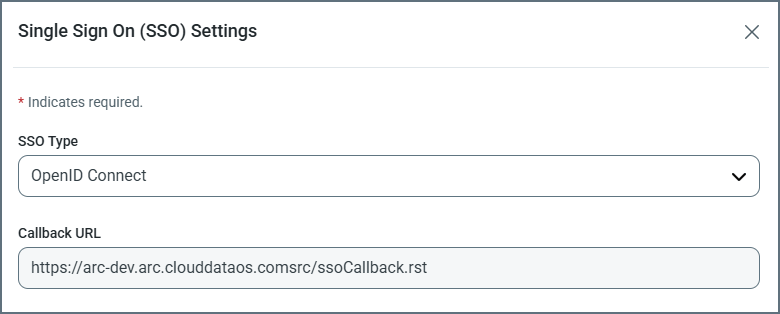
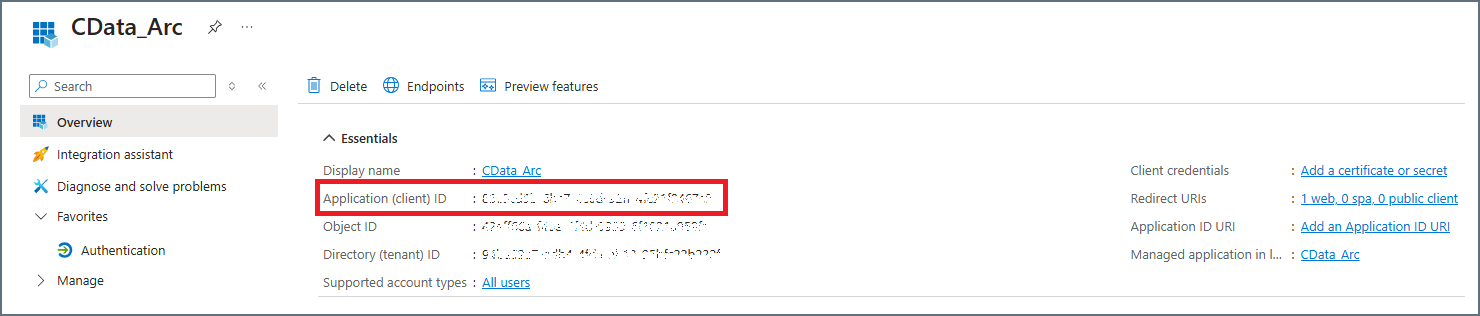
 Keep this dialog box open because you need to return to it later in these steps.
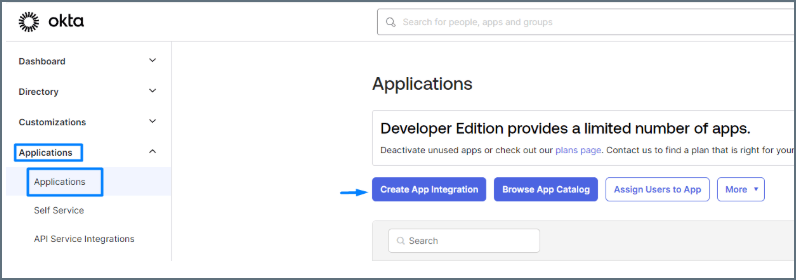
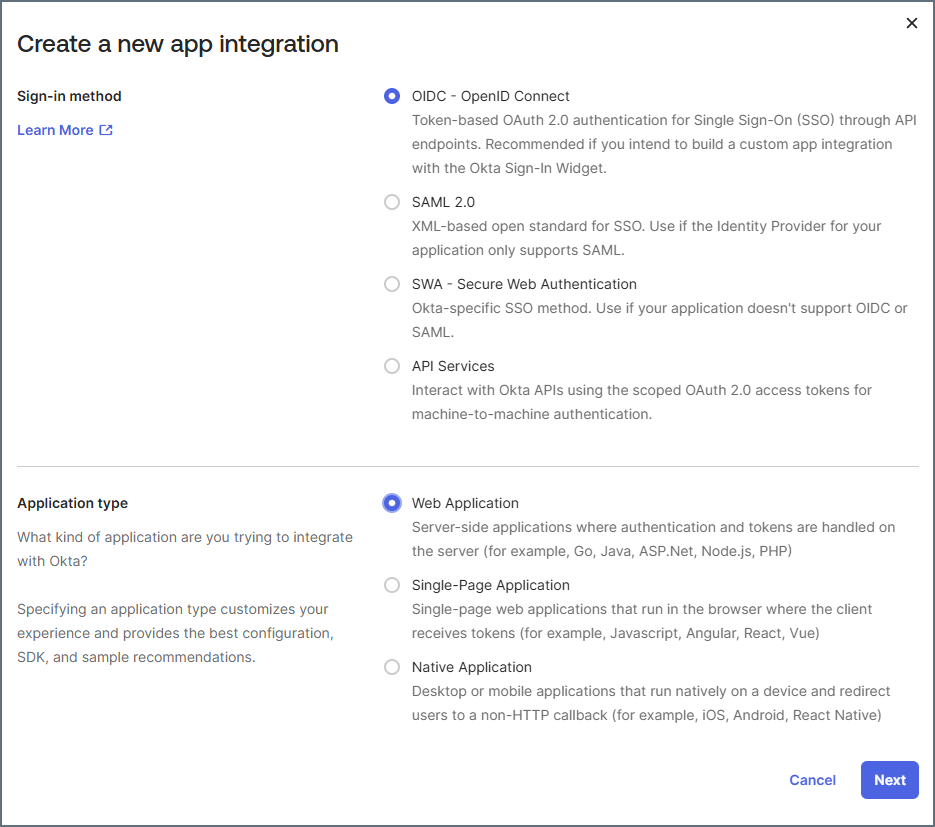
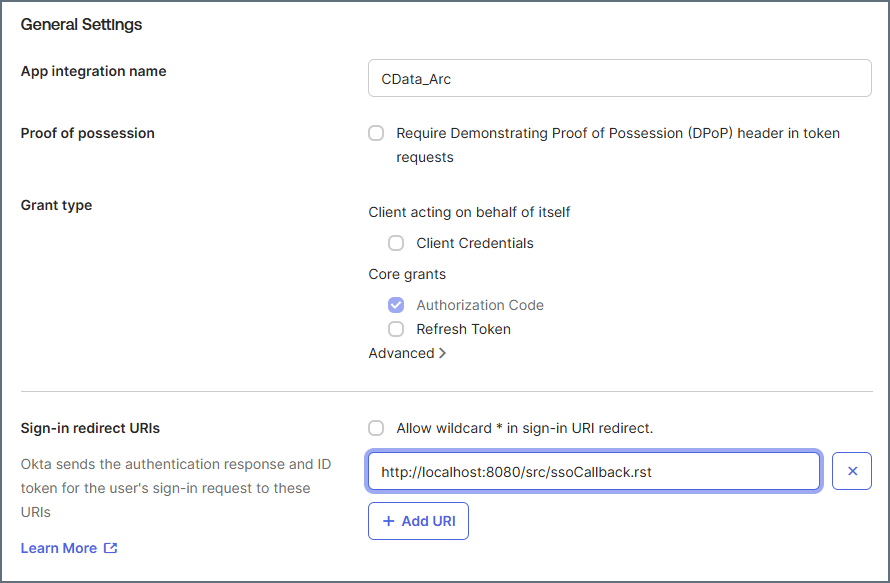
 icon to open the User Provisioning dialog box.