

Key Capabilities
- XML and message header validation using configurable rules and conditions
- XPath-based validation for XML content with sample file support for rule creation
- Data type validation for strings, numbers, and DateTime values
- Group-based rule organization with complex logical conditions (AND/OR)
Overview
Validate connectors are configured with one or more rules that determine whether input XML or message headers are considered valid. Valid input successfully passes through the connector, while XML files or message headers that fail validation throw an error and are not passed along in the flow. For each configured rule, the connector checks the value from the input XML or message header against the target value to see if it is considered valid. See Rules Tab for details.Connector Configuration
This section contains all of the configurable connector properties.Rules Tab
Add and configure rules and groups of rules. Input XML and message headers are considered valid if they conform to all of the configured rules.
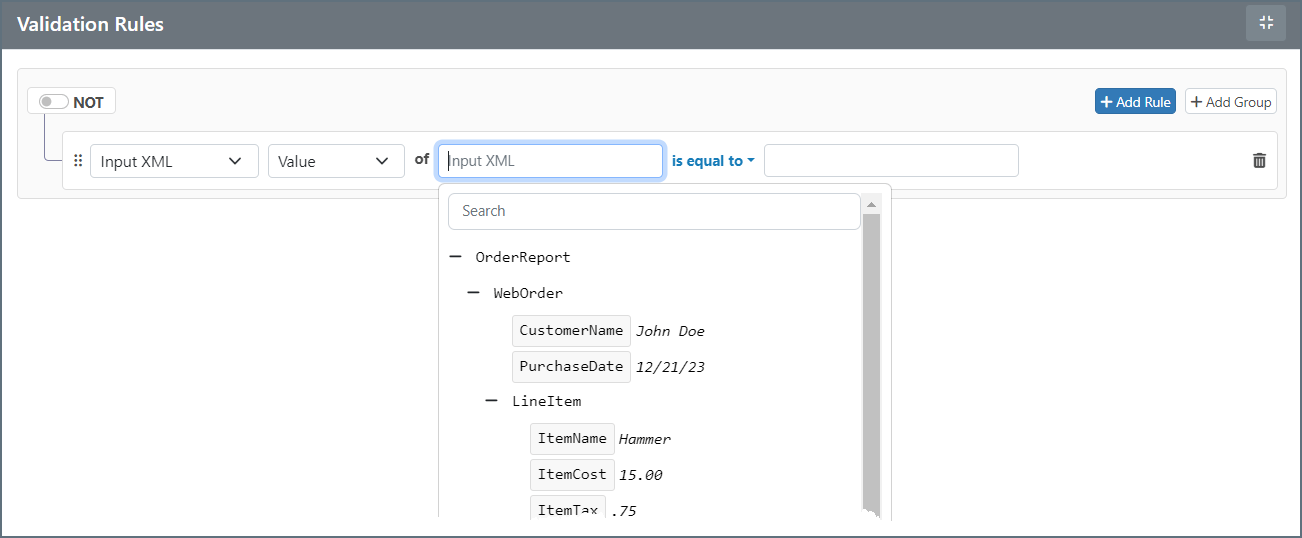
You can build complex validations by defining individual rules and/or groups of rules. To add a validation rule, click Add Rule or Add Group.
When you build your rules, use the dropdowns to make your selections and choose your operator. You can choose from the following:
- Input XML
- Value: The value at the XPath being evaluated
- Data Type: The data type of the value (String, Number, DateTime)
- Occurrences: The number of times the XPath occurs in the document
- Message Header
- Value: The value of the message header being evaluated
- Data Type: The data type of the value (String, Number, DateTime)
 and drag the object to a new location.
Input XML is only considered valid if all validation rules (or groups of rules) are satisfied. If the XPath configured in a rule is not found in the input XML, the validation automatically fails. In other words, if the connector is unable to read a value for a rule’s XPath, the input file does not pass the rule.
and drag the object to a new location.
Input XML is only considered valid if all validation rules (or groups of rules) are satisfied. If the XPath configured in a rule is not found in the input XML, the validation automatically fails. In other words, if the connector is unable to read a value for a rule’s XPath, the input file does not pass the rule.
Settings Tab
Connector Settings
| 設定 | 説明 |
|---|---|
| Connector Id | コネクタの静的で一意の識別子です。 |
| Connector Type | コネクタ名とその機能の説明を表示します。 |
| Connector Description | コネクタおよびフロー内でのその役割について自由形式の説明を提供するためのオプションフィールドです。 |
Advanced Tab
Logging
ログの作成と保存を制御する設定です。
| 設定 | 説明 |
|---|---|
| Log Level | コネクタが生成するログの詳細度です。サポートを依頼する際は、これをDebug に設定してください。 |
| Log Subfolder Scheme | 選択した間隔に従って、コネクタがLogs フォルダ内のファイルをグループ化するよう指示します。Weekly オプション(デフォルト)は、コネクタが毎週新しいサブフォルダを作成し、その週のすべてのログをそのフォルダに保存するよう指示します。この設定を空白のままにすると、コネクタはすべてのログをLogs フォルダに直接保存します。多数のトランザクションを処理するコネクタでは、サブフォルダを使用することでログを整理しやすくなり、パフォーマンスが向上します。 |
| Log Messages | 処理したファイルのログエントリにファイル自体のコピーを含めるには、これをオンにします。これを無効にすると、Transactions タブからファイルのコピーをダウンロードできなくなる場合があります。 |
Other Settings
Miscellaneous
Miscellaneous 設定は、特定のユースケース向けの設定です。
| 設定 | 説明 |
|---|---|
| Other Settings | 非表示のコネクタ設定をセミコロン区切りのリストで設定できます(例:setting1=value1;setting2=value2)。通常のコネクタのユースケースや機能では、これらの設定の使用は必要ありません。 |
Automation Tab
Settings related to the automatic processing of files by the connector.Performance
コネクタへのリソースの割り当てに関する設定です。
| 設定 | 説明 |
|---|---|
| Max Workers | このコネクタでファイルを処理するためにスレッドプールから消費されるワーカースレッドの最大数です。設定すると、Advanced Settings ページのPerformance Settings 部分にあるデフォルト設定が上書きされます。 |
| Max Files | コネクタに割り当てられた各スレッドが送信するファイルの最大数です。設定すると、Advanced Settings ページのPerformance Settings 部分にあるデフォルト設定が上書きされます。 |