Form connectors expose a public web endpoint where clients fill out a form and submit data into a flow, with a drag-and-drop designer and user authentication support.
Form connectors expose a public web endpoint where clients fill out a form and submit that data into a CData Arc flow.
Forms are created on the connector Form Designer tab. A form is divided into sections and detail tables, each of which can have a variable number of fields. For details, see Creating Forms.When you use a Form connector to submit new data, you should place the connector at the start of a connected flow. Clients can connect to the web endpoint, view and fill out the form, and submit this data into the configured Arc flow. For more information, see Submitting Form Data.The following sections explain how to configure the connector, create forms, and submit new form data.
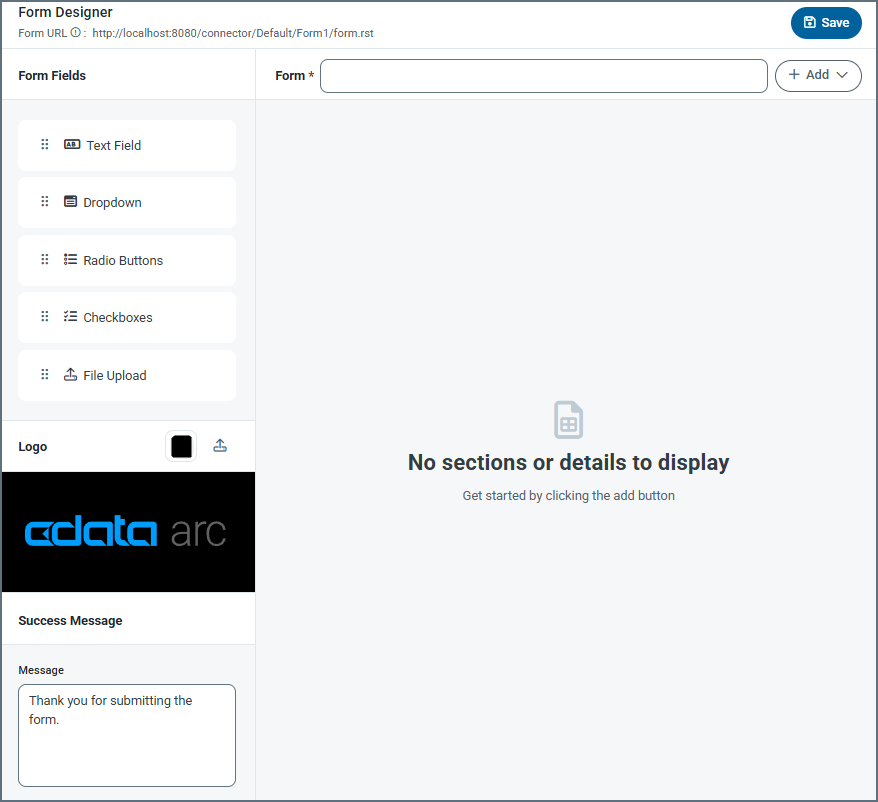
Settings related to building a set of form fields that are organized into sections and detail tables.When clients connect to the configured endpoint and submit a form, they see fields that are laid out exactly as they are configured in the panel above.The designer includes the following settings (see Creating Forms for more details).
Setting
Description
Form URL
A link to the published form.
Form
Title of the form (for example, your company name).
Add
Dropdown to add a section or a detail table. Add Section lets you add specific sections to a form, and Add Detail lets you add a detail table to the form. Detail tables act like a pre-configured table where the form user can add as many records as they need for the dataset.
Form Fields
Drag and drop fields into detail table and section areas of the form. Repeat this as many times as necessary. The field types are: Text Field — An input text box with a name and description. Dropdown — A dropdown list with name and dropdown options. Radio Buttons — A set of radio buttons with name and radio button options. Checkboxes — A set of checkboxes with name and checkbox options. File Upload — Allows form users to upload specific file types directly to the form.
Logo
Upload your company logo, which appears at the top of the form. By default it uses the CData Arc logo. You can also change the color of the banner.
Success Message
The confirmation message users see after they submit form data successfully. You can change the default message or add additional text.
A scheme for assigning filenames to messages that are output by the connector. You can use macros in your filenames dynamically to include information such as identifiers and timestamps. For more information, see Macros.
The Form Users tab lets you create user credentials for clients so that they can access the public endpoint. If a client is not logged into the application administration console already, that client is prompted to enter the User and Password combination when they browse to the endpoint.You can add, edit, and delete credentials on this tab.
This tab lists all messages associated with the connector. Use the search bar to find specific messages, or click the funnel icon to apply a filter. You can filter by time, message direction, and/or status.Incoming form responses appear on this tab.
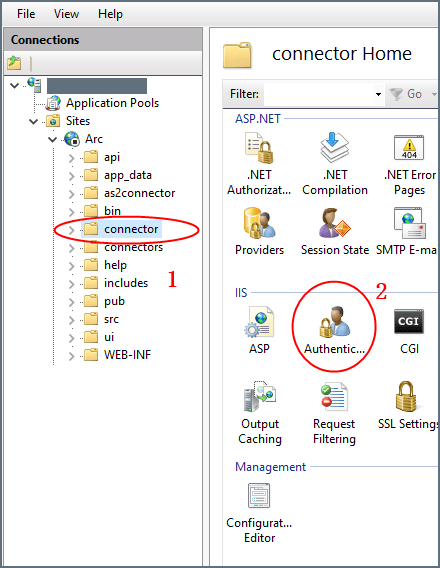
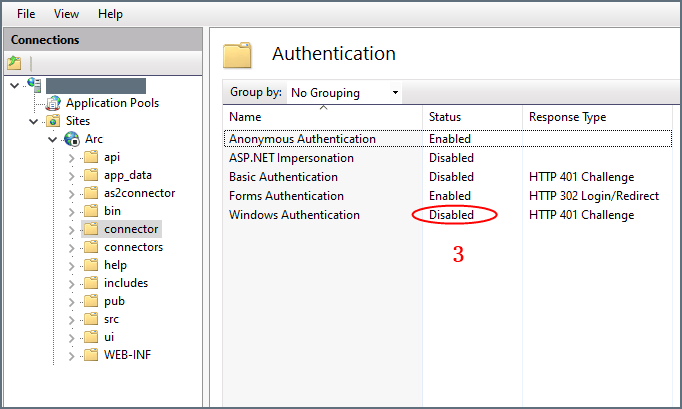
If your Arc instance is hosted on an IIS server and you use Microsoft Windows authentication to login to the application, you must disable Windows authentication for your users. Otherwise, the Form connector cannot properly authenticate users, and the connector will not work properly.To disable Windows authentication:
In your IIS manager, create a new folder named connector in the base application path.
Select Authentication under IIS (in the right pane) for the connector folder.
Set Windows Authentication to Disabled for this folder.
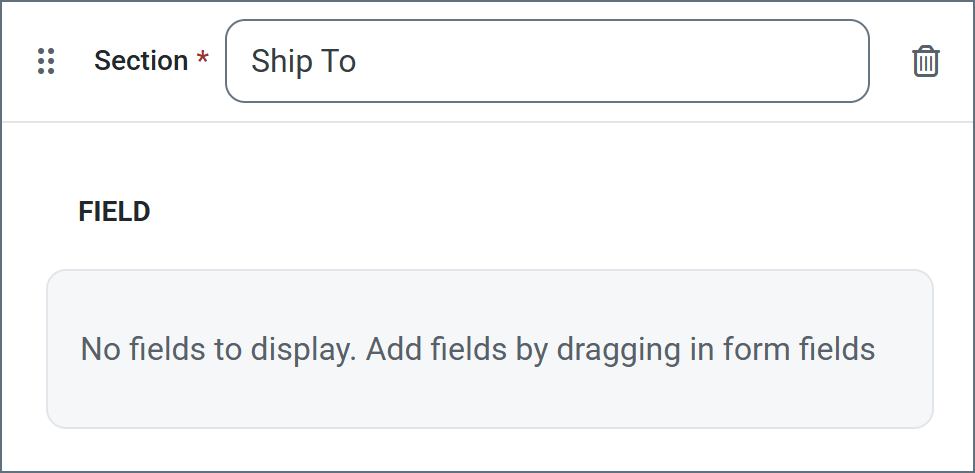
Sections divide fields in the form by categorizing them under a heading. For example, the Ship To section might contain fields like Address, City, and Zip.Sections are not required in order to add fields to the form. However, sections provide logical groupings of items that help users quickly understand the form.To add a section:
Choose Add Section from the dropdown. Enter a section name.
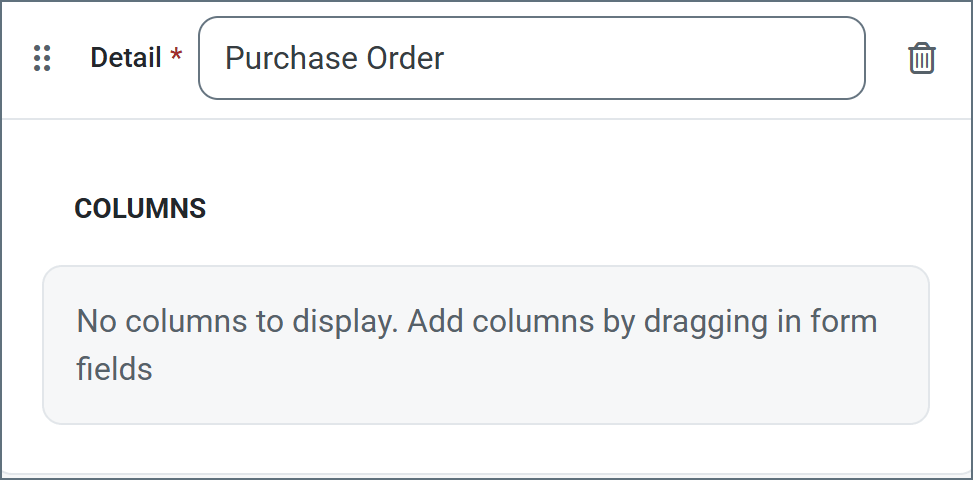
Detail tables allow form creators to embed a table in the web form to enable structured, row-based data entry. They include a configurable number of columns which you define during the form creation. They are ideal for capturing repeatable datasets in a single form submission. End users can then dynamically add as many rows as needed and enter values for each column in those rows. See Accessing Your Form for an example.To add a detail table to your form:
Click Add Detail from the dropdown. Enter a name.
Now you are ready to add columns to the table. Select any of the form field types.
Fields are the basic unit of input for the form.To add a field:
Drag an object from the Form Fields section into your section or detail table.
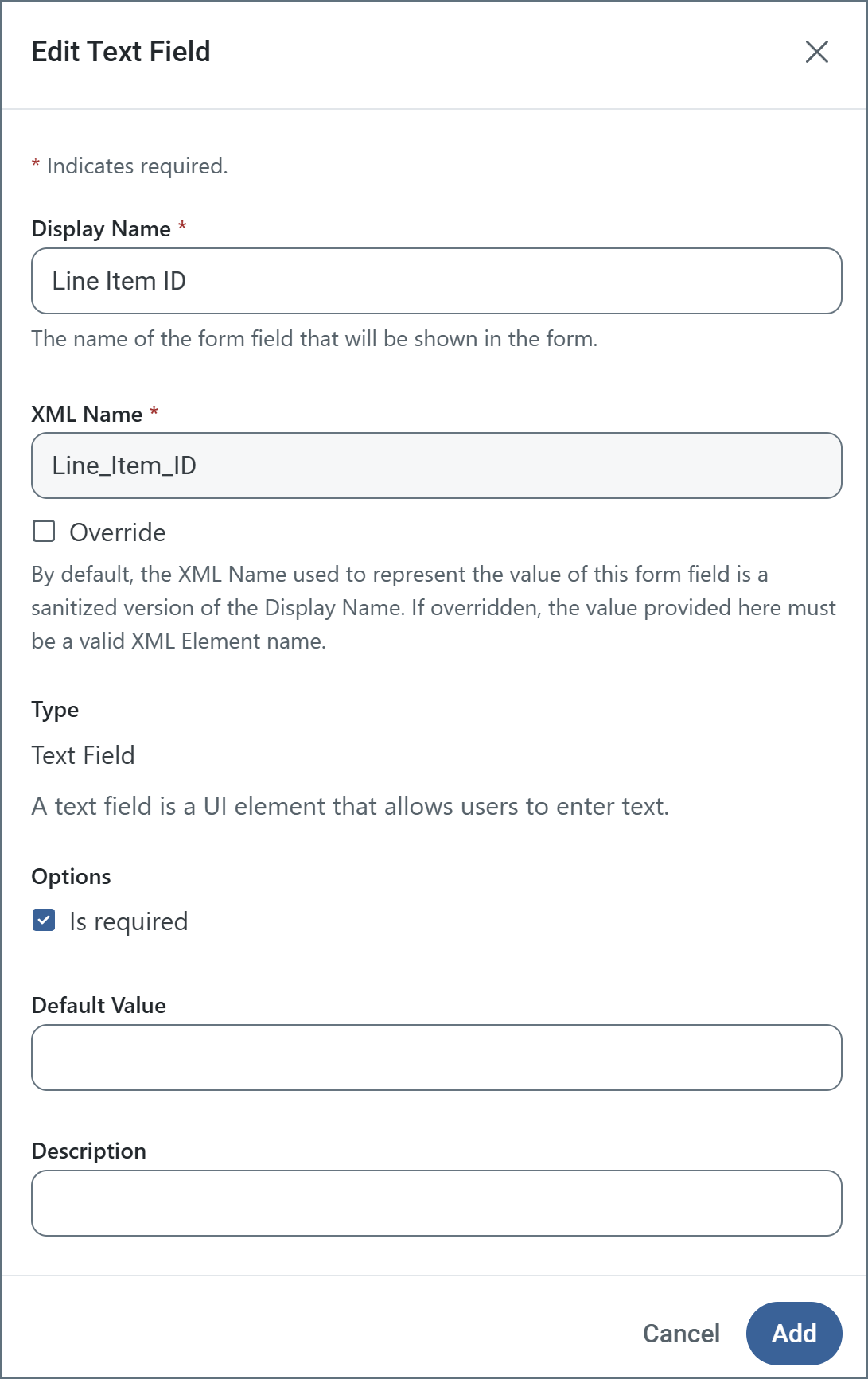
Enter a Display Name (for example, Line Item Id). By default, XML Name is populated, but you can use the Override checkbox to supply a different name.
Use the Is required checkbox to specify whether the field is mandatory.
The other options vary based on the form field type. The following example shows a text field being defined. When you are finished defining the field, click Add.
To edit a field, click the link to its name, or the ellipses to the right of the name.
To remove a field, click the ellipses and choose Remove Instance.
Drag and drop fields in a section or detail table to reorder their position in the form.
XML Name: Sanitized version of the Display Name. It must be a valid XML element name.
Override: Checkbox which allows you to change the default XML Name.
Accepted File Type Extensions: The allowed list of upload file types. For example, .xml only accepts XML files. To allow all file types, use *. Click Add Option to add the options you need.
Is required: Checkbox indicating whether the field is mandatory.
Default Value: Populates the form with the text supplied here.
Description: Helper text describing what the field is for.
After you create a form, users access the Form connector’s web endpoint and submit data using the form.For fields in the main form, users simply enter the values that correspond to the labels on the form (which are taken from the name of the fields that you created).Users can add rows to the detail table by clicking Add Row. Once a user enters all their data, they click Submit to submit their data. If the submission is successful, a message similar to the following appears.When a user submits a form, the form data is pushed to the Transactions tab. The output is an XML file that contains the following structure:
{"docsConfig":{"theme":"mint","$schema":"https://mintlify.com/docs.json","name":"CData Arc Documentation","colors":{"primary":"#002660","light":"#FFE500","dark":"#002660"},"logo":{"light":"https://mintcdn.com/cdata-arc/-adMVRA2NGLWRgFp/public/images/cdata_arc_web.svg?fit=max\u0026auto=format\u0026n=-adMVRA2NGLWRgFp\u0026q=85\u0026s=8863df3ad6488c6280d057711f48aa94","dark":"https://mintcdn.com/cdata-arc/-adMVRA2NGLWRgFp/public/images/cdata_arc_yellow.svg?fit=max\u0026auto=format\u0026n=-adMVRA2NGLWRgFp\u0026q=85\u0026s=db878c051424afd58007b04161a4f5e1","href":"https://www.cdata.com/arc"},"favicon":"https://mintcdn.com/cdata-arc/Lo_2D5t4szDfleFN/favicon.ico?fit=max\u0026auto=format\u0026n=Lo_2D5t4szDfleFN\u0026q=85\u0026s=4b165e5b4d92eef3607cdc47218f10e2","appearance":{"default":"system","strict":false},"background":{"color":{"light":"#F1EEE9","dark":"#15151C"}},"footer":{"socials":{"x":"https://x.com/cdatasoftware","youtube":"https://www.youtube.com/c/CDataSoftware","linkedin":"https://www.linkedin.com/company/cdatasoftware","facebook":"https://www.facebook.com/cdatasoftware","instagram":"https://www.instagram.com/cdatasoftware"}},"fonts":{"heading":{"family":"DM Sans","weight":700},"body":{"family":"DM Sans"}},"styling":{"eyebrows":"breadcrumbs","latex":false},"contextual":{"options":["copy","view","chatgpt","claude","perplexity","mcp","cursor","vscode"],"display":"header"},"variables":{"siteName":"CData Arc","siteNameShort":"Arc","companyName":"CData"},"navigation":{"languages":[{"language":"en","navbar":{"primary":{"type":"button","label":" Contact Us","href":"https://www.cdata.com/company/contact.aspx"}},"href":"26.4/self-hosted/en/getting-started"},{"language":"ja","navbar":{"primary":{"type":"button","label":"お問い合わせ","href":"https://jp.cdata.com/contact/"}},"href":"26.4/self-hosted/ja/getting-started"}]}},"deployment":{"deploymentMetadataValue":{"subdomain":"cdata-arc","hasAudioNarration":false,"actualSubdomain":"cdata-arc","customDomains":["docs.arc.cdata.com"],"gitSource":{"type":"github","owner":"cdatasoftware","repo":"arc-docs","deployBranch":"main","contentDirectory":"","isPrivate":true,"mountPath":"","label":""},"chroma":{"liveDeploymentHistoryId":"6ae14a4699b9508b21c9dbd8","collectionId":"90177a11-7b4b-4316-b7a6-26cb9925267d","schemaVersion":"v3","latestBuiltDeploymentHistoryId":"6ae14a4699b9508b21c9dbd8"},"entitlements":{"AI_CHAT":{"status":"ENABLED"},"WEB_MCP":{"status":"ENABLED"},"NARRATION":{"status":"ENABLED"}},"buildId":"6ae14a4699b9508b21c9dbd8","clientVersion":"0.0.3990","searchFilterCounts":[{"language":"en","tag":"Arc User Guide","count":3135},{"language":"ja","tag":"Arc ユーザーガイド","count":2659},{"language":"en","tag":"Connectors","count":1994},{"language":"en","tag":"Self-Hosted","count":1921},{"language":"ja","tag":"Self-Hosted","count":1921},{"language":"en","tag":"Cloud","count":1760},{"language":"ja","tag":"コネクタ","count":1658},{"language":"ja","tag":"Cloud","count":1211},{"language":"en","tag":"Other","count":1064},{"language":"ja","tag":"その他","count":887},{"language":"en","tag":"Scripting","count":608},{"language":"en","tag":"ArcScript","count":581},{"language":"en","tag":"API Reference","count":546},{"language":"ja","tag":"スクリプティング","count":512},{"language":"ja","tag":"ArcScript","count":489},{"language":"ja","tag":"API リファレンス","count":472},{"language":"en","tag":"Getting Started","count":357},{"language":"en","tag":"Core","count":341},{"language":"ja","tag":"コア","count":312},{"language":"ja","tag":"はじめに","count":306}]},"assistantConfig":{"enableAskAiButton":false,"enableStarterQuestions":false,"enableAskAiSearchBar":true},"basePath":"","hasChatPermissions":true,"hasWebMcpPermissions":true,"toggles":[{"name":"kill-isr","enabled":true,"variant":{"name":"disabled","enabled":false,"feature_enabled":true},"impressionData":false},{"name":"agent-mintlify-slack","enabled":true,"variant":{"name":"disabled","enabled":false,"feature_enabled":true},"impressionData":false},{"name":"editor-v7-file-tree","enabled":true,"variant":{"name":"disabled","enabled":false,"feature_enabled":true},"impressionData":false},{"name":"agent-integrations-settings","enabled":true,"variant":{"name":"disabled","enabled":false,"feature_enabled":true},"impressionData":false},{"name":"automations-pr-grouping","enabled":true,"variant":{"name":"disabled","enabled":false,"feature_enabled":true},"impressionData":false},{"name":"custom-prefix","enabled":true,"variant":{"name":"disabled","enabled":false,"feature_enabled":true},"impressionData":false},{"name":"analytics-v7","enabled":true,"variant":{"name":"disabled","enabled":false,"feature_enabled":true},"impressionData":false},{"name":"user-flows-analytics","enabled":true,"variant":{"name":"disabled","enabled":false,"feature_enabled":true},"impressionData":false},{"name":"no-publish-flow","enabled":true,"variant":{"name":"disabled","enabled":false,"feature_enabled":true},"impressionData":false},{"name":"workos-onboarding","enabled":true,"variant":{"name":"disabled","enabled":false,"feature_enabled":true},"impressionData":false},{"name":"llms-txt-v2","enabled":true,"variant":{"name":"disabled","enabled":false,"feature_enabled":true},"impressionData":false},{"name":"pause-universal-search-reconcile","enabled":true,"variant":{"name":"disabled","enabled":false,"feature_enabled":true},"impressionData":false},{"name":"snapshot-serving-live","enabled":true,"variant":{"name":"disabled","enabled":false,"feature_enabled":true},"impressionData":false},{"name":"stripTemperatureMiddleware","enabled":true,"variant":{"name":"disabled","enabled":false,"feature_enabled":true},"impressionData":false},{"name":"per-site-search-delta","enabled":true,"variant":{"name":"disabled","enabled":false,"feature_enabled":true},"impressionData":false},{"name":"support-platform-pylon-zendesk","enabled":true,"variant":{"name":"disabled","enabled":false,"feature_enabled":true},"impressionData":false},{"name":"snapshot-serving","enabled":true,"variant":{"name":"disabled","enabled":false,"feature_enabled":true},"impressionData":false},{"name":"instant-rollback","enabled":true,"variant":{"name":"disabled","enabled":false,"feature_enabled":true},"impressionData":false},{"name":"granular-notifications-server","enabled":true,"variant":{"name":"disabled","enabled":false,"feature_enabled":true},"impressionData":false},{"name":"granular-notifications","enabled":true,"variant":{"name":"disabled","enabled":false,"feature_enabled":true},"impressionData":false},{"name":"editor-private-page-search","enabled":true,"variant":{"name":"disabled","enabled":false,"feature_enabled":true},"impressionData":false},{"name":"automations-fable","enabled":true,"variant":{"name":"disabled","enabled":false,"feature_enabled":true},"impressionData":false},{"name":"fixed-ai-action-pricing","enabled":true,"variant":{"name":"disabled","enabled":false,"feature_enabled":true},"impressionData":false},{"name":"automation-resolve-merge-conflict","enabled":true,"variant":{"name":"disabled","enabled":false,"feature_enabled":true},"impressionData":false},{"name":"scoped-publishing","enabled":true,"variant":{"name":"disabled","enabled":false,"feature_enabled":true},"impressionData":false},{"name":"mintql","enabled":true,"variant":{"name":"disabled","enabled":false,"feature_enabled":true},"impressionData":false},{"name":"page-level-analytics","enabled":true,"variant":{"name":"disabled","enabled":false,"feature_enabled":true},"impressionData":false},{"name":"editor-version-history-v2","enabled":true,"variant":{"name":"disabled","enabled":false,"feature_enabled":true},"impressionData":false},{"name":"editor-nav-generations","enabled":true,"variant":{"name":"disabled","enabled":false,"feature_enabled":true},"impressionData":false},{"name":"billing-page-v2","enabled":true,"variant":{"name":"disabled","enabled":false,"feature_enabled":true},"impressionData":false},{"name":"workspace-projects","enabled":true,"variant":{"name":"disabled","enabled":false,"feature_enabled":true},"impressionData":false},{"name":"assistant-v5","enabled":true,"variant":{"name":"disabled","enabled":false,"feature_enabled":true},"impressionData":false},{"name":"byok-sep-25","enabled":true,"variant":{"name":"disabled","enabled":false,"feature_enabled":true},"impressionData":false},{"name":"fork-pr-previews","enabled":true,"variant":{"name":"disabled","enabled":false,"feature_enabled":true},"impressionData":false},{"name":"revalidation-jwt","enabled":true,"variant":{"name":"disabled","enabled":false,"feature_enabled":true},"impressionData":false},{"name":"vite-origin","enabled":true,"variant":{"name":"disabled","enabled":false,"feature_enabled":true},"impressionData":false},{"name":"editor-agent-model-picker","enabled":true,"variant":{"name":"disabled","enabled":false,"feature_enabled":true},"impressionData":false},{"name":"billing-updated-9-15","enabled":true,"variant":{"name":"disabled","enabled":false,"feature_enabled":true},"impressionData":false},{"name":"workos-sso-scim","enabled":true,"variant":{"name":"disabled","enabled":false,"feature_enabled":true},"impressionData":false},{"name":"hobby-abuse-scan","enabled":true,"variant":{"name":"disabled","enabled":false,"feature_enabled":true},"impressionData":false},{"name":"dashboard-inbox","enabled":true,"variant":{"name":"disabled","enabled":false,"feature_enabled":true},"impressionData":false},{"name":"workos-signup","enabled":true,"variant":{"name":"disabled","enabled":false,"feature_enabled":true},"impressionData":false},{"name":"workos-enabled","enabled":true,"variant":{"name":"disabled","enabled":false,"feature_enabled":true},"impressionData":false}],"isAtlas":false,"googleFontsInlined":true},"customCss":[{"filePath":"custom.css","content":"@font-face{font-family:'Grafier';src:local('Grafier'),url(/public/fonts/grafier/PPGrafier-Regular.woff2) format('woff2'),url(/public/fonts/grafier/PPGrafier-Regular.woff) format('woff');font-weight:400;font-style:normal;font-display:swap}:root{--brand-agility:#FFE500;--brand-resolve:#002660;--brand-depth:#15151C;--brand-clarity:#F1EEE9;--brand-balance:#B5B9BC;--brand-link:#0B59CE;--brand-link-hover:#1F5B8E;--system-error:#BE6634;--n0:#FFFFFF;--n1:#FFFDFA;--n2:#F1EEE9;--n3:#D9D6D2;--n9:#525252;--n11:#15151C;--surface-bg:var(--brand-clarity);--surface-sidebar:transparent;--surface-card:var(--n0);--surface-header:transparent;--text-primary:var(--n11);--text-secondary:var(--n9);--border:var(--n3);--radius:5px;--shadow:0 10px 35px rgba(50,50,93,.10), 0 3px 15px rgba(0,0,0,.07);--shadow-up:0 13px 35px rgba(50,50,93,.20), 0 3px 18px rgba(0,0,0,.08);--font-sans:'DM Sans', ui-sans-serif, system-ui, sans-serif;--font-mono:'DM Mono', 'Nimbus Mono PS', 'Courier New', monospace;--logo-h:23px;--logo-w:116px}html.dark{--surface-bg:#1a1a22;--surface-sidebar:var(--surface-bg);--surface-card:#1a1a22;--surface-header:var(--surface-bg);--text-primary:rgb(158, 159, 161);--text-secondary:var(--brand-balance);--border:#2e2e3a;--brand-link:#5b9cf6;--brand-link-hover:#93c5fd}html:not(.dark) body{background-color:var(--surface-bg)}html.dark body{background-color:var(--surface-bg)}html.dark #background-color{background-color:var(--surface-bg)!important}html:not(.dark) body .mint-bg-white{background:linear-gradient(135deg,#fffdfa 0,#f1eee9 100%)!important}html.dark body .mint-bg-white{background:linear-gradient(135deg,#1a1a22 0,#15151c 100%)!important}body,html{font-weight:400;color:var(--text-primary)}h1,h2,h3,h4,h5,h6{line-height:1.2;color:#000}body,h3,h4,h5,h6,html{font-family:var(--font-sans)}h3,h4,h5,h6{font-weight:700}#page-title,h1,h2{font-family:'Grafier',var(--font-sans);font-weight:400!important;letter-spacing:normal!important;font-feature-settings:\"ss01\",\"case\"}#page-title *,h1 *,h2 *{letter-spacing:inherit!important;font-weight:inherit!important}html.dark h1,html.dark h2,html.dark h3,html.dark h4,html.dark h5,html.dark h6{color:#fff}label,li,p,td,th{line-height:1.65}code,kbd,pre,samp{font-family:var(--font-mono)!important}a{color:var(--brand-link);text-decoration:none;transition:color .15s}a:hover{color:var(--brand-link-hover)}#header a,#navbar a{color:inherit}#sidebar-content a.nav-anchor{color:var(--text-secondary)}#navbar a.nav-anchor:hover,.nav-anchor:hover{color:var(--brand-resolve)!important}html.dark #navbar a.nav-anchor:hover,html.dark .nav-anchor:hover{color:var(--brand-link-hover)!important}.nav-anchor>div.rounded-md{background:var(--text-secondary)!important}.nav-anchor:hover>div.rounded-md{background:var(--brand-resolve)!important}html.dark .nav-anchor:hover>div.rounded-md{background:var(--brand-link)!important}#header{background-color:var(--surface-header)!important;border-bottom:1px solid var(--border)!important}html.dark #header,html.dark #navbar,html.dark header,html.dark nav{background-color:var(--surface-bg)!important;border-bottom:1px solid var(--border)!important}#navbar a,label,li,p,td,th{font-family:var(--font-sans)}#navbar a{font-weight:500;font-size:.9375rem}html:not(.dark) [class*=btn-primary],html:not(.dark) [class*=button-primary],html:not(.dark) a.btn,html:not(.dark) button:not([class*=ghost]):not([class*=icon]):not([aria-label]):not(#localization-select-trigger):not([class*=text-gray]):not([class*=text-white]):not(.chat-assistant-sheet button):not(.chat-assistant-floating-input button){background-color:var(--brand-depth)!important;color:#fff!important;border-color:var(--brand-depth)!important}html:not(.dark) #navbar button:not(#topbar-cta-button),html:not(.dark) #sidebar button,html:not(.dark) #table-of-contents button,html:not(.dark) .chat-assistant-floating-input button,html:not(.dark) .chat-assistant-sheet button{background-color:transparent!important;color:inherit!important;border-color:transparent!important;box-shadow:none!important}html:not(.dark) #header .breadcrumb-item,html:not(.dark) #header .breadcrumb-item a{color:var(--brand-resolve)}html:not(.dark) #header .breadcrumb-item a:hover{color:var(--brand-link-hover)}html.dark #header .breadcrumb-item,html.dark #header .breadcrumb-item a{color:var(--text-secondary)}html.dark #header .breadcrumb-item a:hover{color:#fff}#topbar-cta-button{background-color:var(--brand-depth)!important;color:#fff!important;border:0!important;border-radius:var(--radius)!important;height:40px;padding:0 20px;font-family:var(--font-sans);font-weight:500;font-size:.9375rem;white-space:nowrap;transition:box-shadow .2s,transform .1s;cursor:pointer}#topbar-cta-button:hover{box-shadow:var(--shadow-up);transform:translateY(-1px);color:#fff!important}html.dark #topbar-cta-button{background-color:var(--brand-agility)!important}html.dark #topbar-cta-button,html.dark #topbar-cta-button:hover{color:var(--brand-depth)!important}html.dark #topbar-cta-button span,html.dark #topbar-cta-button svg{color:var(--brand-depth)!important;fill:var(--brand-depth)!important}#topbar-cta-button span[class*=bg-primary]{background-color:transparent!important;border-radius:inherit!important}img.nav-logo{height:var(--logo-h)!important;width:auto!important;max-width:var(--logo-w)!important;max-height:var(--logo-h)!important}@media (max-width:768px){:root{--logo-h:23px;--logo-w:116px}}#sidebar,html.dark #sidebar{background-color:var(--surface-sidebar)!important;border-right:1px solid var(--border)!important}#sidebar-content a,#sidebar-content button{font-family:var(--font-sans);font-weight:400;font-size:.9rem;color:var(--text-primary);border-radius:var(--radius);transition:background-color .12s,color .12s}#sidebar-content a:hover{background-color:var(--n2);color:var(--brand-resolve)}html.dark #sidebar-content a:hover{background-color:rgba(255,255,255,.06);color:#fff}#sidebar-content li[data-active]>a{color:var(--brand-resolve)!important;font-weight:600!important;background-color:#dedfe1!important;box-shadow:none!important}html.dark #sidebar-content li[data-active]>a{color:#fff!important;background-color:rgba(255,229,0,.12)!important;box-shadow:none!important}.sidebar-group-header{font-family:var(--font-sans);font-size:.7rem;font-weight:500;letter-spacing:.1em;text-transform:uppercase;color:var(--text-secondary)}.nav-tabs{border-bottom:1px solid var(--border)}.nav-tabs-item{font-family:var(--font-sans);font-weight:500;color:var(--text-secondary);transition:color .15s,border-color .15s}.nav-tabs-item[data-active]{color:var(--brand-resolve)!important;font-weight:700!important}html.dark .nav-tabs-item[data-active]{color:#fff!important}a.nav-tabs-item[data-active]>div.absolute.bottom-0{height:8px!important}html:not(.dark) a.nav-tabs-item[data-active]>div.absolute.bottom-0{background-color:var(--brand-resolve)!important}html.dark a.nav-tabs-item[data-active]>div.absolute.bottom-0{background-color:var(--brand-agility)!important}#content-area{background-color:var(--surface-bg);color:var(--text-primary)}#body-content,.mdx-content{font-family:var(--font-sans);color:var(--text-primary)}#page-title{font-size:1.875rem;color:#000;line-height:1.2}html.dark #page-title{color:#fff}:not(pre)>code{background-color:color-mix(in srgb,var(--brand-resolve) 8%,var(--surface-card));color:var(--brand-resolve);border:1px solid color-mix(in srgb,var(--brand-resolve) 18%,transparent);border-radius:3px;padding:.15em .4em;font-family:var(--font-mono)!important;font-size:.875em}html.dark :not(pre)>code{background-color:rgba(255,255,255,.08);color:#93c5fd;border-color:rgba(255,255,255,.12)}.code-block button,pre button{color:var(--brand-balance);border-radius:3px;transition:color .15s,background-color .15s}.code-block button:hover,pre button:hover{color:var(--brand-agility);background-color:rgba(255,229,0,.12)}.card,html.dark .card{background-color:var(--surface-card)}.card{border:1px solid var(--border);border-radius:var(--radius);box-shadow:var(--shadow);transition:box-shadow .2s}.card:hover{box-shadow:var(--shadow-up)}html.dark .card{border-color:var(--border)}.callout[data-type=info]{border-left:4px solid var(--brand-resolve);background-color:color-mix(in srgb,var(--brand-resolve) 6%,var(--surface-card))}.callout[data-type=warning]{border-left:4px solid var(--brand-agility);background-color:color-mix(in srgb,var(--brand-agility) 10%,var(--surface-card))}.callout[data-type=error]{border-left:4px solid var(--system-error);background-color:color-mix(in srgb,var(--system-error) 8%,var(--surface-card))}.callout[data-type=success],.callout[data-type=tip]{border-left:4px solid #27ae60;background-color:color-mix(in srgb,#27ae60 6%,var(--surface-card))}#table-of-contents{font-size:.85rem}.toc-item a{color:var(--text-secondary);transition:color .15s}.toc-item[data-active-deepest] a{color:var(--brand-resolve)!important;font-weight:600}html.dark .toc-item[data-active-deepest] a{color:var(--brand-agility)!important}#search-input,#table-of-contents{font-family:var(--font-sans)}#search-input:focus{outline:2px solid var(--brand-resolve);outline-offset:2px}html.dark #search-input:focus{outline-color:var(--brand-agility)}[cmdk-item][aria-selected=true],[cmdk-item][data-selected=true]{background-color:color-mix(in srgb,var(--brand-resolve) 8%,transparent)!important}html.dark [cmdk-item][aria-selected=true],html.dark [cmdk-item][data-selected=true]{background-color:rgba(255,229,0,.12)!important}#footer,table{font-family:var(--font-sans)}#footer{background-color:transparent!important;border-top:none!important}#footer a{color:var(--brand-balance);transition:color .15s}#footer a:hover{color:var(--text-primary)}#footer [class*=social]:hover,html.dark h1 a,html.dark h2 a,html.dark h3 a,html.dark h4 a{color:var(--brand-agility)}table{border-radius:var(--radius);overflow:hidden;width:100%}table thead tr th,th,thead th{background-color:var(--brand-resolve);color:#fff!important;font-weight:600;font-size:.875rem;padding:.6rem .75rem!important;vertical-align:middle!important}html.dark th{background-color:#1a2a4a}td{border-bottom:1px solid var(--border);padding:.55rem .75rem;font-size:.9rem}td:first-child{padding-left:.75rem!important}tr:last-child td{border-bottom:none}tr:nth-child(even) td{background-color:color-mix(in srgb,var(--brand-resolve) 3%,transparent)}html.dark tr:nth-child(even) td{background-color:rgba(255,255,255,.03)}h1 a,h2 a,h3 a,h4 a{color:var(--brand-resolve);opacity:0;transition:opacity .15s}h1:hover a,h2:hover a,h3:hover a,h4:hover a{opacity:1}hr{border:0;border-top:1px solid var(--border);margin:1.5rem 0}:focus-visible{outline:2px solid var(--brand-resolve);outline-offset:3px;border-radius:var(--radius)}html.dark :focus-visible{outline-color:var(--brand-agility)}::selection{background-color:color-mix(in srgb,var(--brand-agility) 45%,transparent);color:var(--brand-depth)}@media (max-width:768px){h1{font-size:1.625rem}h2{font-size:1.25rem}.code-block,pre{font-size:.8em}}"}],"page":{"pagePath":"26.2/self-hosted/ja/connectors/form","slug":"/26.2/self-hosted/ja/connectors/form","pageMetadata":{"title":"Form Connector","sidebarTitle":"Form","description":"Form connectors expose a public web endpoint where clients fill out a form and submit data into a flow, with a drag-and-drop designer and user authentication support.","href":"/26.2/self-hosted/ja/connectors/form"},"description":{"compiledSource":"\"use strict\";\nconst {jsx: _jsx} = arguments[0];\nconst {useMDXComponents: _provideComponents} = arguments[0];\nfunction _createMdxContent(props) {\n const _components = {\n p: \"p\",\n ..._provideComponents(),\n ...props.components\n };\n return _jsx(_components.p, {\n children: \"Form connectors expose a public web endpoint where clients fill out a form and submit data into a flow, with a drag-and-drop designer and user authentication support.\"\n });\n}\nfunction MDXContent(props = {}) {\n const {wrapper: MDXLayout} = {\n ..._provideComponents(),\n ...props.components\n };\n return MDXLayout ? _jsx(MDXLayout, {\n ...props,\n children: _jsx(_createMdxContent, {\n ...props\n })\n }) : _createMdxContent(props);\n}\nreturn {\n default: MDXContent\n};\n","frontmatter":{},"scope":{}},"pageType":"default","mdx":{"mdxSource":{"compiledSource":"\"use strict\";const{Fragment:_Fragment,jsx:_jsx,jsxs:_jsxs}=arguments[0];const{useMDXComponents:_provideComponents}=arguments[0];const TrustedIp=()=>{const _components={a:`a`,..._provideComponents()},{Note}=_components;if(!Note)_missingMdxReference(`Note`,true);return _jsxs(_Fragment,{children:[_jsxs(`p`,{children:[_jsx(`strong`,{children:`Trusted IP Addresses`}),` セクションでは、次の機能を使用できます。`]}),_jsxs(`table`,{children:[_jsx(`thead`,{children:_jsxs(`tr`,{children:[_jsx(`th`,{children:`機能`}),_jsx(`th`,{children:`説明`})]})}),_jsxs(`tbody`,{children:[_jsxs(`tr`,{children:[_jsx(`td`,{children:_jsx(`strong`,{children:`Add`})}),_jsx(`td`,{children:`新しいIP アドレス範囲を入力します。`})]}),_jsxs(`tr`,{children:[_jsx(`td`,{children:_jsx(`strong`,{children:`Edit`})}),_jsx(`td`,{children:`選択したIP アドレス範囲を変更します。`})]}),_jsxs(`tr`,{children:[_jsx(`td`,{children:_jsx(`strong`,{children:`Delete`})}),_jsx(`td`,{children:`選択したIP アドレス範囲をリストから削除します。`})]})]})]}),_jsx(`p`,{children:`この機能には次の制限が適用されます。`}),_jsxs(`ul`,{style:{listStyleType:`disc`,paddingLeft:`1.5rem`},children:[_jsxs(`li`,{style:{display:`list-item`},children:[_jsx(`code`,{children:`localhost`}),` はリストから変更または削除できません。`]}),_jsx(`li`,{style:{display:`list-item`},children:`定義された範囲外のIP アドレスはすべて拒否されます。`}),_jsxs(`li`,{style:{display:`list-item`},children:[`範囲がサポートされています。例えば、エントリ`,_jsx(`code`,{children:`100.10.100.1-15`}),` は、`,_jsx(`code`,{children:`100.10.100.1`}),` から`,_jsx(`code`,{children:`100.10.100.15`}),` までのIP アドレスが許可されることを示します。`]}),_jsxs(`li`,{style:{display:`list-item`},children:[`Classless inter-domain routing(CIDR)表記がサポートされています。例えば、エントリ`,_jsx(`code`,{children:`100.10.100.0/24`}),` は、`,_jsx(`code`,{children:`100.10.100.0`}),` から`,_jsx(`code`,{children:`100.10.100.255`}),` までのIP アドレスが許可されることを示します。`]}),_jsxs(`li`,{style:{display:`list-item`},children:[`ワイルドカードパターンがサポートされています。例えば、エントリ`,_jsx(`code`,{children:`100.10.100.*`}),` は、`,_jsx(`code`,{children:`100.10.100`}),` で始まるIP アドレスが許可されることを示します。`]})]}),_jsxs(Note,{children:[_jsx(`p`,{children:`クライアントがサーバーに到達するには、明確なネットワークパスが必要です。クラウド環境では、次の3か所で変更が必要になる場合があります。`}),_jsx(`p`,{style:{paddingLeft:`1.5rem`,marginTop:`0.25rem`,marginBottom:`0.25rem`},children:`• クラウドコンソールのネットワークルール。`}),_jsxs(`p`,{style:{paddingLeft:`1.5rem`,marginTop:`0.25rem`,marginBottom:`0.25rem`},children:[`• アプリケーションをホストするマシンのファイアウォールルール。例えば、Amazon AMI を使用する場合、`,_jsx(`em`,{children:`Uncomplicated Firewall`}),`(UFW)を使用して目的のポートでのトラフィックを許可できます。Linux 環境での一般的な方法は、1024 より小さいポートから1024 より大きい非標準ポートへトラフィックを転送し、アプリケーションがその非標準ポートを使用するように設定することです。これにより、非rootユーザーが1024 より小さいポートにバインドする際の権限の問題を回避できます。`]}),_jsxs(`p`,{style:{paddingLeft:`1.5rem`,marginTop:`0.25rem`,marginBottom:`0.25rem`},children:[`• `,_jsx(_components.a,{href:`/26.2/self-hosted/ja/getting-started/administration/settings/security`,children:`Security`}),` タブの`,_jsx(_components.a,{href:`/26.2/self-hosted/ja/getting-started/administration/settings/network-access`,children:`Network Access`}),` 部分。`]})]})]})};const NameDescription=({extraRows})=>_jsxs(`table`,{children:[_jsx(`thead`,{children:_jsxs(`tr`,{children:[_jsx(`th`,{children:`設定`}),_jsx(`th`,{children:`説明`})]})}),_jsxs(`tbody`,{children:[_jsxs(`tr`,{children:[_jsx(`td`,{children:_jsx(`strong`,{children:`Connector Id`})}),_jsx(`td`,{children:`コネクタの静的で一意の識別子です。`})]}),_jsxs(`tr`,{children:[_jsx(`td`,{children:_jsx(`strong`,{children:`Connector Type`})}),_jsx(`td`,{children:`コネクタ名とその機能の説明を表示します。`})]}),_jsxs(`tr`,{children:[_jsx(`td`,{children:_jsx(`strong`,{children:`Connector Description`})}),_jsx(`td`,{children:`コネクタおよびフロー内でのその役割について自由形式の説明を提供するためのオプションフィールドです。`})]}),extraRows]})]});const SlasTab=({siteName=`CData Arc`})=>{const{Note}=_provideComponents()||{};if(!Note)_missingMdxReference(`Note`,true);return _jsxs(_Fragment,{children:[_jsx(`p`,{children:_jsx(`em`,{children:`サービスレベルアグリーメント(SLA)の設定に関する設定です。`})}),_jsxs(`p`,{children:[`SLA を使用すると、フロー内のコネクタが送受信すると見込まれるボリュームを設定し、そのボリュームを達成すると見込まれる期間を設定できます。`,siteName,` は、SLA が達成されない場合にユーザーへ警告するメールを送信し、SLA を`,_jsx(`em`,{children:`At Risk`}),` としてマークします。これは、SLA が間もなく達成されない場合に`,_jsx(`em`,{children:`Violated`}),` としてマークされることを意味します。これにより、ユーザーは介入してSLA が達成されない理由を特定し、適切な対応を取る機会を得られます。At Risk 期間の終了時点でもSLA が達成されない場合、SLA はviolated としてマークされ、ユーザーに再度通知されます。`]}),_jsxs(`p`,{children:[`SLA を定義するには、`,_jsx(`strong`,{children:`Expected Volume`}),` をオンに切り替え、`,_jsx(`strong`,{children:`Settings`}),` タブをクリックします。`]}),_jsx(`img`,{src:`/26.2/images/sla_empty.png`,alt:`SLA Empty`}),_jsxs(`ul`,{children:[_jsx(`li`,{children:`コネクタに送信と受信の個別のアクションがある場合は、ラジオボタンを使用してSLA がどちらの方向に適用されるかを指定します。`}),_jsxs(`li`,{children:[`ウィンドウの`,_jsx(`strong`,{children:`Expect at least`}),` 部分で、次を設定します。`,_jsxs(`ul`,{children:[_jsx(`li`,{children:`処理を見込む最小トランザクション数(ボリューム)を設定します。`}),_jsxs(`li`,{children:[_jsx(`strong`,{children:`Every`}),` フィールドを使用して期間を指定します。`]}),_jsxs(`li`,{children:[`SLA を有効にするタイミングを指定します。`,_jsx(`strong`,{children:`Starting on`}),` を選択した場合は、日付および時刻フィールドを入力します。`]}),_jsxs(`li`,{children:[`SLA を有効にしたい曜日のチェックボックスをオンにします。必要に応じて、ドロップダウンで`,_jsx(`strong`,{children:`Everyday`}),` を選択します。`]})]})]}),_jsxs(`li`,{children:[`ウィンドウの`,_jsx(`strong`,{children:`Set status to 'At Risk'`}),` 部分で、SLA をAt Risk としてマークするタイミングを指定します。`,_jsx(`ul`,{children:_jsxs(`li`,{children:[`デフォルトでは、SLA が違反状態になるまで通知は送信されません。これを変更するには、`,_jsx(`strong`,{children:`Send an 'At Risk' notification`}),` をオンにします。`]})})]})]}),_jsx(`p`,{children:`次の例は、月曜日から金曜日まで毎日1000 件のファイルを受信すると見込むコネクタ向けに設定されたSLA を示しています。1000 件のファイルが受信されていない場合、期間の終了の1時間前にAt Risk 通知が送信されます。`}),_jsx(`img`,{src:`/26.2/images/sla_defined.png`,alt:`SLA Configuration Example`}),_jsxs(Note,{children:[`必要に応じてSLA アラートをオフにすることができます。これはメンテナンスウィンドウ中に役立ちます。navbar で`,_jsx(`strong`,{children:`Settings`}),` をクリックし、`,_jsx(`strong`,{children:`Alerts > General Alerts`}),` に移動します。タブレットと鉛筆のアイコンをクリックして編集し、`,_jsx(`strong`,{children:`SLA Alerts`}),` 設定のチェックを外します。`]})]})};const AlertsTab=({siteNameShort=`Arc`})=>{const _components={a:`a`,..._provideComponents()};return _jsxs(_Fragment,{children:[_jsx(`p`,{children:_jsx(`em`,{children:`アラートの設定に関する設定です。`})}),_jsxs(`p`,{children:[`サービスレベルアグリーメント(SLA)を実行する前に、通知用のメールアラートをセットアップする必要があります。デフォルトでは、`,siteNameShort,` は`,_jsx(_components.a,{href:`/26.2/self-hosted/ja/getting-started/administration/settings/alerts`,children:`Alerts`}),` タブのグローバル設定を使用します。このコネクタに別の設定を使用するには、`,_jsx(`strong`,{children:`Override global setting`}),` をオンに切り替えます。`]}),_jsxs(`p`,{children:[`デフォルトではエラーアラートが有効になっており、エラーが発生するたびにメールが送信されます。これをオフにするには、`,_jsx(`strong`,{children:`Enable`}),` チェックボックスのチェックを外します。`]}),_jsxs(`p`,{children:[_jsx(`strong`,{children:`Subject`}),`(必須)を入力し、必要に応じて`,_jsx(`strong`,{children:`Recipient`}),` のメールアドレスをカンマ区切りのリストで入力します。`]})]})};const MiscConnector=()=>_jsxs(_Fragment,{children:[_jsx(`p`,{children:_jsx(`em`,{children:`Miscellaneous 設定は、特定のユースケース向けの設定です。`})}),_jsxs(`table`,{children:[_jsx(`thead`,{children:_jsxs(`tr`,{children:[_jsx(`th`,{children:`設定`}),_jsx(`th`,{children:`説明`})]})}),_jsx(`tbody`,{children:_jsxs(`tr`,{children:[_jsx(`td`,{children:_jsx(`strong`,{children:`Other Settings`})}),_jsxs(`td`,{children:[`非表示のコネクタ設定をセミコロン区切りのリストで設定できます(例:`,_jsx(`code`,{children:`setting1=value1;setting2=value2`}),`)。通常のコネクタのユースケースや機能では、これらの設定の使用は必要ありません。`]})]})})]})]});const Logging=()=>_jsxs(_Fragment,{children:[_jsx(`p`,{children:_jsx(`em`,{children:`ログの作成と保存を制御する設定です。`})}),_jsxs(`table`,{children:[_jsx(`thead`,{children:_jsxs(`tr`,{children:[_jsx(`th`,{children:`設定`}),_jsx(`th`,{children:`説明`})]})}),_jsxs(`tbody`,{children:[_jsxs(`tr`,{children:[_jsx(`td`,{children:_jsx(`strong`,{children:`Log Level`})}),_jsxs(`td`,{children:[`コネクタが生成するログの詳細度です。サポートを依頼する際は、これを`,_jsx(`strong`,{children:`Debug`}),` に設定してください。`]})]}),_jsxs(`tr`,{children:[_jsx(`td`,{children:_jsx(`strong`,{children:`Log Subfolder Scheme`})}),_jsxs(`td`,{children:[`選択した間隔に従って、コネクタがLogs フォルダ内のファイルをグループ化するよう指示します。`,_jsx(`strong`,{children:`Weekly`}),` オプション(デフォルト)は、コネクタが毎週新しいサブフォルダを作成し、その週のすべてのログをそのフォルダに保存するよう指示します。この設定を空白のままにすると、コネクタはすべてのログをLogs フォルダに直接保存します。多数のトランザクションを処理するコネクタでは、サブフォルダを使用することでログを整理しやすくなり、パフォーマンスが向上します。`]})]}),_jsxs(`tr`,{children:[_jsx(`td`,{children:_jsx(`strong`,{children:`Log Messages`})}),_jsxs(`td`,{children:[`処理したファイルのログエントリにファイル自体のコピーを含めるには、これをオンにします。これを無効にすると、`,_jsx(`strong`,{children:`Transactions`}),` タブからファイルのコピーをダウンロードできなくなる場合があります。`]})]})]})]})]});const MacrosExamples=({extraMacros=[]})=>{const _components={a:`a`,..._provideComponents()};return _jsxs(_Fragment,{children:[_jsxs(`p`,{children:[`%Ext% や %ShortDate% などの一部のマクロは引数を必要としませんが、引数を必要とするものもあります。 引数を取るすべてのマクロは次の構文を使用します。`,_jsx(`code`,{children:`%Macro:argument%`})]}),_jsx(`p`,{children:`引数を取るマクロの例を次に示します。`}),_jsxs(`ul`,{children:[_jsxs(`li`,{children:[`%Header:headername%:`,_jsx(`code`,{children:`headername`}),` はメッセージ上のヘッダーの名前です。`]}),_jsxs(`li`,{children:[`%Header:mycustomheader% は、入力メッセージに設定された`,_jsx(`code`,{children:`mycustomheader`}),` ヘッダーの値に解決されます。`]}),_jsxs(`li`,{children:[`%Header:ponum% は、入力メッセージに設定された`,_jsx(`code`,{children:`ponum`}),` ヘッダーの値に解決されます。`]}),_jsxs(`li`,{children:[`%RegexFilename:pattern%:`,_jsx(`code`,{children:`pattern`}),` は正規表現パターンです。例えば、`,_jsx(`code`,{children:`%RegexFilename:^([\\\\w][A-Za-z]+)%`}),` は、ファイル名の最初の単語にマッチしてそれに解決され、大文字・小文字を区別しません(`,_jsx(`code`,{children:`test_file.xml`}),` は`,_jsx(`code`,{children:`test`}),` に解決されます)。`]}),_jsxs(`li`,{children:[`%Vault:vaultitem%:`,_jsx(`code`,{children:`vaultitem`}),` は`,_jsx(_components.a,{href:`/26.2/self-hosted/ja/getting-started/administration/settings/global-settings-vault`,children:`Vault`}),` 内のアイテムの名前です。例えば、`,_jsx(`code`,{children:`%Vault:companyname%`}),` は、Vault に保存された`,_jsx(`code`,{children:`companyname`}),` アイテムの値に解決されます。`]}),_jsxs(`li`,{children:[`%DateFormat:format%:`,_jsx(`code`,{children:`format`}),` は許容される日付形式です(詳細は`,_jsx(_components.a,{href:`/26.2/self-hosted/ja/scripting/value-formatters/date-formatters#sample-date-formats`,children:`日付形式のサンプル`}),`を参照してください)。例えば、`,_jsx(`code`,{children:`%DateFormat:yyyy-MM-dd-HH-mm-ss-fff%`}),` は、ファイルの日付とタイムスタンプに解決されます。`]}),extraMacros.filter(item=>item.example).map(item=>_jsx(`li`,{children:item.example},`ex-${item.name}`))]}),_jsx(`p`,{children:`次の例に示すように、より高度なマクロを作成することもできます。`}),_jsxs(`ul`,{children:[_jsxs(`li`,{children:[`1 つのファイル名で複数のマクロを組み合わせる:`,_jsx(`code`,{children:`%DateFormat:yyyy-MM-dd-HH-mm-ss-fff%%EXT%`})]}),_jsxs(`li`,{children:[`マクロの外側にテキストを含める:`,_jsx(`code`,{children:`MyFile_%DateFormat:yyyy-MM-dd-HH-mm-ss-fff%`})]}),_jsxs(`li`,{children:[`マクロの内側にテキストを含める:`,_jsx(`code`,{children:`%DateFormat:'DateProcessed-'yyyy-MM-dd_'TimeProcessed-'HH-mm-ss%`})]})]})]})};const MacrosTable=({siteName=`CData Arc`,extraMacros=[]})=>{const _components={a:`a`,..._provideComponents()};return _jsxs(_Fragment,{children:[_jsx(`p`,{children:`ファイル命名戦略でマクロを使用すると、データの整理効率と文脈の理解を高めることができます。 ファイル名にマクロを組み込むことで、識別子、タイムスタンプ、ヘッダー情報などの関連情報を 動的に含めることができ、各ファイルに有用な文脈を提供します。`}),_jsxs(`p`,{children:[siteName,` は次のマクロをサポートしています。これらはすべて次の構文を使用します。`,_jsx(`code`,{children:`%Macro%`})]}),_jsxs(`table`,{children:[_jsx(`thead`,{children:_jsxs(`tr`,{children:[_jsx(`th`,{children:`マクロ`}),_jsx(`th`,{children:`説明`})]})}),_jsxs(`tbody`,{children:[_jsxs(`tr`,{children:[_jsx(`td`,{children:`ConnectorID`}),_jsx(`td`,{children:`コネクタのConnectorID に評価されます。`})]}),_jsxs(`tr`,{children:[_jsx(`td`,{children:`Ext`}),_jsx(`td`,{children:`コネクタが現在処理しているファイルの拡張子に評価されます。`})]}),_jsxs(`tr`,{children:[_jsx(`td`,{children:`Filename`}),_jsx(`td`,{children:`コネクタが現在処理しているファイルのファイル名(拡張子を含む)に評価されます。`})]}),_jsxs(`tr`,{children:[_jsx(`td`,{children:`FilenameNoExt`}),_jsx(`td`,{children:`コネクタが現在処理しているファイルのファイル名(拡張子を除く)に評価されます。`})]}),_jsxs(`tr`,{children:[_jsx(`td`,{children:`MessageId`}),_jsx(`td`,{children:`コネクタが出力しているメッセージのMessageId に評価されます。`})]}),_jsxs(`tr`,{children:[_jsxs(`td`,{children:[`RegexFilename:`,_jsx(`em`,{children:`pattern`})]}),_jsx(`td`,{children:`コネクタが現在処理しているファイルのファイル名に正規表現パターンを適用します。`})]}),_jsxs(`tr`,{children:[_jsxs(`td`,{children:[`Header:`,_jsx(`em`,{children:`headername`})]}),_jsxs(`td`,{children:[`コネクタが現在処理しているメッセージ上の対象ヘッダー(`,_jsx(`code`,{children:`headername`}),`)の値に評価されます。`]})]}),_jsxs(`tr`,{children:[_jsx(`td`,{children:`LongDate`}),_jsx(`td`,{children:`システムの現在の日時を長い形式(例:Wednesday, January 24, 2024)で評価します。`})]}),_jsxs(`tr`,{children:[_jsx(`td`,{children:`ShortDate`}),_jsx(`td`,{children:`システムの現在の日時をyyyy-MM-dd 形式(例:2024-01-24)で評価します。`})]}),_jsxs(`tr`,{children:[_jsxs(`td`,{children:[`DateFormat:`,_jsx(`em`,{children:`format`})]}),_jsxs(`td`,{children:[`システムの現在の日時を指定された形式(`,_jsx(`code`,{children:`format`}),`)で評価します。利用可能な日時形式については、`,_jsx(_components.a,{href:`/26.2/self-hosted/ja/scripting/value-formatters/date-formatters#date-formats-with-literal-characters`,children:`日付形式のサンプル`}),`を参照してください。`]})]}),_jsxs(`tr`,{children:[_jsxs(`td`,{children:[`Vault:`,_jsx(`em`,{children:`vaultitem`})]}),_jsx(`td`,{children:`指定されたVault アイテムの値に評価されます。`})]}),extraMacros.map(item=>_jsxs(`tr`,{children:[_jsx(`td`,{children:item.name}),_jsx(`td`,{children:item.description})]},item.name))]})]})]})};const siteNameShort=`Arc`;const siteName=`CData Arc`;function _createMdxContent(props){const _components={a:`a`,code:`code`,em:`em`,li:`li`,ol:`ol`,p:`p`,pre:`pre`,span:`span`,strong:`strong`,tbody:`tbody`,td:`td`,th:`th`,thead:`thead`,tr:`tr`,ul:`ul`,..._provideComponents(),...props.components},{CodeBlock,Heading,OptimizedImage,Table,Tip,_MdxComponentBoundary}=_components;if(!CodeBlock)_missingMdxReference(`CodeBlock`,true);if(!Heading)_missingMdxReference(`Heading`,true);if(!OptimizedImage)_missingMdxReference(`OptimizedImage`,true);if(!Table)_missingMdxReference(`Table`,true);if(!Tip)_missingMdxReference(`Tip`,true);if(!_MdxComponentBoundary)_missingMdxReference(`_MdxComponentBoundary`,true);return _jsxs(_Fragment,{children:[_jsxs(_components.p,{children:[`Form connectors expose a public web endpoint where clients fill out a form and submit that data into a `,siteName,` flow.`]}),`\n`,_jsx(Heading,{level:`2`,id:`key-capabilities`,children:`Key Capabilities`}),`\n`,_jsxs(_components.ul,{children:[`\n`,_jsx(_components.li,{children:`Web-based form creation with drag-and-drop designer`}),`\n`,_jsx(_components.li,{children:`Support for sections, detail tables, and multiple field types`}),`\n`,_jsx(_components.li,{children:`User authentication and access control for form submissions`}),`\n`,_jsx(_components.li,{children:`Dynamic form generation with customizable branding and success messages`}),`\n`]}),`\n`,_jsx(Heading,{level:`2`,id:`overview`,children:`Overview`}),`\n`,_jsxs(_components.p,{children:[`Forms are created on the connector `,_jsx(_components.strong,{children:`Form Designer`}),` tab. A form is divided into sections and detail tables, each of which can have a variable number of fields. For details, see `,_jsx(_components.a,{href:`#creating-forms`,children:`Creating Forms`}),`.`]}),`\n`,_jsxs(_components.p,{children:[`When you use a Form connector to submit new data, you should place the connector at the start of a connected flow. Clients can connect to the web endpoint, view and fill out the form, and submit this data into the configured `,siteNameShort,` flow. For more information, see `,_jsx(_components.a,{href:`#submitting-form-data`,children:`Submitting Form Data`}),`.`]}),`\n`,_jsx(_components.p,{children:`The following sections explain how to configure the connector, create forms, and submit new form data.`}),`\n`,_jsx(Heading,{level:`2`,id:`connector-configuration`,children:`Connector Configuration`}),`\n`,_jsx(_components.p,{children:`This section contains all of the configurable connector properties.`}),`\n`,_jsx(Heading,{level:`3`,id:`form-designer-tab`,children:`Form Designer Tab`}),`\n`,_jsx(_components.p,{children:_jsx(_components.em,{children:`Settings related to building a set of form fields that are organized into sections and detail tables.`})}),`\n`,_jsx(OptimizedImage,{src:`https://mintcdn.com/cdata-arc/_gFuEsReG0-AQyce/26.2/images/Form_connector_form_designer.png?fit=max\u0026auto=format\u0026n=_gFuEsReG0-AQyce\u0026q=85\u0026s=72c14dd05ee078b304b758c363c21a52`,width:`700`,\"data-og-width\":`878`,\"data-og-height\":`802`,\"data-path\":`26.2/images/Form_connector_form_designer.png`,\"data-optimize\":`true`,\"data-opv\":`3`,srcset:`https://mintcdn.com/cdata-arc/_gFuEsReG0-AQyce/26.2/images/Form_connector_form_designer.png?w=280\u0026fit=max\u0026auto=format\u0026n=_gFuEsReG0-AQyce\u0026q=85\u0026s=475f52a6c43543c83e3c57356be7afe2 280w, https://mintcdn.com/cdata-arc/_gFuEsReG0-AQyce/26.2/images/Form_connector_form_designer.png?w=560\u0026fit=max\u0026auto=format\u0026n=_gFuEsReG0-AQyce\u0026q=85\u0026s=76a8e02204dfe50a58878cd62c2f3e36 560w, https://mintcdn.com/cdata-arc/_gFuEsReG0-AQyce/26.2/images/Form_connector_form_designer.png?w=840\u0026fit=max\u0026auto=format\u0026n=_gFuEsReG0-AQyce\u0026q=85\u0026s=0450983682acd4f93d1efe2946a17ec6 840w, https://mintcdn.com/cdata-arc/_gFuEsReG0-AQyce/26.2/images/Form_connector_form_designer.png?w=1100\u0026fit=max\u0026auto=format\u0026n=_gFuEsReG0-AQyce\u0026q=85\u0026s=f1801e2e7f801134bc6c17c0db6f5a31 1100w, https://mintcdn.com/cdata-arc/_gFuEsReG0-AQyce/26.2/images/Form_connector_form_designer.png?w=1650\u0026fit=max\u0026auto=format\u0026n=_gFuEsReG0-AQyce\u0026q=85\u0026s=ad563174c892d3a75ed03066c3575990 1650w, https://mintcdn.com/cdata-arc/_gFuEsReG0-AQyce/26.2/images/Form_connector_form_designer.png?w=2500\u0026fit=max\u0026auto=format\u0026n=_gFuEsReG0-AQyce\u0026q=85\u0026s=970f16e6a3b5bd3f79a100a4c00e29bf 2500w`}),`\n`,_jsx(_components.p,{children:`When clients connect to the configured endpoint and submit a form, they see fields that are laid out exactly as they are configured in the panel above.`}),`\n`,_jsxs(_components.p,{children:[`The designer includes the following settings (see `,_jsx(_components.a,{href:`#creating-forms`,children:`Creating Forms`}),` for more details).`]}),`\n`,_jsxs(Table,{children:[_jsx(_components.thead,{children:_jsxs(_components.tr,{children:[_jsx(_components.th,{children:`Setting`}),_jsx(_components.th,{children:`Description`})]})}),_jsxs(_components.tbody,{children:[_jsxs(_components.tr,{children:[_jsx(_components.td,{children:_jsx(_components.strong,{children:`Form URL`})}),_jsx(_components.td,{children:`A link to the published form.`})]}),_jsxs(_components.tr,{children:[_jsx(_components.td,{children:_jsx(_components.strong,{children:`Form`})}),_jsx(_components.td,{children:`Title of the form (for example, your company name).`})]}),_jsxs(_components.tr,{children:[_jsx(_components.td,{children:_jsx(_components.strong,{children:`Add`})}),_jsxs(_components.td,{children:[`Dropdown to add a section or a detail table. `,_jsx(_components.strong,{children:`Add Section`}),` lets you add specific sections to a form, and `,_jsx(_components.strong,{children:`Add Detail`}),` lets you add a detail table to the form. Detail tables act like a pre-configured table where the form user can add as many records as they need for the dataset.`]})]}),_jsxs(_components.tr,{children:[_jsx(_components.td,{children:_jsx(_components.strong,{children:`Form Fields`})}),_jsxs(_components.td,{children:[`Drag and drop fields into detail table and section areas of the form. Repeat this as many times as necessary. The field types are:`,_jsx(`br`,{}),_jsx(_components.strong,{children:`Text Field`}),` — An input text box with a name and description.`,_jsx(`br`,{}),_jsx(_components.strong,{children:`Dropdown`}),` — A dropdown list with name and dropdown options.`,_jsx(`br`,{}),_jsx(_components.strong,{children:`Radio Buttons`}),` — A set of radio buttons with name and radio button options.`,_jsx(`br`,{}),_jsx(_components.strong,{children:`Checkboxes`}),` — A set of checkboxes with name and checkbox options.`,_jsx(`br`,{}),_jsx(_components.strong,{children:`File Upload`}),` — Allows form users to upload specific file types directly to the form.`]})]}),_jsxs(_components.tr,{children:[_jsx(_components.td,{children:_jsx(_components.strong,{children:`Logo`})}),_jsxs(_components.td,{children:[`Upload your company logo, which appears at the top of the form. By default it uses the `,siteName,` logo. You can also change the color of the banner.`]})]}),_jsxs(_components.tr,{children:[_jsx(_components.td,{children:_jsx(_components.strong,{children:`Success Message`})}),_jsx(_components.td,{children:`The confirmation message users see after they submit form data successfully. You can change the default message or add additional text.`})]})]})]}),`\n`,_jsx(Heading,{level:`3`,id:`settings-tab`,children:`Settings Tab`}),`\n`,_jsx(Heading,{level:`4`,id:`connector-settings`,children:`Connector Settings`}),`\n`,_jsx(_components.p,{children:_jsx(_components.em,{children:`Settings related to the core configuration of the connector.`})}),`\n`,_jsx(_MdxComponentBoundary,{name:`NameDescription`,children:_jsx(NameDescription,{})}),`\n`,_jsx(Heading,{level:`4`,id:`advanced-settings`,children:`Advanced Settings`}),`\n`,_jsxs(Table,{children:[_jsx(_components.thead,{children:_jsxs(_components.tr,{children:[_jsx(_components.th,{children:`Setting`}),_jsx(_components.th,{children:`Description`})]})}),_jsx(_components.tbody,{children:_jsxs(_components.tr,{children:[_jsx(_components.td,{children:_jsx(_components.strong,{children:`Local File Scheme`})}),_jsxs(_components.td,{children:[`A scheme for assigning filenames to messages that are output by the connector. You can use macros in your filenames dynamically to include information such as identifiers and timestamps. For more information, see `,_jsx(_components.a,{href:`#macros`,children:`Macros`}),`.`]})]})})]}),`\n`,_jsx(Heading,{level:`3`,id:`form-users-tab`,children:`Form Users Tab`}),`\n`,_jsxs(_components.p,{children:[`The `,_jsx(_components.strong,{children:`Form Users`}),` tab lets you create user credentials for clients so that they can access the public endpoint. If a client is not logged into the application administration console already, that client is prompted to enter the `,_jsx(_components.strong,{children:`User`}),` and `,_jsx(_components.strong,{children:`Password`}),` combination when they browse to the endpoint.`]}),`\n`,_jsx(_components.p,{children:`You can add, edit, and delete credentials on this tab.`}),`\n`,_jsx(Heading,{level:`4`,id:`adding-users`,children:`Adding Users`}),`\n`,_jsx(_components.p,{children:`To add user credentials:`}),`\n`,_jsxs(_components.ol,{children:[`\n`,_jsxs(_components.li,{children:[`\n`,_jsxs(_components.p,{children:[`Click `,_jsx(_components.strong,{children:`Add User`}),` to open the `,_jsx(_components.strong,{children:`Add Form User`}),` dialog box.`]}),`\n`]}),`\n`,_jsxs(_components.li,{children:[`\n`,_jsx(_components.p,{children:`Enter a username and password. (Click the eye icon to see the contents of the password field.)`}),`\n`]}),`\n`,_jsxs(_components.li,{children:[`\n`,_jsxs(_components.p,{children:[`Click `,_jsx(_components.strong,{children:`Save Changes`}),` and the new user is added to the list of form users.`]}),`\n`]}),`\n`]}),`\n`,_jsx(Heading,{level:`4`,id:`editing-users`,children:`Editing Users`}),`\n`,_jsx(_components.p,{children:`To edit users:`}),`\n`,_jsxs(_components.ol,{children:[`\n`,_jsxs(_components.li,{children:[`\n`,_jsxs(_components.p,{children:[`Click the ellipses next to the user that you want to edit, then click `,_jsx(_components.strong,{children:`Edit`}),`.`]}),`\n`]}),`\n`,_jsxs(_components.li,{children:[`\n`,_jsxs(_components.p,{children:[`Edit the credentials and click `,_jsx(_components.strong,{children:`Save`}),`. If you decide not to make changes, click `,_jsx(_components.strong,{children:`Cancel`}),`.`]}),`\n`]}),`\n`]}),`\n`,_jsx(Heading,{level:`4`,id:`deleting-individual-users`,children:`Deleting Individual Users`}),`\n`,_jsx(_components.p,{children:`To delete individual users:`}),`\n`,_jsxs(_components.ol,{children:[`\n`,_jsxs(_components.li,{children:[`\n`,_jsxs(_components.p,{children:[`Click the ellipses next to the user that you want to edit, then click `,_jsx(_components.strong,{children:`Remove`}),`.`]}),`\n`]}),`\n`,_jsxs(_components.li,{children:[`\n`,_jsxs(_components.p,{children:[`Click `,_jsx(_components.strong,{children:`Remove`}),` to delete the user or `,_jsx(_components.strong,{children:`Cancel`}),` to cancel the deletion request.`]}),`\n`]}),`\n`]}),`\n`,_jsx(Heading,{level:`4`,id:`deleting-multiple-users`,children:`Deleting Multiple Users`}),`\n`,_jsxs(_components.p,{children:[`To remove multiple users, select the checkboxes for the users you want to delete, then click `,_jsx(_components.strong,{children:`Remove`}),`. Confirm the deletion, or cancel the request.`]}),`\n`,_jsx(Heading,{level:`3`,id:`server-tab`,children:`Server Tab`}),`\n`,_jsx(Heading,{level:`4`,id:`trusted-ip-addresses`,children:`Trusted IP Addresses`}),`\n`,_jsx(_MdxComponentBoundary,{name:`TrustedIp`,children:_jsx(TrustedIp,{})}),`\n`,_jsx(Heading,{level:`3`,id:`advanced-tab`,children:`Advanced Tab`}),`\n`,_jsx(Heading,{level:`4`,id:`logging`,children:`Logging`}),`\n`,_jsx(_MdxComponentBoundary,{name:`Logging`,children:_jsx(Logging,{})}),`\n`,_jsx(Heading,{level:`4`,id:`miscellaneous`,children:`Miscellaneous`}),`\n`,_jsx(_MdxComponentBoundary,{name:`MiscConnector`,children:_jsx(MiscConnector,{})}),`\n`,_jsx(Heading,{level:`3`,id:`alerts-tab`,children:`Alerts Tab`}),`\n`,_jsx(_MdxComponentBoundary,{name:`AlertsTab`,children:_jsx(AlertsTab,{})}),`\n`,_jsx(Heading,{level:`3`,id:`slas-tab`,children:`SLAs Tab`}),`\n`,_jsx(_MdxComponentBoundary,{name:`SlasTab`,children:_jsx(SlasTab,{})}),`\n`,_jsx(Heading,{level:`3`,id:`transactions-tab`,children:`Transactions Tab`}),`\n`,_jsx(_components.p,{children:`This tab lists all messages associated with the connector. Use the search bar to find specific messages, or click the funnel icon to apply a filter. You can filter by time, message direction, and/or status.`}),`\n`,_jsx(_components.p,{children:`Incoming form responses appear on this tab.`}),`\n`,_jsx(Heading,{level:`2`,id:`configuring-the-iis-server`,children:`Configuring the IIS Server`}),`\n`,_jsxs(_components.p,{children:[`If your `,siteNameShort,` instance is hosted on an IIS server and you use Microsoft Windows authentication to login to the application, you must disable Windows authentication for your users. Otherwise, the Form connector cannot properly authenticate users, and the connector will not work properly.`]}),`\n`,_jsx(_components.p,{children:`To disable Windows authentication:`}),`\n`,_jsxs(_components.ol,{children:[`\n`,_jsxs(_components.li,{children:[`\n`,_jsxs(_components.p,{children:[`In your IIS manager, create a new folder named `,_jsx(_components.code,{children:`connector`}),` in the base application path.`]}),`\n`]}),`\n`,_jsxs(_components.li,{children:[`\n`,_jsxs(_components.p,{children:[`Select `,_jsx(_components.strong,{children:`Authentication`}),` under `,_jsx(_components.strong,{children:`IIS`}),` (in the right pane) for the `,_jsx(_components.code,{children:`connector`}),` folder.`]}),`\n`,_jsx(OptimizedImage,{src:`https://mintcdn.com/cdata-arc/OA1EBb9uJH-8XvB5/26.2/images/form_iis_1.png?fit=max\u0026auto=format\u0026n=OA1EBb9uJH-8XvB5\u0026q=85\u0026s=1b218cd44f43816ec63041cf2ede5c71`,width:`450`,\"data-og-width\":`440`,\"data-og-height\":`568`,\"data-path\":`26.2/images/form_iis_1.png`,\"data-optimize\":`true`,\"data-opv\":`3`,srcset:`https://mintcdn.com/cdata-arc/OA1EBb9uJH-8XvB5/26.2/images/form_iis_1.png?w=280\u0026fit=max\u0026auto=format\u0026n=OA1EBb9uJH-8XvB5\u0026q=85\u0026s=ae4cbb23d0348bce52ef4465921fdb13 280w, https://mintcdn.com/cdata-arc/OA1EBb9uJH-8XvB5/26.2/images/form_iis_1.png?w=560\u0026fit=max\u0026auto=format\u0026n=OA1EBb9uJH-8XvB5\u0026q=85\u0026s=e09abf9d6687a1f6d3013feebd6a3d19 560w, https://mintcdn.com/cdata-arc/OA1EBb9uJH-8XvB5/26.2/images/form_iis_1.png?w=840\u0026fit=max\u0026auto=format\u0026n=OA1EBb9uJH-8XvB5\u0026q=85\u0026s=5583cf77e8a2212bfbd09c7cdf6e7e12 840w, https://mintcdn.com/cdata-arc/OA1EBb9uJH-8XvB5/26.2/images/form_iis_1.png?w=1100\u0026fit=max\u0026auto=format\u0026n=OA1EBb9uJH-8XvB5\u0026q=85\u0026s=08b77d8f4bab15fec665fe880a133625 1100w, https://mintcdn.com/cdata-arc/OA1EBb9uJH-8XvB5/26.2/images/form_iis_1.png?w=1650\u0026fit=max\u0026auto=format\u0026n=OA1EBb9uJH-8XvB5\u0026q=85\u0026s=4e84f42f9f1892c0c152ffb66e35f3ea 1650w, https://mintcdn.com/cdata-arc/OA1EBb9uJH-8XvB5/26.2/images/form_iis_1.png?w=2500\u0026fit=max\u0026auto=format\u0026n=OA1EBb9uJH-8XvB5\u0026q=85\u0026s=1bb5ca6a0d35bc45b2f2eed24900ac2b 2500w`}),`\n`]}),`\n`,_jsxs(_components.li,{children:[`\n`,_jsxs(_components.p,{children:[`Set `,_jsx(_components.strong,{children:`Windows Authentication`}),` to `,_jsx(_components.strong,{children:`Disabled`}),` for this folder.`]}),`\n`,_jsx(OptimizedImage,{src:`https://mintcdn.com/cdata-arc/OA1EBb9uJH-8XvB5/26.2/images/form_iis_2.png?fit=max\u0026auto=format\u0026n=OA1EBb9uJH-8XvB5\u0026q=85\u0026s=e655ec147de1b1659d042fa4ac59016e`,width:`500`,\"data-og-width\":`682`,\"data-og-height\":`409`,\"data-path\":`26.2/images/form_iis_2.png`,\"data-optimize\":`true`,\"data-opv\":`3`,srcset:`https://mintcdn.com/cdata-arc/OA1EBb9uJH-8XvB5/26.2/images/form_iis_2.png?w=280\u0026fit=max\u0026auto=format\u0026n=OA1EBb9uJH-8XvB5\u0026q=85\u0026s=8dc4a9a8f9a5f8b6264d68b0255d9d11 280w, https://mintcdn.com/cdata-arc/OA1EBb9uJH-8XvB5/26.2/images/form_iis_2.png?w=560\u0026fit=max\u0026auto=format\u0026n=OA1EBb9uJH-8XvB5\u0026q=85\u0026s=944e96255da1b85456cf85977eca8318 560w, https://mintcdn.com/cdata-arc/OA1EBb9uJH-8XvB5/26.2/images/form_iis_2.png?w=840\u0026fit=max\u0026auto=format\u0026n=OA1EBb9uJH-8XvB5\u0026q=85\u0026s=b8a2d54ffafe270f72e76ce4710a2785 840w, https://mintcdn.com/cdata-arc/OA1EBb9uJH-8XvB5/26.2/images/form_iis_2.png?w=1100\u0026fit=max\u0026auto=format\u0026n=OA1EBb9uJH-8XvB5\u0026q=85\u0026s=7deb8ff254f2991e1a6b0a3b6027049d 1100w, https://mintcdn.com/cdata-arc/OA1EBb9uJH-8XvB5/26.2/images/form_iis_2.png?w=1650\u0026fit=max\u0026auto=format\u0026n=OA1EBb9uJH-8XvB5\u0026q=85\u0026s=9b9ff7e53dfc7b362c8d0ab601eac64b 1650w, https://mintcdn.com/cdata-arc/OA1EBb9uJH-8XvB5/26.2/images/form_iis_2.png?w=2500\u0026fit=max\u0026auto=format\u0026n=OA1EBb9uJH-8XvB5\u0026q=85\u0026s=599ca432e2899ebee2a401d8d5312ce9 2500w`}),`\n`]}),`\n`]}),`\n`,_jsx(Heading,{level:`2`,id:`creating-forms`,children:`Creating Forms`}),`\n`,_jsx(_components.p,{children:`Forms have fields, sections, and details:`}),`\n`,_jsxs(_components.ul,{children:[`\n`,_jsxs(_components.li,{children:[_jsx(_components.strong,{children:`Section`}),`: A heading that groups fields together`]}),`\n`,_jsxs(_components.li,{children:[_jsx(_components.strong,{children:`Detail`}),`: An object that acts like a pre-configured table where the form user can add as many records as they need for the dataset`]}),`\n`,_jsxs(_components.li,{children:[_jsx(_components.strong,{children:`Field`}),`: An input box with a label where users enter form data`]}),`\n`]}),`\n`,_jsxs(_components.p,{children:[`To get started, click the `,_jsx(_components.strong,{children:`Add`}),` button next to the form title, and choose whether to `,_jsx(_components.strong,{children:`Add Section`}),` or `,_jsx(_components.strong,{children:`Add Detail`}),`.`]}),`\n`,_jsx(Heading,{level:`3`,id:`adding-sections`,children:`Adding Sections`}),`\n`,_jsxs(_components.p,{children:[_jsx(_components.em,{children:`Sections`}),` divide fields in the form by categorizing them under a heading. For example, the `,_jsx(_components.strong,{children:`Ship To`}),` section might contain fields like `,_jsx(_components.strong,{children:`Address`}),`, `,_jsx(_components.strong,{children:`City`}),`, and `,_jsx(_components.strong,{children:`Zip`}),`.`]}),`\n`,_jsx(_components.p,{children:`Sections are not required in order to add fields to the form. However, sections provide logical groupings of items that help users quickly understand the form.`}),`\n`,_jsx(_components.p,{children:`To add a section:`}),`\n`,_jsxs(_components.ol,{children:[`\n`,_jsxs(_components.li,{children:[`\n`,_jsxs(_components.p,{children:[`Choose `,_jsx(_components.strong,{children:`Add Section`}),` from the dropdown. Enter a section name.`]}),`\n`]}),`\n`,_jsxs(_components.li,{children:[`\n`,_jsxs(_components.p,{children:[`Now you can start `,_jsx(_components.a,{href:`#adding-fields`,children:`Adding Fields`}),` to the section.`]}),`\n`,_jsx(OptimizedImage,{src:`https://mintcdn.com/cdata-arc/_gFuEsReG0-AQyce/26.2/images/Form_connector_form_designer_add_section_results.png?fit=max\u0026auto=format\u0026n=_gFuEsReG0-AQyce\u0026q=85\u0026s=b6fef3819fb01bb052f15bfda6d86d06`,width:`450`,\"data-og-width\":`975`,\"data-og-height\":`473`,\"data-path\":`26.2/images/Form_connector_form_designer_add_section_results.png`,\"data-optimize\":`true`,\"data-opv\":`3`,srcset:`https://mintcdn.com/cdata-arc/_gFuEsReG0-AQyce/26.2/images/Form_connector_form_designer_add_section_results.png?w=280\u0026fit=max\u0026auto=format\u0026n=_gFuEsReG0-AQyce\u0026q=85\u0026s=c60ee2c53cfd0bb09b6666ff993c24c5 280w, https://mintcdn.com/cdata-arc/_gFuEsReG0-AQyce/26.2/images/Form_connector_form_designer_add_section_results.png?w=560\u0026fit=max\u0026auto=format\u0026n=_gFuEsReG0-AQyce\u0026q=85\u0026s=74328d65becb3e59c7ce2e625e9a44fc 560w, https://mintcdn.com/cdata-arc/_gFuEsReG0-AQyce/26.2/images/Form_connector_form_designer_add_section_results.png?w=840\u0026fit=max\u0026auto=format\u0026n=_gFuEsReG0-AQyce\u0026q=85\u0026s=03ed2ad7de9697821bad1bcc01e454e3 840w, https://mintcdn.com/cdata-arc/_gFuEsReG0-AQyce/26.2/images/Form_connector_form_designer_add_section_results.png?w=1100\u0026fit=max\u0026auto=format\u0026n=_gFuEsReG0-AQyce\u0026q=85\u0026s=01ef508265e638263d1f5a199e01a3ec 1100w, https://mintcdn.com/cdata-arc/_gFuEsReG0-AQyce/26.2/images/Form_connector_form_designer_add_section_results.png?w=1650\u0026fit=max\u0026auto=format\u0026n=_gFuEsReG0-AQyce\u0026q=85\u0026s=aff6643acb45bd86d532f8b61ccfab51 1650w, https://mintcdn.com/cdata-arc/_gFuEsReG0-AQyce/26.2/images/Form_connector_form_designer_add_section_results.png?w=2500\u0026fit=max\u0026auto=format\u0026n=_gFuEsReG0-AQyce\u0026q=85\u0026s=a9419c9c6324fd37c151b096b80d602d 2500w`}),`\n`]}),`\n`]}),`\n`,_jsx(Heading,{level:`3`,id:`adding-detail-tables`,children:`Adding Detail Tables`}),`\n`,_jsxs(_components.p,{children:[_jsx(_components.em,{children:`Detail`}),` tables allow form creators to embed a table in the web form to enable structured, row-based data entry. They include a configurable number of columns which you define during the form creation. They are ideal for capturing repeatable datasets in a single form submission. End users can then dynamically add as many rows as needed and enter values for each column in those rows. See `,_jsx(_components.a,{href:`#accessing-your-form`,children:`Accessing Your Form`}),` for an example.`]}),`\n`,_jsx(_components.p,{children:`To add a detail table to your form:`}),`\n`,_jsxs(_components.ol,{children:[`\n`,_jsxs(_components.li,{children:[`\n`,_jsxs(_components.p,{children:[`Click `,_jsx(_components.strong,{children:`Add Detail`}),` from the dropdown. Enter a name.`]}),`\n`]}),`\n`,_jsxs(_components.li,{children:[`\n`,_jsxs(_components.p,{children:[`Now you are ready to add columns to the table. Select any of the `,_jsx(_components.a,{href:`#form-field-types`,children:`form field types`}),`.`]}),`\n`,_jsx(OptimizedImage,{src:`https://mintcdn.com/cdata-arc/_gFuEsReG0-AQyce/26.2/images/Form_connector_form_designer_add_detail_result.png?fit=max\u0026auto=format\u0026n=_gFuEsReG0-AQyce\u0026q=85\u0026s=70e4336cbf63aa446ea3831345bfe3bc`,width:`450`,\"data-og-width\":`973`,\"data-og-height\":`480`,\"data-path\":`26.2/images/Form_connector_form_designer_add_detail_result.png`,\"data-optimize\":`true`,\"data-opv\":`3`,srcset:`https://mintcdn.com/cdata-arc/_gFuEsReG0-AQyce/26.2/images/Form_connector_form_designer_add_detail_result.png?w=280\u0026fit=max\u0026auto=format\u0026n=_gFuEsReG0-AQyce\u0026q=85\u0026s=e59b0d5067259b19235aaf735e78f6d9 280w, https://mintcdn.com/cdata-arc/_gFuEsReG0-AQyce/26.2/images/Form_connector_form_designer_add_detail_result.png?w=560\u0026fit=max\u0026auto=format\u0026n=_gFuEsReG0-AQyce\u0026q=85\u0026s=80480a56dd2bb73b5cd110d0a50b3875 560w, https://mintcdn.com/cdata-arc/_gFuEsReG0-AQyce/26.2/images/Form_connector_form_designer_add_detail_result.png?w=840\u0026fit=max\u0026auto=format\u0026n=_gFuEsReG0-AQyce\u0026q=85\u0026s=18d620e10342b535363eb810685984d2 840w, https://mintcdn.com/cdata-arc/_gFuEsReG0-AQyce/26.2/images/Form_connector_form_designer_add_detail_result.png?w=1100\u0026fit=max\u0026auto=format\u0026n=_gFuEsReG0-AQyce\u0026q=85\u0026s=1b3002bbbcb7fb862bc3e230c9f6b1c4 1100w, https://mintcdn.com/cdata-arc/_gFuEsReG0-AQyce/26.2/images/Form_connector_form_designer_add_detail_result.png?w=1650\u0026fit=max\u0026auto=format\u0026n=_gFuEsReG0-AQyce\u0026q=85\u0026s=762851bdc03983d9cb875e4f28e7406c 1650w, https://mintcdn.com/cdata-arc/_gFuEsReG0-AQyce/26.2/images/Form_connector_form_designer_add_detail_result.png?w=2500\u0026fit=max\u0026auto=format\u0026n=_gFuEsReG0-AQyce\u0026q=85\u0026s=d14b3cd70fe05c7bcd9241ab4890acbe 2500w`}),`\n`]}),`\n`]}),`\n`,_jsx(Heading,{level:`3`,id:`adding-fields`,children:`Adding Fields`}),`\n`,_jsxs(_components.p,{children:[_jsx(_components.em,{children:`Fields`}),` are the basic unit of input for the form.`]}),`\n`,_jsx(_components.p,{children:`To add a field:`}),`\n`,_jsxs(_components.ol,{children:[`\n`,_jsxs(_components.li,{children:[`\n`,_jsxs(_components.p,{children:[`Drag an object from the `,_jsx(_components.strong,{children:`Form Fields`}),` section into your section or detail table.`]}),`\n`]}),`\n`,_jsxs(_components.li,{children:[`\n`,_jsxs(_components.p,{children:[`Enter a `,_jsx(_components.strong,{children:`Display Name`}),` (for example, Line Item Id). By default, `,_jsx(_components.strong,{children:`XML Name`}),` is populated, but you can use the `,_jsx(_components.strong,{children:`Override`}),` checkbox to supply a different name.`]}),`\n`]}),`\n`,_jsxs(_components.li,{children:[`\n`,_jsxs(_components.p,{children:[`Use the `,_jsx(_components.strong,{children:`Is required`}),` checkbox to specify whether the field is mandatory.`]}),`\n`]}),`\n`,_jsxs(_components.li,{children:[`\n`,_jsxs(_components.p,{children:[`The other options vary based on the `,_jsx(_components.a,{href:`#form-field-types`,children:`form field type`}),`. The following example shows a text field being defined. When you are finished defining the field, click `,_jsx(_components.strong,{children:`Add`}),`.`]}),`\n`,_jsx(OptimizedImage,{src:`https://mintcdn.com/cdata-arc/_gFuEsReG0-AQyce/26.2/images/Form_connector_form_designer_form_field.png?fit=max\u0026auto=format\u0026n=_gFuEsReG0-AQyce\u0026q=85\u0026s=777c51acfda492d4d1ae5f6f39eb056d`,width:`450`,\"data-og-width\":`1091`,\"data-og-height\":`1733`,\"data-path\":`26.2/images/Form_connector_form_designer_form_field.png`,\"data-optimize\":`true`,\"data-opv\":`3`,srcset:`https://mintcdn.com/cdata-arc/_gFuEsReG0-AQyce/26.2/images/Form_connector_form_designer_form_field.png?w=280\u0026fit=max\u0026auto=format\u0026n=_gFuEsReG0-AQyce\u0026q=85\u0026s=cff707df6d3dd3a661fe011bc9f9c637 280w, https://mintcdn.com/cdata-arc/_gFuEsReG0-AQyce/26.2/images/Form_connector_form_designer_form_field.png?w=560\u0026fit=max\u0026auto=format\u0026n=_gFuEsReG0-AQyce\u0026q=85\u0026s=c1ba329627e32996026f280b31d92e85 560w, https://mintcdn.com/cdata-arc/_gFuEsReG0-AQyce/26.2/images/Form_connector_form_designer_form_field.png?w=840\u0026fit=max\u0026auto=format\u0026n=_gFuEsReG0-AQyce\u0026q=85\u0026s=0a0204c95d6501a15362715defde1713 840w, https://mintcdn.com/cdata-arc/_gFuEsReG0-AQyce/26.2/images/Form_connector_form_designer_form_field.png?w=1100\u0026fit=max\u0026auto=format\u0026n=_gFuEsReG0-AQyce\u0026q=85\u0026s=c99af40acfe14987fb34f10c6f458262 1100w, https://mintcdn.com/cdata-arc/_gFuEsReG0-AQyce/26.2/images/Form_connector_form_designer_form_field.png?w=1650\u0026fit=max\u0026auto=format\u0026n=_gFuEsReG0-AQyce\u0026q=85\u0026s=b5aede9ff8f5fc1f0a9faa374a076e34 1650w, https://mintcdn.com/cdata-arc/_gFuEsReG0-AQyce/26.2/images/Form_connector_form_designer_form_field.png?w=2500\u0026fit=max\u0026auto=format\u0026n=_gFuEsReG0-AQyce\u0026q=85\u0026s=b93eee6d25306a0ff4186ba1f5b6ddf7 2500w`}),`\n`]}),`\n`]}),`\n`,_jsxs(Tip,{children:[_jsx(`p`,{children:`To edit a field, click the link to its name, or the ellipses to the right of the name.`}),_jsxs(`p`,{children:[`To remove a field, click the ellipses and choose `,_jsx(_components.strong,{children:`Remove Instance`}),`.`]}),_jsx(`p`,{children:` Drag and drop fields in a section or detail table to reorder their position in the form.`})]}),`\n`,_jsx(Heading,{level:`3`,id:`form-field-types`,children:`Form Field Types`}),`\n`,_jsx(Heading,{level:`4`,id:`text-field-options`,children:`Text Field Options`}),`\n`,_jsxs(_components.ul,{children:[`\n`,_jsx(_components.li,{children:`Display Name: Name of the field in the form.`}),`\n`,_jsx(_components.li,{children:`XML Name: Sanitized version of the Display Name. It must be a valid XML element name.`}),`\n`,_jsx(_components.li,{children:`Override: Checkbox which allows you to change the default XML Name.`}),`\n`,_jsx(_components.li,{children:`Is required: Checkbox indicating whether the field is mandatory.`}),`\n`,_jsx(_components.li,{children:`Default Value: Populates the form with the text supplied here.`}),`\n`,_jsx(_components.li,{children:`Description: Helper text describing what the field is for.`}),`\n`]}),`\n`,_jsx(Heading,{level:`4`,id:`dropdown-field-options`,children:`Dropdown Field Options`}),`\n`,_jsxs(_components.ul,{children:[`\n`,_jsx(_components.li,{children:`Display Name: Name of the field in the form.`}),`\n`,_jsx(_components.li,{children:`XML Name: Sanitized version of the Display Name. It must be a valid XML element name.`}),`\n`,_jsx(_components.li,{children:`Override: Checkbox which allows you to change the default XML Name.`}),`\n`,_jsxs(_components.li,{children:[`Dropdown Options: The list of options that appear in the form dropdown field. Click `,_jsx(_components.strong,{children:`Add Option`}),` to add the options you need.`]}),`\n`,_jsx(_components.li,{children:`Is required: Checkbox indicating whether the field is mandatory.`}),`\n`,_jsx(_components.li,{children:`Default Value: Populates the form with the text supplied here.`}),`\n`,_jsx(_components.li,{children:`Description: Helper text describing what the field is for.`}),`\n`]}),`\n`,_jsx(Heading,{level:`4`,id:`radio-button-field-options`,children:`Radio Button Field Options`}),`\n`,_jsxs(_components.ul,{children:[`\n`,_jsx(_components.li,{children:`Display Name: Name of the field in the form.`}),`\n`,_jsx(_components.li,{children:`XML Name: Sanitized version of the Display Name. It must be a valid XML element name.`}),`\n`,_jsx(_components.li,{children:`Override: Checkbox which allows you to change the default XML Name.`}),`\n`,_jsxs(_components.li,{children:[`Radio Button Options: The list of options that appear in the form radio button field. Click `,_jsx(_components.strong,{children:`Add Option`}),` to add the options you need.`]}),`\n`,_jsx(_components.li,{children:`Is required: Checkbox indicating whether the field is mandatory.`}),`\n`,_jsx(_components.li,{children:`Default Value: Populates the form with the text supplied here.`}),`\n`,_jsx(_components.li,{children:`Description: Helper text describing what the field is for.`}),`\n`]}),`\n`,_jsx(Heading,{level:`4`,id:`checkbox-field-options`,children:`Checkbox Field Options`}),`\n`,_jsxs(_components.ul,{children:[`\n`,_jsx(_components.li,{children:`Display Name: Name of the field in the form.`}),`\n`,_jsx(_components.li,{children:`XML Name: Sanitized version of the Display Name. It must be a valid XML element name.`}),`\n`,_jsx(_components.li,{children:`Override: Checkbox which allows you to change the default XML Name.`}),`\n`,_jsxs(_components.li,{children:[`Checkbox Options: The list of options that appear in the form checkbox field. Click `,_jsx(_components.strong,{children:`Add Option`}),` to add the options you need.`]}),`\n`,_jsx(_components.li,{children:`Is required: Checkbox indicating whether the field is mandatory.`}),`\n`,_jsx(_components.li,{children:`Default Value: Populates the form with the text supplied here.`}),`\n`,_jsx(_components.li,{children:`Description: Helper text describing what the field is for.`}),`\n`]}),`\n`,_jsx(Heading,{level:`4`,id:`file-upload-field-options`,children:`File Upload Field Options`}),`\n`,_jsxs(_components.ul,{children:[`\n`,_jsx(_components.li,{children:`Display Name: Name of the field in the form.`}),`\n`,_jsx(_components.li,{children:`XML Name: Sanitized version of the Display Name. It must be a valid XML element name.`}),`\n`,_jsx(_components.li,{children:`Override: Checkbox which allows you to change the default XML Name.`}),`\n`,_jsxs(_components.li,{children:[`Accepted File Type Extensions: The allowed list of upload file types. For example, `,_jsx(_components.code,{children:`.xml`}),` only accepts XML files. To allow all file types, use `,_jsx(_components.code,{children:`*`}),`. Click `,_jsx(_components.strong,{children:`Add Option`}),` to add the options you need.`]}),`\n`,_jsx(_components.li,{children:`Is required: Checkbox indicating whether the field is mandatory.`}),`\n`,_jsx(_components.li,{children:`Default Value: Populates the form with the text supplied here.`}),`\n`,_jsx(_components.li,{children:`Description: Helper text describing what the field is for.`}),`\n`]}),`\n`,_jsx(Heading,{level:`3`,id:`accessing-your-form`,children:`Accessing Your Form`}),`\n`,_jsxs(_components.p,{children:[`When you finish designing your form, access it by clicking the `,_jsx(_components.strong,{children:`Form URL`}),` link at the top of the designer. The following form is a simple example:`]}),`\n`,_jsx(OptimizedImage,{src:`https://mintcdn.com/cdata-arc/MLT_y2JLCGvnyIYj/26.2/images/Form_connector_final_form.png?fit=max\u0026auto=format\u0026n=MLT_y2JLCGvnyIYj\u0026q=85\u0026s=01d974208b8520cfc2cf6f8b91cb9922`,width:`650`,\"data-og-width\":`2289`,\"data-og-height\":`1130`,\"data-path\":`26.2/images/Form_connector_final_form.png`,\"data-optimize\":`true`,\"data-opv\":`3`,srcset:`https://mintcdn.com/cdata-arc/MLT_y2JLCGvnyIYj/26.2/images/Form_connector_final_form.png?w=280\u0026fit=max\u0026auto=format\u0026n=MLT_y2JLCGvnyIYj\u0026q=85\u0026s=eaef03c3f2d2f1b077d50a15815a8c2f 280w, https://mintcdn.com/cdata-arc/MLT_y2JLCGvnyIYj/26.2/images/Form_connector_final_form.png?w=560\u0026fit=max\u0026auto=format\u0026n=MLT_y2JLCGvnyIYj\u0026q=85\u0026s=c8dc38c87785eec3306536bab1aa1cfb 560w, https://mintcdn.com/cdata-arc/MLT_y2JLCGvnyIYj/26.2/images/Form_connector_final_form.png?w=840\u0026fit=max\u0026auto=format\u0026n=MLT_y2JLCGvnyIYj\u0026q=85\u0026s=759c1462e358dde00c5dad0b23ebc6af 840w, https://mintcdn.com/cdata-arc/MLT_y2JLCGvnyIYj/26.2/images/Form_connector_final_form.png?w=1100\u0026fit=max\u0026auto=format\u0026n=MLT_y2JLCGvnyIYj\u0026q=85\u0026s=4464372eea1fec6ff389152c104ec339 1100w, https://mintcdn.com/cdata-arc/MLT_y2JLCGvnyIYj/26.2/images/Form_connector_final_form.png?w=1650\u0026fit=max\u0026auto=format\u0026n=MLT_y2JLCGvnyIYj\u0026q=85\u0026s=beeff599b32ebb6d3dd427f14a3791c2 1650w, https://mintcdn.com/cdata-arc/MLT_y2JLCGvnyIYj/26.2/images/Form_connector_final_form.png?w=2500\u0026fit=max\u0026auto=format\u0026n=MLT_y2JLCGvnyIYj\u0026q=85\u0026s=cacdd81075f77008527bdd7019efc2d2 2500w`}),`\n`,_jsx(Heading,{level:`2`,id:`submitting-form-data`,children:`Submitting Form Data`}),`\n`,_jsx(_components.p,{children:`After you create a form, users access the Form connector’s web endpoint and submit data using the form.`}),`\n`,_jsx(_components.p,{children:`For fields in the main form, users simply enter the values that correspond to the labels on the form (which are taken from the name of the fields that you created).`}),`\n`,_jsxs(_components.p,{children:[`Users can add rows to the detail table by clicking `,_jsx(_components.strong,{children:`Add Row`}),`. Once a user enters all their data, they click `,_jsx(_components.strong,{children:`Submit`}),` to submit their data. If the submission is successful, a message similar to the following appears.`]}),`\n`,_jsx(OptimizedImage,{src:`https://mintcdn.com/cdata-arc/_gFuEsReG0-AQyce/26.2/images/Form_connector_form_designer_success_message.png?fit=max\u0026auto=format\u0026n=_gFuEsReG0-AQyce\u0026q=85\u0026s=3171e36bd93144fecc931f592e371a35`,width:`250`,\"data-og-width\":`1003`,\"data-og-height\":`500`,\"data-path\":`26.2/images/Form_connector_form_designer_success_message.png`,\"data-optimize\":`true`,\"data-opv\":`3`,srcset:`https://mintcdn.com/cdata-arc/_gFuEsReG0-AQyce/26.2/images/Form_connector_form_designer_success_message.png?w=280\u0026fit=max\u0026auto=format\u0026n=_gFuEsReG0-AQyce\u0026q=85\u0026s=33265d47ef129bba5c10759de0e8fc4c 280w, https://mintcdn.com/cdata-arc/_gFuEsReG0-AQyce/26.2/images/Form_connector_form_designer_success_message.png?w=560\u0026fit=max\u0026auto=format\u0026n=_gFuEsReG0-AQyce\u0026q=85\u0026s=1f0755dbedd0f31ea54fd9e80a42819a 560w, https://mintcdn.com/cdata-arc/_gFuEsReG0-AQyce/26.2/images/Form_connector_form_designer_success_message.png?w=840\u0026fit=max\u0026auto=format\u0026n=_gFuEsReG0-AQyce\u0026q=85\u0026s=896de0a820d1cf9937c6942fcb2f7464 840w, https://mintcdn.com/cdata-arc/_gFuEsReG0-AQyce/26.2/images/Form_connector_form_designer_success_message.png?w=1100\u0026fit=max\u0026auto=format\u0026n=_gFuEsReG0-AQyce\u0026q=85\u0026s=a3bdbc5468645ea4e692e1a6224cace8 1100w, https://mintcdn.com/cdata-arc/_gFuEsReG0-AQyce/26.2/images/Form_connector_form_designer_success_message.png?w=1650\u0026fit=max\u0026auto=format\u0026n=_gFuEsReG0-AQyce\u0026q=85\u0026s=2950a40395fdfaed52fe0a194c4f33e7 1650w, https://mintcdn.com/cdata-arc/_gFuEsReG0-AQyce/26.2/images/Form_connector_form_designer_success_message.png?w=2500\u0026fit=max\u0026auto=format\u0026n=_gFuEsReG0-AQyce\u0026q=85\u0026s=7bf8e0b43fa7b1d602550d994888b9fd 2500w`}),`\n`,_jsxs(_components.p,{children:[`When a user submits a form, the form data is pushed to the `,_jsx(_components.strong,{children:`Transactions`}),` tab. The output is an XML file that contains the following structure:`]}),`\n`,_jsx(CodeBlock,{filename:``,numberOfLines:`15`,language:`xml`,children:_jsx(_components.pre,{className:`shiki shiki-themes github-light-default dark-plus`,style:{backgroundColor:`#ffffff`,\"--shiki-dark-bg\":`#0B0C0E`,color:`#1f2328`,\"--shiki-dark\":`#D4D4D4`},language:`xml`,children:_jsxs(_components.code,{language:`xml`,numberOfLines:`15`,children:[_jsxs(_components.span,{className:`line`,children:[_jsx(_components.span,{style:{color:`#1F2328`,\"--shiki-dark\":`#808080`},children:`\u003c`}),_jsx(_components.span,{style:{color:`#116329`,\"--shiki-dark\":`#569CD6`},children:`Items`}),_jsx(_components.span,{style:{color:`#1F2328`,\"--shiki-dark\":`#808080`},children:`>`})]}),`\n`,_jsxs(_components.span,{className:`line`,children:[_jsx(_components.span,{style:{color:`#1F2328`,\"--shiki-dark\":`#808080`},children:` \u003c`}),_jsx(_components.span,{style:{color:`#116329`,\"--shiki-dark\":`#569CD6`},children:`FormTitle`}),_jsx(_components.span,{style:{color:`#1F2328`,\"--shiki-dark\":`#808080`},children:`>`})]}),`\n`,_jsxs(_components.span,{className:`line`,children:[_jsx(_components.span,{style:{color:`#1F2328`,\"--shiki-dark\":`#808080`},children:` \u003c`}),_jsx(_components.span,{style:{color:`#116329`,\"--shiki-dark\":`#569CD6`},children:`FieldA`}),_jsx(_components.span,{style:{color:`#1F2328`,\"--shiki-dark\":`#808080`},children:`>`}),_jsx(_components.span,{style:{color:`#1F2328`,\"--shiki-dark\":`#D4D4D4`},children:`data`}),_jsx(_components.span,{style:{color:`#1F2328`,\"--shiki-dark\":`#808080`},children:`\u003c/`}),_jsx(_components.span,{style:{color:`#116329`,\"--shiki-dark\":`#569CD6`},children:`FieldA`}),_jsx(_components.span,{style:{color:`#1F2328`,\"--shiki-dark\":`#808080`},children:`>`})]}),`\n`,_jsxs(_components.span,{className:`line`,children:[_jsx(_components.span,{style:{color:`#1F2328`,\"--shiki-dark\":`#808080`},children:` \u003c`}),_jsx(_components.span,{style:{color:`#116329`,\"--shiki-dark\":`#569CD6`},children:`FieldB`}),_jsx(_components.span,{style:{color:`#1F2328`,\"--shiki-dark\":`#808080`},children:`>`}),_jsx(_components.span,{style:{color:`#1F2328`,\"--shiki-dark\":`#D4D4D4`},children:`more data`}),_jsx(_components.span,{style:{color:`#1F2328`,\"--shiki-dark\":`#808080`},children:`\u003c/`}),_jsx(_components.span,{style:{color:`#116329`,\"--shiki-dark\":`#569CD6`},children:`FieldB`}),_jsx(_components.span,{style:{color:`#1F2328`,\"--shiki-dark\":`#808080`},children:`>`})]}),`\n`,_jsxs(_components.span,{className:`line`,children:[_jsx(_components.span,{style:{color:`#1F2328`,\"--shiki-dark\":`#808080`},children:` \u003c`}),_jsx(_components.span,{style:{color:`#116329`,\"--shiki-dark\":`#569CD6`},children:`FieldC`}),_jsx(_components.span,{style:{color:`#1F2328`,\"--shiki-dark\":`#808080`},children:`>`}),_jsx(_components.span,{style:{color:`#1F2328`,\"--shiki-dark\":`#D4D4D4`},children:`even more data`}),_jsx(_components.span,{style:{color:`#1F2328`,\"--shiki-dark\":`#808080`},children:`\u003c/`}),_jsx(_components.span,{style:{color:`#116329`,\"--shiki-dark\":`#569CD6`},children:`FieldC`}),_jsx(_components.span,{style:{color:`#1F2328`,\"--shiki-dark\":`#808080`},children:`>`})]}),`\n`,_jsxs(_components.span,{className:`line`,children:[_jsx(_components.span,{style:{color:`#1F2328`,\"--shiki-dark\":`#808080`},children:` \u003c`}),_jsx(_components.span,{style:{color:`#116329`,\"--shiki-dark\":`#569CD6`},children:`DetailTitle`}),_jsx(_components.span,{style:{color:`#1F2328`,\"--shiki-dark\":`#808080`},children:`>`})]}),`\n`,_jsxs(_components.span,{className:`line`,children:[_jsx(_components.span,{style:{color:`#1F2328`,\"--shiki-dark\":`#808080`},children:` \u003c`}),_jsx(_components.span,{style:{color:`#116329`,\"--shiki-dark\":`#569CD6`},children:`SubFieldA`}),_jsx(_components.span,{style:{color:`#1F2328`,\"--shiki-dark\":`#808080`},children:`>`}),_jsx(_components.span,{style:{color:`#1F2328`,\"--shiki-dark\":`#D4D4D4`},children:`123`}),_jsx(_components.span,{style:{color:`#1F2328`,\"--shiki-dark\":`#808080`},children:`\u003c/`}),_jsx(_components.span,{style:{color:`#116329`,\"--shiki-dark\":`#569CD6`},children:`SubFieldA`}),_jsx(_components.span,{style:{color:`#1F2328`,\"--shiki-dark\":`#808080`},children:`>`})]}),`\n`,_jsxs(_components.span,{className:`line`,children:[_jsx(_components.span,{style:{color:`#1F2328`,\"--shiki-dark\":`#808080`},children:` \u003c`}),_jsx(_components.span,{style:{color:`#116329`,\"--shiki-dark\":`#569CD6`},children:`SubFieldB`}),_jsx(_components.span,{style:{color:`#1F2328`,\"--shiki-dark\":`#808080`},children:`>`}),_jsx(_components.span,{style:{color:`#1F2328`,\"--shiki-dark\":`#D4D4D4`},children:`456`}),_jsx(_components.span,{style:{color:`#1F2328`,\"--shiki-dark\":`#808080`},children:`\u003c/`}),_jsx(_components.span,{style:{color:`#116329`,\"--shiki-dark\":`#569CD6`},children:`SubFieldB`}),_jsx(_components.span,{style:{color:`#1F2328`,\"--shiki-dark\":`#808080`},children:`>`})]}),`\n`,_jsxs(_components.span,{className:`line`,children:[_jsx(_components.span,{style:{color:`#1F2328`,\"--shiki-dark\":`#808080`},children:` \u003c/`}),_jsx(_components.span,{style:{color:`#116329`,\"--shiki-dark\":`#569CD6`},children:`DetailTitle`}),_jsx(_components.span,{style:{color:`#1F2328`,\"--shiki-dark\":`#808080`},children:`>`})]}),`\n`,_jsxs(_components.span,{className:`line`,children:[_jsx(_components.span,{style:{color:`#1F2328`,\"--shiki-dark\":`#808080`},children:` \u003c`}),_jsx(_components.span,{style:{color:`#116329`,\"--shiki-dark\":`#569CD6`},children:`DetailTitle`}),_jsx(_components.span,{style:{color:`#1F2328`,\"--shiki-dark\":`#808080`},children:`>`})]}),`\n`,_jsxs(_components.span,{className:`line`,children:[_jsx(_components.span,{style:{color:`#1F2328`,\"--shiki-dark\":`#808080`},children:` \u003c`}),_jsx(_components.span,{style:{color:`#116329`,\"--shiki-dark\":`#569CD6`},children:`SubFieldA`}),_jsx(_components.span,{style:{color:`#1F2328`,\"--shiki-dark\":`#808080`},children:`>`}),_jsx(_components.span,{style:{color:`#1F2328`,\"--shiki-dark\":`#D4D4D4`},children:`135`}),_jsx(_components.span,{style:{color:`#1F2328`,\"--shiki-dark\":`#808080`},children:`\u003c/`}),_jsx(_components.span,{style:{color:`#116329`,\"--shiki-dark\":`#569CD6`},children:`SubFieldA`}),_jsx(_components.span,{style:{color:`#1F2328`,\"--shiki-dark\":`#808080`},children:`>`})]}),`\n`,_jsxs(_components.span,{className:`line`,children:[_jsx(_components.span,{style:{color:`#1F2328`,\"--shiki-dark\":`#808080`},children:` \u003c`}),_jsx(_components.span,{style:{color:`#116329`,\"--shiki-dark\":`#569CD6`},children:`SubFieldB`}),_jsx(_components.span,{style:{color:`#1F2328`,\"--shiki-dark\":`#808080`},children:`>`}),_jsx(_components.span,{style:{color:`#1F2328`,\"--shiki-dark\":`#D4D4D4`},children:`246`}),_jsx(_components.span,{style:{color:`#1F2328`,\"--shiki-dark\":`#808080`},children:`\u003c/`}),_jsx(_components.span,{style:{color:`#116329`,\"--shiki-dark\":`#569CD6`},children:`SubFieldB`}),_jsx(_components.span,{style:{color:`#1F2328`,\"--shiki-dark\":`#808080`},children:`>`})]}),`\n`,_jsxs(_components.span,{className:`line`,children:[_jsx(_components.span,{style:{color:`#1F2328`,\"--shiki-dark\":`#808080`},children:` \u003c/`}),_jsx(_components.span,{style:{color:`#116329`,\"--shiki-dark\":`#569CD6`},children:`DetailTitle`}),_jsx(_components.span,{style:{color:`#1F2328`,\"--shiki-dark\":`#808080`},children:`>`})]}),`\n`,_jsxs(_components.span,{className:`line`,children:[_jsx(_components.span,{style:{color:`#1F2328`,\"--shiki-dark\":`#808080`},children:` \u003c/`}),_jsx(_components.span,{style:{color:`#116329`,\"--shiki-dark\":`#569CD6`},children:`FormTitle`}),_jsx(_components.span,{style:{color:`#1F2328`,\"--shiki-dark\":`#808080`},children:`>`})]}),`\n`,_jsxs(_components.span,{className:`line`,children:[_jsx(_components.span,{style:{color:`#1F2328`,\"--shiki-dark\":`#808080`},children:`\u003c/`}),_jsx(_components.span,{style:{color:`#116329`,\"--shiki-dark\":`#569CD6`},children:`Items`}),_jsx(_components.span,{style:{color:`#1F2328`,\"--shiki-dark\":`#808080`},children:`>`})]}),`\n`]})})}),`\n`,_jsxs(_components.p,{children:[`This output is well suited to being processed by an `,_jsx(_components.a,{href:`/26.2/self-hosted/ja/connectors/xml-map/xml-map`,children:`XML Map Connector`}),` so that it can be mapped into an XML format that is usable by another connector.`]}),`\n`,_jsx(Heading,{level:`2`,id:`macros`,children:`Macros`}),`\n`,_jsx(_MdxComponentBoundary,{name:`MacrosTable`,children:_jsx(MacrosTable,{})}),`\n`,_jsx(Heading,{level:`3`,id:`examples`,children:`Examples`}),`\n`,_jsx(_MdxComponentBoundary,{name:`MacrosExamples`,children:_jsx(MacrosExamples,{})})]})}function MDXContent(props={}){const{wrapper:MDXLayout}={..._provideComponents(),...props.components};return MDXLayout?_jsx(MDXLayout,{...props,children:_jsx(_createMdxContent,{...props})}):_createMdxContent(props)}return{TrustedIp,NameDescription,SlasTab,AlertsTab,MiscConnector,Logging,MacrosExamples,MacrosTable,siteNameShort,siteName,default:MDXContent};function _missingMdxReference(id,component){throw new Error(`Expected `+(component?`component`:`object`)+\" `\"+id+\"` to be defined: you likely forgot to import, pass, or provide it.\")}","frontmatter":{},"scope":{"config":{},"pageMetadata":{"title":"Form Connector","sidebarTitle":"Form","description":"Form connectors expose a public web endpoint where clients fill out a form and submit data into a flow, with a drag-and-drop designer and user authentication support.","href":"/26.2/self-hosted/ja/connectors/form"}}},"mdxSourceWithNoJs":null,"noJsSplices":[[148,2949,"null;const SlasTab=()=>null;const AlertsTab=()=>null;const MacrosExamples=()=>null;const MacrosTable=()=>null;const Name"],[3588,6633,""],[8273,12930,""],[13799,13816,"`CData Arc`,` flow.`"],[15000,15028,"`Arc`,` flow. For mo"],[19806,19823,"`CData Arc`,` logo. "],[25716,25744,"`Arc`,` instance is "],[57173,57273,"SlasTab,AlertsTab,MacrosExamples,MacrosTable,NameDescription,MiscConnector,Logging,siteNameShort,sit"]]},"mdxExtracts":{"tableOfContents":[{"title":"Key Capabilities","slug":"key-capabilities","depth":2,"children":[]},{"title":"Overview","slug":"overview","depth":2,"children":[]},{"title":"Connector Configuration","slug":"connector-configuration","depth":2,"children":[{"title":"Form Designer Tab","slug":"form-designer-tab","depth":3,"children":[]},{"title":"Settings Tab","slug":"settings-tab","depth":3,"children":[]},{"title":"Connector Settings","slug":"connector-settings","depth":4,"children":[]},{"title":"Advanced Settings","slug":"advanced-settings","depth":4,"children":[]},{"title":"Form Users Tab","slug":"form-users-tab","depth":3,"children":[]},{"title":"Adding Users","slug":"adding-users","depth":4,"children":[]},{"title":"Editing Users","slug":"editing-users","depth":4,"children":[]},{"title":"Deleting Individual Users","slug":"deleting-individual-users","depth":4,"children":[]},{"title":"Deleting Multiple Users","slug":"deleting-multiple-users","depth":4,"children":[]},{"title":"Server Tab","slug":"server-tab","depth":3,"children":[]},{"title":"Trusted IP Addresses","slug":"trusted-ip-addresses","depth":4,"children":[]},{"title":"Advanced Tab","slug":"advanced-tab","depth":3,"children":[]},{"title":"Logging","slug":"logging","depth":4,"children":[]},{"title":"Miscellaneous","slug":"miscellaneous","depth":4,"children":[]},{"title":"Alerts Tab","slug":"alerts-tab","depth":3,"children":[]},{"title":"SLAs Tab","slug":"slas-tab","depth":3,"children":[]},{"title":"Transactions Tab","slug":"transactions-tab","depth":3,"children":[]}]},{"title":"Configuring the IIS Server","slug":"configuring-the-iis-server","depth":2,"children":[]},{"title":"Creating Forms","slug":"creating-forms","depth":2,"children":[{"title":"Adding Sections","slug":"adding-sections","depth":3,"children":[]},{"title":"Adding Detail Tables","slug":"adding-detail-tables","depth":3,"children":[]},{"title":"Adding Fields","slug":"adding-fields","depth":3,"children":[]},{"title":"Form Field Types","slug":"form-field-types","depth":3,"children":[]},{"title":"Text Field Options","slug":"text-field-options","depth":4,"children":[]},{"title":"Dropdown Field Options","slug":"dropdown-field-options","depth":4,"children":[]},{"title":"Radio Button Field Options","slug":"radio-button-field-options","depth":4,"children":[]},{"title":"Checkbox Field Options","slug":"checkbox-field-options","depth":4,"children":[]},{"title":"File Upload Field Options","slug":"file-upload-field-options","depth":4,"children":[]},{"title":"Accessing Your Form","slug":"accessing-your-form","depth":3,"children":[]}]},{"title":"Submitting Form Data","slug":"submitting-form-data","depth":2,"children":[]},{"title":"Macros","slug":"macros","depth":2,"children":[{"title":"Examples","slug":"examples","depth":3,"children":[]}]}],"codeExamples":{}},"jsLinks":["/_mintlify/custom/cdata-arc/7abc77197b3003de/arc-search-scope.js","/_mintlify/custom/cdata-arc/9296136bf4c6dc0a/custom.js"],"subdomain":"cdata-arc","siteName":"CData Arc Documentation","title":"Form Connector - CData Arc Documentation","navMaps":{"firstHrefInVersion":{"26.4":{"href":"/26.4/self-hosted/ja/connectors/form","matchLevel":1},"26.3":{"href":"/26.3/self-hosted/ja/connectors/form","matchLevel":1},"26.2":{"href":"/26.2/self-hosted/ja/connectors/form","matchLevel":0}},"firstHrefInLanguage":{"en":{"href":"/26.2/self-hosted/en/connectors/form","matchLevel":1},"ja":{"href":"/26.2/self-hosted/ja/connectors/form","matchLevel":0}}},"lastModified":"2026-10-23T23:22:03.350Z","originalFileLocation":"26.2/self-hosted/ja/connectors/form.mdx","locale":"ja"},"headHtml":"\u003cscript data-mint-head>(function(){var d=document.documentElement,p=null;if(!p){try{p=localStorage.getItem(\"isDarkMode\")}catch(e){}if(p==='true')p='dark';else if(p==='false')p='light';if(p!=='light'\u0026\u0026p!=='dark'\u0026\u0026p!=='system')p=\"system\"}var r=p==='system'?(matchMedia(\"(prefers-color-scheme: dark)\").matches?'dark':'light'):p;d.classList.remove(r==='dark'?'light':'dark');d.classList.add(r);d.setAttribute(\"data-theme-preference\",p)})();\u003c/script>\u003cmeta data-mint-head name=\"description\" content=\"Form connectors expose a public web endpoint where clients fill out a form and submit data into a flow, with a drag-and-drop designer and user authentication support.\">\u003cmeta data-mint-head name=\"application-name\" content=\"CData Arc Documentation\">\u003cmeta data-mint-head name=\"generator\" content=\"Mintlify\">\u003clink data-mint-head rel=\"icon\" type=\"image/png\" sizes=\"192x192\" href=\"/mintlify-assets/_mintlify/favicons/cdata-arc/cufCVWpSuDsXuo1O/_generated/favicon/android-chrome-192x192.png\" media=\"(prefers-color-scheme: light)\">\u003clink data-mint-head rel=\"apple-touch-icon\" type=\"image/png\" sizes=\"180x180\" href=\"/mintlify-assets/_mintlify/favicons/cdata-arc/cufCVWpSuDsXuo1O/_generated/favicon/apple-touch-icon.png\">\u003clink data-mint-head rel=\"icon\" type=\"image/png\" sizes=\"16x16\" href=\"/mintlify-assets/_mintlify/favicons/cdata-arc/cufCVWpSuDsXuo1O/_generated/favicon/favicon-16x16.png\" media=\"(prefers-color-scheme: light)\">\u003clink data-mint-head rel=\"icon\" type=\"image/png\" sizes=\"32x32\" href=\"/mintlify-assets/_mintlify/favicons/cdata-arc/cufCVWpSuDsXuo1O/_generated/favicon/favicon-32x32.png\" media=\"(prefers-color-scheme: light)\">\u003clink data-mint-head rel=\"shortcut icon\" type=\"image/x-icon\" href=\"/mintlify-assets/_mintlify/favicons/cdata-arc/cufCVWpSuDsXuo1O/_generated/favicon/favicon.ico\" media=\"(prefers-color-scheme: light)\">\u003clink data-mint-head rel=\"icon\" type=\"image/png\" sizes=\"192x192\" href=\"/mintlify-assets/_mintlify/favicons/cdata-arc/cufCVWpSuDsXuo1O/_generated/favicon-dark/android-chrome-192x192.png\" media=\"(prefers-color-scheme: dark)\">\u003clink data-mint-head rel=\"icon\" type=\"image/png\" sizes=\"16x16\" href=\"/mintlify-assets/_mintlify/favicons/cdata-arc/cufCVWpSuDsXuo1O/_generated/favicon-dark/favicon-16x16.png\" media=\"(prefers-color-scheme: dark)\">\u003clink data-mint-head rel=\"icon\" type=\"image/png\" sizes=\"32x32\" href=\"/mintlify-assets/_mintlify/favicons/cdata-arc/cufCVWpSuDsXuo1O/_generated/favicon-dark/favicon-32x32.png\" media=\"(prefers-color-scheme: dark)\">\u003clink data-mint-head rel=\"shortcut icon\" type=\"image/x-icon\" href=\"/mintlify-assets/_mintlify/favicons/cdata-arc/cufCVWpSuDsXuo1O/_generated/favicon-dark/favicon.ico\" media=\"(prefers-color-scheme: dark)\">\u003cmeta data-mint-head property=\"og:title\" content=\"Form Connector - CData Arc Documentation\">\u003cmeta data-mint-head property=\"og:description\" content=\"Form connectors expose a public web endpoint where clients fill out a form and submit data into a flow, with a drag-and-drop designer and user authentication support.\">\u003cmeta data-mint-head property=\"og:site_name\" content=\"CData Arc Documentation\">\u003cmeta data-mint-head property=\"og:url\" content=\"https://docs.arc.cdata.com/26.2/self-hosted/ja/connectors/form\">\u003cmeta data-mint-head property=\"og:type\" content=\"website\">\u003cmeta data-mint-head property=\"og:image\" content=\"https://cdata-arc.mintlify.app/_mintlify/api/og/v2?division=%E3%82%B3%E3%82%A2\u0026amp;title=Form+Connector\u0026amp;description=Form+connectors+expose+a+public+web+endpoint+where+clients+fill+out+a+form+and+submit+data+into+a+flow%2C+with+a+drag-and-drop+designer+and+user+authentication+su\u0026amp;theme=eac48c68b75976672b9dfc10\u0026amp;signature=5aebcbf12e4f34a9cc0cb10d329f2fe1e6125e74cafb91d2d4b0fcdae44d792f\">\u003cmeta data-mint-head property=\"og:image:width\" content=\"1200\">\u003cmeta data-mint-head property=\"og:image:height\" content=\"630\">\u003cmeta data-mint-head name=\"twitter:card\" content=\"summary_large_image\">\u003cmeta data-mint-head name=\"twitter:title\" content=\"Form Connector - CData Arc Documentation\">\u003cmeta data-mint-head name=\"twitter:description\" content=\"Form connectors expose a public web endpoint where clients fill out a form and submit data into a flow, with a drag-and-drop designer and user authentication support.\">\u003cmeta data-mint-head name=\"twitter:image\" content=\"https://cdata-arc.mintlify.app/_mintlify/api/og/v2?division=%E3%82%B3%E3%82%A2\u0026amp;title=Form+Connector\u0026amp;description=Form+connectors+expose+a+public+web+endpoint+where+clients+fill+out+a+form+and+submit+data+into+a+flow%2C+with+a+drag-and-drop+designer+and+user+authentication+su\u0026amp;theme=eac48c68b75976672b9dfc10\u0026amp;signature=5aebcbf12e4f34a9cc0cb10d329f2fe1e6125e74cafb91d2d4b0fcdae44d792f\">\u003cmeta data-mint-head name=\"twitter:image:width\" content=\"1200\">\u003cmeta data-mint-head name=\"twitter:image:height\" content=\"630\">\u003cmeta data-mint-head name=\"msapplication-config\" content=\"/mintlify-assets/_mintlify/favicons/cdata-arc/cufCVWpSuDsXuo1O/_generated/favicon/browserconfig.xml\">\u003cmeta data-mint-head name=\"apple-mobile-web-app-title\" content=\"CData Arc Documentation\">\u003cmeta data-mint-head name=\"msapplication-TileColor\" content=\"#002660\">\u003clink data-mint-head rel=\"canonical\" href=\"https://docs.arc.cdata.com/26.2/self-hosted/ja/connectors/form\">\u003clink data-mint-head rel=\"alternate\" type=\"application/xml\" href=\"/sitemap.xml\">\u003clink data-mint-head rel=\"alternate\" type=\"text/markdown\" href=\"/26.2/self-hosted/ja/connectors/form.md\">\u003clink data-mint-head rel=\"alternate\" hreflang=\"ja\" href=\"https://docs.arc.cdata.com/26.2/self-hosted/ja/connectors/form\">\u003clink data-mint-head rel=\"alternate\" hreflang=\"en\" href=\"https://docs.arc.cdata.com/26.2/self-hosted/en/connectors/form\">\u003clink data-mint-head rel=\"alternate\" hreflang=\"x-default\" href=\"https://docs.arc.cdata.com/26.2/self-hosted/en/connectors/form\">\u003cscript data-mint-head type=\"application/ld+json\">{\"@context\":\"https://schema.org\",\"@graph\":[{\"@type\":\"Organization\",\"@id\":\"https://docs.arc.cdata.com/#organization\",\"name\":\"CData Arc Documentation\",\"url\":\"https://docs.arc.cdata.com\",\"logo\":{\"@type\":\"ImageObject\",\"url\":\"https://mintcdn.com/cdata-arc/-adMVRA2NGLWRgFp/public/images/cdata_arc_web.svg?fit=max\u0026auto=format\u0026n=-adMVRA2NGLWRgFp\u0026q=85\u0026s=8863df3ad6488c6280d057711f48aa94\"}},{\"@type\":\"WebSite\",\"@id\":\"https://docs.arc.cdata.com#website\",\"name\":\"CData Arc Documentation\",\"url\":\"https://docs.arc.cdata.com\",\"publisher\":{\"@id\":\"https://docs.arc.cdata.com/#organization\"}},{\"@type\":\"WebPage\",\"@id\":\"https://docs.arc.cdata.com/26.2/self-hosted/ja/connectors/form#webpage\",\"url\":\"https://docs.arc.cdata.com/26.2/self-hosted/ja/connectors/form\",\"name\":\"Form Connector\",\"description\":\"Form connectors expose a public web endpoint where clients fill out a form and submit data into a flow, with a drag-and-drop designer and user authentication support.\",\"dateModified\":\"2026-10-23T23:22:03.350Z\",\"isPartOf\":{\"@id\":\"https://docs.arc.cdata.com#website\"},\"breadcrumb\":{\"@id\":\"https://docs.arc.cdata.com/26.2/self-hosted/ja/connectors/form#breadcrumb\"}},{\"@type\":\"BreadcrumbList\",\"@id\":\"https://docs.arc.cdata.com/26.2/self-hosted/ja/connectors/form#breadcrumb\",\"itemListElement\":[{\"@type\":\"ListItem\",\"position\":1,\"name\":\"コネクタ\",\"item\":\"https://docs.arc.cdata.com/26.2/self-hosted/ja/connectors/connectors\"},{\"@type\":\"ListItem\",\"position\":2,\"name\":\"コア\",\"item\":\"https://docs.arc.cdata.com/26.2/self-hosted/ja/connectors/core-connectors\"},{\"@type\":\"ListItem\",\"position\":3,\"name\":\"Form Connector\",\"item\":\"https://docs.arc.cdata.com/26.2/self-hosted/ja/connectors/form\"}]},{\"@type\":[\"Article\",\"TechArticle\"],\"@id\":\"https://docs.arc.cdata.com/26.2/self-hosted/ja/connectors/form#article\",\"headline\":\"Form Connector\",\"name\":\"Form Connector\",\"description\":\"Form connectors expose a public web endpoint where clients fill out a form and submit data into a flow, with a drag-and-drop designer and user authentication support.\",\"url\":\"https://docs.arc.cdata.com/26.2/self-hosted/ja/connectors/form\",\"mainEntityOfPage\":{\"@id\":\"https://docs.arc.cdata.com/26.2/self-hosted/ja/connectors/form#webpage\"},\"dateModified\":\"2026-10-23T23:22:03.350Z\",\"publisher\":{\"@id\":\"https://docs.arc.cdata.com/#organization\"},\"isPartOf\":{\"@id\":\"https://docs.arc.cdata.com#website\"}}]}\u003c/script>\u003cscript data-mint-head type=\"application/ld+json\">{\"@context\":\"https://schema.org\",\"@type\":\"WebSite\",\"name\":\"CData Arc Documentation\",\"creator\":{\"@type\":\"Organization\",\"name\":\"Mintlify\",\"url\":\"https://mintlify.com\"}}\u003c/script>","siteName":"CData Arc Documentation","nav":{"global":null,"languages":[{"language":"en","navbar":{"primary":{"type":"button","label":" Contact Us","href":"https://www.cdata.com/company/contact.aspx"}},"pages":[{"title":"en","href":"/26.2/self-hosted/en/connectors/form"}]},{"language":"ja","navbar":{"primary":{"type":"button","label":"お問い合わせ","href":"https://jp.cdata.com/contact/"}},"versions":[{"version":"26.4","default":true,"pages":[{"title":"26.4","href":"/26.4/self-hosted/ja/connectors/form"}]},{"version":"26.3","pages":[{"title":"26.3","href":"/26.3/self-hosted/ja/connectors/form"}]},{"version":"26.2","default":false,"tabs":[{"tab":"Self-Hosted","icon":"server","dropdowns":[{"dropdown":"Arc ユーザーガイド","icon":"book-open","groups":[{"group":"はじめに","pages":[{"title":"はじめに","href":"/26.2/self-hosted/ja/getting-started"},{"title":"クイックスタートガイド","href":"/26.2/self-hosted/ja/getting-started/quick-start-guide"},{"group":"インストールと設定","pages":[{"title":"インストールと設定","href":"/26.2/self-hosted/ja/getting-started/installation/installation-configuration"},{"title":"サーバーの起動","href":"/26.2/self-hosted/ja/getting-started/installation/starting-server"},{"group":"クロスプラットフォーム版","pages":[{"title":"クロスプラットフォーム版","href":"/26.2/self-hosted/ja/getting-started/installation/cross-platform-edition"},{"title":"arc.properties の設定","href":"/26.2/self-hosted/ja/getting-started/installation/arc-properties-configuration"}]},{"group":".NET 版","pages":[{"title":".NET 版","href":"/26.2/self-hosted/ja/getting-started/installation/windows-edition"},{"title":"DMZ Gateway","href":"/26.2/self-hosted/ja/getting-started/administration/dmz-gateway"}]},{"title":"カスタムマスターキーの定義","href":"/26.2/self-hosted/ja/getting-started/installation/custom-master-key"},{"title":"Git バージョン管理","href":"/26.2/self-hosted/ja/getting-started/installation/git-version-control"},{"title":"クラウドマーケットプレイス","href":"/26.2/self-hosted/ja/getting-started/installation/cloud-marketplaces"},{"title":"クラスタリング","href":"/26.2/self-hosted/ja/getting-started/administration/clustering"},{"title":"分離プレーンデプロイメント","href":"/26.2/self-hosted/ja/getting-started/administration/split-plane-deployment"},{"title":"CData Arc のアップグレード方法","href":"/26.2/self-hosted/ja/getting-started/installation/how-to-upgrade"}]},{"group":"管理","pages":[{"title":"管理","href":"/26.2/self-hosted/ja/getting-started/administration/administration"},{"title":"ダッシュボードページ","href":"/26.2/self-hosted/ja/getting-started/administration/dashboard"},{"title":"プロファイルページ","href":"/26.2/self-hosted/ja/getting-started/administration/profiles"},{"group":"設定ページ","pages":[{"title":"設定ページ","href":"/26.2/self-hosted/ja/getting-started/administration/settings/settings-page"},{"title":"ユーザー管理とロール","href":"/26.2/self-hosted/ja/getting-started/administration/settings/user-roles"},{"title":"証明書","href":"/26.2/self-hosted/ja/getting-started/administration/settings/certificates"},{"title":"アラート","href":"/26.2/self-hosted/ja/getting-started/administration/settings/alerts"},{"title":"接続","href":"/26.2/self-hosted/ja/getting-started/administration/settings/connections"},{"group":"セキュリティ","pages":[{"title":"セキュリティ","href":"/26.2/self-hosted/ja/getting-started/administration/settings/security"},{"title":"SSO とユーザープロビジョニング","href":"/26.2/self-hosted/ja/getting-started/administration/settings/single-sign-on"},{"group":"サインイン設定","pages":[{"title":"サインイン設定","href":"/26.2/self-hosted/ja/getting-started/administration/settings/sign-in-settings"},{"title":"二要素認証","href":"/26.2/self-hosted/ja/getting-started/administration/2fa"}]},{"title":"ネットワークアクセス","href":"/26.2/self-hosted/ja/getting-started/administration/settings/network-access"},{"title":"管理API 設定","href":"/26.2/self-hosted/ja/getting-started/administration/settings/admin-api-settings"},{"title":"プロキシ設定","href":"/26.2/self-hosted/ja/getting-started/administration/settings/proxy-settings"}]},{"title":"グローバル設定Vault","href":"/26.2/self-hosted/ja/getting-started/administration/settings/global-settings-vault"},{"group":"高度な設定","pages":[{"title":"高度な設定","href":"/26.2/self-hosted/ja/getting-started/administration/settings/advanced-settings"},{"title":"クリーンアップ設定","href":"/26.2/self-hosted/ja/getting-started/administration/settings/cleanup-settings"},{"title":"パフォーマンス設定","href":"/26.2/self-hosted/ja/getting-started/administration/settings/performance-settings"},{"title":"AI 設定","href":"/26.2/self-hosted/ja/getting-started/administration/settings/ai-settings"},{"group":"移行","pages":[{"title":"移行","href":"/26.2/self-hosted/ja/getting-started/administration/settings/migration"},{"title":"インポートとエクスポート","href":"/26.2/self-hosted/ja/getting-started/administration/importing-exporting-flows"}]},{"title":"追加設定","href":"/26.2/self-hosted/ja/getting-started/administration/settings/additional-settings"},{"title":"Git バージョン管理設定","href":"/26.2/self-hosted/ja/getting-started/administration/settings/git-version-control-settings"}]},{"title":"ライセンス","href":"/26.2/self-hosted/ja/getting-started/administration/settings/license-settings"}]},{"title":"アクティビティページ","href":"/26.2/self-hosted/ja/getting-started/administration/activity"},{"title":"レポート","href":"/26.2/self-hosted/ja/getting-started/administration/reports"},{"title":"セキュリティのベストプラクティス","href":"/26.2/self-hosted/ja/getting-started/administration/security-best-practices"}]},{"title":"アーキテクチャ","href":"/26.2/self-hosted/ja/getting-started/architecture"},{"title":"用語集","href":"/26.2/self-hosted/ja/getting-started/glossary"},{"group":"リリースノート","pages":[{"title":"最新リリース","href":"/26.2/self-hosted/ja/getting-started/release-notes/current"},{"title":"April 2026 (26.1.9515)","href":"/26.2/self-hosted/ja/getting-started/release-notes/2026-04"},{"title":"December 2025 (25.3.9469)","href":"/26.2/self-hosted/ja/getting-started/release-notes/2025-12"},{"title":"September 2025 (25.2.9376)","href":"/26.2/self-hosted/ja/getting-started/release-notes/2025-09"},{"title":"April 2025 (25.1.9273)","href":"/26.2/self-hosted/ja/getting-started/release-notes/2025-04"},{"title":"December 2024 (24.3.9159)","href":"/26.2/self-hosted/ja/getting-started/release-notes/2024-12"},{"title":"July 2024 (24.2.9039)","href":"/26.2/self-hosted/ja/getting-started/release-notes/2024-07"},{"title":"April 2024 (24.1.8949)","href":"/26.2/self-hosted/ja/getting-started/release-notes/2024-04"},{"title":"January 2024 (23.4.8839)","href":"/26.2/self-hosted/ja/getting-started/release-notes/2024-01"},{"title":"October 2023 (23.3.8698)","href":"/26.2/self-hosted/ja/getting-started/release-notes/2023-10"},{"title":"July 2023 (23.2.8601)","href":"/26.2/self-hosted/ja/getting-started/release-notes/2023-07"},{"title":"April 2023 (23.0.8517)","href":"/26.2/self-hosted/ja/getting-started/release-notes/2023-04"},{"title":"January 2023 (22.0.8473)","href":"/26.2/self-hosted/ja/getting-started/release-notes/2023-01"},{"title":"October 2022 (22.0.8336)","href":"/26.2/self-hosted/ja/getting-started/release-notes/2022-10"},{"title":"June 2022 (22.0.8215)","href":"/26.2/self-hosted/ja/getting-started/release-notes/2022-06"},{"title":"April 2022 (21.0.8126)","href":"/26.2/self-hosted/ja/getting-started/release-notes/2022-04"},{"title":"January 2022 (21.0.8054)","href":"/26.2/self-hosted/ja/getting-started/release-notes/2022-01"},{"title":"June 2021 (21.0.7832)","href":"/26.2/self-hosted/ja/getting-started/release-notes/2021-06"}]}]},{"group":"フロー","pages":[{"title":"フロー","href":"/26.2/self-hosted/ja/flows/flows"},{"title":"フローの設計","href":"/26.2/self-hosted/ja/flows/designing-a-flow"},{"title":"共通フロー","href":"/26.2/self-hosted/ja/flows/common-flows"},{"title":"エラーハンドリング","href":"/26.2/self-hosted/ja/flows/error-handling"},{"title":"ワークスペース","href":"/26.2/self-hosted/ja/flows/workspaces"},{"title":"フローAPI","href":"/26.2/self-hosted/ja/flows/flow-api"}]},{"group":"EDI トレーディングパートナー管理コンソール","pages":[{"title":"EDI 取引パートナー管理コンソール","href":"/26.2/self-hosted/ja/tpmc/tpmc"},{"group":"パートナーの管理","pages":[{"title":"パートナーの管理","href":"/26.2/self-hosted/ja/tpmc/edi-partners-tab"},{"title":"パートナーダッシュボード","href":"/26.2/self-hosted/ja/tpmc/partner-dashboard"},{"title":"パートナーユーザーアクセス","href":"/26.2/self-hosted/ja/tpmc/partner-user-access"}]},{"group":"ドキュメントの管理","pages":[{"title":"ドキュメントの管理","href":"/26.2/self-hosted/ja/tpmc/edi-documents-tab"},{"title":"ドキュメントワークフローのマッピング","href":"/26.2/self-hosted/ja/tpmc/edi-mapping"},{"title":"マッピングなしのドキュメントワークフロー","href":"/26.2/self-hosted/ja/tpmc/workflow-nomapping"}]},{"title":"エンドツーエンドのワークフローテスト","href":"/26.2/self-hosted/ja/tpmc/e2e-workflow-testing"}]},{"group":"コネクタ","pages":[{"title":"コネクタ","href":"/26.2/self-hosted/ja/connectors/connectors"},{"group":"コア","pages":[{"title":"コアコネクタ","sidebarTitle":"Core Connectors","href":"/26.2/self-hosted/ja/connectors/core-connectors"},{"title":"AI Connector","sidebarTitle":"AI","href":"/26.2/self-hosted/ja/connectors/ai"},{"group":"API","pages":[{"title":"API Connector Overview","sidebarTitle":"API","href":"/26.2/self-hosted/ja/connectors/api/api"},{"title":"Configure a Connector","sidebarTitle":"Configure a Connector","href":"/26.2/self-hosted/ja/connectors/api/api-config"},{"title":"Establish a Connection","href":"/26.2/self-hosted/ja/connectors/api/api-establish-connection"},{"title":"Build Your First API","href":"/26.2/self-hosted/ja/connectors/api/api-build-first-api"},{"title":"API Resources","href":"/26.2/self-hosted/ja/connectors/api/api-resources"},{"title":"API Actions","href":"/26.2/self-hosted/ja/connectors/api/api-actions"},{"title":"Query Your API","href":"/26.2/self-hosted/ja/connectors/api/api-query"},{"title":"API Management","href":"/26.2/self-hosted/ja/connectors/api/api-management"},{"title":"Authentication","href":"/26.2/self-hosted/ja/connectors/api/api-authentication"},{"title":"Additional Output Formats","href":"/26.2/self-hosted/ja/connectors/api/api-additional-output-formats"}]},{"title":"Batch Create Connector","sidebarTitle":"Batch Create","href":"/26.2/self-hosted/ja/connectors/batch-create"},{"title":"Batch Merge Connector","sidebarTitle":"Batch Merge","href":"/26.2/self-hosted/ja/connectors/batch-merge"},{"title":"Batch Split Connector","sidebarTitle":"Batch Split","href":"/26.2/self-hosted/ja/connectors/batch-split"},{"title":"Branch Connector","sidebarTitle":"Branch","href":"/26.2/self-hosted/ja/connectors/branch"},{"group":"CData(非推奨)","pages":[{"title":"CData コネクタのセットアップ","sidebarTitle":"CData","href":"/26.2/self-hosted/ja/connectors/cdata/cdata"},{"title":"CData Upsert の設定","href":"/26.2/self-hosted/ja/connectors/cdata/cdata-upsert"},{"title":"CData Lookup の設定","href":"/26.2/self-hosted/ja/connectors/cdata/cdata-lookup"},{"title":"CData Lookup Stored Procedure の設定","href":"/26.2/self-hosted/ja/connectors/cdata/cdata-lsp"},{"title":"CData Select の設定","href":"/26.2/self-hosted/ja/connectors/cdata/cdata-select"},{"title":"CData Execute Stored Procedure の設定","href":"/26.2/self-hosted/ja/connectors/cdata/cdata-esp"},{"title":"CData 高度な設定","href":"/26.2/self-hosted/ja/connectors/cdata/cdata-ac"}]},{"title":"Copy Connector","sidebarTitle":"Copy","href":"/26.2/self-hosted/ja/connectors/copy"},{"title":"CSV Connector","sidebarTitle":"CSV","href":"/26.2/self-hosted/ja/connectors/csv"},{"title":"CSV Map Connector","sidebarTitle":"CSV Map","href":"/26.2/self-hosted/ja/connectors/map"},{"title":"Discard Connector","sidebarTitle":"Discard","href":"/26.2/self-hosted/ja/connectors/discard"},{"title":"Encoding Connector","sidebarTitle":"Encoding","href":"/26.2/self-hosted/ja/connectors/encoding"},{"title":"Email Receive Connector","sidebarTitle":"Email Receive","href":"/26.2/self-hosted/ja/connectors/email-receive"},{"title":"Email Receive Connector (Deprecated)","sidebarTitle":"Email Receive (Deprecated)","href":"/26.2/self-hosted/ja/connectors/email-receivev1"},{"title":"Email Send コネクタ","sidebarTitle":"Email Send","href":"/26.2/self-hosted/ja/connectors/email-send"},{"title":"Email Send コネクタ(廃止予定)","sidebarTitle":"Email Send (Deprecated)","href":"/26.2/self-hosted/ja/connectors/email-sendv1"},{"title":"Excel Connector","sidebarTitle":"Excel","href":"/26.2/self-hosted/ja/connectors/excel"},{"title":"File Connector","sidebarTitle":"File","href":"/26.2/self-hosted/ja/connectors/file"},{"title":"Flat File Connector","sidebarTitle":"Flat File","description":"The Flat File connector converts flat file formats into XML and generates flat files from XML, supporting position-delimited and character-delimited formats.","href":"/26.2/self-hosted/ja/connectors/flat-file"},{"title":"Form Connector","sidebarTitle":"Form","href":"/26.2/self-hosted/ja/connectors/form"},{"title":"ICAP Connector","sidebarTitle":"ICAP","description":"The ICAP connector enables integration with Internet Content Adaptation Protocol servers for real-time security scanning and content adaptation services.","href":"/26.2/self-hosted/ja/connectors/icap"},{"title":"JSON Connector","sidebarTitle":"JSON","href":"/26.2/self-hosted/ja/connectors/json"},{"title":"Notify コネクタ","sidebarTitle":"Notify","href":"/26.2/self-hosted/ja/connectors/notify"},{"title":"PSV Connector","sidebarTitle":"PSV","href":"/26.2/self-hosted/ja/connectors/psv"},{"title":"REST Connector","sidebarTitle":"REST","href":"/26.2/self-hosted/ja/connectors/rest"},{"title":"REST V1 Connector (Deprecated)","sidebarTitle":"REST V1 (Deprecated)","href":"/26.2/self-hosted/ja/connectors/restv1"},{"title":"RSS Connector","sidebarTitle":"RSS","href":"/26.2/self-hosted/ja/connectors/rss"},{"title":"Schedule Connector","sidebarTitle":"Schedule","href":"/26.2/self-hosted/ja/connectors/schedule"},{"title":"Script Connector","sidebarTitle":"Script","href":"/26.2/self-hosted/ja/connectors/script"},{"title":"SOAP Connector","sidebarTitle":"SOAP","href":"/26.2/self-hosted/ja/connectors/soap"},{"title":"Split Connector","sidebarTitle":"Split","href":"/26.2/self-hosted/ja/connectors/split"},{"title":"TCP Server Connector","sidebarTitle":"TCP Server","href":"/26.2/self-hosted/ja/connectors/tcp-server"},{"title":"TSV Connector","sidebarTitle":"TSV","href":"/26.2/self-hosted/ja/connectors/tsv"},{"title":"Validate Connector","sidebarTitle":"Validate","href":"/26.2/self-hosted/ja/connectors/validate"},{"title":"Webhook コネクタ","sidebarTitle":"Webhook","href":"/26.2/self-hosted/ja/connectors/webhook"},{"title":"Workspace Receive Connector","sidebarTitle":"Workspace Receive","href":"/26.2/self-hosted/ja/connectors/workspace-receive"},{"title":"Workspace Send Connector","sidebarTitle":"Workspace Send","href":"/26.2/self-hosted/ja/connectors/workspace-send"},{"title":"XML Group Connector","sidebarTitle":"XML Group","href":"/26.2/self-hosted/ja/connectors/xml-group"},{"group":"XML Map","pages":[{"title":"XML Map コネクタの概要","sidebarTitle":"XML Map","href":"/26.2/self-hosted/ja/connectors/xml-map/xml-map"},{"title":"XML Map Configuration","href":"/26.2/self-hosted/ja/connectors/xml-map/xml-map-configuration"},{"title":"Generating Template Files","href":"/26.2/self-hosted/ja/connectors/xml-map/xml-map-template-files"},{"title":"Using the Mapping Editor","href":"/26.2/self-hosted/ja/connectors/xml-map/xml-map-designer"},{"title":"Advanced","sidebarTitle":"Advanced","href":"/26.2/self-hosted/ja/connectors/xml-map/xml-map-advanced"}]},{"title":"XSD Connector","sidebarTitle":"XSD","href":"/26.2/self-hosted/ja/connectors/xsd"},{"title":"XSLT Connector","sidebarTitle":"XSLT","href":"/26.2/self-hosted/ja/connectors/xslt"},{"title":"Zip Connector","sidebarTitle":"Zip","href":"/26.2/self-hosted/ja/connectors/zip"}]},{"group":"MFT","pages":[{"title":"MFT コネクタ","sidebarTitle":"MFT Connectors","href":"/26.2/self-hosted/ja/connectors/mft-connectors"},{"title":"AS2 コネクタ","sidebarTitle":"AS2","href":"/26.2/self-hosted/ja/connectors/as2"},{"title":"AS3 Connector","sidebarTitle":"AS3","href":"/26.2/self-hosted/ja/connectors/as3"},{"title":"AS4 Connector","sidebarTitle":"AS4","href":"/26.2/self-hosted/ja/connectors/as4"},{"title":"AS4 V1 Connector (Deprecated)","sidebarTitle":"AS4 V1 (Deprecated)","href":"/26.2/self-hosted/ja/connectors/as4v1"},{"title":"Azure Blob Connector","sidebarTitle":"Azure Blob","href":"/26.2/self-hosted/ja/connectors/azure-blob"},{"title":"Box Connector","sidebarTitle":"Box","href":"/26.2/self-hosted/ja/connectors/box"},{"title":"Dropbox Connector","sidebarTitle":"Dropbox","href":"/26.2/self-hosted/ja/connectors/dropbox"},{"title":"FTP Connector","sidebarTitle":"FTP","href":"/26.2/self-hosted/ja/connectors/ftp"},{"title":"FTP Server Connector","sidebarTitle":"FTP Server","href":"/26.2/self-hosted/ja/connectors/ftp-server"},{"title":"GISB Connector","sidebarTitle":"GISB","href":"/26.2/self-hosted/ja/connectors/gisb"},{"title":"Google Drive Connector","sidebarTitle":"Google Drive","href":"/26.2/self-hosted/ja/connectors/google-drive"},{"title":"Google Storage Connector","sidebarTitle":"Google Storage","href":"/26.2/self-hosted/ja/connectors/google-storage"},{"title":"OFTP Connector","sidebarTitle":"OFTP","href":"/26.2/self-hosted/ja/connectors/oftp"},{"title":"OneDrive Connector","sidebarTitle":"OneDrive","href":"/26.2/self-hosted/ja/connectors/onedrive"},{"title":"OpenPGP Connector","sidebarTitle":"OpenPGP","href":"/26.2/self-hosted/ja/connectors/openpgp"},{"title":"Peppol Connector","sidebarTitle":"Peppol","href":"/26.2/self-hosted/ja/connectors/peppol"},{"title":"RosettaNet Connector","sidebarTitle":"RosettaNet","href":"/26.2/self-hosted/ja/connectors/rnif"},{"title":"S3 Connector","sidebarTitle":"S3","href":"/26.2/self-hosted/ja/connectors/s3"},{"title":"SCP Connector","sidebarTitle":"SCP","href":"/26.2/self-hosted/ja/connectors/scp"},{"title":"SFTP Connector","sidebarTitle":"SFTP","href":"/26.2/self-hosted/ja/connectors/sftp"},{"title":"SFTP Server Connector","sidebarTitle":"SFTP Server","href":"/26.2/self-hosted/ja/connectors/sftp-server"},{"group":"SharePoint","pages":[{"title":"SharePoint Connection Setup","sidebarTitle":"SharePoint","href":"/26.2/self-hosted/ja/connectors/sharepoint/sharepoint"},{"title":"SharePoint Configuration","href":"/26.2/self-hosted/ja/connectors/sharepoint/sharepoint-config"}]},{"title":"WebDAV Connector","sidebarTitle":"WebDAV","href":"/26.2/self-hosted/ja/connectors/webdav"}]},{"group":"EDI","pages":[{"title":"EDI コネクタ","sidebarTitle":"EDI Connectors","href":"/26.2/self-hosted/ja/connectors/edi-connectors"},{"title":"EANCOM Connector","sidebarTitle":"EANCOM","href":"/26.2/self-hosted/ja/connectors/eancom"},{"title":"EDIFACT Connector","sidebarTitle":"EDIFACT","href":"/26.2/self-hosted/ja/connectors/edifact"},{"title":"HL7 Connector","sidebarTitle":"HL7","href":"/26.2/self-hosted/ja/connectors/hl7"},{"title":"HL7 MLLP Connector","sidebarTitle":"HL7 MLLP","href":"/26.2/self-hosted/ja/connectors/hl7mllp"},{"title":"IATA PADIS Connector","sidebarTitle":"IATA PADIS","href":"/26.2/self-hosted/ja/connectors/iatapadis"},{"title":"Label Connector","sidebarTitle":"Label","href":"/26.2/self-hosted/ja/connectors/label"},{"title":"PDF Label Connector","sidebarTitle":"PDF Label","href":"/26.2/self-hosted/ja/connectors/pdf-label"},{"title":"PIP Connector","sidebarTitle":"PIP","href":"/26.2/self-hosted/ja/connectors/pip"},{"title":"TRADACOMS Connector","sidebarTitle":"TRADACOMS","href":"/26.2/self-hosted/ja/connectors/tradacoms"},{"title":"VDA Connector","sidebarTitle":"VDA","href":"/26.2/self-hosted/ja/connectors/vda"},{"title":"X12 Connector","sidebarTitle":"X12","href":"/26.2/self-hosted/ja/connectors/x12"},{"title":"ZUGFeRD Connector","sidebarTitle":"ZUGFeRD","href":"/26.2/self-hosted/ja/connectors/zugferd"}]},{"group":"データベース","pages":[{"title":"データベースコネクタ","sidebarTitle":"Database Connectors","href":"/26.2/self-hosted/ja/connectors/database-connectors"},{"group":"データベース","pages":[{"title":"Database Connector Setup","sidebarTitle":"Database","href":"/26.2/self-hosted/ja/connectors/database/database"},{"title":"Database Upsert Configuration","sidebarTitle":"Database Upsert","href":"/26.2/self-hosted/ja/connectors/database/database-upsert"},{"title":"Database Lookup Configuration","sidebarTitle":"Database Lookup","href":"/26.2/self-hosted/ja/connectors/database/database-lookup"},{"title":"Database Lookup Stored Procedure Configuration","sidebarTitle":"Database Lookup Stored Procedure","href":"/26.2/self-hosted/ja/connectors/database/database-lsp"},{"title":"Database Select Configuration","sidebarTitle":"Database Select","href":"/26.2/self-hosted/ja/connectors/database/database-select"},{"title":"Database Execute Stored Procedure Configuration","sidebarTitle":"Database Execute Stored Procedure","href":"/26.2/self-hosted/ja/connectors/database/database-esp"},{"title":"Database Advanced Configuration","href":"/26.2/self-hosted/ja/connectors/database/database-ac"}]},{"group":"DB2","pages":[{"title":"DB2 Connector Setup","sidebarTitle":"DB2","href":"/26.2/self-hosted/ja/connectors/db2/db2"},{"title":"DB2 Upsert Configuration","sidebarTitle":"DB2 Upsert","href":"/26.2/self-hosted/ja/connectors/db2/db2-upsert"},{"title":"DB2 Lookup Configuration","sidebarTitle":"DB2 Lookup","href":"/26.2/self-hosted/ja/connectors/db2/db2-lookup"},{"title":"DB2 Lookup Stored Procedure Configuration","sidebarTitle":"DB2 Lookup Stored Procedure","href":"/26.2/self-hosted/ja/connectors/db2/db2-lsp"},{"title":"DB2 Select Configuration","sidebarTitle":"DB2 Select","href":"/26.2/self-hosted/ja/connectors/db2/db2-select"},{"title":"DB2 Execute Stored Procedure Configuration","sidebarTitle":"DB2 Execute Stored Procedure","href":"/26.2/self-hosted/ja/connectors/db2/db2-esp"},{"title":"DB2 Advanced Configuration","href":"/26.2/self-hosted/ja/connectors/db2/db2-ac"}]},{"group":"DB2 for IBM i","pages":[{"title":"DB2 for IBM i Connector Setup","sidebarTitle":"DB2 for IBM i","href":"/26.2/self-hosted/ja/connectors/db2ibmi/db2ibmi"},{"title":"DB2 for IBM i Upsert Configuration","sidebarTitle":"DB2 for IBM i Upsert","href":"/26.2/self-hosted/ja/connectors/db2ibmi/db2ibmi-upsert"},{"title":"DB2 for IBM i Lookup Configuration","sidebarTitle":"DB2 for IBM i Lookup","href":"/26.2/self-hosted/ja/connectors/db2ibmi/db2ibmi-lookup"},{"title":"DB2 for IBM i Lookup Stored Procedure Configuration","sidebarTitle":"DB2 for IBM i Lookup Stored Procedure","href":"/26.2/self-hosted/ja/connectors/db2ibmi/db2ibmi-lsp"},{"title":"DB2 for IBM i Select Configuration","sidebarTitle":"DB2 for IBM i Select","href":"/26.2/self-hosted/ja/connectors/db2ibmi/db2ibmi-select"},{"title":"DB2 for IBM i Execute Stored Procedure Configuration","sidebarTitle":"DB2 for IBM i Execute Stored Procedure","href":"/26.2/self-hosted/ja/connectors/db2ibmi/db2ibmi-esp"},{"title":"DB2 for IBM i Advanced Configuration","href":"/26.2/self-hosted/ja/connectors/db2ibmi/db2ibmi-ac"}]},{"group":"MySQL","pages":[{"title":"MySQL Connector Setup","sidebarTitle":"MySQL","href":"/26.2/self-hosted/ja/connectors/mysql/mysql"},{"title":"MySQL Upsert Configuration","sidebarTitle":"MySQL Upsert","href":"/26.2/self-hosted/ja/connectors/mysql/mysql-upsert"},{"title":"MySQL Lookup Configuration","sidebarTitle":"MySQL Lookup","href":"/26.2/self-hosted/ja/connectors/mysql/mysql-lookup"},{"title":"MySQL Lookup Stored Procedure Configuration","sidebarTitle":"MySQL Lookup Stored Procedure","href":"/26.2/self-hosted/ja/connectors/mysql/mysql-lsp"},{"title":"MySQL Select Configuration","sidebarTitle":"MySQL Select","href":"/26.2/self-hosted/ja/connectors/mysql/mysql-select"},{"title":"MySQL Execute Stored Procedure Configuration","sidebarTitle":"MySQL Execute Stored Procedure","href":"/26.2/self-hosted/ja/connectors/mysql/mysql-esp"},{"title":"MySQL Advanced Configuration","href":"/26.2/self-hosted/ja/connectors/mysql/mysql-ac"}]},{"group":"Oracle","pages":[{"title":"Oracle Connector Setup","sidebarTitle":"Oracle","href":"/26.2/self-hosted/ja/connectors/oracle/oracle"},{"title":"Oracle Upsert Configuration","sidebarTitle":"Oracle Upsert","href":"/26.2/self-hosted/ja/connectors/oracle/oracle-upsert"},{"title":"Oracle Lookup Configuration","sidebarTitle":"Oracle Lookup","href":"/26.2/self-hosted/ja/connectors/oracle/oracle-lookup"},{"title":"Oracle Lookup Stored Procedure Configuration","sidebarTitle":"Oracle Lookup Stored Procedure","href":"/26.2/self-hosted/ja/connectors/oracle/oracle-lsp"},{"title":"Oracle Select Configuration","sidebarTitle":"Oracle Select","href":"/26.2/self-hosted/ja/connectors/oracle/oracle-select"},{"title":"Oracle Execute Stored Procedure Configuration","sidebarTitle":"Oracle Execute Stored Procedure","href":"/26.2/self-hosted/ja/connectors/oracle/oracle-esp"},{"title":"Oracle Advanced Configuration","href":"/26.2/self-hosted/ja/connectors/oracle/oracle-ac"}]},{"group":"PostgreSQL","pages":[{"title":"PostgreSQL Connector Setup","sidebarTitle":"PostgreSQL","href":"/26.2/self-hosted/ja/connectors/postgresql/postgresql"},{"title":"PostgreSQL Upsert Configuration","sidebarTitle":"PostgreSQL Upsert","href":"/26.2/self-hosted/ja/connectors/postgresql/postgresql-upsert"},{"title":"PostgreSQL Lookup Configuration","sidebarTitle":"PostgreSQL Lookup","href":"/26.2/self-hosted/ja/connectors/postgresql/postgresql-lookup"},{"title":"PostgreSQL Lookup Stored Procedure Configuration","sidebarTitle":"PostgreSQL Lookup Stored Procedure","href":"/26.2/self-hosted/ja/connectors/postgresql/postgresql-lsp"},{"title":"PostgreSQL Select Configuration","sidebarTitle":"PostgreSQL Select","href":"/26.2/self-hosted/ja/connectors/postgresql/postgresql-select"},{"title":"PostgreSQL Execute Stored Procedure Configuration","sidebarTitle":"PostgreSQL Execute Stored Procedure","href":"/26.2/self-hosted/ja/connectors/postgresql/postgresql-esp"},{"title":"PostgreSQL Advanced Configuration","href":"/26.2/self-hosted/ja/connectors/postgresql/postgresql-ac"}]},{"group":"SQL Server","pages":[{"title":"SQL Server Connector Setup","sidebarTitle":"SQL Server","href":"/26.2/self-hosted/ja/connectors/sql-server/sql-server"},{"title":"SQL Server Upsert Configuration","sidebarTitle":"SQL Server Upsert","href":"/26.2/self-hosted/ja/connectors/sql-server/sql-server-upsert"},{"title":"SQL Server Lookup Configuration","sidebarTitle":"SQL Server Lookup","href":"/26.2/self-hosted/ja/connectors/sql-server/sql-server-lookup"},{"title":"SQL Server Lookup Stored Procedure Configuration","sidebarTitle":"SQL Server Lookup Stored Procedure","href":"/26.2/self-hosted/ja/connectors/sql-server/sql-server-lsp"},{"title":"SQL Server Select Configuration","sidebarTitle":"SQL Server Select","href":"/26.2/self-hosted/ja/connectors/sql-server/sql-server-select"},{"title":"SQL Server Execute Stored Procedure Configuration","sidebarTitle":"SQL Server Execute Stored Procedure","href":"/26.2/self-hosted/ja/connectors/sql-server/sql-server-esp"},{"title":"SQL Server Advanced Configuration","href":"/26.2/self-hosted/ja/connectors/sql-server/sql-server-ac"}]},{"group":"SQLite","pages":[{"title":"SQLite Connector Setup","sidebarTitle":"SQLite","href":"/26.2/self-hosted/ja/connectors/sqlite/sqlite"},{"title":"SQLite Upsert Configuration","sidebarTitle":"SQLite Upsert","href":"/26.2/self-hosted/ja/connectors/sqlite/sqlite-upsert"},{"title":"SQLite Lookup Configuration","sidebarTitle":"SQLite Lookup","href":"/26.2/self-hosted/ja/connectors/sqlite/sqlite-lookup"},{"title":"SQLite Lookup Stored Procedure Configuration","sidebarTitle":"SQLite Lookup Stored Procedure","href":"/26.2/self-hosted/ja/connectors/sqlite/sqlite-lsp"},{"title":"SQLite Select Configuration","sidebarTitle":"SQLite Select","href":"/26.2/self-hosted/ja/connectors/sqlite/sqlite-select"},{"title":"SQLite Execute Stored Procedure Configuration","sidebarTitle":"SQLite Execute Stored Procedure","href":"/26.2/self-hosted/ja/connectors/sqlite/sqlite-esp"},{"title":"SQLite Advanced Configuration","href":"/26.2/self-hosted/ja/connectors/sqlite/sqlite-ac"}]}]},{"group":"その他","pages":[{"title":"その他のコネクタ","sidebarTitle":"その他のコネクタ","href":"/26.2/self-hosted/ja/connectors/other-connectors"},{"group":"Adobe Commerce","pages":[{"title":"Adobe Commerce Connector Setup","sidebarTitle":"Adobe Commerce","href":"/26.2/self-hosted/ja/connectors/adobe-commerce/adobe-commerce"},{"title":"Adobe Commerce Upsert","href":"/26.2/self-hosted/ja/connectors/adobe-commerce/adobe-commerce-upsert"},{"title":"Adobe Commerce Lookup","href":"/26.2/self-hosted/ja/connectors/adobe-commerce/adobe-commerce-lookup"},{"title":"Adobe Commerce Lookup Stored Procedure","href":"/26.2/self-hosted/ja/connectors/adobe-commerce/adobe-commerce-lsp"},{"title":"Adobe Commerce Select","href":"/26.2/self-hosted/ja/connectors/adobe-commerce/adobe-commerce-select"},{"title":"Adobe Commerce Execute Stored Procedure","href":"/26.2/self-hosted/ja/connectors/adobe-commerce/adobe-commerce-esp"},{"title":"Adobe Commerce Advanced Configuration","href":"/26.2/self-hosted/ja/connectors/adobe-commerce/adobe-commerce-ac"}]},{"group":"Amazon Marketplace","pages":[{"title":"Amazon Marketplace Connector Setup","sidebarTitle":"Amazon Marketplace","href":"/26.2/self-hosted/ja/connectors/amazon-marketplace/amazon-marketplace"},{"title":"Amazon Marketplace Upsert","href":"/26.2/self-hosted/ja/connectors/amazon-marketplace/amazon-marketplace-upsert"},{"title":"Amazon Marketplace Lookup","href":"/26.2/self-hosted/ja/connectors/amazon-marketplace/amazon-marketplace-lookup"},{"title":"Amazon Marketplace Lookup Stored Procedure","href":"/26.2/self-hosted/ja/connectors/amazon-marketplace/amazon-marketplace-lsp"},{"title":"Amazon Marketplace Select","href":"/26.2/self-hosted/ja/connectors/amazon-marketplace/amazon-marketplace-select"},{"title":"Amazon Marketplace Execute Stored Procedure","href":"/26.2/self-hosted/ja/connectors/amazon-marketplace/amazon-marketplace-esp"},{"title":"Amazon Marketplace Confirm Shipment","href":"/26.2/self-hosted/ja/connectors/amazon-marketplace/amazon-marketplace-confirm-shipment"},{"title":"Amazon Marketplace Submit Vendor Order Acknowledgement","href":"/26.2/self-hosted/ja/connectors/amazon-marketplace/amazon-marketplace-submit-vendor-order-acknowledgement"},{"title":"Amazon Marketplace Submit Vendor Shipment Confirmations","href":"/26.2/self-hosted/ja/connectors/amazon-marketplace/amazon-marketplace-submit-vendor-shipment-confirmations"},{"title":"Amazon Marketplace Submit Vendor Payments","href":"/26.2/self-hosted/ja/connectors/amazon-marketplace/amazon-marketplace-submit-vendor-payments"},{"title":"Amazon Marketplace Update Inventory","href":"/26.2/self-hosted/ja/connectors/amazon-marketplace/amazon-marketplace-update-inventory"},{"title":"Amazon Marketplace Advanced Configuration","href":"/26.2/self-hosted/ja/connectors/amazon-marketplace/amazon-marketplace-ac"}]},{"title":"AMQP Connector Setup","sidebarTitle":"AMQP","href":"/26.2/self-hosted/ja/connectors/amqp"},{"title":"Apache Kafka Connector Setup","sidebarTitle":"Apache Kafka","href":"/26.2/self-hosted/ja/connectors/apachekafka"},{"group":"BigCommerce","pages":[{"title":"BigCommerce Connector Setup","sidebarTitle":"BigCommerce","href":"/26.2/self-hosted/ja/connectors/bigcommerce/bigcommerce"},{"title":"BigCommerce Upsert","href":"/26.2/self-hosted/ja/connectors/bigcommerce/bigcommerce-upsert"},{"title":"BigCommerce Lookup","href":"/26.2/self-hosted/ja/connectors/bigcommerce/bigcommerce-lookup"},{"title":"BigCommerce Lookup Stored Procedure","href":"/26.2/self-hosted/ja/connectors/bigcommerce/bigcommerce-lsp"},{"title":"BigCommerce Select","href":"/26.2/self-hosted/ja/connectors/bigcommerce/bigcommerce-select"},{"title":"BigCommerce Execute Stored Procedure","href":"/26.2/self-hosted/ja/connectors/bigcommerce/bigcommerce-esp"},{"title":"BigCommerce Advanced Configuration","href":"/26.2/self-hosted/ja/connectors/bigcommerce/bigcommerce-ac"}]},{"group":"Databricks","pages":[{"title":"Databricks Connector Setup","sidebarTitle":"Databricks","href":"/26.2/self-hosted/ja/connectors/databricks/databricks"},{"title":"Databricks Upsert","href":"/26.2/self-hosted/ja/connectors/databricks/databricks-upsert"},{"title":"Databricks Lookup","href":"/26.2/self-hosted/ja/connectors/databricks/databricks-lookup"},{"title":"Databricks Lookup Stored Procedure","href":"/26.2/self-hosted/ja/connectors/databricks/databricks-lsp"},{"title":"Databricks Select","href":"/26.2/self-hosted/ja/connectors/databricks/databricks-select"},{"title":"Databricks Execute Stored Procedure","href":"/26.2/self-hosted/ja/connectors/databricks/databricks-esp"},{"title":"Databricks Advanced Configuration","href":"/26.2/self-hosted/ja/connectors/databricks/databricks-ac"}]},{"group":"Dynamics 365","pages":[{"title":"Dynamics 365 Connector Setup","sidebarTitle":"Dynamics 365","href":"/26.2/self-hosted/ja/connectors/dynamics-365/dynamics-365"},{"title":"Dynamics 365 Upsert","href":"/26.2/self-hosted/ja/connectors/dynamics-365/dynamics-365-upsert"},{"title":"Dynamics 365 Lookup","href":"/26.2/self-hosted/ja/connectors/dynamics-365/dynamics-365-lookup"},{"title":"Dynamics 365 Lookup Stored Procedure","href":"/26.2/self-hosted/ja/connectors/dynamics-365/dynamics-365-lsp"},{"title":"Dynamics 365 Select","href":"/26.2/self-hosted/ja/connectors/dynamics-365/dynamics-365-select"},{"title":"Dynamics 365 Execute Stored Procedure","href":"/26.2/self-hosted/ja/connectors/dynamics-365/dynamics-365-esp"},{"title":"Dynamics 365 Advanced Configuration","href":"/26.2/self-hosted/ja/connectors/dynamics-365/dynamics-365-ac"}]},{"group":"Dynamics 365 Business Central","pages":[{"title":"Dynamics 365 Business Central Connector Setup","sidebarTitle":"Dynamics 365 Business Central","href":"/26.2/self-hosted/ja/connectors/dynamics-365-bc/dynamics-365-bc"},{"title":"Dynamics 365 Business Central Upsert","href":"/26.2/self-hosted/ja/connectors/dynamics-365-bc/dynamics-365-bc-upsert"},{"title":"Dynamics 365 Business Central Lookup","href":"/26.2/self-hosted/ja/connectors/dynamics-365-bc/dynamics-365-bc-lookup"},{"title":"Dynamics 365 Business Central Lookup Stored Procedure","href":"/26.2/self-hosted/ja/connectors/dynamics-365-bc/dynamics-365-bc-lsp"},{"title":"Dynamics 365 Business Central Select","href":"/26.2/self-hosted/ja/connectors/dynamics-365-bc/dynamics-365-bc-select"},{"title":"Dynamics 365 Business Central Execute Stored Procedure","href":"/26.2/self-hosted/ja/connectors/dynamics-365-bc/dynamics-365-bc-esp"},{"title":"Dynamics 365 Business Central Advanced Configuration","href":"/26.2/self-hosted/ja/connectors/dynamics-365-bc/dynamics-365-bc-ac"}]},{"group":"Exact Online","pages":[{"title":"Exact Online Connector Setup","sidebarTitle":"Exact Online","href":"/26.2/self-hosted/ja/connectors/exact-online/exact-online"},{"title":"Exact Online Upsert","href":"/26.2/self-hosted/ja/connectors/exact-online/exact-online-upsert"},{"title":"Exact Online Lookup","href":"/26.2/self-hosted/ja/connectors/exact-online/exact-online-lookup"},{"title":"Exact Online Lookup Stored Procedure","href":"/26.2/self-hosted/ja/connectors/exact-online/exact-online-lsp"},{"title":"Exact Online Select","href":"/26.2/self-hosted/ja/connectors/exact-online/exact-online-select"},{"title":"Exact Online Execute Stored Procedure","href":"/26.2/self-hosted/ja/connectors/exact-online/exact-online-esp"},{"title":"Exact Online Advanced Configuration","href":"/26.2/self-hosted/ja/connectors/exact-online/exact-online-ac"}]},{"group":"FHIR","pages":[{"title":"FHIR Connector Setup","sidebarTitle":"FHIR","href":"/26.2/self-hosted/ja/connectors/fhir/fhir"},{"title":"FHIR Lookup","href":"/26.2/self-hosted/ja/connectors/fhir/fhir-lookup"},{"title":"FHIR Lookup Stored Procedure","href":"/26.2/self-hosted/ja/connectors/fhir/fhir-lsp"},{"title":"FHIR Select","href":"/26.2/self-hosted/ja/connectors/fhir/fhir-select"},{"title":"FHIR Execute Stored Procedure","href":"/26.2/self-hosted/ja/connectors/fhir/fhir-esp"},{"title":"FHIR Advanced Configuration","href":"/26.2/self-hosted/ja/connectors/fhir/fhir-ac"}]},{"title":"IBM MQ Connector","sidebarTitle":"IBM MQ","href":"/26.2/self-hosted/ja/connectors/ibmmq"},{"title":"Infor","href":"/26.2/self-hosted/ja/connectors/infor"},{"group":"Kintone","pages":[{"title":"Kintone Connector Setup","sidebarTitle":"Kintone","href":"/26.2/self-hosted/ja/connectors/kintone/kintone"},{"title":"Kintone Upsert","href":"/26.2/self-hosted/ja/connectors/kintone/kintone-upsert"},{"title":"Kintone Lookup","href":"/26.2/self-hosted/ja/connectors/kintone/kintone-lookup"},{"title":"Kintone Lookup Stored Procedure","href":"/26.2/self-hosted/ja/connectors/kintone/kintone-lsp"},{"title":"Kintone Select","href":"/26.2/self-hosted/ja/connectors/kintone/kintone-select"},{"title":"Kintone Execute Stored Procedure","href":"/26.2/self-hosted/ja/connectors/kintone/kintone-esp"},{"title":"Kintone Advanced Configuration","href":"/26.2/self-hosted/ja/connectors/kintone/kintone-ac"}]},{"title":"MQTT","href":"/26.2/self-hosted/ja/connectors/mqtt"},{"group":"NetSuite","pages":[{"title":"NetSuite Connector Setup","sidebarTitle":"NetSuite","href":"/26.2/self-hosted/ja/connectors/netsuite/netsuite"},{"title":"NetSuite Upsert","href":"/26.2/self-hosted/ja/connectors/netsuite/netsuite-upsert"},{"title":"NetSuite Lookup","href":"/26.2/self-hosted/ja/connectors/netsuite/netsuite-lookup"},{"title":"NetSuite Lookup Stored Procedure","href":"/26.2/self-hosted/ja/connectors/netsuite/netsuite-lsp"},{"title":"NetSuite Select","href":"/26.2/self-hosted/ja/connectors/netsuite/netsuite-select"},{"title":"NetSuite Execute Stored Procedure","href":"/26.2/self-hosted/ja/connectors/netsuite/netsuite-esp"},{"title":"NetSuite Advanced Configuration","href":"/26.2/self-hosted/ja/connectors/netsuite/netsuite-ac"}]},{"group":"Odoo","pages":[{"title":"Odoo Connector Setup","sidebarTitle":"Odoo","href":"/26.2/self-hosted/ja/connectors/odoo/odoo"},{"title":"Odoo Upsert","href":"/26.2/self-hosted/ja/connectors/odoo/odoo-upsert"},{"title":"Odoo Lookup","href":"/26.2/self-hosted/ja/connectors/odoo/odoo-lookup"},{"title":"Odoo Lookup Stored Procedure","href":"/26.2/self-hosted/ja/connectors/odoo/odoo-lsp"},{"title":"Odoo Select","href":"/26.2/self-hosted/ja/connectors/odoo/odoo-select"},{"title":"Odoo Execute Stored Procedure","href":"/26.2/self-hosted/ja/connectors/odoo/odoo-esp"},{"title":"Odoo Advanced Configuration","href":"/26.2/self-hosted/ja/connectors/odoo/odoo-ac"}]},{"group":"QuickBooks Online","pages":[{"title":"QuickBooks Online Connector Setup","sidebarTitle":"QuickBooks Online","href":"/26.2/self-hosted/ja/connectors/quickbooks-online/quickbooks-online"},{"title":"QuickBooks Online Upsert","href":"/26.2/self-hosted/ja/connectors/quickbooks-online/quickbooks-online-upsert"},{"title":"QuickBooks Online Lookup","href":"/26.2/self-hosted/ja/connectors/quickbooks-online/quickbooks-online-lookup"},{"title":"QuickBooks Online Lookup Stored Procedure","href":"/26.2/self-hosted/ja/connectors/quickbooks-online/quickbooks-online-lsp"},{"title":"QuickBooks Online Select","href":"/26.2/self-hosted/ja/connectors/quickbooks-online/quickbooks-online-select"},{"title":"QuickBooks Online Execute Stored Procedure","href":"/26.2/self-hosted/ja/connectors/quickbooks-online/quickbooks-online-esp"},{"title":"QuickBooks Online Advanced Configuration","href":"/26.2/self-hosted/ja/connectors/quickbooks-online/quickbooks-online-ac"}]},{"group":"Sage Intacct","pages":[{"title":"Sage Intacct Connector Setup","sidebarTitle":"Sage Intacct","href":"/26.2/self-hosted/ja/connectors/sage-intacct/sage-intacct"},{"title":"Sage Intacct Upsert","href":"/26.2/self-hosted/ja/connectors/sage-intacct/sage-intacct-upsert"},{"title":"Sage Intacct Lookup","href":"/26.2/self-hosted/ja/connectors/sage-intacct/sage-intacct-lookup"},{"title":"Sage Intacct Lookup Stored Procedure","href":"/26.2/self-hosted/ja/connectors/sage-intacct/sage-intacct-lsp"},{"title":"Sage Intacct Select","href":"/26.2/self-hosted/ja/connectors/sage-intacct/sage-intacct-select"},{"title":"Sage Intacct Execute Stored Procedure","href":"/26.2/self-hosted/ja/connectors/sage-intacct/sage-intacct-esp"},{"title":"Sage Intacct Advanced Configuration","href":"/26.2/self-hosted/ja/connectors/sage-intacct/sage-intacct-ac"}]},{"group":"Salesforce","pages":[{"title":"Salesforce Connector Setup","sidebarTitle":"Salesforce","href":"/26.2/self-hosted/ja/connectors/salesforce/salesforce"},{"title":"Salesforce Upsert","href":"/26.2/self-hosted/ja/connectors/salesforce/salesforce-upsert"},{"title":"Salesforce Lookup","href":"/26.2/self-hosted/ja/connectors/salesforce/salesforce-lookup"},{"title":"Salesforce Lookup Stored Procedure","href":"/26.2/self-hosted/ja/connectors/salesforce/salesforce-lsp"},{"title":"Salesforce Select","href":"/26.2/self-hosted/ja/connectors/salesforce/salesforce-select"},{"title":"Salesforce Upload","href":"/26.2/self-hosted/ja/connectors/salesforce/salesforce-upload"},{"title":"Salesforce Download","href":"/26.2/self-hosted/ja/connectors/salesforce/salesforce-download"},{"title":"Salesforce Execute Stored Procedure","href":"/26.2/self-hosted/ja/connectors/salesforce/salesforce-esp"},{"title":"Salesforce Advanced Configuration","href":"/26.2/self-hosted/ja/connectors/salesforce/salesforce-ac"}]},{"group":"SAP IDoc Connector","pages":[{"title":"SAP IDoc Connector","sidebarTitle":"SAP IDoc","href":"/26.2/self-hosted/ja/connectors/sap-idoc/sap-idoc"},{"title":"SAP IDoc Send","href":"/26.2/self-hosted/ja/connectors/sap-idoc/sap-idoc-send"},{"title":"SAP IDoc Receive","href":"/26.2/self-hosted/ja/connectors/sap-idoc/sap-idoc-receive"},{"title":"SAP IDoc Translate","href":"/26.2/self-hosted/ja/connectors/sap-idoc/sap-idoc-translate"}]},{"title":"SAP IDoc Connector V1 (Deprecated)","sidebarTitle":"SAP IDoc V1 (Deprecated)","href":"/26.2/self-hosted/ja/connectors/sapidoc-v1"},{"group":"ShipStation","pages":[{"title":"ShipStation Connector Setup","sidebarTitle":"ShipStation","href":"/26.2/self-hosted/ja/connectors/shipstation/shipstation"},{"title":"ShipStation Lookup","href":"/26.2/self-hosted/ja/connectors/shipstation/shipstation-lookup"},{"title":"ShipStation Lookup Stored Procedure","href":"/26.2/self-hosted/ja/connectors/shipstation/shipstation-lsp"},{"title":"ShipStation Select","href":"/26.2/self-hosted/ja/connectors/shipstation/shipstation-select"},{"title":"ShipStation Execute Stored Procedure","href":"/26.2/self-hosted/ja/connectors/shipstation/shipstation-esp"},{"title":"ShipStation Create Shipment Label","href":"/26.2/self-hosted/ja/connectors/shipstation/shipstation-create-shipment-label"},{"title":"ShipStation Advanced Configuration","href":"/26.2/self-hosted/ja/connectors/shipstation/shipstation-ac"}]},{"group":"Shopify","pages":[{"title":"Shopify Connector Setup","sidebarTitle":"Shopify","href":"/26.2/self-hosted/ja/connectors/shopify/shopify"},{"title":"Shopify Upsert","href":"/26.2/self-hosted/ja/connectors/shopify/shopify-upsert"},{"title":"Shopify Lookup","href":"/26.2/self-hosted/ja/connectors/shopify/shopify-lookup"},{"title":"Shopify Lookup Stored Procedure","href":"/26.2/self-hosted/ja/connectors/shopify/shopify-lsp"},{"title":"Shopify Select","href":"/26.2/self-hosted/ja/connectors/shopify/shopify-select"},{"title":"Shopify Execute Stored Procedure","href":"/26.2/self-hosted/ja/connectors/shopify/shopify-esp"},{"title":"Shopify Advanced Configuration","href":"/26.2/self-hosted/ja/connectors/shopify/shopify-ac"}]},{"group":"Snowflake","pages":[{"title":"Snowflake Connector Setup","sidebarTitle":"Snowflake","href":"/26.2/self-hosted/ja/connectors/snowflake/snowflake"},{"title":"Snowflake Upsert","href":"/26.2/self-hosted/ja/connectors/snowflake/snowflake-upsert"},{"title":"Snowflake Lookup","href":"/26.2/self-hosted/ja/connectors/snowflake/snowflake-lookup"},{"title":"Snowflake Lookup Stored Procedure","href":"/26.2/self-hosted/ja/connectors/snowflake/snowflake-lsp"},{"title":"Snowflake Select","href":"/26.2/self-hosted/ja/connectors/snowflake/snowflake-select"},{"title":"Snowflake Execute Stored Procedure","href":"/26.2/self-hosted/ja/connectors/snowflake/snowflake-esp"},{"title":"Snowflake Advanced Configuration","href":"/26.2/self-hosted/ja/connectors/snowflake/snowflake-ac"}]},{"group":"Square","pages":[{"title":"Square Connector Setup","sidebarTitle":"Square","href":"/26.2/self-hosted/ja/connectors/square/square"},{"title":"Square Upsert","href":"/26.2/self-hosted/ja/connectors/square/square-upsert"},{"title":"Square Lookup","href":"/26.2/self-hosted/ja/connectors/square/square-lookup"},{"title":"Square Lookup Stored Procedure","href":"/26.2/self-hosted/ja/connectors/square/square-lsp"},{"title":"Square Select","href":"/26.2/self-hosted/ja/connectors/square/square-select"},{"title":"Square Execute Stored Procedure","href":"/26.2/self-hosted/ja/connectors/square/square-esp"},{"title":"Square Advanced Configuration","href":"/26.2/self-hosted/ja/connectors/square/square-ac"}]},{"group":"Stripe","pages":[{"title":"Stripe Connector Setup","sidebarTitle":"Stripe","href":"/26.2/self-hosted/ja/connectors/stripe/stripe"},{"title":"Stripe Upsert","href":"/26.2/self-hosted/ja/connectors/stripe/stripe-upsert"},{"title":"Stripe Lookup","href":"/26.2/self-hosted/ja/connectors/stripe/stripe-lookup"},{"title":"Stripe Lookup Stored Procedure","href":"/26.2/self-hosted/ja/connectors/stripe/stripe-lsp"},{"title":"Stripe Select","href":"/26.2/self-hosted/ja/connectors/stripe/stripe-select"},{"title":"Stripe Execute Stored Procedure","href":"/26.2/self-hosted/ja/connectors/stripe/stripe-esp"},{"title":"Stripe Advanced Configuration","href":"/26.2/self-hosted/ja/connectors/stripe/stripe-ac"}]},{"group":"Tally","pages":[{"title":"Tally Connector Setup","sidebarTitle":"Tally","href":"/26.2/self-hosted/ja/connectors/tally/tally"},{"title":"Tally Lookup","href":"/26.2/self-hosted/ja/connectors/tally/tally-lookup"},{"title":"Tally Lookup Stored Procedure","href":"/26.2/self-hosted/ja/connectors/tally/tally-lsp"},{"title":"Tally Select","href":"/26.2/self-hosted/ja/connectors/tally/tally-select"},{"title":"Tally Execute Stored Procedure","href":"/26.2/self-hosted/ja/connectors/tally/tally-esp"},{"title":"Tally Export Report","href":"/26.2/self-hosted/ja/connectors/tally/tally-export-report"},{"title":"Tally Advanced Configuration","href":"/26.2/self-hosted/ja/connectors/tally/tally-ac"}]},{"group":"WooCommerce","pages":[{"title":"WooCommerce Connector Setup","sidebarTitle":"WooCommerce","href":"/26.2/self-hosted/ja/connectors/woocommerce/woocommerce"},{"title":"WooCommerce Upsert","href":"/26.2/self-hosted/ja/connectors/woocommerce/woocommerce-upsert"},{"title":"WooCommerce Lookup","href":"/26.2/self-hosted/ja/connectors/woocommerce/woocommerce-lookup"},{"title":"WooCommerce Lookup Stored Procedure","href":"/26.2/self-hosted/ja/connectors/woocommerce/woocommerce-lsp"},{"title":"WooCommerce Select","href":"/26.2/self-hosted/ja/connectors/woocommerce/woocommerce-select"},{"title":"WooCommerce Execute Stored Procedure","href":"/26.2/self-hosted/ja/connectors/woocommerce/woocommerce-esp"},{"title":"WooCommerce Advanced Configuration","href":"/26.2/self-hosted/ja/connectors/woocommerce/woocommerce-ac"}]},{"group":"Zoho CRM","pages":[{"title":"Zoho CRM Connector Setup","sidebarTitle":"Zoho CRM","href":"/26.2/self-hosted/ja/connectors/zoho-crm/zoho-crm"},{"title":"Zoho CRM Upsert","href":"/26.2/self-hosted/ja/connectors/zoho-crm/zoho-crm-upsert"},{"title":"Zoho CRM Lookup","href":"/26.2/self-hosted/ja/connectors/zoho-crm/zoho-crm-lookup"},{"title":"Zoho CRM Select","href":"/26.2/self-hosted/ja/connectors/zoho-crm/zoho-crm-select"},{"title":"Zoho CRM Execute Stored Procedure","href":"/26.2/self-hosted/ja/connectors/zoho-crm/zoho-crm-esp"},{"title":"Zoho CRM Advanced Configuration","href":"/26.2/self-hosted/ja/connectors/zoho-crm/zoho-crm-ac"}]},{"group":"Zoho Inventory","pages":[{"title":"Zoho Inventory Connector Setup","sidebarTitle":"Zoho Inventory","href":"/26.2/self-hosted/ja/connectors/zoho-inventory/zoho-inventory"},{"title":"Zoho Inventory Upsert","href":"/26.2/self-hosted/ja/connectors/zoho-inventory/zoho-inventory-upsert"},{"title":"Zoho Inventory Lookup","href":"/26.2/self-hosted/ja/connectors/zoho-inventory/zoho-inventory-lookup"},{"title":"Zoho Inventory Lookup Stored Procedure","href":"/26.2/self-hosted/ja/connectors/zoho-inventory/zoho-inventory-lsp"},{"title":"Zoho Inventory Select","href":"/26.2/self-hosted/ja/connectors/zoho-inventory/zoho-inventory-select"},{"title":"Zoho Inventory Execute Stored Procedure","href":"/26.2/self-hosted/ja/connectors/zoho-inventory/zoho-inventory-esp"},{"title":"Zoho Inventory Advanced Configuration","href":"/26.2/self-hosted/ja/connectors/zoho-inventory/zoho-inventory-ac"}]}]},{"title":"Connector View and Bulk Editing Connectors","sidebarTitle":"Connector View and Bulk Editing Connectors","href":"/26.2/self-hosted/ja/connectors/bulk-edit-connectors"}]},{"group":"マッピング","pages":[{"title":"マッピング","href":"/26.2/self-hosted/ja/mapping/mapping"},{"title":"マッピングの設定","href":"/26.2/self-hosted/ja/mapping/mapping-config"},{"title":"ノード値エディタの使用","href":"/26.2/self-hosted/ja/mapping/mapping-node-value-editor"},{"title":"条件エディタの使用","href":"/26.2/self-hosted/ja/mapping/mapping-condition-editor"}]},{"group":"管理API","pages":[{"title":"管理API","href":"/26.2/self-hosted/ja/admin-api/admin-api"},{"title":"認証","href":"/26.2/self-hosted/ja/admin-api/admin-api-authentication"},{"title":"クロスオリジンリソース共有(CORS)","href":"/26.2/self-hosted/ja/admin-api/admin-api-cors"},{"title":"リソース","href":"/26.2/self-hosted/ja/admin-api/admin-api-resources"},{"title":"フィルタリング","href":"/26.2/self-hosted/ja/admin-api/admin-api-filtering"},{"title":"アクション","href":"/26.2/self-hosted/ja/admin-api/admin-api-actions"},{"title":"サンプルユースケース","href":"/26.2/self-hosted/ja/admin-api/admin-api-examples"}]},{"group":"ハウツーガイド","pages":[{"title":"ハウツーガイド","href":"/26.2/self-hosted/ja/how-to/how-to"},{"title":"AS2 接続の設定","href":"/26.2/self-hosted/ja/how-to/configure-as2"},{"title":"AS4 接続の設定","href":"/26.2/self-hosted/ja/how-to/configure-as4"},{"title":"OFTP 接続の設定","href":"/26.2/self-hosted/ja/how-to/configure-oftp"},{"title":"Excel ですぐにEDI を始める","href":"/26.2/self-hosted/ja/how-to/edi-quickstart-excel"},{"title":"EDI 850 発注書をCSV にマッピングする","href":"/26.2/self-hosted/ja/how-to/edi850-csv"},{"title":"MySQL アウトプットをEDI 810 Invoice にマッピング","href":"/26.2/self-hosted/ja/how-to/mysql-edi810"},{"title":"CData Arc のバックアップおよび移行","sidebarTitle":"CData Arc のバックアップおよび移行","href":"/26.2/self-hosted/ja/how-to/back-up-migrate-arcesb"}]},{"group":"スクリプティング","pages":[{"title":"スクリプティング","href":"/26.2/self-hosted/ja/scripting/scripting"},{"group":"ArcScript","pages":[{"title":"ArcScript","href":"/26.2/self-hosted/ja/scripting/arcscript"},{"title":"ArcScript 入門","href":"/26.2/self-hosted/ja/scripting/introduction-to-arcscript"},{"group":"キーワード","pages":[{"title":"キーワード","href":"/26.2/self-hosted/ja/scripting/keyword-reference/keywords"},{"title":"arc:break","href":"/26.2/self-hosted/ja/scripting/keyword-reference/op-arc-break"},{"title":"arc:cache","href":"/26.2/self-hosted/ja/scripting/keyword-reference/op-arc-cache"},{"title":"arc:call","href":"/26.2/self-hosted/ja/scripting/keyword-reference/op-arc-call"},{"title":"arc:case","href":"/26.2/self-hosted/ja/scripting/keyword-reference/op-arc-case"},{"title":"arc:catch","href":"/26.2/self-hosted/ja/scripting/keyword-reference/op-arc-catch"},{"title":"arc:check","href":"/26.2/self-hosted/ja/scripting/keyword-reference/op-arc-check"},{"title":"arc:continue","href":"/26.2/self-hosted/ja/scripting/keyword-reference/op-arc-continue"},{"title":"arc:default","href":"/26.2/self-hosted/ja/scripting/keyword-reference/op-arc-default"},{"title":"arc:else","href":"/26.2/self-hosted/ja/scripting/keyword-reference/op-arc-else"},{"title":"arc:enum","href":"/26.2/self-hosted/ja/scripting/keyword-reference/op-arc-enum"},{"title":"arc:equals","href":"/26.2/self-hosted/ja/scripting/keyword-reference/op-arc-equals"},{"title":"arc:exists","href":"/26.2/self-hosted/ja/scripting/keyword-reference/op-arc-exists"},{"title":"arc:finally","href":"/26.2/self-hosted/ja/scripting/keyword-reference/op-arc-finally"},{"title":"arc:first","href":"/26.2/self-hosted/ja/scripting/keyword-reference/op-arc-first"},{"title":"arc:if","href":"/26.2/self-hosted/ja/scripting/keyword-reference/op-arc-if"},{"title":"arc:import","href":"/26.2/self-hosted/ja/scripting/keyword-reference/op-arc-import"},{"title":"arc:include","href":"/26.2/self-hosted/ja/scripting/keyword-reference/op-arc-include"},{"title":"arc:includec","href":"/26.2/self-hosted/ja/scripting/keyword-reference/op-arc-include-c"},{"title":"arc:info","href":"/26.2/self-hosted/ja/scripting/keyword-reference/op-arc-info"},{"title":"arc:last","href":"/26.2/self-hosted/ja/scripting/keyword-reference/op-arc-last"},{"title":"arc:map","href":"/26.2/self-hosted/ja/scripting/keyword-reference/op-arc-map"},{"title":"arc:match","href":"/26.2/self-hosted/ja/scripting/keyword-reference/op-arc-match"},{"title":"arc:notequals","href":"/26.2/self-hosted/ja/scripting/keyword-reference/op-arc-not-equals"},{"title":"arc:null","href":"/26.2/self-hosted/ja/scripting/keyword-reference/op-arc-null"},{"title":"arc:notnull","href":"/26.2/self-hosted/ja/scripting/keyword-reference/op-arc-not-null"},{"title":"arc:push","href":"/26.2/self-hosted/ja/scripting/keyword-reference/op-arc-push"},{"title":"arc:render","href":"/26.2/self-hosted/ja/scripting/keyword-reference/op-arc-render"},{"title":"arc:restrict","href":"/26.2/self-hosted/ja/scripting/keyword-reference/op-arc-restrict"},{"title":"arc:script","href":"/26.2/self-hosted/ja/scripting/keyword-reference/op-arc-script"},{"title":"arc:select","href":"/26.2/self-hosted/ja/scripting/keyword-reference/op-arc-select"},{"title":"arc:set","href":"/26.2/self-hosted/ja/scripting/keyword-reference/op-arc-set"},{"title":"arc:setc","href":"/26.2/self-hosted/ja/scripting/keyword-reference/op-arc-set-c"},{"title":"arc:setm","href":"/26.2/self-hosted/ja/scripting/keyword-reference/op-arc-set-m"},{"title":"arc:throw","href":"/26.2/self-hosted/ja/scripting/keyword-reference/op-arc-throw"},{"title":"arc:try","href":"/26.2/self-hosted/ja/scripting/keyword-reference/op-arc-try"},{"title":"arc:unset","href":"/26.2/self-hosted/ja/scripting/keyword-reference/op-arc-unset"},{"title":"arc:validate","href":"/26.2/self-hosted/ja/scripting/keyword-reference/op-arc-validate"}]},{"group":"オペレーション","pages":[{"title":"オペレーション","href":"/26.2/self-hosted/ja/scripting/operations/operations"},{"title":"appSendEmail","href":"/26.2/self-hosted/ja/scripting/operations/op-app-send-email"},{"title":"cryptoDecrypt","href":"/26.2/self-hosted/ja/scripting/operations/op-crypto-decrypt"},{"title":"cryptoEncrypt","href":"/26.2/self-hosted/ja/scripting/operations/op-crypto-encrypt"},{"title":"dbBeginTransaction","href":"/26.2/self-hosted/ja/scripting/operations/op-db-begin-transaction"},{"title":"dbCall","href":"/26.2/self-hosted/ja/scripting/operations/op-db-call"},{"title":"dbEndTransaction","href":"/26.2/self-hosted/ja/scripting/operations/op-db-end-transaction"},{"title":"dbListColumns","href":"/26.2/self-hosted/ja/scripting/operations/op-db-list-columns"},{"title":"dbListTables","href":"/26.2/self-hosted/ja/scripting/operations/op-db-list-tables"},{"title":"dbListViews","href":"/26.2/self-hosted/ja/scripting/operations/op-db-list-views"},{"title":"dbNonQuery","href":"/26.2/self-hosted/ja/scripting/operations/op-db-non-query"},{"title":"dbQuery","href":"/26.2/self-hosted/ja/scripting/operations/op-db-query"},{"title":"encDecode","href":"/26.2/self-hosted/ja/scripting/operations/op-enc-decode"},{"title":"encEncode","href":"/26.2/self-hosted/ja/scripting/operations/op-enc-encode"},{"title":"excelClose","href":"/26.2/self-hosted/ja/scripting/operations/op-excel-close"},{"title":"excelGet","href":"/26.2/self-hosted/ja/scripting/operations/op-excel-get"},{"title":"excelListSheets","href":"/26.2/self-hosted/ja/scripting/operations/op-excel-list-sheets"},{"title":"excelOpen","href":"/26.2/self-hosted/ja/scripting/operations/op-excel-open"},{"title":"fileCopy","href":"/26.2/self-hosted/ja/scripting/operations/op-file-copy"},{"title":"fileCreate","href":"/26.2/self-hosted/ja/scripting/operations/op-file-create"},{"title":"fileDelete","href":"/26.2/self-hosted/ja/scripting/operations/op-file-delete"},{"title":"fileListDir","href":"/26.2/self-hosted/ja/scripting/operations/op-file-list-dir"},{"title":"fileMakeDir","href":"/26.2/self-hosted/ja/scripting/operations/op-file-make-dir"},{"title":"fileMove","href":"/26.2/self-hosted/ja/scripting/operations/op-file-move"},{"title":"fileRead","href":"/26.2/self-hosted/ja/scripting/operations/op-file-read"},{"title":"fileReadLine","href":"/26.2/self-hosted/ja/scripting/operations/op-file-read-line"},{"title":"fileWrite","href":"/26.2/self-hosted/ja/scripting/operations/op-file-write"},{"title":"flowExecute","href":"/26.2/self-hosted/ja/scripting/operations/op-flow-execute"},{"title":"httpGet","href":"/26.2/self-hosted/ja/scripting/operations/op-http-get"},{"title":"httpPost","href":"/26.2/self-hosted/ja/scripting/operations/op-http-post"},{"title":"httpPut","href":"/26.2/self-hosted/ja/scripting/operations/op-http-put"},{"title":"httpUpload","href":"/26.2/self-hosted/ja/scripting/operations/op-http-upload"},{"title":"integrityResetTampering","href":"/26.2/self-hosted/ja/scripting/operations/op-integrity-reset-tampering"},{"title":"jsonClose","href":"/26.2/self-hosted/ja/scripting/operations/op-json-close"},{"title":"jsonDOMGet","href":"/26.2/self-hosted/ja/scripting/operations/op-json-dom-get"},{"title":"jsonDOMSearch","href":"/26.2/self-hosted/ja/scripting/operations/op-json-dom-search"},{"title":"jsonOpen","href":"/26.2/self-hosted/ja/scripting/operations/op-json-open"},{"title":"messageRead","href":"/26.2/self-hosted/ja/scripting/operations/op-message-read"},{"title":"messageReadLine","href":"/26.2/self-hosted/ja/scripting/operations/op-message-read-line"},{"title":"sysExecute","href":"/26.2/self-hosted/ja/scripting/operations/op-sys-execute"},{"title":"threadSleep","href":"/26.2/self-hosted/ja/scripting/operations/op-thread-sleep"},{"title":"xmlClose","href":"/26.2/self-hosted/ja/scripting/operations/op-xml-close"},{"title":"xmlDOMGet","href":"/26.2/self-hosted/ja/scripting/operations/op-xml-dom-get"},{"title":"xmlDOMSearch","href":"/26.2/self-hosted/ja/scripting/operations/op-xml-dom-search"},{"title":"xmlOpen","href":"/26.2/self-hosted/ja/scripting/operations/op-xml-open"},{"title":"zipCompress","href":"/26.2/self-hosted/ja/scripting/operations/op-zip-compress"},{"title":"zipExtract","href":"/26.2/self-hosted/ja/scripting/operations/op-zip-extract"},{"title":"zipScan","href":"/26.2/self-hosted/ja/scripting/operations/op-zip-scan"}]},{"group":"フォーマッタ","pages":[{"title":"フォーマッタ","href":"/26.2/self-hosted/ja/scripting/value-formatters/formatters"},{"group":"文字列フォーマッタ","pages":[{"title":"文字列フォーマッタ","href":"/26.2/self-hosted/ja/scripting/value-formatters/string-formatters"},{"title":"大文字小文字フォーマッタ","href":"/26.2/self-hosted/ja/scripting/value-formatters/capitalization-string-formatters"},{"title":"エンコード/デコードフォーマッタ","href":"/26.2/self-hosted/ja/scripting/value-formatters/encoding-decoding-string-formatters"},{"title":"論理フォーマッタ","href":"/26.2/self-hosted/ja/scripting/value-formatters/logical-string-formatters"},{"title":"検索フォーマッタ","href":"/26.2/self-hosted/ja/scripting/value-formatters/searching-string-formatters"},{"title":"変換フォーマッタ","href":"/26.2/self-hosted/ja/scripting/value-formatters/transform-string-formatters"},{"title":"空白文字フォーマッタ","href":"/26.2/self-hosted/ja/scripting/value-formatters/whitespace-string-formatters"}]},{"title":"配列フォーマッタ","href":"/26.2/self-hosted/ja/scripting/value-formatters/array-string-formatters"},{"title":"日付フォーマッタ","href":"/26.2/self-hosted/ja/scripting/value-formatters/date-formatters"},{"title":"数値フォーマッタ","href":"/26.2/self-hosted/ja/scripting/value-formatters/number-formatters"},{"title":"ファイルフォーマッタ","href":"/26.2/self-hosted/ja/scripting/value-formatters/file-formatters"},{"title":"ファンクション","href":"/26.2/self-hosted/ja/scripting/value-formatters/function-formatters"}]}]},{"group":"Python","pages":[{"title":"Python","href":"/26.2/self-hosted/ja/scripting/python-scripting"},{"title":"前提条件","href":"/26.2/self-hosted/ja/scripting/python-prerequisites"},{"title":"Python の記述","href":"/26.2/self-hosted/ja/scripting/writing-python"},{"title":"Third-Party Library Support","href":"/26.2/self-hosted/ja/scripting/third-party-library-support"}]}]},{"group":"ソフトウェアライセンスとサードパーティ著作権","pages":[{"title":"ソフトウェア使用許諾契約書","href":"/26.2/self-hosted/ja/getting-started/license"},{"title":"Third Party Copyrights","href":"/26.2/self-hosted/ja/getting-started/third-party-copyrights"}]}]},{"dropdown":"API リファレンス","icon":"code","groups":[{"group":"Overview","pages":[{"title":"API リファレンス","href":"/26.2/self-hosted/ja/api-reference/overview"}]},{"group":"Certificates","pages":[{"title":"証明書の取得","openapi":"26.2/self-hosted/ja/api-reference/openapi.json GET /certificates","href":"/26.2/self-hosted/ja/api-reference/certificates/return-certificates"},{"title":"証明書の作成","openapi":"26.2/self-hosted/ja/api-reference/openapi.json POST /certificates","href":"/26.2/self-hosted/ja/api-reference/certificates/create-certificates"},{"title":"証明書の件数の取得","openapi":"26.2/self-hosted/ja/api-reference/openapi.json GET /certificates/$count","href":"/26.2/self-hosted/ja/api-reference/certificates/return-count-of-certificates"},{"title":"単一の証明書の取得","openapi":"26.2/self-hosted/ja/api-reference/openapi.json GET /certificates('{Name}')","href":"/26.2/self-hosted/ja/api-reference/certificates/return-a-single-certificates"},{"title":"証明書の削除","openapi":"26.2/self-hosted/ja/api-reference/openapi.json DELETE /certificates('{Name}')","href":"/26.2/self-hosted/ja/api-reference/certificates/delete-certificates"},{"title":"指定した証明書の指定したプロパティ値の取得","openapi":"26.2/self-hosted/ja/api-reference/openapi.json GET /certificates('{Name}')/{propertyName}/$value","href":"/26.2/self-hosted/ja/api-reference/certificates/return-specified-property-value-of-specified-certificates"}]},{"group":"Connectors","pages":[{"title":"コネクタの取得","openapi":"26.2/self-hosted/ja/api-reference/openapi.json GET /connectors","href":"/26.2/self-hosted/ja/api-reference/connectors/return-connectors"},{"title":"コネクタの作成","openapi":"26.2/self-hosted/ja/api-reference/openapi.json POST /connectors","href":"/26.2/self-hosted/ja/api-reference/connectors/create-connectors"},{"title":"コネクタの件数の取得","openapi":"26.2/self-hosted/ja/api-reference/openapi.json GET /connectors/$count","href":"/26.2/self-hosted/ja/api-reference/connectors/return-count-of-connectors"},{"title":"単一のコネクタの取得","openapi":"26.2/self-hosted/ja/api-reference/openapi.json GET /connectors('{ConnectorId}')","href":"/26.2/self-hosted/ja/api-reference/connectors/return-a-single-connectors"},{"title":"コネクタの更新","openapi":"26.2/self-hosted/ja/api-reference/openapi.json PUT /connectors('{ConnectorId}')","href":"/26.2/self-hosted/ja/api-reference/connectors/update-connectors"},{"title":"コネクタの削除","openapi":"26.2/self-hosted/ja/api-reference/openapi.json DELETE /connectors('{ConnectorId}')","href":"/26.2/self-hosted/ja/api-reference/connectors/delete-connectors"},{"title":"指定したコネクタの指定したプロパティ値の取得","openapi":"26.2/self-hosted/ja/api-reference/openapi.json GET /connectors('{ConnectorId}')/{propertyName}/$value","href":"/26.2/self-hosted/ja/api-reference/connectors/return-specified-property-value-of-specified-connectors"}]},{"group":"Files","pages":[{"title":"ファイルの取得","openapi":"26.2/self-hosted/ja/api-reference/openapi.json GET /files","href":"/26.2/self-hosted/ja/api-reference/files/return-files"},{"title":"ファイルの作成","openapi":"26.2/self-hosted/ja/api-reference/openapi.json POST /files","href":"/26.2/self-hosted/ja/api-reference/files/create-files"},{"title":"ファイルの件数の取得","openapi":"26.2/self-hosted/ja/api-reference/openapi.json GET /files/$count","href":"/26.2/self-hosted/ja/api-reference/files/return-count-of-files"},{"title":"単一のファイルの取得","openapi":"26.2/self-hosted/ja/api-reference/openapi.json GET /files(ConnectorId='{ConnectorId}',Folder='{Folder}',Filename='{Filename}',MessageId='{MessageId}')","href":"/26.2/self-hosted/ja/api-reference/files/return-a-single-files"},{"title":"ファイルの更新","openapi":"26.2/self-hosted/ja/api-reference/openapi.json PUT /files(ConnectorId='{ConnectorId}',Folder='{Folder}',Filename='{Filename}',MessageId='{MessageId}')","href":"/26.2/self-hosted/ja/api-reference/files/update-files"},{"title":"ファイルの削除","openapi":"26.2/self-hosted/ja/api-reference/openapi.json DELETE /files(ConnectorId='{ConnectorId}',Folder='{Folder}',Filename='{Filename}',MessageId='{MessageId}')","href":"/26.2/self-hosted/ja/api-reference/files/delete-files"},{"title":"指定したファイルの指定したプロパティ値の取得","openapi":"26.2/self-hosted/ja/api-reference/openapi.json GET /files(ConnectorId='{ConnectorId}',Folder='{Folder}',Filename='{Filename}',MessageId='{MessageId}')/{propertyName}/$value","href":"/26.2/self-hosted/ja/api-reference/files/return-specified-property-value-of-specified-files"}]},{"group":"Logs","pages":[{"title":"ログの取得","openapi":"26.2/self-hosted/ja/api-reference/openapi.json GET /logs","href":"/26.2/self-hosted/ja/api-reference/logs/return-logs"},{"title":"ログの件数の取得","openapi":"26.2/self-hosted/ja/api-reference/openapi.json GET /logs/$count","href":"/26.2/self-hosted/ja/api-reference/logs/return-count-of-logs"},{"title":"単一のログの取得","openapi":"26.2/self-hosted/ja/api-reference/openapi.json GET /logs('{Id}')","href":"/26.2/self-hosted/ja/api-reference/logs/return-a-single-logs"},{"title":"ログの削除","openapi":"26.2/self-hosted/ja/api-reference/openapi.json DELETE /logs('{Id}')","href":"/26.2/self-hosted/ja/api-reference/logs/delete-logs"},{"title":"指定したログの指定したプロパティ値の取得","openapi":"26.2/self-hosted/ja/api-reference/openapi.json GET /logs('{Id}')/{propertyName}/$value","href":"/26.2/self-hosted/ja/api-reference/logs/return-specified-property-value-of-specified-logs"}]},{"group":"Profile","pages":[{"title":"プロファイルの取得","openapi":"26.2/self-hosted/ja/api-reference/openapi.json GET /profile","href":"/26.2/self-hosted/ja/api-reference/profile/return-profile"},{"title":"プロファイルの更新","openapi":"26.2/self-hosted/ja/api-reference/openapi.json PUT /profile","href":"/26.2/self-hosted/ja/api-reference/profile/update-profile"},{"title":"プロファイルの件数の取得","openapi":"26.2/self-hosted/ja/api-reference/openapi.json GET /profile/$count","href":"/26.2/self-hosted/ja/api-reference/profile/return-count-of-profile"}]},{"group":"Reports","pages":[{"title":"レポートの取得","openapi":"26.2/self-hosted/ja/api-reference/openapi.json GET /reports","href":"/26.2/self-hosted/ja/api-reference/reports/return-reports"},{"title":"レポートの作成","openapi":"26.2/self-hosted/ja/api-reference/openapi.json POST /reports","href":"/26.2/self-hosted/ja/api-reference/reports/create-reports"},{"title":"レポートの件数の取得","openapi":"26.2/self-hosted/ja/api-reference/openapi.json GET /reports/$count","href":"/26.2/self-hosted/ja/api-reference/reports/return-count-of-reports"},{"title":"単一のレポートの取得","openapi":"26.2/self-hosted/ja/api-reference/openapi.json GET /reports('{Name}')","href":"/26.2/self-hosted/ja/api-reference/reports/return-a-single-reports"},{"title":"レポートの更新","openapi":"26.2/self-hosted/ja/api-reference/openapi.json PUT /reports('{Name}')","href":"/26.2/self-hosted/ja/api-reference/reports/update-reports"},{"title":"レポートの削除","openapi":"26.2/self-hosted/ja/api-reference/openapi.json DELETE /reports('{Name}')","href":"/26.2/self-hosted/ja/api-reference/reports/delete-reports"},{"title":"指定したレポートの指定したプロパティ値の取得","openapi":"26.2/self-hosted/ja/api-reference/openapi.json GET /reports('{Name}')/{propertyName}/$value","href":"/26.2/self-hosted/ja/api-reference/reports/return-specified-property-value-of-specified-reports"}]},{"group":"Requests","pages":[{"title":"リクエストの取得","openapi":"26.2/self-hosted/ja/api-reference/openapi.json GET /requests","href":"/26.2/self-hosted/ja/api-reference/requests/return-requests"},{"title":"リクエストの件数の取得","openapi":"26.2/self-hosted/ja/api-reference/openapi.json GET /requests/$count","href":"/26.2/self-hosted/ja/api-reference/requests/return-count-of-requests"},{"title":"単一のリクエストの取得","openapi":"26.2/self-hosted/ja/api-reference/openapi.json GET /requests('{Id}')","href":"/26.2/self-hosted/ja/api-reference/requests/return-a-single-requests"},{"title":"リクエストの削除","openapi":"26.2/self-hosted/ja/api-reference/openapi.json DELETE /requests('{Id}')","href":"/26.2/self-hosted/ja/api-reference/requests/delete-requests"},{"title":"指定したリクエストの指定したプロパティ値の取得","openapi":"26.2/self-hosted/ja/api-reference/openapi.json GET /requests('{Id}')/{propertyName}/$value","href":"/26.2/self-hosted/ja/api-reference/requests/return-specified-property-value-of-specified-requests"}]},{"group":"Transactions","pages":[{"title":"トランザクションの取得","openapi":"26.2/self-hosted/ja/api-reference/openapi.json GET /transactions","href":"/26.2/self-hosted/ja/api-reference/transactions/return-transactions"},{"title":"トランザクションの件数の取得","openapi":"26.2/self-hosted/ja/api-reference/openapi.json GET /transactions/$count","href":"/26.2/self-hosted/ja/api-reference/transactions/return-count-of-transactions"},{"title":"単一のトランザクションの取得","openapi":"26.2/self-hosted/ja/api-reference/openapi.json GET /transactions('{Id}')","href":"/26.2/self-hosted/ja/api-reference/transactions/return-a-single-transactions"},{"title":"トランザクションの削除","openapi":"26.2/self-hosted/ja/api-reference/openapi.json DELETE /transactions('{Id}')","href":"/26.2/self-hosted/ja/api-reference/transactions/delete-transactions"},{"title":"指定したトランザクションの指定したプロパティ値の取得","openapi":"26.2/self-hosted/ja/api-reference/openapi.json GET /transactions('{Id}')/{propertyName}/$value","href":"/26.2/self-hosted/ja/api-reference/transactions/return-specified-property-value-of-specified-transactions"}]},{"group":"Vault","pages":[{"title":"Vaultの取得","openapi":"26.2/self-hosted/ja/api-reference/openapi.json GET /vault","href":"/26.2/self-hosted/ja/api-reference/vault/return-vault"},{"title":"Vaultの作成","openapi":"26.2/self-hosted/ja/api-reference/openapi.json POST /vault","href":"/26.2/self-hosted/ja/api-reference/vault/create-vault"},{"title":"Vaultの件数の取得","openapi":"26.2/self-hosted/ja/api-reference/openapi.json GET /vault/$count","href":"/26.2/self-hosted/ja/api-reference/vault/return-count-of-vault"},{"title":"単一のVaultの取得","openapi":"26.2/self-hosted/ja/api-reference/openapi.json GET /vault('{Id}')","href":"/26.2/self-hosted/ja/api-reference/vault/return-a-single-vault"},{"title":"Vaultの更新","openapi":"26.2/self-hosted/ja/api-reference/openapi.json PUT /vault('{Id}')","href":"/26.2/self-hosted/ja/api-reference/vault/update-vault"},{"title":"Vaultの削除","openapi":"26.2/self-hosted/ja/api-reference/openapi.json DELETE /vault('{Id}')","href":"/26.2/self-hosted/ja/api-reference/vault/delete-vault"},{"title":"指定したVaultの指定したプロパティ値の取得","openapi":"26.2/self-hosted/ja/api-reference/openapi.json GET /vault('{Id}')/{propertyName}/$value","href":"/26.2/self-hosted/ja/api-reference/vault/return-specified-property-value-of-specified-vault"}]},{"group":"Workspaces","pages":[{"title":"ワークスペースの取得","openapi":"26.2/self-hosted/ja/api-reference/openapi.json GET /workspaces","href":"/26.2/self-hosted/ja/api-reference/workspaces/return-workspaces"},{"title":"ワークスペースの作成","openapi":"26.2/self-hosted/ja/api-reference/openapi.json POST /workspaces","href":"/26.2/self-hosted/ja/api-reference/workspaces/create-workspaces"},{"title":"ワークスペースの件数の取得","openapi":"26.2/self-hosted/ja/api-reference/openapi.json GET /workspaces/$count","href":"/26.2/self-hosted/ja/api-reference/workspaces/return-count-of-workspaces"},{"title":"単一のワークスペースの取得","openapi":"26.2/self-hosted/ja/api-reference/openapi.json GET /workspaces('{Workspaceid}')","href":"/26.2/self-hosted/ja/api-reference/workspaces/return-a-single-workspaces"},{"title":"ワークスペースの更新","openapi":"26.2/self-hosted/ja/api-reference/openapi.json PUT /workspaces('{Workspaceid}')","href":"/26.2/self-hosted/ja/api-reference/workspaces/update-workspaces"},{"title":"ワークスペースの削除","openapi":"26.2/self-hosted/ja/api-reference/openapi.json DELETE /workspaces('{Workspaceid}')","href":"/26.2/self-hosted/ja/api-reference/workspaces/delete-workspaces"},{"title":"指定したワークスペースの指定したプロパティ値の取得","openapi":"26.2/self-hosted/ja/api-reference/openapi.json GET /workspaces('{Workspaceid}')/{propertyName}/$value","href":"/26.2/self-hosted/ja/api-reference/workspaces/return-specified-property-value-of-specified-workspaces"}]},{"group":"Actions","pages":[{"title":"指定したワークスペースおよびコネクタのログファイルのクリーンアップ","openapi":"26.2/self-hosted/ja/api-reference/openapi.json POST /cleanup","href":"/26.2/self-hosted/ja/api-reference/actions/cleans-up-log-files-for-the-specified-workspaces-and-connectors"},{"title":"新しく指定したIdに基づくコネクタ設定の新しいコネクタへのコピー","openapi":"26.2/self-hosted/ja/api-reference/openapi.json POST /copyConnector","href":"/26.2/self-hosted/ja/api-reference/actions/this-action-will-copy-the-connector-settings-to-a-new-connector-based-on-the-newly-specified-id"},{"title":"指定したWorkspaceIdのすべてのコネクタの新しいワークスペースへのコピー","openapi":"26.2/self-hosted/ja/api-reference/openapi.json POST /copyWorkspace","href":"/26.2/self-hosted/ja/api-reference/actions/this-action-will-copy-all-connectors-from-the-specified-workspaceid-to-a-new-workspace"},{"title":"公開鍵/秘密鍵の証明書キーペアの作成","openapi":"26.2/self-hosted/ja/api-reference/openapi.json POST /createCert","href":"/26.2/self-hosted/ja/api-reference/actions/create-the-public-private-certificate-key-pair"},{"title":"指定した証明書の交換","openapi":"26.2/self-hosted/ja/api-reference/openapi.json POST /exchangeCert","href":"/26.2/self-hosted/ja/api-reference/actions/exchange-the-specified-certificate"},{"title":"コネクタ設定のエクスポート","openapi":"26.2/self-hosted/ja/api-reference/openapi.json POST /export","href":"/26.2/self-hosted/ja/api-reference/actions/export-the-connector-settings"},{"title":"内部データ暗号化キー(DEK)のエクスポート","openapi":"26.2/self-hosted/ja/api-reference/openapi.json POST /exportDataEncryptionKey","href":"/26.2/self-hosted/ja/api-reference/actions/export-the-internal-data-encryption-key-dek"},{"title":"各コネクタの未送信メッセージ数の取得","openapi":"26.2/self-hosted/ja/api-reference/openapi.json POST /getMessageCount","href":"/26.2/self-hosted/ja/api-reference/actions/get-the-unsend-messages-count-of-each-connector"},{"title":"アプリケーションのトランザクション詳細の取得","openapi":"26.2/self-hosted/ja/api-reference/openapi.json POST /getTransactionLogs","href":"/26.2/self-hosted/ja/api-reference/actions/retrieves-the-transaction-details-of-the-application"},{"title":"以前のバージョンのアプリケーションからのパートナー/コネクタプロファイルのインポート","openapi":"26.2/self-hosted/ja/api-reference/openapi.json POST /import","href":"/26.2/self-hosted/ja/api-reference/actions/this-action-will-import-partner-connector-profiles-from-previous-versions-of-the-application"},{"title":"内部データ暗号化キー(DEK)のインポートと更新","openapi":"26.2/self-hosted/ja/api-reference/openapi.json POST /importDataEncryptionKey","href":"/26.2/self-hosted/ja/api-reference/actions/import-and-update-the-internal-data-encryption-key-dek"},{"title":"このコネクタのファイルのダウンロード","openapi":"26.2/self-hosted/ja/api-reference/openapi.json POST /receiveFile","href":"/26.2/self-hosted/ja/api-reference/actions/download-files-for-this-connector"},{"title":"メッセージの再キュー","openapi":"26.2/self-hosted/ja/api-reference/openapi.json POST /requeueMessage","href":"/26.2/self-hosted/ja/api-reference/actions/requeue-a-message"},{"title":"指定したコネクタを使用したファイルの送信","openapi":"26.2/self-hosted/ja/api-reference/openapi.json POST /sendFile","href":"/26.2/self-hosted/ja/api-reference/actions/sends-a-file-using-the-specified-connector"}]}]}]},{"tab":"Cloud","icon":"cloud","pages":[{"title":"Cloud","href":"/26.2/cloud/ja/on-premise-placeholder"}]}]}]}]},"title":"Form Connector - CData Arc Documentation","buildId":"dpl_2oYXwqkEXirXBPk8wV1FtM5USFWi","deploymentId":"dpl_2oYXwqkEXirXBPk8wV1FtM5USFWi","dynamics":["a74be98ba7"],"chunks":["zoom-image-lightbox-D7yRe3On.js","lightbox-handle-r17bVUz3.js"]}