

Key Capabilities
- XML and message header validation using configurable rules and conditions
- XPath-based validation for XML content with sample file support for rule creation
- Data type validation for strings, numbers, and DateTime values
- Group-based rule organization with complex logical conditions (AND/OR)
Overview
Validate connectors are configured with one or more rules that determine whether input XML or message headers are considered valid. Valid input successfully passes through the connector, while XML files or message headers that fail validation throw an error and are not passed along in the flow. For each configured rule, the connector checks the value from the input XML or message header against the target value to see if it is considered valid. See Rules Tab for details.Connector Configuration
This section contains all of the configurable connector properties.Rules Tab
Add and configure rules and groups of rules. Input XML and message headers are considered valid if they conform to all of the configured rules.
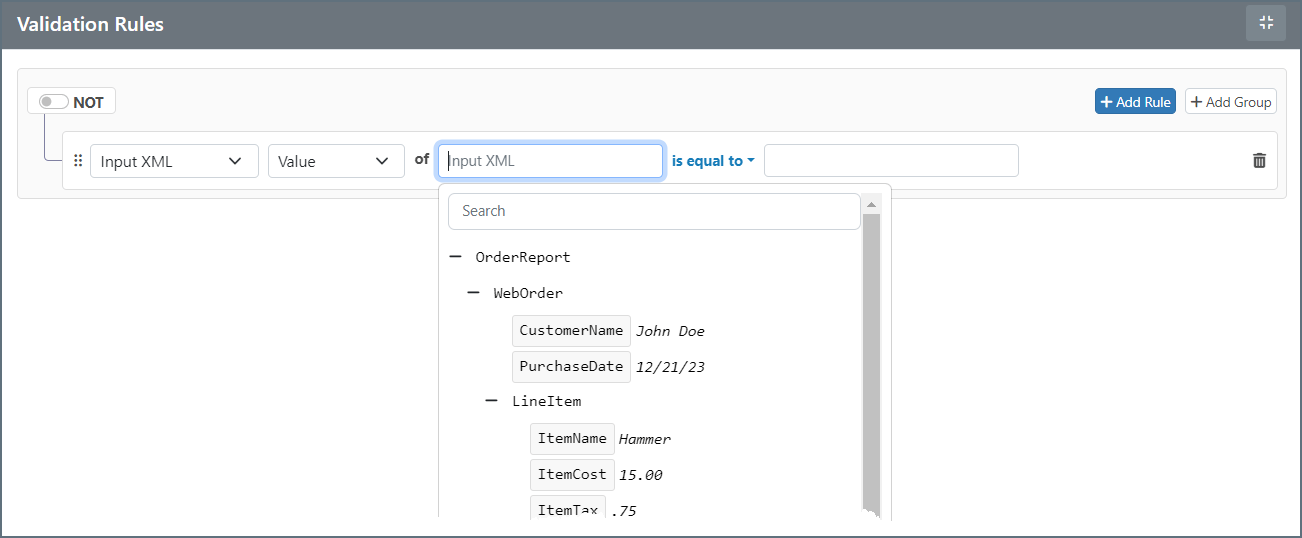
You can build complex validations by defining individual rules and/or groups of rules. To add a validation rule, click Add Rule or Add Group.
When you build your rules, use the dropdowns to make your selections and choose your operator. You can choose from the following:
- Input XML
- Value: The value at the XPath being evaluated
- Data Type: The data type of the value (String, Number, DateTime)
- Occurrences: The number of times the XPath occurs in the document
- Message Header
- Value: The value of the message header being evaluated
- Data Type: The data type of the value (String, Number, DateTime)
 and drag the object to a new location.
Input XML is only considered valid if all validation rules (or groups of rules) are satisfied. If the XPath configured in a rule is not found in the input XML, the validation automatically fails. In other words, if the connector is unable to read a value for a rule’s XPath, the input file does not pass the rule.
and drag the object to a new location.
Input XML is only considered valid if all validation rules (or groups of rules) are satisfied. If the XPath configured in a rule is not found in the input XML, the validation automatically fails. In other words, if the connector is unable to read a value for a rule’s XPath, the input file does not pass the rule.
Settings Tab
Connector Settings
| Setting | Description |
|---|---|
| Connector Id | The static, unique identifier for the connector. |
| Connector Type | Displays the connector name and a description of what it does. |
| Connector Description | An optional field to provide a free-form description of the connector and its role in the flow. |
Advanced Tab
Logging
Settings that govern the creation and storage of logs.
| Setting | Description |
|---|---|
| Log Level | The verbosity of logs generated by the connector. When you request support, set this to Debug. |
| Log Subfolder Scheme | Instructs the connector to group files in the Logs folder according to the selected interval. The Weekly option (which is the default) instructs the connector to create a new subfolder each week and store all logs for the week in that folder. Leaving this setting blank tells the connector to save all logs directly in the Logs folder. For connectors that process many transactions, using subfolders helps keep logs organized and improves performance. |
| Log Messages | Check this to have the log entry for a processed file include a copy of the file itself. If you disable this, you might not be able to download a copy of the file from the Transactions tab. |
Other Settings
Miscellaneous
Miscellaneous settings are for specific use cases.
| Setting | Description |
|---|---|
| Other Settings | Enables you to configure hidden connector settings in a semicolon-separated list (for example, setting1=value1;setting2=value2). Normal connector use cases and functionality should not require the use of these settings. |
Automation Tab
Settings related to the automatic processing of files by the connector.Performance
Settings related to the allocation of resources to the connector.
| Setting | Description |
|---|---|
| Max Workers | The maximum number of worker threads consumed from the threadpool to process files on this connector. If set, this overrides the default setting on the Performance Settings portion of the Advanced Settings page. |
| Max Files | The maximum number of files sent by each thread assigned to the connector. If set, this overrides the default setting on the Performance Settings portion of the Advanced Settings page. |