

Key Capabilities
- Odette FTP support for automotive and manufacturing industry secure file exchange
- Bidirectional file transfer with certificate-based encryption, signing, and compression
- Message routing through intermediary OFTP entities with SSID/SFID configuration
- Automatic retry and resend logic with synchronous and asynchronous receipt handling
Overview
An OFTP connection is configured in two places. Configure the OFTP Profiles page with an Odette identifier, settings for the local OFTP server, and other information that is global across all OFTP connections. Then configure individual OFTP connectors with connection settings specific to a single trading partner (a single OFTP entity). For information on routing an OFTP message through a separate OFTP entity (for example, a clearinghouse), see Message Routing.Profile Configuration
The OFTP profile must be configured before connections can be established with individual OFTP connectors. Click Profiles > OFTP on the navbar.OFTP Profile Tab
Personal Id
Settings for identifying the local profile.Server Settings
Settings related to the OFTP server implementation.Personal Certificate
Settings related to the private decryption and signature certificate.Optional Certificate Settings
Optional settings to define parameters for a certificate.Advanced Settings
Lockouts
Optional settings related to locking server access.Trusted IP Addresses
Logging
ログの作成と保存を制御する設定です。
| 設定 | 説明 |
|---|---|
| Log Level | コネクタが生成するログの詳細度です。サポートを依頼する際は、これをDebug に設定してください。 |
| Log Rotate Interval | 新しいログファイルを作成するまでに待機する日数です。 |
| Log Delete Interval | 古いログファイルを削除するまでに待機する日数です。 |
Miscellaneous
Miscellaneous 設定は、特定のユースケース向けの設定です。
| 設定 | 説明 |
|---|---|
| Other Settings | 非表示のコネクタ設定をセミコロン区切りのリストで設定できます(例:setting1=value1;setting2=value2)。通常のコネクタのユースケースや機能では、これらの設定の使用は必要ありません。 |
Connector Configuration
This section contains all of the configurable connector properties.Settings Tab
Host Configuration
Settings related to the remote OFTP entity to connect to.Connection Info
Settings related to the OFTP connection parameters.Trading Partner Certificates
Settings related to the public key certificates provided by the trading partner.Routing
Settings related to routing an OFTP message through a separate OFTP entity.
For example, if the connector needs to send files to
serverA and route the file through serverB, configure the connector to connect to serverA and set this field to an OFTP connector configured to connect to serverB. See Message Routing for more information.
Advanced Tab
Optional Certificates (PEM/CER Format)
Settings related to additional certificates to use for enhanced security.Alternate Local Profile
Settings that override the OFTP configuration on the Profile page. Setting an alternate local profile allows the use of different local certificates and identifiers for certain trading partners.TLS Client Authentication
Settings related to client authentication when two-way TLS authentication is required.Automatic Certificate Identification
The fields in this section let you specify patterns that allow the connector to automatically identify certificates. The default wildcard character in each field (*) instructs the connector to not search for each pattern.Advanced Settings
Settings not included in the previous categories.Proxy Settings
これらは、接続のルーティング先となるプロキシを識別し認証するための一連の設定です。デフォルトでは、このセクションはSecurity Settings ページのProxy Settings 部分にあるグローバル設定を使用します。チェックボックスをオフにすると、コネクタ固有の設定を指定できます。
| 設定 | 説明 |
|---|---|
| Proxy Type | プロキシベースのファイアウォールで使用されるプロトコル。 |
| Proxy Host | プロキシベースのファイアウォールの名前またはIP アドレス。 |
| Proxy Port | プロキシベースのファイアウォールのTCP ポート。 |
| Proxy User | プロキシベースのファイアウォールで認証するために使用するユーザー名。 |
| Proxy Password | プロキシベースのファイアウォールで認証するために使用するパスワード。 |
| Authentication Scheme | デフォルトのNone のままにするか、次の認証スキームのいずれかを選択します:Basic、Digest、Proprietary、またはNTLM。 |
Message
Message 設定は、コネクタがメッセージを検索する方法と、処理後にメッセージを管理する方法を決定します。
| 設定 | 説明 |
|---|---|
| Save to Sent Folder | コネクタが処理したファイルをコネクタのSent フォルダにコピーするには、これをオンにします。 |
| Sent Folder Scheme | 選択した間隔に従って、コネクタがSent フォルダ内のファイルをグループ化するよう指示します。例えば、Weekly オプションは、コネクタが毎週新しいサブフォルダを作成し、その週のすべての送信済みファイルをそのフォルダに保存するよう指示します。空白の設定は、コネクタがすべてのファイルをSent フォルダに直接保存するよう指示します。多数のトランザクションを処理するコネクタでは、サブフォルダを使用することでファイルを整理しやすくなり、パフォーマンスを向上できます。 |
Logging
ログの作成と保存を制御する設定です。
| 設定 | 説明 |
|---|---|
| Log Level | コネクタが生成するログの詳細度です。サポートを依頼する際は、これをDebug に設定してください。 |
| Log Subfolder Scheme | 選択した間隔に従って、コネクタがLogs フォルダ内のファイルをグループ化するよう指示します。Weekly オプション(デフォルト)は、コネクタが毎週新しいサブフォルダを作成し、その週のすべてのログをそのフォルダに保存するよう指示します。この設定を空白のままにすると、コネクタはすべてのログをLogs フォルダに直接保存します。多数のトランザクションを処理するコネクタでは、サブフォルダを使用することでログを整理しやすくなり、パフォーマンスが向上します。 |
| Log Messages | 処理したファイルのログエントリにファイル自体のコピーを含めるには、これをオンにします。これを無効にすると、Transactions タブからファイルのコピーをダウンロードできなくなる場合があります。 |
Miscellaneous
Miscellaneous 設定は、特定のユースケース向けの設定です。
| 設定 | 説明 |
|---|---|
| Other Settings | 非表示のコネクタ設定をセミコロン区切りのリストで設定できます(例:setting1=value1;setting2=value2)。通常のコネクタのユースケースや機能では、これらの設定の使用は必要ありません。 |
Automation Tab
Automation Settings
Settings related to the automatic processing of files by the connector.Performance
コネクタへのリソースの割り当てに関する設定です。
| 設定 | 説明 |
|---|---|
| Max Workers | このコネクタでファイルを処理するためにスレッドプールから消費されるワーカースレッドの最大数です。設定すると、Advanced Settings ページのPerformance Settings 部分にあるデフォルト設定が上書きされます。 |
| Max Files | コネクタに割り当てられた各スレッドが送信するファイルの最大数です。設定すると、Advanced Settings ページのPerformance Settings 部分にあるデフォルト設定が上書きされます。 |
Alerts Tab
SLAs Tab
Establishing a Connection
The following settings are required to establish an outgoing OFTP connection:- Identifier (the trading partner’s identifier)
- Password (the password associated with the trading partner’s identifier)
- Remote Host
- Port
Send and Receive Files
Once the OFTP profile and partner-specific OFTP connectors have been configured, files can be securely sent and received.Send Files
In an OFTP connector, the Transactions tab displays the files to be sent to the target trading partner. If Send Automation is enabled on the Automation tab, files that reach the Transactions tab of the connector are automatically packaged and sent. Access the log files for all transmissions by expanding the row associated with the transmitted file. The Create Test Files button lets you generate a simple series of test files to send to the trading partner.Resend and Retry
An OFTP Resend is triggered when the trading partner is expected to return an asynchronous receipt, but fails to do so within the Resend Interval duration (60 minutes by default). The application then attempts to resend the transmission. The application continues resending the message until a receipt is received or the Max Attempts (async) is exhausted. A Retry is triggered when the protocol response from the trading partner’s system indicates that the server has not received the transmission. This can indicate a networking or connectivity issue, which is often transient. The application retries the transmission every Retry Interval minutes until the transmission is received or the Max Attempts is exhausted.Receive Files
In an OFTP connector, the Transactions tab displays the files that have been received by the application and routed to the connector. Files are routed to a specific OFTP connector based on the Odette identifier present in the incoming OFTP message. Expand each file row to display a list of available logs for the transmission. These files are available on the connector Transactions tab. If the connector is connected to other connectors in the flow, files are automatically moved from the Transactions tab of the OFTP connector to the Transactions tab of the next connector in the flow.Message Routing
Each OFTP connector is configured to connect to a single OFTP entity. Sometimes using OFTP requires a routing scenario where a file originating at one OFTP entity (agentA in the image below) needs to pass through another OFTP entity (agent B) to reach the destination OFTP entity (agent C).
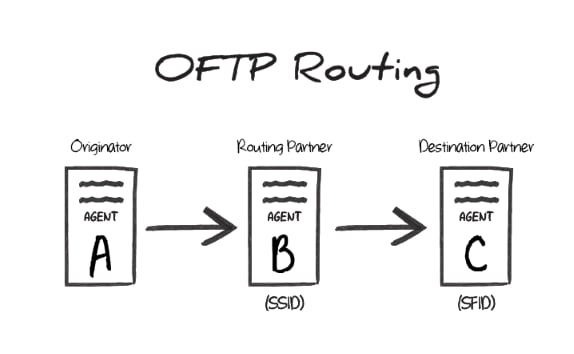
B is the SSID value during the transfer, and the Odette identifier of agent C is the SFID. In other words, the SSID identifies the ‘middleman’ server that the originator connects to, and the SFID identifies the target entity that this ‘middleman’ should route the OFTP message to.
OFTP Routing in Arc
To accomplish this routing scenario in Arc, configure one OFTP connector to connect to agentB (the ‘middleman’ server) and another OFTP connector to connect to agent C (the destination server).
Set the Routing Partner field (in the Routing portion of the Settings tab) for the agent C connector to the OFTP connector that is configured to connect to agent B.
Files to send out to the destination server should be processed by the OFTP connector configured to connect to agent C. The other OFTP connector (targeting agent B) is used behind-the-scenes to route the message, but does not directly process files in the Flow.
SSID vs SFID
If a partner provides a single identifier that they call an SFID, configure an OFTP connector to connect with this entity, and use the SFID as the SSID. If the partner provides an SFID value and an SSID value, the SFID corresponds to serverC in the above scenario, and the SSID corresponds to server B.