> ## Documentation Index
> Fetch the complete documentation index at: https://docs.arc.cdata.com/llms.txt
> Use this file to discover all available pages before exploring further.
# Email Receive Connector (Deprecated)
> The Email Receive connector supports retrieving messages from an IMAP mail server with OAuth 2.0 support and advanced filtering.
export const NameDescription = ({extraRows}) =>
| 設定 |
説明 |
| Connector Id |
コネクタの静的で一意の識別子です。 |
| Connector Type |
コネクタ名とその機能の説明を表示します。 |
| Connector Description |
コネクタおよびフロー内でのその役割について自由形式の説明を提供するためのオプションフィールドです。 |
{extraRows}
;
export const CommonProxySettings = () => <>
これらは、接続のルーティング先となるプロキシを識別し認証するための一連の設定です。デフォルトでは、このセクションはSecurity Settings ページのProxy Settings 部分にあるグローバル設定を使用します。チェックボックスをオフにすると、コネクタ固有の設定を指定できます。
| 設定 | 説明 |
|---|
| Proxy Type |
プロキシベースのファイアウォールで使用されるプロトコル。 |
| Proxy Host |
プロキシベースのファイアウォールの名前またはIP アドレス。 |
| Proxy Port |
プロキシベースのファイアウォールのTCP ポート。 |
| Proxy User |
プロキシベースのファイアウォールで認証するために使用するユーザー名。 |
| Proxy Password |
プロキシベースのファイアウォールで認証するために使用するパスワード。 |
| Authentication Scheme |
デフォルトのNone のままにするか、次の認証スキームのいずれかを選択します:Basic、Digest、Proprietary、またはNTLM。 |
;
export const SlasTab = ({siteName = "CData Arc"}) => <>
サービスレベルアグリーメント(SLA)の設定に関する設定です。
SLA を使用すると、フロー内のコネクタが送受信すると見込まれるボリュームを設定し、そのボリュームを達成すると見込まれる期間を設定できます。{siteName} は、SLA が達成されない場合にユーザーへ警告するメールを送信し、SLA をAt Risk としてマークします。これは、SLA が間もなく達成されない場合にViolated としてマークされることを意味します。これにより、ユーザーは介入してSLA が達成されない理由を特定し、適切な対応を取る機会を得られます。At Risk 期間の終了時点でもSLA が達成されない場合、SLA はviolated としてマークされ、ユーザーに再度通知されます。
SLA を定義するには、Expected Volume をオンに切り替え、Settings タブをクリックします。
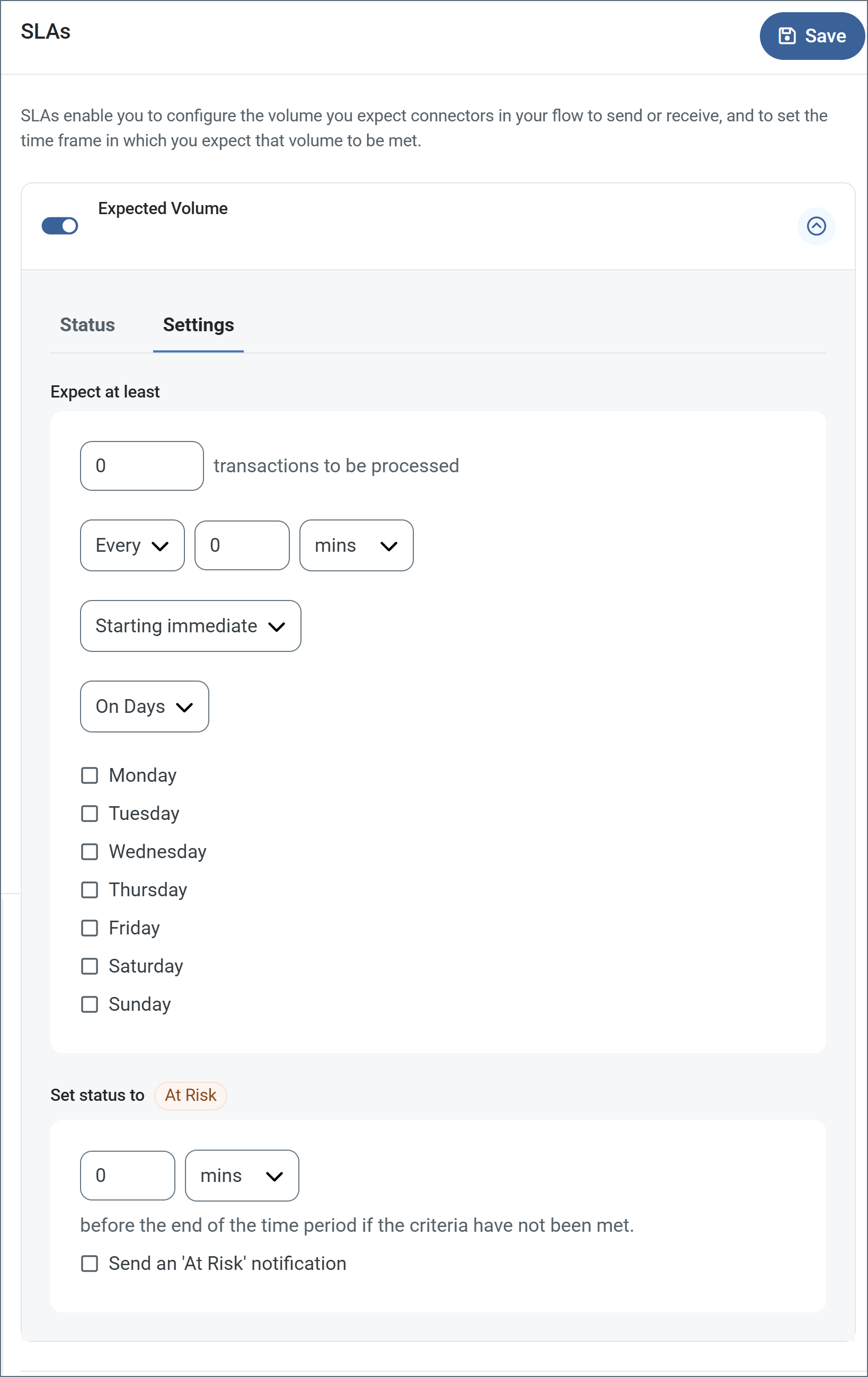
- コネクタに送信と受信の個別のアクションがある場合は、ラジオボタンを使用してSLA がどちらの方向に適用されるかを指定します。
- ウィンドウのExpect at least 部分で、次を設定します。
- 処理を見込む最小トランザクション数(ボリューム)を設定します。
- Every フィールドを使用して期間を指定します。
- SLA を有効にするタイミングを指定します。Starting on を選択した場合は、日付および時刻フィールドを入力します。
- SLA を有効にしたい曜日のチェックボックスをオンにします。必要に応じて、ドロップダウンでEveryday を選択します。
- ウィンドウのSet status to 'At Risk' 部分で、SLA をAt Risk としてマークするタイミングを指定します。
- デフォルトでは、SLA が違反状態になるまで通知は送信されません。これを変更するには、Send an 'At Risk' notification をオンにします。
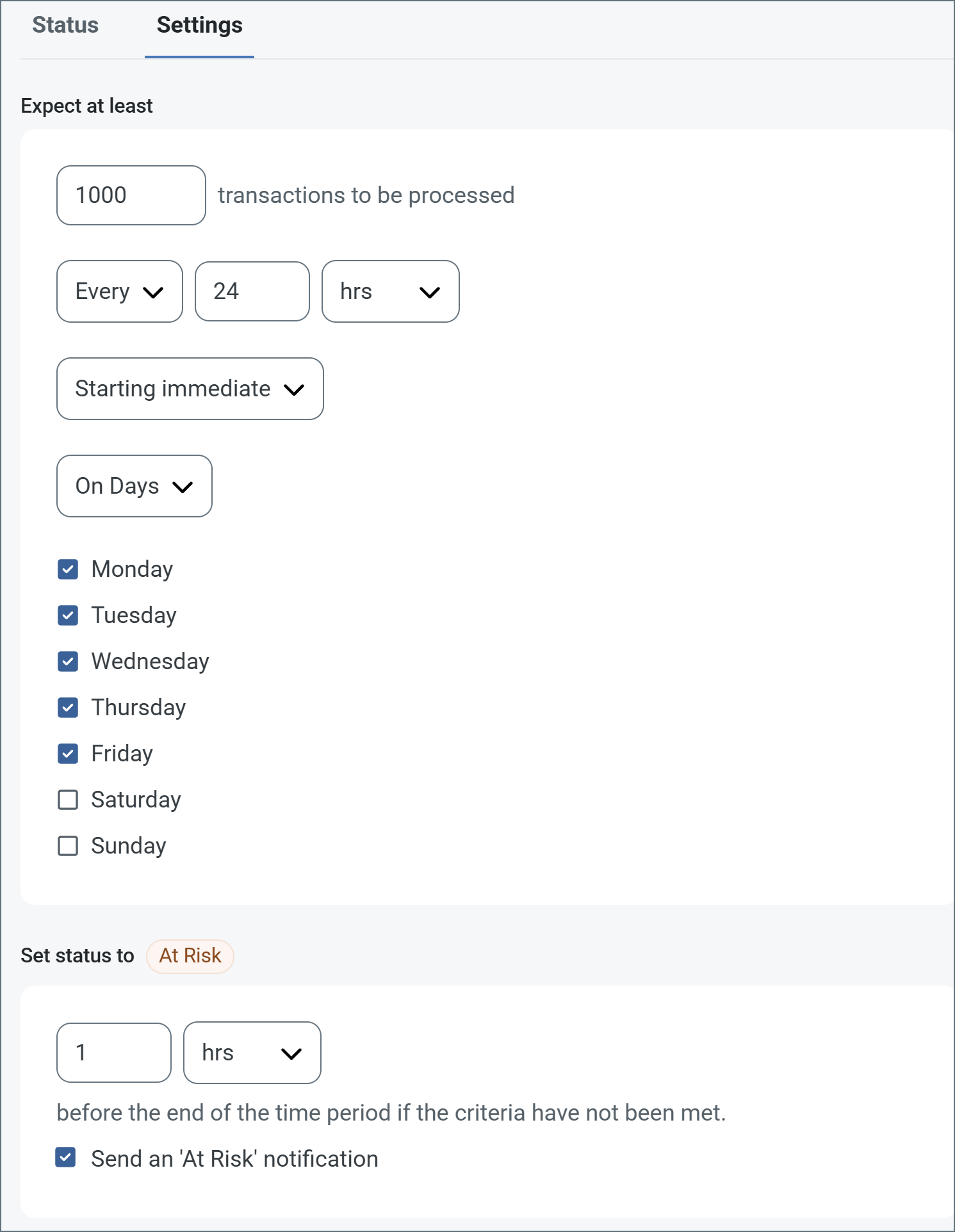
次の例は、月曜日から金曜日まで毎日1000 件のファイルを受信すると見込むコネクタ向けに設定されたSLA を示しています。1000 件のファイルが受信されていない場合、期間の終了の1時間前にAt Risk 通知が送信されます。
 必要に応じてSLA アラートをオフにすることができます。これはメンテナンスウィンドウ中に役立ちます。navbar でSettings をクリックし、Alerts > General Alerts に移動します。タブレットと鉛筆のアイコンをクリックして編集し、SLA Alerts 設定のチェックを外します。
;
export const AlertsTab = ({siteNameShort = "Arc"}) => <>
必要に応じてSLA アラートをオフにすることができます。これはメンテナンスウィンドウ中に役立ちます。navbar でSettings をクリックし、Alerts > General Alerts に移動します。タブレットと鉛筆のアイコンをクリックして編集し、SLA Alerts 設定のチェックを外します。
;
export const AlertsTab = ({siteNameShort = "Arc"}) => <>
アラートの設定に関する設定です。
サービスレベルアグリーメント(SLA)を実行する前に、通知用のメールアラートをセットアップする必要があります。デフォルトでは、{siteNameShort} はAlerts タブのグローバル設定を使用します。このコネクタに別の設定を使用するには、Override global setting をオンに切り替えます。
デフォルトではエラーアラートが有効になっており、エラーが発生するたびにメールが送信されます。これをオフにするには、Enable チェックボックスのチェックを外します。
Subject(必須)を入力します。Allow {siteNameShort}Script in Subject をチェックすると、Subject フィールドで{siteNameShort}Script を使用できます。これを選択すると、{siteNameShort}Script エディタボタンが表示されます( )。
)。
必要に応じてRecipient のメールアドレスをカンマ区切りのリストで入力します。
;
export const MiscConnector = () => <>
Miscellaneous 設定は、特定のユースケース向けの設定です。
| 設定 |
説明 |
| Other Settings |
非表示のコネクタ設定をセミコロン区切りのリストで設定できます(例:setting1=value1;setting2=value2)。通常のコネクタのユースケースや機能では、これらの設定の使用は必要ありません。 |
;
export const MacrosExamples = ({extraMacros = []}) => <>
%Ext% や %ShortDate% などの一部のマクロは引数を必要としませんが、引数を必要とするものもあります。
引数を取るすべてのマクロは次の構文を使用します。%Macro:argument%
引数を取るマクロの例を次に示します。
- %Header:headername%:
headername はメッセージ上のヘッダーの名前です。
- %Header:mycustomheader% は、入力メッセージに設定された
mycustomheader ヘッダーの値に解決されます。
- %Header:ponum% は、入力メッセージに設定された
ponum ヘッダーの値に解決されます。
- %RegexFilename:pattern%:
pattern は正規表現パターンです。例えば、%RegexFilename:^([\w][A-Za-z]+)% は、ファイル名の最初の単語にマッチしてそれに解決され、大文字・小文字を区別しません(test_file.xml はtest に解決されます)。
- %Vault:vaultitem%:
vaultitem はVault 内のアイテムの名前です。例えば、%Vault:companyname% は、Vault に保存されたcompanyname アイテムの値に解決されます。
- %DateFormat:format%:
format は許容される日付形式です(詳細は日付形式のサンプルを参照してください)。例えば、%DateFormat:yyyy-MM-dd-HH-mm-ss-fff% は、ファイルの日付とタイムスタンプに解決されます。
{extraMacros.filter(item => item.example).map(item => - {item.example}
)}
次の例に示すように、より高度なマクロを作成することもできます。
- 1 つのファイル名で複数のマクロを組み合わせる:
%DateFormat:yyyy-MM-dd-HH-mm-ss-fff%%EXT%
- マクロの外側にテキストを含める:
MyFile_%DateFormat:yyyy-MM-dd-HH-mm-ss-fff%
- マクロの内側にテキストを含める:
%DateFormat:'DateProcessed-'yyyy-MM-dd_'TimeProcessed-'HH-mm-ss%
;
export const MacrosTable = ({siteName = "CData Arc", extraMacros = []}) => <>
ファイル命名戦略でマクロを使用すると、データの整理効率と文脈の理解を高めることができます。
ファイル名にマクロを組み込むことで、識別子、タイムスタンプ、ヘッダー情報などの関連情報を
動的に含めることができ、各ファイルに有用な文脈を提供します。
{siteName} は次のマクロをサポートしています。これらはすべて次の構文を使用します。%Macro%
| マクロ | 説明 |
|---|
| ConnectorID | コネクタのConnectorID に評価されます。 |
| ConnectorName | コネクタの名前に評価されます。ファイル名やパスに接続名を含めることができます。例えば、どのデータベース接続が生成したかによってバックアップファイルにタグを付けるために使用できます。 |
| Ext | コネクタが現在処理しているファイルの拡張子に評価されます。 |
| Filename | コネクタが現在処理しているファイルのファイル名(拡張子を含む)に評価されます。 |
| FilenameNoExt | コネクタが現在処理しているファイルのファイル名(拡張子を除く)に評価されます。 |
| MessageId | コネクタが出力しているメッセージのMessageId に評価されます。 |
| RegexFilename:pattern | コネクタが現在処理しているファイルのファイル名に正規表現パターンを適用します。 |
| Header:headername | コネクタが現在処理しているメッセージ上の対象ヘッダー(headername)の値に評価されます。 |
| LongDate | システムの現在の日時を長い形式(例:Wednesday, January 24, 2024)で評価します。 |
| ShortDate | システムの現在の日時をyyyy-MM-dd 形式(例:2024-01-24)で評価します。 |
| DateFormat:format | システムの現在の日時を指定された形式(format)で評価します。利用可能な日時形式については、日付形式のサンプルを参照してください。 |
| Vault:vaultitem | 指定されたVault アイテムの値に評価されます。 |
{extraMacros.map(item =>
| {item.name} |
{item.description} |
)}
;
export const siteNameShort = "Arc";
export const siteName = "CData Arc";
export const extraMacros = [{
name: "Subject",
description: "Evaluates to the subject of the email currently being received by the connector."
}];
The Email Receive connector supports retrieving messages from an IMAP mail server.
## Key Capabilities
* IMAP-based email polling with OAuth 2.0 support for modern providers
* Advanced filtering with IMAP RFC compliant search filters
* Support for downloading full messages or attachments only
* Configurable message retention and deletion policies
## Overview
The Email Receive connector provides a simple way to automate the process of receiving emails. The connector connects to an IMAP server and polls a specified mailbox for new messages to process. By default the connector only receives messages that have not yet been processed, and it supports additional IMAP filters.
The connector supports receiving entire messages in EML format or only downloading attachments on the emails being processed.
OAuth 2.0 configuration for Outlook and Gmail mail servers are the two most common connection configurations made in the Email Receive connector. You can access additional guides and resources for these two mail servers in the CData Community. See [Using OAuth 2.0 in the Email Send and Receive Connectors](https://community.cdata.com/cdata-arc-48/using-oauth-2-0-in-the-email-send-and-receive-connectors-106?tid=106\&fid=48).
## Connector Configuration
This section contains all of the configurable connector properties.
### Settings Tab
#### Email Receive Configuration
*Settings related to establishing the connection.*
#### IMAP Connection
*Settings related to establishing the connection to the IMAP server.*
| Setting | Description |
| ------------ | ----------------------------------------------------------------------------------------------------------------------------------------------------------------------------------------------------------------------------------------------------------------------------------------------------------------------------------------------------------------------------- |
| **Host** | The hostname or IP address of the IMAP server. |
| **Port** | The port on which to connect to the IMAP server. Typical values include 143 and 993. |
| **Mailbox** | The IMAP mailbox to poll for messages. |
| **TLS Type** | The method used to negotiate SSL/TLS when connecting to the server: **STARTTLS**: A plain text connection is established. Afterwards, SSL/TLS can be started with an explicit command. **SSL/TLS**: Negotiation occurs immediately without first establishing a plain text connection. **None (Plain Text)**: A plain text connection is established, and no SSL/TLS is used. |
### Authentication
*Settings related to authenticating the connection.*
| Setting | Description |
| ---------------------------- | ------------------------------------------------------------------------------------------------------------------------------------------------------------------------------------------------------------------------------------------------------ |
| **User** | The username to login to the IMAP server. |
| **Authentication Mechanism** | The type of authentication to use to login to the server. The options vary based on your choice. |
| **Password** | (Basic and NTLM) The password to the IMAP server. |
| **Auth URL** | (OAuth 2.0) The authorization URL for the service. This is the URL you are directed to when clicking the **Connect** button to log in and grant permission to the application. |
| **Access Token URL** | (OAuth 2.0) The URL to the access token. |
| **Client Id** | (OAuth 2.0) The client Id assigned when you registered for OAuth. |
| **Client Secret** | (OAuth 2.0) The secret assigned when you registered for OAuth. |
| **Scope** | (OAuth 2.0) A list of scopes that the application should have access to. |
| **Callback URL** | (OAuth 2.0) The URL where the service you connect to returns tokens to provide access. Services often require you to whitelist the URLs that are allowed, so this is the value to use when configuring the application registration with your service. |
#### Download
*Settings related to processing messages.*
| Setting | Description |
| ----------------------------- | ----------------------------------------------------------------------------------------------------------------------------------------------------------------------------------------------------------------------------------------------------------------------------------------------------- |
| **New Messages** | Check this to only process new messages. This is usually controlled by tracking the UID of downloaded messages. If the UID values become invalid, the connector falls back to using the timestamp of the last processed message or the **Days to Search** setting if no messages have been processed. |
| **Days to Search** | The number of days to search for messages. If **Only process new messages** is checked, this value is only used if the connector cannot search by UID or the timestamp of the last processed message. |
| **Additional Search Filters** | Supply an IMAP RFC compliant search filter to append to the query that is automatically built based on the **New Messages** and **Days to Search** settings. |
| **Download Type** | Choose to download full messages in EML format or only email attachments. |
| **Delete Emails** | Check this to delete successfully downloaded messages from the mailbox. |
| **Expunge After Delete** | Check this to permanently delete successfully downloaded emails from the mailbox. **Warning**: The server might permanently delete (expunge) messages immediately, making them unrecoverable. |
### Automation Tab
#### Automation Settings
*Settings related to the automatic processing of files by the connector.*
| Setting | Description |
| ------------------------- | ----------------------------------------------------------------------------------------------------------------------------------------------------------------------------------------------------------------- |
| **Receive** | Whether the connector should automatically poll the remote mailbox for messages to download. |
| **Receive Interval** | The interval between automatic download attempts. |
| **Minutes Past the Hour** | The minutes offset for an hourly schedule. Only applicable when the interval setting above is set to *Hourly*. For example, if this value is set to 5, the automation service downloads at 1:05, 2:05, 3:05, etc. |
| **Time** | The time of day that the attempt should occur. Only applicable when the interval setting above is set to *Daily*, *Weekly*, or *Monthly*. |
| **Day** | The day on which the attempt should occur. Only applicable when the interval setting above is set to *Weekly* or *Monthly*. |
| **Minutes** | The number of minutes to wait before attempting the download. Only applicable when the interval setting above is set to *Minute*. |
| **Cron Expression** | A five-position string representing a cron expression that determines when the attempt should occur. Only applicable when the interval setting above is set to *Advanced*. |
### Alerts Tab
### SLAs Tab
### Advanced Tab
#### Proxy Settings
#### Advanced Settings
*Settings not included in the previous categories.*
| Setting | Description |
| -------------------------------------- | ------------------------------------------------------------------------------------------------------------------------------------------------------------------------------------------------------------------------------------------------------------------------------------------------------------------------------------------------------------------------------------------------------- |
| **IMAP Headers** | A comma-delimited list of headers from the IMAP message that should be promoted as metadata in the downloaded file. |
| **Incoming Server Public Certificate** | The public key certificate used to verify the identity of a TLS/SSL server. If the target server uses TLS/SSL, set this field to the certificate that identifies the server. If the server's certificate is not available, you can leave this setting blank to allow the underlying OS/JVM to perform certificate validation, or set it to `Any Certificate` to implicitly trust the server's identity. |
| **Command Timeout (seconds)** | The command execution timeout duration in seconds. |
| **Local File Scheme** | A scheme for assigning filenames to messages that are output by the connector. You can use macros in your filenames dynamically to include information such as identifiers and timestamps. For more information, see [Macros](#macros). |
#### Logging
| Setting | Description |
| ------------------------ | ----------------------------------------------------------------------------------------------------------------------------------------------------------------------------------------------------------------------------------------------------------------------------------------------------------------------------------------------------------------------------------------------------------------------------------------------------------------------- |
| **Log Level** | The verbosity of logs generated by the connector. When you request support, set this to **Debug**. |
| **Log Subfolder Scheme** | Instructs the connector to group files in the Logs folder according to the selected interval. The **Weekly** option (which is the default) instructs the connector to create a new subfolder each week and store all logs for the week in that folder. Leaving this setting blank tells the connector to save all logs directly in the Logs folder. For connectors that process many transactions, using subfolders helps keep logs organized and improves performance. |
| **Log Messages** | Check this to have the log entry for a processed file include a copy of the file itself. If you disable this, you might not be able to download a copy of the file from the **Input** or **Output** tabs. |
#### Miscellaneous
## Establishing a Connection
The following settings are required to establish a network-level connection to the IMAP server:
* Host
* Port
* TLS Type
Use the **Test Connection** button to verify that the connector can reach the server.
Once network-level connectivity has been established, the following settings are required to access the messages stored on the IMAP server:
* User
* Password or OAuth 2.0 authentication credentials
* Mailbox
## Receiving Emails
If **Receive Automation** is enabled, the Email Receive connector automatically polls the configured IMAP mailbox for messages to download. By default, the connector only receives messages it has not already downloaded. The first time the connector receives messages, use the **Days to Search** setting in the [Download](#download) configuration section to specify the range of messages to download.
Messages can also be manually retrieved by clicking the **Receive** button on the Output tab of the connector.
The **Download Type** setting determines whether full messages or just message attachments are downloaded. Downloaded files are placed in the **Output Folder** or passed along to the next connector in the flow.
When **Download Type** is set to *Attachments*, the connector adds two headers to each message:
* EmailReceive-Attachment-Index: The attachment number for each attachment
* EmailReceive-Attachment-Count: The total number of attachments on the email
### Search Filters
The **IMAP Search Filter** setting allows for further customization of the range of messages to retrieve. This field accepts standard IMAP protocol filters and only downloads messages that match the configured filters.
The following filters are supported:
| Filter | Description |
| ------------------------------------ | -------------------------------------------------------------------------------------------------------------------------------------------------------- |
| `` | Messages with message sequence numbers corresponding to the specified message sequence number set. |
| **ALL** | All messages in the mailbox: this is the default initial key for AND-ing. |
| **ANSWERED** | Messages with the `\Answered` flag set. |
| **BCC** `` | Messages that contain the specified string in the envelope structure's BCC field. |
| **BEFORE** `` | Messages whose internal date is earlier than the specified date. |
| **BODY** `` | Messages that contain the specified string in the body of the message. |
| **CC** `` | Messages that contain the specified string in the envelope structure's CC field. |
| **DELETED** | Messages with the `\Deleted` flag set. |
| **DRAFT** | Messages with the `\Draft` flag set. |
| **FLAGGED** | Messages with the `\Flagged` flag set. |
| **FROM** `` | Messages that contain the specified string in the envelope structure's FROM field. |
| **HEADER** ` ` | Messages that have a header with the specified field-name (as defined in \[RFC-822]) and that contain the specified string in the \[RFC-822] field-body. |
| **KEYWORD** `` | Messages with the specified keyword set. |
| **LARGER** `` | Messages with an RFC822.SIZE larger than the specified number of octets. |
| **NEW** | Messages that have the `\Recent` flag set but not the `\Seen` flag. This is functionally equivalent to "(RECENT UNSEEN)". |
| **NOT** `` | Messages that do not match the specified search key. |
| **OLD** | Messages that do not have the `\Recent` flag set. This is functionally equivalent to "NOT RECENT" (as opposed to "NOT NEW"). |
| **ON** `` | Messages whose internal date is within the specified date. |
| **OR** ` ` | Messages that match either search key. |
| **RECENT** | Messages that have the `\Recent` flag set. |
| **SEEN** | Messages that have the `\Seen` flag set. |
| **SENTBEFORE** `` | Messages whose \[RFC-822] Date: header is earlier than the specified date. |
| **SENTON** `` | Messages whose \[RFC-822] Date: header is within the specified date. |
| **SENTSINCE** `` | Messages whose \[RFC-822] Date: header is within or later than the specified date. |
| **SINCE** `` | Messages whose internal date is within or later than the specified date. |
| **SMALLER** `` | Messages with an RFC822.SIZE smaller than the specified number of octets. |
| **SUBJECT** `` | Messages that contain the specified string in the envelope structure's SUBJECT field. |
| **TEXT** `` | Messages that contain the specified string in the header or body of the message. |
| **TO** `` | Messages that contain the specified string in the envelope structure's TO field. |
| **UID** `` | Messages with unique identifiers corresponding to the specified unique identifier set. |
| **UNANSWERED** | Messages that do not have the `\Answered` flag set. |
| **UNDELETED** | Messages that do not have the `\Deleted` flag set. |
| **UNDRAFT** | Messages that do not have the `\Draft` flag set. |
| **UNFLAGGED** | Messages that do not have the `\Flagged` flag set. |
| **UNKEYWORD** `` | Messages that do not have the specified keyword set. |
| **UNSEEN** | Messages that do not have the `\Seen` flag set. |
## Macros
### Examples