> ## Documentation Index
> Fetch the complete documentation index at: https://docs.arc.cdata.com/llms.txt
> Use this file to discover all available pages before exploring further.
# AES Connector
> Configuration and usage guide for the CData Arc AES connector, which natively encrypts and decrypts message content using AES.
export const NameDescription = ({extraRows}) =>
| 設定 |
説明 |
| Connector Id |
コネクタの静的で一意の識別子です。 |
| Connector Type |
コネクタ名とその機能の説明を表示します。 |
| Connector Description |
コネクタおよびフロー内でのその役割について自由形式の説明を提供するためのオプションフィールドです。 |
{extraRows}
;
export const SlasTab = ({siteName = "CData Arc"}) => <>
サービスレベルアグリーメント(SLA)の設定に関する設定です。
SLA を使用すると、フロー内のコネクタが送受信すると見込まれるボリュームを設定し、そのボリュームを達成すると見込まれる期間を設定できます。{siteName} は、SLA が達成されない場合にユーザーへ警告するメールを送信し、SLA をAt Risk としてマークします。これは、SLA が間もなく達成されない場合にViolated としてマークされることを意味します。これにより、ユーザーは介入してSLA が達成されない理由を特定し、適切な対応を取る機会を得られます。At Risk 期間の終了時点でもSLA が達成されない場合、SLA はviolated としてマークされ、ユーザーに再度通知されます。
SLA を定義するには、Expected Volume をオンに切り替え、Settings タブをクリックします。
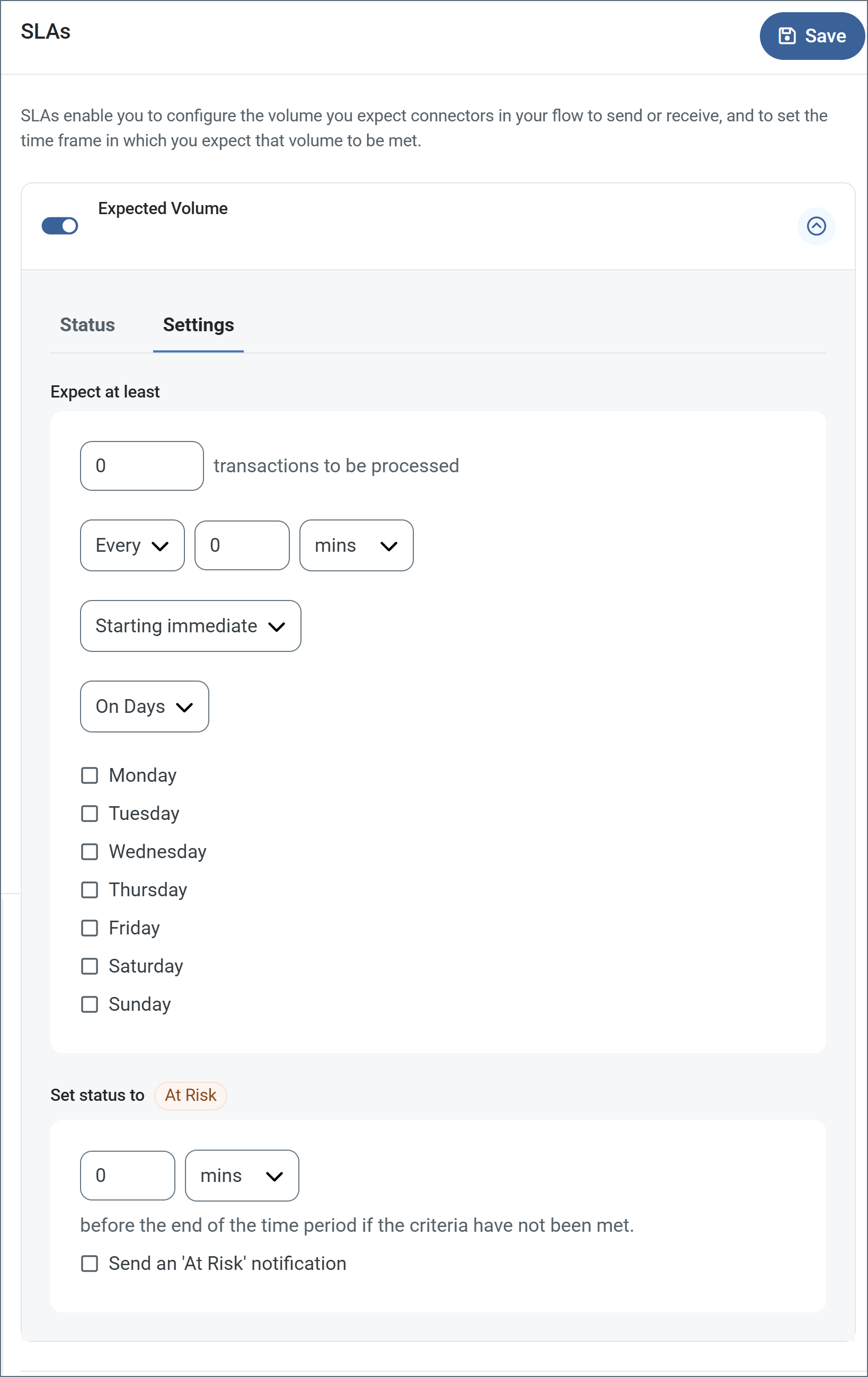
- コネクタに送信と受信の個別のアクションがある場合は、ラジオボタンを使用してSLA がどちらの方向に適用されるかを指定します。
- ウィンドウのExpect at least 部分で、次を設定します。
- 処理を見込む最小トランザクション数(ボリューム)を設定します。
- Every フィールドを使用して期間を指定します。
- SLA を有効にするタイミングを指定します。Starting on を選択した場合は、日付および時刻フィールドを入力します。
- SLA を有効にしたい曜日のチェックボックスをオンにします。必要に応じて、ドロップダウンでEveryday を選択します。
- ウィンドウのSet status to 'At Risk' 部分で、SLA をAt Risk としてマークするタイミングを指定します。
- デフォルトでは、SLA が違反状態になるまで通知は送信されません。これを変更するには、Send an 'At Risk' notification をオンにします。
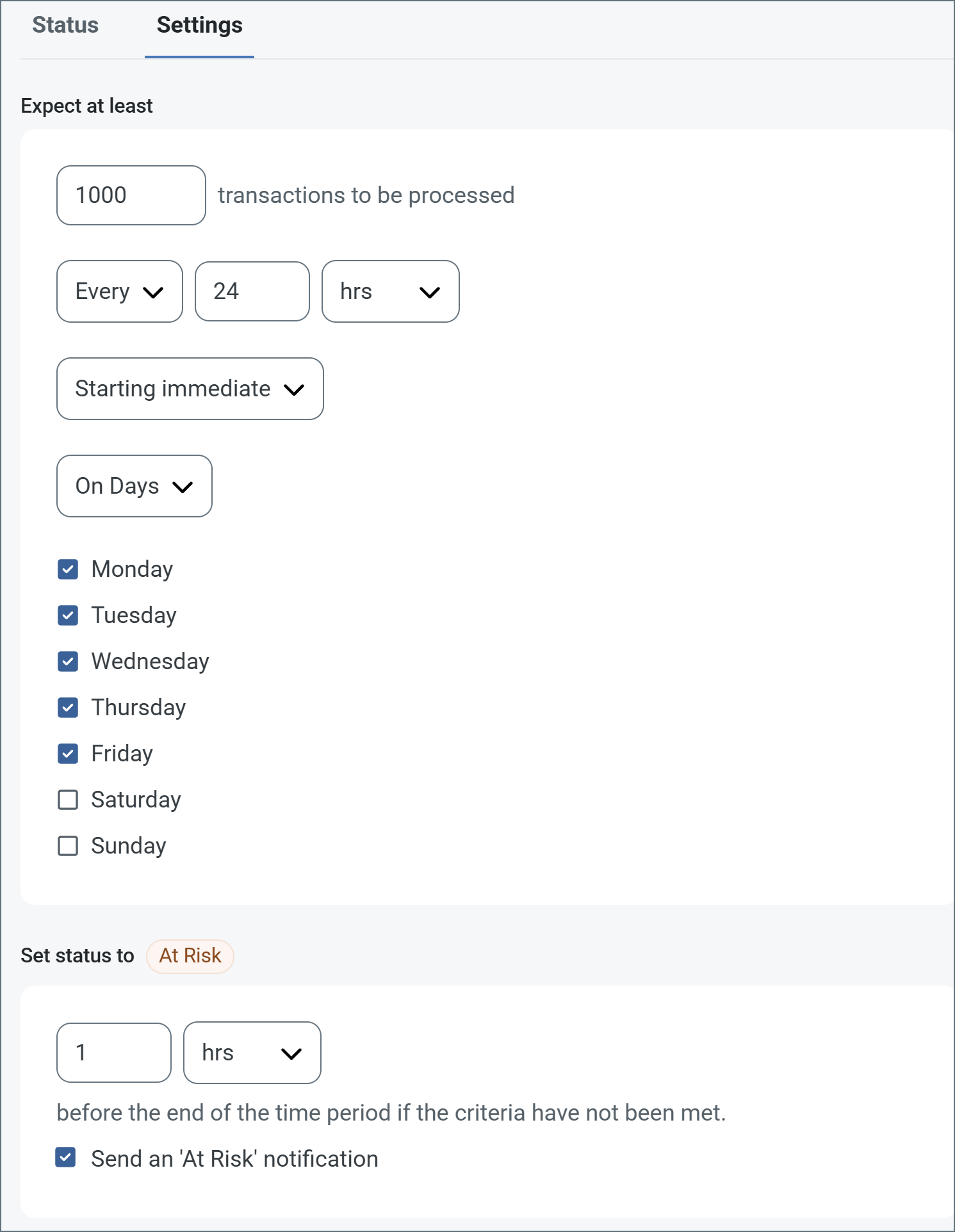
次の例は、月曜日から金曜日まで毎日1000 件のファイルを受信すると見込むコネクタ向けに設定されたSLA を示しています。1000 件のファイルが受信されていない場合、期間の終了の1時間前にAt Risk 通知が送信されます。
 必要に応じてSLA アラートをオフにすることができます。これはメンテナンスウィンドウ中に役立ちます。navbar でSettings をクリックし、Alerts > General Alerts に移動します。タブレットと鉛筆のアイコンをクリックして編集し、SLA Alerts 設定のチェックを外します。
;
export const AlertsTab = ({siteNameShort = "Arc"}) => <>
必要に応じてSLA アラートをオフにすることができます。これはメンテナンスウィンドウ中に役立ちます。navbar でSettings をクリックし、Alerts > General Alerts に移動します。タブレットと鉛筆のアイコンをクリックして編集し、SLA Alerts 設定のチェックを外します。
;
export const AlertsTab = ({siteNameShort = "Arc"}) => <>
アラートの設定に関する設定です。
サービスレベルアグリーメント(SLA)を実行する前に、通知用のメールアラートをセットアップする必要があります。デフォルトでは、{siteNameShort} はAlerts タブのグローバル設定を使用します。このコネクタに別の設定を使用するには、Override global setting をオンに切り替えます。
デフォルトではエラーアラートが有効になっており、エラーが発生するたびにメールが送信されます。これをオフにするには、Enable チェックボックスのチェックを外します。
Subject(必須)を入力します。Allow {siteNameShort}Script in Subject をチェックすると、Subject フィールドで{siteNameShort}Script を使用できます。これを選択すると、{siteNameShort}Script エディタボタンが表示されます( )。
)。
必要に応じてRecipient のメールアドレスをカンマ区切りのリストで入力します。
;
export const Message = () => <>
Message 設定は、コネクタがメッセージを検索する方法と、処理後にメッセージを管理する方法を決定します。
Note: 以下の設定は非推奨となり、デフォルトで非表示になっています。以前に有効化またはデフォルト以外の値に設定されていたコネクタにのみ表示されます。処理済みファイルのコピーを保持するには、フロー内のコネクタを右クリックし、成功パスを表示を選択して、成功パスをFile コネクタに接続してください。
| 設定 | 説明 |
|---|
| Sent フォルダに保存(非推奨) |
コネクタが処理したファイルをSent フォルダにコピーします。デフォルトで無効です。Sent フォルダに保存されたファイルは保存データの暗号化の対象外です。 |
| Sent フォルダのスキーム(非推奨) |
選択した時間間隔でSent フォルダ内のファイルをグループ化します。Sent フォルダに保存が有効な場合のみ適用されます。 |
;
export const MiscConnector = () => <>
Miscellaneous 設定は、特定のユースケース向けの設定です。
| 設定 |
説明 |
| Other Settings |
非表示のコネクタ設定をセミコロン区切りのリストで設定できます(例:setting1=value1;setting2=value2)。通常のコネクタのユースケースや機能では、これらの設定の使用は必要ありません。 |
;
export const Logging = () => <>
ログの作成と保存を制御する設定です。
| 設定 |
説明 |
| Log Level |
コネクタが生成するログの詳細度です。サポートを依頼する際は、これをDebug に設定してください。 |
| Log Subfolder Scheme |
選択した間隔に従って、コネクタがLogs フォルダ内のファイルをグループ化するよう指示します。Weekly オプション(デフォルト)は、コネクタが毎週新しいサブフォルダを作成し、その週のすべてのログをそのフォルダに保存するよう指示します。この設定を空白のままにすると、コネクタはすべてのログをLogs フォルダに直接保存します。多数のトランザクションを処理するコネクタでは、サブフォルダを使用することでログを整理しやすくなり、パフォーマンスが向上します。 |
| Log Messages |
処理したファイルのログエントリにファイル自体のコピーを含めるには、これをオンにします。これを無効にすると、Transactions タブからファイルのコピーをダウンロードできなくなる場合があります。 |
;
export const MacrosExamples = ({extraMacros = []}) => <>
%Ext% や %ShortDate% などの一部のマクロは引数を必要としませんが、引数を必要とするものもあります。
引数を取るすべてのマクロは次の構文を使用します。%Macro:argument%
引数を取るマクロの例を次に示します。
- %Header:headername%:
headername はメッセージ上のヘッダーの名前です。
- %Header:mycustomheader% は、入力メッセージに設定された
mycustomheader ヘッダーの値に解決されます。
- %Header:ponum% は、入力メッセージに設定された
ponum ヘッダーの値に解決されます。
- %RegexFilename:pattern%:
pattern は正規表現パターンです。例えば、%RegexFilename:^([\w][A-Za-z]+)% は、ファイル名の最初の単語にマッチしてそれに解決され、大文字・小文字を区別しません(test_file.xml はtest に解決されます)。
- %Vault:vaultitem%:
vaultitem はVault 内のアイテムの名前です。例えば、%Vault:companyname% は、Vault に保存されたcompanyname アイテムの値に解決されます。
- %DateFormat:format%:
format は許容される日付形式です(詳細は日付形式のサンプルを参照してください)。例えば、%DateFormat:yyyy-MM-dd-HH-mm-ss-fff% は、ファイルの日付とタイムスタンプに解決されます。
{extraMacros.filter(item => item.example).map(item => - {item.example}
)}
次の例に示すように、より高度なマクロを作成することもできます。
- 1 つのファイル名で複数のマクロを組み合わせる:
%DateFormat:yyyy-MM-dd-HH-mm-ss-fff%%EXT%
- マクロの外側にテキストを含める:
MyFile_%DateFormat:yyyy-MM-dd-HH-mm-ss-fff%
- マクロの内側にテキストを含める:
%DateFormat:'DateProcessed-'yyyy-MM-dd_'TimeProcessed-'HH-mm-ss%
;
export const MacrosTable = ({siteName = "CData Arc", extraMacros = []}) => <>
ファイル命名戦略でマクロを使用すると、データの整理効率と文脈の理解を高めることができます。
ファイル名にマクロを組み込むことで、識別子、タイムスタンプ、ヘッダー情報などの関連情報を
動的に含めることができ、各ファイルに有用な文脈を提供します。
{siteName} は次のマクロをサポートしています。これらはすべて次の構文を使用します。%Macro%
| マクロ | 説明 |
|---|
| ConnectorID | コネクタのConnectorID に評価されます。 |
| ConnectorName | コネクタの名前に評価されます。ファイル名やパスに接続名を含めることができます。例えば、どのデータベース接続が生成したかによってバックアップファイルにタグを付けるために使用できます。 |
| Ext | コネクタが現在処理しているファイルの拡張子に評価されます。 |
| Filename | コネクタが現在処理しているファイルのファイル名(拡張子を含む)に評価されます。 |
| FilenameNoExt | コネクタが現在処理しているファイルのファイル名(拡張子を除く)に評価されます。 |
| MessageId | コネクタが出力しているメッセージのMessageId に評価されます。 |
| RegexFilename:pattern | コネクタが現在処理しているファイルのファイル名に正規表現パターンを適用します。 |
| Header:headername | コネクタが現在処理しているメッセージ上の対象ヘッダー(headername)の値に評価されます。 |
| LongDate | システムの現在の日時を長い形式(例:Wednesday, January 24, 2024)で評価します。 |
| ShortDate | システムの現在の日時をyyyy-MM-dd 形式(例:2024-01-24)で評価します。 |
| DateFormat:format | システムの現在の日時を指定された形式(format)で評価します。利用可能な日時形式については、日付形式のサンプルを参照してください。 |
| Vault:vaultitem | 指定されたVault アイテムの値に評価されます。 |
{extraMacros.map(item =>
| {item.name} |
{item.description} |
)}
;
export const Performance = () => <>
コネクタへのリソースの割り当てに関する設定です。
;
export const siteNameShort = "Arc";
export const siteName = "CData Arc";
The AES connector provides native AES encryption and decryption of message content directly within {siteName}.
## Key Capabilities
* Native AES encryption and decryption of message content, with no external tools or scripts required
* Multiple key sources (password-based key derivation, static key, or header-supplied key) and seven cipher modes
* Configurable nonce/IV handling, GCM authentication, password salt, and padding, with interoperability for content encrypted by OpenSSL
## Overview
The AES connector performs native AES encryption and decryption of message content, replacing prior workarounds that required invoking OpenSSL through {siteNameShort}Script and managing external processes. The connector offers two operations: **Encrypt** (the default) and **Decrypt**. You configure how keys, cipher modes, and metadata (such as nonces or IVs and authentication tags) are handled.
The connector can decrypt content originally encrypted with OpenSSL (AES-CBC), provided the same key, IV, and padding configuration are used.
Passwords, keys, and sensitive header values are masked in all logs, message details, audit records, debug output, errors, and support packages. In addition, authentication failures never return partially decrypted content.
## Connector Configuration
This section contains all of the configurable connector properties.
### Settings Tab
The available settings depend on the selected **Operation**, **Key** source, and **Cipher Mode**.
#### Configuration
*Settings related to the core operation of the connector.*
Use the **Operation** radio buttons to specify whether the connector **encrypts** (the default) or **decrypts** message content.
#### Key
*Settings related to the AES key. The available fields depend on the selected **Key** source. The following table shows the settings for **Password-Based Key Derivation***.
| Setting | Description |
| --------------------------- | -------------------------------------------------------------------------------------------------------------------------------------------------------------------- |
| **Key** | How the AES key is provided: **Password-Based Key Derivation** (default), **Static** (a fixed key entered in the settings), or a key read from a message **Header**. |
| **Password** | The password used to derive the AES key. Interpreted as UTF-8. |
| **Key Size (Bits)** | The size of the derived AES key in bits: 128, 192, or 256 (default). |
| **Key Derivation Function** | The PBKDF2 pseudorandom function used to derive the AES key: PBKDF2-HMAC-SHA256 or PBKDF2-HMAC-SHA512. |
| **Iterations** | The number of PBKDF2 iterations. Higher values increase resistance to brute-force attacks at the cost of performance. The default is `600000`. |
| **Password Salt** | How the PBKDF2 salt is provided: **Auto-Generate** (default), a static value, or read from a message header. |
| **Generated Salt Output** | (auto-generated salt) Whether the generated salt is **Included** in the payload or written to an output header. |
##### Non-Default Key Options
* If you are using a **Static** **Key**, provide the **Key** as hexadecimal (prefixed with `0x`) or Base64. The decoded key must be 16, 24, or 32 bytes (AES-128, AES-192, or AES-256).
* If you are using a **Header**-supplied **Key**, binary values *you* enter accept hex (`0x`) or Base64; binary values *the connector generates* and writes to headers are Base64-encoded. The decoded key must be 16, 24, or 32 bytes (AES-128, AES-192, or AES-256).
##### Non-Default Password Salt Options
* If you choose **Static** in **Password Salt**, use the **Password Salt** field to provide a value that decodes to exactly 16 bytes, as `0x`-prefixed hexadecimal or Base64.
* If you choose **Header** in **Password Salt**, enter the name of the message header used to read or write the password salt in the **Password Salt Header** field.
#### Cipher
*Settings related to the cipher mode and nonce/IV handling.*
| Setting | Description |
| ------------------------------- | ----------------------------------------------------------------------------------------------------------------------------------------------------------------------------------------------------------------------------------------------------------------------------------------------------------------------------------------------------------------------------------------------------------------------------------------------------- |
| **Cipher Mode** | The AES cipher mode: **GCM**, **CBC**, **ECB**, **CFB**, **OFB**, **CTS**, or **CTR**. GCM is the default, and is recommended because it provides both confidentiality and authentication. ECB is provided only for legacy compatibility. The other options provide confidentiality, but not authentication. |
| **Padding Mode** | (CBC and ECB modes only) The padding scheme: **PKCS7** (default), **Zeros**, **None**, **ANSIX923**, or **ISO10126**. |
| **Nonce / IV** | How the nonce or IV is provided: **Auto-Generate** (default; a unique nonce or IV is generated for each encryption), **Static**, or **Header**. GCM uses a 12-byte nonce; the other modes use a 16-byte IV. ECB does not use a nonce or IV.
Selecting **Static** displays a warning that reusing a static nonce or IV with the same key is insecure for GCM and weakens the other modes. If you select **Header**, supply the header name. |
| **Generated Nonce / IV Output** | (**Auto-Generate** only) Whether the generated nonce/IV is **Included** in the payload or written to an output **Header**. |
In **Decrypt** mode, the **Nonce / IV** **Auto-Generate** field changes to **Included**.
#### Authentication
*GCM cipher mode only.*
| Setting | Description |
| ---------------------------------------- | --------------------------------------------------------------------------------------------------------------------------------------------------------------------------------------------- |
| **Authentication Tag** | Whether the GCM authentication tag is **Included** in the payload or written to an output **Header**. |
| **Authentication Tag Length (Bits)** | The authentication tag length in bits: 128 (the default), 120, 112, 104, or 96. 128 is recommended; shorter tags reduce authentication strength and should be used only for interoperability. |
| **Additional Authenticated Data** | Optional Additional Authenticated Data (AAD): **None** (default), or read from a message **Header**. |
| **Additional Authenticated Data Header** | The name of the message header used to read the AAD. A value beginning with `0x` is decoded as hexadecimal; otherwise it is interpreted as UTF-8. |
### Advanced Tab
#### Advanced Settings
*Settings not included in the previous categories.*
| Setting | Description |
| --------------------- | ------------------------------------------------------------------------------------------------------------------------------------------------------------------------------------------------------------------------------------------------------------------------------------------------------------ |
| **Processing Delay** | The amount of time (in seconds) by which the processing of files placed in the **Transactions** tab is delayed. This is a legacy setting. Best practice is to [use a File connector](../flows/designing-a-flow#interacting-with-the-local-file-system) to manage local file systems instead of this setting. |
| **Local File Scheme** | A scheme for assigning filenames to messages that are output by the connector. You can use macros in your filenames dynamically to include information such as identifiers and timestamps. For more information, see [Macros](#macros). |
#### Message
#### Logging
#### Miscellaneous
### Automation Tab
#### Settings
*Settings related to the automatic processing of files by the connector.*
| Setting | Description |
| ------------------- | ----------------------------------------------------------------------- |
| **Send Automation** | Whether messages arriving at the connector are automatically processed. |
#### Performance
### Alerts Tab
### SLAs Tab
## Included Payload Format
When metadata is included in the payload, the connector orders the fields as follows, omitting any field that is not configured:
```
salt || nonce/IV || ciphertext || authentication tag
```
## Default Header Names
When keys or metadata are read from or written to message headers, the connector uses these default header names:
| Purpose | Default header |
| ------------- | ---------------------- |
| Password Salt | `Crypto-Password-Salt` |
| AES Key | `Crypto-Key` |
| Nonce / IV | `Crypto-Nonce` |
| Auth Tag | `Crypto-Auth-Tag` |
| AAD | `Crypto-AAD` |
## Macros
### Examples