> ## Documentation Index
> Fetch the complete documentation index at: https://docs.arc.cdata.com/llms.txt
> Use this file to discover all available pages before exploring further.
# Cleanup Settings
> How to configure log file cleanup intervals and archiving options in CData Arc.
export const siteNameShort = "Arc";
{siteNameShort} automatically cleans up log files at regular intervals to maximize application performance. Use the **Cleanup Settings** section on the **Advanced** page to specify whether to **Archive** or **Delete** the log files, set the **Interval** at which to delete them, and specify the **Archive Type** and location for archived files. You can also manually start a cleanup task from this page.
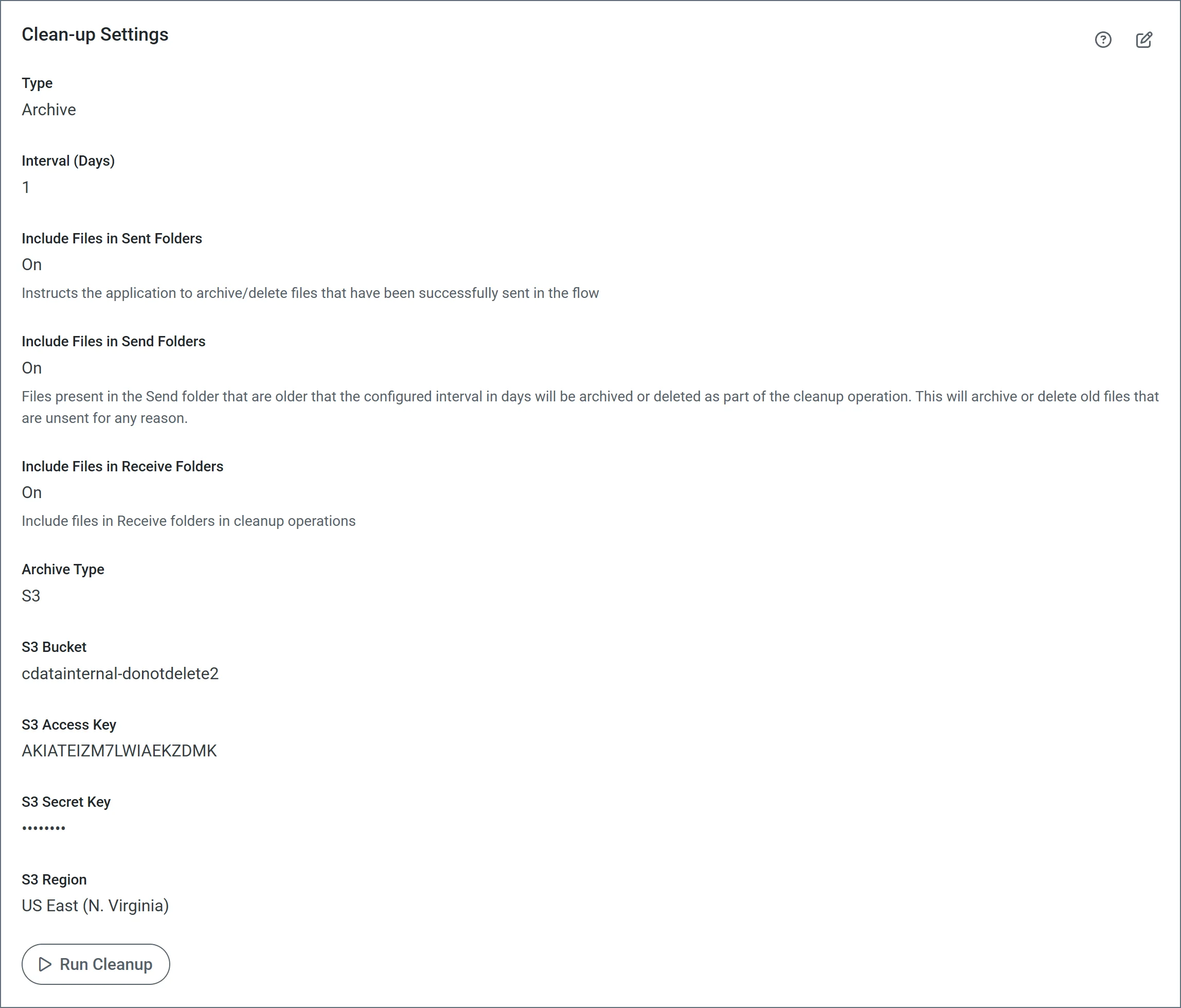 | Setting | Description |
| ------------------------------------ | ---------------------------------------------------------------------------------------------------------------------------------------------------------------------------------------------------------------------------------------------------------------------------------------------------------------------------------------------------------------------------------------- |
| **Type** | Specify whether to archive or delete logs during cleanup. |
| **Interval** | Specify (in days) the cleanup threshold. For example, when set to 5 days, only logs and database entries over 5 days old are cleaned up. |
| **Include files in Sent folders** | Archive or delete files in the connector's Logs/Sent folder that have been successfully sent in the flow. Sent files can consume large amounts of disk space. This option frees up disk space by cleaning up sent files when the cleanup runs. |
| **Include files in Send folders** | Archive or delete files that accumulate in the connector Send folders. |
| **Include files in Receive Folders** | Include files in Receive folders in cleanup operations. |
| **Archive Type** | Specify whether the archive should be sent to your local file disk or to an S3 bucket. Only applicable when **Type** is set to **Archive**. |
| **Local Archive Folder** | Applicable when the **Archive Type** is **Local Disk**. By default, the archive folder is a folder called `archive` in your application directory (`archive` is the only relative path supported). To use a different location, enter an absolute path. If you leave the field empty, each [connector folder](../../architecture#connector-folders) contains its own **Archive** folder. |
| **S3 Options** | If the **Archive Type** is **S3**, set the following S3-specific options: **S3 Bucket**, **S3 Access Key**, **S3 Secret Key**, and **S3 Region**. |
## Include files in Send folders
When a large number of files accumulate in connector Send folders, the performance of the application can suffer. These files can accumulate for various reasons, including:
* A connector exceeds the maximum number of retries for a message and no error path is configured for that connector.
* The Send folder for a connector was overridden in a legacy version of {siteNameShort} and pointed at a shared folder that the application could not clean up. The ability to change the Send folder and apply Send Filters is deprecated in current versions of {siteNameShort}. You should use error paths instead.
If you enable this feature, ensure that your connectors process files in the Send folder on a shorter interval than the cleanup interval you specify on this page. Otherwise, the application might clean up the files in the Send folder before the connectors can process them.
| Setting | Description |
| ------------------------------------ | ---------------------------------------------------------------------------------------------------------------------------------------------------------------------------------------------------------------------------------------------------------------------------------------------------------------------------------------------------------------------------------------- |
| **Type** | Specify whether to archive or delete logs during cleanup. |
| **Interval** | Specify (in days) the cleanup threshold. For example, when set to 5 days, only logs and database entries over 5 days old are cleaned up. |
| **Include files in Sent folders** | Archive or delete files in the connector's Logs/Sent folder that have been successfully sent in the flow. Sent files can consume large amounts of disk space. This option frees up disk space by cleaning up sent files when the cleanup runs. |
| **Include files in Send folders** | Archive or delete files that accumulate in the connector Send folders. |
| **Include files in Receive Folders** | Include files in Receive folders in cleanup operations. |
| **Archive Type** | Specify whether the archive should be sent to your local file disk or to an S3 bucket. Only applicable when **Type** is set to **Archive**. |
| **Local Archive Folder** | Applicable when the **Archive Type** is **Local Disk**. By default, the archive folder is a folder called `archive` in your application directory (`archive` is the only relative path supported). To use a different location, enter an absolute path. If you leave the field empty, each [connector folder](../../architecture#connector-folders) contains its own **Archive** folder. |
| **S3 Options** | If the **Archive Type** is **S3**, set the following S3-specific options: **S3 Bucket**, **S3 Access Key**, **S3 Secret Key**, and **S3 Region**. |
## Include files in Send folders
When a large number of files accumulate in connector Send folders, the performance of the application can suffer. These files can accumulate for various reasons, including:
* A connector exceeds the maximum number of retries for a message and no error path is configured for that connector.
* The Send folder for a connector was overridden in a legacy version of {siteNameShort} and pointed at a shared folder that the application could not clean up. The ability to change the Send folder and apply Send Filters is deprecated in current versions of {siteNameShort}. You should use error paths instead.
If you enable this feature, ensure that your connectors process files in the Send folder on a shorter interval than the cleanup interval you specify on this page. Otherwise, the application might clean up the files in the Send folder before the connectors can process them.