> ## Documentation Index
> Fetch the complete documentation index at: https://docs.arc.cdata.com/llms.txt
> Use this file to discover all available pages before exploring further.
# AS4 Connector
> Configuration and usage guide for the CData Arc AS4 connector, which supports sending and receiving messages using the AS4 protocol.
export const CommonProxySettings = () => <>
These are a collection of settings that identify and authenticate to the proxy through which the connection should be routed. By default, this section uses the global settings on the Proxy Settings portion of the Security Settings page. Clear the checkbox to supply settings specific to your connector.
| Setting | Description |
|---|
| Proxy Type |
The protocol used by a proxy-based firewall. |
| Proxy Host |
The name or IP address of a proxy-based firewall. |
| Proxy Port |
The TCP port for a proxy-based firewall. |
| Proxy User |
The user name to use to authenticate with a proxy-based firewall. |
| Proxy Password |
A password used to authenticate to a proxy-based firewall. |
| Authentication Scheme |
Leave the default None or choose from one of the following authentication schemes: Basic, Digest, Proprietary, or NTLM. |
;
export const SlasTab = ({siteName = "CData Arc"}) => <>
Settings related to configuring Service Level Agreements (SLAs).
SLAs enable you to configure the volume you expect connectors in your flow to send or receive, and to set the time frame in which you expect that volume to be met. {siteName} sends emails to warn the user when an SLA is not met, and marks the SLA as At Risk, which means that if the SLA is not met soon, it will be marked as Violated. This gives the user an opportunity to step in and determine the reasons the SLA is not being met, and to take appropriate actions. If the SLA is still not met at the end of the at-risk time period, the SLA is marked as violated, and the user is notified again.
To define an SLA, toggle Expected Volume on, then click the Settings tab.
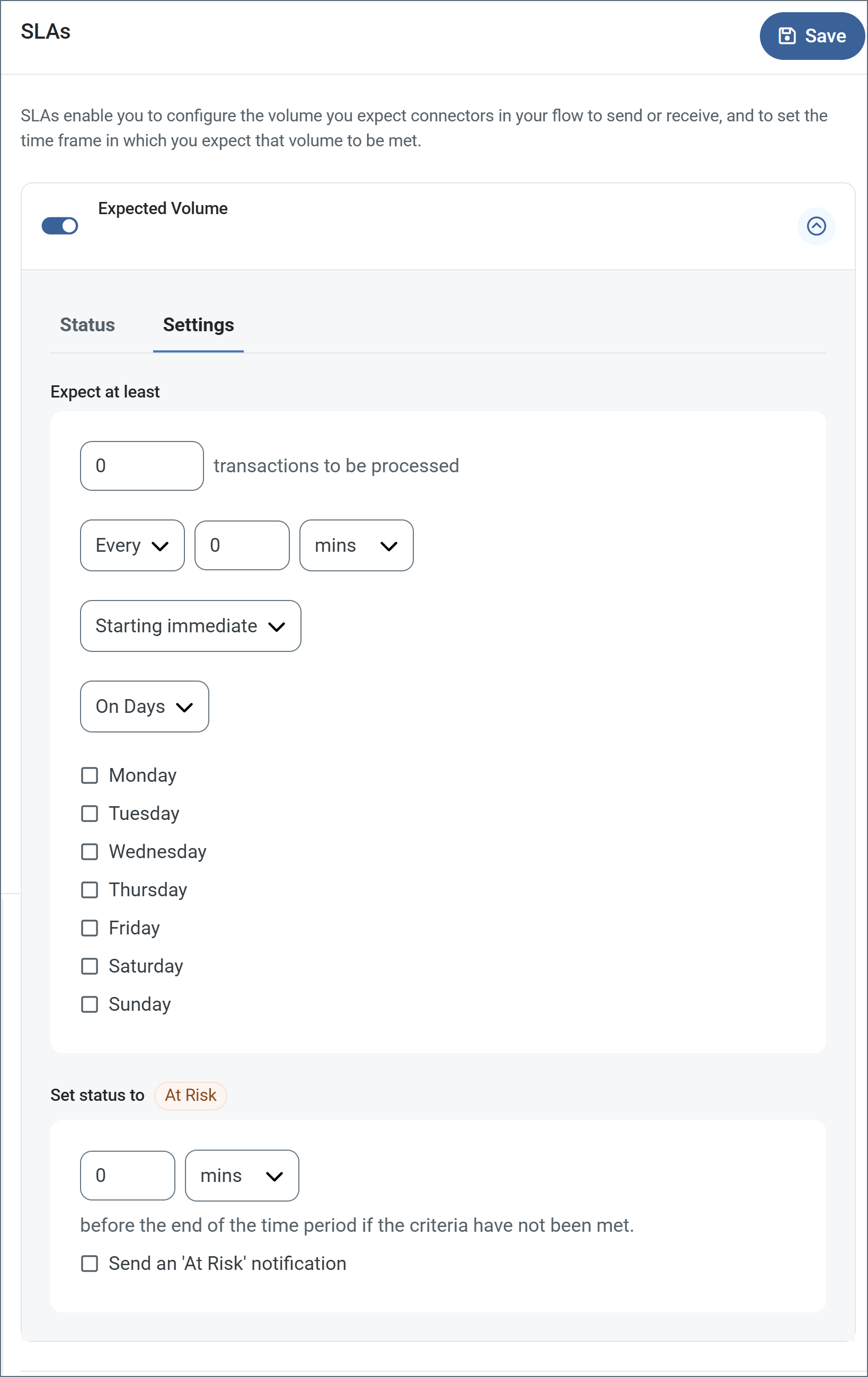
- If your connector has separate send and receive actions, use the radio buttons to specify which direction the SLA pertains to.
- In the Expect at least portion of the window:
- Set the minimum number of transactions you expect to be processed (the volume)
- Use the Every fields to specify the time frame
- Indicate when the SLA should go into effect. If you choose Starting on, complete the date and time fields.
- Check the boxes for the days of the week that you want the SLA to be in effect. Use the dropdown to choose Everyday if necessary.
- In the Set status to 'At Risk' portion of the window, specify when the SLA should be marked as at risk.
- By default, notifications are not sent until an SLA is in violation. To change that, check Send an 'At Risk' notification.
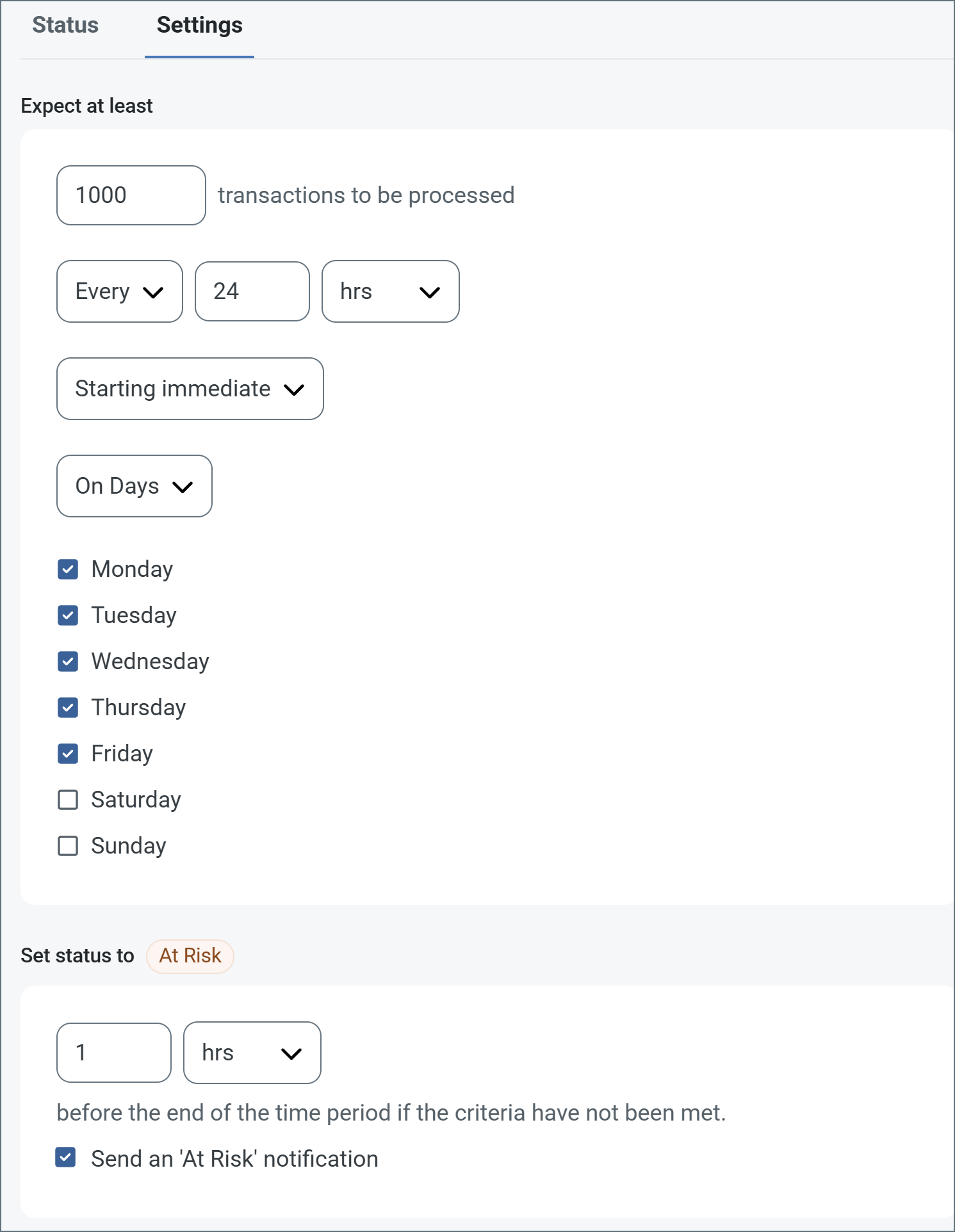
The following example shows an SLA configured for a connector that expects to receive 1000 files every day Monday-Friday. An at-risk notification is sent 1 hour before the end of the time period if the 1000 files have not been received.
 You can turn off SLA alerts if necessary. This can be useful during maintenance windows. Click Settings on the navbar, then navigate to Alerts > General Alerts. Click the tablet and pencil icon to edit, and uncheck the SLA Alerts setting.
;
export const AlertsTab = ({siteNameShort = "Arc"}) => <>
You can turn off SLA alerts if necessary. This can be useful during maintenance windows. Click Settings on the navbar, then navigate to Alerts > General Alerts. Click the tablet and pencil icon to edit, and uncheck the SLA Alerts setting.
;
export const AlertsTab = ({siteNameShort = "Arc"}) => <>
Settings related to configuring alerts.
Before you can execute Service Level Agreements (SLAs), you need to set up email alerts for notifications. By default, {siteNameShort} uses the global settings on the Alerts tab. To use other settings for this connector, toggle Override global setting on.
By default, error alerts are enabled, which means that emails are sent whenever there is an error. To turn them off, uncheck the Enable checkbox.
Enter a Subject (mandatory). Check Allow {siteNameShort}Script in Subject to use {siteNameShort}Script in the Subject field. When you select this, the {siteNameShort}Script Editor button appears ( ).
).
Optionally, enter a comma-separated list of Recipient emails.
;
export const Message = () => <>
Message settings determine how the connector searches for messages and manages them after processing.
Note: The settings below are deprecated and hidden by default. They appear only on connectors where they were previously enabled or configured to a non-default value. To retain copies of successfully processed files, right-click the connector in the flow, choose Show Success Path, and connect the success path to a File connector.
| Setting | Description |
|---|
| Save to Sent Folder (Deprecated) |
Copies files processed by the connector to the Sent folder. Disabled by default. Files saved to the Sent folder are not covered by Encryption at Rest. |
| Sent Folder Scheme (Deprecated) |
Groups files in the Sent folder by the selected time interval. Only relevant when Save to Sent Folder is enabled. |
;
export const MiscConnector = () => <>
Miscellaneous settings are for specific use cases.
| Setting |
Description |
| Other Settings |
Enables you to configure hidden connector settings in a semicolon-separated list (for example, setting1=value1;setting2=value2). Normal connector use cases and functionality should not require the use of these settings. |
;
export const Logging = () => <>
Settings that govern the creation and storage of logs.
| Setting |
Description |
| Log Level |
The verbosity of logs generated by the connector. When you request support, set this to Debug. |
| Log Subfolder Scheme |
Instructs the connector to group files in the Logs folder according to the selected interval. The Weekly option (which is the default) instructs the connector to create a new subfolder each week and store all logs for the week in that folder. Leaving this setting blank tells the connector to save all logs directly in the Logs folder. For connectors that process many transactions, using subfolders helps keep logs organized and improves performance. |
| Log Messages |
Check this to have the log entry for a processed file include a copy of the file itself. If you disable this, you might not be able to download a copy of the file from the Transactions tab. |
;
export const ProfileLogging = () => <>
Settings that govern the creation and storage of logs.
| Setting |
Description |
| Log Level |
The verbosity of logs generated by the connector. When you request support, set this to Debug. |
| Log Rotate Interval |
The number of days to wait before creating a new log file. |
| Log Delete Interval |
The number of days to wait before deleting old log files. |
;
export const MacrosExamples = ({extraMacros = []}) => <>
Some macros, such as %Ext% and %ShortDate%, do not require an argument, but others do. All
macros that take an argument use the following syntax: %Macro:argument%
Here are some examples of the macros that take an argument:
- %Header:headername%: Where
headername is the name of a header on a message.
- %Header:mycustomheader% resolves to the value of the
mycustomheader header set on the input message.
- %Header:ponum% resolves to the value of the
ponum header set on the input message.
- %RegexFilename:pattern%: Where
pattern is a regex pattern. For example, %RegexFilename:^([\w][A-Za-z]+)% matches and resolves to the first word in the filename and is case insensitive (test_file.xml resolves to test).
- %Vault:vaultitem%: Where
vaultitem is the name of an item in the vault. For example, %Vault:companyname% resolves to the value of the companyname item stored in the vault.
- %DateFormat:format%: Where
format is an accepted date format (see Sample Date Formats for details). For example, %DateFormat:yyyy-MM-dd-HH-mm-ss-fff% resolves to the date and timestamp on the file.
{extraMacros.filter(item => item.example).map(item => - {item.example}
)}
You can also create more sophisticated macros, as shown in the following examples:
- Combining multiple macros in one filename:
%DateFormat:yyyy-MM-dd-HH-mm-ss-fff%%EXT%
- Including text outside of the macro:
MyFile_%DateFormat:yyyy-MM-dd-HH-mm-ss-fff%
- Including text within the macro:
%DateFormat:'DateProcessed-'yyyy-MM-dd_'TimeProcessed-'HH-mm-ss%
;
export const MacrosTable = ({siteName = "CData Arc", extraMacros = []}) => <>
Using macros in file naming strategies can enhance organizational efficiency and contextual
understanding of data. By incorporating macros into filenames, you can dynamically include
relevant information such as identifiers, timestamps, and header information, providing
valuable context to each file.
{siteName} supports these macros, which all use the following syntax: %Macro%.
| Macro | Description |
|---|
| ConnectorID | Evaluates to the ConnectorID of the connector. |
| ConnectorName | Evaluates to the name of the connector. Enables you to include the connection name in file names or paths: for example, to tag backup files by which database connection produced them. |
| Ext | Evaluates to the file extension of the file currently being processed by the connector. |
| Filename | Evaluates to the filename (extension included) of the file currently being processed by the connector. |
| FilenameNoExt | Evaluates to the filename (without the extension) of the file currently being processed by the connector. |
| MessageId | Evaluates to the MessageId of the message being output by the connector. |
| RegexFilename:pattern | Applies a RegEx pattern to the filename of the file currently being processed by the connector. |
| Header:headername | Evaluates to the value of a targeted header (headername) on the current message being processed by the connector. |
| LongDate | Evaluates to the current datetime of the system in long-handed format (for example, Wednesday, January 24, 2024). |
| ShortDate | Evaluates to the current datetime of the system in a yyyy-MM-dd format (for example, 2024-01-24). |
| DateFormat:format | Evaluates to the current datetime of the system in the specified format (format). See Sample Date Formats for the available datetime formats. |
| Vault:vaultitem | Evaluates to the value of the specified vault item. |
{extraMacros.map(item =>
| {item.name} |
{item.description} |
)}
;
export const Performance = () => <>
Settings related to the allocation of resources to the connector.
| Setting |
Description |
| Max Workers |
The maximum number of worker threads consumed from the threadpool to process files on this connector. If set, this overrides the default setting on the Performance Settings portion of the Advanced Settings page. |
| Max Files |
The maximum number of files sent by each thread assigned to the connector. If set, this overrides the default setting on the Performance Settings portion of the Advanced Settings page. |
;
export const siteNameShort = "Arc";
export const siteName = "CData Arc";
export const extraMacros = [{
name: "AS4MessageId",
description: "Evaluates to the MessageId of the AS4 message being received by the connector."
}, {
name: "ConversationId",
description: "Evaluates to the ConversationId of the AS4 message being received by the connector."
}, {
name: "SenderRole",
description: "Evaluates to the SenderRole of the AS4 message being received by the connector."
}, {
name: "ReceiverRole",
description: "Evaluates to the ReceiverRole of the AS4 message being received by the connector."
}, {
name: "Service",
description: "Evaluates to the Service of the AS4 message being received by the connector."
}, {
name: "Action",
description: "Evaluates to the Service Action of the AS4 message being received by the connector."
}];
The AS4 connector supports sending and receiving messages using the Applicability Statement 4 (AS4) protocol.
## Key Capabilities
* Modern SOAP-based B2B messaging with multiple profile support (ENTSOG, e-SENS, DBEW, and eDelivery)
* Advanced security with token authentication and certificate management
* Support for both push and pull messaging patterns
* Business agreement handling with service and action definitions
* Comprehensive message properties and custom headers support
* Certified by the [Drummond Group](https://www.drummondgroup.com/certified-products/b2b-interoperability/)
## Overview
An AS4 connection is configured in two places. Configure the AS4 [Profiles](../getting-started/administration/profiles) page with a local AS4 party identifier and a private certificate. Then configure individual AS4 connectors with connection settings specific to a single trading partner. When an input file is processed by an AS4 connector, it is packaged and sent to the specified trading partner.
When {siteNameShort} receives a file over AS4, it attempts to route the file to a specific AS4 connector. The application uses the AS4 party identifiers in the AS4 message to determine which AS4 connector should receive the file. When a file is routed to an AS4 connector, that file is placed in the connector's Transactions tab, or is passed along to the next connected connector in the flow.
The AS4 connector supports shared connections. This means that connections and configurations made in one connector also appear on the **Settings > Connections** tab so they can be reused across other AS4 connectors.
## Profile Configuration
The AS4 Profile must be configured before connections can be established with individual AS4 connectors. Click **Profiles** on the navbar, then click the **AS4** tab.
### AS4 Profile Tab
#### Personal Id
*Settings for identifying the local profile.*
| Setting | Description |
| ------------------------- | ----------------------------------------------------------------------------------------------------------------------------------------------------------------------------------------------------------- |
| **Party Identifier** | Your AS4 identifier. Messages sent by {siteNameShort} must be addressed to this identifier, and outgoing messages use this value to identify the originator of the message. Identifiers are case-sensitive. |
| **Party Identifier Type** | The optional type declaration of the **Party identifier**. If specified, supply the domain to which the identifier belongs. |
#### Personal Certificate
*Settings related to the private decryption certificate and an optional signing certificate.*
| Setting | Description |
| -------------------------------- | ------------------------------------------------------------------------------------------------------------------------------------------------------------------------------------------------------------------------------------------------------------------------------------------------------------------------------------------------------------------------------------------------------------------------------------------------------------------ |
| **Private Certificate** | The private certificate used to decrypt incoming messages and, unless a separate **Signing Certificate** is set, to sign outgoing messages. Never share this certificate with external parties. Click the **Create Certificate** button to generate a self-signed certificate that is ready to use in an AS4 transaction: a corresponding public key is also generated with the same filename and a `.cer` extension. Accepts PKCS#12 certificates (.pfx or .p12). |
| **Private Certificate Password** | The password required to access the **Private Certificate**. |
| **Signing Certificate** | An optional private certificate used to sign outgoing messages. If set, it is used for signing instead of the **Private Certificate**. Set this when your trading partner requires separate signing and decryption certificates, such as with the eDelivery V2 or ENTSOG V4 profiles. |
| **Signing Certificate Password** | The password required to access the **Signing Certificate**. |
#### Rollover Certificate
| Setting | Description |
| ----------------------------------------- | ------------------------------------------------------------------------------------------------------------------------------------------------------------------------------------------------------------------------------------------------------------------------------------------------------------------------------------------------------------------------------------------------------------------------------------------------------------------------------------------------------ |
| **Rollover Private Certificate** | A secondary private certificate that can be used to decrypt incoming messages if decryption with the Private Certificate fails. Only use this setting when transitioning certificates when an overlap period is necessary to accept incoming messages encrypted with either the old or the new certificate. The rollover certificate is never used to sign outgoing messages, which can cause signature verification issues when sending to trading partners that are still using the old certificate. |
| **Rollover Private Certificate Password** | The password required to access the **Rollover Private Certificate**. |
#### Logging
#### Application URLs
*Settings and displayed values related to accessing {siteNameShort} from the public web.*
| Setting | Description |
| ----------------- | ------------------------------------------------------------------------------------------------------------------ |
| **Receiving URL** | The URL at which {siteNameShort} listens for incoming AS4 messages. Share this URL with all your trading partners. |
#### Miscellaneous
## Connector Configuration
Once you configure the global AS4 profile settings, create and configure individual AS4 connectors for each trading partner on the [Flows](docs/flows/flows) page.
### Settings Tab
#### Configuration
| Setting | Description |
| ------------------------- | ------------------------------------------------------------------------------------------------------------------------------------------------------------------------------------------------------------------------ |
| **Connector Id** | The static, unique identifier for the connector. |
| **Connector Type** | Displays the connector name and a description of what it does. |
| **Connector Description** | An optional field to provide a free-form description of the connector and its role in the flow. |
| **Connection** | A list of available AS4 connections. Select an existing connection or click **Create** to add a new one. See [Create a Connection](#create-a-connection) for descriptions of the options on the **Add Connection** page. |
#### Connection Info
*Settings related to connection parameters for the specified trading partner.*
| Setting | Description |
| ----------------------------- | ------------------------------------------------------------------------------------------------------------------------------------------------------------------------------------------------------------------------------------------------------------------------------------------------------------------------ |
| **Send Message Security** | Whether to sign and/or encrypt outgoing AS4 messages. CData strongly recommends you use signatures and encryption. |
| **Receive Message Security** | Whether to require that signatures and/or encryption are present for incoming AS4 messages. An error is thrown if a received message does not have a required security parameter. |
| **Compression** | Whether to compress the payload of outgoing messages. |
| **Message Partition Channel** | The channel over which the AS4 interchange should occur. If you do not specify a channel, the default Message Partition Channel (MPC) is implicitly assigned. MPCs are important when sending or receiving pull requests, because only messages queued in the assigned MPC are returned in response to the pull request. |
#### Receipt
*Settings related to requesting receipts when sending AS4 messages.*
| Setting | Description |
| ------------------ | -------------------------------------------------------------------------------------------------------------------------------------------------------------------------------------------------------------------------------------------------------------------------------------------------------------------------------------------------------------------------------------------------------------------- |
| **Enable Receipt** | Whether a receipt should be returned in response to incoming AS4 messages, and expected in response to outgoing AS4 messages. |
| **Delivery** | Whether the receipt should be returned as a direct response to the outgoing AS4 message (Synchronous) or returned later as part of a separate connection (Asynchronous). Synchronous receipts are recommended unless the size of the AS4 message is very large (50MB is a common threshold), in which case processing the message and delivering a synchronous receipt might strain the connection timeout duration. |
#### Business Agreement Details
*Settings related to the shared details of the AS4 business agreement. These values should be confirmed with the trading partner prior to configuration.*
| Setting | Description |
| ------------------ | ----------------------------------------------------------------------------------------------------------------------------------------------------------------------------------------------------------------------------------------------------------------------------- |
| **Service** | The business process accepting the message. |
| **Service Action** | The operation or activity being executed in the business process. |
| **Service Type** | The optional qualifier providing context to the **Service**. |
| **From Role** | The role of the party from which the message originates. These roles can either be reversed or remain the same when sending versus receiving AS4 requests, based on your partner agreement. This value is used in the `PartyInfo` element of the resulting AS4 SOAP envelope. |
| **To Role** | The role of the party to which the message is delivered. These roles can either be reversed or remain the same when sending versus receiving AS4 requests, based on your partner agreement. This value is used in the `PartyInfo` element of the resulting AS4 SOAP envelope. |
#### Advanced Settings
| Setting | Description |
| --------------------- | --------------------------------------------------------------------------------------------------------------------------------------------------------------------------------------------------------------------------------------- |
| **Local File Scheme** | A scheme for assigning filenames to messages that are output by the connector. You can use macros in your filenames dynamically to include information such as identifiers and timestamps. For more information, see [Macros](#macros). |
### Advanced Tab
#### Message Properties
You can provide a set of custom message properties, specified in name-value pairs, to include as part of the outgoing message. Setting the name-value pairs in the UI is the equivalent of doing `` on the message before it reaches the AS4 connector.
You can override message properties dynamically based on message content, or specify a type other than `string`. To accomplish that, use a script similar to the following to add headers:
```xml theme={null}
```
The names specified in `AS4-MessagePropertyType` must match the names used in `AS4-MessageProperty`. Multiple properties are separated by semicolons. For example, the following expands the script above to include an `integer` property:
```xml theme={null}
```
#### Other Settings
*Settings not included in the previous categories.*
| Setting | Description |
| ---------------------------- | ------------------------------------------------------------------------------------------------------------------------------------------------------------------------------------------------------------------------------------------------------------------------------------------------------------------------------------------------------------------------------------------------------------------------------------------------------------------------------------------------------------------------------ |
| **Attach XML Files** | Whether XML payloads should be packaged as a MIME attachment to the SOAP message, or included directly in the SOAP body. |
| **Duplicate Message Action** | How the connector should behave when it receives an AS4 message with a Message Id that the connector has seen before. The connector detects duplicate messages by *remembering* Message Ids that have been received within the number of minutes specified in **Duplicate Interval**. Options:
**Continue** — Processes the duplicate file like any other file.
**Ignore** — Ignores the inbound file and does not write it to the Receive folder.
**Failure** — Raises an error and does not process the file. |
| **Duplicate Interval** | The number of minutes that a message with the same Message Id is considered a duplicate. If you set this to 0, the Message Ids are stored until the server is restarted. |
| **Pull URL** | The URL endpoint to which pull requests should be sent. Only required if it is different from the **Partner URL**. |
| **Receipt URL** | The URL endpoint to which receipts should be sent. Only required if it is different from the **Partner URL**. |
| **Processing Delay** | The amount of time (in seconds) by which the processing of files placed in the **Transactions** tab is delayed. This is a legacy setting. Best practice is to [use a File connector](../flows/designing-a-flow#interacting-with-the-local-file-system) to manage local file systems instead of this setting. |
#### Proxy Settings
#### Message
#### Logging
#### Miscellaneous
### Automation Tab
#### Automation Settings
*Settings related to the automatic processing of files by the connector.*
| Setting | Description |
| ----------------------------- | --------------------------------------------------------------------------------------------------------------------------------------------------------------------------------------------------------------------------------------------------------------------------------------------------------------------------------------------------------------------------------------------------------------- |
| **Send** | Whether files arriving at the connector are automatically sent as AS4 messages. |
| **Retry Interval (minutes)** | The number of minutes before a failed send is retried. A retry is triggered when the server does not respond to a send attempt, or responds negatively to communicate that the file was not received. |
| **Max Attempts** | The maximum number of times the connector processes the input file. Success is based on a successful server acknowledgement and validation of the receipt (when requested synchronously). If you set this to 0, the connect retries the file indefinitely. |
| **Resend Interval (minutes)** | The number of minutes before unacknowledged messages are resent. A resend is triggered when the server receives the file, but an asynchronous receipt is not provided within the expected timeframe. |
| **Max Attempts (async)** | The maximum number of times the connector processes the input file when asynchronous receipts are requested. Success is based on the return of an asynchronous receipt within the **Resend Interval** after a successful server acknowledgement. If a successful server acknowledgement is not returned, **Max Attempts** is applied instead. If this is set to 0, the connector resends the file indefinitely. |
| **Receive** | Whether the connector should automatically make pull requests to receive messages from the trading partner. |
| **Interval** | The interval between automatic pull requests. |
| **Minutes Past the Hour** | The minutes offset for an hourly schedule. Only applicable when the interval setting above is set to *Hourly*. |
| **Time** | The time of day that the attempt should occur. Only applicable when the interval setting above is set to *Daily*, *Weekly*, or *Monthly*. |
| **Day** | The day on which the attempt should occur. Only applicable when the interval setting above is set to *Weekly* or *Monthly*. |
| **Minutes** | The number of minutes to wait before attempting the download. Only applicable when the interval setting above is set to *Minute*. |
| **Cron Expression** | A five-position string representing a cron expression that determines when the attempt should occur. Only applicable when the interval setting above is set to *Advanced*. |
#### Performance
### Alerts Tab
### SLAs Tab
## Create a Connection
When you create a new connection, begin by supplying a **Name**, then complete the following settings.
*Settings for identifying and connecting to a specific AS4 trading partner.*
| Setting | Description |
| ------------------------------------- | -------------------------------------------------------------------------------------------------------------------------------------------------------------------------------------------------------------------------------------------------------------------------------------------------------------------------------------------------------------------------------------------------------------------------------------------------------------------------------------------------------------------------------------------------------------------------------------------------------------------------------------------------------------------------------------------------------------------------------------------------------------------------- |
| **Party Identifier** | The AS4 party identifier specific to the target trading partner. This value is used in the header of outgoing requests to indicate the intended recipient, and it is used to route incoming AS4 messages to the appropriate AS4 connector. Identifiers are case-sensitive. |
| **Party Identifier Type** | The optional type declaration of the **Party identifier**. If specified, supply the domain to which the identifier belongs. |
| **URL** | The trading partner's public endpoint where outgoing AS4 messages are sent. |
| **Agreement** | The shared AS4 Agreement that governs the exchange. This is required in ENTSOG profiles. |
| **Connection Timeout (seconds)** | The length of time (in seconds) the connector waits for a connection response before throwing a timeout error. |
| **Profile** | The AS4 profile to use in the AS4 interchange. Profiles help determine shared configuration settings to ensure compatibility between partners. The available profiles are: `Standard`, `ENTSOG`, `e-SENS`, `BDEW`, `ENTSOG V4`, and `eDelivery V2`. If you use BDEW, some additional configuration is required. See [Configure a BDEW Profile](#configure-a-bdew-profile) for details.
Several advanced settings, including **Encryption Algorithm**, **Signature Algorithm**, **Security Token Format**, and **SSL Enabled Protocols** allow you to select a value of `Auto`. When you use `Auto`, the connector automatically chooses the appropriate value for each setting based on the profile setting. You can still manually override these values if needed. |
| **Encryption Certificate** | The public key certificate used for AS4 encryption when sending messages. This certificate must be paired with the trading partner's private certificate, and the trading partner should provide a public key certificate when sharing AS4 configuration details. |
| **Verification Certificate** | The public key certificate used to verify AS4 signatures when receiving messages. This field is often unnecessary; most AS4 parties use the same private certificate for both signing and decrypting. If this value is not specified, the application uses the **Encryption Certificate** to verify signatures. |
| **TLS Server Certificate** | The public key certificate used to verify the identity of a TLS/SSL server. If the trading partner does not provide a TLS server certificate, you can leave this setting blank to allow the underlying OS/JVM to perform certificate validation, or it can be set to `Any Certificate` to unconditionally trust the target server's identity. |
| **Rollover Verification Certificate** | A secondary certificate that can be used to verify message signatures if verification with the **Verification Certificate** fails. Only use this setting when transitioning certificates when an overlap period is necessary. |
### Advanced Connection Settings
Click the **Advanced** tab to set the following connection options.
#### Token Authentication
*Settings related to using and requiring token authentication.*
| Setting | Description |
| ------------------------------------ | ------------------------------------------------------------------------------------------------------------------------------------------------------------------------------------------------------------------- |
| **Token Authentication (Receiving)** | Whether authentication tokens must be included in incoming AS4 messages. If enabled, incoming messages must include username credentials that match the **Username** and **Password** fields set under this option. |
| **Token Authentication (Sending)** | Whether authentication tokens should be included in outgoing AS4 messages. If enabled, outgoing messages include username credentials that match the **Username** and **Password** fields set under this option. |
| **Password Type** | Whether username tokens should be in plain text or encrypted digest format. |
#### Alternate Local Profile
*Settings that override the AS4 configuration on the **Profiles** page for this specific AS4 connector. Setting an alternate local profile lets you use different local certificates and identifiers for certain trading partners.*
| Setting | Description |
| -------------------------------- | ------------------------------------------------------------------------------------------------------------------------------------------------------------------------------------------------------- |
| **Party Identifier** | Your AS4 identifier. Overrides the **Party Identifier** on the Profiles page. |
| **Party Identifier Type** | Your AS4 identifier type (optional). Overrides **Party Identifier Type** on the Profiles page. |
| **Private Certificate** | The private certificate used to decrypt incoming messages and, unless a separate **Signing Certificate** is set, to sign outgoing messages. Overrides the **Private Certificate** on the Profiles page. |
| **Private Certificate Password** | The password required to access the local private certificate. |
| **Signing Certificate** | An optional private certificate used to sign outgoing messages. If set, overrides the **Signing Certificate** on the Profiles page. |
| **Signing Certificate Password** | The password required to access the **Signing Certificate**. |
| **Certificate Subject** | Specifies the distinguished name (DN) of the local certificate in the certificate store to use when signing or decrypting messages. |
#### TLS Client Authentication
*Settings related to client authentication when two-way TLS authentication is required.*
| Setting | Description |
| -------------------------------- | ------------------------------------------------------------------------------------------------------------------------------------------------------------- |
| **Use Profile Settings** | Whether to use the **Private Certificate** configured on the Profiles page as the TLS certificate for client authentication. |
| **Private Certificate** | The private certificate presented during TLS client authentication. Only applicable if you are not using the same private certificate from the Profiles page. |
| **Private Certificate Password** | The password required to access the TLS client certificate. |
| **Certificate Subject** | Specifies the distinguished name (DN) of the local certificate in the certificate store to use for TLS authentication. |
#### Other Settings
*Settings not included in the previous categories.*
| Setting | Description |
| --------------------------------- | --------------------------------------------------------------------------------------------------------------------------------------------------------------------------------------------------------------------------------------------------------------------------------------------------------------------------------------------------------------------------------------------------------------------------------------------------------------- |
| **Agreement Ref P-Mode** | The processing mode attribute of the shared AS4 agreement. If you use this, provide the `PMode.Id` parameter. |
| **Receive Agreement Ref P-Mode** | The processing mode attribute of the shared AS4 receive agreement. If you use this, provide the `PMode.Id` parameter. |
| **Agreement Ref Type** | The reference type attribute of the shared AS4 agreement. The two parties should decide upon the semantics of this value. |
| **Encryption Algorithm** | Which encryption algorithm to use if you require message encryption. |
| **Security Token Format** | Specifies the security token format that is included in the message for both encrypting and signing. Options:
**Auto** (automatically chooses based on Profile).
**X.509** (subject in DN format).
**Binary** (Base64 encoded public key).
**KeyIdentifier** (X.509 Subject-Key-Identifier format).
**BinaryPKIPath** (base64 encoded ordered list of X509 public certificates). |
| **Signing Security Token Format** | Specifies the security token format for signing (optional). If set, this value is used for signing instead of the value of **Security Token Format**. Options:
**Auto** (automatically chooses based on Profile).
**X.509** (subject in DN format).
**Binary** (Base64 encoded public key).
**KeyIdentifier** (X.509 Subject-Key-Identifier format).
**BinaryPKIPath** (base64 encoded ordered list of X509 public certificates). |
| **Signature Algorithm** | The algorithm to use when signing outgoing messages. The same algorithm is requested for the corresponding receipts. When set to `Auto`, the connector automatically chooses the appropriate value based on the selected Profile. |
| **TLS Enabled Protocols** | The list of TLS/SSL protocols supported when establishing outgoing connections. Best practice is to only use TLS protocols. SSL v2 and SSL v3 are considered vulnerable and should only be used if your partner does not support higher versions. Keep in mind that TLS v1.3 is not universally adopted, and might be refused if the destination server does not support it. |
| **Signing Certificate** | An optional private certificate used to sign outgoing messages for this connector. If set, overrides the **Signing Certificate** configured on the AS4 Profiles page. |
| **Signing Certificate Password** | The password required to access and use the private key associated with the **Signing Certificate**. |
| **RSA Hash Algorithm** | The cryptographic hash algorithm (such as SHA-256) used in RSA signature operations to create message digests. |
| **Reference Hash Algorithm** | The cryptographic hash algorithm (such as SHA-256) used in references to ensure the integrity of individual message parts. |
| **Normalize Issuer Subject** | Allows you to standardize the format of certificate issuer and subject distinguished names for consistent certificate validation. The default is `false`. |
| **Key Encryption Algorithm** | The algorithm used to encrypt the symmetric session key that protects the message payload (such as RSA-OAEP or RSA-v1.5). |
| **MGF1 Hash Algorithm** | The hash algorithm used in the Mask Generation Function 1 (MGF1) as part of RSA-OAEP padding during key encryption. |
| **OAEP Params** | Optional parameters used in Optimal Asymmetric Encryption Padding (OAEP) to provide additional randomization during RSA encryption. |
| **Transform Receipt** | A setting that applies XML canonicalization or other transformations to receipt and acknowledgment messages before signing. The default is `true`. |
| **Sign Pull Request** | Whether to digitally sign AS4 pull request messages sent to retrieve messages from a trading partner's server. |
| **Enable Reference Token Type** | Whether to include security token reference information in the message header to specify how certificates and keys are identified. |
| **Recipient Key** | The public key or certificate of the message recipient used to encrypt the message payload for confidential transmission. |
| **Key Derivation Method** | The algorithm used to derive encryption keys from shared secrets or key agreement protocols in AS4 security processing. |
### Configure a BDEW Profile
The BDEW (Bundesverband der Energie- und Wasserwirtschaft, or German Association of Energy and Water Industries) AS4 profile is a messaging specification defined by the German energy and water sector. When you configure an AS4 connector to use the BDEW profile, you must add the following headers before you can pass messages to the connector.
```xml theme={null}
```
## Personal Profile Configuration
Your AS4 profile contains key pieces of information that are used to identify you with trading partners. It is configured on the [AS4 tab](#as4-profile-tab) of the Profiles page.
To get started, specify the following information:
* [Party Identifier](#party-identifier)
* [Personal Certificate](#personal-certificate)
### Party Identifier
Similar to an email address in an email exchange, this identifies the partner in an AS4 transmission.
Set **Party Identifier** to a value that meaningfully identifies you or your organization. The value set here is sent in the headers of AS4 transmissions initiated by {siteNameShort}.
The Party Identifier is one piece of information exchanged with trading partners when sharing profile information. Trading partners should use this value in their AS4 system so that they can process requests coming from that identifier.
### Personal Certificate
The private key certificate is used to decrypt incoming messages and, unless a separate **Signing Certificate** is configured, to sign outgoing messages. The AS4 profile uses a private key certificate in PKCS#12 format (a .pfx or .p12 file).
* Click **Upload Certificate** in the **Private Certificate** dropdown to select an existing certificate from disk.
* Click **Create Certificate** to create a new self-signed certificate. This creates a new private key certificate and a public key certificate (.cer file) with the same name.
Some AS4 profiles, including eDelivery V2 and ENTSOG V4, require separate certificates for signing and decryption. In these cases, configure a **Signing Certificate** in addition to the **Private Certificate**. The signing certificate is a separate private key certificate used only to sign outgoing messages; the private certificate continues to handle decryption.
When a signing certificate is configured, the **Verification Certificate** field must be populated with the public key of the partner's signing certificate, not the private certificate. If they do not match, outgoing messages fail with a signature verification error.
### Receiving URL
This is generated based on the **Base URL** in **Settings > Advanced** and the default {siteNameShort} listening endpoint.
Share this value with trading partners so that they can successfully send AS4 messages to {siteNameShort}.
## Partner Setup
Trading partners are responsible for providing specific settings required to connect to their AS4 endpoints. Each AS4 connector must be configured for a single trading partner relationship.
The following AS4 configuration options are required:
* [Party Identifier](#partner-identifier)
* [Partner URL](#partner-url)
* [Trading Partner Certificates](#trading-partner-certificates)
* [Use Receipt](#use-receipt)
* [Service and Service Action](#service-and-service-action)
### Party Identifier
The trading partner provides their **Party Identifier**, which is the part of their profile that is used to identify their organization in an AS4 transmission. The identifier is used in the header of outgoing requests to indicate the intended recipient.
This value is case sensitive, so when configuring new trading partners, make sure the capitalization is correct.
### Partner URL
The **Partner URL** is the public endpoint where the trading partner's AS4 system listens for incoming messages. After receiving a URL from the trading partner, test the URL with a web browser to detect any networking or connectivity issues.
In some cases, the trading partner might provide more than one URL if they use separate URLs for pushing AS4 transmissions, pulling AS4 transmissions, and returning asynchronous receipts. Configure additional URLs on the Advanced tab under **Pull URL** and **Receipt URL**.
### Trading Partner Certificates
Each AS4 connector must be configured with the public key certificate(s) for the target trading partner. The trading partner provides the certificates necessary to encrypt and verify AS4 messages exchanged with them. {siteNameShort} accepts X.509 public key certificates (files with .cer, .der, or .pem extensions).
Typically the trading partner provides a single certificate, which should be configured in the **Encryption Certificate** field.
If the trading partner provides multiple certificates, they must clarify the purpose of each certificate. If the partner provides a full certificate chain (as acquired from a commercial certificate authority), only the leaf certificate needs to be configured (the last certificate in the chain). Sometimes, a separate public key certificate might be required to verify the partner's digital signatures. In this case, set the signature verification certificate on the [Settings tab](#settings-tab) > **Trading Partner Certificates** > **Verification Certificate**.
If you are using a profile that requires separate signing and decryption certificates (such as eDelivery V2 or ENTSOG V4), your trading partner likely uses a separate signing certificate as well. In that case, confirm with the trading partner which certificate to use for signature verification, and set the **Verification Certificate** to the public key of their signing certificate rather than their encryption certificate.
If the trading partner requires TLS/SSL connections, they can provide you with the public key certificate for their TLS server. This should be set under **TLS Server Certificate**. Alternatively, you can set this field to Any Certificate to implicitly trust the identity of the target TLS server.
### Use Receipt
Requesting a receipt ensures non-repudiation of the AS4 message; in other words, the successful delivery of the message cannot be disputed. For this reason, we strongly recommend enabling the **Use Receipt** field. Be sure to agree on the use of receipts with the trading partner ahead-of-time.
By default, receipts are delivered synchronously, meaning that they are returned as a direct response to the AS4 message. Asynchronous receipts are delivered later in a separate connection. Synchronous receipts are recommended unless the size of the AS4 messages is very large, in which case processing and delivering a synchronous receipt might strain the connection timeout duration.
### Service and Service Action
Service, Service Action, and other business agreement details should be communicated with the trading partner. These values help define the business logic associated with the AS4 messages exchanged and how each party should interpret the messages.
### Import from SMP
If the trading partner has a Service Metadata Publisher (SMP) profile, these settings can be imported by clicking the **Import from SMP** button in Settings tab > **Trading Partner Info**. The resulting prompt requires the SML Domain, Participant Id and Scheme, and Document Id and Scheme from which to obtain the SMP profile. The connector settings are automatically populated with the values read from the SMP profile.
## Send and Receive Files
After the AS4 profile and partner-specific AS4 connectors have been configured, files can be securely sent and received.
### Send Files
In an AS4 connector, the Transactions tab displays the files that should be sent to the target trading partner. If **Send Automation** is enabled on the Automation tab, files that reach the connector Transactions tab are automatically enveloped and sent. Access the log files for all transmissions by expanding the row associated with the transmitted file.
The **Create Test Files** button lets you generate a simple series of test files to send to the trading partner.
### Resend and Retry
An AS4 Resend is triggered when the trading partner is expected to return an asynchronous receipt, but fails to do so within the **Resend Interval** duration (60 minutes by default). The application then attempts to resend the transmission. The application continues resending the message until a receipt is received or the **Max Attempts (async)** is exhausted.
A Retry is triggered when the HTTP response from the trading partner indicates that the server has not received the transmission (the response is not a positive 200 OK status). This can indicate a networking or connectivity issue, which is often transient. The application retries the transmission every **Retry Interval** minutes until the transmission is received or the **Max Attempts** is exhausted.
### Receive Files
In an AS4 connector, the Transactions tab displays the files that have been received by the application and routed to the connector (based on the AS4 identifiers present in the incoming AS4 message). Expand each file row to display a list of available logs for the transmission.
These files are available on the connector **Transactions** tab. If the connector is connected to other connectors in the flow, files are automatically moved from the **Transactions** tab of the AS4 connector to the **Transactions** tab of the next connector in the flow.
## Macros
### Examples