> ## Documentation Index
> Fetch the complete documentation index at: https://docs.arc.cdata.com/llms.txt
> Use this file to discover all available pages before exploring further.
# jsonDOMSearch
> jsonpath を使用してインプットJSON ドキュメント内の要素をループし、繰り返し構造を列挙します。
インプットJSON ドキュメント内の要素をループします。
## 必要なパラメータ
* **jsonpath**:ループ対象となる指定セグメントの1始まりのインデックスjsonpath(例:``)。
## オプションのパラメータ
* **uri**:JSON ファイルのURI(例:`http://mydomain.com/resources/somedata.json`、`/tmp/myfile.json`、または `[FilePath]`)。
* **text**:JSON データへの読み取り可能なハンドル参照。このハンドルは[jsonOpen](./op-json-open) オペレーションによって作成され、インプットJSON がファイルやrawテキストではない場合、またはドキュメントのファイルデータにアクセスする複数のアクションを実行する必要がある場合に役立ちます。
* **handle**:JSON データへの読み取り可能なハンドル参照。このハンドルはjsonOpen オペレーションによって作成され、対象のJSON がインプットファイルではない場合にのみ必要です。詳細と例については[jsonOpen](./op-json-open) を参照してください。
## アウトプット属性
* **jsonpath**:インプットアイテムに設定されたjsonpath を基準とした、アウトプットアイテムの1始まりのインデックスjsonpath。
* **name**:ループ対象となる指定要素の名前を返します(例:`[myoutitem.name]` は`foo` JSON 要素の名前である`foo` に解決されます)。
* **type**:ループ対象となる指定要素のデータ型を返します(例:`foo` 要素が文字列値を持つ場合、`[myoutitem.type]` は`STRING` に解決されます)。
## 例
インプットファイルとして渡される次のJSON について考えてみます:
```json theme={null}
{
"hello": "world",
"colors": [
{
"color": "yellow",
"example": "banana"
},
{
"color": "red",
"example": "apple"
},
{
"color": "orange",
"example": "orange"
}
]
}
```
次に示すように、jsonDOMSearch オペレーションを使用して`colors` 配列内のすべてのオブジェクトを列挙できます:
```xml theme={null}
```
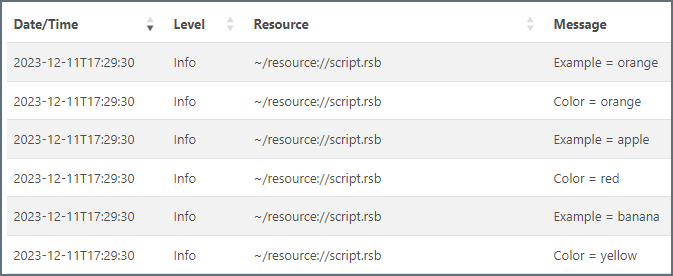
アプリケーションログのアウトプットは次のようになります: