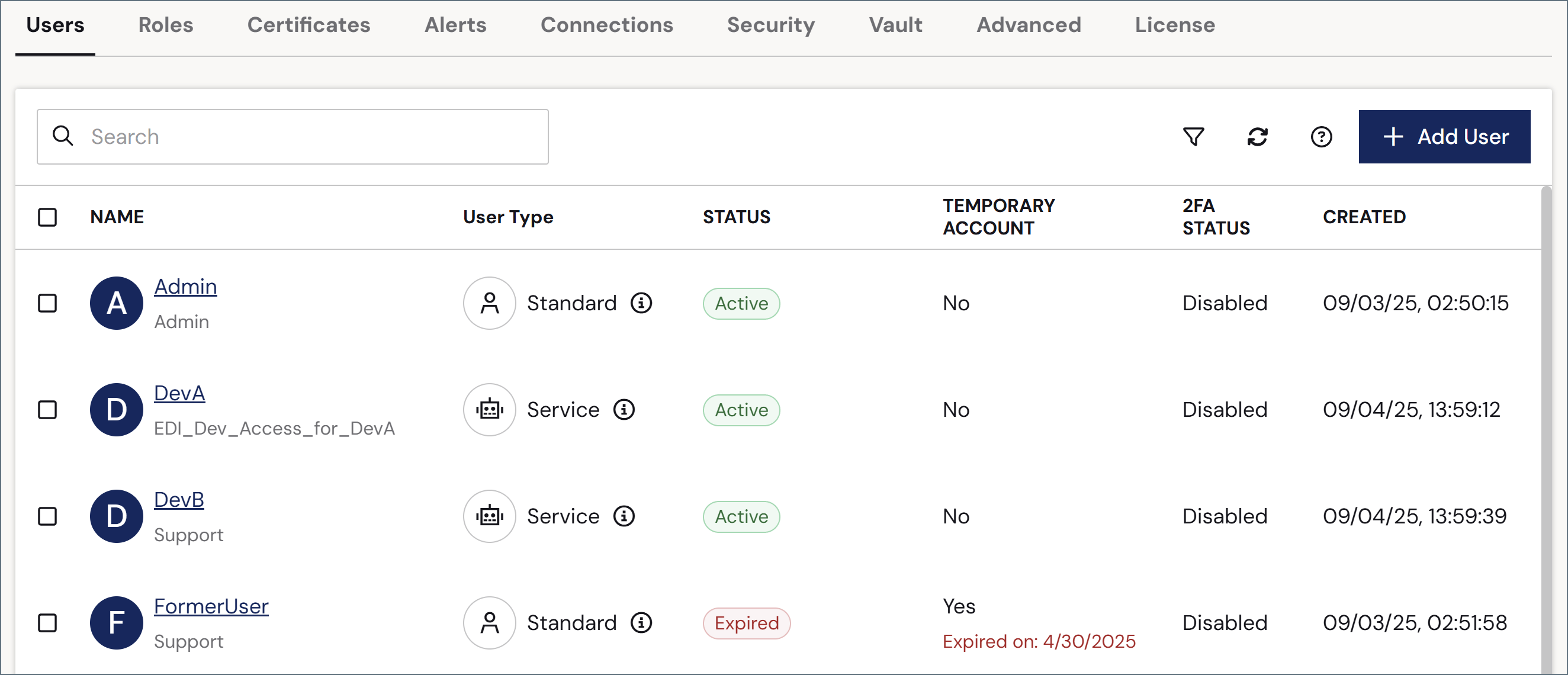
To create and manage users, navigate to the Settings page, then the Users tab. This tab includes a table of all users, and includes information about their roles, their user type and status, whether they are temporary users, their two-factor authentication (2FA) status, and more.
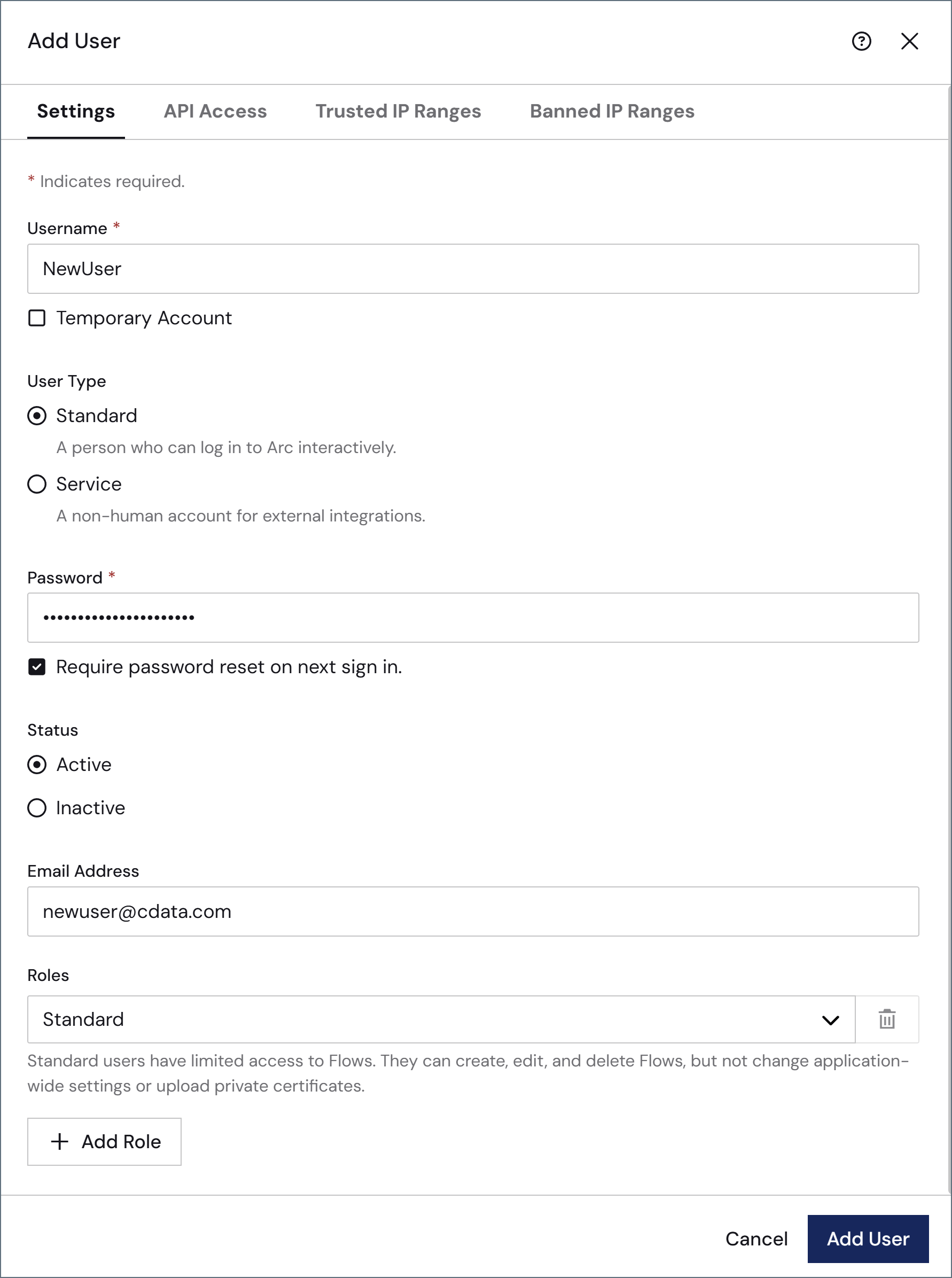 Complete the following fields:
| Field | Description |
| --------------------- | --------------------------------------------------------------------------------------------------------------------------------------------------------------------------------------------------------------------------------------------------------------------------------------------------------------------------------------------------------------------------------------------------------- |
| **Username** | Enter a username. This field cannot be changed once you save the user. |
| **User Type** | Choose whether this is a **Standard** or **Service** account. Standard accounts are for people who can sign in interactively with a username and password. Service accounts are intended for automated, machine-to-machine access (such as invoking [Flow API](../../../flows/flow-api) endpoints), and cannot sign in interactively, so the **Password** field is hidden. See [User Types](#user-types). |
| **Temporary Account** | If the user should only have temporary access, check this and supply an **Expiration Date** (not pictured). |
| **Password** | Enter a password. Ensure that it meets the requirements in [Sign In Settings](./sign-in-settings). Check **Require password reset on next sign in** to force the user to change their password on login. This field does not appear for service accounts. |
| **Status** | Indicate whether the user is active or inactive. |
| **Email Address** | Best practice is to provide an email address for each user so that they can [reset their passwords](#password-resets) when necessary. |
| **Roles** | Select the [user roles](./user-roles) to assign the user. |
To give the new user [Admin API](#admin-api-access) and/or OAuth access, click the **API Access** tab.
Complete the following fields:
| Field | Description |
| --------------------- | --------------------------------------------------------------------------------------------------------------------------------------------------------------------------------------------------------------------------------------------------------------------------------------------------------------------------------------------------------------------------------------------------------- |
| **Username** | Enter a username. This field cannot be changed once you save the user. |
| **User Type** | Choose whether this is a **Standard** or **Service** account. Standard accounts are for people who can sign in interactively with a username and password. Service accounts are intended for automated, machine-to-machine access (such as invoking [Flow API](../../../flows/flow-api) endpoints), and cannot sign in interactively, so the **Password** field is hidden. See [User Types](#user-types). |
| **Temporary Account** | If the user should only have temporary access, check this and supply an **Expiration Date** (not pictured). |
| **Password** | Enter a password. Ensure that it meets the requirements in [Sign In Settings](./sign-in-settings). Check **Require password reset on next sign in** to force the user to change their password on login. This field does not appear for service accounts. |
| **Status** | Indicate whether the user is active or inactive. |
| **Email Address** | Best practice is to provide an email address for each user so that they can [reset their passwords](#password-resets) when necessary. |
| **Roles** | Select the [user roles](./user-roles) to assign the user. |
To give the new user [Admin API](#admin-api-access) and/or OAuth access, click the **API Access** tab.
 | Field | Description |
| ------------------------------- | --------------------------------------------------------------------------------------------------------------------------------------------------------------------------------------------------------------------------------------------------------------------------------------------------------------------------------------------------------------- |
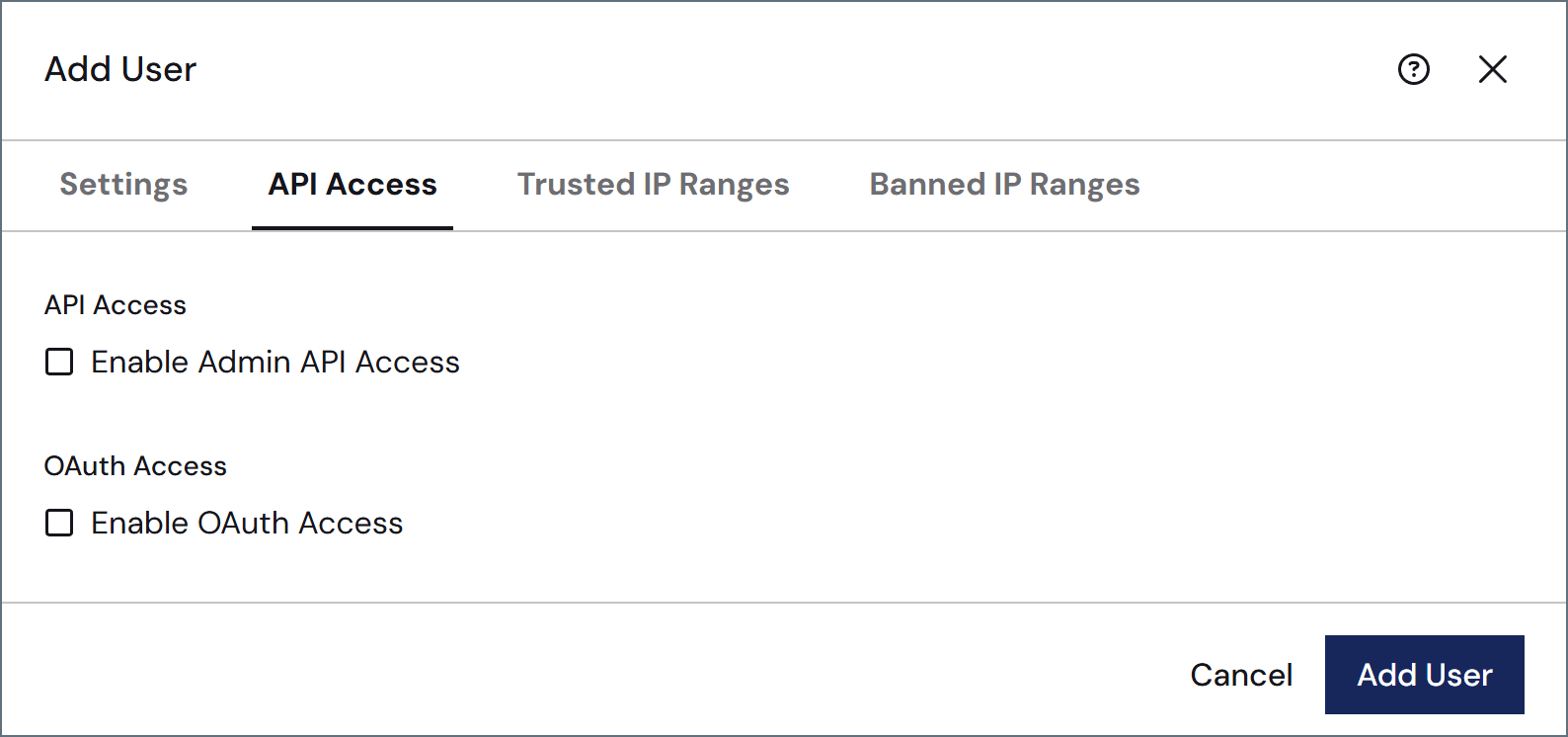
| **API Access** | Check **Enable Authtoken Access** to grant the user an authtoken that can be used to access the Admin API. See [Admin API Access](#admin-api-access) for details. When you enable API access, the rest of the fields in this table appear. |
| **Token Expiration (days)** | The number of days before the token expires. Check **No Expiration** if you do not want the token to expire. |
| **Authtoken** | The system-generated authtoken. Make sure to copy it to a safe location before saving the user, because it is not shown again. |
| **Maximum Requests per Hour** | Uncheck **Unlimited Requests** to set a limit on the maximum requests per hour for this user. |
| **Maximum Concurrent Requests** | Uncheck **Unlimited Requests** to set a limit on the maximum number of requests that can be sent simultaneously. |
| **Enable OAuth Access** | Check **Enable OAuth Access** to grant the user credentials that can be used to secure public API endpoints for the [Admin API](./admin-api-settings). OAuth 2.0 provides a structured authentication flow for clients that need to manage token lifecycles or integrate with external applications. When you enable OAuth access, the following fields appear: |
| **Grant Type** | The OAuth 2.0 grant type that determines how the client application obtains an access token. **Client Credentials** is currently the only option. |
| **Client Id** | The system-generated client Id token. |
| **Client Secret** | The system-generated client secret. Make sure to copy it to a safe location before saving the user, because it is not shown again. |
| **Access URL** | The endpoint URL used by the client application to request an access token using the configured credentials. |
To add trusted or banned IP ranges specific to this user, click the **Trusted IP Ranges** or **Banned IP Ranges** tabs to add the ranges. You can provide single IP addresses, simple ranges (such as `203.0.113.*` or `203.0.113.1-255`), or Classless Inter-Domain Routing (CIDR) ranges. These tabs also display the global trusted and banned ranges that have been defined on the [Network Access](./network-access) portion of the **Settings > Security** page.
## User Types
{siteNameShort} supports two user types:
* **Standard** accounts are for people who sign in to the {siteNameShort} console interactively with a username and password.
* **Service** accounts are for automated, machine-to-machine access, such as invoking [Flow API](../../../flows/flow-api) endpoints or calling the [Admin API](./admin-api-settings). Service accounts do not sign in interactively, so the **Password** field is hidden; instead, they authenticate only with an authtoken or OAuth client credentials configured on the **API Access** tab. For example, you might pair a service account with a role that grants only the [Flow API **Invoke** permission](./user-roles#flow-api-configuration) to let it call specific endpoints without any access to, or visibility into, the {siteNameShort} UI.
## Single Sign-On
{siteNameShort} supports single sign-on (SSO) via identity providers that implement the OpenID standard. For more information, including specific guidance for Azure AD, see [Single Sign-On](./single-sign-on).
## Admin API Access
Each user is granted an authtoken that can be used to access the [Admin API](./admin-api-settings). For more information on authenticating against the Admin API, see [Admin API Authentication](../../../admin-api/admin-api-authentication).
The specific actions that a user can perform using the Admin API mirror the actions that the same user can perform using the UI. For example, a user that cannot delete connectors in the UI cannot use the Admin API to delete connectors. To perform any action using the Admin API, use an authtoken from an Admin user when invoking the API.
## Password Resets
Every user can have an email address associated with their account. This way, if they need to reset their password, they can click the **Forgot password** link to have a reset link emailed to them. Every password reset that is sent adds a row to the [application log](../activity#application-logs).
| Field | Description |
| ------------------------------- | --------------------------------------------------------------------------------------------------------------------------------------------------------------------------------------------------------------------------------------------------------------------------------------------------------------------------------------------------------------- |
| **API Access** | Check **Enable Authtoken Access** to grant the user an authtoken that can be used to access the Admin API. See [Admin API Access](#admin-api-access) for details. When you enable API access, the rest of the fields in this table appear. |
| **Token Expiration (days)** | The number of days before the token expires. Check **No Expiration** if you do not want the token to expire. |
| **Authtoken** | The system-generated authtoken. Make sure to copy it to a safe location before saving the user, because it is not shown again. |
| **Maximum Requests per Hour** | Uncheck **Unlimited Requests** to set a limit on the maximum requests per hour for this user. |
| **Maximum Concurrent Requests** | Uncheck **Unlimited Requests** to set a limit on the maximum number of requests that can be sent simultaneously. |
| **Enable OAuth Access** | Check **Enable OAuth Access** to grant the user credentials that can be used to secure public API endpoints for the [Admin API](./admin-api-settings). OAuth 2.0 provides a structured authentication flow for clients that need to manage token lifecycles or integrate with external applications. When you enable OAuth access, the following fields appear: |
| **Grant Type** | The OAuth 2.0 grant type that determines how the client application obtains an access token. **Client Credentials** is currently the only option. |
| **Client Id** | The system-generated client Id token. |
| **Client Secret** | The system-generated client secret. Make sure to copy it to a safe location before saving the user, because it is not shown again. |
| **Access URL** | The endpoint URL used by the client application to request an access token using the configured credentials. |
To add trusted or banned IP ranges specific to this user, click the **Trusted IP Ranges** or **Banned IP Ranges** tabs to add the ranges. You can provide single IP addresses, simple ranges (such as `203.0.113.*` or `203.0.113.1-255`), or Classless Inter-Domain Routing (CIDR) ranges. These tabs also display the global trusted and banned ranges that have been defined on the [Network Access](./network-access) portion of the **Settings > Security** page.
## User Types
{siteNameShort} supports two user types:
* **Standard** accounts are for people who sign in to the {siteNameShort} console interactively with a username and password.
* **Service** accounts are for automated, machine-to-machine access, such as invoking [Flow API](../../../flows/flow-api) endpoints or calling the [Admin API](./admin-api-settings). Service accounts do not sign in interactively, so the **Password** field is hidden; instead, they authenticate only with an authtoken or OAuth client credentials configured on the **API Access** tab. For example, you might pair a service account with a role that grants only the [Flow API **Invoke** permission](./user-roles#flow-api-configuration) to let it call specific endpoints without any access to, or visibility into, the {siteNameShort} UI.
## Single Sign-On
{siteNameShort} supports single sign-on (SSO) via identity providers that implement the OpenID standard. For more information, including specific guidance for Azure AD, see [Single Sign-On](./single-sign-on).
## Admin API Access
Each user is granted an authtoken that can be used to access the [Admin API](./admin-api-settings). For more information on authenticating against the Admin API, see [Admin API Authentication](../../../admin-api/admin-api-authentication).
The specific actions that a user can perform using the Admin API mirror the actions that the same user can perform using the UI. For example, a user that cannot delete connectors in the UI cannot use the Admin API to delete connectors. To perform any action using the Admin API, use an authtoken from an Admin user when invoking the API.
## Password Resets
Every user can have an email address associated with their account. This way, if they need to reset their password, they can click the **Forgot password** link to have a reset link emailed to them. Every password reset that is sent adds a row to the [application log](../activity#application-logs).